# numkey
Open source by [DevsLab](https://devslab.kr/brand/open-source/)
[](https://www.npmjs.com/package/@devslab/numkey)
[](https://github.com/devslab-kr/numkey/actions/workflows/ci.yml)

[](./LICENSE)
[](https://stackblitz.com/github/devslab-kr/numkey/tree/main/examples/vanilla)
**English** | [한국어](README.ko.md) · [📺 Live demo](https://devslab-kr.github.io/numkey/)
Try it online: [⚡ StackBlitz — Vanilla](https://stackblitz.com/github/devslab-kr/numkey/tree/main/examples/vanilla) · [Vue](https://stackblitz.com/github/devslab-kr/numkey/tree/main/examples/vue) · [React](https://stackblitz.com/github/devslab-kr/numkey/tree/main/examples/react) · [Svelte](https://stackblitz.com/github/devslab-kr/numkey/tree/main/examples/svelte) · [Solid](https://stackblitz.com/github/devslab-kr/numkey/tree/main/examples/solid) | [📦 CodeSandbox](https://codesandbox.io/s/github/devslab-kr/numkey/tree/main/examples/vanilla)
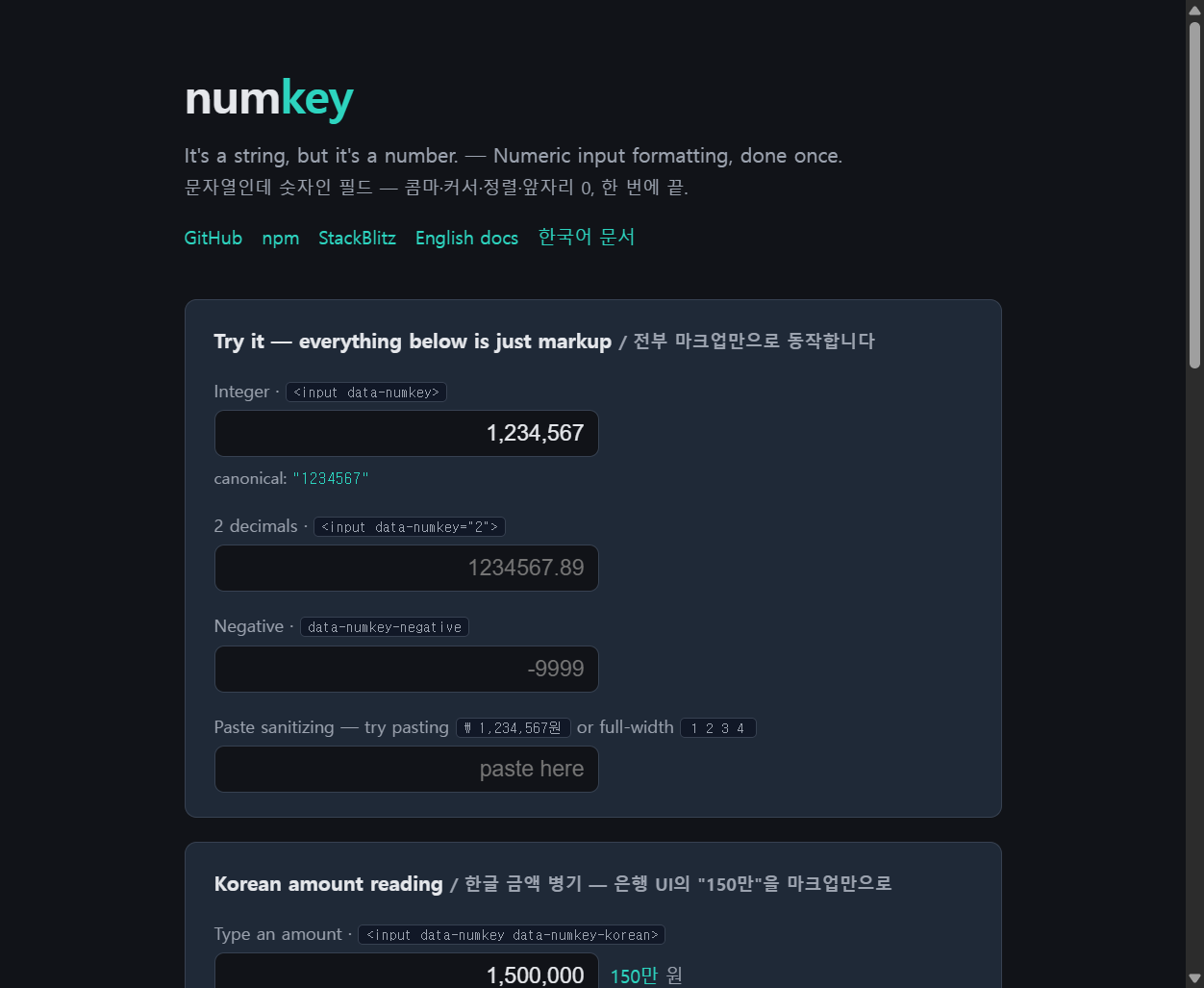
**"It's a string, but it's a number."** Every business app has these fields —
amounts, quantities, prices — and every team rebuilds the same input by hand:
live thousands grouping (`10,000`), no leading zeros, right-aligned, numeric
keypad on mobile, and a caret that doesn't jump while separators appear and
disappear around it.
numkey is that input, done once:
- **Caret-safe live formatting** — type into the middle of `1,234,567` and the
cursor stays where you expect, even as groups reflow
- **String-first value model** — the canonical value is a plain numeric string
(`"1234567.89"`), never an IEEE 754 float, so money is safe
- **Leading-zero cleanup** (`007` → `7`), full-width digit normalization
(`123` → `123` — Korean/Japanese IME), paste sanitizing (`₩ 1,234원` → `1234`)
- **Right alignment + `inputmode`** set automatically (opt-out available)
- **IME-safe** — nothing runs mid-composition
- **Zero dependencies**, TypeScript-first, ESM/CJS dual + a CDN global build
- Works with **plain `
```
Server-rendered values (``) are formatted
on load. To read the raw value back before submitting:
```html
```
(Or simply strip separators server-side — the posted value is the display
value.)
### How the attributes work
**`data-numkey` is the on-switch.** It is what gets an input bound (auto-init
watches `input[data-numkey]`), and its value doubles as the max decimal
places — empty means integers only. Every other `data-numkey-*` attribute is
an *option* that is only read from inputs that have `data-numkey`; on its own
it does nothing:
```html
```
| Attribute | Meaning |
|---|---|
| `data-numkey` | **the switch** — binds the input; the value is the max decimal places (empty = integer) |
| `data-numkey-negative` | allow a leading minus |
| `data-numkey-align="left"` | opt out of automatic right alignment |
| `data-numkey-group="4"` | group size (default 3); `"3,2"` for Indian lakh — see below |
| `data-numkey-separator=" "` | group separator (default `,`) |
| `data-numkey-point=","` | decimal mark shown in the field (default `.`) |
| `data-numkey-locale` | derive separators from a locale — see below |
| `data-numkey-korean` | live Korean amount reading ("150만") — see below |
| `data-numkey-korean-entry` | accept Korean shorthand entry ("3만5천" → blur → "35,000") — see below |
| `data-numkey-name="amount"` | hidden input posting the canonical value — see below |
| `data-numkey-min` / `data-numkey-max` | bounds, applied on blur only (typing is never interrupted) |
### Locale-aware display (opt-in)
By default the display is **deterministic**: every visitor sees
`1,234,567.89`, whatever their browser is set to — which is what business
forms usually need. `data-numkey-locale` opts a field into locale separators:
```html
```
The locale changes **only how the value is drawn**. The canonical value is
always `"1234567.89"` — `numkey.getValue(el)` returns the same string in all
three cases. Since a plain form POST submits the *display* value, a form
using locales should post through `data-numkey-name` (below) or normalize
server-side.
### Indian lakh/crore grouping
The Indian system groups the last three digits and then every two —
`12,34,56,789`, not `123,456,789`. Give `group` a `[primary, secondary]`
pair, or just name the locale:
```html
```
```ts
format('10000000', { group: [3, 2] }) // '1,00,00,000' (1 crore)
format('123456789', { locale: 'en-IN' }) // '12,34,56,789'
```
An explicit `group` always wins over the locale, and a single number stays
uniform grouping (`4` → `1234,5678` for 만-style). `group: 0` turns
separators off entirely.
### Korean amount reading (한글 금액 병기)
The "150만" hint that banking and fintech UIs render next to amount fields —
usually rebuilt by hand in every project:
```html
```
An empty attribute generates a `` right after the
input (unstyled — add "원" with CSS `.numkey-korean::after { content: " 원" }`);
a value is treated as a CSS selector for an existing element. The same engine
is available as a pure function:
```ts
import { toKorean } from '@devslab/numkey'
toKorean('1500000') // "150만"
toKorean('927483041001') // "9,274억 8,304만 1,001"
toKorean('100000001') // "1억 1" — zero groups omitted
```
And the inverse — accept the shorthand people actually type into
부동산/주식 apps, either as a pure function or on the field itself:
```ts
import { fromKorean } from '@devslab/numkey'
fromKorean('3만5천') // "35000"
fromKorean('1.5억') // "150000000"
fromKorean('삼십오만') // "350000"
```
```html
```
`getValue` and the `data-numkey-name` hidden sync (below) see the parsed
value even while the draft is still on screen.
### Posting the canonical value (`data-numkey-name`)
A plain form POST submits what the field displays — `1,234,567` — which every
server handler then has to de-comma. `data-numkey-name` generates a hidden
input that always carries the settled canonical value instead:
```html
```
The hidden value is kept settled even mid-typing (`1,234.` posts `1234`), so
whatever moment the form submits, the server sees a clean number.
> Use `type="text"` inputs. numkey sets `inputmode` so mobile keyboards show
> the numeric keypad; `type="number"` has no caret API and fights formatting.
## npm
```sh
npm install @devslab/numkey
```
```ts
import { format, parse, bind, observe } from '@devslab/numkey'
format('1234567.5', { decimals: 2 }) // "1,234,567.5"
parse('₩ 1,234,567원') // "1234567"
bind(document.querySelector('#amount'), { decimals: 2 }) // one element
observe() // all [data-numkey]
```
## Vue 3
```vue
```
## React
```tsx
import { NumkeyInput, useNumkey } from '@devslab/numkey/react'
// Controlled: value/onValueChange speak canonical strings
const [amount, setAmount] = useState('')
// Uncontrolled: ref-callback hook
```
## Svelte
An action — and it imports nothing from `svelte`, so there is no peer
dependency at all. `bind:value` works: the action re-syncs the binding after
formatting, so the bound variable holds the **display** value. For the
**canonical** value use `onValue`.
```svelte
(amount = v) }} />
```
## Solid
A `use:` directive (reactive to a signal) and a ref factory. Solid delegates
`input` at the document level, so `onInput` already reads the formatted
value — no re-sync needed.
```tsx
import { numkey, useNumkey } from '@devslab/numkey/solid'
const [amount, setAmount] = createSignal('') // canonical
```
## API
### Options
| Option | Default | |
|---|---|---|
| `decimals` | `0` | max fraction digits (0 = integers only) |
| `negative` | `false` | allow a leading minus |
| `group` | `3` | digits per group — `4` for 만-style, `[3, 2]` for Indian lakh, `0` for none |
| `separator` | `","` | group separator in the display |
| `decimalPoint` | `"."` | decimal mark in the display (canonical always uses `.`) |
| `locale` | — | **opt-in**: derive `separator`/`decimalPoint` via `Intl` — `"auto"` (browser language) or a BCP 47 tag. Without it the display is deterministic no matter the visitor's browser, which is what business forms usually need. Explicit `separator`/`decimalPoint` win. |
| `min` / `max` | — | bounds, applied on blur only — clamping mid-keystroke would make 50 untypeable in a min-10 field |
### Core (pure functions)
| | |
|---|---|
| `parse(display, opts?)` | display/paste mess → canonical `"1234567.89"` |
| `format(canonical, opts?)` | canonical → display `"1,234,567.89"` |
| `finalize(canonical)` | settle transient typing states (`"1234."` → `"1234"`) |
| `toKorean(canonical, opts?)` | Korean amount reading (`"1500000"` → `"150만"`) |
| `fromKorean(text)` | Korean shorthand → canonical (`"3만5천"` → `"35000"`) |
### DOM
| | |
|---|---|
| `bind(el, opts?)` | attach live formatting; returns an unbind function |
| `observe(root?)` | bind all `[data-numkey]` now and as they appear |
| `getValue(el, opts?)` | canonical value of a bound input |
| `setValue(el, canonical, opts?)` | write a canonical value as the formatted display |
| `applyToInput(el, opts?)` | one caret-preserving reformat (building block) |
| `createRefBinder(opts?)` | ref-callback factory for any framework |
### Framework entry points
| | |
|---|---|
| `@devslab/numkey/vue` | `NumkeyInput` (v-model → canonical), `vNumkey` directive |
| `@devslab/numkey/react` | `NumkeyInput` (`value`/`onValueChange` → canonical), `useNumkey` |
| `@devslab/numkey/svelte` | `use:numkey` action (`bind:value` → display, `onValue` → canonical) |
| `@devslab/numkey/solid` | `use:numkey` directive, `useNumkey` ref factory |
## Notes
- European formats work via options: `{ separator: '.', decimalPoint: ',' }`
displays `1.234.567,89` while the canonical value stays `"1234567.89"`.
- Accounting negatives paste correctly: `(1,234)` — what Excel and most ERP
exports produce — reads as `-1234` on a `negative` field (currency signs
may sit outside the parens). Parentheses that don't enclose digits, like
`(주)한국 1234`, are left alone, and a positive-only field ignores the
form entirely.
- Backspace/Delete next to a group separator deletes the adjacent digit in
one keystroke (the separator is skipped, and the reformat handles the rest).
## Roadmap
- ~~`v0.2` — Korean amount reading (`150만`) + hidden canonical sync~~ ✅ shipped
- ~~`v0.3` — Korean shorthand entry (`3만5천` → 35,000)~~ ✅ shipped
- ~~`v0.4` — smart deletion across separators + `min`/`max`~~ ✅ shipped
- ~~`v0.5` — Svelte action / Solid directive~~ ✅ shipped
- ~~`v0.6` — Indian lakh/crore grouping (`12,34,567`) + locale-derived group sizes~~ ✅ shipped
Nothing else is planned — [open an issue](https://github.com/devslab-kr/numkey/issues)
if your form needs something this doesn't do.
Ideas we considered and why they are not here (in-field prefix/suffix, the
unspecified Korean reading of negatives): [docs/backlog.md](./docs/backlog.md).
## Contributing
Issues and PRs welcome — see [CONTRIBUTING.md](./CONTRIBUTING.md) for the dev
setup and the ground rules (string-first values, IME safety, char-by-char
regression tests).
## Family
- [kokey](https://github.com/devslab-kr/kokey) — the keyboard-layout sibling in the "-key" input family: wrong-layout text restoration with a full Korean IME automaton
- More open source from [devslab](https://github.com/devslab-kr)
## License
MIT © [devslab](https://github.com/devslab-kr)