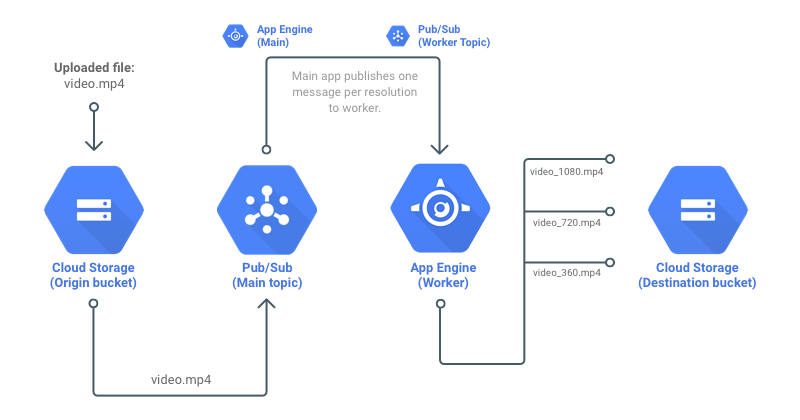
Use Google Cloud Storage, Pub/Sub and App Engine to transcode videos to many resolutions.
## 🔥 Setup - Clone the app: ``` git clone https://github.com/diego3g/gcloud-node-video-transcoding.git ``` - Install all dependencies: ``` yarn yarn lerna bootstrap ``` - Install GCloud CLI following https://cloud.google.com/sdk/docs/quickstarts?hl=pt-br - Authenticate to Google Cloud: ``` gcloud auth login ``` - Setup a Google Cloud Project; - Setup `GOOGLE_APPLICATION_CREDENTIALS` environment variable following https://cloud.google.com/docs/authentication/getting-started?hl=pt-br - Create origin and destination bucket inside Google Cloud Storage; - Create a topic inside Pub/Sub called `jupiter`; - Setup Google Cloud Storage notification to new topic, so every file uploaded to bucket will publish a message to the queue: ``` gsutil notification create -t jupiter -f json -e OBJECT_FINALIZE gs://ORIGIN_BUCKET_NAME ``` *Replace ORIGIN_BUCKET_NAME with your origin bucket name :)* - To see all the notifications: ``` gsutil notification list gs://ORIGIN_BUCET_NAME ``` - Update destination bucket name inside (https://github.com/diego3g/gcloud-node-video-transcoding/blob/master/packages/worker/src/services/transcode.ts#L26) ``` const destinationBucket = storage.bucket('DESTINATION_BUCKET_NAME'); ``` - Run main application: ``` yarn dev:main ``` - Run worker application (in another terminal): ``` yarn dev:worker ``` - Upload `.mp4` file to ORIGIN bucket and monitor logs via: ``` gcloud app logs tail -s default gcloud app logs tail -s worker ``` ## 📝 License This project lives under MIT License. See [LICENSE](LICENSE.md) for more details.