Turn your agent into a professional video editor



npx skills add diffusionstudio/skills
## Diffusion Studio
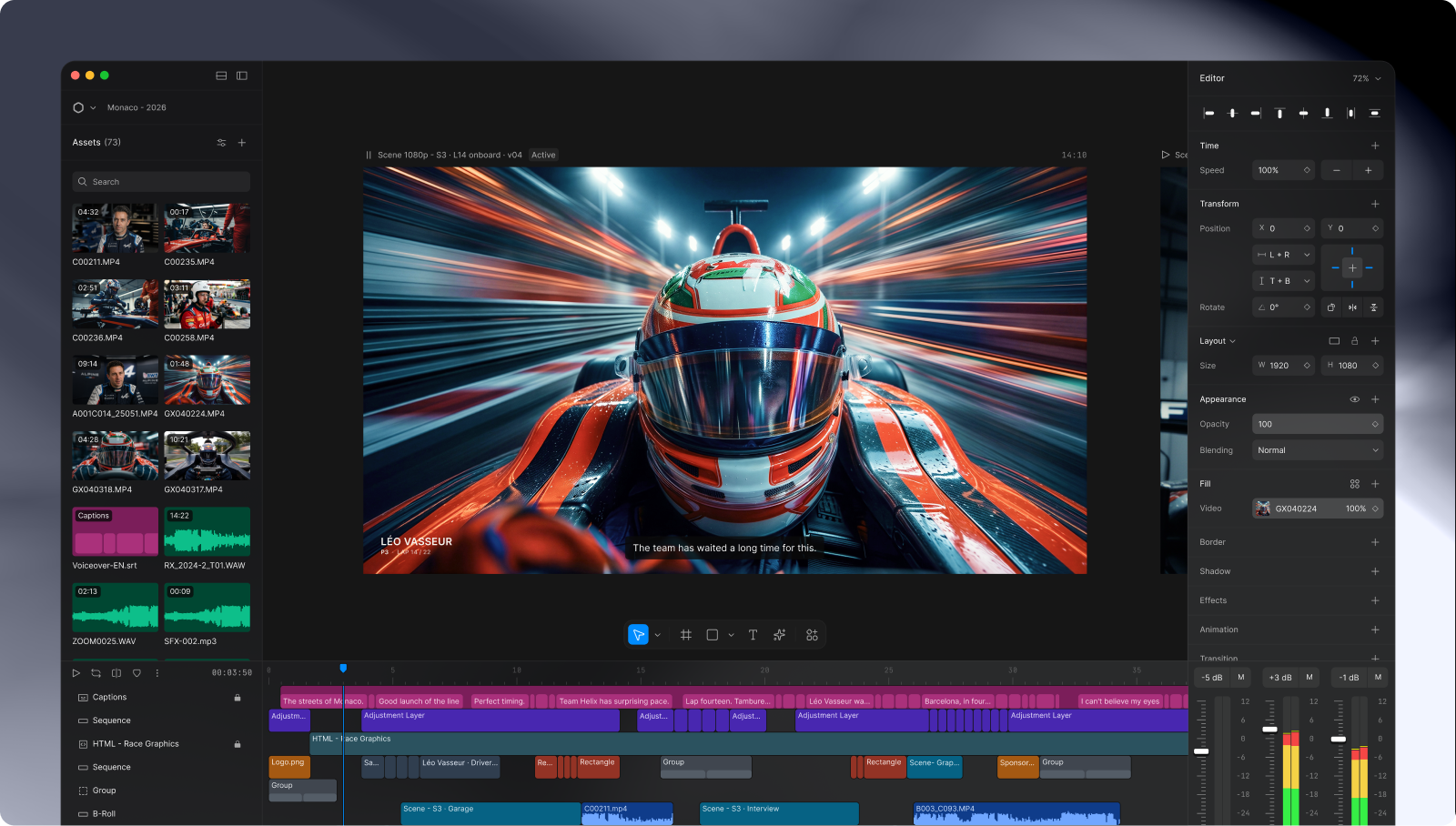
Edit videos with Codex, Claude Code, OpenCode, or Pi. Refine any output in a fully featured editing environment.
Every edit you make is written to real code, so the agent always sees the latest version. A headless mode is available too.
## What people do with it
Drop your raw footage and files into a folder, then ask for the video you want. That's it.
The agent handles everything from there:
- Cuts the clips
- Removes filler words
- Adds subtitles
- Applies color correction and filters
- Handles animations
- Renders the final video
Beyond finishing a cut, it covers:
- **Motion graphics**: explainers, promos, and title sequences
- **Clipping**: highlights from a long video, reformatted for social
- **Video understanding**: summaries, scene search, quotes with timestamps
## Getting started
Download the desktop app for macOS (Apple Silicon) or Windows (x64), it walks you through setting everything up:
 Use with Claude Code, Codex, Cursor, Copilot, or Gemini CLI. The app registers its MCP server with your agent, so just ask for what you want in plain language.
## Prompt examples
Use with Claude Code, Codex, Cursor, Copilot, or Gemini CLI. The app registers its MCP server with your agent, so just ask for what you want in plain language.
## Prompt examples
Motion graphics
```text
Create a polished, 20-second SaaS product promo video for https://typesafe.ai/. Use the website’s branding and highlight the product’s main benefit with animated UI mockups, concise on-screen text, and smooth transitions. End with a clear call to action.
```
```text
Recreate the 3blue1brown animation from https://youtu.be/HEfHFsfGXjs, closely matching its visual style, pacing, framing, colors, labels, and transitions. Use the exact collision mathematics from Gregory Galperin's original paper, do not approximate the physics.
```
Video editing
```text
Edit the footage in /path/to/folder
```
```text
Turn this footage into a polished YouTube video. Add readable captions and an attention-grabbing graphic in the opening to give viewers a strong visual hook.
```
Clipping
```text
Can you pull the best 30-second moment from https://youtu.be/MtQ0qxyf-Ds and make a vertical version for social?
```
```text
Make a 15-second version of this launch video. https://x.com/claudeai/status/2045156267690213649
```
Video understanding and reasoning
```text
In three bullets, explain what starts the conflict. Include timestamps. https://youtu.be/aqz-KE-bpKQ
```
```text
Name three recurring locations and give one visual cue that distinguishes each. https://youtu.be/dQw4w9WgXcQ
```
## Made with Diffusion Studio
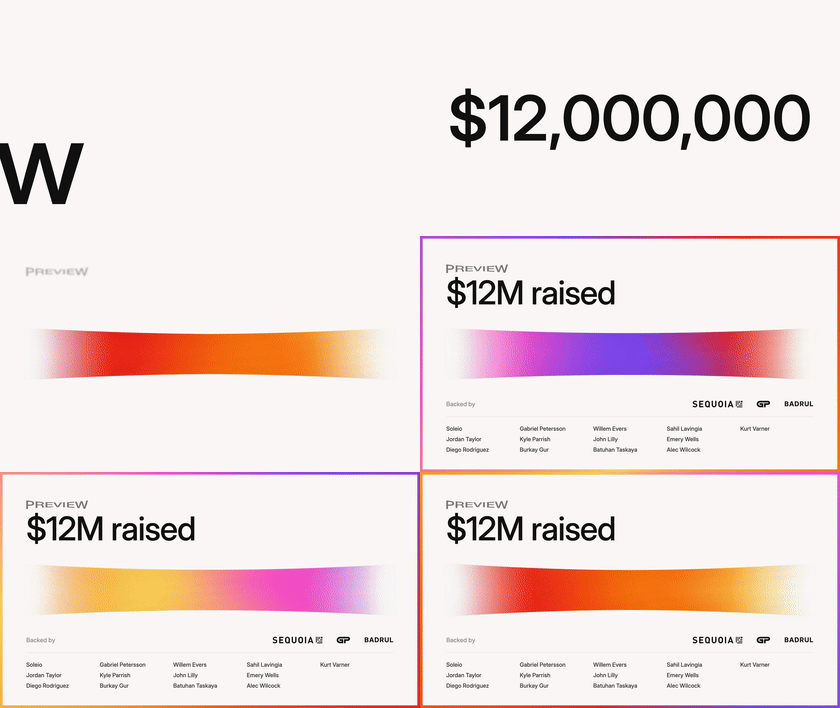
Both were created by prompting. The compositions are published in [diffusionstudio/open-projects](https://github.com/diffusionstudio/open-projects):
| [Launch video](https://github.com/diffusionstudio/open-projects/tree/main/launch-video) | [Raise announcement](https://github.com/diffusionstudio/open-projects/tree/main/raise-announcement) |
| --- | --- |
|  |
|  |
## How it works
Diffusion Studio uses [SolidJS](https://www.solidjs.com) modules as the document source. Think IDE, but it renders a video canvas instead of text.
Editing works both ways: change something on the canvas and the code updates; change the code and the canvas redraws.
The desktop app includes command-line tools that let agents watch and listen to footage, edit it on a timeline, and render the result.
## Compositions as code
A project is a folder of that JSX: `open` a folder once (`diffusion open ` from a shell), then edit the files. Saving recompiles the entry file and mounts it directly into the editor's ECS.
Every element carries an `id`, which is how the write-back finds its target: a rect dragged on the canvas, a clip trimmed on the timeline, or a retyped line lands as a prop on the element that authored it.
The root is a `` holding one `` per frame you cut in:
```tsx
import { For } from "solid-js";
const TITLES = [
{ text: "The Grid", start: 0, end: 2.5 },
{ text: "Neon Nights", start: 2.5, end: 5 },
];
export default function Project() {
return (
{(t) => (
{t.text}
)}
);
}
```
Everything a mount produces stays a first-class editor node, so a person can pick up in the UI exactly where the script left off.
## Seeing and hearing the media
Cutting footage requires understanding it. The app exposes the inspection tools an agent needs to work with media it cannot watch — as MCP tools, and as the same commands in a shell:
```sh
diffusion probe clip.mp4 # container + codec metadata, like ffprobe
diffusion grab clip.mp4 -t 0 12 45 # decode frames to PNGs
diffusion filmstrip clip.mp4 # grid of video frames
diffusion waveform track.mp3 # audio waveform, silence flagged
diffusion transcribe interview.wav # timed, word-level transcript
diffusion listen interview.mp4 -p "what is said in the intro?" # ask a multimodal model
diffusion capture intro -t 0 2 4 # the frames a render would produce, by scene id
```
Each command is the MCP tool of the same name: `diffusion grab` is `grab`, `--per-sheet` is `perSheet`.
| Command | Purpose |
| --- | --- |
| `diffusion open` | Launch the app and open (or create) a project folder, anywhere on disk |
| `diffusion context` | Summary of app state |
| `diffusion capture` | Render frames of a scene, as an export would, to a labelled contact sheet or one PNG per position |
| `diffusion check` | Check a node's subtree for structural mistakes (black-frame gaps, never-visible nodes, failed sources) and report subtree stats |
| `diffusion probe` / `grab` / `filmstrip` / `waveform` / `transcribe` / `listen` | Inspect a file by id or path |
| `diffusion fonts` | Discover Google Fonts and local font families |
| `diffusion screenshot` / `diffusion logs` | The app itself: capture the window, read recent console output |
| `diffusion report` | Report a bug in the tools or the app: diagnostics bundled, filed as a GitHub issue via `gh` |
Conventions throughout: every result is one JSON object, the same structured content the MCP tool returns; errors go to stderr with exit code `1`. Everything is built to be piped, grepped, and driven by a program.
## Documentation
- [Tool reference](docs/reference/tools/README.md): every tool and CLI command, its options, and its output
- [JSX reference](docs/reference/jsx/README.md): the composition markup with elements, timing, paints, and captions
- [Examples](docs/examples/README.md): runnable compositions, from basic scenes to three.js and raw WebGPU
## Repository layout
| Path | Package | What it is |
| --- | --- | --- |
| `apps/web` | `@diffusionstudio/web` | The editor UI (Solid + Vite) |
| `apps/desktop` | `@diffusionstudio/desktop` | Electron shell hosting the editor |
| `apps/cli` | `@diffusionstudio/cli` | The `diffusion` CLI (`dapi` alias): a client of the app's MCP server |
| `packages/runtime` | `@diffusionstudio/runtime` | Headless editor runtime: the koota world, traits, actions, systems, media decoding, capture. No DOM, no Solid |
| `packages/reconciler` | `@diffusionstudio/reconciler` | Evaluates a compiled project bundle and reconciles its element tree onto runtime entities, via Solid's universal renderer |
| `packages/jsx` | `@diffusionstudio/jsx` | The authoring API: element vocabulary and types |
| `packages/assets` | `@diffusionstudio/assets` | A project's asset library: the `assets.yml` manifest, content hashing, probing, resolution |
| `packages/encoder` | `@diffusionstudio/encoder` | Offline video/audio/image encoding over runtime worlds (mediabunny) |
| `packages/koota-solid` | `@diffusionstudio/koota-solid` | Solid bindings for koota, ported from `@koota/react` |
## Contributing / local setup
Requirements: Node 20+ and npm.
```sh
git clone https://github.com/diffusionstudio/editor.git
cd editor
npm install
cp apps/web/.env.example apps/web/.env # required: the app won't run without it
npm run dev
```
To put `diffusion` (and its `dapi` alias) on your PATH, link it once (`unlink` undoes it):
```sh
npm run link --workspace=@diffusionstudio/cli
```
Before sending a PR:
```sh
npm run check # typecheck all workspaces
npm run lint # lint all workspaces
npm run test # ensure tests are green
```
## License
[MPL-2.0](LICENSE)
The brand assets in [apps/desktop/assets](apps/desktop/assets) are not covered by this license. Copyright (c) Diffusion Studio Inc. All rights reserved.
|
## How it works
Diffusion Studio uses [SolidJS](https://www.solidjs.com) modules as the document source. Think IDE, but it renders a video canvas instead of text.
Editing works both ways: change something on the canvas and the code updates; change the code and the canvas redraws.
The desktop app includes command-line tools that let agents watch and listen to footage, edit it on a timeline, and render the result.
## Compositions as code
A project is a folder of that JSX: `open` a folder once (`diffusion open ` from a shell), then edit the files. Saving recompiles the entry file and mounts it directly into the editor's ECS.
Every element carries an `id`, which is how the write-back finds its target: a rect dragged on the canvas, a clip trimmed on the timeline, or a retyped line lands as a prop on the element that authored it.
The root is a `` holding one `` per frame you cut in:
```tsx
import { For } from "solid-js";
const TITLES = [
{ text: "The Grid", start: 0, end: 2.5 },
{ text: "Neon Nights", start: 2.5, end: 5 },
];
export default function Project() {
return (
{(t) => (
{t.text}
)}
);
}
```
Everything a mount produces stays a first-class editor node, so a person can pick up in the UI exactly where the script left off.
## Seeing and hearing the media
Cutting footage requires understanding it. The app exposes the inspection tools an agent needs to work with media it cannot watch — as MCP tools, and as the same commands in a shell:
```sh
diffusion probe clip.mp4 # container + codec metadata, like ffprobe
diffusion grab clip.mp4 -t 0 12 45 # decode frames to PNGs
diffusion filmstrip clip.mp4 # grid of video frames
diffusion waveform track.mp3 # audio waveform, silence flagged
diffusion transcribe interview.wav # timed, word-level transcript
diffusion listen interview.mp4 -p "what is said in the intro?" # ask a multimodal model
diffusion capture intro -t 0 2 4 # the frames a render would produce, by scene id
```
Each command is the MCP tool of the same name: `diffusion grab` is `grab`, `--per-sheet` is `perSheet`.
| Command | Purpose |
| --- | --- |
| `diffusion open` | Launch the app and open (or create) a project folder, anywhere on disk |
| `diffusion context` | Summary of app state |
| `diffusion capture` | Render frames of a scene, as an export would, to a labelled contact sheet or one PNG per position |
| `diffusion check` | Check a node's subtree for structural mistakes (black-frame gaps, never-visible nodes, failed sources) and report subtree stats |
| `diffusion probe` / `grab` / `filmstrip` / `waveform` / `transcribe` / `listen` | Inspect a file by id or path |
| `diffusion fonts` | Discover Google Fonts and local font families |
| `diffusion screenshot` / `diffusion logs` | The app itself: capture the window, read recent console output |
| `diffusion report` | Report a bug in the tools or the app: diagnostics bundled, filed as a GitHub issue via `gh` |
Conventions throughout: every result is one JSON object, the same structured content the MCP tool returns; errors go to stderr with exit code `1`. Everything is built to be piped, grepped, and driven by a program.
## Documentation
- [Tool reference](docs/reference/tools/README.md): every tool and CLI command, its options, and its output
- [JSX reference](docs/reference/jsx/README.md): the composition markup with elements, timing, paints, and captions
- [Examples](docs/examples/README.md): runnable compositions, from basic scenes to three.js and raw WebGPU
## Repository layout
| Path | Package | What it is |
| --- | --- | --- |
| `apps/web` | `@diffusionstudio/web` | The editor UI (Solid + Vite) |
| `apps/desktop` | `@diffusionstudio/desktop` | Electron shell hosting the editor |
| `apps/cli` | `@diffusionstudio/cli` | The `diffusion` CLI (`dapi` alias): a client of the app's MCP server |
| `packages/runtime` | `@diffusionstudio/runtime` | Headless editor runtime: the koota world, traits, actions, systems, media decoding, capture. No DOM, no Solid |
| `packages/reconciler` | `@diffusionstudio/reconciler` | Evaluates a compiled project bundle and reconciles its element tree onto runtime entities, via Solid's universal renderer |
| `packages/jsx` | `@diffusionstudio/jsx` | The authoring API: element vocabulary and types |
| `packages/assets` | `@diffusionstudio/assets` | A project's asset library: the `assets.yml` manifest, content hashing, probing, resolution |
| `packages/encoder` | `@diffusionstudio/encoder` | Offline video/audio/image encoding over runtime worlds (mediabunny) |
| `packages/koota-solid` | `@diffusionstudio/koota-solid` | Solid bindings for koota, ported from `@koota/react` |
## Contributing / local setup
Requirements: Node 20+ and npm.
```sh
git clone https://github.com/diffusionstudio/editor.git
cd editor
npm install
cp apps/web/.env.example apps/web/.env # required: the app won't run without it
npm run dev
```
To put `diffusion` (and its `dapi` alias) on your PATH, link it once (`unlink` undoes it):
```sh
npm run link --workspace=@diffusionstudio/cli
```
Before sending a PR:
```sh
npm run check # typecheck all workspaces
npm run lint # lint all workspaces
npm run test # ensure tests are green
```
## License
[MPL-2.0](LICENSE)
The brand assets in [apps/desktop/assets](apps/desktop/assets) are not covered by this license. Copyright (c) Diffusion Studio Inc. All rights reserved.