# Aseprite MCP Tools A Python MCP server that gives AI assistants full control over [Aseprite](https://www.aseprite.org/) for creating pixel art and animated sprites. **123 tools across 18 categories** — canvas, drawing, layers, animation, palettes, effects, slices, tilemaps, exports, visual-feedback/analysis tools, and a raw Lua escape hatch. The tool set is designed so an LLM has everything it needs to produce *good* pixel art, not just primitives: shading ramps with hue shifting, ordered dithering, outlines, retro palette presets with quantization, onion-skin renders, and frame diffing, bounds and lint checks for animation work. ## Examples ### Cosy room (Opus 5.5)
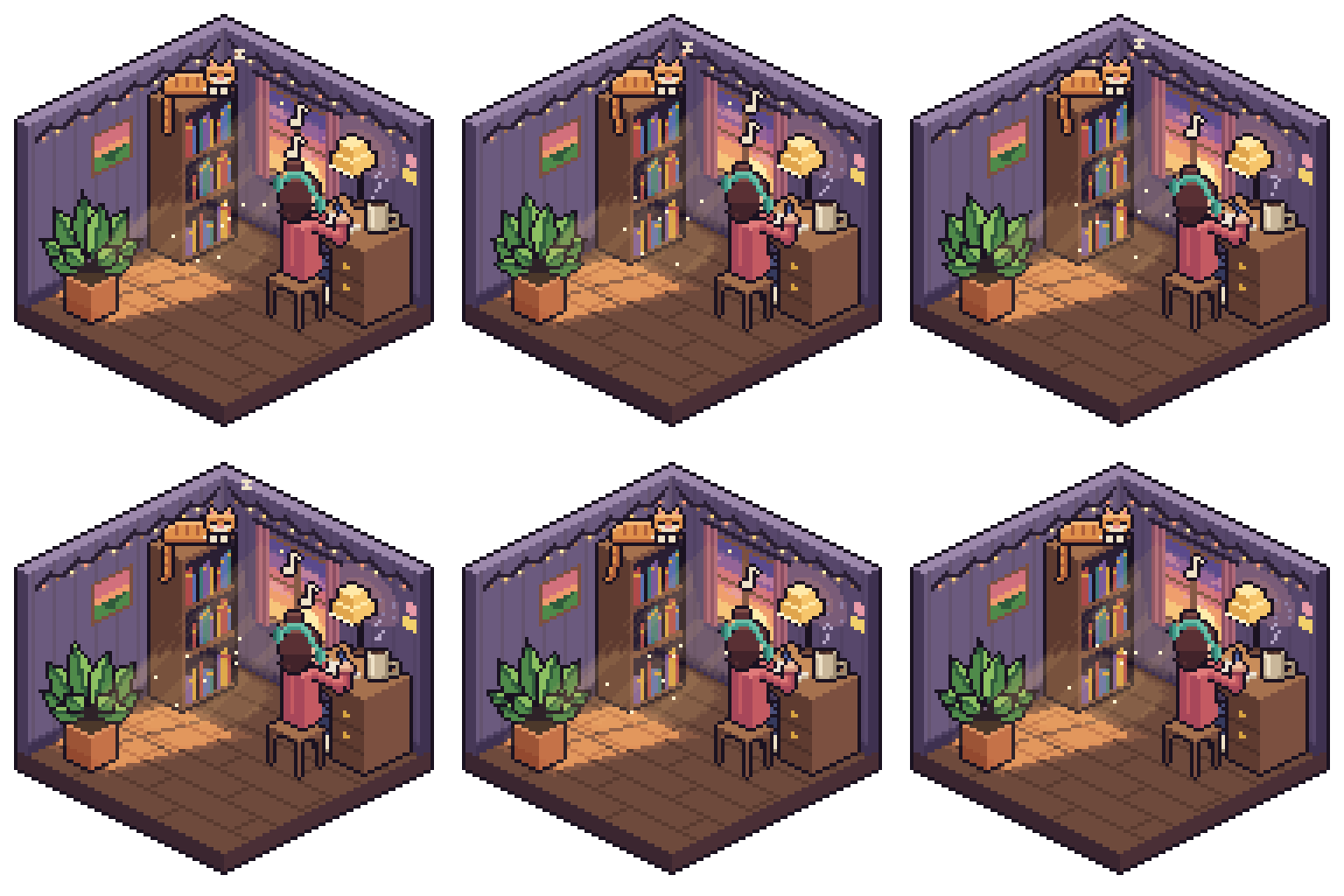
Animated isometric pixel-art bedroom at dusk with a girl doing homework and a cat asleep on the bookshelf, by Claude Opus 5.5
An isometric bedroom at dusk with a girl doing her homework, animated as a lofi-style loop.
128×128, 16-frame loop, exported at 4×.
### Swordsman: Fable 5 vs Opus 5.5
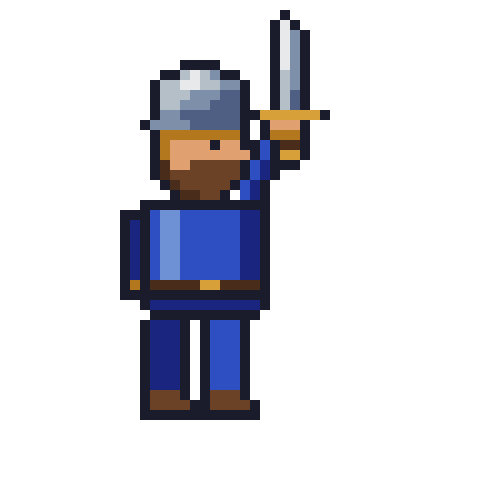
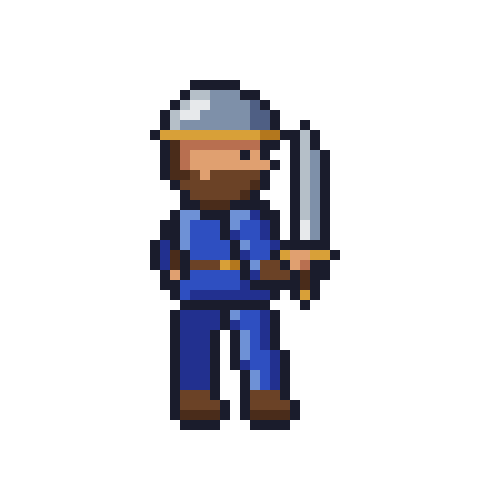
Fable 5 Opus 5.5
Pixel-art swordsman drawn by Claude Fable 5 The same swordsman redrawn by Claude Opus 5.5
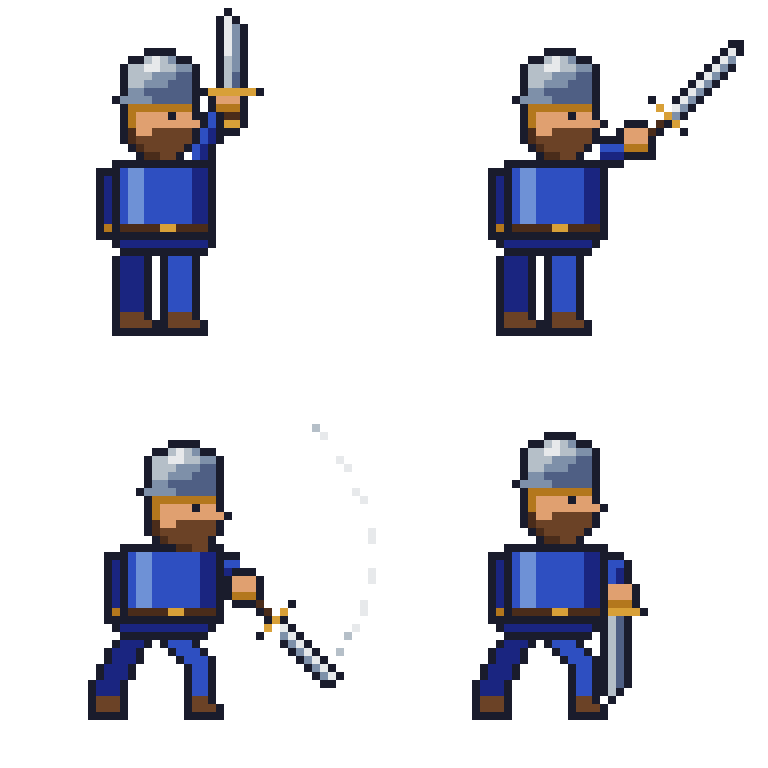
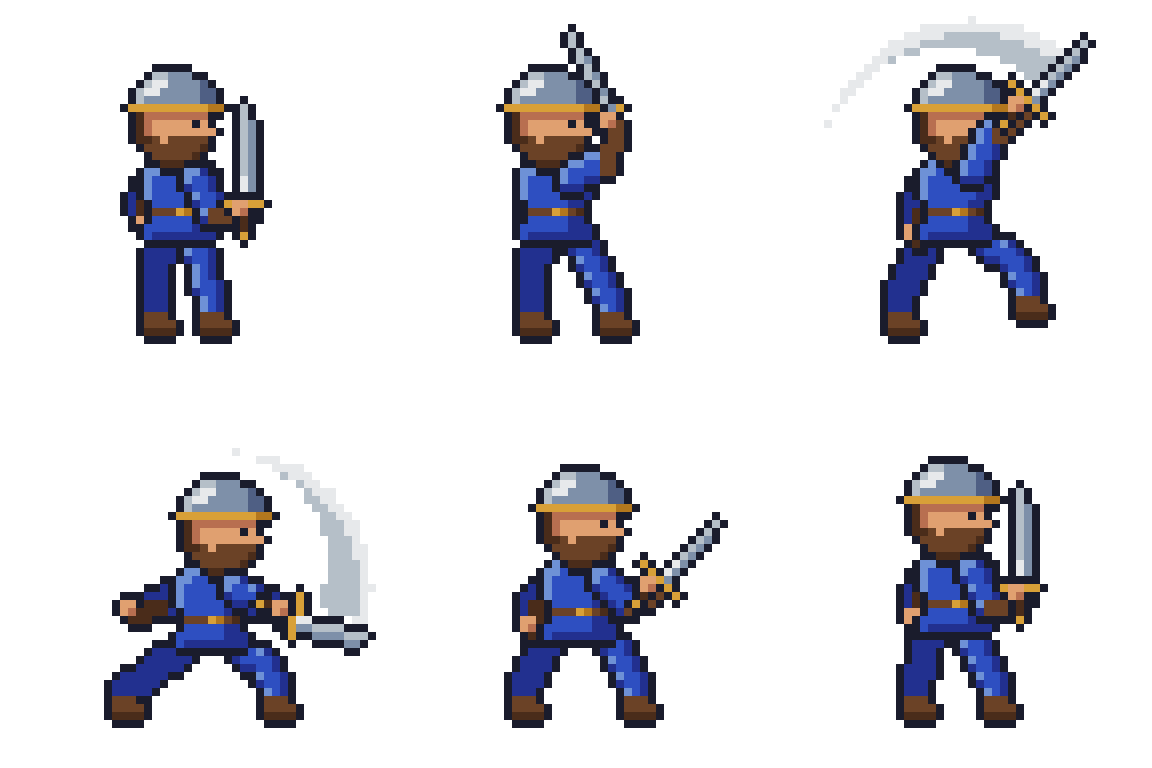
4-frame sword slash by Claude Fable 5 8-frame sword slash by Claude Opus 5.5
The benchmark swordsman, then a slash from windup to follow-through.
48×48, 4-frame slash.
Opus 5.5 critiqued the Fable 5 sprite and redrew it at the same size.
48×48, 8-frame slash.
The Fable 5 tasks recreate the benchmark from [Draw Me a Swordsman](https://ljvmiranda921.github.io/notebook/2025/07/20/draw-me-a-swordsman/) by Lj Miranda, whose findings inspired this server's expanded toolset. ### Slime (Opus 5.5)
Pixel-art green slime drawn by Claude Opus 5.5
A green slime.
32×32 still, exported at 8×.
The slime hopping to the right with squash and stretch, by Claude Opus 5.5
The slime bouncing to the right with squash and stretch.
43-frame animation, exported at 4×.
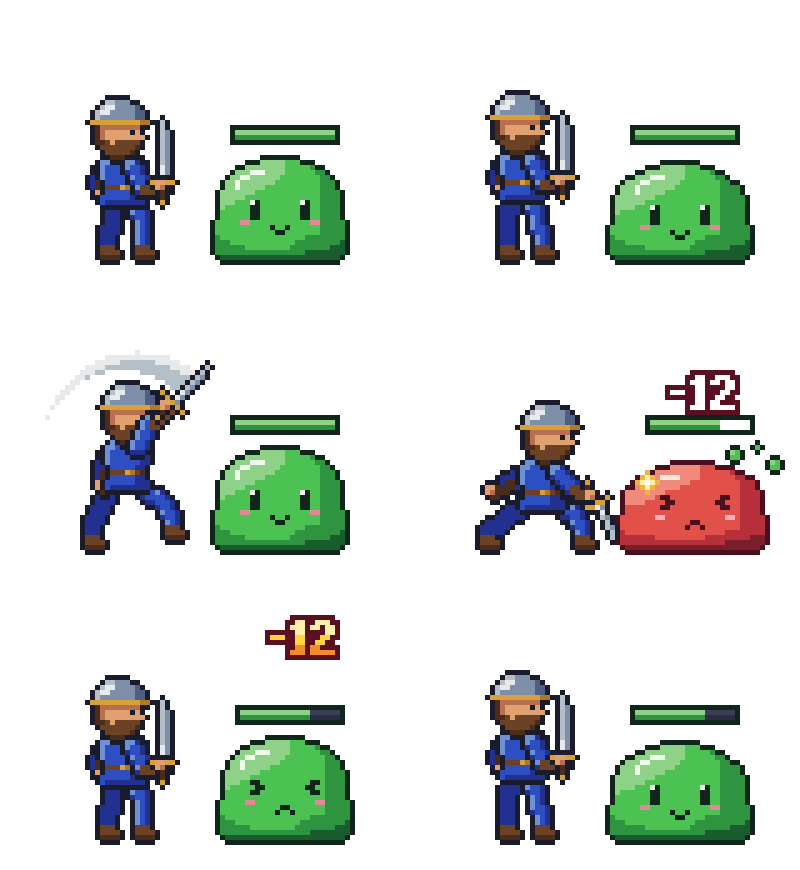
### Swordsman vs. slime (Opus 5.5)
The swordsman slashes the slime, which flashes red as a -12 damage number pops out and its health bar drops, by Claude Opus 5.5
The swordsman slashes the slime, which flashes red, loses health and pops a damage number.
80×58, 15 frames, exported at 5×.
## Related Projects [Aseprite Live](https://github.com/N7z/aseprite-live) – Watch an AI agent draw pixel art in Aseprite, live, in your browser ## Tool Categories | Category | Tools | Description | |----------|------:|-------------| | [Canvas](#canvas) | 7 | Create sprites, manage layers/frames, set the active state | | [Drawing](#drawing) | 16 | Pixels, text rows, lines, rectangles, circles, ellipses, polygons, paths, fills, gradients, isometric boxes | | [Text](#text) | 3 | Draw and measure text with bitmap sprite-sheet or TrueType fonts | | [Layers](#layers) | 7 | Delete, rename, duplicate, reorder, blend modes, merge, flatten | | [Selection & Regions](#selection--regions) | 4 | Move, copy, and erase rectangular regions or colors | | [Effects](#effects) | 12 | Outlines, color replacement, HSL adjustment, ordered dithering, native Aseprite filters | | [Animation](#animation) | 24 | Frames, cels, tags, tweening with easing, propagation | | [Palette](#palette) | 8 | Get/set palettes, retro presets, color ramps, quantization, color modes | | [Transform](#transform) | 4 | Flip, rotate, resize, crop | | [Slices](#slices) | 5 | Named regions, 9-patch centers, pivot points | | [Tilemap](#tilemap) | 5 | Tilemap layers, tileset editing, tile placement | | [Export & Import](#export--import) | 8 | PNG, GIF, sprite sheets, per-layer/per-tag export, previews on a background, image import | | [Inspection](#inspection) | 6 | Read pixels (one layer, the visible composite, or as text rows) and sprite metadata | | [Analysis & Visual Feedback](#analysis--visual-feedback) | 6 | Sprite previews the model can see, onion-skin renders, frame diffing, bounds, lint, color statistics | | [Quality](#quality) | 4 | Validate and sanitize animation consistency | | [Scene](#scene) | 1 | Copy layers between sprite files | | [Preview & Guide](#preview--guide) | 3 | Local HTTP preview server, workflow guide | | [Scripting](#scripting) | 1 | Raw Lua escape hatch for anything not covered above | ### Canvas | Tool | Description | |------|-------------| | `create_canvas` | Create a new sprite with the given dimensions | | `add_layer` | Add a new layer, optionally inside a named group | | `add_group` | Add a new (optionally nested) group layer | | `add_frame` | Append a new frame | | `set_frame` | Set the active frame | | `set_frame_duration` | Set one frame's duration in ms | | `set_layer` | Set the active layer (optionally creating it) | ### Drawing All `_at` variants target a specific layer/frame and can create the cel on demand. Coordinates are sprite-global. ``` draw_rows(filename="mug.aseprite", layer_name="mug", frame_index=1, x=4, y=2, rows=[".WWWW..", ".WWWWKK", ".WWWW.K", "..WW.K."], legend={"W": "#F4F4F4", "K": "#8B5A2B"}, outline="#1A1C2C") ``` `.` (or any character missing from the legend) leaves a pixel untouched; `read_rows` returns pixels in the same format, so an edit is read, change a few characters, draw again. | Tool | Description | |------|-------------| | `draw_pixels` | Plot individual pixels with per-pixel colors | | `draw_pixels_at` | Plot pixels on a specific layer/frame | | `draw_line` / `draw_line_at` | Lines with thickness | | `draw_rectangle` / `draw_rectangle_at` | Outlined or filled rectangles | | `draw_circle` / `draw_circle_at` | Outlined or filled circles | | `draw_ellipse_at` | Outlined or filled ellipses with separate x/y radii | | `draw_polygon` | Outlined or filled polygons from a point list | | `draw_path` | Polyline through a point list with thickness | | `fill_area` / `fill_area_at` | Paint-bucket flood fill | | `apply_gradient_rect` | Smooth linear gradient fill in a rectangle | | `draw_rows` | Pixels as rows of characters plus a colour legend, like ASCII art, with an optional 1px outline — the compact way to place hand-chosen detail (faces, hands, animals, handles) | | `draw_iso_box` | Solid 2:1 isometric box with clean 2-1 edges and a colour per face, for furniture and props | ### Text Aseprite's Lua API has no text drawing, so glyphs are rasterised on the server and composited into the sprite. Two font backends are supported: **bitmap** sprite-sheet fonts (the right choice for pixel art — glyphs are already pixels and `size` scales them by whole numbers) and **TrueType** `.ttf`/`.otf` files, rendered without antialiasing unless you ask for it. Fonts are discovered in `~/.aseprite-mcp/fonts`: a bitmap font is a directory containing `font.json` plus its sheet PNGs; a TrueType font is just the font file. Installed system fonts are listed too. `font` also accepts a direct path. | Tool | Description | |------|-------------| | `list_text_fonts` | List the bitmap and TrueType fonts available to `draw_text` | | `measure_text` | Width, height, advance and baseline extents — size a panel or centre a label without redrawing to find out | | `draw_text` | Draw text with anchors, faux bold, outline, drop shadow and letter spacing | Call `measure_text` first when the layout depends on the text: it returns the same metrics `draw_text` will use, so a label can be centred or a plate sized in one pass. ``` measure_text(text="MODERATOR", font="minecraft", size=2, bold=1) -> width=115 height=15 advance_width=117 above_baseline=14 below_baseline=1 left_bearing=0 draw_text(filename="badge.aseprite", text="MODERATOR", x=64, y=17, font="minecraft", size=2, anchor="baseline", bold=1, color="#FFFFFF", shadow_color="#14237A") ``` Anchors are `topleft`/`top`/`topright`, `left`/`center`/`right`, `bottomleft`/`bottom`/`bottomright`, plus `baselineleft`/`baseline`/`baselineright` for pinning several labels to one baseline. Outline and shadow grow the stamp but never move the glyphs. #### font.json ```json { "name": "my-font", "letter_gap": 1, "space_width": 3, "sheets": [{ "file": "sheet.png", "cell_w": 8, "cell_h": 8, "ascent": 7, "chars": [" !\"#$%&'()*+,-./", "0123456789:;<=>?"] }], "overrides": { "86": {"ascent": 7, "rows": ["#...#", "#...#", ".#.#.", "..#.."]} } } ``` Each sheet carries its own `ascent`, so sheets with different cell sizes still share a baseline — that is how a compact ASCII sheet and a taller accented sheet combine into one run. `origin` shifts the cell grid when the sheet has a margin, `ink_rule: "dark"` reads sheets that use an opaque white background to delimit variable-width glyph boxes, and `advance: "box"` takes the advance from the box rather than the ink. `overrides` replaces individual glyphs with hand-drawn rows, which is useful when a sheet ships a glyph that is off-centre or too tall to sit on the line. ### Layers | Tool | Description | |------|-------------| | `delete_layer` | Delete a layer by name | | `rename_layer` | Rename a layer | | `duplicate_layer` | Duplicate a layer with all cels, opacity, and blend mode, optionally into a group | | `reorder_layer` | Move a layer to a position in the stack | | `set_layer_blend_mode` | Set blend mode (multiply, screen, overlay, ... 19 modes) | | `merge_layer_down` | Merge a layer into the one below it | | `flatten_sprite` | Flatten all layers into one | ### Selection & Regions | Tool | Description | |------|-------------| | `move_region` | Cut a rectangle of pixels and paste it elsewhere | | `copy_region` | Copy a rectangle to another position, layer, or frame | | `erase_region` | Make a rectangle transparent | | `erase_color` | Magic-eraser: make all pixels of a color transparent (with tolerance) | ### Effects The pixel-art toolbox: clean outlines, palette-respecting blends, and shading variants. | Tool | Description | |------|-------------| | `outline_cel` | Add a 1px outline around all opaque pixels, or only around the shapes in a region | | `replace_color` | Replace one color with another (with tolerance), preserving alpha | | `adjust_hsl` | Shift hue/saturation/lightness of a cel — palette swaps, night scenes, shadows | | `apply_dither_gradient` | Two-color gradient using Bayer 4×4 ordered dithering | | `apply_dither_pattern` | Uniform dithered mix of two colors at a given density | Native filters run Aseprite's own engine commands on a layer and frame: | Tool | Description | |------|-------------| | `outline_native` | Aseprite's Outline command around opaque pixels | | `adjust_hsl_native` | Aseprite's Hue/Saturation/Lightness filter | | `adjust_brightness_contrast` | Brightness/Contrast filter | | `invert_colors` | Colour inversion | | `apply_convolution` | Convolution filter: blur, sharpen, edge, emboss … | | `list_convolution_matrices` | List the built-in matrices for `apply_convolution` | | `extract_palette` | Build an optimal palette from the sprite (native colour quantization) | ### Animation | Tool | Description | |------|-------------| | `add_frames` | Append N frames with optional duration | | `delete_frame` | Delete a frame | | `set_frame_duration_all` | Set every frame's duration | | `duplicate_frame_range` | Duplicate a frame range N times | | `copy_frame` / `propagate_frame_to_range` | Copy all cels of a frame to other frames | | `create_cel` / `clear_cel` / `copy_cel` | Cel lifecycle on a layer/frame | | `propagate_cels` | Copy selected layers' cels across a frame range | | `set_cel_position` | Place a cel at x,y | | `set_cel_opacity` | Set a single cel's opacity | | `offset_cel_positions` | Shift cels by a delta across frames | | `tween_cel_positions` | Linear position tween across frames | | `tween_cel_positions_eased` | Position tween with easing (ease_in/out, smoothstep) | | `tween_cel_opacity_eased` | Opacity tween with easing | | `tween_cel_scale_eased` | Scale tween with easing and anchor | | `oscillate_cel_positions` | Sine-wave motion (bobbing, breathing, hovering) | | `set_tag` / `delete_tag` | Animation tags with direction (forward/reverse/pingpong) | | `set_layer_visibility` / `set_layer_opacity` | Layer-level visibility and opacity | | `set_onion_skin` | Configure onion-skin UI prefs (see `render_onion_skin` for batch use) | | `get_sprite_info` | Sprite metadata: size, layers, frames, durations, tags | ### Palette | Tool | Description | |------|-------------| | `get_palette` | Read the palette as hex colors | | `set_palette` | Set the palette from a list of hex colors | | `list_palette_presets` | List built-in retro palettes | | `apply_palette_preset` | Apply a preset: `gameboy`, `pico8`, `c64`, `cga`, `dawnbringer16`, `dawnbringer32`, `grayscale_4`, `monochrome` | | `generate_color_ramp` | Build a dark→light shading ramp with hue shifting from a base color | | `quantize_to_palette` | Snap every pixel to the nearest palette color | | `remap_colors_in_cel_range` | Remap specific colors across a frame range | | `set_color_mode` | Convert between RGB, grayscale, and indexed | ### Transform | Tool | Description | |------|-------------| | `flip_layer` | Flip a cel horizontally or vertically | | `rotate_layer` | Rotate a cel 90/180/270° | | `resize_canvas` | Scale the sprite to new dimensions | | `crop_canvas` | Crop to a rectangle | ### Slices | Tool | Description | |------|-------------| | `create_slice` | Create a named rectangular region | | `set_slice_center` | Set the 9-patch stretchable center | | `set_slice_pivot` | Set the pivot point | | `list_slices` | List all slices with bounds, centers, pivots as JSON | | `delete_slice` | Delete a slice | ### Tilemap | Tool | Description | |------|-------------| | `create_tilemap_layer` | Add a tilemap layer with its own tileset and tile grid | | `draw_on_tile` | Paint pixels into a tileset tile (auto-appends new tiles) | | `set_tiles` | Place tiles on the map by grid position | | `get_tile_at` | Read which tile occupies a grid cell | | `get_tilemap_info` | Tile size, tile count, and map dimensions as JSON | ### Export & Import | Tool | Description | |------|-------------| | `export_sprite` | Export to PNG, GIF, JPG, ... | | `export_frame` | Export one frame as PNG with integer upscaling (to look at your work, use `view_sprite`) | | `export_spritesheet` | Sprite sheet (horizontal/vertical/rows/columns/packed) with optional JSON metadata and per-tag filtering | | `export_layers` | One PNG per layer | | `export_tag` | Export an animation tag as GIF or PNG sequence | | `export_animation` | GIF or PNG sequence of every frame or one tag, scaled, optionally on a solid background — the sprite itself is never changed | | `import_image_as_layer` | Import a PNG into a layer (references, premade parts) | | `copy_sprite` | Duplicate the .aseprite file | ### Inspection | Tool | Description | |------|-------------| | `get_pixel_color` | Read one pixel's RGBA | | `get_pixels_rect` | Read a rectangle of pixels as JSON | | `get_composite_pixel` / `get_composite_rect` | Read what is visible (all layers composited) at a pixel or over a rectangle | | `read_rows` | Read a region as rows of characters plus a legend — the compact format `draw_rows` takes back | | `get_sprite_info` | Sprite metadata (also listed under Animation) | ### Analysis & Visual Feedback Batch-mode equivalents of what a human artist gets from the Aseprite UI. | Tool | Description | |------|-------------| | `view_sprite` | Return an image of the frames straight to the model — zoomed, with pixel grid and coordinate rulers so it can fix exact pixels | | `render_onion_skin` | Render a frame over translucent ghosts of neighboring frames — check motion continuity without opening Aseprite | | `compare_frames` | Diff two frames, optionally one layer or region (did the feet move?): changed pixel count, percentage, bounding box | | `get_bounds` | Bounding box of the drawn pixels per frame, optionally one layer — measure rise and fall, ground line, canvas edges | | `lint_sprite` | Detached pieces, lone pixels and orphan pixels, with coordinates | | `get_color_stats` | Color histogram of a frame — catches palette drift and near-duplicate colors | `view_sprite` is the drawing loop's eyes: it returns the picture as MCP image content, so the model sees its work without exporting a file and opening it, and works in clients that cannot read local files. Pick frames with `"3"`, `"1-4"` or `"1,3,6-8"`, `layer_name` to isolate one layer, and `region="x,y,w,h"` to zoom into a detail with rulers still in sprite coordinates. ### Quality | Tool | Description | |------|-------------| | `ensure_layers_present` | Create missing cels for layers across a frame range | | `validate_scene` | Report missing layers/cels as JSON | | `audit_animation` | Audit frames for overlaps and out-of-range layer activity | | `animation_sanitize` | Normalize layer order, coverage, and overlaps | ### Scene | Tool | Description | |------|-------------| | `copy_layers_between_sprites` | Copy layers by name from one .aseprite file to another | ### Preview & Guide | Tool | Description | |------|-------------| | `start_preview_server` / `stop_preview_server` | Serve exported files over local HTTP | | `animation_workflow_guide` | How to animate well: key poses, anticipation, squash and stretch, timing (`character`, `idle`, `environment`) | The server also sends short pixel-art rules as MCP `instructions` when a client connects (silhouette first, one light direction, clean lines, check each pass), so the model gets them without calling anything. ### Scripting | Tool | Description | |------|-------------| | `run_lua_script` | Execute arbitrary Aseprite Lua ([API docs](https://www.aseprite.org/api/)) in batch mode. The last resort, for what no dedicated tool covers: one script can batch many operations into a single Aseprite launch. Remember to `spr:saveAs(spr.filename)` and `print()` your results. ⚠️ Runs unrestricted code on the host — only pass scripts you trust. | ## Recommended Workflow for LLMs 1. **Plan the palette first**: `generate_color_ramp` for each material (skin, armor, blade), or `apply_palette_preset` for a retro look. 2. **Build in layers**: background / body / equipment / effects, so parts can be animated and edited independently. 3. **Draw coarse to fine**: silhouette with `draw_rectangle_at` / `draw_ellipse_at` / `fill_area_at`, then refine with `draw_rows`. 4. **Look at your work**: `view_sprite` after every pass (`region` to zoom in), fix, repeat. Use `get_color_stats` to keep the palette tight and `lint_sprite` to catch stray and detached pixels. 5. **Shade with intent**: `adjust_hsl` for shadow layers, `apply_dither_gradient` for blends, `outline_cel` for readability. 6. **Animate with the cel tools**: `propagate_cels`, then `tween_cel_positions_eased` / `oscillate_cel_positions`; verify with `view_sprite`, `compare_frames` and `get_bounds`; export with `export_animation` or `export_tag`. ## Docker Usage ### Quick Start Build and run the Docker image: ```bash docker build -t aseprite-mcp:latest . docker run -it --rm aseprite-mcp:latest ``` Or use the provided build scripts: - **Linux/macOS**: `chmod +x build-docker.sh && ./build-docker.sh` - **Windows**: `.\build-docker.ps1` ### Using Docker Compose ```bash # Production docker-compose up aseprite-mcp # Development mode docker-compose --profile dev up aseprite-mcp-dev ``` See [DOCKER.md](DOCKER.md) for detailed Docker setup instructions. ### Optional: Install Aseprite via Steam To have the container install Aseprite via SteamCMD at startup, provide Steam credentials: ```powershell # Create a .env with STEAM_USERNAME/STEAM_PASSWORD (and optional STEAM_GUARD_CODE) # Then docker run --rm -i --env-file .env aseprite-mcp:latest ``` If installed, the binary will be at `/opt/steamapps/common/Aseprite/aseprite` and `ASEPRITE_PATH` will be picked up automatically. ## Local Installation ### Prerequisites - Python 3.13+ - `uv` package manager - Aseprite (set `ASEPRITE_PATH` in `.env` if it is not on your PATH) ### Installation: ```json { "mcpServers": { "aseprite": { "command": "/opt/homebrew/bin/uv", "args": [ "--directory", "/path/to/repo", "run", "-m", "aseprite_mcp" ] } } } ```