dsh-connect-qoder
Connect Qoder (Lingma CN / international) models to DeepSeek Harness, with an account pool, daily check-in, credit readouts and model management.
中文 ·
Installation ·
How it works ·
Configuration ·
Account pool ·
Changelog ·
Issues


A standalone [DeepSeek Harness (DSH)](https://github.com/deepseek-ai/deepseek-harness) bundle plugin. It connects your Qoder account's models to the DSH model picker, with an account pool, daily check-in, credit readouts and model management. **The CN and international editions are two parallel providers (`qoder` / `qoder-global`) that can be used at the same time**; the plugin's settings card separates them with tabs.
> Qoder does not expose an OpenAI-compatible endpoint (its official SDK is only an agent launcher), so this plugin talks to Qoder's cosy gateway directly, implementing a minimal client for the protocol. No Qoder desktop sign-in is needed — just a PAT (Personal Access Token).
## Features
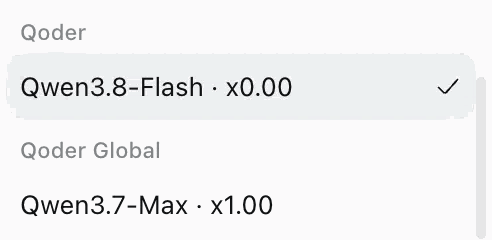
- **Two parallel providers (CN + international)** — the CN edition registers as the `qoder` provider (`gateway.qoder.com.cn`); the international edition registers as `qoder-global` (`api1.qoder.sh`). **Regions with a PAT configured show their models in the DSH model picker**: with a PAT for both regions you get two groups that can be used simultaneously and independently per session. **A region without a PAT lists no models** (no request could succeed, so listing them would only invite failures); configure a PAT and hit "Refresh models" to make them appear — the provider itself stays registered, because its settings card is the configuration entry point. Model names embed the upstream credit multiplier (e.g. `Qwen3.8-Flash · x0.00`), matching Qoder's own model menu.
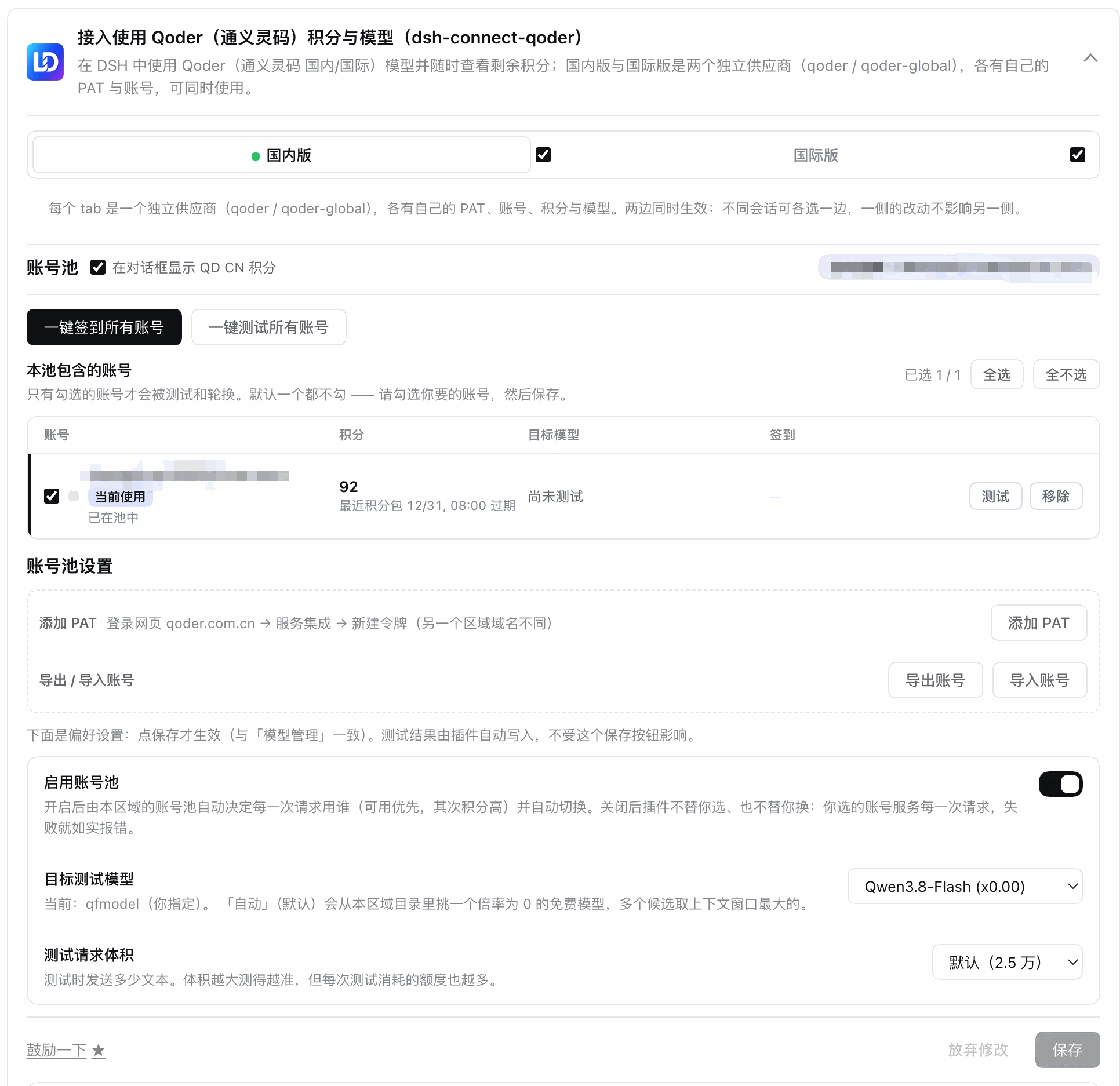
 - **Settings card tabs** — the card top has "CN / Global" tabs, each with its own PAT, account pool, model management and credits; catalogs, selections and state stay fully isolated per tab.
- **Per-region kill switch** — each tab has a checkbox on the right (both checked by default). **Unchecking removes that provider from the DSH model picker entirely** (not just hiding the tab): both its adapter route and its "Settings → Models" directory entry are removed. PAT, credits, and selections are **all kept**; re-checking restores everything. Note: a session that had already selected a model of the disabled provider will get `NO_ADAPTER` on its next call.
- **Model management** — refresh the full model catalog from upstream and toggle each model on or off; each row shows the multiplier (`(0.50x)`), context/output limits, thinking-effort tiers and a free marker, plus "Image" and "Off-able thinking" switches, a context-tier selector and a "Test" button on the right. Selections are written to local config and sync to the model picker immediately.
- **Settings card tabs** — the card top has "CN / Global" tabs, each with its own PAT, account pool, model management and credits; catalogs, selections and state stay fully isolated per tab.
- **Per-region kill switch** — each tab has a checkbox on the right (both checked by default). **Unchecking removes that provider from the DSH model picker entirely** (not just hiding the tab): both its adapter route and its "Settings → Models" directory entry are removed. PAT, credits, and selections are **all kept**; re-checking restores everything. Note: a session that had already selected a model of the disabled provider will get `NO_ADAPTER` on its next call.
- **Model management** — refresh the full model catalog from upstream and toggle each model on or off; each row shows the multiplier (`(0.50x)`), context/output limits, thinking-effort tiers and a free marker, plus "Image" and "Off-able thinking" switches, a context-tier selector and a "Test" button on the right. Selections are written to local config and sync to the model picker immediately.
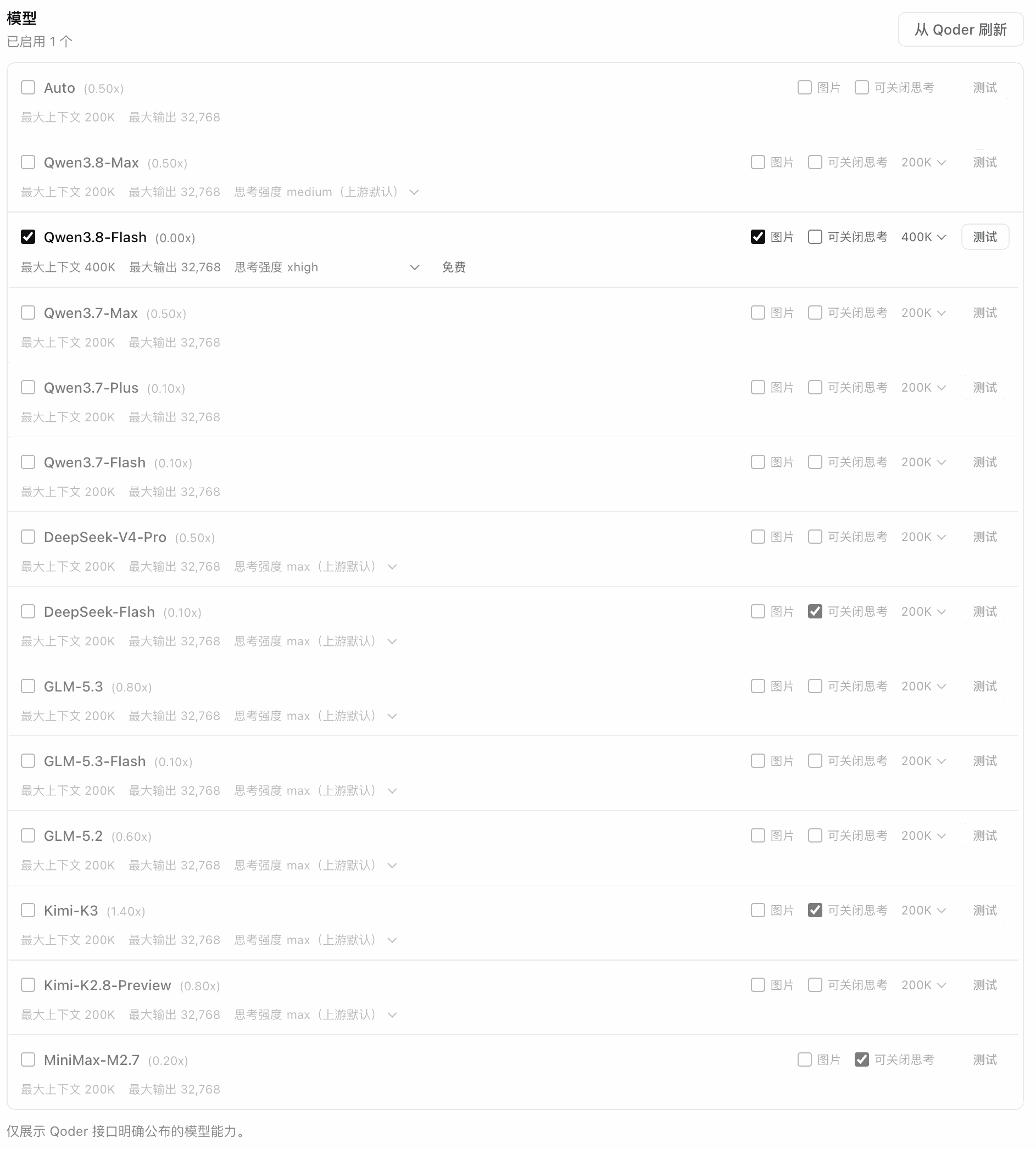 - **Per-model availability probe** — every model row has a "Test" button that goes straight to upstream: rate-limited (429) → "Rate limited", invalid credential → "Invalid credential", content-policy rejection → "Blocked by content policy", quota exhausted → "Quota exhausted", and other upstream transient failures are classified honestly. Probes run in the background, **credentials never reach the page**; results are not written into settings and do not change your saved selections. **Probes are real requests** (they consume a small amount of upstream credit), so they are per-model and manual only — there is no batch "test all checked" button.
- **Daily check-in** — Qoder runs an official daily check-in campaign (individual users claim 100 credits a day, valid for 30 days). The account pool has a "Check in all accounts" action: it claims per account, treats an already-claimed day as idempotent success (no double claim, not a failure), and refreshes credits afterwards. Both regions are wired up (the international edition needs the device-risk identity that the local Qoder client ships; when it cannot be obtained the plugin reports that honestly instead of pretending "no campaign today").
- **Credits (read-only)** — the pool table shows each account's remaining credits and its nearest credit-package expiry (from Qoder's `sash/api/v2/me/usage`, queried with the `jt-` jobToken); packages expiring within three days are highlighted. The query is **read-only** and costs no credits; when it fails (credential rejected / upstream silent) the card says why and offers a way out instead of showing a blank.
- **Secure loopback shim** — one random port + in-process random secret per region, so the real Qoder PAT **never reaches pi-ai**: pi-ai only talks to the local shim, which performs upstream requests with cosy sessions (jobTokens).
- **Multi-account pool (PAT)** — a per-region local vault `$DSH_HOME/.qoder-accounts..json` (0600) merges the settings PAT, environment variable, and vault accounts into one de-duplicated list; the card can add (paste a `pt-…`, validated via a `JobToken` exchange that returns the display name; you may also set your own label), rename accounts, and can pin a specific account to serve (`regions..accountId`, empty = automatic by settings → env → vault). **Taking an account out of rotation and deleting it are different actions**: untick it in the pool table and save (the PAT stays put, and you can tick it back at any time), or press the row's **Delete** button — a second confirmation erases the stored PAT for good and drops the account from the pool and the region selection. A PAT coming from the app's settings or the environment is not the plugin's to delete, so those rows get no delete button.
- **Probe-ranked selection and automatic failover** — "Test all accounts" sends a real request per pool member (the target model defaults to an automatically picked multiplier-0 free model in that region) and persists results to `$DSH_HOME/.qoder-pool..json`; with the pool enabled, the chat stream picks the top-ranked usable account before the first byte (`rankPool`: usability → highest credits → soonest expiry → id) and retries the next usable accounts on failure, writing failures back as `live-request` probes. With the switch off, the plugin neither picks nor swaps for you — it just reports the error.
- **Account transfer (import / export)** — export a region's vault accounts to a transfer file, preview it, and import by index; cross-region domains (`qoder.com.cn` / `qoder.sh`) are positively matched and non-matching records are counted as `skipped`.
- **Thinking effort and context budgets** — upstream declares `thinking_config.efforts` per model, and the card lists **only the tiers that really exist** (Qwen-family `low/medium/xhigh`, DeepSeek/GLM-family `low/high/max`); your choice is saved and sent with every request using the same fields the Qoder client uses (dual-written at the top level and in `parameters`). Context tiers likewise come only from the model's declared `context_config`; nothing is invented when a model declares none.
- **Honest model capabilities** — upstream's `is_vl` is a **platform**-level image claim, not a per-model capability (the built-in catalog says `true` for almost everything, including text-only models). Image input is pre-checked only for models confirmed multimodal in vendor docs, keyed by exact model id; unverified models stay unchecked and the switch tooltip explains why. "Off-able thinking" is offered only where upstream explicitly declares it and the model is not in the known-rejection set. Fewer options beats an option that fails when pressed.
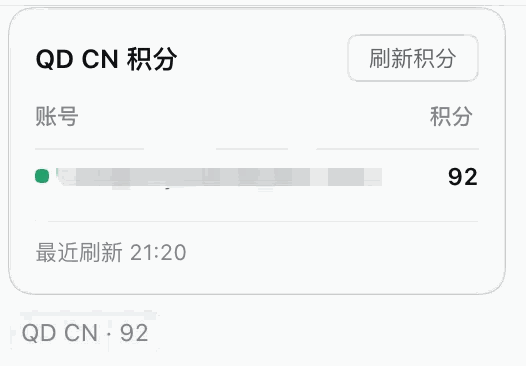
- **Composer credits readout (position is a choice)** — the session input shows `QD CN` / `QD AI` with the serving account's balance (e.g. `QD CN · 92`); clicking it opens a per-account balance table where a row click switches accounts. Gated by the per-region "show credits in the composer" switch (default on, opt-out). **The readout can sit in either of two places** (a per-region dropdown in the card, default unchanged): **the composer toolbar** (`conversation.input.left`, closer and easier to glance at) or **below the composer** (`conversation.composer.dock`, the ambient row where the shell renders its own round / tok-per-sec / token / cache-hit stats). The reason it is a choice: the composer toolbar is a **shared list slot**, so another plugin parking something there can crowd the readout out of sight — switch to "below the composer" if that happens (mirrors workbuddy issue #62).
- **Per-model availability probe** — every model row has a "Test" button that goes straight to upstream: rate-limited (429) → "Rate limited", invalid credential → "Invalid credential", content-policy rejection → "Blocked by content policy", quota exhausted → "Quota exhausted", and other upstream transient failures are classified honestly. Probes run in the background, **credentials never reach the page**; results are not written into settings and do not change your saved selections. **Probes are real requests** (they consume a small amount of upstream credit), so they are per-model and manual only — there is no batch "test all checked" button.
- **Daily check-in** — Qoder runs an official daily check-in campaign (individual users claim 100 credits a day, valid for 30 days). The account pool has a "Check in all accounts" action: it claims per account, treats an already-claimed day as idempotent success (no double claim, not a failure), and refreshes credits afterwards. Both regions are wired up (the international edition needs the device-risk identity that the local Qoder client ships; when it cannot be obtained the plugin reports that honestly instead of pretending "no campaign today").
- **Credits (read-only)** — the pool table shows each account's remaining credits and its nearest credit-package expiry (from Qoder's `sash/api/v2/me/usage`, queried with the `jt-` jobToken); packages expiring within three days are highlighted. The query is **read-only** and costs no credits; when it fails (credential rejected / upstream silent) the card says why and offers a way out instead of showing a blank.
- **Secure loopback shim** — one random port + in-process random secret per region, so the real Qoder PAT **never reaches pi-ai**: pi-ai only talks to the local shim, which performs upstream requests with cosy sessions (jobTokens).
- **Multi-account pool (PAT)** — a per-region local vault `$DSH_HOME/.qoder-accounts..json` (0600) merges the settings PAT, environment variable, and vault accounts into one de-duplicated list; the card can add (paste a `pt-…`, validated via a `JobToken` exchange that returns the display name; you may also set your own label), rename accounts, and can pin a specific account to serve (`regions..accountId`, empty = automatic by settings → env → vault). **Taking an account out of rotation and deleting it are different actions**: untick it in the pool table and save (the PAT stays put, and you can tick it back at any time), or press the row's **Delete** button — a second confirmation erases the stored PAT for good and drops the account from the pool and the region selection. A PAT coming from the app's settings or the environment is not the plugin's to delete, so those rows get no delete button.
- **Probe-ranked selection and automatic failover** — "Test all accounts" sends a real request per pool member (the target model defaults to an automatically picked multiplier-0 free model in that region) and persists results to `$DSH_HOME/.qoder-pool..json`; with the pool enabled, the chat stream picks the top-ranked usable account before the first byte (`rankPool`: usability → highest credits → soonest expiry → id) and retries the next usable accounts on failure, writing failures back as `live-request` probes. With the switch off, the plugin neither picks nor swaps for you — it just reports the error.
- **Account transfer (import / export)** — export a region's vault accounts to a transfer file, preview it, and import by index; cross-region domains (`qoder.com.cn` / `qoder.sh`) are positively matched and non-matching records are counted as `skipped`.
- **Thinking effort and context budgets** — upstream declares `thinking_config.efforts` per model, and the card lists **only the tiers that really exist** (Qwen-family `low/medium/xhigh`, DeepSeek/GLM-family `low/high/max`); your choice is saved and sent with every request using the same fields the Qoder client uses (dual-written at the top level and in `parameters`). Context tiers likewise come only from the model's declared `context_config`; nothing is invented when a model declares none.
- **Honest model capabilities** — upstream's `is_vl` is a **platform**-level image claim, not a per-model capability (the built-in catalog says `true` for almost everything, including text-only models). Image input is pre-checked only for models confirmed multimodal in vendor docs, keyed by exact model id; unverified models stay unchecked and the switch tooltip explains why. "Off-able thinking" is offered only where upstream explicitly declares it and the model is not in the known-rejection set. Fewer options beats an option that fails when pressed.
- **Composer credits readout (position is a choice)** — the session input shows `QD CN` / `QD AI` with the serving account's balance (e.g. `QD CN · 92`); clicking it opens a per-account balance table where a row click switches accounts. Gated by the per-region "show credits in the composer" switch (default on, opt-out). **The readout can sit in either of two places** (a per-region dropdown in the card, default unchanged): **the composer toolbar** (`conversation.input.left`, closer and easier to glance at) or **below the composer** (`conversation.composer.dock`, the ambient row where the shell renders its own round / tok-per-sec / token / cache-hit stats). The reason it is a choice: the composer toolbar is a **shared list slot**, so another plugin parking something there can crowd the readout out of sight — switch to "below the composer" if that happens (mirrors workbuddy issue #62).
 - **CLI diagnostics** — `dsh-connect-qoder doctor|status|logout [--json] [--region cn|global]`: `doctor` reports PAT source, cosy fingerprint derivation, pi-ai generation, host heartbeat liveness, and vault account counts; `status` reports credential source, upstream reachability, and remaining credits; `logout` clears a region's vault accounts and pool measurements. No browser needed.
## How it works
```text
DSH PiAiAdapter (one set per provider)
-> secure loopback shim (random port + in-process secret per region)
-> QoderUpstreamClient (minimal cosy-protocol client)
-> CN https://gateway.qoder.com.cn/algo/api/v2/...
-> Global https://api1.qoder.sh/algo/api/v2/...
-> Qoder SSE (OpenAI-shaped deltas)
-> DSH executes local tools and returns results
```
The CN and international editions each own a full runtime stack — upstream client, model catalog, loopback shim, adapter — isolated by region configuration (gateway / openapi / catalog paths), so **models from both regions can be available at the same time and used by different sessions**.
Credentials are PATs (settings card `regions..pat`, or environment variables — see [Configuration](#configuration)); the settings value wins. Sessions lazily exchange a **jobToken** on demand: the PAT is used once in that exchange, and every subsequent request carries a cosy bearer (custom Base64 payload + MD5 signature) plus "machine fingerprint" session headers. **The PAT never reaches pi-ai and never leaves the process except in that one local exchange; this plugin neither reads nor writes Qoder desktop sign-in files.**
Encoding and signing details (custom alphabet, `n/3` rearrangement, `cosy&&` signature, RSA/AES session wrapping) are documented at the top of `src/cosy.ts`; the error taxonomy (content policy / rate limit / quota exhausted / transient) and how it maps onto DSH retry semantics live in `src/upstream.ts`.
## Installation
### From a published package (recommended)
```bash
dsh plugin --profile desktop add @dmh2002/dsh-connect-qoder # Desktop
dsh plugin --profile web add @dmh2002/dsh-connect-qoder # Web
```
Then **restart that profile's DSH process** (the host half of a bundle loads at startup). You can also search for `dsh-connect-qoder` in DSH's "Plugin market / Bundles" and install it in one click.
> The npm package name carries the `@dmh2002/` scope. The plugin's **configuration identity inside DSH does not** — the settings namespace, the `/plugins/dsh-connect-qoder/…` routes and the CLI program name all stay `dsh-connect-qoder`, so anyone upgrading from 0.2.0 keeps their saved configuration with no need to re-enter PATs. But the **browser bundle's module id and the settings card's slot keys are both keyed by the scoped package name** (`plugins.bundle.config` takes the bare package name, `plugins.row.config` takes `#
- **CLI diagnostics** — `dsh-connect-qoder doctor|status|logout [--json] [--region cn|global]`: `doctor` reports PAT source, cosy fingerprint derivation, pi-ai generation, host heartbeat liveness, and vault account counts; `status` reports credential source, upstream reachability, and remaining credits; `logout` clears a region's vault accounts and pool measurements. No browser needed.
## How it works
```text
DSH PiAiAdapter (one set per provider)
-> secure loopback shim (random port + in-process secret per region)
-> QoderUpstreamClient (minimal cosy-protocol client)
-> CN https://gateway.qoder.com.cn/algo/api/v2/...
-> Global https://api1.qoder.sh/algo/api/v2/...
-> Qoder SSE (OpenAI-shaped deltas)
-> DSH executes local tools and returns results
```
The CN and international editions each own a full runtime stack — upstream client, model catalog, loopback shim, adapter — isolated by region configuration (gateway / openapi / catalog paths), so **models from both regions can be available at the same time and used by different sessions**.
Credentials are PATs (settings card `regions..pat`, or environment variables — see [Configuration](#configuration)); the settings value wins. Sessions lazily exchange a **jobToken** on demand: the PAT is used once in that exchange, and every subsequent request carries a cosy bearer (custom Base64 payload + MD5 signature) plus "machine fingerprint" session headers. **The PAT never reaches pi-ai and never leaves the process except in that one local exchange; this plugin neither reads nor writes Qoder desktop sign-in files.**
Encoding and signing details (custom alphabet, `n/3` rearrangement, `cosy&&` signature, RSA/AES session wrapping) are documented at the top of `src/cosy.ts`; the error taxonomy (content policy / rate limit / quota exhausted / transient) and how it maps onto DSH retry semantics live in `src/upstream.ts`.
## Installation
### From a published package (recommended)
```bash
dsh plugin --profile desktop add @dmh2002/dsh-connect-qoder # Desktop
dsh plugin --profile web add @dmh2002/dsh-connect-qoder # Web
```
Then **restart that profile's DSH process** (the host half of a bundle loads at startup). You can also search for `dsh-connect-qoder` in DSH's "Plugin market / Bundles" and install it in one click.
> The npm package name carries the `@dmh2002/` scope. The plugin's **configuration identity inside DSH does not** — the settings namespace, the `/plugins/dsh-connect-qoder/…` routes and the CLI program name all stay `dsh-connect-qoder`, so anyone upgrading from 0.2.0 keeps their saved configuration with no need to re-enter PATs. But the **browser bundle's module id and the settings card's slot keys are both keyed by the scoped package name** (`plugins.bundle.config` takes the bare package name, `plugins.row.config` takes `#`, and the row id stays unscoped); these are injected from `package.json` at build time, so a rename cannot leave them behind.
### From source (development)
```bash
git clone https://github.com/dingminhua/dsh-connect-qoder.git
cd dsh-connect-qoder
pnpm install
pnpm run check # typecheck + test + build must all pass first
```
Install the repository directory with `link:` so edits take effect after a DSH restart (without reinstalling the dependency tree):
```bash
dsh plugin --profile desktop add /Users/dmh2002/DshProject/dsh-connect-qoder
```
### Verify the installation
- "Settings → Plugins" should show the dsh-connect-qoder card with its CN / Global tabs.
- `pnpm exec dsh-connect-qoder doctor`, run inside that profile directory, should print both regions' PAT status and fingerprint derivation.
- After configuring a PAT, "Refresh from Qoder" should fetch the region's real catalog; the model picker shows `Qoder` / `Qoder Global` groups.
## Configuration
### PAT (Personal Access Token)
Create a PAT (`pt-…`) in your Qoder account settings. Two ways to provide it — **the settings card wins over the environment variable**:
| Region | Where to issue it | Setting | Environment variable |
| --- | --- | --- | --- |
| CN (qoder.com.cn) | Console → Settings → API Tokens | Card "CN" tab → Add PAT | `QODERCN_PERSONAL_ACCESS_TOKEN` |
| Global (qoder.sh) | Console → Settings → Personal Access Tokens | Card "Global" tab → Add PAT | `QODER_PERSONAL_ACCESS_TOKEN` |
- The PAT is stored only in the local plugin configuration (`regions..pat`); it is never uploaded and never enters any network request.
- A region without a PAT lists no models; the `doctor` command points out which region is missing one.
- **Step-by-step walkthrough in [`docs/PAT.md`](docs/PAT.md)** (issuing, verification, precedence, troubleshooting).
### Region enable/disable
The checkbox on each tab controls whether that region participates in the model picker (opt-out: **only an explicit uncheck disables it**). Disabling only removes the route and the directory entries; configuration is kept.
### Multi-account pool and credential sources
Besides the settings PAT and the environment variable, each region has a local vault (`$DSH_HOME/.qoder-accounts..json`, mode 0600) that stores multiple PAT accounts. The three sources are merged de-duplicated by **settings → env → vault** (a PAT appearing in two sources is listed once, under the higher-priority source).
- The card can add (paste a `pt-…`, validated via a `JobToken` exchange that returns the display name; you may also set your own label) and rename vault accounts, and can pin a specific account to serve (`regions..accountId`, empty = automatic). Deleting a vault account is the pool table's per-row **Delete** button (which asks once before it acts); unticking and saving only takes it out of rotation.
- The selected credential is used only for the session's jobToken exchange and subsequent cosy requests — it never reaches pi-ai or the page.
- `logout [--region cn|global]` clears that region's vault accounts and pool measurements (`.qoder-accounts..json` and `.qoder-pool..json`).
- Membership, the batch actions, and the failover rules are covered in the [Account pool](#account-pool) section.
## Account pool
One machine often holds several Qoder accounts (several PATs). The **account pool** collapses that into single clicks: check accounts into the pool, then "Check in all accounts" or "Test all accounts"; switch on **Enable account pool** and the plugin automatically fails over to another account when a request fails upstream.
**Each region (CN / international) has its own pool**: members, target model, credits and check-in state never cross over — the accounts belong to different providers anyway. **Both regions have daily check-in**: the international campaign is only served to requests carrying device-risk headers, which the plugin obtains from the device-identity component shipped by the local Qoder client; if it cannot be read, the plugin reports that honestly instead of silently degrading to "no campaign today".
### Automatic failover (enabled together with the pool)
- **Ranking decides who serves**: with the pool on, **every request** goes to the top-ranked usable account, so "currently serving" may not be the account you pinned.
- **Failures walk down the list**: when a request fails upstream, the plugin retries the next usable accounts **in order**, until one takes over or all are exhausted — only then is the error surfaced.
- **What triggers a switch**: 429 rate limits, exhausted quota, rejected credentials (401/403), 5xx gateway/network failures — those are per-account states.
- **What does not**: an invalid request (HTTP 400) — the same body fails identically for everyone, so retrying only makes you wait; and a stream that has already started is never replayed (bytes are on the wire).
- **Known-bad accounts are skipped**: members inside a rate-limit cooldown or with a credential the upstream rejected do not participate. **Never-tested accounts count as usable by default** — a freshly added account should not be excluded because nobody pressed "Test" yet.
- **Your manual choice is never rewritten**: the pool overrides routing at runtime and never writes back your saved selection; turning the switch off restores your pinned account immediately.
- **Failures are remembered**: a failed request is stored as that account's measurement (including the reset time the upstream states), so the next request starts from a usable account instead of hitting the same wall again.
### What the switch actually controls
**It controls "should the plugin decide", not "are you allowed to act".**
| | Pool **on** | Pool **off** |
| --- | --- | --- |
| Who serves | chosen **automatically** by ranking (usable → most credits → soonest-expiring package → id) | the account **you** pin in the account rows |
| Request fails | retries the next usable account **automatically** | no switch; the error is reported as-is |
| Check in all / Test all | available | **still available** |
| Target test model | editable | **still editable** |
The last two rows are deliberate: checking in and testing are **manual actions** on the members you selected — a different question from whether the plugin routes automatically.
**The one hard rule**: with zero members checked, batch actions refuse outright. An empty pool never degrades into "then run it on all accounts" — that would be the one reading that spends credits you did not authorize.
### Ranking rules (who serves when the pool is on)
1. **Usable first** — accounts measured unusable (rate-limit cooldown, rejected credential) go to the back and do not participate;
2. **Most credits first** — but only with a **fresh reading** (from card polling, a batch test, or a save; valid for 10 minutes). The request path never calls upstream just to rank, otherwise one page of chat becomes N extra requests;
3. **Soonest-expiring credit package** — packages expiring within 3 days get spent before they lapse;
4. Finally account id, so the order is a total, reproducible sequence.
### The two batch actions
- **Check in all accounts** — claims the daily campaign per account. **Status is read before claiming**, so an already-claimed day is marked "checked in" without a write request (idempotent, no double claim); a failure on one account marks that row and **never aborts the batch**. Claiming changes balances, so the region's usage cache is invalidated when the batch ends.
- **Test all accounts** — one real request per member, answering "can this account use this model right now". The target model defaults to "automatic": a multiplier-0 free model in that region (largest context wins ties). You may pin one — but **testing stays disabled until a free model appears**, so credits are never spent without you knowing. Tests share the per-model probe, so they **have a real cost**.
There is **no automatic** check-in: claiming collects a real reward, so it only happens when you press the button.
## CLI diagnostics
Run **inside the profile directory that has the plugin installed** (recommended, no global install):
```bash
cd ~/.dsh/profiles/desktop
pnpm exec dsh-connect-qoder doctor # PAT source + cosy fingerprint + pi-ai generation + heartbeat + vault counts (offline)
pnpm exec dsh-connect-qoder status # per region: credential source + upstream model-list reachability + remaining credits (needs PAT)
pnpm exec dsh-connect-qoder logout --region cn # clear that region's vault accounts and pool measurements
pnpm exec dsh-connect-qoder doctor --json # machine-readable output
```
`status` really exchanges a jobToken and fetches the model catalog (then reads usage once, read-only), so it needs that region's environment or vault PAT; `doctor` is fully offline.
> **Two things measured on a real machine**:
> 1. **Do not use a bare path like `node node_modules/dsh-connect-qoder/lib/bin.js`** — as of 0.3.0 the package name is scoped, so the symlink lives at `node_modules/@dmh2002/dsh-connect-qoder`; the old path just gives `MODULE_NOT_FOUND` (a missing **entry file**, not a missing peer).
> 2. The CLI depends on the host-provided peers (`@deepseek-ai/dsh-atomic-write` / `dsh-home-paths`). Locally, pnpm installs them into the profile's dependency tree, and both `pnpm exec` and an npm-installed tarball work. But that **depends on your pnpm version and `auto-install-peers` setting** — if you see `Cannot find package '@deepseek-ai/dsh-atomic-write'`, that layer did not get installed. Provider registration, the settings card and chat are **unaffected** (they run inside the host, which resolves those names). The sibling workbuddy's issue #47 is the same shape; its fix (host-first, fall back to a built-in copy on demand) applies here too and has not been ported yet.
## Platform support
| Platform | Status |
| --- | --- |
| macOS | ✅ Verified (development and CI) |
| Windows | ✅ CI tests pass (upstream uses standard fetch; no platform-specific paths) |
| Linux | ✅ CI tests pass |
## Supported host line
| Host | Peer range |
| --- | --- |
| DSH (`@deepseek-ai/*`) | `>=0.1.7-rc.1 <0.2.0-0 \|\| >=0.2.0-rc.1 <0.3.0-0` |
| Node.js | `^22.19.0 \|\| >=24.0.0` |
> Enforced by `tests/dsh-line.spec.ts`: the upper bound must carry `-0` (DSH only ships prereleases; `<0.3.0` would block nothing).
## Security notes
- The PAT is stored only in the local plugin configuration (or an environment variable) and **never enters any network request**; external calls always use cosy session tokens (jobToken) plus machine-fingerprint headers.
- The local shim is a random-port loopback service with an in-process secret, verifying Host / Origin / Content-Type, with a 64 MB request-body cap.
- The plugin only reads PATs you explicitly provide; it **never reads or modifies** Qoder desktop sign-in/credential files.
- Diagnostic output (`doctor` / `status` and card probes) is redacted and never prints token-like strings.
## Market listing and presentation
The plugin declares an installable `dsh.bundle` manifest (`dsh.bundle.patch: ./cordis.patch.yml`), so `dsh plugin add` works. Community markets usually sync entries from the [Awesome DSH Plugin](https://github.com/awesome-dsh-plugin/awesome-dsh-plugin) registry; the submission draft lives in [`awesome-dsh-plugin-submission/dingminhua__dsh-connect-qoder.yml`](awesome-dsh-plugin-submission/dingminhua__dsh-connect-qoder.yml).
**Registry rules** (per [contributing.md](https://github.com/awesome-dsh-plugin/awesome-dsh-plugin/blob/main/contributing.md)):
- One YAML per plugin: `data/plugins/__.yml`, with `url` (exactly the repository URL), `name` (`owner/repo`), `category` (a valid value; `model` here), `description.en` (required, ends with a period) / `description.zh` (optional); quote any description containing `: `.
- The repository must declare the `dsh.bundle` manifest, carry the `dsh-plugin` topic, be at least a day old and actively maintained; descriptions must be factual and free of marketing language — they are checked against the code.
- The registry's two READMEs are generated, never hand-edited; after changing a YAML, run `npm ci` + `node scripts/generate-readme.mjs` in that repository.
- A PR carries at most 3 entries; only touch your own.
Market screenshots and GitHub README badges are two different mechanisms:
- **Market screenshots** are declared, under the current convention, by **`screenshots.json` in this plugin's own repository root** (see [screenshots.json](screenshots.json)); the registry's `data/screenshots.json` is a legacy fallback and takes no new keys.
- **GitHub badges** come from the Shields image links at the top of this README. **Market icons / placeholders** follow each storefront's own display rules — they are neither an npm field nor a README badge.
## Known limitations
- This depends on Qoder's cosy gateway and `sash` endpoints (**not an official public API**); upstream changes may require plugin changes. The protocol behavior is referenced from [Zhengyuuuui/qoder2api](https://github.com/Zhengyuuuui/qoder2api) and independently implemented here — no source is copied.
- **Daily check-in** is Qoder's operational campaign for **individual** accounts (organization accounts do not participate); the rules and amounts are the vendor's to change. The international campaign requires the device identity that the local Qoder client provides, so **on a machine without the Qoder desktop client, international check-in is unavailable** (the plugin says so explicitly rather than degrading silently).
- Image input and "off-able thinking" are offered per a **verified** list: capabilities the upstream does not state are never pre-checked, so a model that actually works may need one manual check from you.
- Per-model and batch tests **send real requests** and consume a little upstream credit. There is no "test all checked" button, and batch actions only touch accounts you explicitly checked into the pool.
- **The standalone CLI depends on host-provided peers** (`@deepseek-ai/dsh-atomic-write` / `dsh-home-paths`). Locally pnpm installs them alongside the package and `pnpm exec dsh-connect-qoder …` works; if your pnpm configuration does not, the CLI reports `Cannot find package …`. Provider registration, the settings card and chat are unaffected — they run inside the host, which resolves those names. The workbuddy fix (host-first, fall back to a built-in copy) applies here and has not been ported yet.
## Disclaimer
- This project is **for personal learning and research only**; it drives only your own Qoder account on your own machine. Do not use it commercially or beyond reasonable personal use.
- Users must comply with the Qoder / Lingma terms of service; any consequence of using this project (including account restrictions, quota wipe or service interruption) is borne by the user.
- The author accepts no liability for any direct or indirect loss caused by using or misusing this project.
- This project is unaffiliated with Alibaba, Lingma, Qoder, or DeepSeek and is not endorsed or authorized by them; names appear only to describe compatibility, and their trademarks belong to their respective owners.
## Acknowledgements
This project builds on other people's public work — see [THIRD_PARTY_NOTICES.md](THIRD_PARTY_NOTICES.md):
- [**Zhengyuuuui/qoder2api**](https://github.com/Zhengyuuuui/qoder2api): reference implementation of the cosy protocol wire behavior (encoding, signing, sessions, fingerprints, jobToken, SSE shapes, error classification). This project **independently re-implements** that behavior in TypeScript and copies no source code; the repository ships no standalone LICENSE and its README points at `wangtufly/QCCG` (GPL-3.0).
- [**L0NE-6/Qoder-Daily**](https://github.com/L0NE-6/Qoder-Daily) (MIT): reference for the daily check-in protocol (the `campaigns` / `claim` shapes, idempotency, and the international device-risk idea). This project independently implements it from that documentation plus local measurement, copying no source.
- [**dingminhua/dsh-connect-workbuddy**](https://github.com/dingminhua/dsh-connect-workbuddy) (MIT): baseline for the plugin engineering layout, card interaction model, loopback shim pattern, and npm publishing workflow.
- [**dingminhua/dsh-connect-trae**](https://github.com/dingminhua/dsh-connect-trae) (MIT): card look & publishing baseline, referenced via workbuddy.
- [**franksong2702/dsh-codex-connect**](https://github.com/franksong2702/dsh-codex-connect) (Apache-2.0): DSH plugin structure and pi-ai provider registration, referenced via workbuddy.
- Qoder official SDK type definitions: used only to cross-check usage/header shapes; not distributed.
## License
MIT © LaoDing — see [LICENSE](LICENSE).