dsh-connect-trae
Connect locally signed-in Trae models to DeepSeek Harness with local DSH tools and a read-only credits overview.
中文 ·
Install ·
How it works ·
Model coverage ·
Changelog ·
Issues


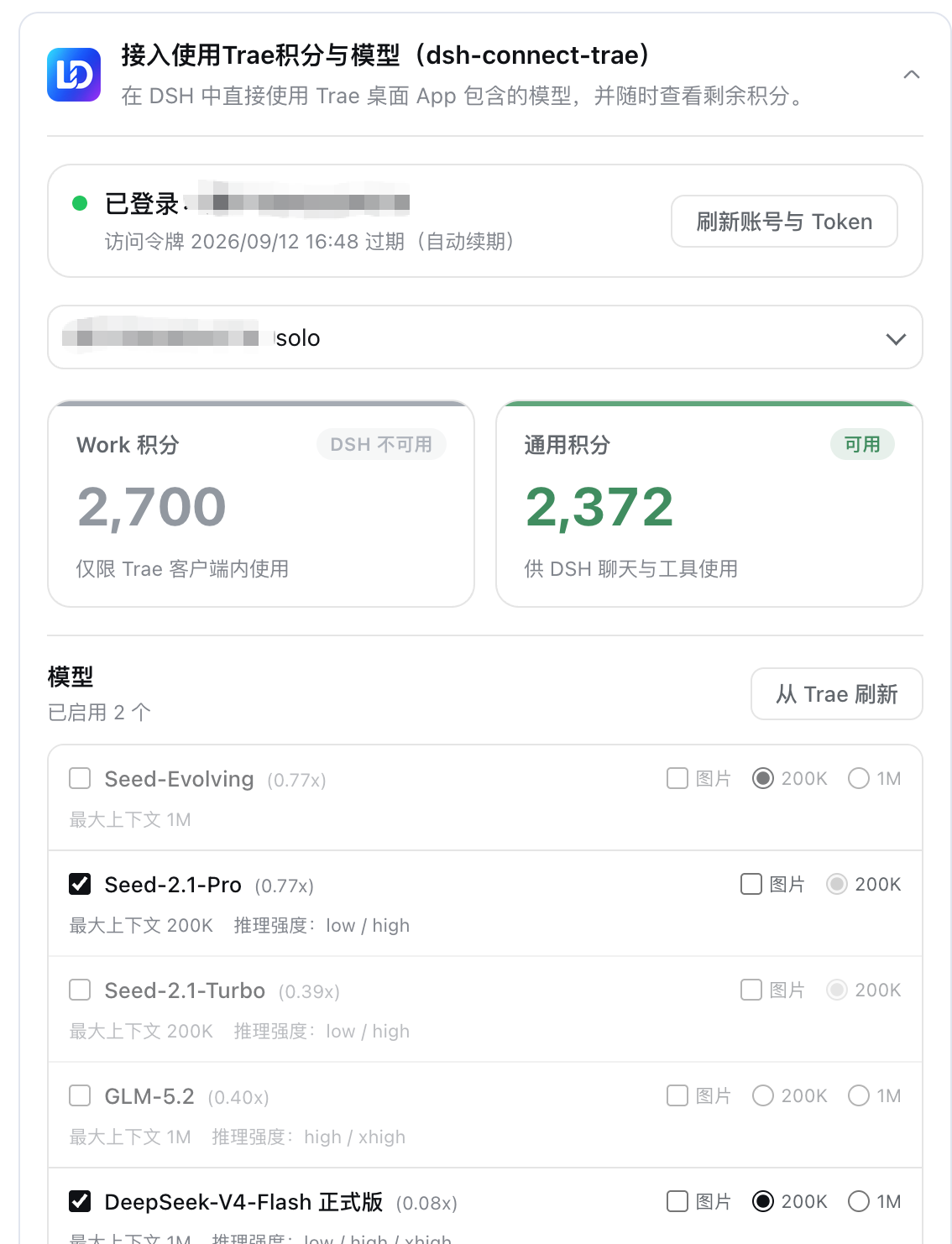
A [DeepSeek Harness (DSH)](https://github.com/deepseek-ai/deepseek-harness) bundle plugin that connects locally signed-in Trae models (**both CN and international installs**) to the DSH model picker. Trae generates structured tool calls while DSH executes its own local tools, with a read-only usage overview (Work/general credits on CN, subscription status on international) and model-management panel. **The CN and international sides are two parallel providers (`trae` / `trae-global`) that can be used at the same time**; the settings card separates them with tabs for convenient management.
## Features
- **Dual parallel providers** — the CN side registers as the `trae` provider (e.g. `DeepSeek-V4-Flash`, `DeepSeek-V4-Pro`), the international side as `trae-global` (the Gemini/GPT/MiniMax roster), and **both rosters appear in the DSH model picker simultaneously**: different sessions can each pick a side without interfering.
- **Tabbed settings card** — the card's top carries a "Domestic / Global" tab bar; each tab holds its own account picker, usage overview, and model management. Account, directory, selection, and unsaved drafts are fully isolated per tab — switching accounts or refreshing models on one tab never touches the other side's runtime catalog or sessions.
- **Multiplier in the model name** — model names show the credit multiplier in Trae's own menu format (e.g. `GLM-5.2 · x0.79`), updated with each directory refresh.
- **DSH local tool loop** — gets pending structured `tool_calls` from Trae `llm_utils_chat`, lets DSH execute its own local tools, then returns tool results to the model.
- **Dual-region detection (CN / international)** — detects local sign-ins across Trae CN, TRAE SOLO CN, Trae, and TRAE SOLO installs. The region is derived from the credential's own `userRegion` claim (host suffix and edition label as fallbacks), with no manual switch.
- **Region-isolated directories and selections** — CN and international each keep their own model directory, enabled picks, image opt-ins, and context budgets, and each provider reads only its own slot.
- **Account switching** — refreshes the token list and lets users select an account without storing tokens in DSH settings.
- **Read-only usage and model management** — Work/general credits on CN accounts, subscription/trial status on international ones; enable Trae models freely. Read-only queries consume nothing.
- **Secure loopback shim** — one random port + in-process random secret per region; the real Trae token is never handed to pi-ai.
## How it works
```text
DSH PiAiAdapter (one stack per provider)
-> secure loopback shim (one random port + in-process random secret per region)
-> TraeSoloBridge
-> CN: https://trae-api-cn.mchost.guru/api/agent/v3/llm_utils_chat
-> Global: https://coresg-normal.trae.ai/api/agent/v3/llm_utils_chat
-> Trae SSE / pending function_call
-> OpenAI SSE tool_calls
-> DSH executes local tools and returns their results
```
The CN and international sides each own a complete runtime stack — credential store, model catalog, wire map, upstream clients, loopback shim, adapter — with visibility filtered by the credential's own region claim, so **both regions' accounts can be signed in and used by different sessions at the same time**.
Usage overview hits the read-only `https://api.trae.cn/trae/api/v2/pay/*` and `/trae/api/v2/ug/*` endpoints (international accounts read their own gateway's subscription status). Refreshed tokens are kept per region in `$DSH_HOME/.trae-auth.cn.json` and `$DSH_HOME/.trae-auth.ai.json` (two simultaneously signed-in accounts never overwrite each other; the legacy single file `.trae-auth.json` is still read as a migration source).
> See `docs/IMPLEMENTATION_PLAN.md`, `docs/SOLO_ROUTE_DECISION.md`, `docs/USAGE_API_RESEARCH.md`.
## Model coverage
This plugin serves models from Trae's **SOLO channel** (`DeepSeek-V4-Flash-Official`, `DeepSeek-V4-Pro-Official`, `GLM-5.3`, `GLM-5.2`, `Kimi-K3`, `MiniMax-M3`, `Qwen3.8-Max`, `Doubao-Seed-*`, …), for both the domestic and international sides.
The following four models currently come from the **TraeCode (Trae IDE) channel** and have **not** been opened up to the SOLO channel, so this plugin does **not** support them yet:
| Model |
| --- |
| `deepseek-v4.1-flash` |
| `glm-5.3-flash` |
| `kimi-k2.8-preview` |
| `qwen3.8-flash` |
These four are reachable only inside the Trae IDE client; there is no callable channel for them on the plugin side. **They can only be supported once Trae officially opens them up to the SOLO channel.**
> Note the distinction: **`GLM-5.3` is supported** (it goes through the SOLO channel), but **`glm-5.3-flash` is not** — they are different models.
To use these four models today, use the **Trae IDE itself**.
## Install
```sh
dsh plugin --profile desktop add dsh-connect-trae
```
Or directly via npm:
```sh
npm install dsh-connect-trae
```
Restart the DSH process after install/update/uninstall.
## Windows notes
- **Account data directory**: the plugin reads `%APPDATA%\Trae CN` / `%APPDATA%\TRAE SOLO CN` → `User\globalStorage\storage.json` (unrelated to the install directory). The folder names match macOS, so no extra config is needed; if the name does not match, point the `authFile` + `edition` plugin options at the exact path.
- **App version headers**: the plugin reads `appVersion` from `\Programs\\resources\app\product.json` and sends `x-app-version` / `x-ide-version`; if unreadable, those headers are omitted (same as the previous behavior).
- **Raw Chat probing (known limitation)**: `model-cache` depends on the `sqlite3` command-line tool, which is not installed by default on Windows; Raw Chat capability probing fails and falls back safely. Raw Chat is off by default and does not affect the main flow.
- See `docs/WINDOWS_TOKEN_PROBE.md` for troubleshooting.
## Development
```sh
pnpm install
pnpm run check # typecheck + test + build
```
Local dev via a `link:` install to the desktop profile (restart DSH Desktop after editing):
```sh
dsh plugin --profile desktop add /Users/dmh2002/DshProject/dsh-connect-trae
```
## Acknowledgements
- [Wang-JQ77/dsh-trae-api](https://github.com/Wang-JQ77/dsh-trae-api) (MIT) — Reference implementation for research into Trae authentication, sessions, and model protocols.
## Third-party open-source dependencies
The open-source projects referenced for Trae integration (architecture/protocol research), together with their licenses and compliance notes, are recorded in [THIRD_PARTY_NOTICES.md](THIRD_PARTY_NOTICES.md). When introducing new Trae-related external dependencies or reusing code from other projects, update that file accordingly and honor the upstream licenses.
## License
This project is licensed under the [MIT License](LICENSE). Copyright: **Copyright (c) 2026 LaoDing**.