dsh-connect-workbuddy
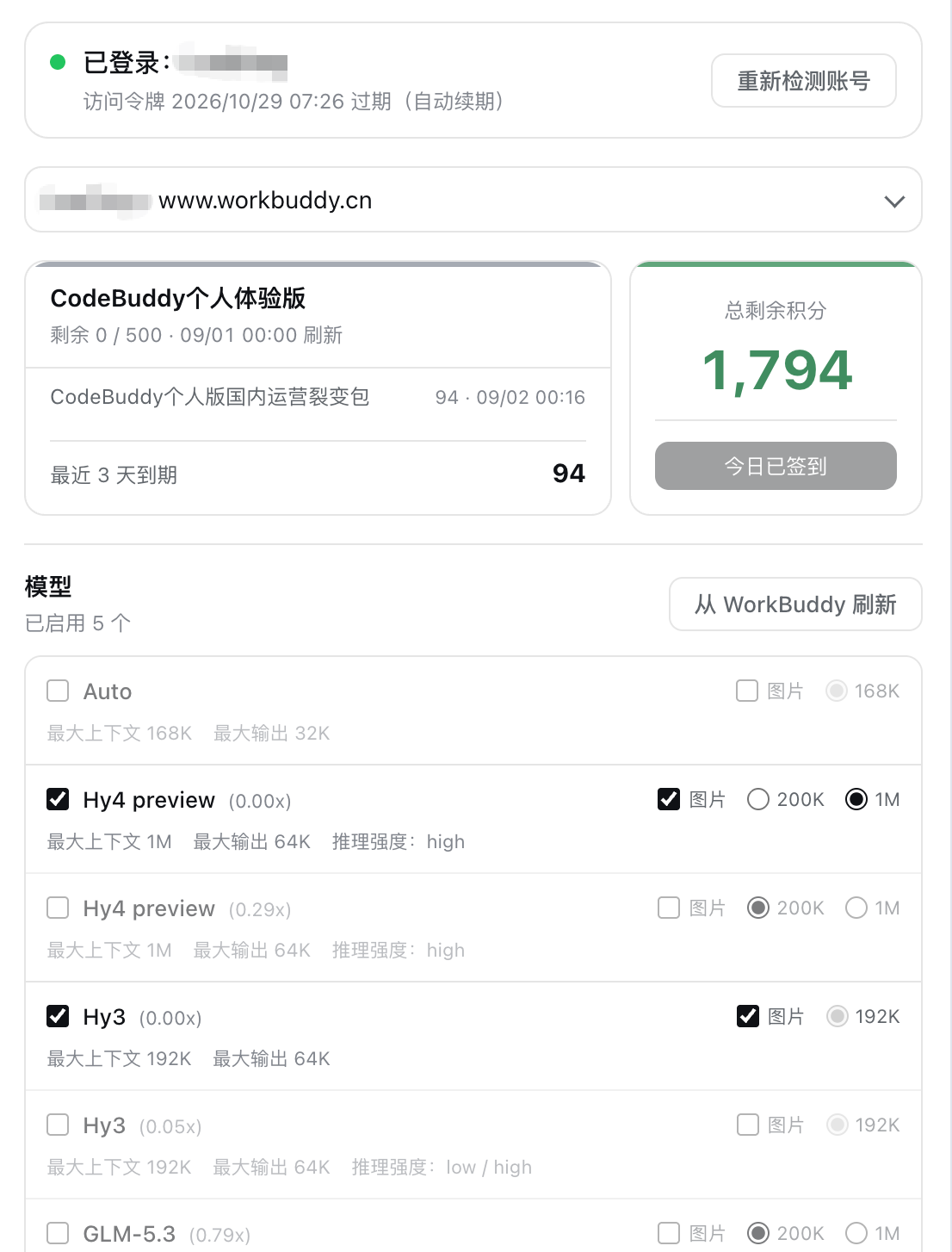
Connect locally signed-in WorkBuddy models — CN and international — to DeepSeek Harness: read each model's credit multiplier automatically, toggle image input per model, switch between multiple accounts, and keep daily check-in with a read-only credits overview in capsule readouts on the card and in the composer.


[English](README.en.md) | 中文
A [DeepSeek Harness (DSH)](https://github.com/deepseek-ai/deepseek-harness) bundle plugin that connects locally signed-in WorkBuddy models to the DSH model picker — **both the CN app and the international WorkBuddy AI app are supported** — with an account pool, selectable model management, and a set of read-only capabilities built around credits: **every catalog refresh reads each model's credit multiplier from upstream** (the `x0.79` figure comes entirely from the upstream catalog; the plugin neither hard-codes it nor guesses), image input is toggled per model, multiple accounts can be switched or fail over automatically through the pool, and daily check-in plus read-only credit overviews shown as compact pills on the card and in the composer. **The CN and international sides are two parallel providers (`workbuddy` / `workbuddy-global`) that can be used at the same time**; the settings card separates them with tabs for convenient management. All it needs is a WorkBuddy sign-in on this machine — or **one sign-in from the browser**.
## Risk notice
> **WorkBuddy has begun restricting requests from unofficial clients. This project does not promise that these endpoints will keep working; the day upstream tightens its rules, the plugin may stop working. Read the [Disclaimer](#disclaimer) at the end of this file and judge the account risk for yourself. Using the official WorkBuddy client is always the safest choice.**
It is worth stating what this plugin is actually for: **saving you the trip back and forth between the WorkBuddy client and DSH.** You are already signed in to WorkBuddy on your own machine; the plugin simply connects that existing sign-in to DSH's model picker so you can use it where you write code — it does not supply accounts, share credentials, or bypass billing. Every call spends **your own account's** quota at the multiplier upstream reports, and the plugin never modifies account state; it carries no privilege escalation or credit-farming capability of any kind.
It depends on the WorkBuddy client's own endpoints (not a public API), so the plugin may need to follow along when upstream changes them — that is normal for a tool of this kind, and it is the reason this notice exists. **Judge the account risk yourself before deciding to install.**
## Features
- **Dual parallel providers (CN + international)** — the CN side registers as the `workbuddy` provider (`GLM-5.3`, `DeepSeek-V4-Pro`, `Kimi-K3`, `MiniMax-M3`, `Hy3`, etc.), the international side as `workbuddy-global` (`GPT-5.6`, `Gemini-3.5-Flash`, `GLM-5.3`, `Kimi-K3`, etc.). **A region's models appear in the DSH model picker when that region has an account**: with accounts on both sides, both rosters are selectable at once, and different sessions can each pick a side without interfering. **A region with no local sign-in lists no models** — it cannot serve a single request, so listing them would offer nothing but failures. Sign in once for that region and its models come back on "detect accounts again" or after a restart; the provider itself stays registered either way, because its settings card is how you sign in (re-detection lives in the pool block). Model names carry the upstream credit multiplier (e.g. `GLM-5.3 · x0.79`), matching WorkBuddy's own model menu.
- **Tabbed settings card** — the card's top carries a "Domestic / Global" tab bar; each tab holds its own account pool and model management. Account, directory, selection, and unsaved drafts are fully isolated per tab — switching accounts or refreshing models on one tab never touches the other side's runtime catalog or sessions.
- **Switch either provider off on its own** — each tab carries an on/off checkbox (both checked by default). Unchecking one **withdraws that provider from DSH's model picker entirely** (it is not merely a hidden tab): its adapter route and its "Settings → Models" directory entry are both pulled, and startup no longer sends pointless requests for it. Account, credits, directory, and selection are all kept, and re-checking restores everything. The typical use is "I have no use for the international side" — switch it off and keep the picker clean. Note: a session that had already selected a model from the switched-off provider will report `NO_ADAPTER` on its next call; the card states this plainly on the switched-off tab instead of failing silently.
- **Model management** — refresh the full catalog from upstream and enable or disable each model individually; refresh is a draft operation that only takes effect on save. Upstream also reports credit multiplier, context/output limits, and reasoning efforts; **image input is decided by a verified table**: a refresh pre-checks only models the table records as natively multimodal, leaves documented text-only models unchecked, and treats any id without a source as unverified and unchecked rather than guessing. The table carries two evidence tiers — vendor documentation (13 entries) and **the upstream catalog's own description** (2 entries: `space-bunny` and `minimax-m3.1-flash`, whose descriptions say “native multimodal”) — while a NEW id still needs a vendor source; see the “Image input” section of [docs/DESIGN.md](docs/DESIGN.md). Upstream's `supportsImages` is a *platform* declaration, not the model's capability, so it does not drive that decision at all. You can still tick any box by hand, and your selection is kept locally. **Every model row also carries a “Can disable” (`off`) checkbox**: it decides whether that model gets the “turn thinking off entirely” level. The default comes from a reviewed built-in table (the 9 models that claim the capability but answer HTTP 400 for it start unticked), and you can change it per model — **untick** for a model you do not need the level on. **The 9 tabled models cannot be ticked at all** (their row is marked "refuses off" with an explanatory tooltip): the level is not merely an extra option — pi-ai uses it as the DEFAULT for every request that names no tier, and a compaction summary is exactly such a request, so one tick made every `/compact` for that model fail with HTTP 400 / code 11133 (issue #83). Models outside the table are still decided entirely by your selection and their own declaration; your ticks are saved on first save and recomputed no further.
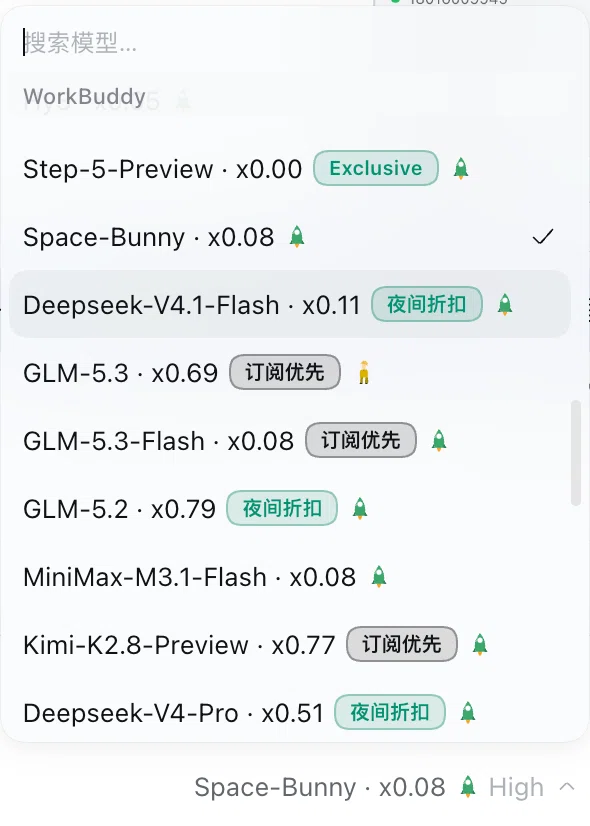 - **Campaign badges on model rows** — the upstream model catalog carries campaign information (free trials, night discounts, limited-time free use, subscription-only tiers, and the like). The plugin adds **no extra request** (it reuses the catalog configuration it already fetches when refreshing models) and draws a pill badge right on the model row: the upstream supplies both the colour and the wording, and hovering shows the upstream's campaign text, its start/end dates, and its daily window (e.g. “night 23:00–7:50”). **A badge is a function of the current moment**: it shows only inside the window the upstream declares and disappears on its own when that window closes; a window that crosses midnight is judged in the timezone the upstream declared; when several campaigns hit the same model, only the highest-priority one is drawn. A benefit marker without an end date (such as “subscription only”) stays until upstream withdraws it. **The multiplier shown is the price you actually pay**: while a “night discount” is running, the card and the picker both show the discounted `x0.06` instead of the catalog figure, and both go back on their own when the window closes — no restart needed (issue #120). **A badge is a hint, not behaviour** — it reports the campaign and discount upstream currently advertises, and makes no choice for you. **The same badge now appears in the DSH model picker**: every menu row draws the identical pill after the model name and before the load icon — menu rows use the upstream's short wording ("night", "free"), the composer trigger beside the input uses the full one ("night discount", "exclusive free"); judged from the same data at the same clock, because the screen where the model is chosen is exactly where "is it free right now" matters most. (Both regions' catalogs ship the campaign fields: read as the app, the CN `/v3/config` carries 8 promotions + 1 tier badge and the global one carries 5 + 1; the evidence and the decision rules are written up in [docs/PROMO_BADGE.md](docs/PROMO_BADGE.md).)
- **Model load on model rows (CN only)** — the upstream answers "how busy is this model right now" from a separate read-only probe (`POST /v2/chat/busy`, up to 50 ids per call, free, no account state touched). The plugin asks it once per catalog refresh and draws the level as a small figure beside the model name: **the number of people = how many are queueing** (healthy `normal` = one yellow figure, `busy` = two orange ones, `congested` = three red ones), while **idle is a green rocket** (nobody is queueing = full speed ahead) — idle is deliberately *not* drawn as "one green person", because at 12px "nobody is waiting" and "one person is waiting" have to be distinguishable at a glance; **unavailable** is a crossed-out figure. The probe's own `unknown` **draws nothing**: **"we were told nothing" is never reported as "all good"**. Colours follow the theme and the `title` tooltip ("极度拥堵") is still there. **The level is not persisted**: the catalog is a fact that survives a restart, a load level is a fact about that minute, so it is stamped onto the runtime catalog only and dies with the process; a failed probe logs one warning and never blocks the refresh. Measured on the CN gateway: the probe answers byte-identically under the CLI and the app identity, the 50-id ceiling is real (62 ids → HTTP 400), and 19 models come back in 186 ms. **The international region shows no load badge, because the international gateway simply does not have this endpoint** — measured, `www.workbuddy.ai` answers **404** for `/v2/chat/busy` (and for the neighbouring `/v3/chat/busy`, `/v2/models/busy` and friends), while the very same credential reads its `/v3/config` fine (28 models) and that document carries **no load or queue field at all**. This is not something the plugin left unimplemented, and it is not a configuration or permission problem: **upstream has never published this data for the international region**. So the international region shows the model name and campaign badges only; the failed probe degrades quietly to "no badge", never blocking the model list, and the plugin never guesses a load level from latency or credits.
- **Queueing tells you your position** — upstream expresses a queue with three business codes (`6020` waiting, `6021` queue full, `6022` this user already at the maximum). Instead of passing along a raw upstream error, the plugin says "模型排队中:你排在第 8777 位,队列共 9021 个请求;约 7 秒后自动重试". **A queue does not trigger failover**: the line is shared platform-wide and bound to the model, so another account is handed the same position — no account-pool rotation, no extra requests burned. (The upstream's `/v2/chat/queue/status` returns an i18n KEY rather than a sentence, so the plugin never relays its `message` and always uses its own wording.) **The "resend once it is your turn" half is not implemented** — that needs the queue answer's real envelope on the OpenAI-compatible channel, and writing it unmeasured would mean code that never runs.
- **Tabbed settings card (accounts / models / capabilities / diagnostics)** — the card used to be a single 3,500-pixel column that mixed two things with completely different commit semantics: **operating accounts** (who is serving, how much is left, switch order, check-in log) and **editing the catalog** (ticking models, context budgets, reasoning tiers, turning thinking off). An account change takes effect on the click; a catalog change is a draft that needs Save — so the Save button often sat three screens away from the thing it saves. Now each tab does one thing, and **switching tabs neither refetches nor drops an unsaved draft** (inactive panels stay mounted and are merely `hidden`, so they also leave the accessibility tree). The third tab, Capabilities, holds the **grants**: let the plugin drive the local CodeBuddy CLI, let the model buy an image on its own, where the credit readout is drawn. Each takes effect on the click and never passes through Save, and each is expected to grow sub-options of its own (a working directory for the CLI route, a size or price cap for the image tool) — which is why they no longer share one thin strip above the account table. The fourth tab, Diagnostics, is a read-only fact table: current region, upstream host, the account actually serving (by NAME, never by id), sign-in validity, how many models the catalog holds, how many are enabled, the pool switch, and the **raw text** of the upstream's most recent error (quoted, never translated or summarised) — its only reason to exist is to be pasted into a bug report, so it contains no control that changes a setting.
- **Model availability testing, including cooldown recovery times** — working out when a limited model frees up used to mean guessing through repeated failures. Now every model row has a **Test** button that gives you a direct answer for whether the model works right now and, if not, when it comes back. **It sends a real-volume request (about 25k input tokens)**, rather than "ping it and see if it answers" — because the upstream throttles on request **SIZE** (measured: about 20k tokens pass, about 30k are refused), so a small request looks fine while every request in a long conversation may be refused. That is exactly where "the test passes but I am limited" came from. **Where the recovery time comes from**: the upstream's 429 carries **no** `Retry-After` header (and no `X-RateLimit-*`), but it writes the reset time into the response **body** — `{"code":6004,"msg":"…将在 2026-09-30 02:30:30 UTC+8 重置…"}`. The plugin parses that time and converts it using the UTC offset the message states, so the result does not depend on your machine's timezone; the card then shows “✗ Rate limited · usable again after 2026/9/30 02:30:30”. When none of the sources states a time, the plugin **never invents a countdown** and says plainly that no time was given. A rate limit deliberately does **not** borrow the monthly refresh time, which would tell you to wait weeks for a limit that clears in seconds. **A success never has a cooldown**: this gateway also attaches `Retry-After` to a 200, and its value is the account's monthly quota reset (measured: `2026-11-01 00:00 +08:00`) — not a wait. So a successful row shows “✓ Usable” and never appends “usable again after”, and records written by older builds with that stray time are healed on read. Probes run in the Host, so **the credential never reaches the page**, and results are not written to settings — your saved selection is untouched.
- **Image generation tool `workbuddy_draw_image` (CN and international, OFF by default, granted per region)** — hands WorkBuddy's text-to-image capability to the agent: say "draw me a cat sunning itself on a windowsill" in the conversation and the model calls the tool itself, then posts the image back. **It is off by default**, because it is the one capability here where the MODEL decides to spend: about 5.71 credits an image on the CN gateway and about 0.03 on the international one, and the host offers no per-call confirmation. Tick 「Let the model draw images」 on that region's Capabilities tab to enable it; while it is off the tool is **not registered at all**, so the model never sees it and cannot attempt a call that would fail. **Both gateways work, but through two different models**: CN `hunyuan-image-alpha` and international `hy-image-3.5` (the latter measured on 2026-10-25). The two credit pools are independent, so **5.71 and 0.03 are not a cross-region price difference for the same image** — they are two different models on two different gateways, and neither number converts into the other. The grant is **per region**: ticking the box on one tab authorises only that gateway's accounts, and with both ticked the CN gateway wins (the only order that keeps the old behaviour). **Endpoint and request body are copied from the official CLI's ImageService** (`POST /v2/images/generations`), and the product is a 24-hour COS signed URL the plugin tells you to download in time. **The same tool edits images**: pass `image` (a local path, `file://`, `http(s)`, a data URL, or bare base64, up to 8 MB) and it switches to `POST /v2/images/edits` with the model carrying the `image-to-image` tag (CN `hunyuan-image-alpha-edit`, international `hy-image-3.5`); omit it and you get text-to-image — **the mode is decided solely by whether there is an input image, there is no `mode` parameter**. Input images are only normalised into the data URL the gateway accepts: **no rescaling, cropping or format conversion**. An unreadable, malformed or oversized image fails before any request is sent, so it is not a paid failure. **Sizes are not limited to squares, and the ceiling is about 4.19 megapixels** (measured tier by tier on 2026-10-25: `1024x1536`, `2048x2048`, `2048x1536`, `2560x1440` and `2560x1600` all succeed and come back at exactly the requested width and height, not silently downscaled; `2560x2560` and anything larger is refused outright). So the usual answers are `2560x1440` for a 16:9 desktop, `2048x2048` for a large square and `2048x1536` for a wide one; for portrait, put the long edge in the same range — beyond that you need super-resolution, the parameter itself is maxed out. **It really costs money**: about **5.71 credits per image** on CN and **0.03** on the international gateway (both measured), so the tool description gives both magnitudes and says to trust the `credit` each response returns, a failure carries a 30-second cooldown (while a bad parameter, a missing sign-in or an unknown model costs nothing and does not cool down), and there is no "draw four at once" parameter that could spend uncontrollably. The definition is hand-written raw JSON Schema, **adding no dependency**. See [docs/IMAGE_GEN.md](docs/IMAGE_GEN.md) for the evidence, protocol and live run.
**Two things to know.** ① **It really does spend credits** — one measured probe reported `credit` 0.02 (a refused one 429s and costs almost nothing). So testing is **manual and per-model only**: there is deliberately no “Test selected” batch button, because sweeping the whole list from one click is an uncontrolled spend — and the Host enforces the same rule, **accepting a single model only** and refusing multi-model requests. ② The upstream advertises a 1M context yet throttles far below it, and the plugin advertises each model's **native** window to DSH (no longer clamped to 200K as of 3.5.0), so DSH compacts very late — hitting the throttle in a long session follows directly from that. To make DSH compact sooner, set a “DSH context budget” cap on the model's row (200K / 500K / the model's native window).
- **Local account switching** — discovers the multiple sign-in credentials WorkBuddy's desktop app leaves behind and lets you switch per region. Tokens are never written to DSH settings.
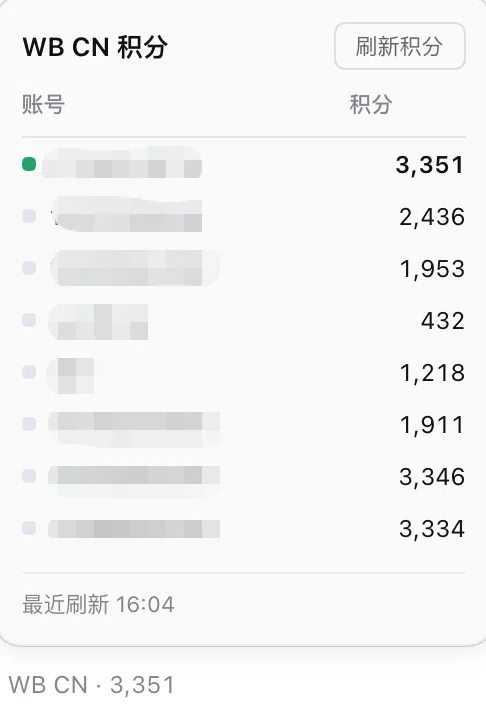
- **Credit readout in the composer toolbar (follows the selected model, per region)** — a clickable readout sits at the left of the composer toolbar (e.g. `WB CN · 1,072`) and **switches region automatically with the model this session is using**: pick a WB CN model and it shows the domestic balance, pick a WB AI model and it shows the international one; with any other provider's model it does not appear at all. It refreshes every 5 minutes and can also be refreshed by hand. Clicking it opens a panel: a **table of balances per account**, where clicking a row switches to that account (the same setting the card's account picker writes), and an account that cannot serve right now is **labelled in its row** (e.g. rate-limited, out of credits) using the same wording as the account-pool table. The per-account figures are fetched only while the panel is open, so the 5-minute background refresh never multiplies by the account count. To turn a side off, untick “Show credits in the composer toolbar” under that region's tab on the card; while a region's provider is switched off, the readout disappears and its switch is disabled. The same block carries a “Position” line: by default the readout sits in the composer toolbar (the row with the model picker); choosing “below the input box” moves it to the turn/step/token stats row instead — useful when another plugin has taken the toolbar seat.
- **Campaign badges on model rows** — the upstream model catalog carries campaign information (free trials, night discounts, limited-time free use, subscription-only tiers, and the like). The plugin adds **no extra request** (it reuses the catalog configuration it already fetches when refreshing models) and draws a pill badge right on the model row: the upstream supplies both the colour and the wording, and hovering shows the upstream's campaign text, its start/end dates, and its daily window (e.g. “night 23:00–7:50”). **A badge is a function of the current moment**: it shows only inside the window the upstream declares and disappears on its own when that window closes; a window that crosses midnight is judged in the timezone the upstream declared; when several campaigns hit the same model, only the highest-priority one is drawn. A benefit marker without an end date (such as “subscription only”) stays until upstream withdraws it. **The multiplier shown is the price you actually pay**: while a “night discount” is running, the card and the picker both show the discounted `x0.06` instead of the catalog figure, and both go back on their own when the window closes — no restart needed (issue #120). **A badge is a hint, not behaviour** — it reports the campaign and discount upstream currently advertises, and makes no choice for you. **The same badge now appears in the DSH model picker**: every menu row draws the identical pill after the model name and before the load icon — menu rows use the upstream's short wording ("night", "free"), the composer trigger beside the input uses the full one ("night discount", "exclusive free"); judged from the same data at the same clock, because the screen where the model is chosen is exactly where "is it free right now" matters most. (Both regions' catalogs ship the campaign fields: read as the app, the CN `/v3/config` carries 8 promotions + 1 tier badge and the global one carries 5 + 1; the evidence and the decision rules are written up in [docs/PROMO_BADGE.md](docs/PROMO_BADGE.md).)
- **Model load on model rows (CN only)** — the upstream answers "how busy is this model right now" from a separate read-only probe (`POST /v2/chat/busy`, up to 50 ids per call, free, no account state touched). The plugin asks it once per catalog refresh and draws the level as a small figure beside the model name: **the number of people = how many are queueing** (healthy `normal` = one yellow figure, `busy` = two orange ones, `congested` = three red ones), while **idle is a green rocket** (nobody is queueing = full speed ahead) — idle is deliberately *not* drawn as "one green person", because at 12px "nobody is waiting" and "one person is waiting" have to be distinguishable at a glance; **unavailable** is a crossed-out figure. The probe's own `unknown` **draws nothing**: **"we were told nothing" is never reported as "all good"**. Colours follow the theme and the `title` tooltip ("极度拥堵") is still there. **The level is not persisted**: the catalog is a fact that survives a restart, a load level is a fact about that minute, so it is stamped onto the runtime catalog only and dies with the process; a failed probe logs one warning and never blocks the refresh. Measured on the CN gateway: the probe answers byte-identically under the CLI and the app identity, the 50-id ceiling is real (62 ids → HTTP 400), and 19 models come back in 186 ms. **The international region shows no load badge, because the international gateway simply does not have this endpoint** — measured, `www.workbuddy.ai` answers **404** for `/v2/chat/busy` (and for the neighbouring `/v3/chat/busy`, `/v2/models/busy` and friends), while the very same credential reads its `/v3/config` fine (28 models) and that document carries **no load or queue field at all**. This is not something the plugin left unimplemented, and it is not a configuration or permission problem: **upstream has never published this data for the international region**. So the international region shows the model name and campaign badges only; the failed probe degrades quietly to "no badge", never blocking the model list, and the plugin never guesses a load level from latency or credits.
- **Queueing tells you your position** — upstream expresses a queue with three business codes (`6020` waiting, `6021` queue full, `6022` this user already at the maximum). Instead of passing along a raw upstream error, the plugin says "模型排队中:你排在第 8777 位,队列共 9021 个请求;约 7 秒后自动重试". **A queue does not trigger failover**: the line is shared platform-wide and bound to the model, so another account is handed the same position — no account-pool rotation, no extra requests burned. (The upstream's `/v2/chat/queue/status` returns an i18n KEY rather than a sentence, so the plugin never relays its `message` and always uses its own wording.) **The "resend once it is your turn" half is not implemented** — that needs the queue answer's real envelope on the OpenAI-compatible channel, and writing it unmeasured would mean code that never runs.
- **Tabbed settings card (accounts / models / capabilities / diagnostics)** — the card used to be a single 3,500-pixel column that mixed two things with completely different commit semantics: **operating accounts** (who is serving, how much is left, switch order, check-in log) and **editing the catalog** (ticking models, context budgets, reasoning tiers, turning thinking off). An account change takes effect on the click; a catalog change is a draft that needs Save — so the Save button often sat three screens away from the thing it saves. Now each tab does one thing, and **switching tabs neither refetches nor drops an unsaved draft** (inactive panels stay mounted and are merely `hidden`, so they also leave the accessibility tree). The third tab, Capabilities, holds the **grants**: let the plugin drive the local CodeBuddy CLI, let the model buy an image on its own, where the credit readout is drawn. Each takes effect on the click and never passes through Save, and each is expected to grow sub-options of its own (a working directory for the CLI route, a size or price cap for the image tool) — which is why they no longer share one thin strip above the account table. The fourth tab, Diagnostics, is a read-only fact table: current region, upstream host, the account actually serving (by NAME, never by id), sign-in validity, how many models the catalog holds, how many are enabled, the pool switch, and the **raw text** of the upstream's most recent error (quoted, never translated or summarised) — its only reason to exist is to be pasted into a bug report, so it contains no control that changes a setting.
- **Model availability testing, including cooldown recovery times** — working out when a limited model frees up used to mean guessing through repeated failures. Now every model row has a **Test** button that gives you a direct answer for whether the model works right now and, if not, when it comes back. **It sends a real-volume request (about 25k input tokens)**, rather than "ping it and see if it answers" — because the upstream throttles on request **SIZE** (measured: about 20k tokens pass, about 30k are refused), so a small request looks fine while every request in a long conversation may be refused. That is exactly where "the test passes but I am limited" came from. **Where the recovery time comes from**: the upstream's 429 carries **no** `Retry-After` header (and no `X-RateLimit-*`), but it writes the reset time into the response **body** — `{"code":6004,"msg":"…将在 2026-09-30 02:30:30 UTC+8 重置…"}`. The plugin parses that time and converts it using the UTC offset the message states, so the result does not depend on your machine's timezone; the card then shows “✗ Rate limited · usable again after 2026/9/30 02:30:30”. When none of the sources states a time, the plugin **never invents a countdown** and says plainly that no time was given. A rate limit deliberately does **not** borrow the monthly refresh time, which would tell you to wait weeks for a limit that clears in seconds. **A success never has a cooldown**: this gateway also attaches `Retry-After` to a 200, and its value is the account's monthly quota reset (measured: `2026-11-01 00:00 +08:00`) — not a wait. So a successful row shows “✓ Usable” and never appends “usable again after”, and records written by older builds with that stray time are healed on read. Probes run in the Host, so **the credential never reaches the page**, and results are not written to settings — your saved selection is untouched.
- **Image generation tool `workbuddy_draw_image` (CN and international, OFF by default, granted per region)** — hands WorkBuddy's text-to-image capability to the agent: say "draw me a cat sunning itself on a windowsill" in the conversation and the model calls the tool itself, then posts the image back. **It is off by default**, because it is the one capability here where the MODEL decides to spend: about 5.71 credits an image on the CN gateway and about 0.03 on the international one, and the host offers no per-call confirmation. Tick 「Let the model draw images」 on that region's Capabilities tab to enable it; while it is off the tool is **not registered at all**, so the model never sees it and cannot attempt a call that would fail. **Both gateways work, but through two different models**: CN `hunyuan-image-alpha` and international `hy-image-3.5` (the latter measured on 2026-10-25). The two credit pools are independent, so **5.71 and 0.03 are not a cross-region price difference for the same image** — they are two different models on two different gateways, and neither number converts into the other. The grant is **per region**: ticking the box on one tab authorises only that gateway's accounts, and with both ticked the CN gateway wins (the only order that keeps the old behaviour). **Endpoint and request body are copied from the official CLI's ImageService** (`POST /v2/images/generations`), and the product is a 24-hour COS signed URL the plugin tells you to download in time. **The same tool edits images**: pass `image` (a local path, `file://`, `http(s)`, a data URL, or bare base64, up to 8 MB) and it switches to `POST /v2/images/edits` with the model carrying the `image-to-image` tag (CN `hunyuan-image-alpha-edit`, international `hy-image-3.5`); omit it and you get text-to-image — **the mode is decided solely by whether there is an input image, there is no `mode` parameter**. Input images are only normalised into the data URL the gateway accepts: **no rescaling, cropping or format conversion**. An unreadable, malformed or oversized image fails before any request is sent, so it is not a paid failure. **Sizes are not limited to squares, and the ceiling is about 4.19 megapixels** (measured tier by tier on 2026-10-25: `1024x1536`, `2048x2048`, `2048x1536`, `2560x1440` and `2560x1600` all succeed and come back at exactly the requested width and height, not silently downscaled; `2560x2560` and anything larger is refused outright). So the usual answers are `2560x1440` for a 16:9 desktop, `2048x2048` for a large square and `2048x1536` for a wide one; for portrait, put the long edge in the same range — beyond that you need super-resolution, the parameter itself is maxed out. **It really costs money**: about **5.71 credits per image** on CN and **0.03** on the international gateway (both measured), so the tool description gives both magnitudes and says to trust the `credit` each response returns, a failure carries a 30-second cooldown (while a bad parameter, a missing sign-in or an unknown model costs nothing and does not cool down), and there is no "draw four at once" parameter that could spend uncontrollably. The definition is hand-written raw JSON Schema, **adding no dependency**. See [docs/IMAGE_GEN.md](docs/IMAGE_GEN.md) for the evidence, protocol and live run.
**Two things to know.** ① **It really does spend credits** — one measured probe reported `credit` 0.02 (a refused one 429s and costs almost nothing). So testing is **manual and per-model only**: there is deliberately no “Test selected” batch button, because sweeping the whole list from one click is an uncontrolled spend — and the Host enforces the same rule, **accepting a single model only** and refusing multi-model requests. ② The upstream advertises a 1M context yet throttles far below it, and the plugin advertises each model's **native** window to DSH (no longer clamped to 200K as of 3.5.0), so DSH compacts very late — hitting the throttle in a long session follows directly from that. To make DSH compact sooner, set a “DSH context budget” cap on the model's row (200K / 500K / the model's native window).
- **Local account switching** — discovers the multiple sign-in credentials WorkBuddy's desktop app leaves behind and lets you switch per region. Tokens are never written to DSH settings.
- **Credit readout in the composer toolbar (follows the selected model, per region)** — a clickable readout sits at the left of the composer toolbar (e.g. `WB CN · 1,072`) and **switches region automatically with the model this session is using**: pick a WB CN model and it shows the domestic balance, pick a WB AI model and it shows the international one; with any other provider's model it does not appear at all. It refreshes every 5 minutes and can also be refreshed by hand. Clicking it opens a panel: a **table of balances per account**, where clicking a row switches to that account (the same setting the card's account picker writes), and an account that cannot serve right now is **labelled in its row** (e.g. rate-limited, out of credits) using the same wording as the account-pool table. The per-account figures are fetched only while the panel is open, so the 5-minute background refresh never multiplies by the account count. To turn a side off, untick “Show credits in the composer toolbar” under that region's tab on the card; while a region's provider is switched off, the readout disappears and its switch is disabled. The same block carries a “Position” line: by default the readout sits in the composer toolbar (the row with the model picker); choosing “below the input box” moves it to the turn/step/token stats row instead — useful when another plugin has taken the toolbar seat.
 - **Account pool: batch actions across several accounts, plus automatic failover** — tick the accounts you want into a pool and you get **one-click check-in for every account**, **one-click testing of every account against a model you choose** (defaulting to the region's zero-multiplier free model), and with **Enable the account pool** switched on, **automatic failover**: a request that fails upstream is retried against the pool's other usable accounts, in order, until one serves it or none is left. Membership starts **empty and is an explicit opt-in**: "signed in on this machine" is not the same as "spend this account's credits and claim its rewards". The pool's **ranking decides who serves every request** (usable first, then expiring-credits-first, higher credits, freshest credential), and on a failure the next usable member is tried. It **never writes back your saved selection** — switch the pool off and your own account applies again immediately. **The switch only decides whether the PLUGIN chooses** — with it off, the plugin stops picking and switching accounts for you, but check-in and testing stay available (they are manual actions). Testing reuses the model rows' real-volume probe, so it **does cost real credits**; **automatic check-in is deliberately not offered** — a check-in claims real rewards, so it only ever runs when you press the button. See [Account pool](#account-pool).
- **Enterprise / education accounts: check-in and Claim do not apply** — a seat carrying an `enterpriseId` shows **no check-in column, no benefit campaigns, and no Claim request** in the pool (5.8.0, issue #129): upstream refuses the personal-entitlement **write** endpoints for such members (measured `10001`), while its **read** endpoint still lists the campaigns as unclaimed — so "the read said available" can never be the reason to write. Their credits live in a different book too (enterprise usage = limit − used), and the personal credit table simply returns an empty list. The flag now reaches the pool rows (`localPoolMembers`, `poolMembersOf`, `otherAccounts`) and the web account rows, and it is attached the moment an account enters the pool rather than after a click discovers it is unsupported. It is deliberately **not** on the usage page's top-level `account` object (that one was fixed for the display **name** only, via `preferredAccountName`) and not on the composer pill, which renders neither button.
- **Optional: make the usage page record these calls like the official client's (5.8.0, issue #132, OFF by default)** — with `usageIdentity` on, chat requests carry `X-IDE-Name: WorkBuddy` (plus `X-IDE-Type: CLI` and a version taken from the existing product UA, not a second hard-coded number), so the usage page's client column is no longer blank, and the conversation-identity triple becomes the official **32-character lower-case hex UUIDv7** with `X-Request-ID` alongside it — the gateway echoes that id as the SSE `id` and writes it into the usage page, so hyphenated v4 ids made one account's rows look like two different clients — while "fresh per request, all distinct" has not been relaxed. **`User-Agent` is untouched under either setting**: billing and rate limits recognise the CLI channel. The image endpoint does not follow this switch; it keeps the shape measured on 2026-10-21. It is off by default because the shape fixes nothing on its own (the three `11128` doors read message openings, a missing conversation id, and whether the first message is a system prompt — no header moves any of them) and the only measurement is a reporter's on an older build, so a purely cosmetic alignment does not get to put every account at risk first. There is also an opt-in `keepPromptLast` (**off by default**): the usage page takes the request text from the LAST `user` message, and the host appends its time samples, runtime context and `` blocks AFTER what you actually typed, so that column recorded injected text; when enabled it moves those injected blocks **above the real prompt** — order only, except that the recorded prompt's own leading `mNNNNN` marker is stripped (leave it and that column still opens with a marker, i.e. nothing was fixed); earlier messages **keep** theirs, because the model cites history by those ids and the only id that can never matter is the message being answered now. It stays off by default because the order is something the upstream counts and a few leading characters are removed from the real prompt. The move matches only the host's own injected prefixes, and a conversation with no injected tail is untouched byte for byte — marker included — pinned by tests written for both.
- **Optional: move each new session's title request onto the hidden lightweight model (issue #133, OFF by default)** — the DSH host fires one title-generation request per new session through the same provider as the conversation, so it is billed at the main paid model's rate. With `sessionTitle.enabled` on, a request the plugin recognises as a title (its only user message opens with the host's template `Generate the session title from this JSON array of human messages:`) is re-pointed at `sessionTitle.model` (default `wb-lite`). The reporter measured 0 credits for those calls, with three caveats: it is still a real upstream request and counts toward request volume; the measurement is the reporter's account, not reproduced here; detection is fail-closed — if the host rewords the template the rewrite silently stops and billing reverts, and ordinary conversations are never touched. If the upstream rejects the model, only that session's title fails once; the conversation is unaffected. Like `usageIdentity` / `keepPromptLast` / `extraInjectedPrefixes` in the bullets above, `sessionTitle` is read once when the plugin mounts: **after editing `cordis.patch.yml`, reload the plugin or restart DSH for the change to take effect** — hot edits do not apply.
- **Benefits: a marker for what is unclaimed, plus a per-account Claim button** — the card marks, account by account, anything in the upstream's benefit campaigns (compensation / gifts) that **has not been claimed yet**. The data comes from the upstream's own two status endpoints; in the marking stage the plugin is **read-only** and never calls the two write endpoints. Three display rules all follow the upstream's state: `active && !claimed` shows the row, `claimed` removes it entirely, and an expired campaign (upstream flips `active` to `false`) disappears by itself — the plugin **never compares `end_time` against the local clock**, so a skewed machine cannot argue with the server; `end_time` only drives the "three days left" highlight. `active` alone is not enough to decide: an already-claimed account still reports `active: true`, and reading it alone would leave a claimed campaign hanging there forever. The read reuses the check-in pipeline (once per account, cached for 30 minutes, no request while the account pool is off), and a failing endpoint counts as "unread" rather than caching "nobody has benefits". Each row ends in a solid amber **Claim pill**, and one click claims **one campaign of one account**: there is no "claim everything", because a click spends one irrevocable real entitlement — and the write route **requires `accountId`**, so the request itself cannot batch. Before writing it **re-reads** the status and decides again; anything already claimed or expired returns 409 without touching upstream. After a successful claim it answers with the upstream's **fresh reading** and refreshes the card, with no optimistic update — even a silent upstream failure cannot leave a false "claimed" behind — and it also drops that account's cached benefit state, so the pill cannot linger on a stale status.
- **Optional: a LAST-RESORT 「继续」 when the gateway refuses the request (OFF by default, 1 send by default)** — when the upstream rejects with `400` and business code `11128` the turn simply ends: the plugin does not retry inside that request (its three-rung ladder already ran), it does not swap accounts (the gate matches message contents, and every account sends the same ones), and the host does not retry. **This is not a fix for 11128.** Fixed system fingerprints (the identity / Web GUI / @-path paragraph from #163) are byte-identical every turn, so resending only pays for the same 400 again; since 5.13.1 `prepareChatBody` rewrites known phrases sentence by sentence (5.14.0 adds the Web-GUI paragraph's second sentence, see #167). Only content that happens to change between turns can be helped by a new turn. Turning on the card's Capabilities switch makes the engine wait 300 ms and send `继续` through `agent.followup` (`source.kind` is `workbuddy-continue`, **not** `user`). **The cap counts CONSECUTIVE sends** (`channelRejectContinue.maxConsecutive`, default **1**; the old default of 3 is disproven — if one cannot help, three cannot): one successful turn, or one message you type yourself, resets it; the plugin's own message does not. Subagent sessions are never touched, and neither is a session already running or with something queued. **Every send spends a real request**, hence OFF by default; it is also the only upstream-shaped switch whose change **takes effect immediately**. It can be set directly in `cordis.patch.yml`:
```yaml
channelRejectContinue:
enabled: true
maxConsecutive: 1
text: 继续
```
- **Actionable advice when a credential is refused** — when the upstream rejects the selected account's token, the plugin actually **probes** the other local sign-ins: if one still answers, it tells you to switch to it (with a one-click switch) instead of vaguely asking you to sign in again — re-authenticating fixes nothing while you are pinned to a revoked backup. Only when there is genuinely no other local account does it ask you to sign in again.
- **Add accounts by QR sign-in, import/export them in bulk, test or delete them one by one** — the WorkBuddy desktop app is no longer a prerequisite: the card's **Sign in with QR code** button (labelled **Sign in on the web** for the international build — that region uses a browser login page, there is no QR; it sits just above **More settings** and acts immediately, with nothing to save) opens a dialog and takes you **straight to the authorization page** in your browser; if the browser blocks that, the dialog's link, copy and **Open page again** are the fallback. Every credential lands in the plugin's own vault (`$DSH_HOME/workbuddy-vault//.json`, one file per account), and the desktop app's auth files stay **read-only and are never modified**. Each row of the account table gains **Test** and **Remove**: a row test reuses the same probe as the batch run, so the two are comparable; removing deletes only the copy the plugin stored and **hides** the account: it disappears at once and the automatic poll cannot bring it back, while **Detect accounts again** restores it (signing in or importing the same account clears the hide too). **The desktop app's sign-in is never touched** — removing means "this plugin no longer lists it", not "sign out of the app". **Export / import accounts** moves credentials to another machine: pick accounts to export a JSON file → choose a file and read a **redacted preview** (field names and whether a token is present; the token itself never enters the preview) → tick what to import. An import overwrites per account rather than duplicating, and **only a record positively identified as belonging to that region is stored** — a domain the plugin cannot classify is skipped and counted as skipped. See [Account pool](#account-pool).
- **Credits live in the account pool** — the member table shows each account's remaining credits and nearest expiry, and credits are the ranking's second key (more credits serves first). The queries are **read-only** and consume no credits.
- **Multi-candidate credential paths** — probes the platform defaults for macOS / Windows / Linux in turn, overridable by environment variable or directly in the card. **When nothing is found, the card lists which paths were probed and why each one failed**: five distinct reasons (absent / unreadable / no usable token / encrypted with no key available / belongs to the other region), so the easiest case to misdiagnose — signed in, but the desktop app is not present — says the app must be there instead of telling you to sign in again. The **belongs to the other region** reason is different in kind: that sign-in is real and usable, it is simply filed under the other tab, so the card states the fix outright — switch tabs, no need to sign in again. The list says it once: the paragraph states the conclusion, the collapsed list supplies the per-path detail, and the two never repeat each other.
- **Secure loopback shim** — one random port + in-process random secret per region; the real WorkBuddy token is never handed to pi-ai.
- **Command-line diagnostics** — `status` / `doctor` / `logout`, reporting sign-in and credits per region, without a browser.
- **CLI route (optional, off by default)** — Disguising requests as a CodeBuddy client to pass the channel check is an arms race, and it has already produced account-level restrictions (issue #98, code 11140). A second route skips that disguise: **let the locally signed-in CodeBuddy CLI run the task itself** — it reads files, runs git, edits code. Turn on `cliBridge.enabled` and the plugin gains a `codebuddy_ask` tool and a `/codebuddy` command, with the result injected back into the session model. While it is off, the plugin behaves **exactly** as before. **It bypasses the client-fingerprint layer, not the account layer**: it uses the same accounts from this plugin's vault, so it is not a get-out-of-jail card after a block. See [CLI route](#cli-route-optional-let-codebuddy-do-the-work).
## How it works
```text
DSH PiAiAdapter (one stack per provider)
-> secure loopback shim (one random port + in-process random secret per region)
-> WorkBuddyUpstreamClient
-> CN: https://copilot.tencent.com/v2/chat/completions
-> Global: https://www.workbuddy.ai/v2/chat/completions
-> WorkBuddy SSE
-> DSH executes local tools and returns their results
```
The CN and international sides each own a complete runtime stack — credential store, model catalog, loopback shim, adapter — with visibility filtered by credential domain (`workbuddy.ai` / `codebuddy.ai` → international, anything else → CN), so **both regions' accounts can be signed in and used by different sessions at the same time**. The international product has two brand domains: the desktop app signs in at `workbuddy.ai`, while the CodeBuddy CLI signs in at `codebuddy.ai` — both are international.
The model catalog comes from each region's correct source, and both read the **same** `/v3/config` document the WorkBuddy app itself consumes, **as the app's own client identity** (`WorkBuddy/ WorkBuddy/ CLI/`, the header the desktop's `buildVlmGatewayHeaders` builds). That is required, not cosmetic: `/v3/config` serves a different product configuration per **client channel**, and the CLI channel's answer is a strict subset of the app channel's that publishes **neither `modelPromotions` nor `modelTiers`** — reading as the CLI is what left the CN badge empty. Chat and the availability probe still send as the CLI agent (the conversation-identity triple is bound to the chat channel); only the catalog read uses the app identity. If CN cannot read `/v3/config`, it falls back to the legacy `/v2/enterprises/personal/models` and logs a line, so that path is used only while degraded. The credits overview comes from `https://www.codebuddy.cn/v2/billing/meter/get-user-resource` (international accounts auto-route to the global gateway their credential belongs to, `workbuddy.ai` or `codebuddy.ai` — tokens are not interchangeable across the two brand domains); all are read-only.
Credentials are read (read-only) from the WorkBuddy desktop app's own auth file. Refreshed tokens are kept per region in `$DSH_HOME/.workbuddy-auth.cn.json` and `$DSH_HOME/.workbuddy-auth.global.json` (two simultaneously signed-in accounts never overwrite each other; the legacy single file `.workbuddy-auth.json` is still read as a migration source); the desktop app's file is never written.
**Encrypted credential fields**: newer desktop builds (Windows first) replace the auth file's `accessToken` / `refreshToken` strings with an AES-256-GCM envelope (`{"$wbEncrypted":1,"envelope":"…"}`), and the account's **display name (`nickname`) is encrypted the same way** — left unopened it degrades to a bare uin number. The envelope is sealed with a field key **compiled into the app itself**, not a user secret — so the plugin ships no key copy. When it meets an encrypted document it runs the installed app with `ELECTRON_RUN_AS_NODE` and calls that app's own native binding (`electron_browser_workbuddy_storage.loggerGet()`) to fetch the same payload and derive the key locally: it asks the very build that wrote the file. The key is cached in process memory only — never on disk, never in logs. Plain-string documents (macOS, older Windows builds) take the original path and never spawn a child process. `account.phoneNumber` is encrypted there too, and the plugin deliberately **neither reads nor displays it**. If the app lives somewhere unusual, point `WORKBUDDY_APP_EXECUTABLE` at its executable.
## Account pool
- **Account pool: batch actions across several accounts, plus automatic failover** — tick the accounts you want into a pool and you get **one-click check-in for every account**, **one-click testing of every account against a model you choose** (defaulting to the region's zero-multiplier free model), and with **Enable the account pool** switched on, **automatic failover**: a request that fails upstream is retried against the pool's other usable accounts, in order, until one serves it or none is left. Membership starts **empty and is an explicit opt-in**: "signed in on this machine" is not the same as "spend this account's credits and claim its rewards". The pool's **ranking decides who serves every request** (usable first, then expiring-credits-first, higher credits, freshest credential), and on a failure the next usable member is tried. It **never writes back your saved selection** — switch the pool off and your own account applies again immediately. **The switch only decides whether the PLUGIN chooses** — with it off, the plugin stops picking and switching accounts for you, but check-in and testing stay available (they are manual actions). Testing reuses the model rows' real-volume probe, so it **does cost real credits**; **automatic check-in is deliberately not offered** — a check-in claims real rewards, so it only ever runs when you press the button. See [Account pool](#account-pool).
- **Enterprise / education accounts: check-in and Claim do not apply** — a seat carrying an `enterpriseId` shows **no check-in column, no benefit campaigns, and no Claim request** in the pool (5.8.0, issue #129): upstream refuses the personal-entitlement **write** endpoints for such members (measured `10001`), while its **read** endpoint still lists the campaigns as unclaimed — so "the read said available" can never be the reason to write. Their credits live in a different book too (enterprise usage = limit − used), and the personal credit table simply returns an empty list. The flag now reaches the pool rows (`localPoolMembers`, `poolMembersOf`, `otherAccounts`) and the web account rows, and it is attached the moment an account enters the pool rather than after a click discovers it is unsupported. It is deliberately **not** on the usage page's top-level `account` object (that one was fixed for the display **name** only, via `preferredAccountName`) and not on the composer pill, which renders neither button.
- **Optional: make the usage page record these calls like the official client's (5.8.0, issue #132, OFF by default)** — with `usageIdentity` on, chat requests carry `X-IDE-Name: WorkBuddy` (plus `X-IDE-Type: CLI` and a version taken from the existing product UA, not a second hard-coded number), so the usage page's client column is no longer blank, and the conversation-identity triple becomes the official **32-character lower-case hex UUIDv7** with `X-Request-ID` alongside it — the gateway echoes that id as the SSE `id` and writes it into the usage page, so hyphenated v4 ids made one account's rows look like two different clients — while "fresh per request, all distinct" has not been relaxed. **`User-Agent` is untouched under either setting**: billing and rate limits recognise the CLI channel. The image endpoint does not follow this switch; it keeps the shape measured on 2026-10-21. It is off by default because the shape fixes nothing on its own (the three `11128` doors read message openings, a missing conversation id, and whether the first message is a system prompt — no header moves any of them) and the only measurement is a reporter's on an older build, so a purely cosmetic alignment does not get to put every account at risk first. There is also an opt-in `keepPromptLast` (**off by default**): the usage page takes the request text from the LAST `user` message, and the host appends its time samples, runtime context and `` blocks AFTER what you actually typed, so that column recorded injected text; when enabled it moves those injected blocks **above the real prompt** — order only, except that the recorded prompt's own leading `mNNNNN` marker is stripped (leave it and that column still opens with a marker, i.e. nothing was fixed); earlier messages **keep** theirs, because the model cites history by those ids and the only id that can never matter is the message being answered now. It stays off by default because the order is something the upstream counts and a few leading characters are removed from the real prompt. The move matches only the host's own injected prefixes, and a conversation with no injected tail is untouched byte for byte — marker included — pinned by tests written for both.
- **Optional: move each new session's title request onto the hidden lightweight model (issue #133, OFF by default)** — the DSH host fires one title-generation request per new session through the same provider as the conversation, so it is billed at the main paid model's rate. With `sessionTitle.enabled` on, a request the plugin recognises as a title (its only user message opens with the host's template `Generate the session title from this JSON array of human messages:`) is re-pointed at `sessionTitle.model` (default `wb-lite`). The reporter measured 0 credits for those calls, with three caveats: it is still a real upstream request and counts toward request volume; the measurement is the reporter's account, not reproduced here; detection is fail-closed — if the host rewords the template the rewrite silently stops and billing reverts, and ordinary conversations are never touched. If the upstream rejects the model, only that session's title fails once; the conversation is unaffected. Like `usageIdentity` / `keepPromptLast` / `extraInjectedPrefixes` in the bullets above, `sessionTitle` is read once when the plugin mounts: **after editing `cordis.patch.yml`, reload the plugin or restart DSH for the change to take effect** — hot edits do not apply.
- **Benefits: a marker for what is unclaimed, plus a per-account Claim button** — the card marks, account by account, anything in the upstream's benefit campaigns (compensation / gifts) that **has not been claimed yet**. The data comes from the upstream's own two status endpoints; in the marking stage the plugin is **read-only** and never calls the two write endpoints. Three display rules all follow the upstream's state: `active && !claimed` shows the row, `claimed` removes it entirely, and an expired campaign (upstream flips `active` to `false`) disappears by itself — the plugin **never compares `end_time` against the local clock**, so a skewed machine cannot argue with the server; `end_time` only drives the "three days left" highlight. `active` alone is not enough to decide: an already-claimed account still reports `active: true`, and reading it alone would leave a claimed campaign hanging there forever. The read reuses the check-in pipeline (once per account, cached for 30 minutes, no request while the account pool is off), and a failing endpoint counts as "unread" rather than caching "nobody has benefits". Each row ends in a solid amber **Claim pill**, and one click claims **one campaign of one account**: there is no "claim everything", because a click spends one irrevocable real entitlement — and the write route **requires `accountId`**, so the request itself cannot batch. Before writing it **re-reads** the status and decides again; anything already claimed or expired returns 409 without touching upstream. After a successful claim it answers with the upstream's **fresh reading** and refreshes the card, with no optimistic update — even a silent upstream failure cannot leave a false "claimed" behind — and it also drops that account's cached benefit state, so the pill cannot linger on a stale status.
- **Optional: a LAST-RESORT 「继续」 when the gateway refuses the request (OFF by default, 1 send by default)** — when the upstream rejects with `400` and business code `11128` the turn simply ends: the plugin does not retry inside that request (its three-rung ladder already ran), it does not swap accounts (the gate matches message contents, and every account sends the same ones), and the host does not retry. **This is not a fix for 11128.** Fixed system fingerprints (the identity / Web GUI / @-path paragraph from #163) are byte-identical every turn, so resending only pays for the same 400 again; since 5.13.1 `prepareChatBody` rewrites known phrases sentence by sentence (5.14.0 adds the Web-GUI paragraph's second sentence, see #167). Only content that happens to change between turns can be helped by a new turn. Turning on the card's Capabilities switch makes the engine wait 300 ms and send `继续` through `agent.followup` (`source.kind` is `workbuddy-continue`, **not** `user`). **The cap counts CONSECUTIVE sends** (`channelRejectContinue.maxConsecutive`, default **1**; the old default of 3 is disproven — if one cannot help, three cannot): one successful turn, or one message you type yourself, resets it; the plugin's own message does not. Subagent sessions are never touched, and neither is a session already running or with something queued. **Every send spends a real request**, hence OFF by default; it is also the only upstream-shaped switch whose change **takes effect immediately**. It can be set directly in `cordis.patch.yml`:
```yaml
channelRejectContinue:
enabled: true
maxConsecutive: 1
text: 继续
```
- **Actionable advice when a credential is refused** — when the upstream rejects the selected account's token, the plugin actually **probes** the other local sign-ins: if one still answers, it tells you to switch to it (with a one-click switch) instead of vaguely asking you to sign in again — re-authenticating fixes nothing while you are pinned to a revoked backup. Only when there is genuinely no other local account does it ask you to sign in again.
- **Add accounts by QR sign-in, import/export them in bulk, test or delete them one by one** — the WorkBuddy desktop app is no longer a prerequisite: the card's **Sign in with QR code** button (labelled **Sign in on the web** for the international build — that region uses a browser login page, there is no QR; it sits just above **More settings** and acts immediately, with nothing to save) opens a dialog and takes you **straight to the authorization page** in your browser; if the browser blocks that, the dialog's link, copy and **Open page again** are the fallback. Every credential lands in the plugin's own vault (`$DSH_HOME/workbuddy-vault//.json`, one file per account), and the desktop app's auth files stay **read-only and are never modified**. Each row of the account table gains **Test** and **Remove**: a row test reuses the same probe as the batch run, so the two are comparable; removing deletes only the copy the plugin stored and **hides** the account: it disappears at once and the automatic poll cannot bring it back, while **Detect accounts again** restores it (signing in or importing the same account clears the hide too). **The desktop app's sign-in is never touched** — removing means "this plugin no longer lists it", not "sign out of the app". **Export / import accounts** moves credentials to another machine: pick accounts to export a JSON file → choose a file and read a **redacted preview** (field names and whether a token is present; the token itself never enters the preview) → tick what to import. An import overwrites per account rather than duplicating, and **only a record positively identified as belonging to that region is stored** — a domain the plugin cannot classify is skipped and counted as skipped. See [Account pool](#account-pool).
- **Credits live in the account pool** — the member table shows each account's remaining credits and nearest expiry, and credits are the ranking's second key (more credits serves first). The queries are **read-only** and consume no credits.
- **Multi-candidate credential paths** — probes the platform defaults for macOS / Windows / Linux in turn, overridable by environment variable or directly in the card. **When nothing is found, the card lists which paths were probed and why each one failed**: five distinct reasons (absent / unreadable / no usable token / encrypted with no key available / belongs to the other region), so the easiest case to misdiagnose — signed in, but the desktop app is not present — says the app must be there instead of telling you to sign in again. The **belongs to the other region** reason is different in kind: that sign-in is real and usable, it is simply filed under the other tab, so the card states the fix outright — switch tabs, no need to sign in again. The list says it once: the paragraph states the conclusion, the collapsed list supplies the per-path detail, and the two never repeat each other.
- **Secure loopback shim** — one random port + in-process random secret per region; the real WorkBuddy token is never handed to pi-ai.
- **Command-line diagnostics** — `status` / `doctor` / `logout`, reporting sign-in and credits per region, without a browser.
- **CLI route (optional, off by default)** — Disguising requests as a CodeBuddy client to pass the channel check is an arms race, and it has already produced account-level restrictions (issue #98, code 11140). A second route skips that disguise: **let the locally signed-in CodeBuddy CLI run the task itself** — it reads files, runs git, edits code. Turn on `cliBridge.enabled` and the plugin gains a `codebuddy_ask` tool and a `/codebuddy` command, with the result injected back into the session model. While it is off, the plugin behaves **exactly** as before. **It bypasses the client-fingerprint layer, not the account layer**: it uses the same accounts from this plugin's vault, so it is not a get-out-of-jail card after a block. See [CLI route](#cli-route-optional-let-codebuddy-do-the-work).
## How it works
```text
DSH PiAiAdapter (one stack per provider)
-> secure loopback shim (one random port + in-process random secret per region)
-> WorkBuddyUpstreamClient
-> CN: https://copilot.tencent.com/v2/chat/completions
-> Global: https://www.workbuddy.ai/v2/chat/completions
-> WorkBuddy SSE
-> DSH executes local tools and returns their results
```
The CN and international sides each own a complete runtime stack — credential store, model catalog, loopback shim, adapter — with visibility filtered by credential domain (`workbuddy.ai` / `codebuddy.ai` → international, anything else → CN), so **both regions' accounts can be signed in and used by different sessions at the same time**. The international product has two brand domains: the desktop app signs in at `workbuddy.ai`, while the CodeBuddy CLI signs in at `codebuddy.ai` — both are international.
The model catalog comes from each region's correct source, and both read the **same** `/v3/config` document the WorkBuddy app itself consumes, **as the app's own client identity** (`WorkBuddy/ WorkBuddy/ CLI/`, the header the desktop's `buildVlmGatewayHeaders` builds). That is required, not cosmetic: `/v3/config` serves a different product configuration per **client channel**, and the CLI channel's answer is a strict subset of the app channel's that publishes **neither `modelPromotions` nor `modelTiers`** — reading as the CLI is what left the CN badge empty. Chat and the availability probe still send as the CLI agent (the conversation-identity triple is bound to the chat channel); only the catalog read uses the app identity. If CN cannot read `/v3/config`, it falls back to the legacy `/v2/enterprises/personal/models` and logs a line, so that path is used only while degraded. The credits overview comes from `https://www.codebuddy.cn/v2/billing/meter/get-user-resource` (international accounts auto-route to the global gateway their credential belongs to, `workbuddy.ai` or `codebuddy.ai` — tokens are not interchangeable across the two brand domains); all are read-only.
Credentials are read (read-only) from the WorkBuddy desktop app's own auth file. Refreshed tokens are kept per region in `$DSH_HOME/.workbuddy-auth.cn.json` and `$DSH_HOME/.workbuddy-auth.global.json` (two simultaneously signed-in accounts never overwrite each other; the legacy single file `.workbuddy-auth.json` is still read as a migration source); the desktop app's file is never written.
**Encrypted credential fields**: newer desktop builds (Windows first) replace the auth file's `accessToken` / `refreshToken` strings with an AES-256-GCM envelope (`{"$wbEncrypted":1,"envelope":"…"}`), and the account's **display name (`nickname`) is encrypted the same way** — left unopened it degrades to a bare uin number. The envelope is sealed with a field key **compiled into the app itself**, not a user secret — so the plugin ships no key copy. When it meets an encrypted document it runs the installed app with `ELECTRON_RUN_AS_NODE` and calls that app's own native binding (`electron_browser_workbuddy_storage.loggerGet()`) to fetch the same payload and derive the key locally: it asks the very build that wrote the file. The key is cached in process memory only — never on disk, never in logs. Plain-string documents (macOS, older Windows builds) take the original path and never spawn a child process. `account.phoneNumber` is encrypted there too, and the plugin deliberately **neither reads nor displays it**. If the app lives somewhere unusual, point `WORKBUDDY_APP_EXECUTABLE` at its executable.
## Account pool
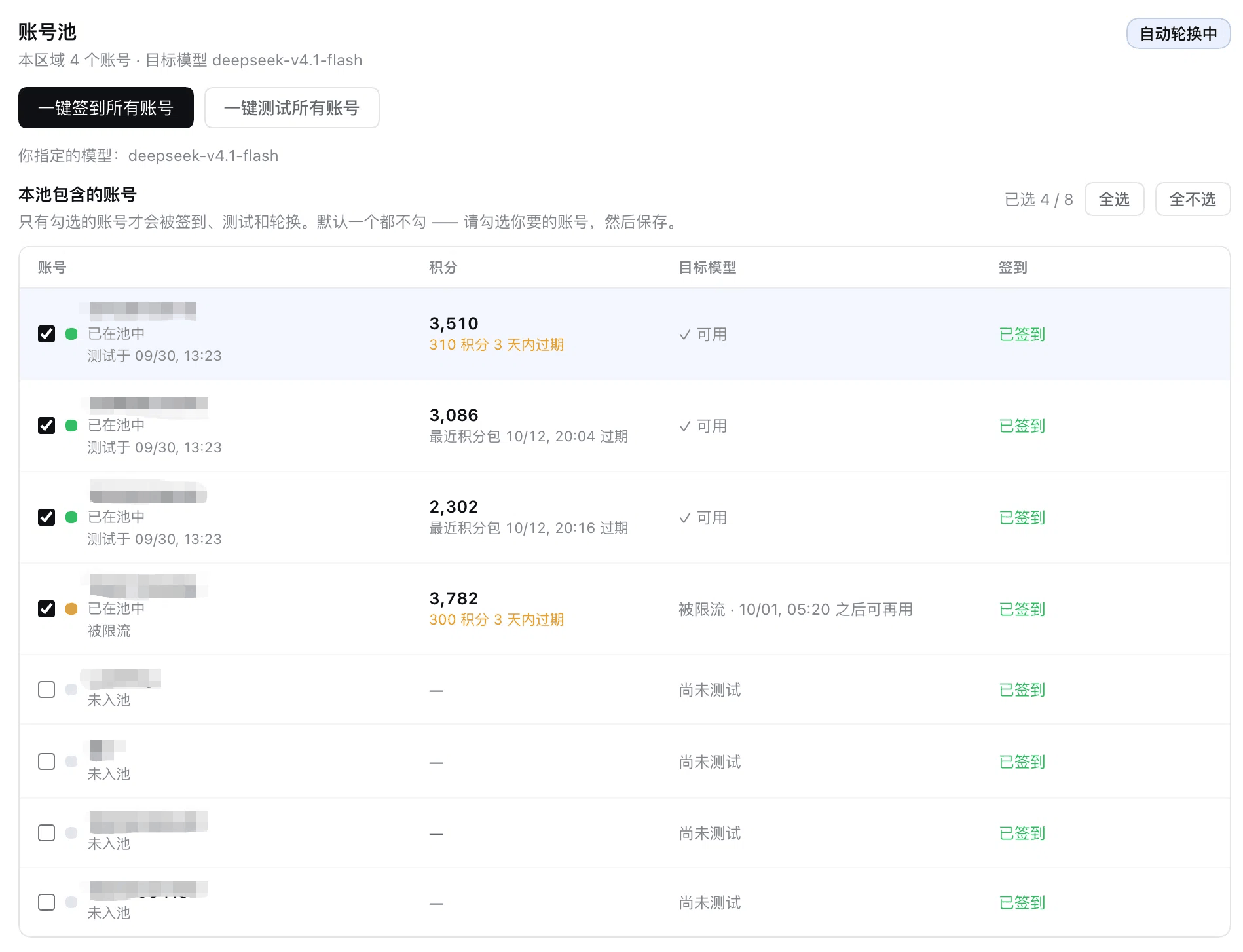
A machine usually carries more than one WorkBuddy sign-in. The **account pool** turns that into a single click: tick the accounts you want into the pool, then press **Check in selected** or **Test selected**; switch on **Enable the account pool** and the plugin will carry on through a failure by itself.
**Each region (domestic / international) has its own independent pool** — membership and target model never affect the other side, because the two sides' accounts belong to different upstream stacks.
### The two batch actions
- **Check in selected** — signs in account by account. It **reads today's status first**, so an account that is already checked in is marked as such and receives **no write request at all** (idempotent — no duplicate claims); a single account failing marks only that row and **never aborts the batch**.
- **Test selected** — sends one **real-volume** probe per member (about 25k input tokens; the same `probeModel` the model rows use, so it inherits both measured facts: throttling is triggered by request **size**, and the reset time is written into the response **body** rather than a header), reporting whether that account can serve that model right now.
**Which model is tested:** by default the **zero-multiplier free model in that region's catalog** (measured: the domestic catalog currently has exactly one, `hy3`; the name is deliberately **not** hard-coded, because the upstream changes multipliers — `deepseek-v4.1-flash` has already moved from 0 to 0.11), or a specific model you pick in the dropdown. If the model you named has left the catalog, the **manual action refuses outright** (`target-model-stale`) instead of quietly substituting another one — you asked to test *that* model, and swapping it answers a question you did not ask.
**Cost and boundaries:** testing is a real request. Pointed at the free model (multiplier 0) it costs virtually nothing, but it is **not a free no-op**; check-in claims that day's real reward. Both actions run **only when you press the button** — the plugin **does not offer automatic check-in**, and the card does not show a switch that can never be flipped.
### Membership is an explicit opt-in, empty by default
"signed in on this machine" is not "spend this account's credits and claim its rewards". Membership starts **empty** and must be ticked one by one (or with **Select all**); **an empty pool never degrades into "all accounts"** — with nothing ticked, both batch actions are refused rather than running every account on your behalf.
Ticking boxes is a **draft edit**: it lands on **Save**, the save button carries a dirty marker until then, and the draft survives switching tabs or closing the card.
### Automatic routing and failover: what "Enable the account pool" turns on
This plugin's standing rule is that it **never rewrites who pays** — your saved choice is yours. What the switch changes is **who serves**, decided by the pool's ranking, request by request:
1. **The ranking picks the serving account for every request** — so the card's "in use" account is the ranking's answer, which is not necessarily the one you picked above it. The ranking is below.
2. **On a failure the next usable member is tried**, then the next, until one serves it or none is left. Only then is the error reported — annotated with how many accounts were tried, so a pool that failed over and still lost does not read like a single account failing.
3. **Your saved selection is never rewritten.** Turning the pool off restores it immediately and completely (the pool steers through a runtime override, never through the settings). That is also why the card states which account is actually in use: it may be a different one, and you should be able to see that.
4. **Which failures trigger a retry:** 429 rate limits, 402 exhausted credits, 401 dead sessions, 502 gateway/network errors — all of these describe **one account's** state, and another may well survive them.
5. **Which do not:** a malformed request (HTTP 400). Every account answers the same 400, so walking the pool would only multiply the wait before the user sees an error they must act on anyway. A stream that dies **mid-flight** is not retried either — bytes are already on the wire, and replaying would splice two answers together.
6. **Members already known to be unusable are skipped** — a rate-limited account still inside its stated cooldown, or one whose credential the upstream rejected. **An account that was never tested counts as usable**: a freshly discovered sign-in must not be invisible just because nobody has measured it yet.
7. **A live failure is RECORDED as a measurement** (with the reset time the upstream stated), so the NEXT request starts from an available account instead of re-hitting the account that just refused it. Before this, only the manual batch test wrote measurements — so a just-limited account still read as untested and kept being picked first. HTTP 400 is the exception: that is the REQUEST being rejected, which says nothing about the account, and recording it would sideline a good one. Accounts not checked into the pool are not measured either, since the tick is what grants "you may spend this account's credits".
8. Every retry leaves a `warn` line in the host log naming the failure and the account that follows.
### What the switch actually controls
**It controls whether the PLUGIN decides by itself — not whether YOU may act.**
| | Pool **on** | Pool **off** |
|---|---|---|
| Who serves | Chosen **automatically** by the ranking (usable → credits → soonest-expiring → freshest credential) | The account you selected; the plugin does not choose |
| On a failure | **Automatically** retried on the next usable account | Reported as-is, no retry |
| Check-in all / test all | Available | **Still available** |
| Target test model | Editable | **Still editable** |
The last two rows are deliberate: check-in and testing are MANUAL actions over the members you ticked, which is a different question from "does the plugin route automatically". Gating them on the switch meant switching the pool off ALSO removed the ability to check in or test — while "off" should mean "I'll do it by hand", not "nothing is allowed".
**The one hard rule**: with nothing checked in the pool, batch actions are refused. An empty pool **never** degrades into "then run on every account" — that is the one reading which would spend credits you never authorized.
**Where manual selection lives**: in the account pool section. **With the pool off** that section shows an "Account in use" dropdown; picking one takes effect immediately (it writes the region's account slot through the same verified path the credential-recovery "switch to a usable account" action uses). **With the pool on the row is absent** — the ranking decides there, and a dropdown that changes nothing is worse than no dropdown. Account discovery ("detect accounts again"), membership, check-in and testing all sit in that one section, so accounts are managed in exactly one place.
### The ranking (what decides who serves)
1. **Usable first** — an account a measurement rules out (limited with its cooldown unexpired, credential rejected, upstream unreachable) sorts last and is not chosen;
2. **Expiring credits first** — points lapsing within three days are lost if unspent, so an account holding any comes first, the soonest-lapsing one ahead of the rest, and between two of them the larger amount at risk wins;
3. **Higher credit balance first.** Among accounts with nothing expiring, the largest balance goes first. Credits take part **only when a fresh reading exists** (what the card's poll, a batch test or a save collected; valid for 10 minutes). The request path **never** fetches credits — that is an upstream call per member, and one page of chat would turn into N extra requests;
4. **Freshest credential first**;
5. The account id closes the order, making it **total** and reproducible rather than jittering with the roster's order.
> **Why #2 outranks #3** (issue #70): these used to be strict lexicographic keys — total first, expiry consulted only when totals were **exactly** equal. Totals are almost never exactly equal, so the expiry rule **never actually fired**: a "use it or lose it" rule wholly shadowed by another, i.e. dead code. In the reported case an account held **196.4 points lapsing that same day** and still ranked last, merely because it held ~1,200 fewer points than the other two — so all 196.4 were lost.
>
> The cost is worth stating plainly: this also puts an account with **1 expiring point** ahead of one holding **50,000**. That is not a defect — credits are fungible, so leaving the 1 point unspent loses it with certainty, whereas the 50,000 account is still there on the next request. The one real cost is a failover round-trip when the expiring account cannot cover a whole request, which the existing failover path absorbs.
### Why an account leaves the pool, and when it comes back
| Probe outcome | What it means for failover |
| --- | --- |
| Usable | Eligible |
| Rate limited | Out of the pool **temporarily**, returning on the reset time the upstream stated (and when it states none, the card says so rather than **inventing a countdown**) |
| Out of credit | Out of the pool, returning at the monthly package's refresh time |
| Credential rejected / model not found / upstream unreachable / failed | Out of the pool until a later probe refreshes the result |
| **Account restricted upstream** | **Benched for good; waiting fixes nothing** (5.8.0). The upstream names this ACCOUNT ("unusual activity"), so automatic failover **does** route around it. That is the opposite of a channel-verification refusal, which is about the REQUEST: switching accounts there would only burn credit on the same 400, so the plugin does not switch. The only real way back is a **manual "test"** of that account: the pool id is a hash of `uin`/`uid`, so re-authorising produces the same id and nothing clears the stored measurement (a re-login does **not** lift this bench). Re-test after the upstream lifts the restriction and it becomes a candidate again. The plugin **invents no countdown**; the bench only removes it from rotation — with no usable candidate left the request still falls to your saved account |
The key line: **"rate limited" is not "unusable"**. It is precisely the state most worth waiting on — treating it as permanently dead throws away the accounts that would have served you best.
### Manual selection: there is no account dropdown any more
Accounts are managed **in the account pool**: membership checkboxes are the selection surface, and re-detection lives there too. The old "account" dropdown had become self-contradictory once the pool existed — with the pool on, the ranking decides who serves, so changing it did nothing yet looked authoritative, and the status line above could name one account while the dropdown showed another.
The region status line changed with it: **while the pool is on it does not name a single account** (several signed in at once is the normal case, so "Signed in: A" was simply the wrong claim) — it states that the region is usable and that the pool picks. **While the pool is off it does name the account**, because then it really is the only answer. The dot and the token expiry beside it are about "can this region be used", which is a different question from "who is being billed" — the pool block answers that one.
### Saving and drafts: why the card has two Save buttons
One for model management, one for the pool — **deliberately kept apart** rather than merged: the two draft domains differ, and merging them means one failed write drags the other down (a catalog that will not save would stop you saving pool preferences too); a shared Discard would also throw away both drafts on a single misclick. Both sides use a **verified write** — **a write that did not land never discards the draft**, or your edits are lost for good. The busy spinner covers **only that verified write** (5.8.0, issue #131): as soon as it lands, the button clears and the draft is discarded, and the usage refresh that follows is display only — a slow or failed refresh never re-labelling a saved setting as "not saved", it only adds a line saying the setting saved but the list has not refreshed. Both used to share one loading, so a single slow refresh could spin forever on data that had long since been written.
One class of state in the pool **does not go through a draft**: probe results, cooldowns, and the account that served a request. Those are **observations**, written frequently by the plugin itself. The reason is practical — drafts are overwrite-based, so if observations lived in one, a single manual **Save** could roll the result a timer had just written **back to a several-minute-old value**.
## Install
> ⚠️ **Version requirement: DSH 0.1.7-rc.1 or newer (current window: `0.1.7-rc.1` – `0.2.x` GA).** Since v2.1.0 this plugin only supports hosts on DSH 0.1.7-rc.1 and above (older hosts cannot resolve the dependencies to install this version); hosts on 0.1.5 and earlier should stay on v2.0.15. Since v2.1.2 the upper bound is **`<0.3.0-0`**; the 0.3.0 line is explicitly refused. See [Supported host range](#supported-host-range) below.
> ⚠️ **For the CN 「channel verification」 400 (`code 11128`), make sure the plugin is ≥ 5.14.0.** From 5.13.1 the plugin rewrites the known fixed fingerprints **before the request is sent**, and 5.14.0 adds the Web-GUI paragraph's SECOND sentence (#167, the branch still reproducing on 5.13.1); 5.12.x and earlier only had the neutral-head + zero-width ladder, which measured **400 on every rung** for the same body (matrix in [#164](https://github.com/dingminhua/dsh-connect-workbuddy/issues/164)). Anyone left on an older build keeps hitting a 400 that is already fixed, and it looks like "fails every single time, restarting does nothing".
>
> Two things stop people from actually upgrading: **① different marketplace indexes can report three different "latest" at the same moment** (5.12.3 / 5.12.4 / 5.13.1 were all live at once per #164), so "check for updates" on a stale index never shows the new version; **② pnpm's 24-hour release-age window** (`minimumReleaseAge`) **silently resolves a floating range back to the previous version**. When you need this fixed right now, pin the **exact version**: `dsh-connect-workbuddy@5.14.0`.
### Supported host range
DSH's shipped gate (`evaluatePluginCompatibility` in `packages/boot/app-boot/src/plugin-compatibility.ts`) checks every declared `dsh-*` peer range; **one unsatisfied peer skips the entire bundle** (it lands in `skippedBundles` and is only printed to stderr) — no provider is registered, no card appears, the model list goes empty, and the page shows no error at all.
| Host version | Verdict |
| --- | --- |
| `0.1.7-rc.1` – `0.1.7-rc.2` | ✅ supported |
| `0.2.x` **GA** (`0.2.0`, `0.2.1`, …) | ✅ supported (verified from 2.1.2) |
| `0.2.x` **prerelease** (`0.2.0-rc.1`, `0.2.1-rc.1`, …) | ⚠️ outside the declared range — see below |
| `0.3.0-0` and above | ❌ explicitly refused (that line is unverified) |
| `0.1.6` and earlier | ❌ explicitly refused (0.1.5 users should stay on v2.0.15) |
> **On `0.2.x` prereleases (corrected in v4.7.0)**: this table previously listed `0.2.0-rc.1` as "✅ supported". That was **wrong**.
> npm semver admits a prerelease only when a comparator carries a prerelease on the **same `major.minor.patch` tuple**.
> The declared `>=0.1.7-rc.1 <0.3.0-0` opens only `0.1.7-x`, while `<0.3.0-0` excludes the `0.3.0` tuple — so versions such as
> **`0.2.1-rc.1` satisfy neither comparator** (`satisfies('0.2.1-rc.1', …) === false`).
> The practical impact is small: the host gate only evaluates the `@deepseek-ai/dsh*` namespace, and on rc hosts this plugin loads
> normally via `link:` / a manual install. It is also **not fixable by editing the range** — no static range can cover "any `0.2.x`
> prerelease"; five candidate formulations were computed and refuted (see CHANGELOG 4.7.0). It resolves itself once the host ships `0.2.1` GA.
> The upper bound is written `<0.3.0-0`, not `<0.3.0`: **every DSH tag to date is a prerelease** (`-alpha.N` / `-rc.N`), so `<0.3.0` alone would admit the entire unverified `0.3.0-alpha.1` / `0.3.0-rc.1` line, leaving the guardrail inert — exactly the defect shape 2.1.2 fixes. `tests/dsh-line.spec.ts` guards this contract, including the prerelease cliff.
> 🪟 **Platform support: Windows, macOS, and Linux are supported side by side.** **Windows is a first-class target**, not an afterthought: CI runs the full suite on `windows-latest`, and four areas carry Windows-specific branches with their own tests — credential paths, process heartbeat, desktop-app executable lookup, and settings writes. **When fixing a defect that only reproduces on Windows, the Windows reporter's field evidence and an encryption vector captured from a real Windows install are what the fix is judged against** (see the 2.0.6 / 2.0.11 / 2.0.12 sections of [CHANGELOG](CHANGELOG.md)). See the [Platform support](#platform-support) section for the per-platform differences and known limitations.
Prerequisite: the WorkBuddy desktop app is installed and signed in (the plugin reuses the app's sign-in state).
```sh
dsh plugin --profile desktop add dsh-connect-workbuddy
```
Or directly via npm:
```sh
npm install dsh-connect-workbuddy
```
Restart the DSH process after install/update/uninstall.
> ⚠️ **Pin an EXACT version for a fresh release; do not rely on a floating range.** pnpm enforces a release-age window (`minimumReleaseAge`, 24h by default), so shortly after a version ships a floating range is **silently resolved back to the previous one**: `^4.4.2` still resolves to `4.4.2`, while an exact `4.4.3` gets `4.4.3` immediately. Both spellings "install successfully", so the symptom is *"the upgrade command finished and the version did not change"* — easily misread as a failed release. Measured (isolated directory, pnpm 12.3.4, `--lockfile-only`, touching nothing of the user's environment):
>
> | Target spelling | Resolved version |
> | --- | --- |
> | floating `^4.4.2` | **4.4.2** ⚠️ |
> | exact `4.4.3` | **4.4.3** |
> | floating + `--config.minimum-release-age=0` | **4.4.3** |
>
> To pick up a new release right away, pin it: `dsh plugin --profile desktop add dsh-connect-workbuddy@4.4.4`. A floating range catches up once the window elapses.
The plugin also runs under **Web** and **TUI**; pick the command matching your profile:
```sh
dsh plugin --profile web add dsh-connect-workbuddy # Web
dsh plugin --profile dsh-tui add dsh-connect-workbuddy # TUI
```
## Platform support
All three platforms are supported targets; the differences below are **implementation facts**, not polite ways of saying "not yet supported". To change this section, change [`docs/WINDOWS.md`](docs/WINDOWS.md) too — that file is where platform-related constraints are registered.
| Aspect | Windows | macOS | Linux |
| --- | --- | --- | --- |
| Default credential directory | `%LOCALAPPDATA%` / `%APPDATA%` first, falling back to `\AppData` when unset (so a redirected profile still resolves) | `~/Library/Application Support/CodeBuddyExtension/Data/Public/auth` | `$XDG_CONFIG_HOME` first, falling back to `~/.config` |
| Desktop-app executable | `%LOCALAPPDATA%\Programs\WorkBuddy`, `%LOCALAPPDATA%\WorkBuddy`, and both `Program Files` (located as `WorkBuddy.exe`) | Read from the bundle's `Info.plist` (`CFBundleExecutable`) — the real value is **`Electron`**, never guessed from the app name; covers the international `WorkBuddy AI.app` and apps filed under a subdirectory of `/Applications` | Not applicable (no corresponding app for encrypted credentials on Linux; point `WORKBUDDY_AUTH_FILE` at the credential) |
| Process-heartbeat timestamp source | PowerShell `Get-Process` `StartTime` (POSIX has no `ps -lstart` equivalent) | `ps -o lstart=` | `ps -o lstart=` |
| Child-process window | **`windowsHide` is required**: the host itself has no console (it is a GUI process), so without it every probe flashes a visible black window on screen | Not applicable (the option only takes effect on Windows) | Not applicable |
| Transient settings-file contention | **Does hit it**: an antivirus scanner / OneDrive / an editor locking the profile's `cordis.patch.yml` briefly makes the rename replace fail, and `@deepseek-ai/dsh-atomic-write`'s retries are enabled **only on `win32`** | Does not: POSIX rename replaces outright, so the same code never enters the retry branch | Same as macOS |
| CI coverage | `windows-latest`, full suite | The developer's own Mac | `ubuntu-latest`, full suite |
**Three Windows-specific things worth knowing**:
1. **An account change may fail to save** (the profile's `cordis.patch.yml` held open). The plugin **reads the value back after writing**: it reports "cleared" only once the write is confirmed on disk, and otherwise reports the failure and keeps your previous choice. Close whatever holds the file and retry. See [Known limitations](#known-limitations).
2. **Credential paths are partly verified on real Windows hardware.** The candidate list is derived from platform conventions and pinned by unit tests (including both the unset and the blank-string fallback for `LOCALAPPDATA` / `APPDATA`). On a real Windows 11 machine, `%LOCALAPPDATA%\CodeBuddyExtension\Data\Public\auth` and `%LOCALAPPDATA%\Programs\WorkBuddy\WorkBuddy.exe` **did resolve**, and the encrypted credential's `keyId` matched the registered vector verbatim. **The remaining candidates are still not verified per-item** — if your credential or app lives elsewhere, point `WORKBUDDY_AUTH_FILE` / `WORKBUDDY_APP_EXECUTABLE` at it and please report what you see.
3. **Encrypted credentials (from 5.6.0) require the desktop app to be present**, on Windows exactly as on macOS; if the app lives in a custom directory (e.g. `E:\WorkBuddy\WorkBuddy.exe`), point `WORKBUDDY_APP_EXECUTABLE` at it.
### Using it on a server: carry the credential over
On a headless server (or any machine where you would rather not install the WorkBuddy desktop app), the plugin has no local credential to read. The way around it is to **copy the credential directory over from a machine that has already signed in to WorkBuddy** — the plugin only reads that file and does not require the app to be present (**provided the credential itself is not encrypted**, see below):
```sh
# 1) On the machine that is already signed in to WorkBuddy, locate and pack the credential dir
# macOS: ~/Library/Application Support/CodeBuddyExtension
# Linux: ${XDG_CONFIG_HOME:-~/.config}/CodeBuddyExtension
# Windows: %LOCALAPPDATA%\CodeBuddyExtension and %APPDATA%\CodeBuddyExtension
tar czf codebuddy-cred.tgz -C CodeBuddyExtension
# 2) Move codebuddy-cred.tgz to the server and unpack it into the directory the plugin reads
# Linux:
mkdir -p "${XDG_CONFIG_HOME:-$HOME/.config}"
tar xzf codebuddy-cred.tgz -C "${XDG_CONFIG_HOME:-$HOME/.config}"
# 3) Confirm the plugin sees it
dsh plugin --profile web exec dsh-connect-workbuddy status
```
> ⚠️ **On Linux there is no `~/.local/share` path.** The candidate directories come from `defaultDesktopAuthDirs()` in `src/auth.ts`, and **Linux reads only `$XDG_CONFIG_HOME` (defaulting to `~/.config`)**:
>
> | Platform | The credential directory the plugin actually reads |
> | --- | --- |
> | macOS | `~/Library/Application Support/CodeBuddyExtension/Data/Public/auth` |
> | Linux | `${XDG_CONFIG_HOME:-~/.config}/CodeBuddyExtension/Data/Public/auth` |
> | Windows | `CodeBuddyExtension\Data\Public\auth` under `%LOCALAPPDATA%` and `%APPDATA%` |
>
> So **unpacking into `~/.local/share` alone will not be seen** — either unpack into the directories listed above, or point `WORKBUDDY_AUTH_FILE` straight at the auth file (when set explicitly, sibling backup files in that directory are still scanned, so account switching keeps working).
> 🔐 **Encrypted credentials (WorkBuddy 5.6.0 and later) cannot be carried over this way.** Recent desktop builds encrypt the token fields inside the auth file, and the key is fetched at runtime from the app's native binding and never written to disk. On a server without the app, copying the encrypted auth file over **will not be readable** (the plugin reports not-signed-in honestly rather than degrading into reading a truncated token). What works: carry the credential from a machine still running a pre-5.6.0 version or an unencrypted credential, or install the app on that server to obtain the key.
>
> Two `doctor` lines tell you which case you are in:
>
> ```
> Desktop auth file: present (…/CodeBuddyExtension/Data/Public/auth/.workbuddy-auth.json)
> Encrypted-credential support: unavailable (…)
> ```
>
> `Desktop auth file: present` means the file was found; if `status` still reports not-signed-in while `Encrypted-credential support` is `unavailable` (no app on the server), that is the encrypted-credential-without-key case — carrying the file over cannot fix it.
> 🔒 **The credential is the account**: that file is a directly usable session. Transfer it over an encrypted channel (`scp` / private network), tighten it with `chmod 600` once on the server, and keep it out of anything that gets packaged or committed.
## CLI route (optional): let CodeBuddy do the work
> Off by default (`cliBridge.enabled: false`). While it is off, no tool and no command is registered, and the provider route is untouched. **The one exception** is the live pill described below: its read-only route and client component are registered unconditionally (the client needs them to tell "no turn" from "no route"), so an open page still asks that local route every 5 seconds — it never touches the upstream and spends nothing, and answers with an empty array.
This route uses CodeBuddy as a **tool** rather than as a model provider: the plugin exposes a `codebuddy_ask` tool and a `/codebuddy` command, and a local, already signed-in CodeBuddy CLI runs one real turn in its own process — reading files, running `git`, editing code — then hands the conclusion back.
**What this actually buys, stated plainly.** The provider route has to make a request look like a CodeBuddy client to pass the gateway's channel check; since 4.15.x that check matches an exact substring mid-prompt, and the plugin dodges it with zero-width spaces at punctuation boundaries. That is an arms race, and it is no longer free: issue #98 has produced an **account-level** restriction (`code 11140`, "the account shows abnormal behaviour and has been restricted").
The CLI route escapes the **client-fingerprint layer**, not the account layer. It hands the CLI `CODEBUDDY_AUTH_TOKEN` taken from this plugin's own vault — the same WorkBuddy accounts. So the claim "the process talking to the gateway really is the signed-in CodeBuddy CLI, there is no identity to forge, therefore the account cannot be restricted" **does not hold**: the identity is the same set of accounts, `11140` is account-level, and the same accounts are just as restricted on this route. What is genuinely bypassed is "does this request's client fingerprint look like CodeBuddy" — a real gain against the channel check, but not immunity from blocking. The two routes are complementary fallbacks, not a replacement.
### Prerequisites
- The CodeBuddy CLI is installed (npm package `@tencent-ai/codebuddy-code`; `codebuddy` and `cbc` are the same entry point). For a non-standard install, point `cliBridge.binary` at the absolute path.
- It is signed in. Credentials are resolved in this order: the `CODEBUDDY_AUTH_TOKEN` environment variable, then this plugin's **own** vault (`$DSH_HOME/workbuddy-vault//.json`). In other words, **the accounts you already signed in for this plugin are reused directly — no second sign-in.** (Verified against the real CLI: `getAuthenticationAttributesSync` checks `CODEBUDDY_AUTH_TOKEN` ahead of its own sign-in file.)
- Region **outranks freshness**: a domestic token is valid against `copilot.tencent.com`, while a global token gets a 401 there (measured: `401 Authentication required ... (target: https://copilot.tencent.com)`). Hence the default `cn,global` order, falling through only when a region fails.
### Turning it on
```jsonc
{
"cliBridge": {
"enabled": true
}
}
```
Every other key has a default. See the table below. Changing them does not need a host restart: `cliBridge` is a volatile field, so a change rebuilds only this route instead of reloading both provider stacks.
### The two entrances
| Entrance | Who triggers it | Working directory | Whose budget it spends |
| --- | --- | --- | --- |
| `codebuddy_ask` tool | the model decides to call it | the session workspace, or a `working_dir` the caller passes, or `cliBridge.workingDir` | CodeBuddy quota, plus the DSH tokens of the wake-up the result is injected into (`injectResult` is on by default) |
| `/codebuddy` command | a human types it | **always the current session workspace** | the same — the command itself skips the model, but by default the result is injected back into it |
An **empty** `/codebuddy` means "review the uncommitted changes in this workspace" (that invocation is forced to the read-only `dontAsk` permission mode and is told to run `git diff` itself and report only what it actually saw); **text after it** is sent through verbatim; **a leading `--edit`** grants write permission for that one turn (`acceptEdits`, e.g. `/codebuddy --edit fix this null deref`) without changing the default. `--edit` on its own means "review and fix what you find".
When the turn finishes, the conclusion is **injected back into the session model** (`cliBridge.injectResult`, on by default): an idle session is woken for a new turn, a running one gets it queued for its next step. **That step really spends DSH tokens** — set `injectResult` to `false` to leave the model untouched, and the `/codebuddy` result is then shown to you only. The injected text starts with `[dsh-connect-workbuddy · 由 /codebuddy 自动回注,不是用户输入]` so neither you nor the model mistakes it for a human message.
### While it runs: the pill under the composer
A Host tool call is **one-shot**: the interface learns nothing until `execute()` returns. The minutes in between — reading files, running `git`, retrying — used to be a blank spinner, and a user could not tell "still working" from "hung".
So the plugin registers a **live pill** on `conversation.composer.dock` (the row under the composer, next to the credit readout): `CodeBuddy · 7 tools · 42s · last: Bash`. It is fed by the plugin's own read-only route, `/plugins/dsh-connect-workbuddy/cli-live`, which serializes the host-side live board (`src/cli-bridge/live.ts`).
- **It appears only while a turn is live.** With nothing running the component renders `null`, so the row is untouched — and the route is registered **unconditionally** (even with the switch off) so the client can tell "no turn" from "no route" without knowing the switch's state.
- **It describes only the turn this session started.** The live board is **host-wide** (one route answers for every session in the process), so the seat — `conversation.composer.dock`, declared `scope: 'session'` — hands the registration a `sessionId` and the pill keeps only those rows. Without that filter, session A's composer would describe session B's turn (or another tab's): a line about a directory the reader is not in, with a counter that keeps moving. When the host passes no `sessionId` (an older host, or a test mounting the component directly) the filter is **off** — losing a diagnostic readout is worse than showing a neighbouring turn — and a row the host could not attribute (`sessionId: ''`) is kept for the same reason: it is still evidence of real work.
- **No provider gate.** The credit readout renders only while the session's model is a WorkBuddy provider, because it reports that provider's quota. This pill reports a local process, and the CLI route is deliberately model-independent: a turn started from a DeepSeek session has to be visible too. `cliBridge.enabled` needs no separate check either — with the bridge off no turn can begin, the board is empty, and the pill renders nothing.
- **The seconds tick locally, without extra requests.** The document is polled every 5s; the counter is advanced by a 1s local tick from `startedAt`. Concurrent sessions share **one** in-flight request (module cache + inflight dedupe), so N tabs do not become N polls.
- **Clock skew is corrected against the host.** `startedAt` is the host's clock; a browser a minute behind would compute a negative age. The document ships `serverTime` and the client derives an offset from it — recomputed **only when a fresh document arrives**, because a cached one carries the old `serverTime` and re-measuring each poll would subtract the elapsed time again and freeze the counter.
- **The tool count is an approximation.** It counts `tool_use` frames in the CLI's NDJSON; `phase` is `starting` / `running` / `finishing`, and `lastTool` is the most recent tool name. These are progress signals for a human, not a billing figure.
- **It neither lies nor lingers.** A document whose `serverTime` is not a finite number is discarded whole (otherwise the label would print `NaNs`), and three consecutive failed polls (15s) clear the pill rather than leave a ghost describing a turn that ended. With several turns live in one session it shows the newest and appends `+N`; the directory goes in the tooltip only, because this dock is one line.
> The pill lives in the plugin's client entry (`dsh.client`), so changing it means **rebuilding `lib/client.js` and restarting the Host**, same as host-side code.
### Permissions: read-only by default
`permissionMode` defaults to **`dontAsk`**: read-only tools (Read/Glob/Grep) run, writes and command execution are refused, and the turn **does not hang** — the CLI ends the turn itself and reports which tools were denied.
**Why not `plan`**, the more conservative candidate and the default this review suggested: under `-p` (headless), `plan` emits a `control_request` and waits on stdin for an approval, and an unattended call has nobody at the terminal to click it. Left unhandled, the CLI waits out its own 60-second protocol timeout while the plugin waits out `timeoutSecs` (900 seconds by default) — both measured attempts hung exactly this way. Hence `dontAsk` as the default, plus an explicit denial of every `control_request` in the runner. **The denial is per tool.** Only `ExitPlanMode` carries `interrupt: true` (without it `plan` will not finish; measured hanging past 70 seconds). Every other tool (Bash, Write, …) must NOT carry it: with it the whole turn aborts (measured under `acceptEdits` — a denied Bash gave `is_error`, an empty reply, and a 4.2-second turn), while without it the CLI records the denial and picks a different tool, finishing normally (measured: it switched to PowerShell and succeeded in 12 seconds). To let it edit files for real, set `acceptEdits` explicitly.
### Working directory: a four-step ladder plus allowed roots
`codebuddy_ask` resolves its directory as: the caller's `working_dir` → **this session's workspace** (`session.header.cwd`) → `cliBridge.workingDir` → (only when `allow_unattended` is on) a scratch directory → otherwise it **refuses and explains the three ways out**.
Whichever step wins, the directory must pass three checks: **absolute**, **exists and is a directory**, and **inside an allowed root** (the session workspace, `cliBridge.workingDir`, `cliBridge.allowedDirs`). `allowedDirs` is a comma-separated list of absolute paths for directories outside the workspace. So a model that invents `/` or `~/.ssh` cannot get it executed, and `..` cannot walk out (the comparison uses resolved `realpath` and matches on path-separator boundaries, so `/repo-evil` is not inside `/repo`).
### Configuration
| Key | Default | Meaning |
| --- | --- | --- |
| `enabled` | `false` | The only switch. When `false`, this route registers nothing. |
| `binary` | `''` | Absolute path to the CLI executable. **When empty, only known install locations are probed and a miss refuses to run** — it never falls back to whatever `codebuddy` is on PATH (that binary would be handed the vault token). |
| `model` | `''` | Passed to `--model`; empty uses the CLI's own default. |
| `permissionMode` | `dontAsk` | `dontAsk` (default, read-only) / `plan` / `default` / `auto` / `acceptEdits` / `bypassPermissions`. The last two can write. |
| `effort` | `''` | `--effort`: `minimal` / `low` / `medium` / `high` / `xhigh` / `max`; empty uses the CLI default. |
| `maxTurns` | `10` | CLI turn limit for one task (hard cap 100). |
| `timeoutSecs` | `900` | Wall-clock timeout for one task, in seconds (hard cap 1800). |
| `regionOrder` | `cn,global` | Credential region priority. |
| `workingDir` | `''` | Default working directory for the tool entrance, and also one of the allowed roots. |
| `allowedDirs` | `''` | Extra allowed roots: comma-separated absolute paths. |
| `appendSystemPrompt` | `''` | Appended to the CLI system prompt; empty appends nothing. |
| `allowUnattended` | `false` | Allow falling back to a scratch directory when no working directory exists. Off by default: the CLI can read and write, so it should not run in a directory nobody named. |
| `maxReplyChars` | `60000` | Maximum characters handed back to the session model; longer replies are truncated with a note (hard cap 400000). |
| `injectResult` | `true` | Whether to inject the result back into the session model. Only `false` leaves the model completely untouched. |
| `maxTurnsPerSessionHour` | `6` | Turns per session per hour. `0` disables the cap. |
| `maxTurnsPerHour` | `20` | Turns across all sessions per hour. `0` disables the cap. |
### Boundaries
- **No shared context.** CodeBuddy is a separate agent and cannot see this conversation. It is good at "review this module independently" or "go investigate"; it is bad at "continue the thread I was on" — it has to re-read the repository.
- **Writing is gated, not sandboxed.** `dontAsk` is read-only by default; once you set `acceptEdits` it really does edit files in the workspace. The allowed roots constrain **where** it runs, not **what** it does there.
- **Two separate budgets.** CodeBuddy CLI quota and DSH model credit are unrelated. The command itself spends no DSH model tokens, but the default injection makes the session model take another turn — that one is real DSH usage. The tool description carries the cost signal, and the hourly caps exist to stop an "inject → model asks again → inject again" loop.
- **It fails instead of trying every account.** Only a recognised credential refusal (401 / `Authentication required` / `/login`) moves on to the next account; timeouts, crashes and a missing CLI are raised immediately — retrying a 900-second timeout across a dozen vault accounts is worse than the failure. The walk also no longer looks at what the model said: an early version scanned the CLI's **prose** too, so reviewing code that merely quoted `HTTP 401` discarded a good turn.
- **A timeout kills the whole process tree.** The CLI spawns `git` / `npm`, so killing only the direct child leaves orphans. POSIX signals the process group; Windows uses `taskkill /T`.
- **Restart needed.** New bundles and JS changes only take effect after a DSH host restart.
## Command line
```sh
dsh plugin --profile exec dsh-connect-workbuddy status # sign-in state and remaining credit
dsh plugin --profile exec dsh-connect-workbuddy doctor # credential paths and host diagnostics
dsh plugin --profile exec dsh-connect-workbuddy logout # clear the plugin-held credential copy
```
`status` and `doctor` accept `--json` for machine-readable output.
> **Why these three commands work on a machine with nothing installed (issue #47)**
>
> The plugin declares `@deepseek-ai/dsh-atomic-write`, `@deepseek-ai/dsh-home-paths`, and the rest of the DSH packages as **peers**: the host supplies them and the plugin ships no copy. That works inside a **booted DSH process** (the host's runtime interception layer resolves those names against the installation), but `dsh plugin … exec` is not that — it runs one `pnpm exec` in the profile directory, and that child uses **stock Node resolution**. The profile is created with `autoInstallPeers: false`, so the peers are never installed there and the two packages cannot be found.
>
> Up to 4.3.1 this was a **load-time** crash (`ERR_MODULE_NOT_FOUND`), naming a file that looked unrelated to the command:
>
> ```
> Error [ERR_MODULE_NOT_FOUND]: Cannot find package '@deepseek-ai/dsh-atomic-write'
> imported from …/profiles/dsh-tui/node_modules/dsh-connect-workbuddy/lib/host-heartbeat-*.js
> ```
>
> The reason is bundling: `auth`, `host-heartbeat`, `at-rest`, and `pi-ai-runtime` are emitted as **one shared chunk**, so the moment `lib/bin.js` imported it, the top-level import in `auth.ts` was evaluated — even for a read-only `status`. **From 4.3.2** those two packages are host-first and loaded on demand: the host's copy still wins where the host is present (keeping one cross-process write protocol shared with the host), and a small built-in implementation takes over where it is not. `exec` therefore works on a clean machine, and `doctor` prints which one is in use:
>
> ```
> Atomic writes: built-in copy (host peer not resolvable here; normal outside a booted DSH)
> ```
>
> Inside the repository checkout (peers present) it reports `host-provided (@deepseek-ai/dsh-atomic-write)` instead. The guard lives in `tests/host-peers.spec.ts`: it scans the **built output** and fails as soon as `lib/bin.js`'s dependency graph contains a bare package name again.
## Development
```sh
pnpm install
pnpm run check # typecheck + test + build
```
Local dev via a `link:` install to the desktop profile (restart DSH Desktop after editing):
```sh
dsh plugin --profile desktop add /Users/dmh2002/DshProject/dsh-connect-workbuddy
```
### Calling `chatStream()` from a script: it returns an **envelope**, not a stream
```ts
const envelope = await client.chatStream(credential, bodyJson)
if (!envelope.ok) { /* failure: envelope.status / .kind / .message / .detail */ }
else { await envelope.response.text() /* or consume it as SSE */ }
```
**Check `envelope.ok` before consuming.** It returns `{ ok: true, response }` or `{ ok: false, status, kind, message, detail }` — not something you can `for await` directly. Skip that check and the usual outcome is **every failure reported as a success** (there is no `response`, reading it throws or is swallowed, and "all models passed"). Recorded here on the strength of the issue #56 reporter's own note, so the next person does not lose the same hour.
`kind` on a failed envelope is the failure classification used throughout this document (`soft_rate` / `model_busy` / `hard_credit` / `session_dead` / `policy_reject` / `not_found` / `server` / `client`), and `detail` carries the upstream `upstreamCode` / `requestId` / `displayMsg`.
## Marketplace listing
The plugin ships an installable `dsh.bundle` manifest and is published to npm. Community marketplaces generally sync entries from the [Awesome DSH Plugin](https://github.com/awesome-dsh-plugin/awesome-dsh-plugin) registry; the local mirror of the entry lives at [`awesome-dsh-plugin-submission/dingminhua__dsh-connect-workbuddy.yml`](awesome-dsh-plugin-submission/dingminhua__dsh-connect-workbuddy.yml). **The entry was merged and listed via PR [#3812](https://github.com/awesome-dsh-plugin/awesome-dsh-plugin/pull/3812) (2026-08-30).**
> ⚠️ **A merged entry does not update itself.** #3812 was merged when the plugin was at 2.0.15, so the registry line kept describing that release: no CN/international dual providers, no per-refresh credit multipliers, no account pool with failover, and nothing saying check-in is **manual** (it claims a real reward and only runs on a button press). **Every meaningful capability change needs its own entry PR**; the registry review states plainly that a description is read as a claim and checked against the code. The current update is PR [#10281](https://github.com/awesome-dsh-plugin/awesome-dsh-plugin/pull/10281).
**Listing directory rules** (per [contributing.md](https://github.com/awesome-dsh-plugin/awesome-dsh-plugin/blob/main/contributing.md)):
- One YAML per plugin: `data/plugins/__.yml` with `url` (exactly matching the repo), `name` (`owner/repo`), `category` (one of the valid values; this project uses `model`), and `description.en` (required, ending with a period) / `description.zh` (optional); a description containing `: ` must be quoted.
- The repo must declare a `dsh.bundle` manifest (here `dsh.bundle.patch: ./cordis.patch.yml`) and carry the `dsh-plugin` topic — **declaring only `dsh.client` is the most common rejection**. The 1-day repo age is checked automatically by CI (there is **no commit-count bar**; that one was removed).
- Both READMEs (`README.md` / `README.zh.md`) are generated — never edit by hand; after changing the YAML, regenerate with `node scripts/generate-readme.mjs`.
- At most 3 entries per PR; change only your own entry, never touch other plugins.
Marketplace screenshots and GitHub README badges are two separate mechanisms:
- **GitHub badges** are produced by the Shields/dshfind image links at the top of this README.
- **Marketplace screenshots** follow the current convention and are declared in the plugin's own root [`screenshots.json`](screenshots.json) (this project declares its usage-card screenshot there). The registry's `data/screenshots.json` is a legacy fallback and **no longer accepts new keys** (this project removed its edit before submitting).
- **Marketplace icons** are declared with the entry's optional `icon:` field (this project points at `icons/dsh-connect-workbuddy-128.png`): it **must be a GitHub-hosted raster** (png/jpg/jpeg/webp) — SVG and third-party image hosts are refused — and storefronts fall back to the owner avatar when it is omitted. It is not a generic npm `package.json` field, nor a README badge.
**The title and description on the plugin card are not rendered by this plugin** — they are **package metadata** the DSH plugin manager reads: it takes its words from `meta.title` / `meta.description` in `locale/.json` (`locale/en.json` is the anchor, so without it `zh.json` is never read; without the `"./locale/*.json"` wildcard in `exports` the whole directory is skipped **silently**), and falls back to `package.json`'s `description` for English. The same sentence therefore lives in three places in this repository, and [`tests/locale-meta.spec.ts`](tests/locale-meta.spec.ts) pins them together: the card dictionary (`locale/en.json` / `locale/zh.json`), the English fallback (`package.json.description`) and the listing draft (`description.en` / `description.zh` in `awesome-dsh-plugin-submission/dingminhua__dsh-connect-workbuddy.yml`). **Edit one, edit all three.**
## Known limitations
- The plugin depends on WorkBuddy client endpoints (not an official public API), so a WorkBuddy update may require adjustments.
- **Account switching** relies on the historical auth files the WorkBuddy desktop app leaves behind (the app's own backups), not an official multi-account API. Following the app's current sign-in remains the default; switching is an explicit opt-in, and historical credentials can be invalidated by the app's cleanup or sign-out.
- If an explicitly selected account disappears locally (the app replaced its login or cleaned up its backups), the plugin does **not** silently switch to another account — that would bill a different account. The card says the saved account no longer exists; pick an account again, or use "Follow the app's sign-in" to clear the saved choice. **Signing in again in the desktop app will not fix this**: the credentials are fine, it is the saved account id that no longer matches.
- Users upgrading from before 2.0.0 may still carry the old top-level `accountId` (the migration source). It applies only to its own region and **stops applying once that region is explicitly cleared (`accounts. = ""`)** — otherwise the account you cleared would be silently restored at the next startup. The card shows whether a region is "using the saved account" or "following the app's current sign-in": the restored default is usually the very account you just cleared, so without that line there is no way to tell a successful clear from a no-op.
- **On Windows, an account change may fail to save while the profile's `cordis.patch.yml` is held open.** DSH updates that file by writing a temp file and replacing the target; an antivirus scanner, a sync client (OneDrive), or an open editor can lock it briefly, and once the replacement retries are exhausted the failed write does **not** make `set()` reject. The plugin therefore reads the value back after writing: it shows "cleared" **only once the write is confirmed on disk**, and on failure it reports the error and keeps your previous choice (never a false confirmation that the old selection silently contradicts). Close whatever holds the file and retry.
- Windows and Linux credential paths are derived from platform conventions. On a real Windows 11 machine, `%LOCALAPPDATA%\CodeBuddyExtension\Data\Public\auth` and `%LOCALAPPDATA%\Programs\WorkBuddy\WorkBuddy.exe` **did resolve**, but **the remaining candidates and the Linux paths are still not verified on real hardware**; set `WORKBUDDY_AUTH_FILE` if yours lives elsewhere.
- **The standalone CLI (`dsh plugin … exec`) does not carry the host-supplied peer packages**, so outside the host the plugin falls back to a built-in atomic-write implementation (`src/host-peers.ts`). It transcribes the host's behavioural contract (the `.lock` naming, the Windows `EACCES`/`EBUSY`/`EPERM` retries and their cadence) and is used **only** when those two packages cannot be resolved — inside the host, and in this checkout, the host's or the dependency's copy is still used. `doctor` reports which one is in effect. See the issue #47 note under [Command line](#command-line).
- **Encrypted credentials require the desktop app to be present.** Newer desktop builds (**from 5.6.0, on macOS as well as Windows**) encrypt the token fields in the auth file, and the plugin needs that app's own native binding to obtain the field key. If the app is not installed, was uninstalled, or lives outside the probed paths (on Windows the install registration is consulted automatically, so a non-default install is found without configuration; set `WORKBUDDY_APP_EXECUTABLE` if that misses too), an encrypted file cannot be read — the account then shows as signed out, and the plugin **never** degrades into emitting a truncated token. `doctor` reports whether this capability is available. The key is a build-time constant that may rotate with app releases; the plugin fetches it from the local app each run and caches nothing on disk, so an app upgrade needs no plugin upgrade.
- **The executable is located from the bundle's own declaration, not guessed from the app name.** The WorkBuddy macOS bundles declare `CFBundleExecutable` as `Electron` (not `WorkBuddy`), so the plugin reads each bundle's `Info.plist` to learn the binary's name. Both the domestic `WorkBuddy.app` and the international `WorkBuddy AI.app` are candidates, and an app filed into a subdirectory of an applications folder (e.g. `/Applications/IDE/WorkBuddy.app`) is found by a one-level scan that confirms each candidate's bundle identifier before use — so a different Electron app can never be launched by mistake.
- **"Signed out" and "your sign-in cannot be read" are reported separately.** When an encrypted file cannot be read, the advice is to install the desktop app or point `WORKBUDDY_APP_EXECUTABLE` at it — **not** to sign in again, which cannot help: the credential is fine, the key is what is missing.
- **A 403 "request illegal" (code 11140) is a server-side policy refusal, not a sign-in problem.** The chat gateway sometimes refuses a request outright under its content policy; the body reads `{"code":11140,"msg":"request illegal","requestId":"…","displayMsg":{"en":"The content did not pass the safety review. Please adjust and retry."}}`. The plugin used to file this under the generic `client` error (HTTP 400), which DSH then displayed as an AUTH failure — it looked like a broken sign-in, but **signing in again cannot fix it**: the credentials are fine; it is this one request that was refused. The refusal now passes through as 403 with the official message, `code 11140`, and the `requestId` (give that to official support). The `error.code` written back to the host is the stable class `policy_reject` rather than the numeric `11140`: the host decides in-place retrial from that class, and a policy refusal is deterministic — retrying only burns the budget, and `11140` is not a word the host knows, and the per-model "test" reports "refused by the server's content policy" instead of "token refused". Two ways out: send the same prompt from the WorkBuddy desktop app with the same account (if the desktop app is refused too, the limit is on the account/content side), or switch region/account and retry.
- **A busy model is not an exhausted balance — but the international gateway lists two same-named models, and picking the paid one really is a credit problem.** 14003 (`model_busy`) is a **model-scoped**, **transient** throttle that has nothing to do with the account or its credits; switching model works around it. The plugin used to translate it to `quota_exceeded` on the way back to the host, and the host classifies failures by regexing the error text — `quota_exceeded` happens to match `@deepseek-ai/dsh-llm`'s `isQuotaExceededError`, so the class became `QUOTA` and the chat client **replaced the plugin's message with its own hard-coded 「Request quota exhausted.」** (that sentence was never the plugin's). Since 4.12.0 `model_busy` is no longer translated: the host reads `RATE_LIMIT`, the plugin's own wording survives, and the failure lands in the host's **in-place retry** set, so `dsh-llm-retry` retries it a bounded number of times with the default 500 ms→10 s backoff. **`soft_rate` (6004) keeps the old translation**: its reset is hours away, so the retry budget cannot produce an answer and must not be spent.
- **The other half of the report is a naming trap: the international roster has two 「Deepseek-V4.1-Flash」 entries.** Of the 28 models on `/v3/config`, `deepseek-v4.1-flash` (`x0.00`, **free**) and `deepseek-v4.1-flash-sg` (`x0.03`, **paid**) have **byte-identical names, descriptions, context windows and capability fields**; only the ` · x0.00` / ` · x0.03` suffix the plugin appends distinguishes them in the picker. A zero-credit account that selects the **paid** one gets 429 / code 14018 「Credits exhausted」 — that time the balance really is the problem, the host's wording is **correct**, and no retry can help. So when you see the quota message, check the multiplier suffix first: switch the international deepseek entry to the `x0.00` one, or use `step-5-preview` (`x0.00`, no paid twin). The only free models on the international gateway are `deepseek-v4.1-flash`, `hy3` and `step-5-preview`.
- The host's text-based classification order is part of the trap: a `401`/`403` digit **outranks** everything (yields `AUTH`), the `quota` wording **outranks** `429` (yields `QUOTA` and triggers the substitution above), and a `400` digit yields `INVALID_REQUEST`. An error body written back to the host therefore must not carry those literals casually — `tests/issue84-model-busy-not-quota.spec.ts` pins this layer by driving the real pi-ai client against the real shim and feeding the resulting text to the host's own `isQuotaExceededError()`.
- **Switching region makes the context "grow", and can hit `code 11115` immediately — the gateway is not over-charging you.** The same history is counted under different buckets in the two regions, and the root cause is how the host's bundled `@earendil-works/pi-ai` replays history. It evaluates `isSameModel` for every assistant message (`transform-messages.js:68`, keyed on provider **and** api **and** model id all being equal): for a message that fails, its thinking is **downgraded to ordinary content** (`:88–96` — not dropped), and content is what the gateways count, while thinking goes out in a different field. This plugin registers the domestic and international editions as **two provider ids** (`workbuddy` / `workbuddy-global`, see [How it works](#how-it-works)) that carry the **same model id** — so one region switch moves **all the other side's thinking into the content bucket at once**. That is the cause of issue #59's "the same conversation history is charged 1.374M by the international gateway and 708K by the domestic one (1.94×)"; switching back is the same formula read the other way, 0.696×.
- Three consequences you can see: a region switch can move the token count by ±30%–94%, and **how far depends only on the other side's thinking character count, not on total history length**; **switching models inside one region** triggers the same downgrade (the model leg of `isSameModel`), so the count can move without a region switch at all — the downgrade itself cannot be removed, but **its becoming prose can**, see `dropForeignThinking` below; and that jump lands on top of the host's current compaction threshold (`min(0.8 × window, window − 128000 − 65536)`), so a session that was comfortably under the limit can hit `code 11115 prompt is too long` the moment you switch region.
- **The downgrade is not only a counting problem: the reasoning becomes the answer, and the model then copies that shape (issue #147).** The bullet above covers what the downgrade does to BILLING; this one covers what it does to CONTENT. For a message where `isSameModel` fails, pi-ai does not drop its thinking — it rewrites each block to `{type:'text'}` (`transform-messages.js:87–90`), i.e. the answer channel. So after a provider switch, **another model's internal working notes are presented as this turn's reply**, and a model that reads "all of my past reasoning was plain text" keeps writing its plan into the text channel from then on. The reporter measured one real turn: 56 of 80 assistant messages carried an answer while their own `reasoning` was ≤ 1 character, 20 of those held English working notes totalling 58,960 characters, and CJK fell to 1.37% of the 60,984 visible characters where the previous six turns had been entirely Chinese. It also pushed the session from 696,966 to 758,005 total tokens against an 800,000 compaction threshold.
- **Cross-provider foreign thinking is dropped unconditionally; the `dropForeignThinking` switch only covers a model switch inside one route (off by default)**: this plugin **removes** those foreign thinking blocks before the request goes out, instead of letting them be flattened into prose. Removal rather than preservation, because these blocks are built by the host's `foreignAssistant()` and carry **no `thinkingSignature`** — even claimed as our own turn they could never be replayed as signed reasoning, so their only possible contribution to the wire was the prose they became. Text blocks and tool calls are never touched, and neither is any message's identity.
- **No switch for the cross-provider leg**: after a provider switch the host rebuilds the other provider's assistant turns as `dsh-foreign`, and pi-ai flattens their thinking into assistant text; the WorkBuddy gateway scans assistant messages, so the whole turn is refused with `11128` (issue #163's measured scene: 14,410 / 4,225 / 5,138 characters of reasoning replayed as prose, with all three in-place rescue rungs and three auto-`继续` attempts failing). Those blocks could never be replayed as reasoning anyway, so dropping them is a correction rather than a preference and does not wait for an opt-in. `dropForeignThinking` only widens the same repair to a model switch **inside one route** (`hy3` → `deepseek-v4.1-flash`, both served by this bundle and stamped `provider: workbuddy`); for that leg the off path is still **byte-for-byte** what earlier builds sent.
- An automatic drop writes a warn (only while the switch is off) and still reports through `latestForeignThinking`, so the log names which blocks that request removed.
- The ORDER is load-bearing: the repair runs **after** `alignAssistantIdentities`. A global-region turn of this plugin's own arrives carrying `api: 'dsh-foreign'` too (the host's replay-degrade path), so diagnosing first would classify it as foreign and delete its reasoning — exactly issue #102 in reverse. `tests/issue147-foreign-thinking.spec.ts` pins the order through pi-ai's real `transformMessages`.
- Turns already recorded in history are **not** retroactively repaired: they are already stored as prose, and the switch governs later requests only. Starting a new session after the provider switch is the direct way out.
- **It also covers switching MODELS inside one region** (`hy3` → `deepseek-v4.1-flash`, both served by this plugin, both stamped `provider: workbuddy`). The provider and api legs are equal there, so only the `model` leg separates the turn from the request — and 5.12.0's predicate compared just the first two, so that switch detected **nothing** and the switch looked broken. The model id comes from the request entry points (`model.id` on `stream` / `streamSimple`); omitting it keeps 5.12.0's behaviour exactly, which is why the card's read-only path is unaffected (it reads `lastForeignThinking`, which the request path fills).
- **This is a mismatch between the host and pi-ai, not a bug in this plugin**: not replaying thinking across providers/models is right in itself (another model's train of thought is not context this model should be fed), and the mistake is treating `provider` as a necessary condition for "the same model" when the two provider ids here are **two access regions of one model**. The fix belongs upstream (same api + same model id, providers as an equivalence group); on the plugin side the backstop is `src/context-rescue.ts` since 4.8.0 — **once the upstream confirms an overflow, it folds history in chunks and resends**, instead of replaying the entire range the host meant to compact (which is exactly what makes a compaction request overflow itself and deadlock). To see where it happened: set `WORKBUDDY_BODY_REPORT` to capture a body-composition report — it records counts only, never text. **It appends continuously**: one `.jsonl` per region, rolled to `.1` past 32 MB (one old copy kept); unset the variable and delete the files when you are done — do not leave it on for long sessions.
## Disclaimer
**Read all of it, then decide whether to install.** (There is also a [risk notice](#risk-notice) near the top; the two say the same thing.)
- **Third-party access carries account risk.** The official terms of service restrict unauthorised third-party access. Using this project may lead to account or feature restrictions, **account bans**, or suspension and termination of service. **Working normally and being billed normally do not mean you are authorized, and do not mean there is no account risk.**
- This project is **for personal study and research only**. It drives only your own WorkBuddy / WorkBuddy AI account locally; **do not use it commercially or beyond reasonable personal use**.
- Using this project **does not guarantee continuous availability, an unrestricted account, or always-accurate credit figures**. The author cannot control the platform's limits, penalties or service changes; the day upstream tightens its rules, the plugin may stop working.
- **Understand the risk and decide for yourself whether to install.** Account restrictions, lost credits and service interruptions caused by using this project are **your own responsibility**; if you cannot accept that, use the **official WorkBuddy client**, which is always the safest choice.
- The author is **not liable for any direct or indirect loss** arising from the use or misuse of this project.
- This project is **unaffiliated with and unendorsed by Tencent, WorkBuddy, or DeepSeek**. Names appear solely to describe compatibility; **their trademarks belong to their respective owners**.
## Acknowledgements
This project builds on work others have published. Sources and licenses are credited honestly below; we hold that in genuine respect.
### Reference for the connection core
- [corrinehu/dsh-workbuddy-connect](https://github.com/corrinehu/dsh-workbuddy-connect) (MIT, Copyright (c) 2026 Corrine Hu) — **the principal reference for this project.** That project first validated a working WorkBuddy-to-DSH integration: desktop credential discovery and refresh, the upstream protocol and header conventions, loopback shim hardening, pi-ai provider assembly, and the status CLI were all studied from it. This project reimplements those proven capabilities while focusing on improving the experience.
- [Sliverkiss/workbuddy2api](https://github.com/Sliverkiss/workbuddy2api) (MIT) — reference implementation of the WorkBuddy upstream protocol (the `copilot.tencent.com` wire behavior), referenced via `dsh-workbuddy-connect`.
- [hawklithm/workbuddy2api](https://github.com/hawklithm/workbuddy2api) (MIT, Copyright (c) 2026 Mayer) — **the only entry in this list that is a CODE PORT rather than a design reference**: its `src/codebuddy_proxy/dsml_parser.py` is a DSML tool-call parser for a proxy in front of the same WorkBuddy/CodeBuddy upstream, and this project ported it to `src/dsml-recovery.ts` (the tag state machine, ignored-region detection, missing-wrapper repair, recursive parameter parsing, and the streaming buffer), adding the two gates it does not have (a tool name must be declared in THIS request; no declared tools means no recovery at all). The three deliberate deviations are listed in that file's header; the formal attribution is in [THIRD_PARTY_NOTICES.md](THIRD_PARTY_NOTICES.md).
### References for the auto-continue semantics
- [HsiangNianian/dsh-auto-continue](https://github.com/HsiangNianian/dsh-auto-continue) (MIT) — the source of the "consecutive-failure cap" semantics: the counter increments on send, stops at the cap, resets on a successful turn, and skips subagent sessions. This project's `channelRejectContinue` takes only that layer, not its engine.
- [YuJunZhiXue/dsh-purge](https://github.com/YuJunZhiXue/dsh-purge) (MIT) — three concrete practices: which failure codes must not be continued (quota / rate limit / transport), do not queue behind a busy inbox, and use a message's `source.kind` to tell human intervention from the plugin's own message.
### Baseline for the plugin presentation and structure
- [dingminhua/dsh-connect-trae](https://github.com/dingminhua/dsh-connect-trae) (MIT, Copyright (c) 2026 LaoDing) — the plugin's presentation is kept consistent with it: the settings-card structure and interaction, the model-management (refresh → select → save) and account-selection model, the read-only host↔client route shape, and the npm release engineering.
- [dingminhua/dsh-subagent-default-model](https://github.com/dingminhua/dsh-subagent-default-model) (MIT, Copyright (c) 2026 LaoDing) — source of the `dsm-*` card style system, the `row.*` bilingual copy-key convention, and the brand icon, referenced via `dsh-connect-trae`.
- [franksong2702/dsh-codex-connect](https://github.com/franksong2702/dsh-codex-connect) (Apache-2.0) — reference for the DSH plugin structure and provider registration, referenced via `dsh-workbuddy-connect`. Its Apache-2.0 obligations are discharged separately in [THIRD_PARTY_NOTICES.md](THIRD_PARTY_NOTICES.md).
### Note
Copyright in each project above belongs to its respective author. This project follows a **learn-the-design, write-our-own-code** approach and does not copy any reference project's source wholesale; key modules are written independently and each file's header comment names the specific project and pattern it draws on. If you find an attribution missing or incorrect, please open an issue and we will correct it promptly.
## Third-party open-source dependencies
The open-source projects referenced here, together with their licenses and compliance notes, are recorded in full in [THIRD_PARTY_NOTICES.md](THIRD_PARTY_NOTICES.md). When introducing new WorkBuddy-related external dependencies or reusing code from other projects, update that file and honor the upstream licenses.
## License
This project is licensed under the [MIT License](LICENSE). Copyright: **Copyright (c) 2026 LaoDing**.