# infai
```
██╗███╗ ██╗███████╗ █████╗ ██╗
██║████╗ ██║██╔════╝██╔══██╗██║
██║██╔██╗ ██║█████╗ ███████║██║
██║██║╚██╗██║██╔══╝ ██╔══██║██║
██║██║ ╚████║██║ ██║ ██║██║
╚═╝╚═╝ ╚═══╝╚═╝ ╚═╝ ╚═╝╚═╝
```
**Two terminal tools for local-first AI, from one repository.**
| | What it is | Website |
|---|---|---|
|  **infai** · engine | A control plane for local inference. Find or download a model, save a launch profile for llama.cpp or vLLM, and run and monitor many models from one TUI. | [infai.dipankar-das.com](https://infai.dipankar-das.com/) |
|
 **infaiw** · workflows | An agent harness that works with you, not around you. It runs as a background service with durable sessions, delegated sidecar loops, MCP, and approvals that wait for you. | [infai.dipankar-das.com/infaiw](https://infai.dipankar-das.com/infaiw/) |
Each is a single Go binary for macOS and Linux, released and installed separately.
Use either one on its own, or both together.
- [infai: local inference](#infai-local-inference)
- [infaiw: agent harness](#infaiw-agent-harness)
- [Building from source](#building-from-source)
- [Contributing](#contributing)
---
## infai: local inference
[](https://infai.dipankar-das.com/)
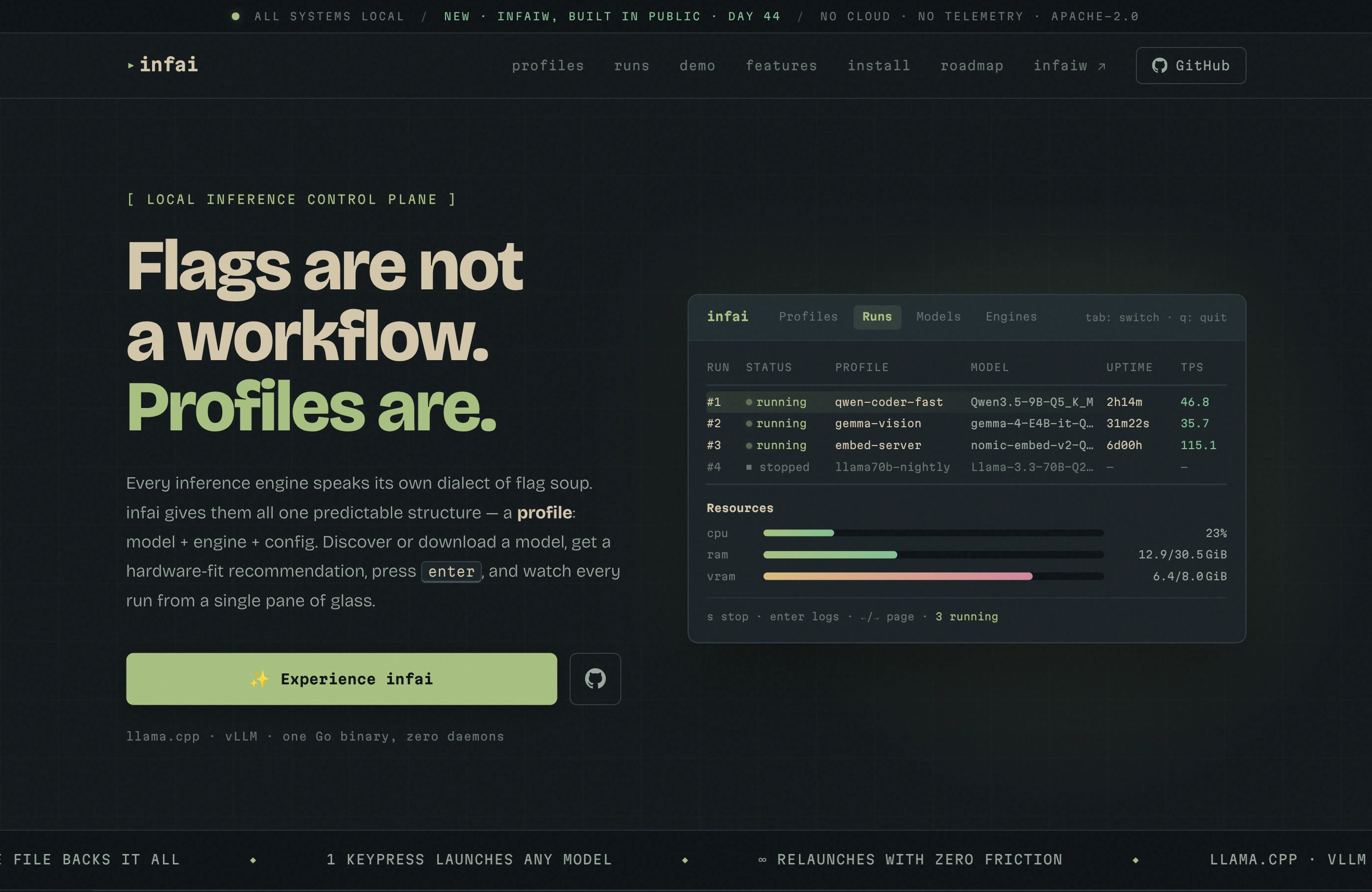
Every inference engine has its own dialect of flags. infai gives them one shape, the
**profile**: model + engine + config. Define it once, then launch it with a keypress.
### Install
```bash
brew install dipankardas011/tap/infai # macOS and Linux
```
Other ways to install
- **Linux packages:** install `infai` from the
[openSUSE Software portal](https://software.opensuse.org/download.html?project=home%3Adipankardas%3Ainfai&package=infai),
which has repository setup for Debian, Ubuntu, Fedora, and openSUSE.
- **Script (Linux):** installs to `/usr/local/bin`.
```bash
curl -sL https://raw.githubusercontent.com/dipankardas011/infai/main/install.sh | bash
```
- **Binary:** download one from [Releases](https://github.com/dipankardas011/infai/releases)
(Linux and macOS, amd64 and arm64).
### Quick start
```bash
infai # open the TUI
infai --version
```
On first launch infai creates its local database. In the **Engines** tab, add your
llama.cpp or vLLM binary. In the **Models** tab, add a model folder and press `s` to
sync it, or press `w` to download from Hugging Face. Then create a profile in
**Profiles** and press `enter` to launch it.
### Features
- **Profiles:** named launch configurations (context size, GPU layers, KV-cache types,
flash attention, sampling, ports, extra flags), with engine-aware options for
llama.cpp and vLLM.
- **Runs dashboard:** run several models at once, with status, uptime, and live
tokens per second for each one. Ports are checked before launch.
- **Live telemetry and logs:** system and per-model CPU, RAM, and VRAM, plus a
scrollable server log you can copy.
- **Model library:** scans folders for GGUF and SafeTensors files, reads their
metadata, and links multimodal projectors automatically.
- **Hugging Face downloads:** search the Hub, pick a GGUF quantization, and download
with resumable, atomic transfers. Provenance stays attached to the model.
- **Hardware-fit checks:** estimates whether a model fits your hardware and suggests
launch settings before you start.
- **11 themes:** tokyonight, everforest, onedark, rosepine, gruvbox, catppuccin, nord,
dracula, kanagawa, solarized, monokai.
### Keys
`tab` / `shift+tab` switch tabs, `t` picks a theme, `?` shows help, `q` quits.
| Tab or screen | Keys |
|---|---|
| Profiles | `enter` launch · `n` new · `e` edit · `x` delete · `/` filter |
| Runs | `enter` view · `s` stop · `r` restart · `x` remove · `pgup`/`pgdown` page |
| Models | `enter` info · `s` sync · `i` import · `w` download · `o` open on Hugging Face · `x` remove |
| Engines | `a` add · `e` rename · `x` delete |
| Profile editor | `ctrl+a` advanced options · `ctrl+s` save · `esc` discard |
| Server logs | `s` stop · `r` restart · `c` clear · `y` copy · `esc` back |
### Data
Profiles, folders, engines, and settings live in one SQLite file. Back it up with `cp`.
| OS | Path |
|---|---|
| Linux | `~/.config/infai/config.db` |
| macOS | `~/Library/Application Support/infai/config.db` |
Schema migrations run automatically on startup.
---
## infaiw: agent harness
[](https://infai.dipankar-das.com/infaiw/)
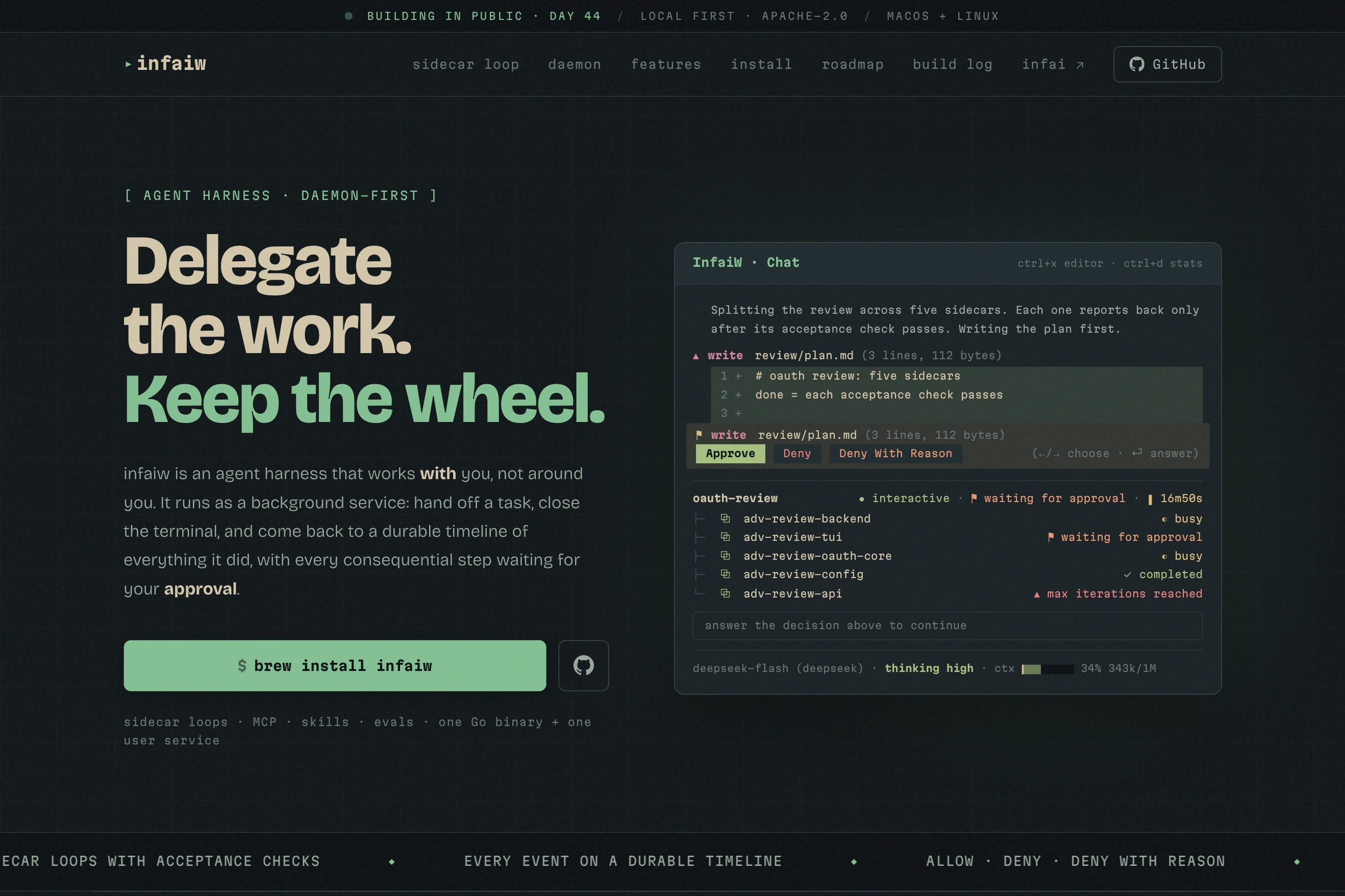
infaiw runs agents as a background service, so a session keeps working after you
close the terminal. The `infaiw` TUI is a client: attach from several terminals,
leave, and come back to the same session.
- **Sidecar loops:** delegated subagents that are not done until an acceptance check
passes. Each loop is its own session and is recorded on the timeline.
- **Durable, branching timelines:** every session is an event timeline that is
compact to store and fast to replay, and you can branch from any point.
- **Human first:** approvals wait for you even after you close the window. Approve,
deny, or deny with a reason.
- **Inter-session messaging:** sessions have mailboxes, and the engine routes messages
between them.
- **Task checklists with intent:** each task records what was expected, so the agent
can recover the goal mid-task.
- **Hybrid auto-compaction:** recent events stay verbatim and older ones are
compressed.
- **Tools:** files, bash, web fetch and search, images in and out, skills, MCP servers
(with OAuth, elicitation, and prompts), and evals.
- **Providers:** DeepSeek, OpenAI Codex, and Claude Code through your local login,
with configurable thinking levels.
### Install and start
The service is opt-in: installing the package does not start it. Run these as your
normal user, without `sudo`.
**Homebrew (macOS and Linux)**
```bash
brew install dipankardas011/tap/infaiw
brew services start infaiw
```
**Linux packages:** install `infaiw` from the
[openSUSE Software portal](https://software.opensuse.org/download.html?project=home%3Adipankardas%3Ainfai&package=infaiw), then:
```bash
systemctl --user daemon-reload
systemctl --user enable --now infaiw.service
```
### Quick start
```bash
infaiw provider login # sign in to a model provider
infaiw # open the TUI and start a session
```
The TUI attaches to `localhost:6000` by default. Use `--host` and `--port` to reach
another server, and `--session ` to resume a saved session.
#### Claude Code
This provider uses the Claude Code CLI already installed and signed in on the same
machine. There is no API key: infai never reads, stores or forwards the CLI's login.
It requires Claude Code 2.1.301 or newer, which you can check with `claude --version`;
adding the provider fails with an actionable message if the CLI is missing, too old,
or not signed in.
The systemd user manager does not read shell startup files, so its `PATH` does not
include `~/.local/bin` where the native install lives. The packaged unit adds it, and
`~/.config/infaiw/server.env` can override the service environment when the CLI is
somewhere else.
infai keeps the agent loop, so the CLI runs with its own tools, MCP servers, settings
and slash commands disabled, in an empty infai-owned directory, and without writing a
session. Tool requests come back through a JSON Schema infai supplies, and infai
executes them under its own approvals.
When the service delegates its cgroup — the packaged unit does, on systemd 254 or
newer — each turn is capped at 500m CPU and 512 MiB of memory, entered at process
start. A turn that exceeds the memory cap is reported as a provider failure naming
the limit. Hosts without delegation run the provider unconstrained.
| Command | Does |
|---|---|
| `infaiw` | Open the chat TUI |
| `infaiw server` | Run the agent server in the foreground (the service runs this) |
| `infaiw provider list \| login \| logout` | Manage model provider credentials |
| `infaiw mcp list \| add \| edit \| remove \| refresh` | Manage MCP servers and their authorization |
| `infaiw hitl_policy list \| add \| remove` | Manage human-in-the-loop tool policies |
### Keys
| Keys | Action |
|---|---|
| `ctrl+o` | Sessions |
| `ctrl+m` | Switch model |
| `ctrl+t` | Cycle thinking level |
| `ctrl+d` | Session stats |
| `ctrl+x` | Edit the message in your `$EDITOR` |
| `ctrl+v` / `ctrl+u` | Paste an image / clear attachments |
| `/` | Commands, skills, and MCP prompts |
| `←` `→` `enter` | Choose and answer a pending approval (`ctrl+g` for detail) |
| `ctrl+c` | Quit the TUI (the session keeps running) |
### Running the service
Homebrew
Homebrew manages launchd on macOS and systemd on Linux. Use
`brew services stop infaiw` or `brew services restart infaiw`. Logs are in
`$(brew --prefix)/var/log/infaiw.log`. Upgrading the formula stops a running
`infaiw server`, and the service starts the new binary; an inactive service stays
inactive.
If you installed the old cask, migrate once:
```bash
brew uninstall --cask infaiw
brew update
brew install dipankardas011/tap/infaiw
brew services start infaiw
```
The executable moves from the Caskroom to the Cellar. Your user data is not moved
or removed.
systemd (Linux packages)
- `--user` runs the service as your account, not root.
- `enable` starts it on future logins; `--now` also starts it immediately.
- Follow the logs with `journalctl --user -u infaiw.service -f` (`ctrl+c` stops
following, not the server).
- Package upgrades restart running instances; inactive ones stay inactive.
- Stop it and disable startup with `systemctl --user disable --now infaiw.service`.
Your data and configuration are kept.
Without lingering, a user service stops after your last session ends. To keep it
running after logout and start it at boot (may need admin rights):
```bash
sudo loginctl enable-linger "$USER"
```
Packaging follows the [Homebrew service DSL](https://docs.brew.sh/Formula-Cookbook#service-files),
[openSUSE unit guidelines](https://en.opensuse.org/openSUSE:Systemd_packaging_guidelines),
and Debian's [dh_installsystemduser](https://manpages.debian.org/bookworm/debhelper/dh_installsystemduser.1.en.html)
with `--no-enable`.
### Configuration
`infaiw server` is configured only through `INFAI_AGENT_*` environment variables, for
example `INFAI_AGENT_PORT=6000`. Background services do not inherit your shell
environment, so put them in `~/.config/infaiw/server.env` (`chmod 600` if it holds
secrets) and restart the service.
---
## Building from source
Requires Go 1.26+. infai also needs a C compiler, because it uses SQLite through CGO;
infaiw does not.
```bash
git clone https://github.com/dipankardas011/infai.git
cd infai
CGO_ENABLED=1 go build -o infai ./cmd/inference
CGO_ENABLED=0 go build -o infaiw ./cmd/agent
go test ./...
```
## Contributing
Bug reports and pull requests are welcome on
[GitHub](https://github.com/dipankardas011/infai). See [AGENTS.md](AGENTS.md) for the
architecture and conventions.
The website lives on the `gh-pages` branch; edit it by committing there. Provider
catalogs are the exception: they live in `catalog/` on `main`, next to the code that
reads them.
infaiw is being built in public, one post a day; follow along from the
[build log](https://infai.dipankar-das.com/infaiw/#buildlog).
## License
[Apache 2.0](LICENSE)