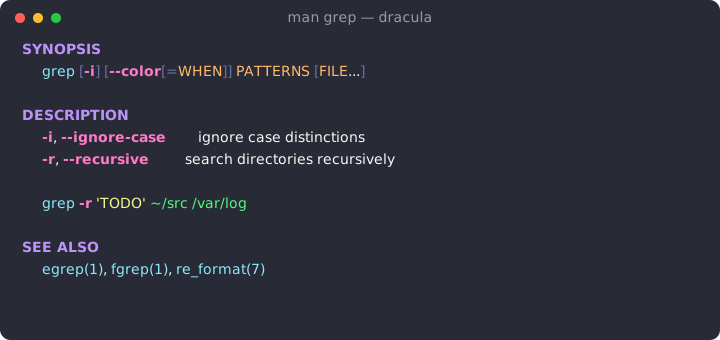
Man pages, but they spark joy.
A semantic, themeable man-page colorizer for zsh — a drop-in upgrade to oh-my-zsh's colored-man-pages.
| 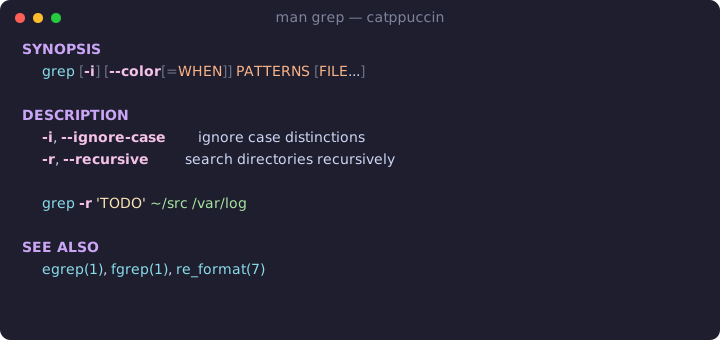 |
| **Gruvbox** | **Tokyo Night** |
|
|
| **Gruvbox** | **Tokyo Night** |
| 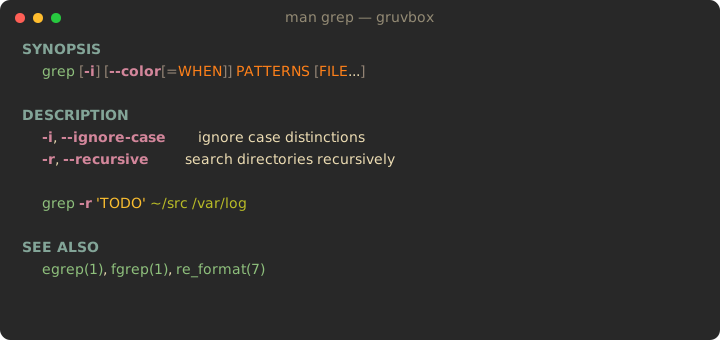 |
| 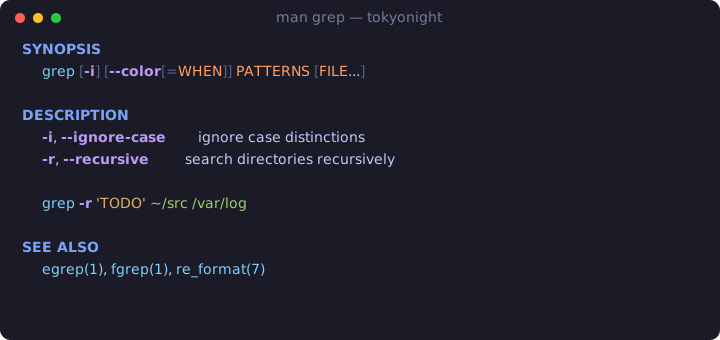 |
| **Light** | **ansi** *(inherits your terminal's 16 colors)* |
|
|
| **Light** | **ansi** *(inherits your terminal's 16 colors)* |
| 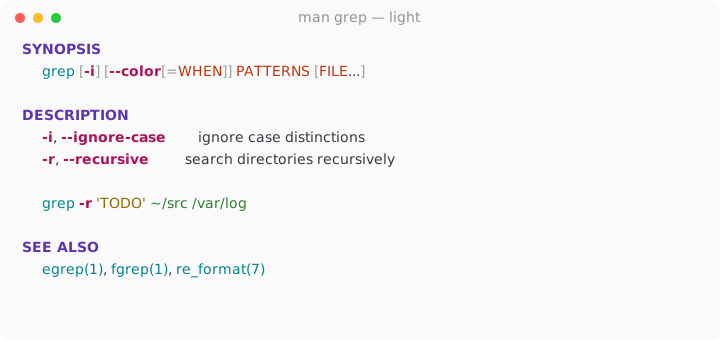 |
| 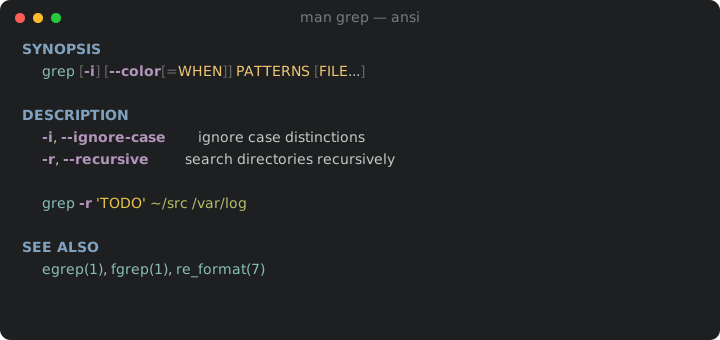 |
Pick one in two keystrokes:
```sh
man-theme set tokyonight
```
---
## Install
### oh-my-zsh
```sh
git clone https://github.com/diverdale/colored-man-pages-plus \
"${ZSH_CUSTOM:-$HOME/.oh-my-zsh/custom}/plugins/colored-man-pages-plus"
```
Add it to your plugin list in `~/.zshrc` — and **remove the stock
`colored-man-pages`** so they don't both wrap `man`:
```sh
plugins=(... colored-man-pages-plus)
```
Reload with `exec zsh`, then run any `man` page. That's it.
### Without oh-my-zsh
```sh
git clone https://github.com/diverdale/colored-man-pages-plus ~/.colored-man-pages-plus
echo 'source ~/.colored-man-pages-plus/colored-man-pages-plus.plugin.zsh' >> ~/.zshrc
```
---
## 🎭 Theming — the fun part
There are four ways to control color, from "just pick a vibe" to "repaint every
pixel."
### 1. Pick a built-in theme
Either form works; `zstyle` is the oh-my-zsh-native one.
```sh
zstyle ':colored-man:theme' name catppuccin # the idiomatic way
export COLORED_MAN_THEME=catppuccin # or a plain env var
```
Built-ins: `dracula` · `catppuccin` · `gruvbox` · `tokyonight` · `light` · `ansi`
### 2. Let it match your terminal — `auto`
`auto` asks your terminal for its background color (OSC 11) and picks the
`light` theme on a light background, or your chosen dark theme otherwise:
```sh
export COLORED_MAN_THEME=auto
export COLORED_MAN_DARK_THEME=gruvbox # used when the background is dark
```
Now your man pages follow you from a sunny café to a late-night session
automatically. Detection is cached per shell, times out safely, and falls back
to dark if your terminal stays quiet.
### 3. Match your *whole* scheme — `ansi`
The `ansi` theme doesn't ship its own colors — it maps each role onto your
terminal's own **16 ANSI colors**. So whatever scheme you already run (your
Gogh/iTerm/base16 palette), man pages will use *those exact colors* and stay in
visual harmony with the rest of your terminal. Zero config, infinitely personal.
```sh
export COLORED_MAN_THEME=ansi
```
### 4. Override individual roles
Love a theme but want flags to *pop*? Override just that role — hex or an ANSI
index — and keep everything else:
```sh
typeset -A COLORED_MAN_OVERRIDE
COLORED_MAN_OVERRIDE[flag]="#ff5555" # screaming red flags
COLORED_MAN_OVERRIDE[path]="#00d7ff" # neon paths
COLORED_MAN_OVERRIDE[literal]=11 # ANSI bright-yellow
```
Overrides win over the active theme, so you can layer a couple of personal
tweaks on top of any built-in.
### The roles
Every theme is just a map from these roles to colors:
| Role | What it paints | Style |
|------|----------------|-------|
| `header` | top-level sections (`NAME`, `SYNOPSIS`, …) | bold |
| `subheader` | indented sub-sections | bold |
| `command` | the page's command + `name(N)` cross-refs | — |
| `flag` | `-i`, `--ignore-case` | bold |
| `argument` | italic placeholders (`PATTERNS`, `file`) | italic |
| `path` | `/var/log`, `~/.config` | underline |
| `literal` | `'quoted'` / `"quoted"` strings | — |
| `punct` | brackets & pipes in `SYNOPSIS`; separator rules | — |
| `default` | body text | — (usually the terminal default) |
### 🖌️ Build your own theme
A theme is a 9-line file. Copy one, recolor it, and it shows up instantly:
```sh
cp "$ZSH_CUSTOM/plugins/colored-man-pages-plus/themes/dracula.zsh" \
"$ZSH_CUSTOM/plugins/colored-man-pages-plus/themes/synthwave.zsh"
```
```zsh
# themes/synthwave.zsh
cmp_palette=(
header "#ff7edb"
subheader "#ff7edb"
command "#36f9f6"
flag "#fede5d"
argument "#ff8b39"
path "#72f1b8"
literal "#f97e72"
punct "#495495"
default "" # "" = leave body text the terminal default
)
```
```sh
man-theme preview synthwave # admire it
man-theme set synthwave --save # keep it
```
Made something nice? PRs adding themes are very welcome — see
[Contributing](#contributing).
---
## 🧪 `man-theme` — the switcher
```sh
man-theme # list themes, marking the active one
man-theme preview # render a sample in dracula/catppuccin/gruvbox/tokyonight
man-theme preview gruvbox # ...or a specific one
man-theme set tokyonight # switch for this session
man-theme set dracula --save # switch and persist to ~/.zshrc
man-theme current # print the active theme name
```
`preview` paints a real sample page right in your terminal, so you can
comparison-shop themes without leaving the prompt.
---
## Features
- **Semantic highlighting** — 8 roles, derived from groff/mandoc's own bold/italic
output plus light heuristics (so attributes come from groff, not guesswork).
- **6 curated themes + `auto` + `ansi` + bring-your-own.**
- **Truecolor with graceful fallback** — 24-bit → 256 → 16, detected automatically.
- **Clickable cross-references** — `name(1)` refs and URLs become OSC-8 hyperlinks
in terminals that support them.
- **Section separators** — subtle rules between top-level sections for scannability.
- **Fail-safe** — honors `NO_COLOR`, never colorizes piped/redirected output, and
passes anything it doesn't recognize through untouched. Worst case: uncolored,
never mangled.
---
## ⚙️ Full configuration reference
All optional. Defaults: `dracula`, links on, separators on.
```sh
# Theme
zstyle ':colored-man:theme' name dracula # or: export COLORED_MAN_THEME=dracula
export COLORED_MAN_THEME=auto # detect light/dark
export COLORED_MAN_DARK_THEME=gruvbox # dark theme `auto` falls back to
# Per-role overrides (hex like "#ff0000" or an ANSI index 0-15)
typeset -A COLORED_MAN_OVERRIDE
COLORED_MAN_OVERRIDE[flag]="#ff5555"
# Toggles
export COLORED_MAN_SEPARATORS=off # default on
export COLORED_MAN_LINKS=off # default on
export COLORED_MAN_FORCE=1 # use our pager even if MANPAGER is set
```
---
## How it works
`man` formats a page and pipes it to `$MANPAGER`. The plugin points `MANPAGER`
at [`lib/shim.sh`](lib/shim.sh), which runs the text through
[`lib/colorize.awk`](lib/colorize.awk) (in byte mode, for deterministic parsing)
and into `less -R`. The awk engine decodes groff/mandoc backspace overstrike
(`g\bg` = bold, `_\bc` = underline/italic) into attributes, assigns semantic
roles, and emits ANSI escapes that [`lib/resolve-color.zsh`](lib/resolve-color.zsh)
built for your terminal's color depth.
```
man grep ─▶ man() wrapper ─▶ groff/mandoc ─▶ shim.sh
└─▶ colorize.awk ─▶ less -R
(resolve theme, export palette) (decode → roles → ANSI)
```
---
## Tests
```sh
zsh test/run.zsh
```
Plain zsh + `diff`, no external test dependencies. 23 checks covering the
overstrike decoder, semantic roles, UTF-8 safety, OSC-8 links, separators, the
color resolver (including 256/16 downgrades), `NO_COLOR` passthrough, and
theme/override resolution — run against captured `man` fixtures.
Regenerate the README previews after editing themes:
```sh
zsh tools/gen-previews.zsh
```
---
## Compatibility
Works with groff and mandoc man implementations (Linux, macOS, BSD). Requires
zsh and `awk`; uses `less` when available. Truecolor is detected via
`$COLORTERM`, degrading to 256- or 16-color automatically.
---
## Contributing
Bug reports, theme submissions, and detection-rule improvements are all welcome.
- **New theme?** Add `themes/
|
Pick one in two keystrokes:
```sh
man-theme set tokyonight
```
---
## Install
### oh-my-zsh
```sh
git clone https://github.com/diverdale/colored-man-pages-plus \
"${ZSH_CUSTOM:-$HOME/.oh-my-zsh/custom}/plugins/colored-man-pages-plus"
```
Add it to your plugin list in `~/.zshrc` — and **remove the stock
`colored-man-pages`** so they don't both wrap `man`:
```sh
plugins=(... colored-man-pages-plus)
```
Reload with `exec zsh`, then run any `man` page. That's it.
### Without oh-my-zsh
```sh
git clone https://github.com/diverdale/colored-man-pages-plus ~/.colored-man-pages-plus
echo 'source ~/.colored-man-pages-plus/colored-man-pages-plus.plugin.zsh' >> ~/.zshrc
```
---
## 🎭 Theming — the fun part
There are four ways to control color, from "just pick a vibe" to "repaint every
pixel."
### 1. Pick a built-in theme
Either form works; `zstyle` is the oh-my-zsh-native one.
```sh
zstyle ':colored-man:theme' name catppuccin # the idiomatic way
export COLORED_MAN_THEME=catppuccin # or a plain env var
```
Built-ins: `dracula` · `catppuccin` · `gruvbox` · `tokyonight` · `light` · `ansi`
### 2. Let it match your terminal — `auto`
`auto` asks your terminal for its background color (OSC 11) and picks the
`light` theme on a light background, or your chosen dark theme otherwise:
```sh
export COLORED_MAN_THEME=auto
export COLORED_MAN_DARK_THEME=gruvbox # used when the background is dark
```
Now your man pages follow you from a sunny café to a late-night session
automatically. Detection is cached per shell, times out safely, and falls back
to dark if your terminal stays quiet.
### 3. Match your *whole* scheme — `ansi`
The `ansi` theme doesn't ship its own colors — it maps each role onto your
terminal's own **16 ANSI colors**. So whatever scheme you already run (your
Gogh/iTerm/base16 palette), man pages will use *those exact colors* and stay in
visual harmony with the rest of your terminal. Zero config, infinitely personal.
```sh
export COLORED_MAN_THEME=ansi
```
### 4. Override individual roles
Love a theme but want flags to *pop*? Override just that role — hex or an ANSI
index — and keep everything else:
```sh
typeset -A COLORED_MAN_OVERRIDE
COLORED_MAN_OVERRIDE[flag]="#ff5555" # screaming red flags
COLORED_MAN_OVERRIDE[path]="#00d7ff" # neon paths
COLORED_MAN_OVERRIDE[literal]=11 # ANSI bright-yellow
```
Overrides win over the active theme, so you can layer a couple of personal
tweaks on top of any built-in.
### The roles
Every theme is just a map from these roles to colors:
| Role | What it paints | Style |
|------|----------------|-------|
| `header` | top-level sections (`NAME`, `SYNOPSIS`, …) | bold |
| `subheader` | indented sub-sections | bold |
| `command` | the page's command + `name(N)` cross-refs | — |
| `flag` | `-i`, `--ignore-case` | bold |
| `argument` | italic placeholders (`PATTERNS`, `file`) | italic |
| `path` | `/var/log`, `~/.config` | underline |
| `literal` | `'quoted'` / `"quoted"` strings | — |
| `punct` | brackets & pipes in `SYNOPSIS`; separator rules | — |
| `default` | body text | — (usually the terminal default) |
### 🖌️ Build your own theme
A theme is a 9-line file. Copy one, recolor it, and it shows up instantly:
```sh
cp "$ZSH_CUSTOM/plugins/colored-man-pages-plus/themes/dracula.zsh" \
"$ZSH_CUSTOM/plugins/colored-man-pages-plus/themes/synthwave.zsh"
```
```zsh
# themes/synthwave.zsh
cmp_palette=(
header "#ff7edb"
subheader "#ff7edb"
command "#36f9f6"
flag "#fede5d"
argument "#ff8b39"
path "#72f1b8"
literal "#f97e72"
punct "#495495"
default "" # "" = leave body text the terminal default
)
```
```sh
man-theme preview synthwave # admire it
man-theme set synthwave --save # keep it
```
Made something nice? PRs adding themes are very welcome — see
[Contributing](#contributing).
---
## 🧪 `man-theme` — the switcher
```sh
man-theme # list themes, marking the active one
man-theme preview # render a sample in dracula/catppuccin/gruvbox/tokyonight
man-theme preview gruvbox # ...or a specific one
man-theme set tokyonight # switch for this session
man-theme set dracula --save # switch and persist to ~/.zshrc
man-theme current # print the active theme name
```
`preview` paints a real sample page right in your terminal, so you can
comparison-shop themes without leaving the prompt.
---
## Features
- **Semantic highlighting** — 8 roles, derived from groff/mandoc's own bold/italic
output plus light heuristics (so attributes come from groff, not guesswork).
- **6 curated themes + `auto` + `ansi` + bring-your-own.**
- **Truecolor with graceful fallback** — 24-bit → 256 → 16, detected automatically.
- **Clickable cross-references** — `name(1)` refs and URLs become OSC-8 hyperlinks
in terminals that support them.
- **Section separators** — subtle rules between top-level sections for scannability.
- **Fail-safe** — honors `NO_COLOR`, never colorizes piped/redirected output, and
passes anything it doesn't recognize through untouched. Worst case: uncolored,
never mangled.
---
## ⚙️ Full configuration reference
All optional. Defaults: `dracula`, links on, separators on.
```sh
# Theme
zstyle ':colored-man:theme' name dracula # or: export COLORED_MAN_THEME=dracula
export COLORED_MAN_THEME=auto # detect light/dark
export COLORED_MAN_DARK_THEME=gruvbox # dark theme `auto` falls back to
# Per-role overrides (hex like "#ff0000" or an ANSI index 0-15)
typeset -A COLORED_MAN_OVERRIDE
COLORED_MAN_OVERRIDE[flag]="#ff5555"
# Toggles
export COLORED_MAN_SEPARATORS=off # default on
export COLORED_MAN_LINKS=off # default on
export COLORED_MAN_FORCE=1 # use our pager even if MANPAGER is set
```
---
## How it works
`man` formats a page and pipes it to `$MANPAGER`. The plugin points `MANPAGER`
at [`lib/shim.sh`](lib/shim.sh), which runs the text through
[`lib/colorize.awk`](lib/colorize.awk) (in byte mode, for deterministic parsing)
and into `less -R`. The awk engine decodes groff/mandoc backspace overstrike
(`g\bg` = bold, `_\bc` = underline/italic) into attributes, assigns semantic
roles, and emits ANSI escapes that [`lib/resolve-color.zsh`](lib/resolve-color.zsh)
built for your terminal's color depth.
```
man grep ─▶ man() wrapper ─▶ groff/mandoc ─▶ shim.sh
└─▶ colorize.awk ─▶ less -R
(resolve theme, export palette) (decode → roles → ANSI)
```
---
## Tests
```sh
zsh test/run.zsh
```
Plain zsh + `diff`, no external test dependencies. 23 checks covering the
overstrike decoder, semantic roles, UTF-8 safety, OSC-8 links, separators, the
color resolver (including 256/16 downgrades), `NO_COLOR` passthrough, and
theme/override resolution — run against captured `man` fixtures.
Regenerate the README previews after editing themes:
```sh
zsh tools/gen-previews.zsh
```
---
## Compatibility
Works with groff and mandoc man implementations (Linux, macOS, BSD). Requires
zsh and `awk`; uses `less` when available. Truecolor is detected via
`$COLORTERM`, degrading to 256- or 16-color automatically.
---
## Contributing
Bug reports, theme submissions, and detection-rule improvements are all welcome.
- **New theme?** Add `themes/