# Pacer
Two rings in the macOS menu bar that tell you whether your AI coding subscriptions will last until their reset — and what to change if they won't. Claude Code, Codex, Cursor, Antigravity and more, every account you are logged into, side by side.
 **The rings** are the session and the week of whichever tab is open — the Claude login you used last, until you pick another. Each fills to its **speed**: the projected % at reset if you keep going like this. 100 = you run out exactly at reset. Green ≤ 80, amber ≤ 100, and past 100 the ring becomes a solid red disc. (A tab you are not logged into has no speed: its rings show what was **used**, on a tighter scale, the way its card does.) No numbers up there.
Click it:
**The rings** are the session and the week of whichever tab is open — the Claude login you used last, until you pick another. Each fills to its **speed**: the projected % at reset if you keep going like this. 100 = you run out exactly at reset. Green ≤ 80, amber ≤ 100, and past 100 the ring becomes a solid red disc. (A tab you are not logged into has no speed: its rings show what was **used**, on a tighter scale, the way its card does.) No numbers up there.
Click it:
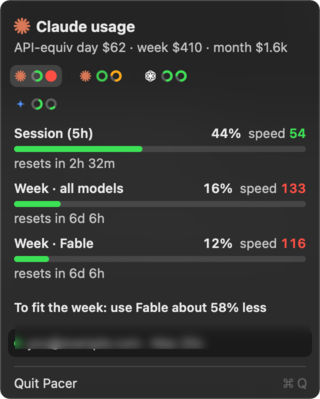
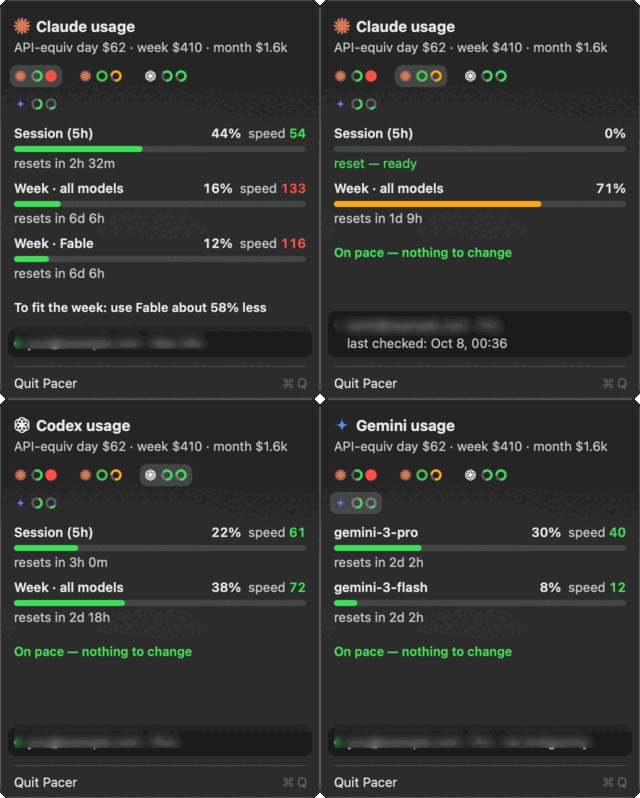 Click a tab to see that account, and the menu bar follows it — the rings up there and the card always mean the same subscription. Click anywhere else on the card to sample now.
## What's different
Every other menu-bar tool shows the percent. Pacer shows the **speed**: where you land at reset if you keep going like this. 16% used sounds fine — until you notice it's 10% into the week.
- **One sentence of advice.** Computed from your actual model mix: stop/reduce Fable, move X% of Opus work to Sonnet, or do less. "On pace — nothing to change" when you're fine.
- **Per-model weights measured on your own account.** Anthropic doesn't publish how Opus/Sonnet/Fable count against the limits. Pacer joins the official usage % with your local transcripts and fits the weights from the data (and whether cache reads are discounted). Until there's enough data it uses API price ratios.
- **API-equivalent cost** over a rolling day, week and 30 days, across every Claude Code profile whose transcripts are in `~/.claude/projects` (a `CLAUDE_CONFIG_DIR` profile counts when its `projects` is a symlink there), so you know what the subscriptions are worth to you.
- **Notifications** when the pace crosses 100, when it comes back, and when any window passes 90%.
- **Every account, remembered.** Each subscription seen on the machine keeps its last reading. One you are not logged into shows what was used and "last checked"; when its reset passes, that window drops to 0 and its ring turns green — the cue to switch back. Forgotten after a week unseen.
- **It asks again when a reset is due**, instead of waiting for the next 10-minute sample.
- Tiny. One Node script (no dependencies) + one Swift file. The data is a JSON file other tools can read.
## Install
Requires macOS 13+, Node ≥ 18, Xcode Command Line Tools (`xcode-select --install`), and at least one login from the table below.
```sh
brew install dkremsa/tap/pacer
brew services start pacer # samples every 10 min, survives reboots
cp -R "$(brew --prefix)/opt/pacer/Pacer.app" /Applications/ && open "/Applications/Pacer.app"
```
The formula was called `claude-pacer` before v2.0.0. That name still resolves, but an **installed** `claude-pacer`
does not upgrade across the rename — run `brew uninstall claude-pacer` first.
Or from source: `git clone https://github.com/dkremsa/claude-pacer.git ~/.claude/pacer && cd ~/.claude/pacer && ./build.sh` — compiles the app into `/Applications` and installs a launchd agent that samples every 10 minutes.
**Start at login:** System Settings → General → Login Items & Extensions → **+** → pick **Pacer** from Applications. The sampler already runs at boot; this is for the menu-bar icon.
## Reminders
A reminder to start a Claude Code session later — set it now, paste it when you are ready:
```
pacer remind add 2026-10-13T09:00 "Ads check" "check the ads spend and promo credit" --dir ~/code/site --flags --chrome
pacer remind add 2026-10-13T09:00 "Weekly review" "summarise last week's commits" --every week
pacer remind list
pacer remind done
```
When one falls due Pacer posts a notification; clicking it copies `cd && claude ''` to the clipboard. Nothing runs on its own. `--every day|week|month` makes it recurring: when it fires it moves to its next date, skipping any it missed while the Mac was asleep; **Done** removes it for good. Due and upcoming reminders are also listed in the menu, each with **Copy command** and **Done**. They are kept in `~/.claude/pacer/reminders.json`.
## For other tools
`~/.claude/pacer/status.json` is refreshed every 10 minutes: `pace`, `level`, `advice`, `windows[]` (used %, speed, projected, hours left), `cost` (all transcripts under `~/.claude/projects`, rolling `day`/`week`/`month`), `fit` — the rest for the **default** Claude Code login (`acct` names it; it falls to the login used last only when the default one cannot be read) — plus `accounts[]`, the same windows for every account with its own `pace`/`level` (same verdict as the top level; a window already at 100% is `red`) and, for Claude, `dir` — the `CLAUDE_CONFIG_DIR` it was read from, `null` for the default login, absent until a tick has read it, read at `accountsAt`. When the Claude read fails, `error` and `errorAt` are set and `t` is left alone, so check `t` for freshness before trusting the top-level figures. `node pacer.mjs status` prints the same.
## How the number is made
- Week windows: `projected = used% / fraction of the window elapsed`.
- The 5-hour session: rate over the last 45 minutes, projected to the reset (a session is bursty; an average since it opened lags).
- The headline is the worst window.
## Providers
| | read from | windows |
|---|---|---|
| Claude Code | the keychain login, for the default profile and every `CLAUDE_CONFIG_DIR` profile in `~/.claude-*` | session, week, per-model week |
| Codex | `~/.codex/auth.json`, live; its session transcripts as the fallback | 5 h, week |
| Antigravity | the running app's local language server — one tab per model vendor it resells | per-model allowance |
| Cursor | the IDE's login | billing month (paid seats) |
| Gemini CLI, GitHub Copilot | their stored logins — **untested**, written from their public clients | daily per model · monthly premium requests |
A provider with no login on the machine costs nothing and shows nothing. Pacer only ever talks to a provider's own usage endpoint, with the login that provider already stored, and never refreshes or writes a token. Per-model weights, advice from your model mix and the API-equivalent cost are Claude-only.
Click a tab to see that account, and the menu bar follows it — the rings up there and the card always mean the same subscription. Click anywhere else on the card to sample now.
## What's different
Every other menu-bar tool shows the percent. Pacer shows the **speed**: where you land at reset if you keep going like this. 16% used sounds fine — until you notice it's 10% into the week.
- **One sentence of advice.** Computed from your actual model mix: stop/reduce Fable, move X% of Opus work to Sonnet, or do less. "On pace — nothing to change" when you're fine.
- **Per-model weights measured on your own account.** Anthropic doesn't publish how Opus/Sonnet/Fable count against the limits. Pacer joins the official usage % with your local transcripts and fits the weights from the data (and whether cache reads are discounted). Until there's enough data it uses API price ratios.
- **API-equivalent cost** over a rolling day, week and 30 days, across every Claude Code profile whose transcripts are in `~/.claude/projects` (a `CLAUDE_CONFIG_DIR` profile counts when its `projects` is a symlink there), so you know what the subscriptions are worth to you.
- **Notifications** when the pace crosses 100, when it comes back, and when any window passes 90%.
- **Every account, remembered.** Each subscription seen on the machine keeps its last reading. One you are not logged into shows what was used and "last checked"; when its reset passes, that window drops to 0 and its ring turns green — the cue to switch back. Forgotten after a week unseen.
- **It asks again when a reset is due**, instead of waiting for the next 10-minute sample.
- Tiny. One Node script (no dependencies) + one Swift file. The data is a JSON file other tools can read.
## Install
Requires macOS 13+, Node ≥ 18, Xcode Command Line Tools (`xcode-select --install`), and at least one login from the table below.
```sh
brew install dkremsa/tap/pacer
brew services start pacer # samples every 10 min, survives reboots
cp -R "$(brew --prefix)/opt/pacer/Pacer.app" /Applications/ && open "/Applications/Pacer.app"
```
The formula was called `claude-pacer` before v2.0.0. That name still resolves, but an **installed** `claude-pacer`
does not upgrade across the rename — run `brew uninstall claude-pacer` first.
Or from source: `git clone https://github.com/dkremsa/claude-pacer.git ~/.claude/pacer && cd ~/.claude/pacer && ./build.sh` — compiles the app into `/Applications` and installs a launchd agent that samples every 10 minutes.
**Start at login:** System Settings → General → Login Items & Extensions → **+** → pick **Pacer** from Applications. The sampler already runs at boot; this is for the menu-bar icon.
## Reminders
A reminder to start a Claude Code session later — set it now, paste it when you are ready:
```
pacer remind add 2026-10-13T09:00 "Ads check" "check the ads spend and promo credit" --dir ~/code/site --flags --chrome
pacer remind add 2026-10-13T09:00 "Weekly review" "summarise last week's commits" --every week
pacer remind list
pacer remind done
```
When one falls due Pacer posts a notification; clicking it copies `cd && claude ''` to the clipboard. Nothing runs on its own. `--every day|week|month` makes it recurring: when it fires it moves to its next date, skipping any it missed while the Mac was asleep; **Done** removes it for good. Due and upcoming reminders are also listed in the menu, each with **Copy command** and **Done**. They are kept in `~/.claude/pacer/reminders.json`.
## For other tools
`~/.claude/pacer/status.json` is refreshed every 10 minutes: `pace`, `level`, `advice`, `windows[]` (used %, speed, projected, hours left), `cost` (all transcripts under `~/.claude/projects`, rolling `day`/`week`/`month`), `fit` — the rest for the **default** Claude Code login (`acct` names it; it falls to the login used last only when the default one cannot be read) — plus `accounts[]`, the same windows for every account with its own `pace`/`level` (same verdict as the top level; a window already at 100% is `red`) and, for Claude, `dir` — the `CLAUDE_CONFIG_DIR` it was read from, `null` for the default login, absent until a tick has read it, read at `accountsAt`. When the Claude read fails, `error` and `errorAt` are set and `t` is left alone, so check `t` for freshness before trusting the top-level figures. `node pacer.mjs status` prints the same.
## How the number is made
- Week windows: `projected = used% / fraction of the window elapsed`.
- The 5-hour session: rate over the last 45 minutes, projected to the reset (a session is bursty; an average since it opened lags).
- The headline is the worst window.
## Providers
| | read from | windows |
|---|---|---|
| Claude Code | the keychain login, for the default profile and every `CLAUDE_CONFIG_DIR` profile in `~/.claude-*` | session, week, per-model week |
| Codex | `~/.codex/auth.json`, live; its session transcripts as the fallback | 5 h, week |
| Antigravity | the running app's local language server — one tab per model vendor it resells | per-model allowance |
| Cursor | the IDE's login | billing month (paid seats) |
| Gemini CLI, GitHub Copilot | their stored logins — **untested**, written from their public clients | daily per model · monthly premium requests |
A provider with no login on the machine costs nothing and shows nothing. Pacer only ever talks to a provider's own usage endpoint, with the login that provider already stored, and never refreshes or writes a token. Per-model weights, advice from your model mix and the API-equivalent cost are Claude-only.