**English** | [Русский](README_ru.md)
yandex-wiki-search-mcp logo # Yandex Wiki Search MCP [![yandex-wiki-search-mcp MCP server](https://glama.ai/mcp/servers/dlbolshov/yandex-wiki-search-mcp/badges/score.svg)](https://glama.ai/mcp/servers/dlbolshov/yandex-wiki-search-mcp) [![PyPI](https://img.shields.io/pypi/v/yandex-wiki-search-mcp)](https://pypi.org/project/yandex-wiki-search-mcp/) [![Python](https://img.shields.io/pypi/pyversions/yandex-wiki-search-mcp)](https://pypi.org/project/yandex-wiki-search-mcp/) [![CI](https://github.com/dlbolshov/yandex-wiki-search-mcp/actions/workflows/test.yml/badge.svg)](https://github.com/dlbolshov/yandex-wiki-search-mcp/actions/workflows/test.yml) [![codecov](https://img.shields.io/codecov/c/github/dlbolshov/yandex-wiki-search-mcp?logo=codecov&logoColor=white)](https://app.codecov.io/gh/dlbolshov/yandex-wiki-search-mcp) [![License](https://img.shields.io/github/license/dlbolshov/yandex-wiki-search-mcp)](LICENSE) [![Docker](https://img.shields.io/badge/ghcr.io-yandex--wiki--search--mcp-2496ED?logo=docker&logoColor=white)](https://github.com/dlbolshov/yandex-wiki-search-mcp/pkgs/container/yandex-wiki-search-mcp)



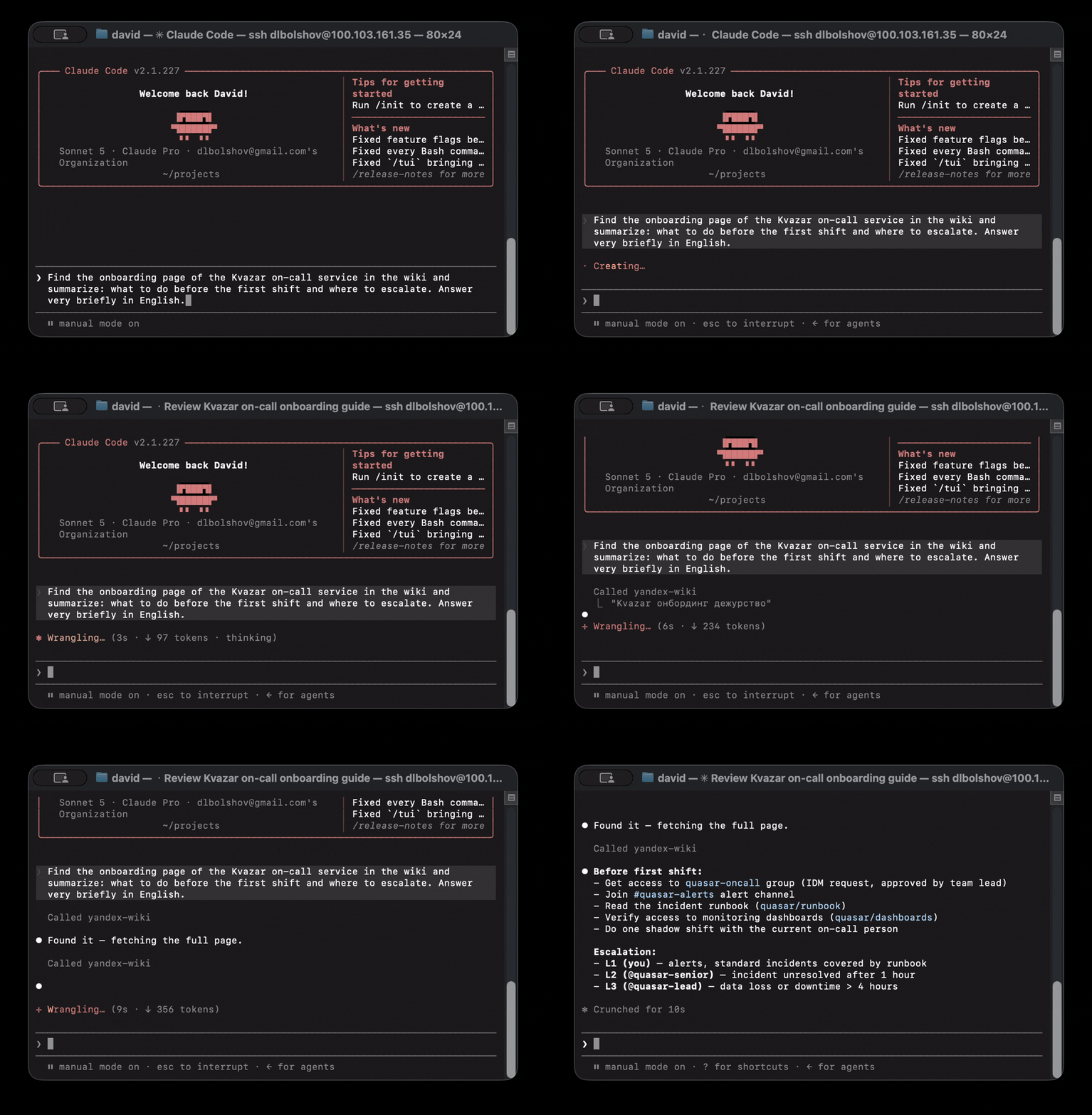
![Demo: search a wiki page and summarize it via MCP](https://raw.githubusercontent.com/dlbolshov/yandex-wiki-search-mcp/main/docs/assets/demo_eng_small.gif) Connect Claude, Cursor, Windsurf, or any MCP client to **Yandex Wiki**: full-text search, pages, comments, attachments, and dynamic tables ("grids") — **33 tools** with typed schemas. *An unofficial project — not affiliated with or endorsed by Yandex.* - 🔍 **Full-text search** across the entire wiki — the same backend that powers the Wiki web search bar, up to 50 results per query - 📄 **Full page lifecycle** — create, update, append (top / bottom / anchor), clone, delete with a recovery token, comments, file uploads - 📊 **Dynamic tables (grids)** — 11 write tools: rows, columns, cells, copy, sort - 🔒 **Server-side read-only mode** — `WIKI_READ_ONLY=true` simply doesn't register write tools, so the agent can't bypass it - 🧩 **Typed tool surface** — every tool ships an input JSON schema and safety annotations (read-only / destructive / idempotent hints), and all but `page_read_attachment`, which answers with a native image or resource block, an output schema too - 🐳 **Runs anywhere** — stdio for desktop clients, streamable-http + Docker (with optional multi-user OAuth) for teams ## Quick start 1. Get a Yandex OAuth token with Wiki access ([official guide](https://yandex.ru/support/wiki/ru/api-ref/access)) and your organization ID. 2. Install into your client: [![Add to Cursor](https://img.shields.io/badge/Cursor-Add_MCP_Server-000000?logo=cursor&logoColor=white)](https://cursor.com/install-mcp?name=yandex-wiki-search&config=eyJjb21tYW5kIjoidXZ4IiwiYXJncyI6WyJ5YW5kZXgtd2lraS1zZWFyY2gtbWNwIl0sImVudiI6eyJXSUtJX1RPS0VOIjoiWU9VUl9UT0tFTiIsIldJS0lfT1JHX0lEIjoiWU9VUl9PUkdfSUQiLCJXSUtJX1JFQURfT05MWSI6InRydWUifX0=) [![Install in VS Code](https://img.shields.io/badge/VS_Code-Install_MCP_Server-0098FF?logo=githubcopilot&logoColor=white)](https://insiders.vscode.dev/redirect/mcp/install?name=yandex-wiki-search&config=%7B%22name%22%3A%22yandex-wiki-search%22%2C%22command%22%3A%22uvx%22%2C%22args%22%3A%5B%22yandex-wiki-search-mcp%22%5D%2C%22env%22%3A%7B%22WIKI_TOKEN%22%3A%22YOUR_TOKEN%22%2C%22WIKI_ORG_ID%22%3A%22YOUR_ORG_ID%22%2C%22WIKI_READ_ONLY%22%3A%22true%22%7D%7D) [![Add to LM Studio](https://img.shields.io/badge/LM_Studio-Add_MCP_Server-4F46E5?logo=lmstudio&logoColor=white)](https://lmstudio.ai/install-mcp?name=yandex-wiki-search&config=eyJjb21tYW5kIjoidXZ4IiwiYXJncyI6WyJ5YW5kZXgtd2lraS1zZWFyY2gtbWNwIl0sImVudiI6eyJXSUtJX1RPS0VOIjoiWU9VUl9UT0tFTiIsIldJS0lfT1JHX0lEIjoiWU9VUl9PUkdfSUQiLCJXSUtJX1JFQURfT05MWSI6InRydWUifX0=) [![Install in Claude Desktop](https://img.shields.io/badge/Claude_Desktop-Get_.mcpb-D97757?logo=claude&logoColor=white)](https://github.com/dlbolshov/yandex-wiki-search-mcp/releases/latest/download/yandex-wiki-search-mcp.mcpb) The Claude Desktop badge downloads the `.mcpb` bundle of the latest release — double-click it and Claude Desktop installs the server, prompting for the token and org ID ([uv](https://docs.astral.sh/uv/) must be installed).




Claude Desktop / Windsurf / any JSON-config client (uvx) ```json { "mcpServers": { "yandex-wiki-search": { "command": "uvx", "args": ["yandex-wiki-search-mcp"], "env": { "WIKI_TOKEN": "YOUR_TOKEN", "WIKI_ORG_ID": "YOUR_ORG_ID", "WIKI_READ_ONLY": "true" } } } } ```
Claude Code (CLI) ```bash claude mcp add yandex-wiki-search \ -e WIKI_TOKEN=YOUR_TOKEN -e WIKI_ORG_ID=YOUR_ORG_ID -e WIKI_READ_ONLY=true \ -- uvx yandex-wiki-search-mcp ```
Docker (no Python required) ```json { "mcpServers": { "yandex-wiki-search": { "command": "docker", "args": ["run","--rm","-i", "-e","WIKI_TOKEN","-e","WIKI_ORG_ID","-e","WIKI_READ_ONLY=true", "ghcr.io/dlbolshov/yandex-wiki-search-mcp:latest"], "env": {"WIKI_TOKEN":"YOUR_TOKEN","WIKI_ORG_ID":"YOUR_ORG_ID"} } } } ```
> [!TIP] > Start with `WIKI_READ_ONLY=true` — the server won't even register write tools. > Flip it to `false` once you trust your agent with edits. 3. Ask your agent something — see below.
Need the old MCP SDK (1.x)? The server runs on MCP Python SDK v2. That is invisible to clients — one v2 server answers every protocol revision back to `2024-11-05` as well as the current one, so there is nothing to change on your side and nothing to reinstall. The only reason to hold back is a shared environment that pins `mcp<2` for something else. `1.0.1` is the last release built on the 1.x SDK and stays on PyPI: ```bash pip install "yandex-wiki-search-mcp<1.1" ```
## What can it do > *"Find our onboarding docs and summarize the key steps."* > > *"What do we have on incident response? Open the most relevant page."* > > *"Create a page `team/weekly-notes` and append today's standup summary."* > > *"Add a row to the on-call rotation grid: alice, next week."* > > *"Upload this PDF to the project page and link it at the bottom."* > > *"Delete the draft page, but keep the recovery token in case I change my mind."* ## Tools 33 tools. All write tools disappear when `WIKI_READ_ONLY=true`. ### Search & read (10) | Tool | What it does | |---|---| | `page_search` | Full-text search across the entire Wiki (pages and files), ranked results with a text excerpt each; server-side filters, and cursor paging through ~100 results in the `highlight` mode (up to 50 in one call otherwise) | | `page_get` | Get a page by `page_id` or `slug` (accepts full Wiki URLs too) | | `page_get_descendants` | Traverse a page subtree — one flat list of `{id, slug}` from all nesting levels; `from_root=true` walks the whole Wiki; `fetch_all` drains the cursor in one call | | `page_get_comments` | List page comments (`fetch_all` supported) | | `page_get_resources` | List page resources (attachments + grids) with server-side title search (`fetch_all` supported) | | `page_get_attachments` | List page attachments (`fetch_all` supported) | | `page_read_attachment` | Read an attachment's content straight into the conversation (nothing is saved anywhere) — PNG/JPEG/GIF/WebP as a native image block that vision-capable clients render, text as text (SVG included: it is XML, and an image block a vision API cannot decode fails the host's next call), other binaries as a base64 blob. The format is decided by the file's magic bytes, not by the wire's claim. Capped to protect the model's context window: 128 KiB for text/binary, 2 MiB for images; anything larger is refused with a pointer to `page_download_attachment` or `download_url` from `page_get_attachments` | | `page_get_grids` | List grids attached to a page (`fetch_all` supported) | | `grid_get` | Get a grid by `grid_id` with row/column/revision filters | | `user_get_current` | Who am I — `username` and `home_cluster` (the caller's personal-section slug) | ### Pages: write (12) | Tool | What it does | |---|---| | `page_create` | Create a page | | `page_update` | Update page title and/or full content; set or clear a redirect to another page | | `page_edit` | Edit content by exact-text replacements without resending the whole page; a missing or ambiguous match fails the call before anything is written; writes back with `allow_merge` so a concurrent edit is merged, not overwritten | | `page_append_content` | Append content to top, bottom, or a named anchor | | `page_clone` | Copy a page to a new slug — the copy gets a new id; children, comments, and history stay with the original; occupied slugs are refused. The API has no true move/rename ([details](docs/api-notes.md#pages)) | | `page_add_comment` | Add a comment or reply in a thread | | `page_delete_comment` | Delete a comment; returns the page's updated comment count | | `page_delete_attachment` | Delete an attachment from a page | | `page_delete` | Delete a page and receive a recovery token | | `page_recover` | Recover a deleted page by recovery token | | `page_upload_attachment` | Upload a local file in chunks and attach it to a page — registered only with `TRANSPORT=stdio` and OAuth off: over HTTP "local" would mean the server's filesystem, not the caller's | | `page_download_attachment` | Download an attachment to a local file — streamed to disk with no size cap, nothing enters the conversation. Written atomically (`.part` → fsync → rename), refuses to overwrite unless asked, and lands with the permissions a normal write would give (`0666 & ~umask`, never executable); replacing a file keeps that file's own mode. The directory fsync that makes the rename itself crash-durable, and the mode inheritance, are POSIX-only. Gated the same way as `page_upload_attachment`: stdio only | ### Grids: write (11)
Expand the table | Tool | What it does | |---|---| | `grid_create` | Create a grid on a page | | `grid_update` | Update grid title and/or default sort | | `grid_copy` | Copy a grid to an existing target page (async operation) | | `grid_delete` | Delete a grid | | `grid_add_rows` | Add rows at a position or after a given row | | `grid_update_cells` | Update individual cells by row + column | | `grid_delete_rows` | Delete rows | | `grid_move_row` | Move a row | | `grid_add_columns` | Add typed columns | | `grid_delete_columns` | Delete columns by slug | | `grid_move_column` | Move a column | Grid specifics: - Mutations use optimistic locking — fetch the grid first and pass the latest `revision`. - `grid_update.default_sort` takes `[{"column": "status", "direction": "asc"}]` entries; the server converts them to the wire format the API expects. - `grid_add_columns` requires `required` on every column because the real API validates it. - `grid_copy` returns operation metadata, not a ready copied grid object.
## How it compares Facts verified against the alternatives' docs and published code, July–August 2026; the official hosted server's tool list captured live from `mcp.wiki.yandex.net` (`wiki-mcp-server` 1.28.1, 2026-08-11). | | **yandex-wiki-search-mcp** | [Yandex's official MCP](https://yandex.ru/support/wiki/en/mcp) (hosted) | [ya-yandex-wiki-mcp](https://github.com/APonkratov/yandex-wiki-mcp) | [slartus/mcp-yandex-wiki](https://github.com/slartus/mcp-yandex-wiki) | [ya-wiki-mcp](https://github.com/imdeniil/ya-wiki-mcp) | |---|---|---|---|---|---| | Full-text search | ✅ up to 50 results, server-side filters + highlighting | ❌ no search tool | ❌ | ✅ up to 10 results | ❌ | | Pages: create / update / append / delete + recover | ✅ all, plus partial edits via text replacement (`page_edit`) | partial — no append / recover; has partial edits via text replacement | ✅ all | partial — no append / recover | partial — no recover | | Pages: clone to a new slug | ✅ `page_clone` | ❌ | ❌ | ❌ | ✅ | | Grids: write tools | ✅ 11 | ✅ 12, incl. column update + row pin/color | ✅ 11 | ❌ read-only | ✅ 11, incl. clone | | Comments, attachment upload | ✅ incl. deletion, inline image preview, and download to disk | comments ✅ / upload ❌ (download + preview instead) | ✅ | ❌ | ❌ | | Server-side read-only mode | ✅ | ❌ | ✅ | ❌ | ❌ | | Typed output schemas + tool annotations | ✅ | ❌ | ❌ | ❌ | ❌ tools return plain strings | | YFM helpers | ✅ syntax cheat sheet resource + `yfm_warnings` in write tools | ❌ | ❌ | ❌ | ✅ Markdown→YFM converter + page-tree cache, prompt templates | | Docker / PyPI / MCP Registry | ✅ / ✅ / ✅ | — hosted service, closed source, nothing to install | ✅ / ✅ / ✅ | ❌ manual install | ❌ / ✅ / ❌ | | Multi-user OAuth for HTTP deployments | ✅ | ❌ per-user token pasted into static headers, no OAuth flow | ✅ | ❌ | ❌ | Also worth knowing: - [best-doctor/mcp-yandex-wiki](https://github.com/best-doctor/mcp-yandex-wiki) (Python) — page create / update plus reads, with a separate `-ro` read-only entry point; no delete / recover, no grids, no search; PyPI only - [brekhov-ilya/yandex-wiki-mcp](https://github.com/brekhov-ilya/yandex-wiki-mcp) (npm) — pages read / write / move, grids read-only; interactive PKCE token flow with auto-refresh, no full-text search - [n-r-w/yandex-mcp](https://github.com/n-r-w/yandex-mcp) (Go) — Yandex Tracker + Wiki in one server, read-only by design (5 wiki read tools), no search; auth via IAM tokens from the `yc` CLI only — Yandex OAuth tokens are not supported - [bim-ba/ycli](https://github.com/bim-ba/ycli) (Python) — one toolkit for Tracker + Wiki + Forms: a CLI, a Python SDK, a Claude Code plugin, and an MCP server whose Wiki surface is 42 `wiki_*` tools (15 read / 27 write, annotated, with a `--read-only` flag); no full-text search tool, and attachment downloads stay CLI/SDK-only As of August 2026, full-text search exists only here (up to 50 results) and in slartus (up to 10) — Yandex's own hosted server ships without a search tool — and the combination of search, grid writes, server-side read-only mode, and typed schemas is unique to this project. This project is a fork of `ya-yandex-wiki-mcp` and builds on findings from `slartus/mcp-yandex-wiki` — see [Credits](#credits). ## Full-text search `page_search` wraps the `POST /v1/search` endpoint — the same backend that powers the Wiki web search bar, undocumented until Yandex published its [API reference](https://yandex.ru/support/wiki/ru/api-ref/search/search__search) in August 2026. Search first, then open a result with `page_get` by its `slug`. - Two wire modes. By default: up to **50** results in one call (`limit` is clamped to 1–50; the API rejects anything else) and no pagination — the response cursors are always `null`. With `highlight=true`: pages are hard-capped at **10** results regardless of `limit`, matches come wrapped in ``, and `cursor` (the page number echoed back in `next_cursor`) walks up to **~100** results. The set ends when `results` comes back empty or `next_cursor` is `null` on a non-empty page — past the end `next_cursor` keeps counting up over empty pages, so it alone does not mean "more exists". - **Filters run server-side, before the limit** — a filtered search does not lose matches to it: `slug_prefix` (section filter, deep prefixes like `tech-doc/ml` are fine), `result_type` (`page`/`file`), `authors` (page owners by `uid`/`cloud_uid` — `user_get_current` supplies your own, turning "find my pages about X" into two calls), and `created_between`/`modified_between` date intervals (both bounds required — the API rejects open ones). - Quoted `"exact phrase"` queries work; `page` results get absolute `https://wiki.yandex.ru/...` links, `file` results get direct download links. - `content` is a **~510-character excerpt, not the page and not a summary**: it is cut from wherever the match sits, the query terms need not be inside it, and its line breaks and tabs are the page's own layout (table cells arrive tab-separated) rather than separators between fragments. Pass `highlight=true` to get matches wrapped in `` tags. Read the page with `page_get` before answering from it. Empty for `file` results. ## Traversing the tree `page_get_descendants` returns a subtree as one flat list of `{id, slug}` from every nesting level. Passing `from_root=true` instead of `page_id`/`slug` walks the **whole Wiki** — the way in when no starting slug is known, so search is not the only entry point. Prefer a section slug when you have one: wikis run to thousands of pages, and `fetch_all` stops at its ~500-item cap with `truncated: true`. More verified API behavior (scopes, 403 semantics, error envelopes, limits): [docs/api-notes.md](docs/api-notes.md). ## Configuration | Variable | Required | Default | Description | |---|---|---|---| | `WIKI_TOKEN` | one of the two | — | Yandex OAuth token (takes precedence when both are set) | | `WIKI_IAM_TOKEN` | | — | IAM token (Yandex Cloud organizations) | | `WIKI_ORG_ID` | exactly one of the two | — | Yandex 360 organization ID (`X-Org-Id`) | | `WIKI_CLOUD_ORG_ID` | | — | Yandex Cloud organization ID (`X-Cloud-Org-Id`) | | `WIKI_READ_ONLY` | no | `false` | `true` disables all write tools server-side | | `TRANSPORT` | no | `stdio` | `stdio` \| `sse` \| `streamable-http` | | `HOST` / `PORT` | no | `127.0.0.1` / `8000` | HTTP transports only. The Docker image sets `HOST=0.0.0.0`, the address a published port reaches; natively, set it only to serve other machines | | `MCP_ALLOWED_HOSTS` | no | loopback without OAuth | HTTP transports only: comma-separated `Host` names the MCP endpoint answers, each with or without a port (`wiki.example.com,mcp-wiki:8000`). Unset, a server without OAuth answers only `localhost`, `127.0.0.1` and `[::1]`, which keeps a web page from driving it through DNS rebinding; list any other name clients use — a Compose service name, a LAN address, a reverse proxy's hostname — or they get `421`. A list replaces the loopback default, so keep `localhost` and `127.0.0.1` in it if local clients still connect. Under OAuth nothing is checked unless this is set. `*` switches the check off | | `STATELESS_HTTP` / `JSON_RESPONSE` | no | `true` / `true` | `streamable-http` only: keep no per-session state / answer with JSON instead of SSE | | `LOG_LEVEL` | no | `INFO` | Logs go to stderr; `DEBUG` additionally logs Wiki API requests (method, path, status, duration — never headers or bodies) | | `WIKI_API_BASE_URL` | no | `https://api.wiki.yandex.net` | Wiki API endpoint | | `WIKI_WEB_BASE_URL` | no | `https://wiki.yandex.ru` | Base for absolute page links in `page_search` results | | `WIKI_AUTH_SCHEME` | no | `OAuth` | `Authorization` header scheme for `WIKI_TOKEN` (`OAuth` \| `Bearer`) | | `WIKI_MAX_RETRIES` | no | `2` | Retries for dropped connections and `429`/`502`/`503`/`504` on requests safe to repeat — GETs (except attachment downloads), search, and upload parts; never timeouts. `0` disables them. A write refused with `429` is not retried: the error says it was not applied and can be resent | | `TOOL_RESULT_TEXT` | no | `pretty` | Text duplicate of structured tool results: `pretty` (indent=2) \| `compact` (single line, 10-30% off the text block) \| `none` (structured only — check your client renders `structuredContent` first) |
Multi-user OAuth + Redis (HTTP deployments only) With `OAUTH_ENABLED=true` the server becomes an OAuth provider: each MCP user authorizes with their own Yandex account, and requests to the Wiki API are made with their personal token. `page_upload_attachment` and `page_download_attachment` are not registered in this mode — nor on any HTTP transport: they read and write files on the machine the server runs on, which over HTTP is not the caller's machine. | Variable | Default | Description | |---|---|---| | `OAUTH_ENABLED` | `false` | Enable the OAuth provider | | `OAUTH_STORE` | `memory` | `memory` \| `redis` | | `OAUTH_SERVER_URL` | `https://oauth.yandex.ru` | Yandex OAuth server | | `OAUTH_USE_SCOPES` | `true` | Request Wiki scopes during authorization | | `OAUTH_CLIENT_ID` / `OAUTH_CLIENT_SECRET` | — | Your Yandex OAuth app credentials | | `OAUTH_REGISTRATION_IDLE_SECONDS` | `2592000` (30 days) | How long a dynamically registered MCP client is kept unused. Registration is unauthenticated by protocol design, so without an expiry every registration is kept forever. A registration nobody signs in with is dropped this long after registering; each sign-in or token refresh restarts the window, counted from the moment the tokens it issued run out: the 31-day refresh token, or the access token if Yandex issued a longer one (commonly a year). Client secrets never expire on their own (`client_secret_expires_at: 0`). A client that comes back after its registration is gone has to register again: clients on the TypeScript MCP SDK, mcp-remote among them, do that themselves; the MCP Python SDK client does not, and needs its stored client information cleared. Empty disables the expiry; a registration kept with one while it was on loses it at its next sign-in or refresh. Formerly `OAUTH_CLIENT_SECRET_EXPIRY_SECONDS`, which is still read | | `MCP_SERVER_PUBLIC_URL` | — | Public URL of this server (OAuth callbacks) | | `OAUTH_ENCRYPTION_KEYS` | — | Comma-separated base64 32-byte keys (required for `redis` store) | | `REDIS_ENDPOINT` / `REDIS_PORT` / `REDIS_DB` / `REDIS_PASSWORD` / `REDIS_POOL_MAX_SIZE` | `localhost` / `6379` / `0` / — / `10` | Redis connection | **Choosing the organization per user.** `WIKI_ORG_ID` / `WIKI_CLOUD_ORG_ID` are optional under OAuth, because each request can name its own organization: append `?orgId=...` (or `?cloudOrgId=...`) to the MCP server URL your client connects to. A query parameter wins over the server-wide setting, so one deployment can serve several organizations. If a request carries neither, the tool call fails with a message pointing at both options — set the environment variable as the default if all your users share one organization. See [`.env.example`](.env.example) for the full annotated list and [`compose.yaml`](compose.yaml) for a Redis baseline.
## Deployment ```mermaid %%{init: {"flowchart": {"wrappingWidth": 300}}}%% flowchart LR L["Local MCP client<br/>Claude / Cursor /<br/>Windsurf / VS Code<br/>single user"] T["Team MCP clients<br/>multi-user,<br/>optional OAuth"] S["yandex-wiki-search-mcp"] W["Yandex Wiki API"] R[("Redis<br/>optional OAuth<br/>token store")] L -- "stdio" --> S T -- "streamable-http" --> S S --> W S -.-> R ``` **HTTP server via Docker** (the MCP endpoint is `http://localhost:8000/mcp`): ```bash docker run --env-file .env -e TRANSPORT=streamable-http -p 127.0.0.1:8000:8000 \ --log-opt max-size=10m --log-opt max-file=3 \ ghcr.io/dlbolshov/yandex-wiki-search-mcp:latest ``` > [!WARNING] > Without `OAUTH_ENABLED=true` the HTTP endpoint has no authentication of its > own: anyone who can reach the port works with your `WIKI_TOKEN`. The examples > publish it on loopback only, which keeps other machines out, and the server > answers only loopback `Host` names, which keeps out a web page that rebinds > its own name to `127.0.0.1` (see `MCP_ALLOWED_HOSTS`). Neither is > authentication: any process on the machine can still use it. Widen access > only behind an authenticating reverse proxy, or with OAuth on. > [!NOTE] > The server writes no log files of its own — everything goes to stderr, which > Docker's default `json-file` driver stores **without a size limit**. The > `--log-opt` flags above cap it; drop them only if your daemon already sets a > default.
Docker Compose ```yaml services: mcp-wiki: image: ghcr.io/dlbolshov/yandex-wiki-search-mcp:latest # or: build: . ports: - "127.0.0.1:8000:8000" environment: - WIKI_TOKEN=${WIKI_TOKEN} - WIKI_ORG_ID=${WIKI_ORG_ID} - TRANSPORT=streamable-http # Only if another container reaches it as http://mcp-wiki:8000: # - MCP_ALLOWED_HOSTS=localhost,127.0.0.1,mcp-wiki logging: driver: json-file options: max-size: "10m" max-file: "3" ``` For Redis-backed OAuth storage, use the existing [`compose.yaml`](compose.yaml) as the baseline.
## Security - **Read-only is server-side**: with `WIKI_READ_ONLY=true` write tools are never registered — there is nothing for a confused agent to call. - **Plain-token HTTP is unauthenticated**: with an HTTP transport and OAuth off, every caller that reaches the port acts as the owner of `WIKI_TOKEN` — in any organization that token can reach, since `?orgId=`/`?cloudOrgId=` on the endpoint override the configured one. Keep it on loopback or behind an authenticating proxy, or enable OAuth. Loopback alone does not keep out a web page that rebinds its own name to `127.0.0.1`, so the server also answers only the `Host` names in `MCP_ALLOWED_HOSTS` — loopback ones by default. The local-filesystem tools (`page_upload_attachment`, `page_download_attachment`) are registered over stdio only, so an HTTP server never reads or writes its own disk on a caller's behalf. - **Wiki API does not enforce OAuth scopes** (re-verified 2026-08-11, after Yandex documented the scopes — see [docs/api-notes.md](docs/api-notes.md)): a `wiki:read` token can still write, so use the read-only mode rather than relying on token scopes. - Secrets are `SecretStr` throughout — masked in logs and `repr`; `DEBUG` HTTP logging never includes headers or bodies. - Deletion is recoverable: `page_delete` returns a recovery token for `page_recover`. - Unrelated keys in a shared `.env` are ignored, but a misspelled setting (`WIKI_READ_ONL`) stops the server instead of silently falling back to a default you did not choose. ## Development ```bash uv sync --dev uv run yandex-wiki-search-mcp # run locally uv run pytest # tests ``` uv picks an interpreter from Python 3.11–3.14, the range `uv.lock` has wheels for (`.python-versions`), and downloads one if the machine has none. Before committing, run the full verification set from [CONTRIBUTING.md](CONTRIBUTING.md). How the server is put together — the layers, the code map, testing seams, CI and the release process — is described in [docs/architecture.md](docs/architecture.md). Verified API behavior and probe scripts are documented in [docs/api-notes.md](docs/api-notes.md). The Wiki API drifts (the search endpoint silently changed contract once already, back when it was undocumented) — `scripts/contract_sweep.py` re-verifies every client method against a live organization and reports validation mismatches and undeclared keys: ```bash uv run python scripts/contract_sweep.py users/YOU/contract-sweep # live contract checks uv run python scripts/contract_sweep.py users/YOU/contract-sweep --cleanup # remove fixtures ``` With `SWEEP_SLUG=users/YOU/contract-sweep` in `.env` (see `.env.example`) the slug argument can be omitted; the server itself never reads that variable. The [API drift check](.github/workflows/api-drift.yml) workflow runs the same sweep weekly when the `DRIFT_*` repository secrets are configured (instructions in the workflow header); without them it skips quietly. ## Credits This project began as a fork of [APonkratov/yandex-wiki-mcp](https://github.com/APonkratov/yandex-wiki-mcp) (`ya-yandex-wiki-mcp`) by Aleksandr Ponkratov, an excellent, well-tested Python MCP server for the Yandex Wiki API, licensed under Apache-2.0. It has since grown its own surface — full-text search, typed input schemas on all 33 tools and output schemas on 32, YFM helpers, cursor draining, multi-user OAuth and a live contract sweep against the API — while the original copyright and license are preserved (see [LICENSE](LICENSE) and [NOTICE](NOTICE)). The idea and key API findings behind full-text search come from [slartus/mcp-yandex-wiki](https://github.com/slartus/mcp-yandex-wiki) (JavaScript, MIT): it was the first to discover the then-undocumented `POST /v1/search` endpoint (Yandex published a reference for it only in August 2026) and to report that OAuth scopes are not enforced. No code was taken from it — only findings and ideas, independently re-verified against a live organization and extended here. ## Trademarks "Yandex" and "Yandex Wiki" are trademarks of YANDEX LLC. This is an unofficial, community-built project: not affiliated with, sponsored, or endorsed by Yandex — the names are used nominatively, to state which service the server talks to. The logo is an original mark that reproduces neither Yandex Wiki nor MCP branding ([design notes](docs/assets/logo/README.md)). --- `mcp-name: io.github.dlbolshov/yandex-wiki-search-mcp`
