---
> **English** · [简体中文](./README.zh-CN.md)
Your agent can read, write, search and plan. What it does not have is an address.
Ask it to answer a customer, watch a newsletter, or sign up for a service, and it needs a real mailbox on a real domain — one a stranger can actually send to. A hosted inbox charges for every seat. An API-only inbox wants a subscription before your agent has sent a single message.
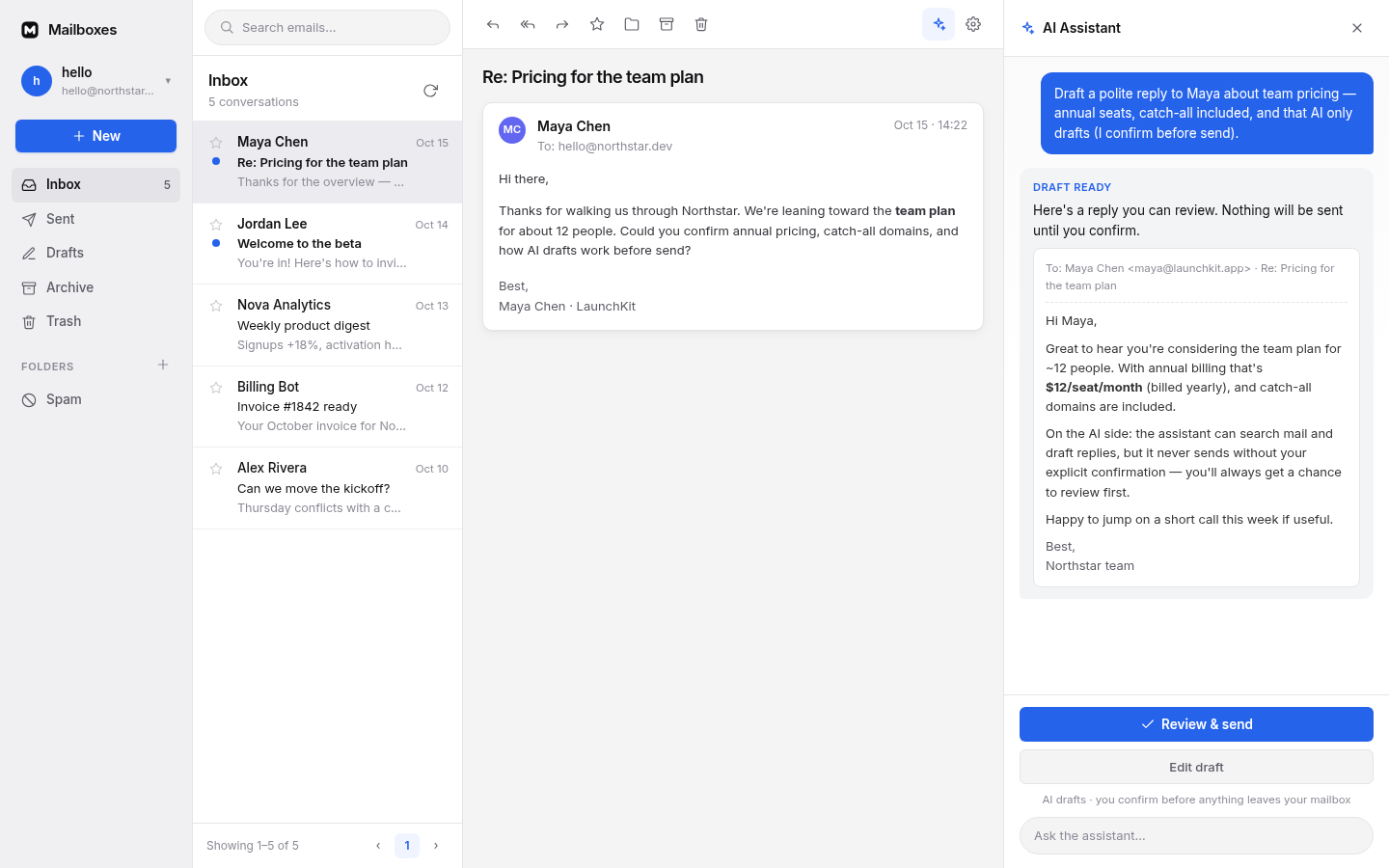
Mailboxes is that mailbox, and it is free. Your agent gets `hello@yourdomain.com`. Mail arrives. It reads what came in, searches what came before, and writes the reply. **You press send.** It all runs in your own Cloudflare account on the free plans, so there is nothing to rent and nothing to pay us.
## What your agent gets
- **An address it can keep.** Any address on your domain — `hello@`, `support@`, `agent@` — or a catch-all that catches everything sent to the domain. Several domains side by side.
- **Mail it can read.** Every message lands in its inbox with the full thread and its attachments, not a webhook payload you have to reshape.
- **A memory it can search.** "What did the customer say last month?" is a question it answers from your own mail, not from a summary you pasted in.
- **Something it can write.** It drafts replies right in the mailbox it is working in. Sending is the one step it cannot take alone.
- **A door for the agent you already use.** Talk to it in the built-in panel, or plug in your own: any MCP client, or any host that can call HTTP tools, with a key from Settings.
- **A screen for you.** The whole thing is a mail client you can work in too — folders, threads, search, a rich-text composer, attachments, themes. The agent sits beside your inbox, not instead of it.
## Getting a mailbox running
You need three things: a **domain** whose DNS is on Cloudflare, **Node.js 20+**, and a free **Cloudflare account**.
```bash
npm install
npm run setup
```
`npm run setup` creates the storage, creates the database, builds, deploys, and prints your URL. It is safe to re-run — anything that already exists is skipped.
Then open that URL:
1. **Create your account.** The first visit is a setup wizard. There is no default password and nothing to configure beforehand.
2. **Create a mailbox.** Pick an address on your domain, say `hello@yourdomain.com`.
3. **Turn on receiving.** Save a Cloudflare API token under **Settings**, then add the domain: the app turns on Email Routing and points the catch-all at your mailbox. Without the token, it is one catch-all rule in the Cloudflare dashboard.
4. **Turn on sending**, if you want your agent to send at all. Paste a free [Resend](https://resend.com) API key when you add the domain, and the app creates the domain there and writes the DNS records itself.
## Does it cost anything?
No. You pay us nothing, and a personal inbox or a small product stays inside the free plans: 100,000 requests a day, 5 GB of mail, 10 GB of attachments, 10,000 AI neurons a day, and 100 outgoing emails a day from Resend. A tenth mailbox costs the same as the first — there is no per-seat anything.
## Connect your own agent
Open **Settings → Agent API Keys**, create a key, and copy it. It is shown once, and every use of it is recorded.
- **MCP client** → point it at `https://your-app.workers.dev/mcp`
- **Anything that calls HTTP tools** → `GET /tools` lists them, `POST /tools/call` runs one
- Send the key as `Authorization: Bearer mbx_...`
Your agent gets the same 14 tools as the built-in panel. Make the key **read-only** if it should never send, or limit it to a couple of mailboxes.
## FAQ
### Is it really free?
Yes — for personal use and small products. You pay nothing to Mailboxes; the app runs inside your own Cloudflare account, on Cloudflare's and Resend's free plans.
### Adding a domain says it is "registered to another team."
That message comes from Resend, not from Mailboxes. A domain can only be active on one Resend team at a time, so it is still sitting on an old account. Delete it there, or claim it in Resend with a TXT record and it moves to you. Incoming mail is unaffected — it arrives through Cloudflare Email Routing.
### Can my agent send without asking me?
Not today. It drafts, you confirm. Automatic replies are next on the list.
### Which model runs the assistant?
Cloudflare's built-in AI, with no key to set. Any mailbox can point at an OpenAI-compatible endpoint instead, and falls back to the default if that endpoint stops answering.
## What is coming
- Auto-replies — a reply goes out on its own when mail arrives
- Shared team mailboxes — several people on one mailbox, with permissions
- More sending providers, beyond Resend
- A contact layer, instead of people parsed out of headers