
BashCut
A native macOS video editor that coding agents can drive.
Everything the UI does, Claude Code and Codex can do through the bashcut CLI or MCP.
Website ·
Quick start ·
Demo videos ·
Download ·
TestFlight beta ·
Docs ·
Automation ·
Plugins ·
Agent kit ·
Issues
Tiếng Việt
---
## Demo videos
Sixteen videos in fourteen genres, each cut by an agent in BashCut from one prompt. Most come with a screen
recording of the agent at work, the prompt, the timeline and the sources and licences:
**[bashcut.birchapps.com/demo](https://bashcut.birchapps.com/demo)**.
| Landscape 16:9 | Vertical 9:16 |
|---|---|
| [A 30-second BashCut ad](https://bashcut.birchapps.com/demo/promo) | [Vertical news: a NASA bulletin](https://bashcut.birchapps.com/demo/nasa) |
| [Travel vlog: sea, river, city](https://bashcut.birchapps.com/demo/travel) | [Beat-cut montage](https://bashcut.birchapps.com/demo/montage) |
| [Explainer: why video is 29.97 fps](https://bashcut.birchapps.com/demo/explainer) | [Podcast to vertical short](https://bashcut.birchapps.com/demo/podcast) |
| [History short: the Battle of Bạch Đằng, 938](https://bashcut.birchapps.com/demo/bachdang) | [Daily vlog: an afternoon walk](https://bashcut.birchapps.com/demo/daily) |
| [Show apartment tour](https://bashcut.birchapps.com/demo/realestate) | [Vietsub a foreign drama clip](https://bashcut.birchapps.com/demo/vietsub) |
| [Tutorial: add captions in a minute](https://bashcut.birchapps.com/demo/tutorial) | [Remove logos and watermarks, before / after](https://bashcut.birchapps.com/demo/logo) |
## Quick start
From zero to your first agent edit in about five minutes. The full guide, with screenshots and prompts to copy, is
at **[bashcut.birchapps.com/quickstart](https://bashcut.birchapps.com/quickstart)**.
1. **Install** (macOS 14+ and Homebrew): `brew install --cask dongnguyenvie/tap/bashcut`. Other ways are under
[Install](#install).
2. **Connect your agent.** Inside BashCut nothing is needed: the Claude and Codex tabs in the agent dock already
have the skills. For Claude Code or Codex in your own terminal, run `bashcut agent setup claude` or
`bashcut agent setup codex`, or add the kit as a Claude Code plugin:
`/plugin marketplace add dongnguyenvie/bashcut-agent-kit`, then `/plugin install bc@bashcut-agent-kit`.
3. **Install the recommended plugins.** Type `/bc:setup` once in a Claude or Codex tab: the agent installs
captions (Whisper), Vietnamese voice, silence markers and the AI Editor, and checks they work. Or do it by hand
in **Plugins › Browse**. API keys go in the plugin's Options, never in the chat.
4. **Make a project**, import your clips and open the Claude tab in the agent dock.
5. **Say what you want**, for example *"Edit these clips into a 60-second vertical vlog. Show me the plan before
you cut."*, or press **Brief** in the agent dock and pick one of 25 templates.
6. **Review, undo, export.** Every change is in History. Ask for a review pass, undo what you dislike, then export.
## About
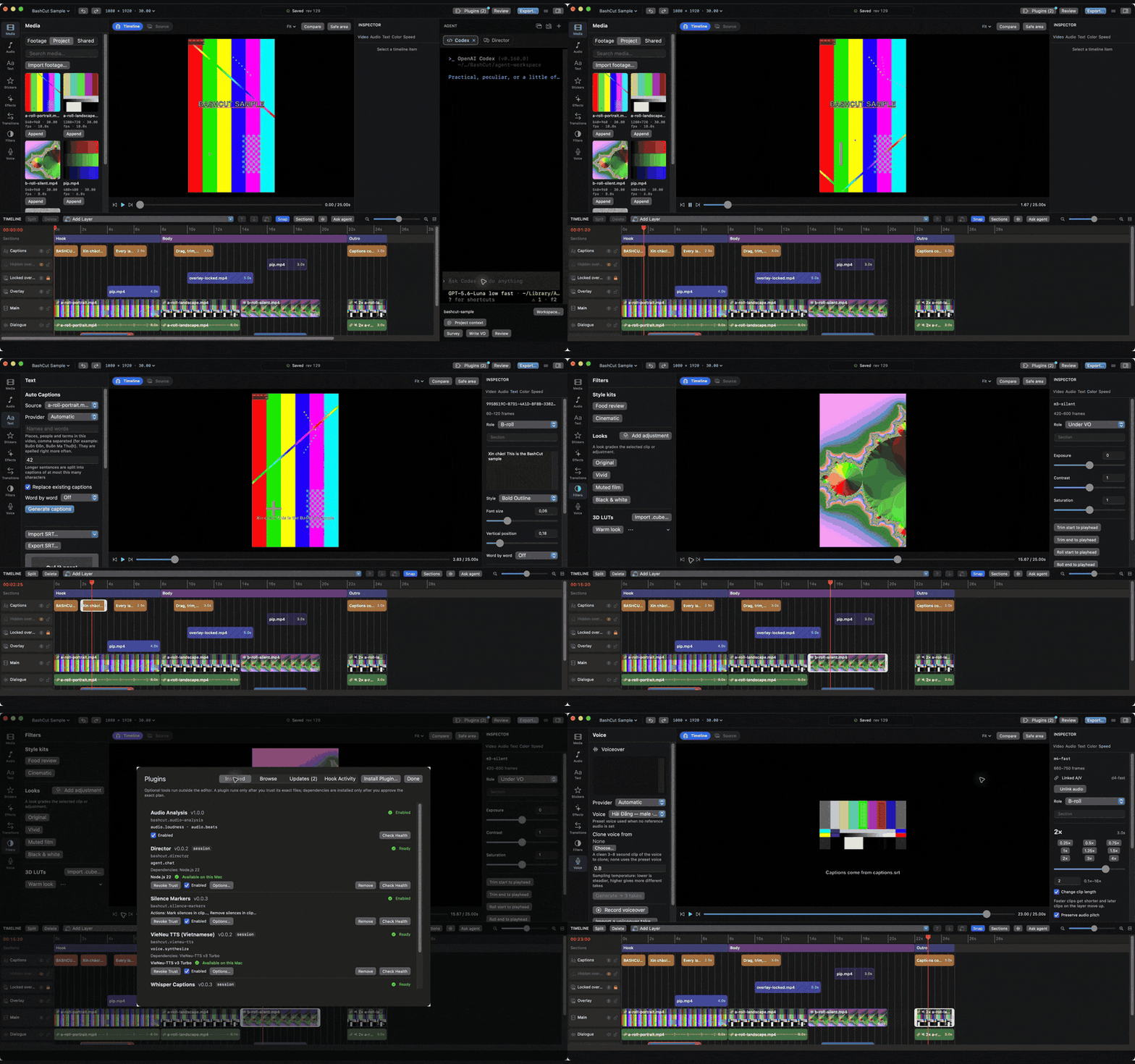
BashCut is a native macOS video editor built on AVFoundation, with a Claude Code / Codex terminal docked beside the
timeline. Preview and export share one composition engine, so what you see is what you export. Projects are
plain JSON next to your footage: agents and scripts read and edit them through the same atomic, undoable edit
operations the UI uses.
BashCut is under active development. See the [CHANGELOG](CHANGELOG.md) for what changed
and [implementation status](docs/status/implementation.md) for what is verified and what is left.
## Use the AI you already pay for
No extra AI bill: BashCut works with the subscriptions and apps you already have.
| You have | How BashCut uses it |
|---|---|
| **Claude subscription** (Pro / Max) | The **Claude** tab in the agent dock runs the real Claude Code CLI with your login. BashCut never passes `ANTHROPIC_API_KEY`, so your plan is used, not API credits |
| **ChatGPT subscription** (Plus / Pro) | The **Codex** tab runs the real Codex CLI with your ChatGPT login |
| **Claude Desktop / Codex app** | Point them at BashCut: `bashcut agent setup claude` or `bashcut agent setup codex` installs the editing skills and the `bashcut` MCP server, so they edit the open project from outside the app |
| **Any other model** (Gemini, GPT, Grok, Mistral, Groq, OpenRouter, a local or OpenAI-compatible server) | Install the **[AI Editor](https://github.com/dongnguyenvie/bashcut-plugins/tree/main/plugins/director)** plugin: a chat agent inside BashCut with your own API key, with thinking levels (`off` / `low` / `medium` / `high`) for reasoning models |
Whichever you pick, the agent edits through the same undoable commands as the UI: every change lands in History,
shows in Show Changes and can be undone. See [Automation](docs/guides/automation.md).
## What's inside
### Editing
- **Layered timeline**: as many video, overlay, text, sticker, adjustment, voiceover, music and SFX layers as you
need, with linked sound, sections, snapping, multi-select, gaps, split, trim, move, lift and ripple delete
- **Viewer and source viewer**: In/Out, Insert/Overwrite, viewer zoom, safe area and before/after compare
- **Speed**: constant speed, reverse, freeze frames and CapCut-style speed ramps (montage, hero, bullet, jump-cut,
flash in/out, or your own curve)
- **Motion**: keyframes for position, scale, rotation, opacity and volume, shown on the timeline, plus animation
presets (zoom, pan, Ken Burns, pop-in, slide-up, zoom-punch); crop and rounded corners
- **Transitions**: 39 kinds in groups (fade, whip, wipe, shape, crash, roll, seamless, glitch…) and saved transition
presets, also as the In and Out of captions, titles, stickers and overlays
- **Still images** and stickers (emoji or image) on the timeline
- **Change the canvas** of an open project (9:16, 16:9, 1:1…) without rebuilding it
- **Reframe and clean up**: subject-aware reframe for a vertical cut, blur fill for off-aspect photos and clips,
blur, mosaic (`pixelate`) and soft edges (`feather`) on a clip, background removal for images
- **Multi-selection**: shared Inspector edits, block moves, copy and paste across projects
- J/K/L playback, full-screen preview, and timeline clips coloured by what they are
### Captions and text
- Transcribe speech into captions with a local Whisper plugin, import and export SubRip
- **Word-by-word captions**: highlight, karaoke and reveal styles
- Text presets for hook titles, place labels, keyword stickers and chapter cards, keeping their style when edited;
Vietnamese and English throughout; two fonts in one title, cover titles that read at phone size, brand kits
- **Vietsub** through the Translate Captions plugin: translate every caption and keep its timing and look, cover
subtitles burned into the footage, and blur channel logos and watermarks
### Color
- LUT import (`.cube`), exposure, contrast and saturation
- **Adjustment layers** and **filter stacks** that grade everything below them
- **Looks** and **style kits**: save a grade (with its LUT) and a caption style, apply them to the next video in one
step
### Sound
- Volume, fades, volume keyframes, loudness normalization at export
- **Music bed** at one fixed level under the voice's measured loudness; ducking under speech only when asked, held
through short gaps so the music does not pump between lines
- Voiceover recording, and text-to-speech takes through a voice plugin (VieNeu TTS for Vietnamese, cloned voices)
- **Beat grid** from the music, for cutting on the beat
- Measure loudness, true peak and speech-band energy, and **sync** a camera with a screen recording by their sound,
without ffmpeg
### Library
- One library for music and SFX, text styles, stickers, effect recipes, transition presets and looks: built-in
items, your own (this project or every project), and packs that plugins ship
- Search, tags, packs, import and export of packs, usage stats, and **search or generate** new items through plugins
(stock photos, video, music and SFX from open sources; AI illustrations with one locked style)
- **All assets search** (⇧⌘F): project media, selects and the whole library in one search, ignoring accents and đ
### Review and export
- Review checks: gaps in the picture, repeated framing between cuts, long caption lines, speech-recognition loops,
voiceover too close to real speech; full history; autosave with crash recovery; reload when files change on disk,
with conflict handling
- Preview proxies for heavy footage; export presets for TikTok, YouTube 1080p and 4K, a quick draft and ProRes,
queued in the background, with burned-in captions and an optional `.srt`; OTIO export. Several outputs (say a
TikTok and a YouTube cut) in one go. An agent's final export waits for a passing draft audit and refuses
graphics still rendered as drafts
- **Batch pipelines**: the same steps over many files or projects (import, captions, translate, cover, export…),
each input in its own project. Build, save and run them in the Batch window or with `bashcut batch`; checks keys,
files and disk space before the run, retries from the failed step and resumes after a quit
### AI agents
- **Agent dock**: real Claude Code, Codex and Shell terminals beside the timeline, plus chat agents and terminal
agents from plugins (AI Editor with your own API key, Antigravity…). A two-step setup card sets up the agent
skills and the recommended editing plugins
- **New brief** (⌘K, or the brief bar under the terminal): 25 request templates with chips and fields, recent and
saved briefs, and a **Footage** row for files and folders the agent should import. **To** picks the agent (the
last used by default, or start a new one); the brief waits until the agent is ready
- **Folder trust in BashCut**: BashCut asks before Claude Code or Codex works in a new folder, and accepts Claude
Code's Bypass Permissions mode in the same sheet, so the CLIs' own menus do not show
- **Send to Agent**: select clips and send them with your request; the **scope guard** keeps the agent's edits to
those clips, or asks you first
- **Show Changes**: see what an agent changed, jump to it, and undo it as one step
- **Knowledge**: agents remember lessons, your preferences and project facts between sessions; review them in the
Knowledge window's inbox, edit project notes and skills, and revert any change from its history
- The **[agent kit](https://github.com/dongnguyenvie/bashcut-agent-kit)**: editing skills (footage survey, beat
cuts, sound mix, captions, colour, effects, voiceover, style study, self-learning) loaded into every agent tab
- **Agent permissions**: choose what agents may do without asking (edits, exports, plugin actions), or allow
everything
### Skills
The agent kit's skills show as `bc:` in Claude Code and Codex:
- `bc:edit-workflow`: the whole edit from intake to export, with gates, a checklist and audits; read it first
- `bc:footage-survey`: inventory, contact sheets and shot descriptions before cutting
- `bc:rough-cut`: selects by quote, retakes, padding and long → short
- `bc:beat-cut`: cuts on the beat or on sentences, rhythm checked by measurement, punch-ins
- `bc:audio-mix`: the mix measured by role, levels, ducking, music, SFX and loudness per output
- `bc:voiceover`: narration sized to its windows, text-to-speech takes checked and re-taken in place, dubbing
- `bc:captions-text`: captions, word timings, titles, cards and fonts that draw the language
- `bc:color-grade`: measured grading, looks and LUTs
- `bc:effects`: which effect fits which moment, with native transitions, speed and reframes
- `bc:visual-plan`: what the viewer sees on every line of a talking video
- `bc:motion-graphics`: designed graphics over footage (cards, counters, kinetic type)
- `bc:stock-images`: stock photos, video and icons placed as illustration
- `bc:style-study`: a reference style measured and turned into a memo, a look and text presets
- `bc:library`: making, harvesting and pruning library items
- `bc:review`: the critic loop before export
- `bc:self-learn`: lessons, preferences and facts in BashCut's knowledge
- `bc:setup`: installs the recommended plugins (only when you type `/bc:setup`)
Topic recipes (`bashcut.vlog:plan`, travel, food, explainer, hook script, publish…) ship with the Vlog plugin in
[bashcut-plugins](https://github.com/dongnguyenvie/bashcut-plugins) and load as plugin skills.
### Automation
- The `bashcut` CLI and MCP server cover every UI action, dialog, shortcut and view: 248 commands, with dry runs,
revision checks and one undoable edit per call ([command reference](docs/reference/commands.md))
- **The edit as one list**: `plan check` validates a whole cut (clips, captions, titles, transitions, voiceover,
graphics and the mix) and `plan apply` builds it in one undoable step, keeping edits made by hand
- `ui frame` renders any frame to a PNG, so an agent can look at its own work
- Command palette (⇧⌘P), a full Mac menu bar and searchable Settings
### Plugins
- Out-of-process plugins in any language: capabilities (transcription, voice, beats, loudness, sync, library search
and generate), actions in menus and context menus, hooks on editor events, options, chat and terminal agents,
library packs and **agent skills** that teach agents how to use them
- **Plugin UI**: a plugin can have its own panel in the left rail, tabs in the agent dock, sheets and windows that
keep the timeline editable, with views
BashCut draws natively from the components the plugin sends (lists, forms, buttons, images, audio previews); plugins
can build on each other (generate speech through your voice plugin, require another plugin)
- A signed [plugin registry](https://github.com/dongnguyenvie/bashcut-plugins) with Browse, one-click install, daily
update checks, Trust per plugin and dependency setup that never needs Terminal; plugins from a link or a folder
too. See [Writing plugins](docs/guides/plugins.md)
## Install
Requires macOS 14 or later.
### Homebrew
```sh
brew install --cask dongnguyenvie/tap/bashcut
```
This installs `BashCut.app` into `/Applications` and links the `bashcut` CLI and `bashcut-mcp` server into
Homebrew's `bin`, so agents in any terminal can drive the app. Update from **BashCut › Check for Updates… › Update
Now** (Homebrew downloads the release, then BashCut quits and opens the new version) or `brew upgrade --cask bashcut`; remove
with `brew uninstall --cask bashcut` (add `--zap` to also delete settings and caches).
### Download a release
Download `BashCut-.dmg` (or `.zip`) from the [latest release](https://github.com/dongnguyenvie/BashCut/releases/latest),
open it and drag BashCut to Applications. Builds are signed with Developer ID and notarized by Apple; check a download
against the release's `SHA256SUMS` with `shasum -a 256 -c --ignore-missing SHA256SUMS`. To use the CLI from a terminal, link it yourself:
```sh
sudo ln -s /Applications/BashCut.app/Contents/MacOS/bashcut /usr/local/bin/bashcut
sudo ln -s /Applications/BashCut.app/Contents/MacOS/bashcut-mcp /usr/local/bin/bashcut-mcp
```
### TestFlight
Join the public beta on [TestFlight](https://testflight.apple.com/join/XwsNZxre) (needs the TestFlight app). The
TestFlight build is the sandboxed Mac App Store build: it runs only the plugins bundled with the app, and its
bundled CLI cannot run from a regular terminal.
Or build BashCut from source, below.
## How to Build
Requires macOS 14+, Xcode with Swift 6, and network access for the first package resolution.
```sh
scripts/run.sh
```
This builds with SwiftPM, packages `build/BashCut.app`, signs it with a Developer ID Application identity
(else the first Apple Development one, or `BASHCUT_SIGN_IDENTITY`) so macOS keeps folder-access grants across rebuilds
and shares them with an installed release, and opens it. The
app executable is `BashCutApp` and the bundled CLI is `bashcut`, avoiding a name collision on case-insensitive
disks.
To try a change against every timeline case, generate the [sample project](docs/guides/sample-project.md) shown
above (needs `ffmpeg`):
```sh
scripts/sample-project.py
```
For Xcode, install XcodeGen >= 2.46, then run `scripts/generate-project.sh` and open `BashCut.xcodeproj`
(generated from `project.yml`). Xcode builds the string catalog; the SwiftPM launcher copies equivalent `.strings`
resources. The UI follows the system language.
## Verify
```sh
scripts/verify.sh build
scripts/verify.sh test
scripts/verify.sh perf # 20 synthetic clips, ~30 seconds, 1080×1920
scripts/verify.sh lint # requires SwiftLint
scripts/verify.sh xcode test # regenerates and tests the Xcode project (requires XcodeGen)
```
Pure model tests also run on their own with `cd Packages/BashCutCore && swift test`. Tests never use the real
video workspace or agent CLIs, and package downloads happen at dependency resolution, not in tests.
`scripts/bench-agents.py` is a manual A/B bench that runs one brief with Claude Code and Codex, launched as the app
launches them, and compares tokens, tool calls, time and the final review; results are in
[implementation status](docs/status/implementation.md).
## Related repositories
Two other repositories are part of BashCut. Contributions are welcome in each:
| Repository | What it holds | Contribute there |
|---|---|---|
| [bashcut-plugins](https://github.com/dongnguyenvie/bashcut-plugins) | The plugin registry (`registry.json`) and its plugins: Whisper Captions, VieNeu TTS, Translate Captions, Silence Markers, HyperFrames Graphics, Image Generation, Online Resources, Vlog recipes, AI Editor and Antigravity | New plugins and fixes to existing ones. See [Writing plugins](docs/guides/plugins.md) |
| [bashcut-agent-kit](https://github.com/dongnguyenvie/bashcut-agent-kit) | Editing skills for Claude Code and Codex (footage survey, beat cuts, audio mix, captions, colour, effects, voiceover…). BashCut ships them and loads them in its agent tabs | Editing know-how that agents should follow. See its README › Writing skills |
Changes to the editor itself, its commands and the plugin API belong in this repository.
## Documentation
- [Documentation index](docs/README.md): guides, reference and design specs
- [Automation: CLI and MCP](docs/guides/automation.md) and the generated
[command reference](docs/reference/commands.md)
- [Project format](docs/reference/project-format.md)
- [Implementation status](docs/status/implementation.md)
- [CONTRIBUTING.md](CONTRIBUTING.md): build layout and one-file templates (agent providers, model adapters,
commands, capabilities, timeline formats)
- [CHANGELOG.md](CHANGELOG.md)
## License
MIT. See [LICENSE](LICENSE).