# Testing Files Generator - make real test files at any exact size
Follow me:
[](https://github.com/donislawdev/TestingFilesGenerator/actions/workflows/ci.yml)
[](https://github.com/donislawdev/TestingFilesGenerator/releases/latest)
[](https://github.com/donislawdev/TestingFilesGenerator/releases)
[](LICENSE)



**Testing Files Generator** is a tool for QA engineers and developers who need real
files to test against - an upload form, a parser, anything that takes a file and
has an opinion about it. You pick one of its 31 formats and the size you want,
and you get **exactly that**: ask for a 10 MB PDF and you get a PDF that a reader
will open, at 10 MB to the byte. Every run also leaves a manifest saying **what
your system should do with each file**, which is the part other generators leave
to you. GUI + CLI
⭐ **If it saved you time, leave a star.** That is how the next tester who
needs it finds out it exists.
## ⚡ What it can do
- **Hit an exact size, to the byte** - ask for 10485761 bytes and get exactly
that, never a silently rounded file.
- **Write 31 real formats** - a generated PNG opens in an image viewer, a DOCX
opens in Word, a ZIP extracts. Not padded zeros with an extension.
- **Say what should happen to each file** - the manifest carries an expected
outcome, so your test reads the assertion instead of you writing it out.
- **Repeat itself byte for byte** - same recipe and seed, same bytes, on any
machine. Commit a small recipe instead of large binary fixtures.
- **Build a boundary set in one command** - one byte under a limit, the limit
itself, one byte over. That is where off by one errors live.
- **Produce ten thousand files at once** - one command, one manifest, and sizes
drawn from the seed.
- **Fill an archive for real** - a ZIP that holds 200 documents, not a stub with
the right extension.
- **Take settings per format** - image dimensions, JPEG quality, PDF pages,
spreadsheet rows and columns.
- **Fit into CI** - an exit code for every ending, machine readable output, and
nothing on standard output when a run fails.
- **Clean up after itself** - `verify` tells you nothing moved, `cleanup`
removes exactly what it wrote and nothing else.
- **Work completely offline** - no account, no cloud, no telemetry, no update
check. The command line binary has no network stack compiled into it at all.
- **Cost nothing and stay out of your way** - GPL-3.0, and the files you
generate are yours with no strings attached.

## 🧭 Table of contents
This README is also the manual. The short version is above the line, the full
reference is below it.
- [What it can do](#-what-it-can-do)
- [Install](#-install)
- [Quick start](#-quick-start)
- [Formats it generates](#-formats-it-generates)
- [Presets](#-presets)
- [The problem it solves](#-the-problem-it-solves)
- [What makes it different](#-what-makes-it-different)
- [Reference](#reference)
- [Commands](#️-commands)
- [Recipes](#-recipes)
- [Formats in detail](#-formats-in-detail)
- [The manifest](#-the-manifest)
- [The desktop window](#️-the-desktop-window)
- [Using it in CI](#️-using-it-in-ci)
- [Questions](#-questions)
- [Where this is](#-where-this-is)
- [Everything inside a generated file is made up](#-everything-inside-a-generated-file-is-made-up)
- [Licence](#-licence)
## 📦 Install
**Download a binary.** Take the archive for your system from the
[releases page](https://github.com/donislawdev/TestingFilesGenerator/releases),
unpack it and run it. `tfg` is the command line, `tfg-gui` is the desktop
window. The Windows and macOS downloads are signed, so they start without a
warning about an unknown developer. The Linux ones are not, because desktop
Linux has no equivalent to sign them with.
**With Docker.** The command line also comes as an image for Linux, on x64 and
Arm. It holds the program from the release archive and nothing else, and it
runs with no network:
```
docker run --rm --network none -v "${PWD}:/work" ghcr.io/donislawdev/tfg:0.5.0 generate --format pdf --size 1mb
```
The files land in the current directory. On Linux add
`--user "$(id -u):$(id -g)"`, so the image may write there and the files
belong to you. With no directory mounted the run stops with exit code 5
instead of writing files that disappear with the container.
**With Go installed:**
```
go install -tags noasm github.com/donislawdev/TestingFilesGenerator/cmd/tfg@latest
```
**From source.** Needs Go 1.27.3 or newer, and nothing else:
```
git clone https://github.com/donislawdev/TestingFilesGenerator
cd TestingFilesGenerator
go build -tags "$(cat .github/build-tags)" ./cmd/tfg
```
**The tag is not optional.** The AVIF encoder has an assembly path that reads
past the end of a buffer and takes the process down on some picture sizes, and
the tag turns it off. Building without it does not compile, and says so. The
files it produces are the same either way.
The desktop window is a second binary,
`go build -tags "$(cat .github/build-tags)" ./cmd/tfg-gui`. It draws
through OpenGL and reaches it through C, so that one needs a C compiler and is
built natively on each system. Built without one it still compiles, and says on
start that it has no window in it and that everything is on the command line.
The window needs OpenGL 2.1 to draw. On Windows the archive carries a
software renderer for machines whose graphics driver offers none - Mesa
llvmpipe, in an `opengl` folder next to `tfg-gui.exe` - and the window uses it
by itself when the driver refuses: a virtual machine without 3D acceleration,
a remote desktop, a server. Drawn that way it is slower and says so on its
About screen. On a machine with a driver the folder is not touched unless
you ask: `tfg-gui --software-gl` loads the renderer on any Windows machine,
which is the way to see the window as a machine without a driver sees it. Keep
the folder next to the program: without it, and without a driver, the window
says what it looked for in a dialog and on standard error, and exits 1. Linux
has Mesa in the system and macOS has never lacked what the toolkit needs, so
nothing of the kind ships there, and there the flag says so and changes
nothing. The command line needs no graphics driver and does everything the
window does.
## 🚀 Quick start
**1. Make a file.** One PNG, exactly two megabytes:
```
tfg generate --format png --size 2mb --out ./out
```
**2. Make a lot of files.** Ten thousand log files, each between one and eight
kilobytes, with the sizes drawn from the seed so tomorrow gives the same set.
**Give each run its own directory** - the manifest is the only record of what a
run wrote, so the tool refuses to write a second one over it:
```
tfg generate --format log --size-range 1kb-8kb --count 10000 --out ./logs
```
**3. Check them, then remove them.**
```
tfg verify ./logs/manifest.json
tfg cleanup ./logs/manifest.json --yes
```
```
logs matches ./logs/manifest.json: 10000 files checked
```
**Sizes count in 1024s**, the way your file manager does, so `2mb` means
2097152 bytes. A plain byte count works too: `--size 2097152`.
## 📁 Formats it generates
Every one is a **real file of that format** - it opens in the software that
owns it, at the exact size you asked for:
| group | formats |
|---|---|
| 📄 **Documents** | `pdf`, `docx` (Word), `xlsx` (Excel), `pptx` (PowerPoint), `rtf` (Rich Text Format) |
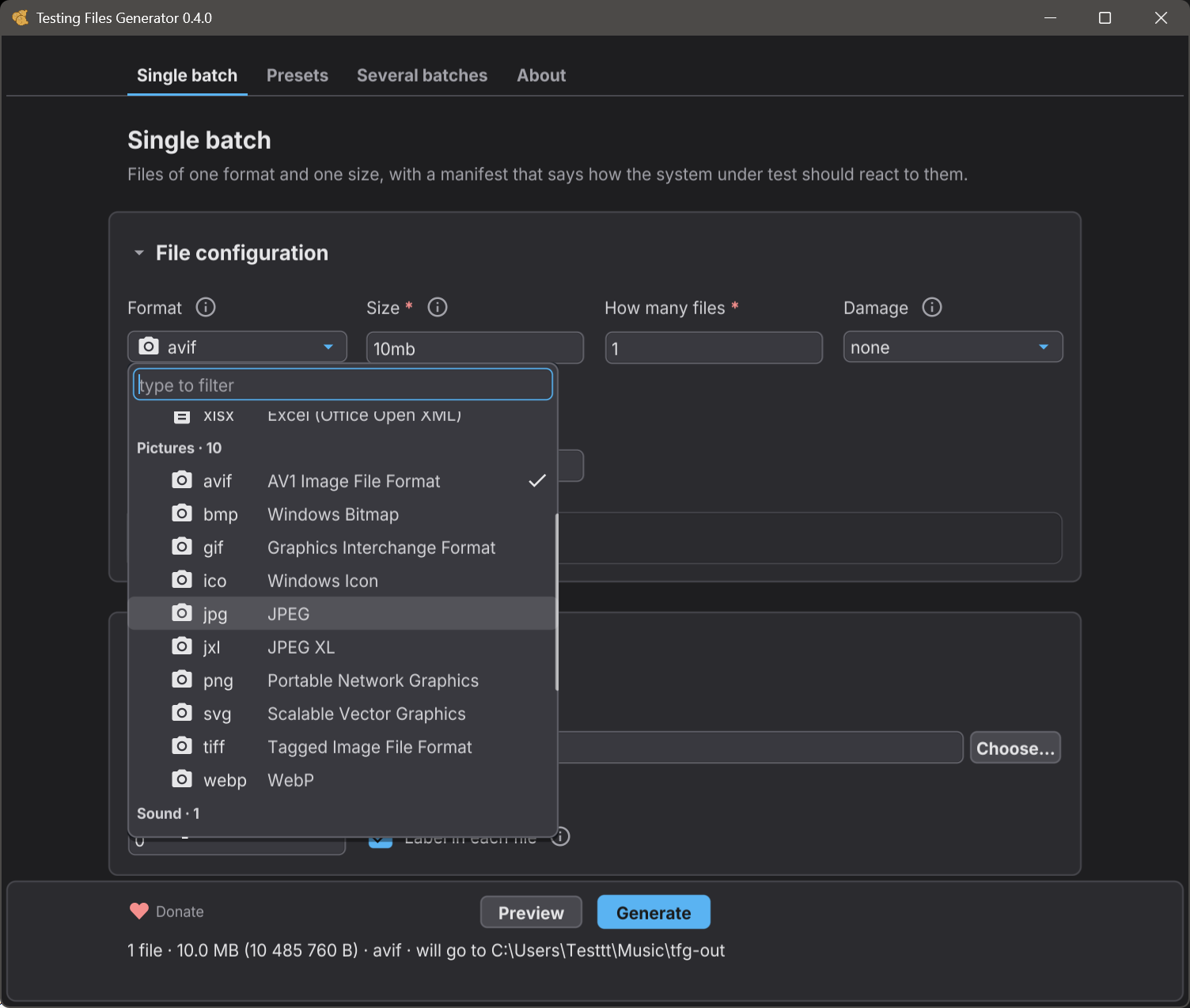
| 🖼️ **Images** | `png`, `jpg`, `bmp`, `gif`, `ico`, `svg`, `tiff`, `webp`, `avif`, `jxl` |
| 📝 **Text and markup** | `txt`, `md`, `csv`, `json`, `xml`, `html`, `log` |
| ⚙️ **Configuration** | `yaml`, `toml` |
| 🗺️ **Maps** | `geojson` (RFC 7946) |
| ✉️ **Mail** | `eml` (RFC 5322 with MIME, real files attached) |
| 🗜️ **Archives** | `zip`, `targz` (`.tar.gz`) |
| 🔊 **Audio** | `wav` |
| 🎞️ **Video** | `webm`, `mp4` (both AV1, no sound) |
Coming next: `7z`, `mp3`.
Most of them take settings of their own - image dimensions, JPEG quality, PDF
page count, rows and columns in a spreadsheet, what goes inside an archive. See
[format settings](#per-format-settings).
## 🧪 Presets
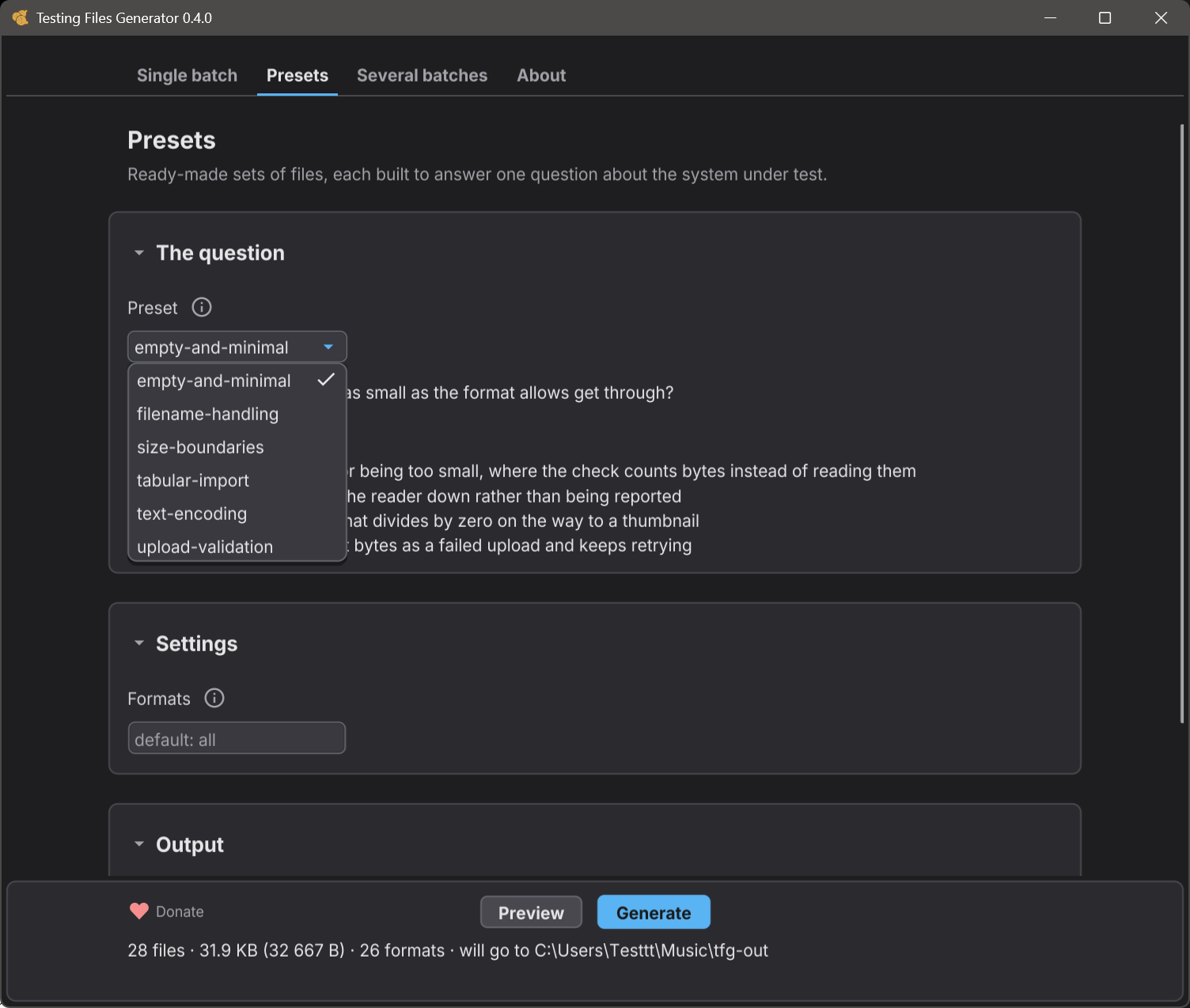
A preset is a ready-made set of files that answers one common testing question,
so you do not have to design the set yourself. Every file in it says what it is
for, and the manifest says how your system should react to it:
| preset | the question it answers |
|---|---|
| `empty-and-minimal` | Does a file that is valid and as small as the format allows get through? |
| `filename-handling` | Will my system store, show and give back a file name it did not expect? |
| `size-boundaries` | Is a size limit enforced exactly where it is declared? |
| `tabular-import` | Does my table import survive what real tools export? |
| `text-encoding` | Does my reader know which encoding a file is in, or is it guessing? |
| `upload-validation` | Does my upload form take what it should and turn the rest away? |
```
tfg preset show size-boundaries
tfg generate --preset size-boundaries --limit 10mb --out ./limits
```
`show` tells you what the set would cost before you build it, and says outright
when a number is a placeholder of ours rather than a limit of yours. Presets are
ordinary recipes underneath - `tfg preset eject size-boundaries` prints the
recipe and you edit it from there. The Presets screen of the window offers the
same ones.
## 🤔 The problem it solves
You are testing software that accepts files from people. Sooner or later you
need:
- a PDF of **exactly** 10 MB, to find out whether the upload limit is real
- the three files that sit either side of that limit, to catch off by one errors
- 10,000 log files, to see what the nightly job does when the folder is big
- a ZIP that genuinely holds 200 documents, not a stub with the right extension
- a 4 GB file, without keeping a 4 GB file in your repository
- the **same** fixtures on your laptop and on the build server, byte for byte
Making one such file by hand is easy. Making them repeatedly, at exact sizes, in
formats that really open in real software, is the tedious part - and that is the
part this replaces.
**Who it is for:** QA engineers, test automation, and anyone whose code has an
upload form, an import routine, a parser or a storage quota behind it.
## ⭐ What makes it different
Other generators stop at the bytes. They hand you a folder, and you are still
the one deciding what each file is supposed to prove.
This one answers the question your test actually asks: **what should happen when
this file arrives?**
Every run writes a `manifest.json` beside the files - a plain list of everything
it produced, and for each entry a declared expectation. Say your upload endpoint
allows 1 MB. Ask for the three files that sit on that line:
```
tfg generate --preset size-boundaries --limit 1mb --spread 1B --format pdf --out ./edges
```
| file | bytes | your system should | because |
|---|---|---|---|
| `1mb_under_1b.pdf` | 1048575 | **accept** it | it is inside the limit |
| `1mb_at_limit.pdf` | 1048576 | **accept** it | the limit itself is allowed |
| `1mb_over_1b.pdf` | 1048577 | **reject** it | `size_limit` |
Three files, three different answers, in machine readable form. Your test reads
the manifest instead of you hand writing the assertions:
```python
import json
import os
directory = "edges"
manifest = json.load(open(os.path.join(directory, "manifest.json")))
for entry in manifest["files"]:
response = upload(os.path.join(directory, entry["path"]))
outcome = entry["expected"]["outcome"]
if outcome == "accept":
assert response.ok, entry["path"]
elif outcome == "reject":
assert not response.ok, entry["path"]
```
A run from a preset also writes `manifest.instructions.md` - the same facts for
a person to read: every file, what your system should do with it and why the
file is in the set.
And where the right answer genuinely depends on your own policy, the manifest
says `unspecified` instead of inventing one. A generator that guesses produces
false failures, and a suite that cries wolf gets switched off.
---
# Reference
Everything the tool does, in one place.
## 🎛️ Commands
```
tfg generate produce files, from a recipe or from flags
tfg validate check a recipe and write nothing
tfg verify check a directory against a manifest
tfg cleanup remove the files a manifest lists
tfg recipe fmt print a recipe in its settled shape
tfg preset build a set of files from a named test question
tfg formats list the formats this build supports
tfg damage list the ways this build can break a file on purpose
tfg tool small things to do with files you already have
tfg version print the tool version
tfg license print the licence and what it means for generated files
```
### `tfg generate`
```
tfg generate [flags] settings come from the file
tfg generate --format txt --size 1mb settings come from the flags
```
| flag | what it does |
|---|---|
| `--format ` | format of the files, for example `txt` |
| `--size ` | exact size of every file, such as `10mb` or a plain byte count |
| `--size-range ` | a size drawn per file from a range, such as `1kb-8kb`. The draw comes from the seed |
| `--boundary ` | three files around a limit: one byte under, the limit, one byte over |
| `--count ` | how many files to produce. Default `1` |
| `--id ` | target id, the anchor the seeds are derived from. Default `files` |
| `--name ` | name template, for example `invoice_{index:04}.txt` |
| `--out ` | directory to write into. Default `.` |
| `--seed ` | run seed. The same seed gives the same bytes |
| `--set =` | a format setting, repeatable: `--set width=1920 --set height=1080` |
| `--damage ` | break the files on purpose, repeatable and applied in order. Run `tfg damage` for the list |
| `--expected ` | `accept`, `reject`, `sanitize` or `unspecified` |
| `--expected-reason ` | why that outcome, from the closed list below |
| `--preset ` | build the set a named test question calls for |
| `--clean` | turn off the self describing label written inside each file |
| `--dry-run` | count and show, write nothing at all |
| `--json` | write the manifest to standard output |
| `--memory ` | how much memory the run may use: `auto` (the default, half of what this machine gives the program), a size such as `8gb`, or `off` for no limit. Pictures wait for room rather than all being held at once, and a plan larger than this is refused before anything is written. When a run gets close to this amount, the program frees memory more often, which makes the run slower. A run that needs more memory than this still gets it. Under `auto`, a plan of up to 2.0 GB is never refused. Also on `validate` and `preset show` |
### `tfg validate`
```
tfg validate [--json] [--memory ]
```
Checks a recipe and writes nothing. Reports **every** problem at once rather
than the first, and each one names the setting it is about. Prints a hash of the
recipe in its settled shape - the same hash that goes into the manifest.
### `tfg verify`
```
tfg verify [--against ] [--json]
```
Reports files that are missing, files nobody asked for, and files whose content
has changed. `--against` picks a different directory - by default it checks the
one holding the manifest.
### `tfg cleanup`
```
tfg cleanup [--yes] [--force] [--with-manifest] [--against ] [--json]
```
Removes what the manifest lists and **nothing else**. Without `--yes` it deletes
nothing and prints what it would remove. A file whose content changed since it
was written is left alone and reported, because it may not be ours - `--force`
removes those too. `--with-manifest` removes the manifest and the instructions
beside it as well, once every file it lists is gone. The list printed without
`--yes` names them too.
### `tfg recipe fmt`
```
tfg recipe fmt [-w] [--check]
```
Prints a recipe in its settled shape, comments kept. `-w` writes it back to the
file, `--check` prints nothing and ends with code `3` when the layout is not
settled - useful in a pre-commit hook. It says nothing about whether the recipe
is **valid**, which is what `tfg validate` is for.
### `tfg preset`
```
tfg preset list [--json] what this build offers
tfg preset show [--json] what it takes and what it would produce
tfg preset eject -o my.yaml the recipe it stands for, to edit
```
`-o` writes the recipe byte for byte as it would be printed, and refuses a file
that is already there. `tfg preset eject > my.yaml` does the same in cmd,
bash and PowerShell 7. Windows PowerShell 5.1 saves it as UTF-16, which `tfg`
refuses to read, so use `-o` there.
### `tfg formats`
```
tfg formats [--json] every format, with fidelity, determinism and smallest size
tfg formats what a single format accepts
```
### `tfg tool`
```
tfg tool list [--json] the tools this build has
tfg tool show [--json] what one tool works on and takes
tfg tool checksum [--algorithm sha256] [--expected ] [--json]
tfg tool checksum-write [--algorithm sha256] [--json]
tfg tool checksum-check [--json]
tfg tool archive-scan [--unpacked_limit ] [--json]
```
Small things to do with files you already have, beside the generator. Every tool
is also on the Tools tab of the window, with the same settings. The first one
works out the checksum of a file - md5, sha1, sha256, sha512 or crc32, sha256
unless you ask - and compares it with one you were given, telling the algorithm
from its length. A checksum that does not match ends with code 7, the same as
`tfg verify`. crc32 is the one ZIP and PNG use, not the one `cksum` prints.
`checksum-write` writes the checksum of every file in a folder into SHA256SUMS
beside them, the same bytes `sha256sum` writes, and never over one that is
there. `checksum-check` checks every file a checksum file lists, in the folder
the checksum file is in. Files it does not list are not looked at, the same as
`sha256sum -c`, and a path that leaves that folder is refused rather than read.
`archive-scan` looks into a ZIP, TAR, TAR.GZ or gzip file without unpacking it
and says whether unpacking it is safe: no entry written outside the folder, no
link, no device, no two names landing on one file, no name a system cannot
write, nothing built to explode and nothing damaged. Archives inside it - a
ZIP in a ZIP, a JAR in a WAR, a DOCX in a TAR - are read the same way, in
memory, up to 16 deep, and a trap in one of them is a trap in the whole: a
program that unpacks everything inside unpacks those too. An archive inside
larger than 256 MB, or than what is left of it while the archives around it
are held, or one this tool does not read, is reported as not checked. `--unpacked_limit 500mb` also reports an archive that unpacks to more
than that, counting the archives inside. Safe ends with code 0, anything found
with 7. A report lists 100 findings of each kind and counts the rest, and what
the tool holds in memory has a ceiling whatever the archive holds.
### `tfg damage`
```
tfg damage [--json] every damage, with the smallest file it takes and its settings
tfg damage what one damage does to the bytes, and what it takes
```
A damaged file comes out **exactly** the size you asked for and is one a reader
refuses, so the manifest records it as expected to be rejected. That is the third
question an upload validator asks - does it open - and until damage arrived every
file this tool wrote was well formed by definition.
Use them with `tfg generate --damage `, repeatable and applied in the order
given, or with the `damage` key of a target in a recipe:
```
tfg generate --format png --size 20kb --count 10 --damage zero-head:bytes=16
```
The smallest file a damage can be given follows its settings, so the column is
measured with the defaults. Ask for less and the run is refused before anything is
written, naming a size that would work.
Asking for `--expected accept` beside a damage is refused too, because nothing
could meet it. Write `sanitize` if the system under test is meant to repair the
file, or `unspecified` if that is the question you are asking - both of those,
and `reject`, work as they always did.
## 📜 Recipes
A recipe is a YAML file describing a whole run. Commit it beside your tests and
the fixtures stop being binaries in your repository:
```yaml
# fixtures.yaml
version: 1
seed: 7741
defaults:
label: true
targets:
- id: invoices
format: pdf
count: 25
size: 300kb
name: invoice_{index:04}.pdf
properties:
pages: 3
page_size: a4
expected: accept
- id: over_the_limit
format: png
count: 2
size: 12mb
expected:
outcome: reject
reason: size_limit
- id: bundle
format: zip
contains:
- format: txt
count: 200
size: 4kb
output:
dir: ./fixtures
manifest: manifest.json
```
```
tfg validate fixtures.yaml
tfg generate fixtures.yaml
```
### Top level keys
| key | meaning |
|---|---|
| `version` | recipe schema version. `1` |
| `seed` | the number that makes a run repeatable. Same seed, same bytes |
| `defaults.label` | write the self describing label inside each file. Default `true` |
| `targets` | the list of things to produce. See below |
| `extends` | a preset to build on, as `preset:size-boundaries`. Its files come first and your `targets` are added after them. See [Building on a preset](#building-on-a-preset) |
| `with` | the preset's parameters, written the way the flags take them: `limit: 5mb`, `spread: 1B,1kb,1mb`, `format: png`. One left out stands in from its default, and the manifest says so |
| `output.dir` | where the files and the manifest go. A relative path is read from the directory you run in, not from the one the recipe sits in |
| `output.manifest` | manifest file name. Default `manifest.json` |
So a recipe kept in `recipes/` with `dir: out` writes into `out` next to you, not
next to the recipe. Give an absolute path, or `--out`, when you want it fixed.
### Target keys
| key | meaning |
|---|---|
| `id` | names the target, and is the anchor its seeds are derived from |
| `format` | one of the formats below |
| `count` | how many files. Default `1` |
| `size` | exact size of every file |
| `size-range` | a size drawn per file from a range, such as `1kb-8kb` |
| `boundary` | three files around a limit: under, at, over |
| `contains` | for archives: entries of `format`, `count` and `size` |
| `name` | name template, such as `invoice_{index:04}.pdf` |
| `label` | override `defaults.label` for this target |
| `group` | a label carried into the manifest, for grouping in reports |
| `properties` | the format's own settings. See the table below |
| `expected` | what your system should do with these files |
**Every target needs exactly one of `size`, `size-range`, `boundary` or
`contains`.** Two of them is an error, and so is none.
### Declaring expectations
Short form, when the outcome is enough:
```yaml
expected: accept
```
Long form, when the reason matters:
```yaml
expected:
outcome: reject
reason: size_limit
```
**Outcomes:** `accept`, `reject`, `sanitize`, `unspecified`.
**Reasons** are a closed list, so a report can group by them:
`content_malformed`, `count_limit`, `dimensions_limit`, `duplicate`,
`encoding_invalid`, `extension_rule`, `filename_invalid`, `filename_too_long`,
`filename_traversal`, `malware_signature`, `mime_mismatch`, `nesting_depth`,
`none`, `size_limit`, `size_zero`.
A reason names **the rule in play**, not the verdict. That is why the same
reason can sit under either outcome - a file one byte under a limit is
`accept`, and the rule it is about is still `size_limit`.
### Building on a preset
A recipe can start from a preset's set and add its own files:
```yaml
version: 1
seed: 7
extends: preset:size-boundaries
with:
limit: 5mb
format: png
targets:
- id: our-legacy-format
format: tiff
count: 1
size: 3mb
```
This is the same run as `tfg preset eject size-boundaries --limit 5mb --format png`
with the extra target typed under it, byte for byte. The file is shorter, it
says which question the set answers, and the manifest records the preset under
`run.preset` with the parameters you left out listed as `defaulted`. A target
whose `id` the preset already uses is refused, never silently replaced. A
recipe with `extends` and no `targets` of its own is legal, and it is how a
preset run is committed to a repository. The `--limit` and other preset flags
do not apply beside a recipe file, and the recipe's `with` is where they go.
### Not built yet
These keys are recognised and **refused with a message saying so**, never
ignored quietly: `policy`, `engine`, `defaults.fill`, `fill` on a target,
`output.split_threshold`. `extends` names a preset and nothing else yet, so a
recipe cannot build on another file.
## 📁 Formats in detail
The formats are listed near the top of this file. Each is produced at an
exact size and checked against independent readers before it ships - a PNG is
opened and its pixels compared, a DOCX is read back by three separate
libraries, an archive is extracted.
```
tfg formats # every format, with fidelity, determinism and smallest size
tfg formats png # what a single format accepts
```
### Per format settings
Set them with `--set key=value` on the command line, or under `properties:` in a
recipe. `tfg formats ` prints the allowed range or list for each:
| format | settings |
|---|---|
| `pdf` | `pages`, `page_size`, `orientation`, `rotate`, `pdf_version`, and the document properties `title`, `author`, `subject`, `keywords`, `creator`, `producer`, `created`, `modified` |
| `png`, `bmp`, `tiff`, `webp` | `width`, `height` |
| `gif` | `width`, `height`, `frames` |
| `avif`, `jpg`, `jxl` | `width`, `height`, `quality` |
| `ico` | `width`, `height`, `embed` |
| `wav` | `sample_rate`, `bit_depth`, `channels`, `content` |
| `webm`, `mp4` | `width`, `height`, `duration`, `change_interval`, `frame_rate`, `keyframe_interval`, `quality` |
| `zip` | `entries`, `entry_format`, `entry_size`, `compression`, `depth`, `directory_entries`, `password`, `encryption` |
| `targz` | `entries`, `entry_format`, `entry_size`, `compression`, `depth`, `directory_entries`, `entry_mode`, `entry_owner` |
| `docx` | `paragraphs` |
| `xlsx` | `rows`, `columns` |
| `pptx` | `slides` |
| `rtf` | `characters`, `text_encoding`, `elements`, `nesting`, `links`, `inline`, `inline_format`, `inline_size`, `picture_data` |
| `csv` | `delimiter`, `line_ending`, `header`, `quote_style`, `columns` |
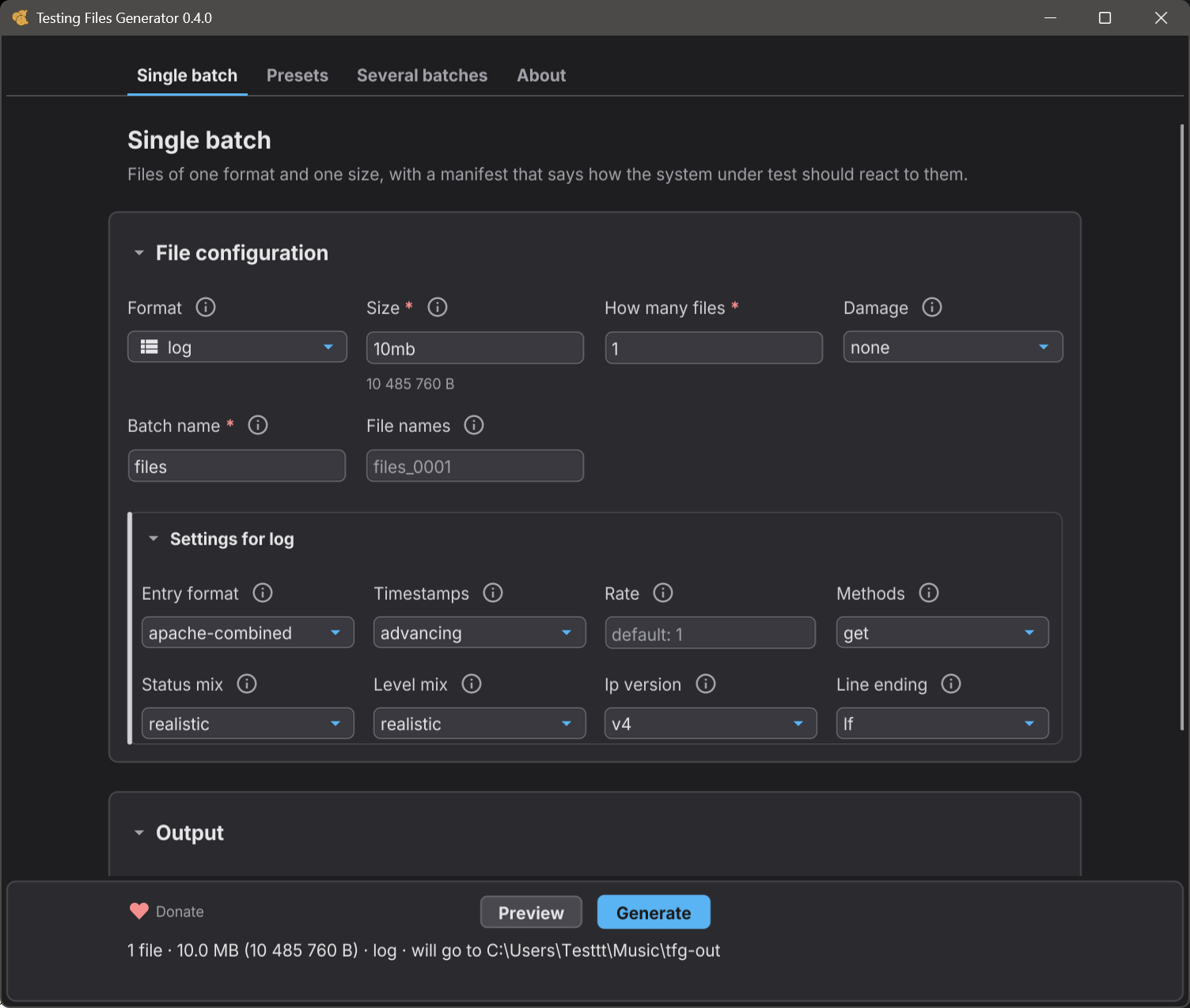
| `log` | `entry_format`, `timestamps`, `rate`, `methods`, `status_mix`, `level_mix`, `ip_version`, `line_ending` |
| `txt`, `md`, `xml` | `encoding`, `bom` |
| `json` | `formatting` |
| `geojson` | `geometry`, `formatting`, `precision`, `altitude`, `vertices`, `holes`, `winding`, `antimeridian`, `unlocated`, `ids`, `bbox` |
| `eml` | `body`, `layout`, `text_encoding`, `charset`, `headers`, `recipients`, `line_endings`, `attachments`, `attachment_format`, `attachment_size`, `filename_style`, `message_depth`, `inline`, `inline_format`, `inline_size` |
| `svg` | `width`, `height` |
| `html` | `structure`, `nesting`, `characters`, `elements`, `links`, `bom`, `formatting`, `styles`, `inline`, `inline_format`, `inline_size` |
| `yaml`, `toml` | none in this build - the document is a fixed shape, and a size is the only thing to ask for |
```
tfg generate --format jpg --size 500kb --set width=1920 --set height=1080 --set quality=85
```
**Ask for a size a format cannot reach and you get an error, never a file of the
wrong size.** The message names the format, the smallest it can be, the reason
for that floor and what to do instead. `tfg formats` lists every floor.
**A locked archive is a fixture, not protection.** `password` and `encryption`
produce an archive that real readers open with a password, which is what makes it
useful for testing one. It offers no confidentiality: the key is worked out from
the run seed so that the same recipe gives the same archive on every machine, and
the password is written into the manifest beside the file so a test can open it.
## 🧾 The manifest
Written next to the files at the end of every run, including a run that was
interrupted. One entry per file:
```json
{
"manifest_version": "1.0",
"tool": { "name": "testing-files-generator", "version": "0.5.0" },
"run": {
"id": "run_b359aa8d94",
"seed": 0,
"command": "tfg generate --format png --size 2mb --out ./out",
"platform": { "os": "windows", "arch": "amd64" },
"complete": true
},
"summary": {
"file_count": 1,
"total_bytes": 2097152,
"by_format": { "png": 1 },
"by_expected": { "unspecified": 1 }
},
"files": [
{
"path": "files_0001.png",
"bytes": 2097152,
"format": "png",
"fidelity": "full",
"determinism": "byte",
"seed": "8dc2d18c",
"hashes": { "sha256": "1a1f7c..." },
"properties": { "width": 640, "height": 480 },
"expected": {
"outcome": "unspecified",
"detail": "No expectation was declared for this file.",
"confidence": "policy_dependent"
}
}
]
}
```
`recipe_hash` is added when the run came from a recipe, and `preset` and
`overrides` when it came from a preset - so a manifest can always be traced back
to what produced it.
Every entry also carries `target_id`, the id of the target in the recipe that
produced the file, and `summary.by_target` counts the files each target came to.
A recipe with several targets can therefore be checked target by target without
reading file names.
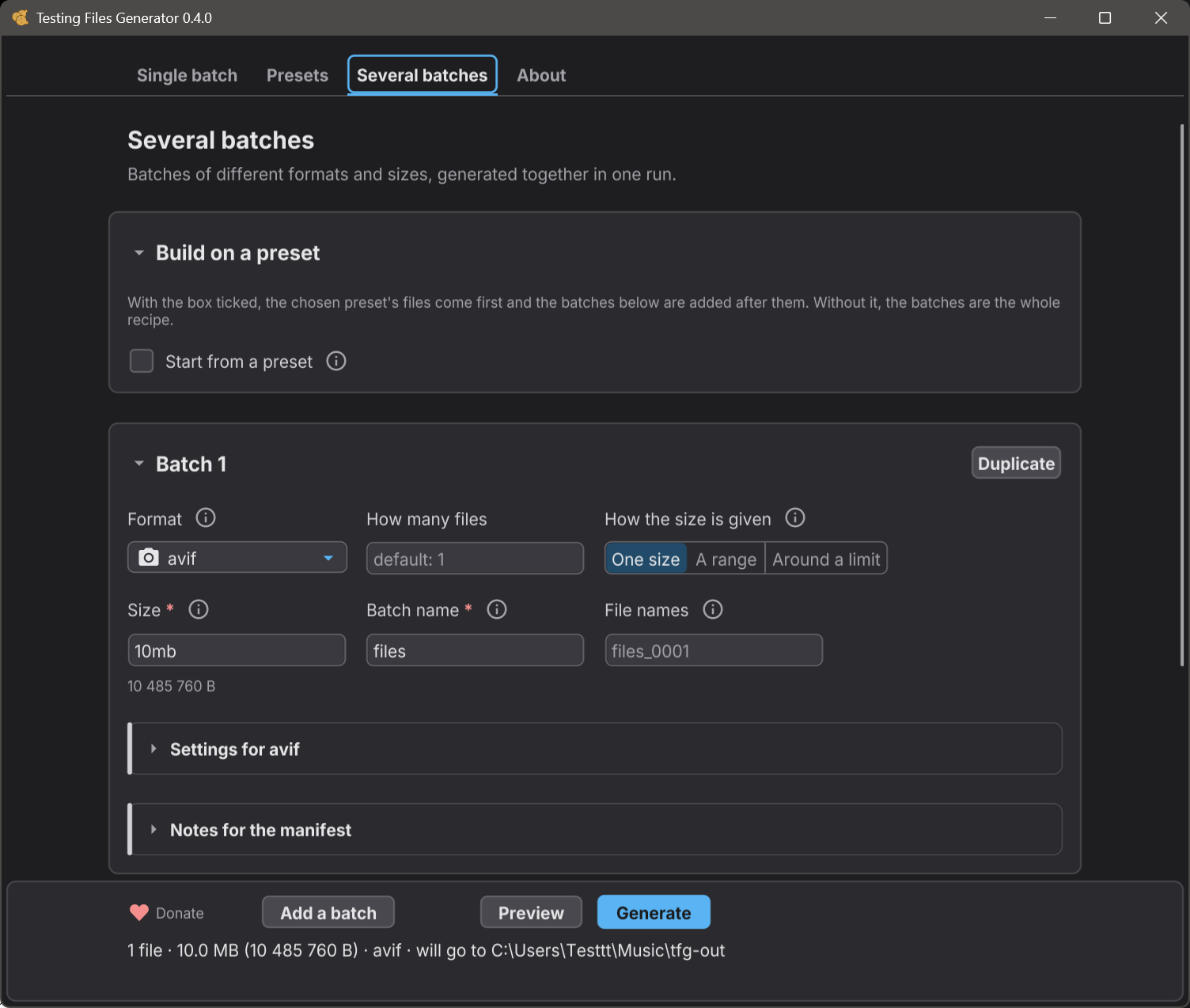
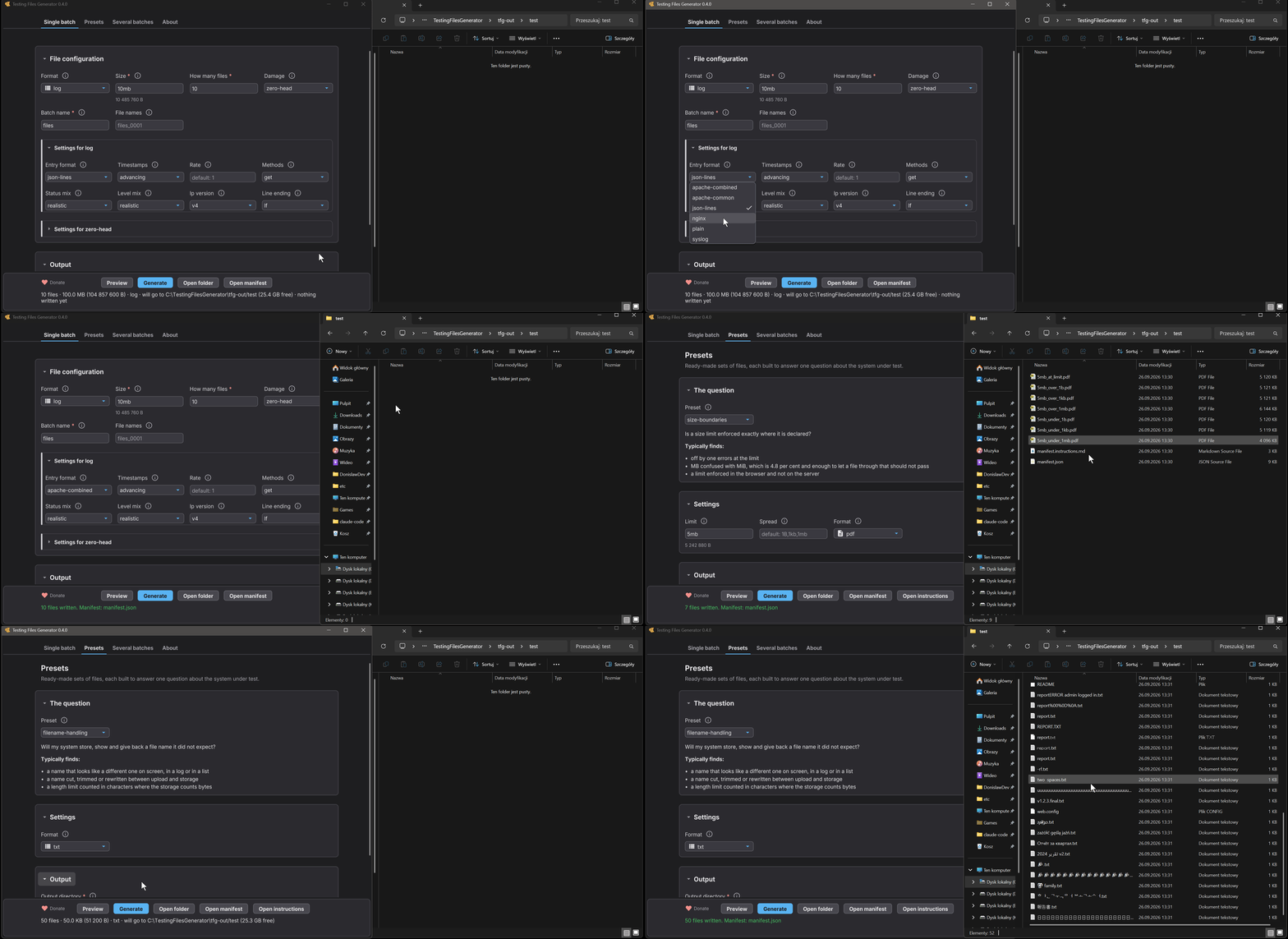
## 🖥️ The desktop window
The same engine with a window on it, for the testing that is not scripted. It is
not a cut down version: a test compares the two interfaces capability by
capability, and anything only one of them can do has to be declared and
justified rather than quietly drifting apart.
Six screens - one batch, presets, several batches at once, tools, preferences,
and about. It shows what a run would cost before writing anything, reports progress
while it runs, and can be cancelled part way without leaving a half written file
behind. The window speaks your system's language when it has it (English and
Polish today) and English otherwise. Preferences lets you choose another, and
says what the window keeps between runs.
It does not open a recipe file yet. Recipes are a command line thing for now,
and the window builds its batches in the form.
## ⚙️ Using it in CI
Built for it. Every ending has its own exit code, machine readable output goes
to standard output, and a failed run prints nothing there:
| code | meaning |
|---|---|
| `0` | everything worked |
| `1` | an unexpected error inside the tool |
| `2` | wrong command or flag |
| `3` | the recipe is not valid |
| `4` | the format cannot do what was asked |
| `5` | a read or write failed |
| `6` | not enough disk space |
| `7` | `verify` found a mismatch |
| `8` | the run finished but not everything was produced |
| `130` / `143` | interrupted by Ctrl+C, or stopped by a signal |
```yaml
- name: build the fixtures
run: tfg generate fixtures.yaml --out ./fixtures
- name: run the tests
run: pytest tests/
- name: nothing moved
run: tfg verify ./fixtures/manifest.json
```
An invalid recipe writes **no files at all** and reports every problem at once,
each naming the setting it is about. A run stopped with Ctrl+C still leaves a
manifest, and never leaves a half written file behind.
### In GitHub Actions
On a Linux runner the Docker image needs no install step:
```yaml
- name: build the fixtures
run: docker run --rm --network none --user "$(id -u):$(id -g)" -v "$PWD:/work" ghcr.io/donislawdev/tfg:0.5.0 generate fixtures.yaml --out fixtures
```
Name the version rather than `latest`, so the same recipe gives the same bytes
next month too.
Windows and macOS runners cannot run that image. There, download the archive
for the runner, check it and put it on the path. Every later step, in any
shell, then has `tfg`. The checksum says the archive arrived whole, and the
attestation says this project's release workflow made it. That attestation is
made over the files as published, after signing, which is why the command
names the SPDX predicate. On macOS this needs an Apple silicon runner, such as
`macos-latest`, because that is the only Mac build there is.
```yaml
- name: install tfg
shell: bash
env:
GH_TOKEN: ${{ github.token }}
run: |
version=0.5.0
arch=amd64
if [ "$RUNNER_ARCH" = ARM64 ]; then arch=arm64; fi
case "$RUNNER_OS" in
Windows) archive="tfg_${version}_windows_${arch}.zip" ;;
macOS) archive="tfg_${version}_macos_arm64.tar.gz" ;;
*) archive="tfg_${version}_linux_${arch}.tar.gz" ;;
esac
cd "$RUNNER_TEMP"
url="https://github.com/donislawdev/TestingFilesGenerator/releases/download/v$version"
curl -fsSLO "$url/$archive"
curl -fsSLO "$url/verify-SHA256SUMS.txt"
grep " $archive\$" verify-SHA256SUMS.txt | shasum -a 256 -c
gh attestation verify "$archive" --repo donislawdev/TestingFilesGenerator \
--predicate-type https://spdx.dev/Document/v2.3
mkdir tfg
if [ "${archive##*.}" = zip ]; then unzip -q "$archive" -d tfg; else tar -xzf "$archive" -C tfg; fi
echo "$RUNNER_TEMP/tfg" >> "$GITHUB_PATH"
```
### A PowerShell script needs one more line
PowerShell does not carry the exit code of a program out of a `.ps1` file. Run
one with `-File` and the script answers `0` even when the tool inside refused
the work, so a build that should be red goes green:
```powershell
tfg generate fixtures.yaml --out ./fixtures
exit $LASTEXITCODE
```
That last line is the whole of it. This is how PowerShell behaves rather than
anything about this tool, which returns the code from the table above either
way. `cmd`, `bash` and `zsh` need nothing extra.
## ❓ Questions
### How is this different from `dd`, `fsutil` or `truncate`?
Those give you a file of the right size full of nothing. A 2 MB file named
`photo.png` made that way is not a PNG, so anything that really parses it
rejects it for the wrong reason - and your test then passes for the wrong reason
too. Here it is a real PNG of exactly 2 MB that opens in an image viewer, and it
arrives with a statement about how your system should treat it.
### Is it free? Can I use it at work?
Yes to both. It is GPL-3.0 and costs nothing.
### Can I use the generated files in a closed source product?
Yes. The licence covers the code of the tool, not what the tool produces.
Generated files, recipes and manifests are output, not derived works, so you can
commit them and ship them with no obligation.
### Do the files contain real personal data?
No. Everything inside is synthesised from a seed. No dataset is read, no service
is contacted, no third party content is embedded.
### Will I get the same files on another machine?
Yes, byte for byte, given the same recipe and seed. The project tests that on
every change, and breaking it requires a major version bump.
### Does it need the internet?
Never. No telemetry, no update check, no cloud client, and the command line
binary does not even have a network stack compiled into it.
The one link in the whole program is the Donate button in the window, and
pressing it hands the address to your browser. Your browser makes that
connection, if you ask for it. The program never opens one.
### Why is a run over thousands of files slower on Windows?
Because Windows charges more for every path it looks at, and a command that
goes over thousands of files looks at thousands of paths.
Measured on the same machine, 3000 files of 1 kB: `verify` takes about
0.9 seconds on Windows and about 0.2 seconds on Linux in a container. How deep
your output directory sits changes the Windows figure - the same 3000 files
verify in about half that from a short path like `C:\fixtures`, because every
folder above them is part of what gets looked at.
An earlier version of this answer said the cost was the antivirus scanning
each file as it was opened, and that `verify` took about 22 seconds. Measuring
it properly showed the reading was wrong: opening and reading all 3000 files
was a small part of that time and working out paths was most of it. That has
been fixed, and the numbers above are what it costs now. If a scanner does
watch the folder you generate into, an exclusion still helps - the files this
tool writes are made up from a seed and contain nothing to find.
### What if I ask for something impossible?
You get an error saying why, with a suggestion, and no file. Silence and silent
rounding are the two things this tool will not do.
### Can I generate a file that is deliberately broken?
Yes. Add `--damage zero-head` and the file comes out at exactly the size you
asked for with its first bytes overwritten by zeros, so a reader turns it away,
and the manifest says your system should reject it. [`tfg damage`](#tfg-damage)
lists what this build can do and what each damage takes.
```
tfg generate --format png --size 2mb --damage zero-head --out ./out
```
### Which formats are coming next?
`7z` and `mp3`.
## 🚧 Where this is
Honest scope, because a tool that oversells itself wastes your afternoon.
**Working end to end:** every format above, recipes, presets, the desktop window,
`generate`, `validate`, `verify`, `cleanup`, boundary sets, archive contents,
size ranges, per format settings, manifests and every exit code above.
**Not there yet:** three more formats. The preset catalogue has one entry so far.
The recipe keys listed under [Not built yet](#not-built-yet). The Linux
downloads are unsigned.
Found a problem or want a format? The
[issue tracker](https://github.com/donislawdev/TestingFilesGenerator/issues) is
open, and so is the discussion about what gets built next.
Want to help? [CONTRIBUTING.md](CONTRIBUTING.md) says what a change has to
satisfy before it can go in, and how to translate the window into another
language without writing any Go.
## 🔒 Everything inside a generated file is made up
The contents are synthesised from a seed. Names, addresses, e-mail addresses, IP
addresses, timestamps, invoice numbers, log lines and every other value are
produced by an algorithm and describe nobody. No real person, company, account
or system is represented, and any resemblance to a real one is coincidence.
Nothing is copied in from anywhere either. The tool reads no dataset, contacts no
service and embeds no third party content - the vocabulary it draws from is a
short list of ordinary English words written for this project. That is also why
the output is safe to commit: a fixture generated here carries no personal data,
so it does not turn your repository into something a privacy regulation has an
opinion about.
Two things this does not promise. A generated value can collide with a real one
by chance, the same way any random string can, so treat a generated e-mail
address as unusable rather than unused - do not send anything to it. And the
files are built to exercise software, not to look convincing to a reader, so
they are not a substitute for anonymised production data when what you need is
realistic distributions.
## 📄 Licence
Copyright (C) 2026 DonislawDev. The project is built with an AI-assisted workflow.
Released under the GNU General Public License, version 3. The full text is in
[LICENSE](LICENSE). Run `tfg license` for the short version, including what it
means for the files you generate.
Code from other projects is compiled into the binary. Their licences and
copyright notices are in [THIRD-PARTY-NOTICES.md](THIRD-PARTY-NOTICES.md).
**The files you generate are yours.** Using this tool does not place your
project under the GPL.
---
If this saves you an afternoon, a star helps other testers find it - and you can
[support the project](https://donislawdev.com/support/).