.mcpb` from [Releases](https://github.com/dontpayfull/AInotate/releases/latest) and open it: a one-click extension |
| Codex | `codex plugin marketplace add dontpayfull/AInotate`, then `codex plugin add ainotate@ainotate`: skill and MCP server |
| Gemini CLI | `gemini extensions install https://github.com/dontpayfull/AInotate`: skill and MCP server |
| Cursor | [](https://cursor.com/install-mcp?name=ainotate&config=eyJjb21tYW5kIjoidXZ4IiwiYXJncyI6WyItLWZyb20iLCJhaW5vdGF0ZVthbGxdIiwiYWlub3RhdGUiLCJtY3AiXX0=) (needs [uv](https://docs.astral.sh/uv/)), plus the skill below |
| VS Code, Cline, other MCP clients | command `ainotate`, arguments `mcp` (stdio); also listed in the [MCP Registry](https://registry.modelcontextprotocol.io) as `io.github.dontpayfull/ainotate`; agents can follow [llms-install.md](https://github.com/dontpayfull/AInotate/blob/main/llms-install.md) |
```json
{"mcpServers": {"ainotate": {"command": "ainotate", "args": ["mcp"]}}}
```
AInotate runs on your own computer: Cowork reaches it through the Claude
desktop app, so keep the app open while a task uses it. The plugin runs
AInotate with `uvx`, pinned to its release, so it needs
[uv](https://docs.astral.sh/uv/).
The **skill** teaches an agent when and how to annotate: pick a source,
find exact positions, annotate, read the image to verify, deliver. The
plugin brings it along; without the plugin it ships with the package:
```bash
ainotate install-skill # Claude Code and Codex (~/.claude/skills, ~/.agents/skills)
ainotate install-skill --zip ~/Desktop # a ZIP for Claude Desktop, Cowork, claude.ai:
# Customize > Skills > Upload a skill
npx skills add dontpayfull/AInotate # any agent the skills CLI knows (Cursor, Windsurf, ...)
```
Config paths for every OS, permissions and the tool list:
[skills/ainotate/references/mcp.md](https://github.com/dontpayfull/AInotate/blob/main/skills/ainotate/references/mcp.md).
**3. Ask.** "Show me where to switch Wikipedia to dark mode." The agent
captures the page, annotates it, checks it and sends the image. With the
skill it also does this on its own whenever an answer depends on where
something is on the screen: a "how do I" question, a visual bug, a
before/after of a change.
## Gallery
Every image below was made in one `shoot` call against a public site:
open the page, find the elements, place the labels, draw, frame. The specs
are in [docs/images/specs](https://github.com/dontpayfull/AInotate/tree/main/docs/images/specs).
| | |
|---|---|
| 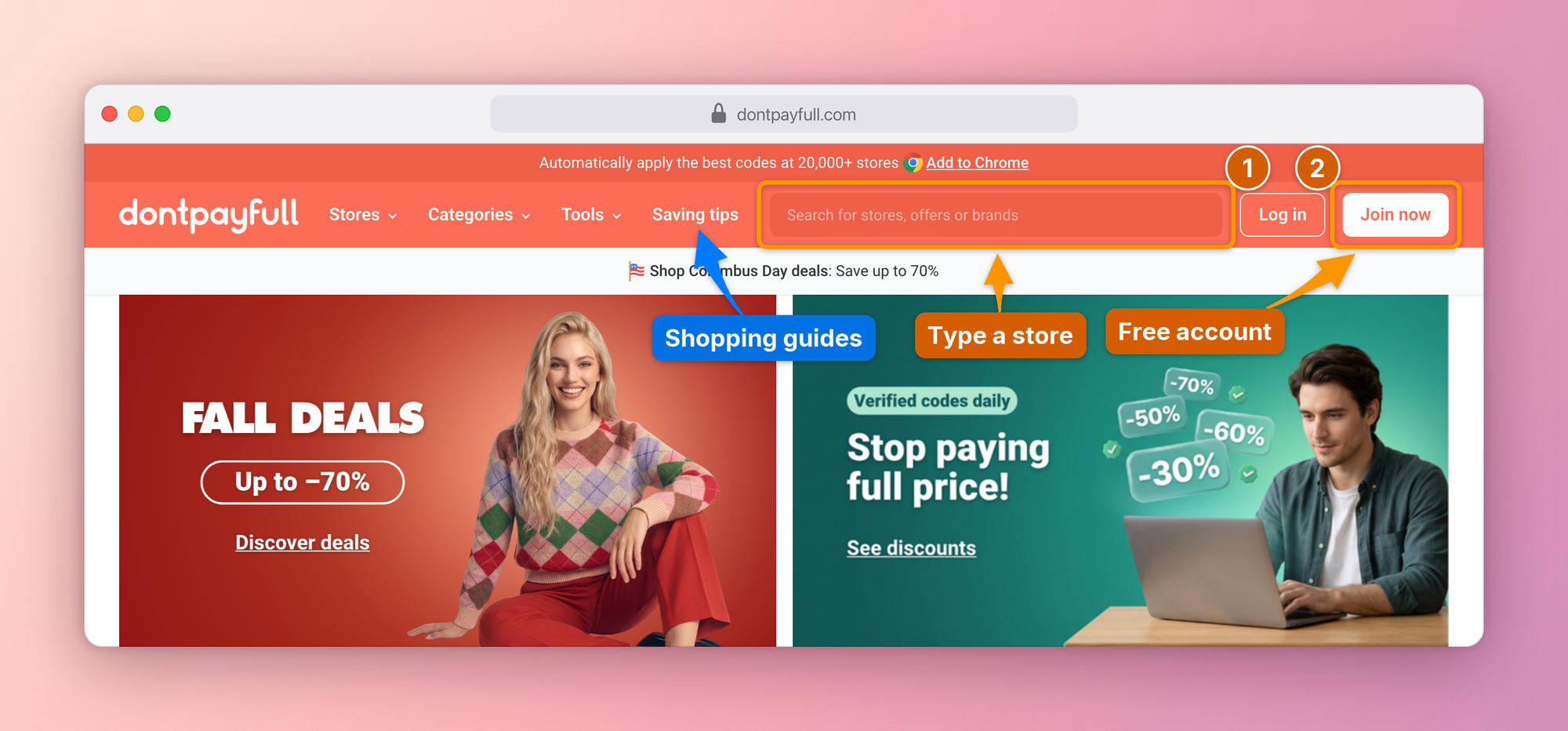 | 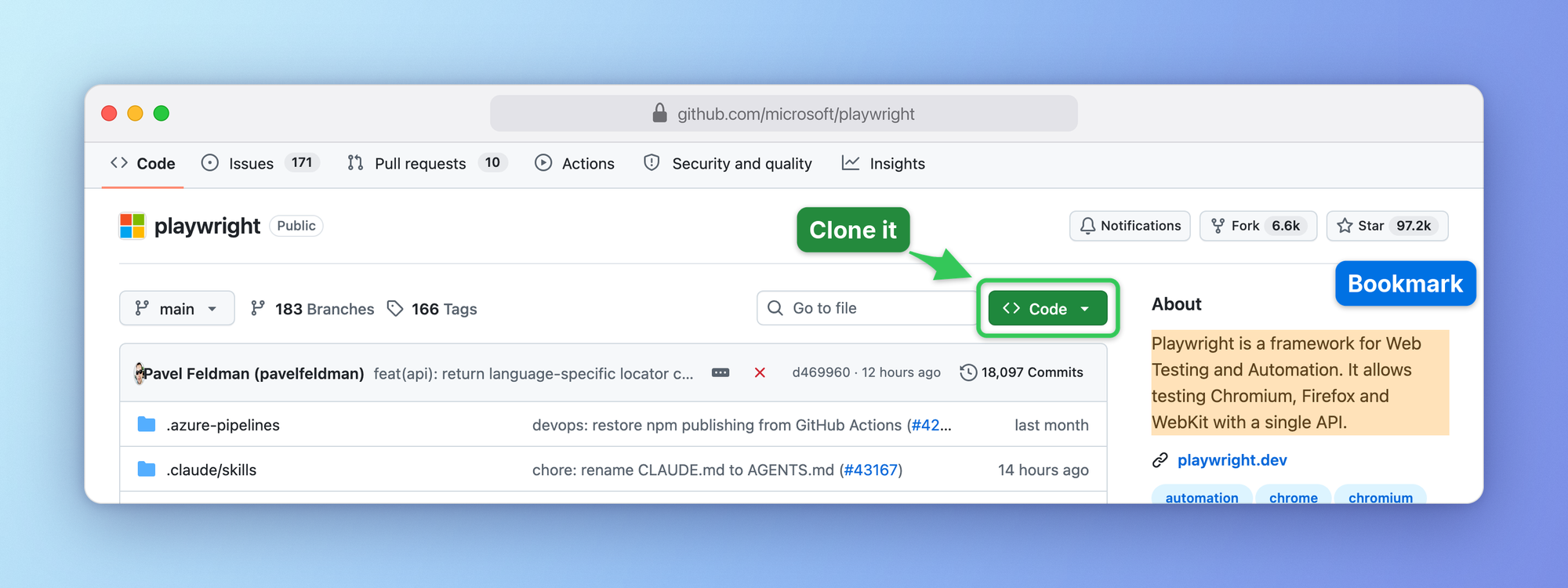 |
| **Numbered steps** on the busy header of [DontPayFull](https://www.dontpayfull.com), coupons for 20,000+ stores | **Box, arrow and highlight** on GitHub |
| 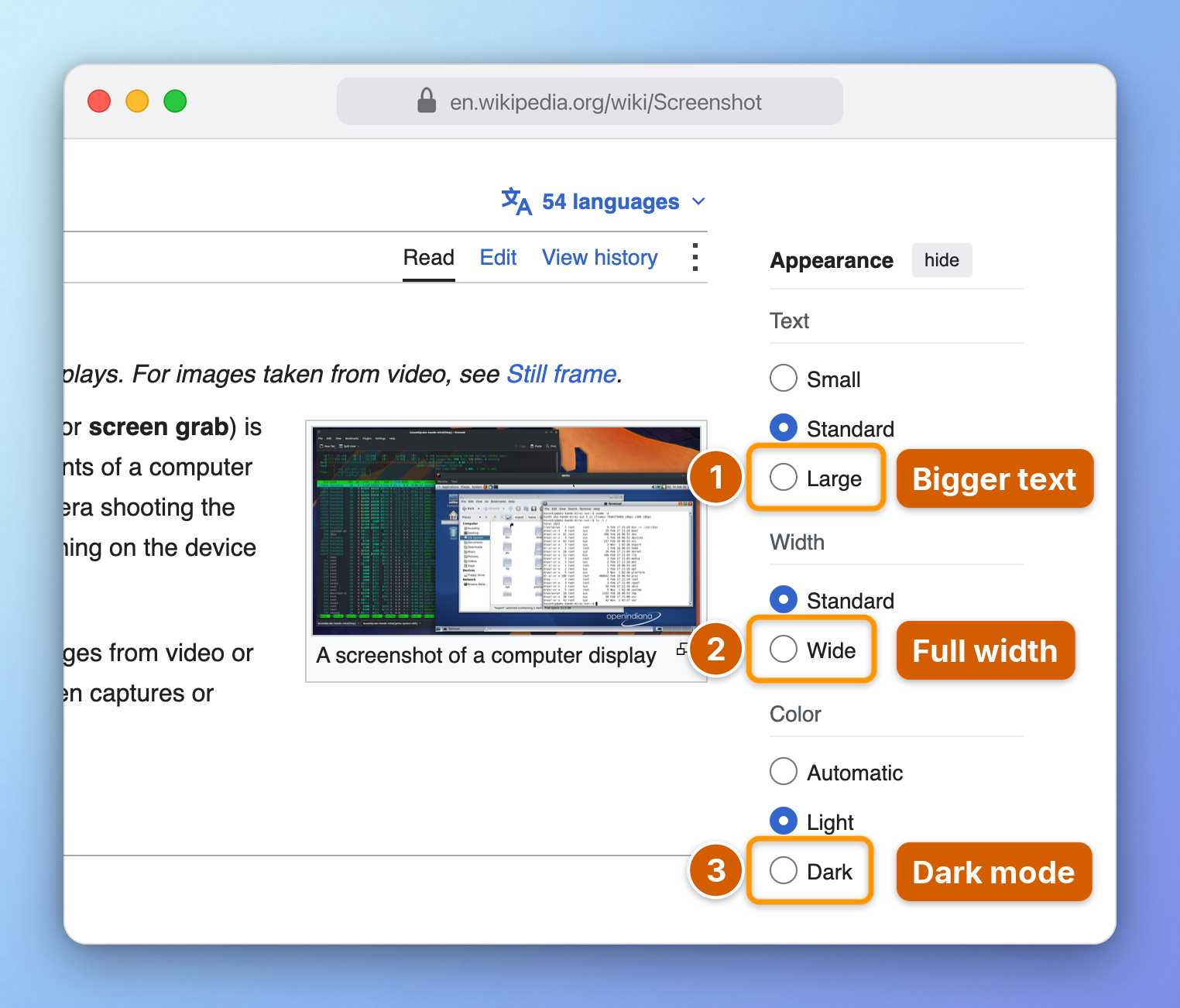 | 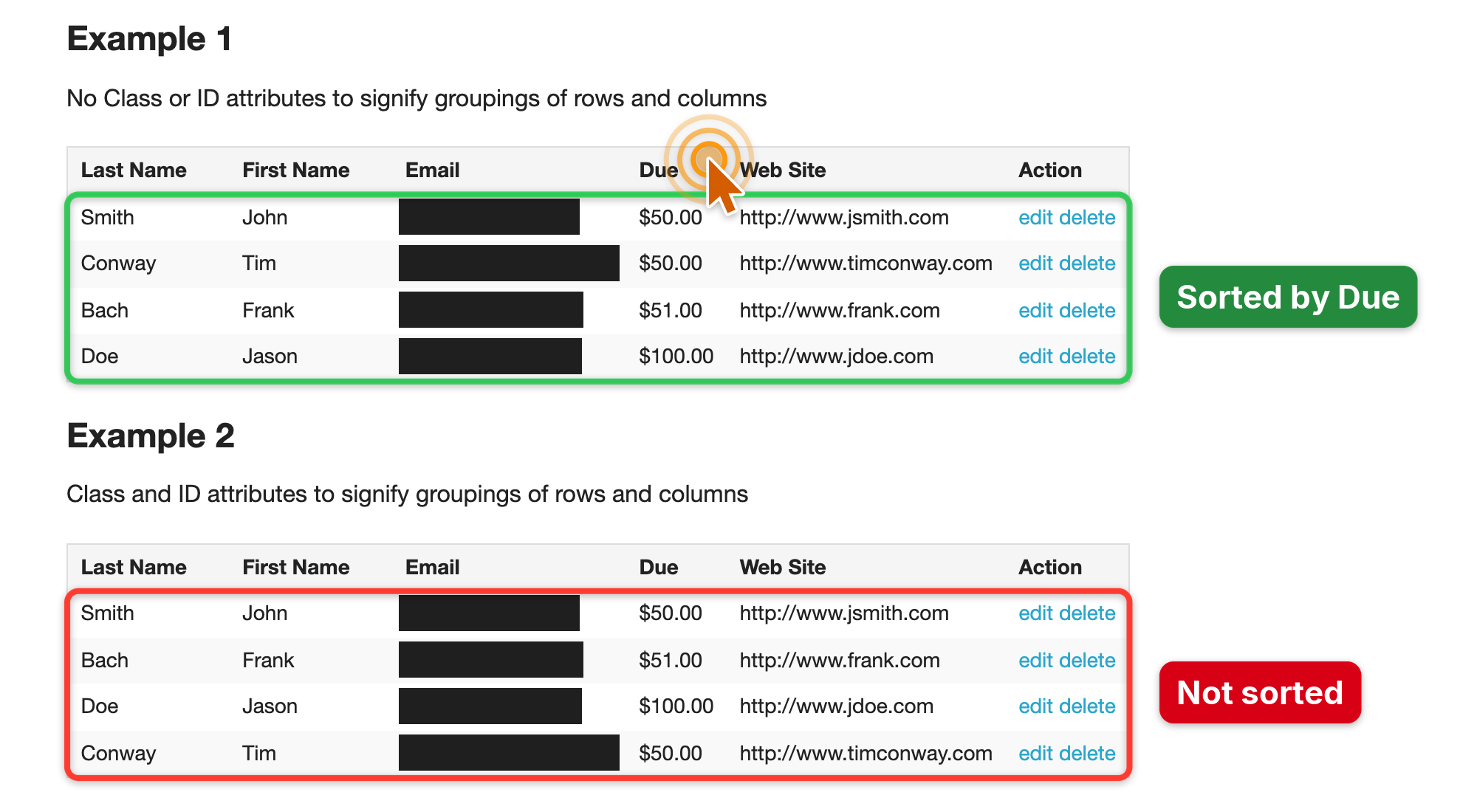 |
| **Step-by-step guide** with browser chrome and a gradient frame | **Bug report**, emails redacted automatically by the privacy scan |
| 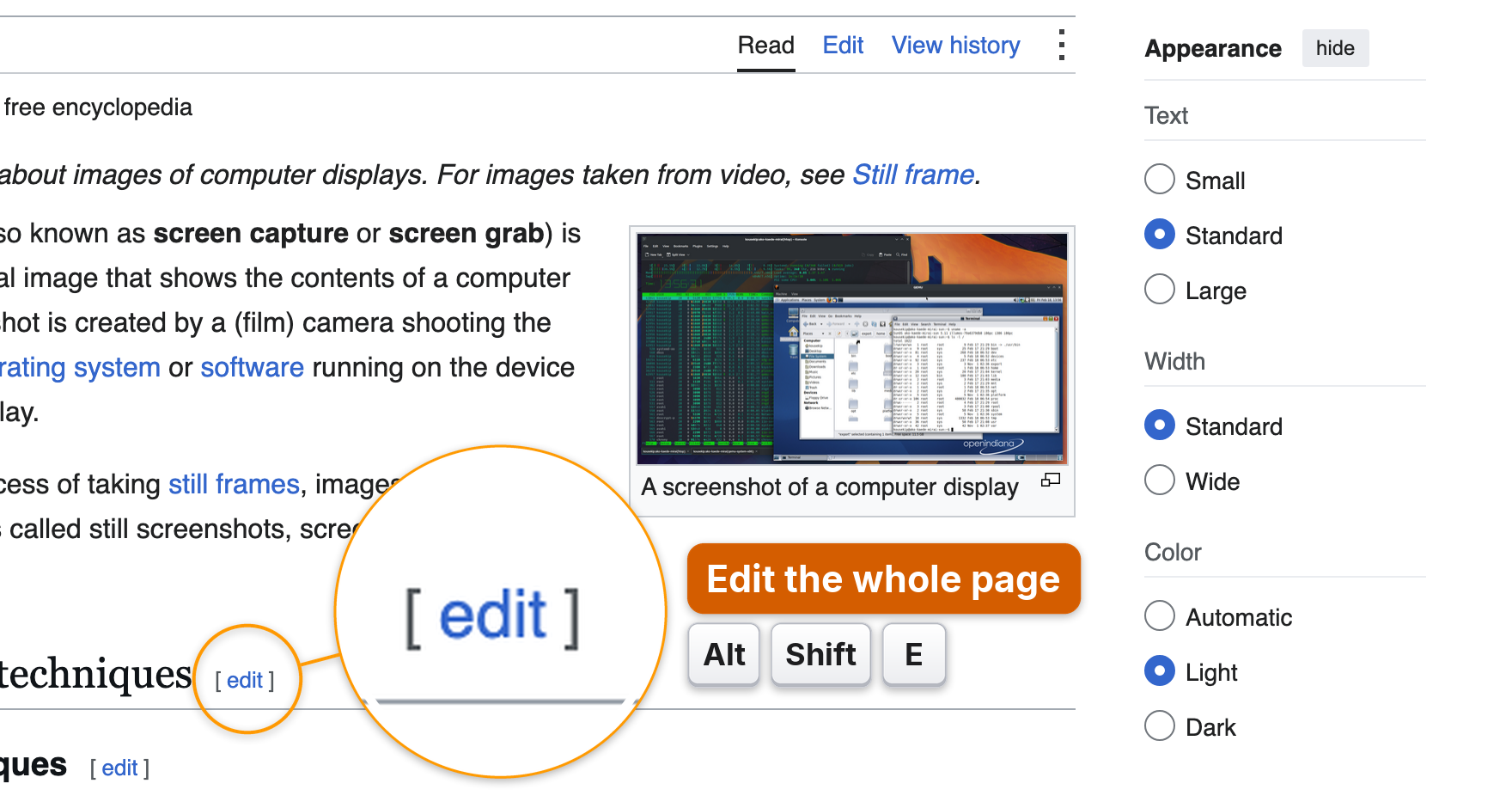 | 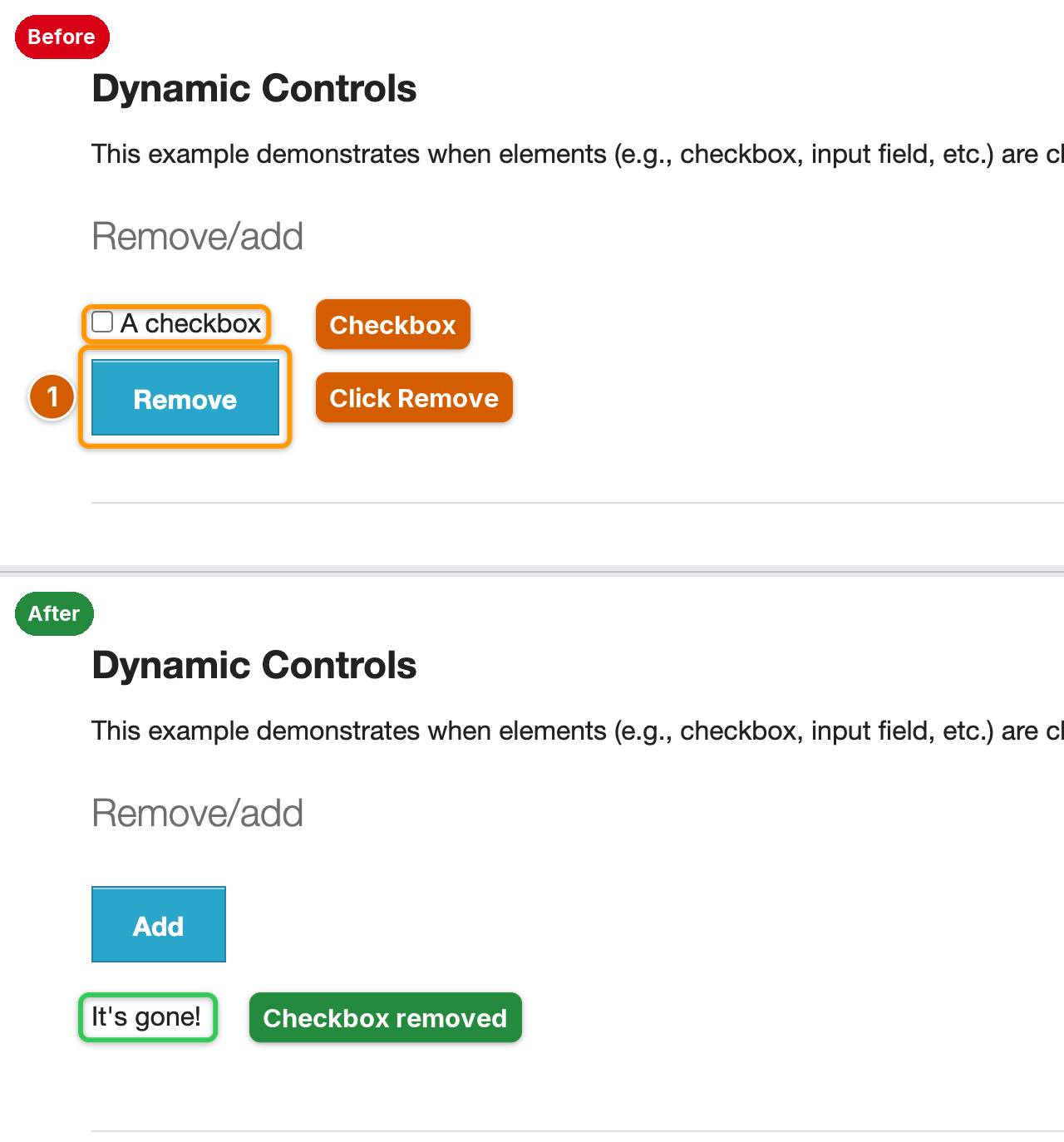 |
| **Magnifier and keycaps** for tiny controls and shortcuts | **Before / after** plate from two shots |
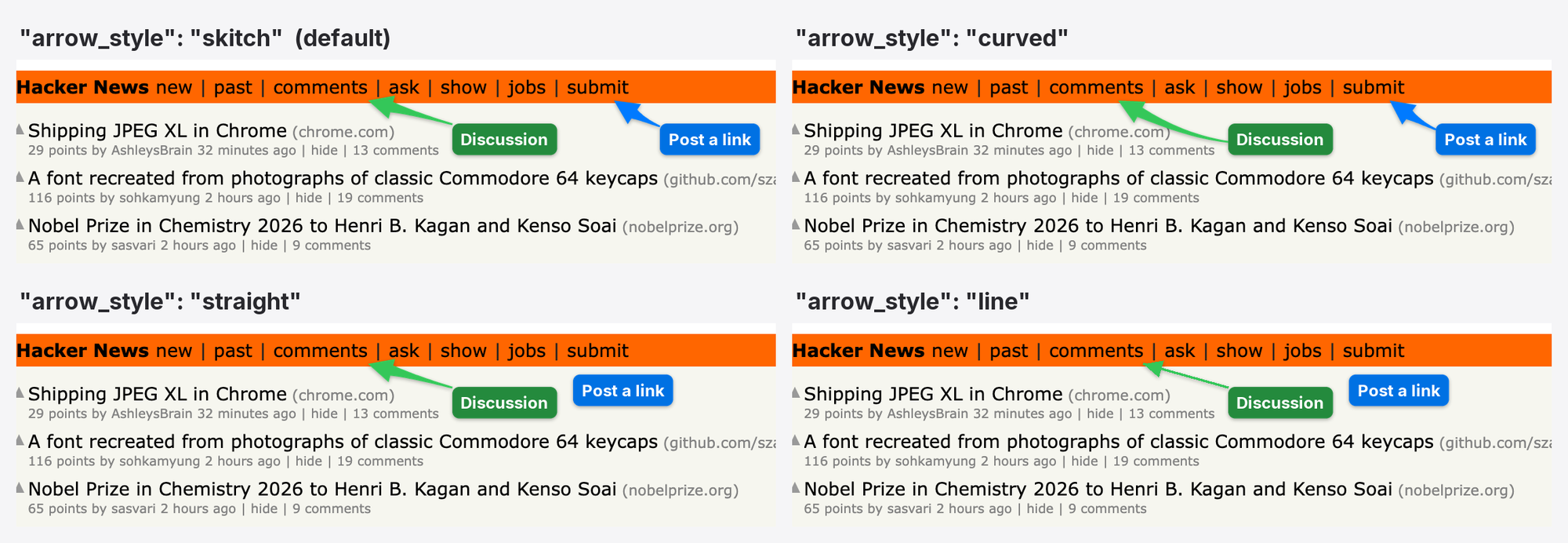
Four arrow styles: skitch (default: straight when the way is clear, a gentle bend when it is long and diagonal, a curve around text), curved, straight, line
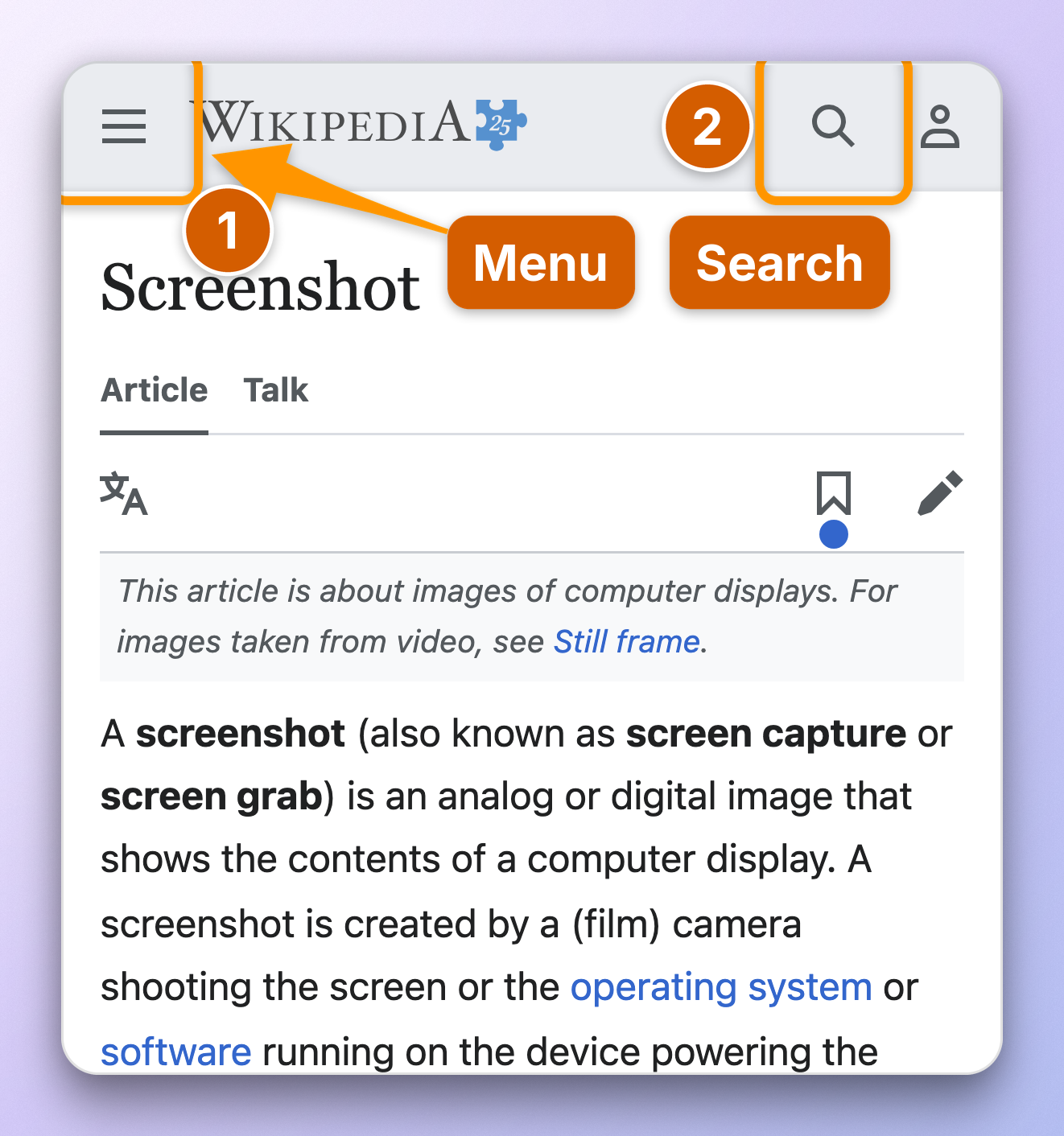
Phone preset: mobile viewport, touch and user agent
## Labels that stay off the content

A label dropped at a fixed spot next to its target usually lands on the
text the reader needs. AInotate places every label itself:
- It maps the page content first (text, icons, lines, images) and tries
hundreds of spots per label. Empty space near the target wins; a spot
over text is used only when the frame has no free room.
- Arrows are priced too: a long arrow, or one that crosses text, another
label or another mark, loses to a shorter, cleaner one. When the
straight path crosses text, the arrow curves around it.
- All labels are planned together, so the first one cannot take the only
clean spot a later one needs.
- Step badges sit on the corner of their box that covers the least.
The image is never enlarged to make room. If a label still has to cover
something, AInotate says so in a warning, and `label_at` pins a label
exactly where you want it.
## From the command line
Save this as `hn.json`:
```json
{"url": "https://news.ycombinator.com",
"frame": {"chrome": "browser"},
"marks": [
{"type": "step", "n": 1, "target": {"text": "new", "exact": true},
"label": "Newest"},
{"type": "step", "n": 2, "target": {"text": "login"},
"label": "Sign in"}]}
```
```bash
ainotate shoot hn.json --draft # temp file; drop --draft to save
```
The output path is printed on stdout. Images are saved to
`~/Pictures/AInotate` unless you configure another folder. `ainotate --help`
lists every command (capture, annotate, locate by OCR, grid, zoom, window
capture with UI element targets, elements, guide, compare, animate, copy,
install-skill); the full spec is in
[skills/ainotate/references/spec.md](https://github.com/dontpayfull/AInotate/blob/main/skills/ainotate/references/spec.md). Exit codes: `0` ok,
`1` cannot save, `2` invalid spec, `3` cannot draw, `4` capture failed or an
optional dependency is missing, `5` ambiguous text target, `6` target not
found.
**Python.** The same pipeline is importable:
```python
from ainotate.shoot import shoot
res = shoot({"url": "https://en.wikipedia.org/wiki/Screenshot",
"marks": [{"type": "box",
"target": {"text": "View history"},
"label": "Past edits"}]}, draft=True)
print(res.paths[0], res.redactions)
```
## Features
- **Marks:** numbered `step`, `box`, `arrow`, `click` ripple, `keys`
(keycaps), `magnify` (loupe), `highlight`, `spotlight`, `text`, solid
`redact`, and decorative `blur` / `pixelate`.
- **Placement that reads well:** labels go to free space near their
target and are planned together; arrows are tapered Skitch-style
shapes with a soft shadow that curve around text (see
[Labels that stay off the content](#labels-that-stay-off-the-content)).
Warnings for overlapping labels, crossing arrows, more than 6 marks or
labels over 4 words.
- **Web capture in one call:** `ainotate shoot` opens a page (laptop, wide
or phone preset), runs actions (click, fill, wait, scroll), measures
each target, redacts, annotates and saves.
- **Any browser:** its own Playwright Chromium, Firefox or WebKit, or
attach over CDP to a Chromium you already use and are logged into
(Chrome, Edge, Brave, Arc, BrowserOS). The preset is applied to that one
tab and restored afterwards.
- **Any image:** `locate` finds text by OCR (Apple Vision, Windows OCR or
Tesseract); `grid` and `zoom` locate icons at full resolution. Screen,
window and clipboard capture are built in.
- **Desktop apps on macOS:** `ainotate window ID --target` measures
buttons, switches and fields through the Accessibility API, so marks sit
exactly on the control, icons included; `ainotate elements --app NAME`
lists what it can find.
- **Frames:** gradient backgrounds (auto from the screenshot, or presets),
rounded corners, shadow, browser or window chrome, social aspect ratios.
- **Sharing:** guides in Markdown, HTML and PDF; before/after plates;
APNG and GIF animations; copy to the clipboard.
- **Strict specs:** a typo stops the run with a list of every problem
instead of saving a wrong or unredacted image. Clear exit codes.
- **Diacritics:** bundled Inter font, so Romanian, German, French and
other Latin-script labels render correctly everywhere.
## Privacy
- **Redaction is solid.** `redact` paints an opaque block. AInotate never
uses blur to hide data: blur and pixelation can be reversed. `blur` and
`pixelate` exist only to de-emphasize clutter, and a mark flagged
`"sensitive": true` is refused for them.
- **Automatic redaction is on for web shots.** `shoot` scans the live
page (text and input values) for emails, phone numbers, card numbers,
IBANs, API keys, tokens, JWTs, password and personal-data fields, and
blacks them out. On images it runs on OCR when you pass
`--privacy auto`. You can allow-list your own addresses or add regexes.
- **It is best-effort.** Detection misses things: text drawn in images or
canvas, unusual formats, data split across elements, embedded frames
from other sites (reported, not redacted). Always look at the image
before you share it. The skill makes this check mandatory for agents.
- **Local.** Capture, OCR and rendering run on your machine. AInotate makes
no network requests of its own beyond loading the pages you ask it to
capture.
## Platform support
| | macOS | Windows | Linux |
|---|---|---|---|
| Annotate, frames, export | verified | experimental | experimental |
| Web capture (Playwright, CDP) | verified | experimental | experimental |
| Screen and window capture | verified | experimental | experimental (X11) |
| UI elements (`window --target`, `elements`) | verified (Accessibility) | not yet | not yet |
| OCR (`locate`, text targets) | verified (Vision) | experimental (Windows OCR) | experimental (Tesseract) |
| Clipboard | verified | experimental | experimental |
| MCP server | verified | experimental | experimental |
**Experimental** means implemented and unit-tested with mocks, not yet
verified on real Windows or Linux machines. Reports are welcome.
## License
Copyright © 2026 [DontPayFull](https://www.dontpayfull.com).
AInotate is free software under the
[GNU Affero General Public License v3.0 or later](https://github.com/dontpayfull/AInotate/blob/main/LICENSE). If you run a
modified AInotate as a network service, the AGPL requires you to offer its
source to the users of that service.
Bundled and derived third-party work (the Inter font, arrow proportions
from Arrowshot, a label-placement idea from github/awesome-copilot) and
dependency licenses are listed in [NOTICE](https://github.com/dontpayfull/AInotate/blob/main/NOTICE).
---
Made with ❤️ by the DontPayFull team
Coupons & discount codes for 20,000+ stores
