
# mcp-memory-service
## Persistent Shared Memory for AI Agent Pipelines
Open-source memory backend for multi-agent systems.
Agents store decisions, share causal knowledge graphs, and retrieve
context in 5ms — without cloud lock-in or API costs.
**Works with LangGraph · CrewAI · AutoGen · any HTTP client · Claude Desktop**
---
[](https://opensource.org/licenses/Apache-2.0)
[](https://pypi.org/project/mcp-memory-service/)
[](https://pypi.org/project/mcp-memory-service/)
[](https://github.com/doobidoo/mcp-memory-service/stargazers)
[](https://github.com/langchain-ai/langgraph)
[](https://crewai.com)
[](https://github.com/microsoft/autogen)
[](https://claude.ai)
[](https://cursor.sh)
[](docs/remote-mcp-setup.md)
[](docs/remote-mcp-setup.md)
[](docs/oauth-setup.md)
[](https://github.com/sponsors/doobidoo)
---
## 🎬 See It in Action
[](https://youtu.be/W34r8VFoSdQ)
**[Watch the Web Dashboard Walkthrough on YouTube](https://youtu.be/W34r8VFoSdQ)** — Semantic search, tag browser, document ingestion, analytics, quality scoring, and API docs in under 2 minutes.
---
## 🌐 Works with claude.ai (Browser)
Unlike desktop-only MCP servers, **mcp-memory-service supports Remote MCP** for native claude.ai integration.
**What this means:**
- ✅ Use persistent memory directly in your browser (no Claude Desktop required)
- ✅ Works on any device (laptop, tablet, phone)
- ✅ Enterprise-ready (OAuth 2.0 + HTTPS + CORS)
- ✅ Self-hosted OR cloud-hosted (your choice)
**5-Minute Setup:**
```bash
# 1. Start server with Remote MCP enabled
MCP_STREAMABLE_HTTP_MODE=1 \
MCP_SSE_HOST=0.0.0.0 \
MCP_SSE_PORT=8765 \
MCP_OAUTH_ENABLED=true \
python -m mcp_memory_service.server
# 2. Expose via Cloudflare Tunnel (or your own HTTPS setup)
cloudflared tunnel --url http://localhost:8765
# → Outputs: https://random-name.trycloudflare.com
# 3. In claude.ai: Settings → Connectors → Add Connector
# Paste the URL: https://random-name.trycloudflare.com/mcp
# OAuth flow will handle authentication automatically
```
**Production Setup:** See [Remote MCP Setup Guide](docs/remote-mcp-setup.md) for Let's Encrypt, nginx, and firewall configuration.
**Step-by-Step Tutorial:** [Blog: 5-Minute claude.ai Setup](https://doobidoo.github.io/mcp-memory-service/blog/remote-mcp-tutorial.html) | [Wiki Guide](https://github.com/doobidoo/mcp-memory-service/wiki/Claude-AI-Remote-MCP-Integration)
---
## Why Agents Need This
| Without mcp-memory-service | With mcp-memory-service |
|---|---|
| Each agent run starts from zero | Agents retrieve prior decisions in 5ms |
| Memory is local to one graph/run | Memory is shared across all agents and runs |
| You manage Redis + Pinecone + glue code | One self-hosted service, zero cloud cost |
| No causal relationships between facts | Knowledge graph with typed edges (causes, fixes, contradicts) |
| Context window limits create amnesia | Autonomous consolidation compresses old memories |
**Key capabilities for agent pipelines:**
- **Framework-agnostic REST API** — 15 endpoints, no MCP client library needed
- **Knowledge graph** — agents share causal chains, not just facts
- **`X-Agent-ID` header** — auto-tag memories by agent identity for scoped retrieval
- **`conversation_id`** — bypass deduplication for incremental conversation storage
- **SSE events** — real-time notifications when any agent stores or deletes a memory
- **Embeddings run locally via ONNX** — memory never leaves your infrastructure
## Agent Quick Start
```bash
pip install mcp-memory-service
MCP_ALLOW_ANONYMOUS_ACCESS=true memory server --http
# REST API running at http://localhost:8000
```
```python
import httpx
BASE_URL = "http://localhost:8000"
# Store — auto-tag with X-Agent-ID header
async with httpx.AsyncClient() as client:
await client.post(f"{BASE_URL}/api/memories", json={
"content": "API rate limit is 100 req/min",
"tags": ["api", "limits"],
}, headers={"X-Agent-ID": "researcher"})
# Stored with tags: ["api", "limits", "agent:researcher"]
# Search — scope to a specific agent
results = await client.post(f"{BASE_URL}/api/memories/search", json={
"query": "API rate limits",
"tags": ["agent:researcher"],
})
print(results.json()["memories"])
```
**Framework-specific guides:** [docs/agents/](docs/agents/)
### Real-World: Multi-Agent Cluster with Shared Memory
> *"After I work with one of the cluster agents on something I want my local agent to know about, the cluster agent adds a special tag to the memory entry that my local agent recognizes as a message from a cluster agent. So they end up using it as a comms bridge — and it's pretty delightful."*
> — [@jeremykoerber](https://github.com/jeremykoerber), [issue #591](https://github.com/doobidoo/mcp-memory-service/issues/591)
A 5-agent openclaw cluster uses mcp-memory-service as shared state **and** as an inter-agent messaging bus — without any custom protocol. Cluster agents tag memories with a sentinel like `msg:cluster`, and the local agent filters on that tag to receive cross-cluster signals. The memory service becomes the coordination layer with zero additional infrastructure.
```python
# Cluster agent stores a learning and flags it for the local agent
await client.post(f"{BASE_URL}/api/memories", json={
"content": "Rate limit on provider X is 50 RPM — switch to provider Y after 40",
"tags": ["api", "limits", "msg:cluster"], # sentinel tag
}, headers={"X-Agent-ID": "cluster-agent-3"})
# Local agent polls for cluster messages
results = await client.post(f"{BASE_URL}/api/memories/search", json={
"query": "messages from cluster",
"tags": ["msg:cluster"],
})
```
This pattern — **tags as inter-agent signals** — emerges naturally from the tagging system and requires no additional infrastructure.
### Real-World: Self-Hosted Docker Stack with Cloudflare Tunnel
> *"The quality of life that session-independent memory adds to AI workflows is immense. File-based memory demands constant discipline. Semantic recall from a live database doesn't. Storing data on my own hardware while making it remotely accessible across platforms turned out to be a feature I didn't know I needed."*
> — [@PL-Peter](https://github.com/PL-Peter), [discussion #602](https://github.com/doobidoo/mcp-memory-service/discussions/602)
A production-tested self-hosted deployment using Docker containers behind a Cloudflare tunnel, with [AuthMCP Gateway](https://github.com/loglux/authmcp-gateway) handling authentication:
| Layer | Role |
|-------|------|
| **Cloudflare Tunnel** | Name-based routing, subnet-based access control, authentication before hitting self-hosted resources |
| **AuthMCP Gateway** | Auth/aggregation with locally managed users, admin UI, per-user MCP server access control, bearer token auth |
| **mcp-memory-service** | Two Docker containers sharing one SQLite backend — one for MCP, one for the web UI (document ingestion) |
**Security best practices for this setup:**
- Use Cloudflare ZeroTrust with subnet-based access control (e.g., allow Anthropic subnets + your own IPs)
- Add **Client IP Address Filtering** to all Cloudflare API tokens (Dashboard → My Profile → API Tokens → Edit → Client IP Address Filtering) to limit abuse if a token leaks
- If using IPv6, include your IPv6 /64 network in the allowlist (Python prefers IPv6 by default)
- Set `MCP_OAUTH_ACCESS_TOKEN_EXPIRE_MINUTES=1440` to extend OAuth tokens to 24 hours (refresh tokens not yet supported)
- Consider an auth proxy like [AuthMCP](https://github.com/loglux/authmcp-gateway) or [mcp-auth-proxy](https://github.com/sigbit/mcp-auth-proxy) for robust session management
## Comparison with Alternatives
### vs. Commercial Memory APIs
| | Mem0 | Zep | DIY Redis+Pinecone | **mcp-memory-service** |
|---|---|---|---|---|
| License | Proprietary | Enterprise | — | **Apache 2.0** |
| Cost | Per-call API | Enterprise | Infra costs | **$0** |
| **🌐 claude.ai Browser** | ❌ Desktop only | ❌ Desktop only | ❌ | **✅ Remote MCP** |
| **OAuth 2.0 + DCR** | ❓ Unknown | ❓ Unknown | ❌ | **✅ Enterprise-ready** |
| **Streamable HTTP** | ❌ | ❌ | ❌ | **✅ (SSE deprecated)** |
| Framework integration | SDK | SDK | Manual | **REST API (any HTTP client)** |
| Knowledge graph | No | Limited | No | **Yes (typed edges)** |
| Auto consolidation | No | No | No | **Yes (decay + compression)** |
| On-premise embeddings | No | No | Manual | **Yes (ONNX, local)** |
| Privacy | Cloud | Cloud | Partial | **100% local** |
| Hybrid search | No | Yes | Manual | **Yes (BM25 + vector)** |
| MCP protocol | No | No | No | **Yes** |
| REST API | Yes | Yes | Manual | **Yes (15 endpoints)** |
### vs. MCP-Native Alternatives
[MemPalace](https://github.com/milla-jovovich/mempalace) (~20k ⭐) is a strong MCP-native alternative worth knowing about.
| | **MemPalace** | **mcp-memory-service** |
|---|---|---|
| LongMemEval R@5 (zero LLM) | **96.6%** | 86.0% (session) / 80.4% (turn) |
| LongMemEval R@5 (with reranking) | **100%**¹ | — |
| Storage granularity | Session-level | **Turn-level** |
| Team / multi-device sync | ❌ Local only | **✅ Cloudflare sync** |
| REST API / Web dashboard | ❌ | **✅** |
| OAuth 2.1 + multi-user | ❌ | **✅** |
| Knowledge graph | ❌ | **✅ (typed edges)** |
| Auto consolidation | ❌ | **✅ (decay + compression)** |
| Compatible AI tools | Claude-focused | **13+ tools** |
| License | MIT | **Apache 2.0** |
**Why the benchmark gap?** MemPalace stores each conversation as a single unit (session-level). LongMemEval asks "which session contains the answer?" — a question that session-level storage answers structurally. mcp-memory-service defaults to turn-level storage (one entry per message), which enables fine-grained retrieval ("what exactly did the user say about X?") but spreads a session's signal across many entries. Using `memory_store_session` (session-level ingestion, added in v10.35.0) brings our score to **86.0% R@5** — closing the gap significantly. The remaining difference is primarily due to MemPalace's larger embedding model.
> ¹ 100% result uses optional LLM reranking (~500 API calls) and includes a partially tuned test set. Clean held-out score: **98.4% R@5**.
---
## Stop Re-Explaining Your Project to AI Every Session
Your AI assistant forgets everything when you start a new chat. After 50 tool uses, context explodes to 500k+ tokens—Claude slows down, you restart, and now it remembers nothing. You spend 10 minutes re-explaining your architecture. **Again.**
**MCP Memory Service solves this.**
It automatically captures your project context, architecture decisions, and code patterns. When you start fresh sessions, your AI already knows everything—no re-explaining, no context loss, no wasted time.
## 🎥 2-Minute Video Demo
Technical showcase: Performance, Architecture, AI/ML Intelligence & Developer Experience
### ⚡ Works With Your Favorite AI Tools
#### 🤖 Agent Frameworks (REST API)
**LangGraph** · **CrewAI** · **AutoGen** · **Any HTTP Client** · **OpenClaw/Nanobot** · **Custom Pipelines**
#### 🖥️ CLI & Terminal AI (MCP)
**Claude Code** · **Gemini CLI** · **Gemini Code Assist** · **OpenCode** · **Codex CLI** · **Goose** · **Aider** · **GitHub Copilot CLI** · **Amp** · **Continue** · **Zed** · **Cody**
#### 🎨 Desktop & IDE (MCP)
**Claude Desktop** · **VS Code** · **Cursor** · **Windsurf** · **Kilo Code** · **Raycast** · **JetBrains** · **Replit** · **Sourcegraph** · **Qodo**
#### 💬 Chat Interfaces (MCP)
**ChatGPT** (Developer Mode) · **claude.ai** (Remote MCP via HTTPS)
**Works seamlessly with any MCP-compatible client or HTTP client** - whether you're building agent pipelines, coding in the terminal, IDE, or browser.
> **💡 NEW**: ChatGPT now supports MCP! Enable Developer Mode to connect your memory service directly. [See setup guide →](https://github.com/doobidoo/mcp-memory-service/discussions/377#discussioncomment-15605174)
---
## 🚀 Get Started in 60 Seconds
> Not sure which setup fits your needs? See the **[Setup Guide](docs/setup-guide.md)** — a decision tree walks you to the right path in under a minute.
**1. Install:**
```bash
pip install mcp-memory-service
```
**2. Configure your AI client:**
Claude Desktop
Add to your config file:
- **macOS**: `~/Library/Application Support/Claude/claude_desktop_config.json`
- **Windows**: `%APPDATA%\Claude\claude_desktop_config.json`
- **Linux**: `~/.config/Claude/claude_desktop_config.json`
```json
{
"mcpServers": {
"memory": {
"command": "memory",
"args": ["server"]
}
}
}
```
Restart Claude Desktop. Your AI now remembers everything across sessions.
Claude Code
```bash
claude mcp add memory -- memory server
```
Restart Claude Code. Memory tools will appear automatically.
🌐 claude.ai (Browser — Remote MCP)
No local installation required on the client — works directly in your browser:
```bash
# 1. Start server with Remote MCP
MCP_STREAMABLE_HTTP_MODE=1 python -m mcp_memory_service.server
# 2. Expose publicly (Cloudflare Tunnel)
cloudflared tunnel --url http://localhost:8765
# 3. Add connector in claude.ai Settings → Connectors with the tunnel URL
```
See [Remote MCP Setup Guide](docs/remote-mcp-setup.md) for production deployment with Let's Encrypt, nginx, and Docker.
🔧 Advanced: Custom Backends & Team Setup
For production deployments, team collaboration, or cloud sync:
```bash
git clone https://github.com/doobidoo/mcp-memory-service.git
cd mcp-memory-service
python scripts/installation/install.py
```
Choose from:
- **SQLite** (local, fast, single-user)
- **Cloudflare** (cloud, multi-device sync)
- **Hybrid** (best of both: 5ms local + background cloud sync)
---
## 💡 Why You Need This
### The Problem
| Session 1 | Session 2 (Fresh Start) |
|-----------|-------------------------|
| You: "We're building a Next.js app with Prisma and tRPC" | AI: "What's your tech stack?" ❌ |
| AI: "Got it, I see you're using App Router" | You: *Explains architecture again for 10 minutes* 😤 |
| You: "Add authentication with NextAuth" | AI: "Should I use Pages Router or App Router?" ❌ |
### The Solution
| Session 1 | Session 2 (Fresh Start) |
|-----------|-------------------------|
| You: "We're building a Next.js app with Prisma and tRPC" | AI: "I remember—Next.js App Router with Prisma and tRPC. What should we build?" ✅ |
| AI: "Got it, I see you're using App Router" | You: "Add OAuth login" |
| You: "Add authentication with NextAuth" | AI: "I'll integrate NextAuth with your existing Prisma setup." ✅ |
**Result:** Zero re-explaining. Zero context loss. Just continuous, intelligent collaboration.
---
## 🌐 SHODH Ecosystem Compatibility
MCP Memory Service is **fully compatible** with the [SHODH Unified Memory API Specification v1.0.0](https://github.com/varun29ankuS/shodh-memory/blob/main/specs/openapi.yaml), enabling seamless interoperability across the SHODH ecosystem.
### Compatible Implementations
| Implementation | Backend | Embeddings | Use Case |
|----------------|---------|------------|----------|
| **[shodh-memory](https://github.com/varun29ankuS/shodh-memory)** | RocksDB | MiniLM-L6-v2 (ONNX) | Reference implementation |
| **[shodh-cloudflare](https://github.com/doobidoo/shodh-cloudflare)** | Cloudflare Workers + Vectorize | Workers AI (bge-small) | Edge deployment, multi-device sync |
| **mcp-memory-service** (this) | SQLite-vec / Hybrid | MiniLM-L6-v2 (ONNX) | Desktop AI assistants (MCP) |
### Unified Schema Support
All SHODH implementations share the same memory schema:
- ✅ **Emotional Metadata**: `emotion`, `emotional_valence`, `emotional_arousal`
- ✅ **Episodic Memory**: `episode_id`, `sequence_number`, `preceding_memory_id`
- ✅ **Source Tracking**: `source_type`, `credibility`
- ✅ **Quality Scoring**: `quality_score`, `access_count`, `last_accessed_at`
**Interoperability Example:**
Export memories from mcp-memory-service → Import to shodh-cloudflare → Sync across devices → Full fidelity preservation of emotional_valence, episode_id, and all spec fields.
---
## ✨ Quick Start Features
🧠 **Persistent Memory** – Context survives across sessions with semantic search
🔍 **Smart Retrieval** – Finds relevant context automatically using AI embeddings
⚡ **5ms Speed** – Instant context injection, no latency
🔄 **Multi-Client** – Works across 20+ AI applications
☁️ **Cloud Sync** – Optional Cloudflare backend for team collaboration
🔒 **Privacy-First** – Local-first, you control your data
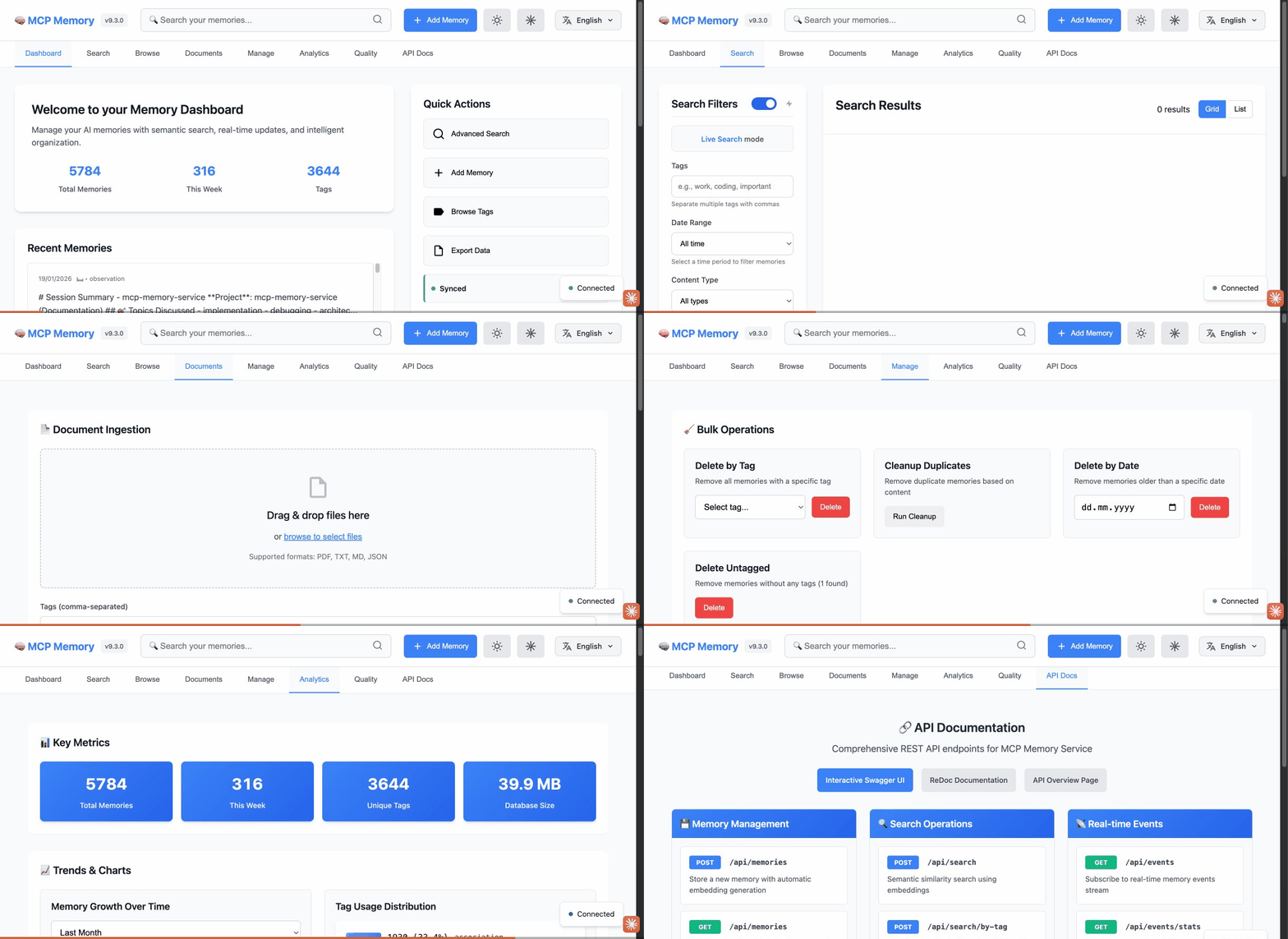
📊 **Web Dashboard** – Visualize and manage memories at `http://localhost:8000`
🧬 **Knowledge Graph** – Interactive D3.js visualization of memory relationships 🆕
### 🖥️ Dashboard Preview (v9.3.0)
**8 Dashboard Tabs:** Dashboard • Search • Browse • Documents • Manage • Analytics • **Quality** (NEW) • API Docs
📖 See [Web Dashboard Guide](https://github.com/doobidoo/mcp-memory-service/wiki/Web-Dashboard-Guide) for complete documentation.
---
## Latest Release: **v10.35.0** (April 8, 2026)
**feat: session-level memory ingestion — LongMemEval R@5 86.0% (+5.6% vs turn-level)**
**What's New:**
- **`memory_store_session` MCP tool**: Stores a full conversation as a single memory unit — all turns concatenated as `[role] content`, stored with `memory_type=session` and auto-tagged `session:`.
- **`POST /api/sessions` HTTP endpoint**: REST endpoint for session-level ingestion mirroring the MCP tool.
- **LongMemEval session-mode results**: R@5 86.0% (+5.6% vs turn-level), with biggest gains in multi-session (+15.2%) and temporal-reasoning (+10.6%) categories.
- **`--ingestion-mode session|turn|both`** flag for LongMemEval benchmark for direct strategy comparison.
- **`session` and `conversation_turn` memory types** added to the ontology.
- **1,537 tests** passing (+17 new: 10 handler + 7 HTTP endpoint tests).
---
**Previous Releases**:
- **v10.34.0** - feat: LongMemEval benchmark — R@5 80.4%, R@10 90.4%, NDCG@10 82.2%, MRR 89.1% (PR #665, 1,520 tests)
- **v10.33.0** - refactor: eliminate event-loop blocking + fix silent conflict data loss in SQLite storage (PR #663, 1,520 tests)
- **v10.32.0** - feat: transport health endpoint + configurable timeouts + optional DCR registration key protection (community PRs #656, #657, 1,520 tests)
- **v10.31.2** - fix: storage consistency, error handling, and upload progress — `_safe_json_loads` consistency, non-JSON error handling, upload progress tracking (community PRs #648, #649, #650, 1,503 tests)
- **v10.31.1** - fix: tombstone blocks re-insertion after delete of same content (#644) — `_purge_tombstone()` before INSERT (1,521 tests)
- **v10.31.0** - feat: Harvest Evolution (P4) + Sync-in-Async Refactoring — harvest dedup via `update_memory_versioned()`, `asyncio.to_thread()` in `_execute_with_retry` (1,520 tests)
- **v10.30.0** - feat: Memory Evolution (P1+P2+P3) — non-destructive versioned updates, staleness scoring, conflict detection + resolution (1,514 tests)
- **v10.29.1** - fix: clean up orphaned graph edges on memory deletion — cascade edge removal in delete/delete_by_tag/delete_by_tags + periodic orphan pruning in consolidation
- **v10.29.0** - feat(harvest): LLM-based classification via Groq (Phase 2, #628) — `memory_harvest` supports `use_llm=true` for higher-precision category labels via _GroqClassifierBridge
- **v10.28.5** - Bug fix: MCP_ALLOW_ANONYMOUS_ACCESS=true now respected in the dashboard (anonymous users granted read+write scope)
- **v10.28.4** - Security patch: cryptography>=46.0.6 (CVE-2026-34073), serialize-javascript>=7.0.5 (CVE-2026-34043), CodeQL cleanup
- **v10.28.3** - HTTP MCP endpoint fix: accept 'content' as alias for 'query' so Claude Code HTTP transport returns results
- **v10.28.2** - Relationship inference tuning: 93.5% typed labels vs 0.5% before + German language support
- **v10.28.1** - Harvest false-positive fix: skip system prompts, skill outputs, and long injected content (3 new tests)
- **v10.28.0** - Session harvest tool (`memory_harvest`): extract learnings from Claude Code transcripts + security dependency updates (#614-#616)
- **v10.27.0** - External embedding compatibility fix (missing `index` field, community PR #612) + Docker/Cloudflare deployment docs
- **v10.26.8** - 6 bug fixes in consolidation, embeddings, and memory types (#603-#608)
- **v10.26.7** - Cloudflare D1 fresh-database schema initialization fix (issue #600), community contribution by @Lyt060814
- **v10.26.6** - Security patch: authlib>=1.6.9, PyJWT>=2.12.0, pypdf>=6.9.1 (5 Dependabot alerts: 1 critical, 3 high, 1 medium)
- **v10.26.5** - Security patch: black dev dependency bumped to >=26.3.1 (GHSA-3936-cmfr-pm3m, CVE-2026-32274, path traversal)
- **v10.26.4** - FTS5 hybrid search fix on upgrade + dashboard auth lifecycle fixes (9 bugs)
- **v10.26.3** - Dashboard metadata display fixes + quality scorer resilience (Groq 429 fallback chain, empty-query absolute prompt)
- **v10.26.2** - OAuth public PKCE client fix (token exchange 500 error, issue #576) + automated CHANGELOG housekeeping
- **v10.26.1** - Hybrid backend correctly reported in MCP health checks (`HealthCheckFactory` structural detection fix for wrapped/delegated backends, issue #570)
- **v10.26.0** - Credentials tab + Settings restructure + Sync Owner selector in dashboard; `MCP_HYBRID_SYNC_OWNER=http` recommended for hybrid mode
- **v10.25.3** - Patch release: stdio handshake timeout cap, syntax fixes, hybrid sync fix, dashboard version badge fix
- **v10.25.2** - Patch fix: `update_and_restart.sh` health check reads `status` field instead of removed `version` field
- **v10.25.1** - Security: CORS wildcard default changed to localhost-only, soft-delete leak in `search_by_tag_chronological()` fixed (GHSA-g9rg-8vq5-mpwm)
- **v10.25.0** - Embedding migration script, 5 soft-delete leak fixes, cosine distance formula fix, substring tag matching fix, O(n²) association sampling fix — 23 new tests, 1,420 total
**Full version history**: [CHANGELOG.md](CHANGELOG.md) | [Older versions (v10.22.0 and earlier)](docs/archive/CHANGELOG-HISTORIC.md) | [All Releases](https://github.com/doobidoo/mcp-memory-service/releases)
---
## Migration to v9.0.0
**⚡ TL;DR**: No manual migration needed - upgrades happen automatically!
**Breaking Changes:**
- **Memory Type Ontology**: Legacy types auto-migrate to new taxonomy (task→observation, note→observation)
- **Asymmetric Relationships**: Directed edges only (no longer bidirectional)
**Migration Process:**
1. Stop your MCP server
2. Update to latest version (`git pull` or `pip install --upgrade mcp-memory-service`)
3. Restart server - automatic migrations run on startup:
- Database schema migrations (009, 010)
- Memory type soft-validation (legacy types → observation)
- No tag migration needed (backward compatible)
**Safety**: Migrations are idempotent and safe to re-run
---
### Breaking Changes
#### 1. Memory Type Ontology
**What Changed:**
- Legacy memory types (task, note, standard) are deprecated
- New formal taxonomy: 5 base types (observation, decision, learning, error, pattern) with 21 subtypes
- Type validation now defaults to 'observation' for invalid types (soft validation)
**Migration Process:**
✅ **Automatic** - No manual action required!
When you restart the server with v9.0.0:
- Invalid memory types are automatically soft-validated to 'observation'
- Database schema updates run automatically
- Existing memories continue to work without modification
**New Memory Types:**
- observation: General observations, facts, and discoveries
- decision: Decisions and planning
- learning: Learnings and insights
- error: Errors and failures
- pattern: Patterns and trends
**Backward Compatibility:**
- Existing memories will be auto-migrated (task→observation, note→observation, standard→observation)
- Invalid types default to 'observation' (no errors thrown)
#### 2. Asymmetric Relationships
**What Changed:**
- Asymmetric relationships (causes, fixes, supports, follows) now store only directed edges
- Symmetric relationships (related, contradicts) continue storing bidirectional edges
- Database migration (010) removes incorrect reverse edges
**Migration Required:**
No action needed - database migration runs automatically on startup.
**Code Changes Required:**
If your code expects bidirectional storage for asymmetric relationships:
```python
# OLD (will no longer work):
# Asymmetric relationships were stored bidirectionally
result = storage.find_connected(memory_id, relationship_type="causes")
# NEW (correct approach):
# Use direction parameter for asymmetric relationships
result = storage.find_connected(
memory_id,
relationship_type="causes",
direction="both" # Explicit direction required for asymmetric types
)
```
**Relationship Types:**
- Asymmetric: causes, fixes, supports, follows (A→B ≠ B→A)
- Symmetric: related, contradicts (A↔B)
### Retrieval Benchmarks
Three benchmarks measure retrieval quality (all-MiniLM-L6-v2, 384d embeddings, zero LLM API calls):
**LongMemEval** ([500 questions](https://huggingface.co/datasets/xiaowu0162/longmemeval-cleaned), ~45–62 distractor sessions per question):
| Question Type | R@5 | R@10 | NDCG@10 | MRR |
|---------------|-----|------|---------|-----|
| **Overall** | **80.4%** | **90.4%** | **82.2%** | **89.1%** |
| single-session-assistant | 100.0% | 100.0% | 99.3% | 99.1% |
| knowledge-update | 84.6% | 96.8% | 86.2% | 95.5% |
| single-session-user | 91.4% | 92.9% | 86.0% | 83.8% |
| temporal-reasoning | 72.0% | 84.1% | 75.1% | 85.7% |
| multi-session | 70.7% | 86.0% | 77.6% | 89.4% |
**DevBench** (practical developer workflow queries):
| Category | Recall@5 | MRR |
|----------|----------|-----|
| **Overall** | **91.1%** | **0.861** |
| exact | 100% | 1.000 |
| semantic | 80.0% | 0.700 |
| cross-type | 90.0% | 0.867 |
**LoCoMo** ([ACL 2024](https://github.com/snap-research/locomo) long-term conversational memory):
| Category | Recall@5 | MRR |
|----------|----------|-----|
| **Overall** | **49.7%** | **0.414** |
| multi-hop | 72.0% | 0.600 |
| temporal | 33.5% | 0.274 |
Run benchmarks: `python scripts/benchmarks/benchmark_longmemeval.py`, `python scripts/benchmarks/benchmark_devbench.py`, `python scripts/benchmarks/benchmark_locomo.py`
### Performance Improvements
- ontology validation: 97.5x faster (module-level caching)
- Type lookups: 35.9x faster (cached reverse maps)
- Tag validation: 47.3% faster (eliminated double parsing)
### Testing
- 829/914 tests passing (90.7%)
- 80 new ontology tests with 100% backward compatibility
- All API/HTTP integration tests passing
### Support
If you encounter issues during migration:
- Check [Troubleshooting Guide](docs/troubleshooting/)
- Review [CHANGELOG.md](CHANGELOG.md) for detailed changes
- Open an issue: https://github.com/doobidoo/mcp-memory-service/issues
---
## 📚 Documentation & Resources
- **[Agent Integration Guides](docs/agents/)** 🆕 – LangGraph, CrewAI, AutoGen, HTTP generic
- **[Remote MCP Setup (claude.ai)](docs/remote-mcp-setup.md)** 🆕 – Browser integration via HTTPS + OAuth
- **[Setup Guide](docs/setup-guide.md)** – Decision tree + step-by-step paths for all use cases
- **[Configuration Guide](docs/mastery/configuration-guide.md)** – Backend options and customization
- **[Architecture Overview](docs/architecture.md)** – How it works under the hood
- **[Team Setup Guide](docs/setup-guide.md#path-4-full-stack)** – OAuth and cloud collaboration
- **[Knowledge Graph Dashboard](docs/features/knowledge-graph-dashboard.md)** 🆕 – Interactive graph visualization guide
- **[Troubleshooting](docs/troubleshooting/)** – Common issues and solutions
- **[API Reference](https://github.com/doobidoo/mcp-memory-service/wiki)** – Programmatic usage
- **[Wiki](https://github.com/doobidoo/mcp-memory-service/wiki)** – Complete documentation
- [](https://deepwiki.com/doobidoo/mcp-memory-service) – AI-powered documentation assistant
- **[MCP Starter Kit](https://kruppster57.gumroad.com/l/glbhd)** – Build your own MCP server using the patterns from this project
---
## 🤝 Contributing
We welcome contributions! See [CONTRIBUTING.md](CONTRIBUTING.md) for guidelines.
**Quick Development Setup:**
```bash
git clone https://github.com/doobidoo/mcp-memory-service.git
cd mcp-memory-service
pip install -e . # Editable install
pytest tests/ # Run test suite
```
---