[](https://github.com/dragonflydb/dragonfly/actions/workflows/ci.yml) [](https://github.com/dragonflydb/dragonfly/pkgs/container/dragonfly) [](https://github.com/dragonflydb/dragonfly/pkgs/container/dragonfly) [](https://twitter.com/dragonflydbio)
> ก่อนไปต่อ ฝากกด GitHub star ⭐️ ให้พวกเราด้วยนะ ขอบคุณ!
ภาษาอื่น ๆ: [English](README.md) [简体中文](README.zh-CN.md) [日本語](README.ja-JP.md) [한국어](README.ko-KR.md) [Português](README.pt-BR.md)
[เว็บไซต์](https://www.dragonflydb.io/) • [เอกสาร](https://dragonflydb.io/docs) • [เริ่มต้นใช้งาน](https://www.dragonflydb.io/docs/getting-started) • [Community Discord](https://discord.gg/HsPjXGVH85) • [Dragonfly User Conference](https://www.dragonflydb.io/events/dragonfly-ascent) • [ร่วมเป็นส่วนหนึ่งของ Dragonfly Community](https://www.dragonflydb.io/community)
[GitHub Discussions](https://github.com/dragonflydb/dragonfly/discussions) • [GitHub Issues](https://github.com/dragonflydb/dragonfly/issues) • [แนวทางการ Contribute](https://github.com/dragonflydb/dragonfly/blob/main/CONTRIBUTING.md) • [คู่มือสำหรับ AI Agents](AGENTS.md) • [Dragonfly Cloud](https://www.dragonflydb.io/cloud)
## The world's most efficient in-memory data store
Dragonfly คือ in-memory data store ที่สร้างขึ้นสำหรับ workload ของแอปพลิเคชันยุคใหม่
Dragonfly รองรับ API ของ Redis และ Memcached อย่างเต็มรูปแบบ จึงนำมาใช้แทนได้โดยไม่ต้องแก้โค้ด เมื่อเทียบกับ in-memory data store รุ่นก่อน Dragonfly ให้ throughput สูงกว่าถึง 25 เท่า มี cache hit rate สูงขึ้นพร้อม tail latency ที่ต่ำลง และใช้ทรัพยากรน้อยลงได้ถึง 80% สำหรับ workload ขนาดเท่ากัน
## Contents
- [Benchmarks](#benchmarks)
- [Quick start](https://github.com/dragonflydb/dragonfly/tree/main/docs/quick-start)
- [Configuration](#configuration)
- [Design decisions](#design-decisions)
- [Background](#background)
- [Build from source](./docs/build-from-source.md)
- [Contributors](#contributors)
## Benchmarks
เราเริ่มด้วยการเปรียบเทียบ Dragonfly กับ Redis บนอินสแตนซ์ `m5.large` ซึ่งนิยมใช้รัน Redis เนื่องจาก Redis มีสถาปัตยกรรมแบบ single-threaded โปรแกรม benchmark รันจากอินสแตนซ์สำหรับทำ load test อีกเครื่องหนึ่ง (c5n) ใน AZ เดียวกัน โดยใช้คำสั่ง `memtier_benchmark -c 20 --test-time 100 -t 4 -d 256 --distinct-client-seed`
Dragonfly ให้ประสิทธิภาพใกล้เคียงกับ Redis:
1. SETs (`--ratio 1:0`):
| Redis | DF |
| -----------------------------------------|----------------------------------------|
| QPS: 159K, P99.9: 1.16ms, P99: 0.82ms | QPS:173K, P99.9: 1.26ms, P99: 0.9ms |
| | |
2. GETs (`--ratio 0:1`):
| Redis | DF |
| ----------------------------------------|----------------------------------------|
| QPS: 194K, P99.9: 0.8ms, P99: 0.65ms | QPS: 191K, P99.9: 0.95ms, P99: 0.8ms |
ผล benchmark ข้างต้นแสดงว่า algorithm layer ที่ช่วยให้ DF scale ในแนวตั้งไม่ได้ลดประสิทธิภาพลงมากเมื่อรันแบบ single-threaded
อย่างไรก็ตาม เมื่อใช้อินสแตนซ์ที่มีประสิทธิภาพสูงขึ้นเล็กน้อย (m5.xlarge) ความแตกต่างระหว่าง DF กับ Redis เริ่มเพิ่มขึ้น
(`memtier_benchmark -c 20 --test-time 100 -t 6 -d 256 --distinct-client-seed`):
1. SETs (`--ratio 1:0`):
| Redis | DF |
| ----------------------------------------|----------------------------------------|
| QPS: 190K, P99.9: 2.45ms, P99: 0.97ms | QPS: 279K , P99.9: 1.95ms, P99: 1.48ms|
2. GETs (`--ratio 0:1`):
| Redis | DF |
| ----------------------------------------|----------------------------------------|
| QPS: 220K, P99.9: 0.98ms , P99: 0.8ms | QPS: 305K, P99.9: 1.03ms, P99: 0.87ms |
ขีดความสามารถด้าน throughput ของ Dragonfly ยังคงเพิ่มขึ้นตามขนาดอินสแตนซ์ ขณะที่ Redis แบบ single-threaded ติด bottleneck ที่ CPU และไปถึงจุดสูงสุดของประสิทธิภาพบนอินสแตนซ์นั้น
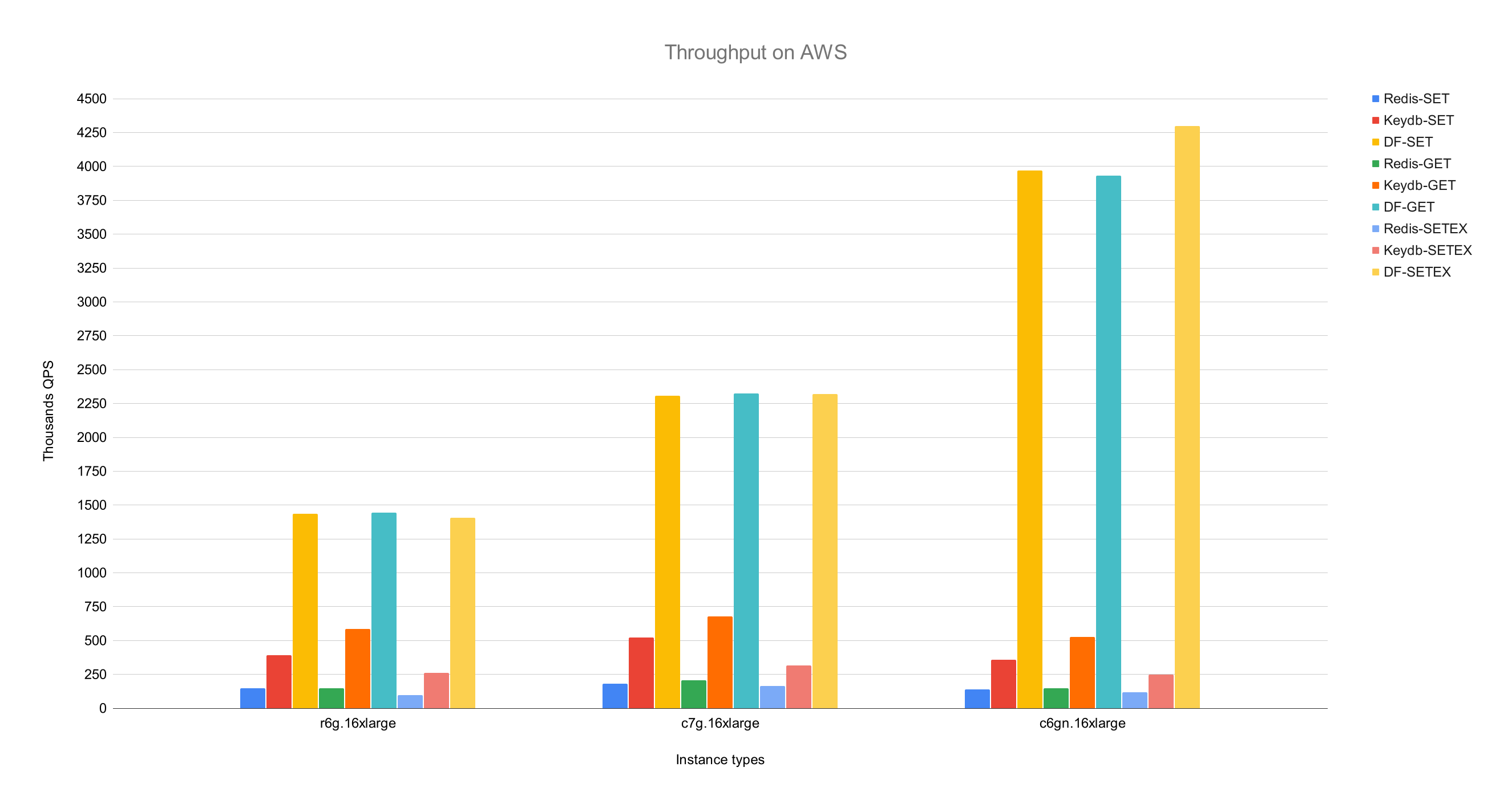 เมื่อเปรียบเทียบ Dragonfly กับ Redis บนอินสแตนซ์ c6gn.16xlarge ซึ่งรองรับ network bandwidth ได้สูงที่สุด Dragonfly ให้ throughput สูงกว่า Redis ที่รันแบบ single process ถึง 25 เท่า และทำได้มากกว่า 3.8M QPS
ค่า latency ที่ percentile 99 ของ Dragonfly ขณะทำ throughput ได้สูงสุด:
| op | r6g | c6gn | c7g |
|-------|-------|-------|-------|
| set | 0.8ms | 1ms | 1ms |
| get | 0.9ms | 0.9ms | 0.8ms |
| setex | 0.9ms | 1.1ms | 1.3ms |
*benchmark ทั้งหมดรันด้วย `memtier_benchmark` (ดูตัวอย่างด้านล่าง) โดยปรับจำนวน thread ให้เหมาะกับแต่ละ server และ instance type ส่วน `memtier` รันแยกบนเครื่อง c6gn.16xlarge อีกเครื่องหนึ่ง เราตั้งเวลา expiry เป็น 500 สำหรับ benchmark ของ SETEX เพื่อให้ key ยังไม่หมดอายุก่อนการทดสอบเสร็จ*
```bash
memtier_benchmark --ratio ... -t -c 30 -n 200000 --distinct-client-seed -d 256 \
--expiry-range=...
```
ในโหมด pipeline (`--pipeline=30`) Dragonfly ทำ throughput ได้ถึง **10M QPS** สำหรับ SET และ **15M QPS** สำหรับ GET
### Dragonfly vs. Memcached
เราเปรียบเทียบ Dragonfly กับ Memcached บนอินสแตนซ์ c6gn.16xlarge ของ AWS
เมื่อมี latency ใกล้เคียงกัน Dragonfly ให้ throughput สูงกว่า Memcached ทั้งใน workload แบบ write และ read นอกจากนี้ Dragonfly ยังให้ latency ที่ดีกว่าใน workload แบบ write เพราะมีการแย่ง lock ใน [write path ของ Memcached](docs/memcached_benchmark.md)
#### SET benchmark
| Server | QPS(thousands qps) | latency 99% | 99.9% |
|:---------:|:------------------:|:-----------:|:-------:|
| Dragonfly | 🟩 3844 |🟩 0.9ms | 🟩 2.4ms |
| Memcached | 806 | 1.6ms | 3.2ms |
#### GET benchmark
| Server | QPS(thousands qps) | latency 99% | 99.9% |
|-----------|:------------------:|:-----------:|:-------:|
| Dragonfly | 🟩 3717 | 1ms | 2.4ms |
| Memcached | 2100 | 🟩 0.34ms | 🟩 0.6ms |
Memcached ให้ latency ต่ำกว่าในการทดสอบ read แต่ throughput ก็ต่ำกว่าด้วย
### Memory efficiency
เพื่อทดสอบ memory efficiency เราเติมข้อมูลประมาณ 5GB ลงใน Dragonfly และ Redis ด้วยคำสั่ง `debug populate 5000000 key 1024` จากนั้นส่ง update traffic ด้วย `memtier` แล้วเริ่มสร้าง snapshot ด้วยคำสั่ง `bgsave`
กราฟด้านล่างแสดงประสิทธิภาพด้านการใช้หน่วยความจำของ server แต่ละตัว
เมื่อเปรียบเทียบ Dragonfly กับ Redis บนอินสแตนซ์ c6gn.16xlarge ซึ่งรองรับ network bandwidth ได้สูงที่สุด Dragonfly ให้ throughput สูงกว่า Redis ที่รันแบบ single process ถึง 25 เท่า และทำได้มากกว่า 3.8M QPS
ค่า latency ที่ percentile 99 ของ Dragonfly ขณะทำ throughput ได้สูงสุด:
| op | r6g | c6gn | c7g |
|-------|-------|-------|-------|
| set | 0.8ms | 1ms | 1ms |
| get | 0.9ms | 0.9ms | 0.8ms |
| setex | 0.9ms | 1.1ms | 1.3ms |
*benchmark ทั้งหมดรันด้วย `memtier_benchmark` (ดูตัวอย่างด้านล่าง) โดยปรับจำนวน thread ให้เหมาะกับแต่ละ server และ instance type ส่วน `memtier` รันแยกบนเครื่อง c6gn.16xlarge อีกเครื่องหนึ่ง เราตั้งเวลา expiry เป็น 500 สำหรับ benchmark ของ SETEX เพื่อให้ key ยังไม่หมดอายุก่อนการทดสอบเสร็จ*
```bash
memtier_benchmark --ratio ... -t -c 30 -n 200000 --distinct-client-seed -d 256 \
--expiry-range=...
```
ในโหมด pipeline (`--pipeline=30`) Dragonfly ทำ throughput ได้ถึง **10M QPS** สำหรับ SET และ **15M QPS** สำหรับ GET
### Dragonfly vs. Memcached
เราเปรียบเทียบ Dragonfly กับ Memcached บนอินสแตนซ์ c6gn.16xlarge ของ AWS
เมื่อมี latency ใกล้เคียงกัน Dragonfly ให้ throughput สูงกว่า Memcached ทั้งใน workload แบบ write และ read นอกจากนี้ Dragonfly ยังให้ latency ที่ดีกว่าใน workload แบบ write เพราะมีการแย่ง lock ใน [write path ของ Memcached](docs/memcached_benchmark.md)
#### SET benchmark
| Server | QPS(thousands qps) | latency 99% | 99.9% |
|:---------:|:------------------:|:-----------:|:-------:|
| Dragonfly | 🟩 3844 |🟩 0.9ms | 🟩 2.4ms |
| Memcached | 806 | 1.6ms | 3.2ms |
#### GET benchmark
| Server | QPS(thousands qps) | latency 99% | 99.9% |
|-----------|:------------------:|:-----------:|:-------:|
| Dragonfly | 🟩 3717 | 1ms | 2.4ms |
| Memcached | 2100 | 🟩 0.34ms | 🟩 0.6ms |
Memcached ให้ latency ต่ำกว่าในการทดสอบ read แต่ throughput ก็ต่ำกว่าด้วย
### Memory efficiency
เพื่อทดสอบ memory efficiency เราเติมข้อมูลประมาณ 5GB ลงใน Dragonfly และ Redis ด้วยคำสั่ง `debug populate 5000000 key 1024` จากนั้นส่ง update traffic ด้วย `memtier` แล้วเริ่มสร้าง snapshot ด้วยคำสั่ง `bgsave`
กราฟด้านล่างแสดงประสิทธิภาพด้านการใช้หน่วยความจำของ server แต่ละตัว
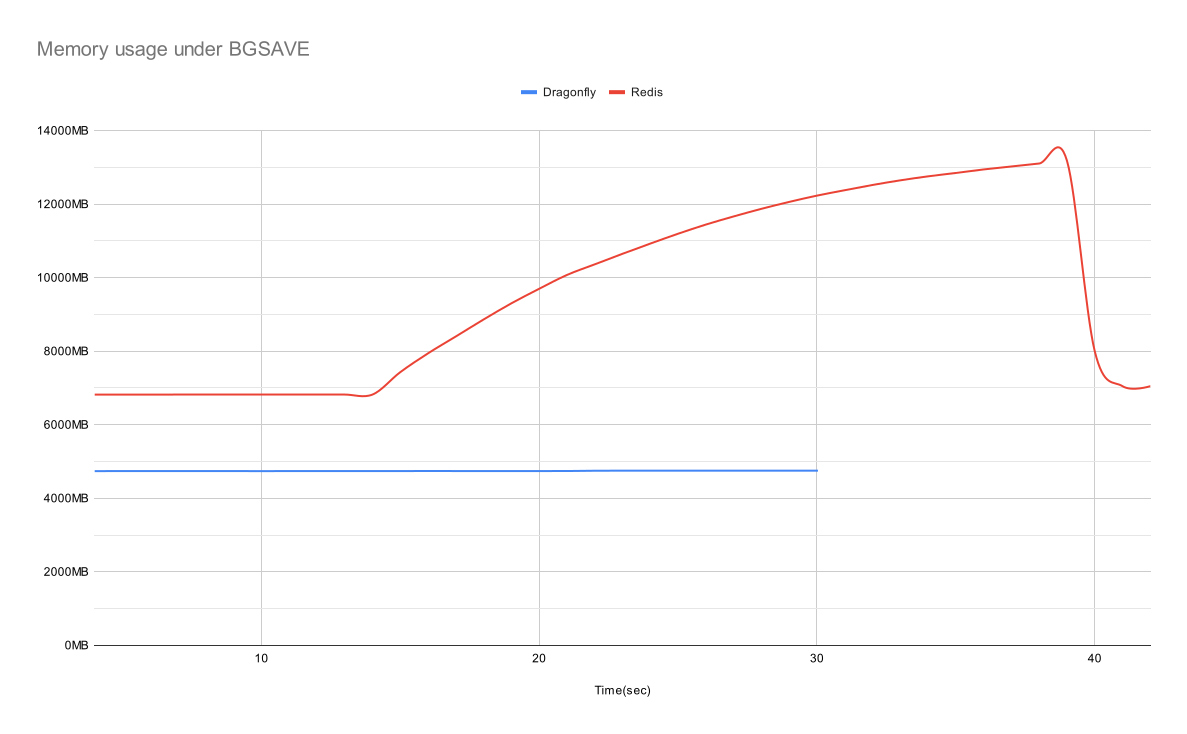 ในสถานะ idle Dragonfly ใช้หน่วยความจำอย่างมีประสิทธิภาพกว่า Redis 30% และไม่พบการใช้หน่วยความจำเพิ่มขึ้นจนสังเกตได้ระหว่างสร้าง snapshot เมื่อถึงจุดสูงสุด Redis ใช้หน่วยความจำเกือบ 3 เท่าของ Dragonfly
Dragonfly สร้าง snapshot เสร็จเร็วกว่า โดยใช้เวลาเพียงไม่กี่วินาที
อ่านรายละเอียดเพิ่มเติมเกี่ยวกับ memory efficiency ของ Dragonfly ได้ใน [เอกสาร Dashtable](/docs/dashtable.md)
## Configuration
Dragonfly รองรับ argument ที่ใช้กันทั่วไปของ Redis ในส่วนที่นำมาใช้กับ Dragonfly ได้ ตัวอย่างเช่น คุณสามารถรันคำสั่ง `dragonfly --requirepass=foo --bind localhost` ได้
ปัจจุบัน Dragonfly รองรับ argument เฉพาะของ Redis ดังนี้:
* `port`: พอร์ตสำหรับเชื่อมต่อแบบ Redis (`ค่าเริ่มต้น: 6379`)
* `bind`: ใช้ `localhost` เพื่ออนุญาตเฉพาะการเชื่อมต่อจากเครื่องเดียวกัน หรือระบุ public IP เพื่อให้ client เชื่อมต่อมายัง **IP นั้น** ได้ รวมถึง client จากภายนอก ใช้ `0.0.0.0` เพื่ออนุญาตการเชื่อมต่อจาก IPv4 address ใดก็ได้
* `requirepass`: password สำหรับยืนยันตัวตนด้วย AUTH (`ค่าเริ่มต้น: ""`)
* `maxmemory`: ขีดจำกัดหน่วยความจำสูงสุดที่ database ใช้ โดยระบุเป็นจำนวน byte ในรูปแบบที่อ่านง่าย เช่น `12gb` หรือ `500mb` (`ค่าเริ่มต้น: 0`) ค่า `maxmemory` เท่ากับ `0` หมายความว่าโปรแกรมจะกำหนดขีดจำกัดหน่วยความจำสูงสุดโดยอัตโนมัติ
* `dir`: Dragonfly เวอร์ชัน Docker ใช้โฟลเดอร์ `/data` สำหรับสร้าง snapshot เป็นค่าเริ่มต้น ส่วน CLI ใช้ `""` คุณใช้ออปชัน `-v` ของ Docker เพื่อ map โฟลเดอร์นี้ไปยังโฟลเดอร์บนเครื่อง host ได้
* `dbfilename`: ชื่อไฟล์สำหรับบันทึกและโหลด database (`ค่าเริ่มต้น: dump`)
นอกจากนี้ยังมี argument เฉพาะของ Dragonfly เองอีกชุดหนึ่ง:
* `memcached_port`: พอร์ตสำหรับเปิดใช้ API ที่เข้ากันได้กับ Memcached (`ค่าเริ่มต้น: disabled`)
* `keys_output_limit`: จำนวน key สูงสุดที่คำสั่ง `keys` จะส่งกลับ (`ค่าเริ่มต้น: 8192`) คำสั่ง `keys` เป็นคำสั่งที่อันตราย เราจึงตัดผลลัพธ์ไว้เพื่อป้องกันการใช้หน่วยความจำเพิ่มขึ้นอย่างมากเมื่อดึง key มากเกินไป
* `dbnum`: จำนวน database สูงสุดที่คำสั่ง `select` รองรับ
* `cache_mode`: ดูรายละเอียดที่หัวข้อ [novel cache design](#novel-cache-design) ด้านล่าง
* `hz`: ความถี่ในการตรวจสอบการหมดอายุของ key (`ค่าเริ่มต้น: 100`) ความถี่ที่ต่ำลงใช้ CPU น้อยลงในสถานะ idle แต่แลกกับอัตราการ evict ที่ช้าลง
* `snapshot_cron`: cron schedule expression สำหรับกำหนดเวลาสร้าง backup snapshot อัตโนมัติ โดยใช้ syntax มาตรฐานของ cron ที่มีความละเอียดระดับนาที (`ค่าเริ่มต้น: ""`)
ตารางด้านล่างแสดงตัวอย่าง cron schedule expression อ่านรายละเอียดเพิ่มเติมเกี่ยวกับ argument นี้ได้ใน [เอกสารของเรา](https://www.dragonflydb.io/docs/managing-dragonfly/backups#the-snapshot_cron-flag)
| Cron Schedule Expression | คำอธิบาย |
|--------------------------|--------------------------------------------|
| `* * * * *` | ทุกนาที |
| `*/5 * * * *` | ทุก 5 นาที |
| `5 */2 * * *` | นาทีที่ 5 ของทุก 2 ชั่วโมง |
| `0 0 * * *` | เที่ยงคืน (00:00) ของทุกวัน |
| `0 6 * * 1-5` | 06:00 น. (รุ่งเช้า) ของวันจันทร์ถึงศุกร์ |
* `primary_port_http_enabled`: อนุญาตให้เข้าถึง HTTP console ผ่านพอร์ต TCP หลักเมื่อตั้งค่าเป็น `true` (`ค่าเริ่มต้น: true`)
* `admin_port`: เปิดให้เข้าถึง admin console ผ่านพอร์ตที่กำหนด (`ค่าเริ่มต้น: disabled`) รองรับทั้ง HTTP และ RESP
* `admin_bind`: bind การเชื่อมต่อ TCP ของ admin console กับ address ที่กำหนด (`ค่าเริ่มต้น: any`) รองรับทั้ง HTTP และ RESP
* `admin_nopass`: เปิดให้เข้าถึง admin console ผ่านพอร์ตที่กำหนดโดยไม่ต้องใช้ auth token (`ค่าเริ่มต้น: false`) รองรับทั้ง HTTP และ RESP
* `cluster_mode`: โหมด cluster ที่รองรับ (`ค่าเริ่มต้น: ""`) ปัจจุบันรองรับเฉพาะ `emulated`
* `cluster_announce_ip`: IP ที่คำสั่งของ cluster จะประกาศให้ client รู้
* `announce_port`: พอร์ตที่คำสั่งของ cluster จะประกาศให้ client และ replication master รู้
### Example start script with popular options:
```bash
./dragonfly-x86_64 --logtostderr --requirepass=youshallnotpass --cache_mode=true -dbnum 1 --bind localhost --port 6379 --maxmemory=12gb --keys_output_limit=12288 --dbfilename dump.rdb
```
คุณระบุ argument ผ่านช่องทางอื่นได้ด้วย:
* `--flagfile `: ไฟล์นี้ต้องระบุ flag บรรทัดละหนึ่งรายการ สำหรับ flag แบบ key-value ให้ใช้เครื่องหมาย `=` แทนเว้นวรรค โดยไม่ต้องใส่ quote ครอบค่า
* ตั้ง environment variable เป็น `DFLY_x` โดย `x` ต้องเหมือนชื่อ flag ทุกตัวอักษรและแยกตัวพิมพ์เล็ก-ใหญ่
ดู option เพิ่มเติม เช่น การจัดการ log หรือการรองรับ TLS ได้ด้วยคำสั่ง `dragonfly --help`
## Design decisions
### Novel cache design
Dragonfly มี caching algorithm แบบ adaptive เพียงชุดเดียวที่ทำงานร่วมกันทั้งระบบ มีโครงสร้างเรียบง่าย และประหยัดหน่วยความจำ
คุณเปิดโหมด cache ได้ด้วย flag `--cache_mode=true` เมื่อเปิดโหมดนี้ Dragonfly จะ evict item ที่มีโอกาสถูกเรียกใช้ในอนาคตน้อยที่สุด แต่จะทำเมื่อการใช้หน่วยความจำใกล้ถึงขีดจำกัด `maxmemory` เท่านั้น
### Expiration deadlines with relative accuracy
ช่วงเวลา expiration จำกัดไว้ที่ประมาณ 8 ปี
Expiration deadline ที่มีความละเอียดระดับ millisecond (เช่น PEXPIRE, PSETEX) จะถูกปัดเป็นวินาทีที่ใกล้ที่สุด **เมื่อ deadline มากกว่า 2^28ms** โดยมี error ต่ำกว่า 0.001% ซึ่งน่าจะยอมรับได้สำหรับช่วงเวลาที่ยาว หากเงื่อนไขนี้ไม่เหมาะกับ use case ของคุณ โปรดติดต่อเราหรือเปิด issue เพื่ออธิบายกรณีดังกล่าว
อ่านรายละเอียดเพิ่มเติมเกี่ยวกับความแตกต่างระหว่าง expiration deadline ของ Dragonfly และ Redis [ได้ที่นี่](docs/differences.md)
### Native HTTP console and Prometheus-compatible metrics
โดยค่าเริ่มต้น Dragonfly อนุญาตให้เข้าถึงผ่าน HTTP บนพอร์ต TCP หลัก (6379) คุณจึงเชื่อมต่อ Dragonfly ผ่าน Redis protocol หรือ HTTP protocol ก็ได้ โดย server จะตรวจจับ protocol โดยอัตโนมัติเมื่อเริ่มเชื่อมต่อ คุณสามารถทดลองเปิดผ่าน browser ได้ ปัจจุบัน HTTP console ยังแสดงข้อมูลไม่มาก แต่ในอนาคตจะเพิ่มข้อมูลที่เป็นประโยชน์ต่อการ debug และจัดการระบบ
เปิด URL `:6379/metrics` เพื่อดู metric ที่เข้ากันได้กับ Prometheus
metric ที่ Dragonfly export ในรูปแบบที่ Prometheus รองรับสามารถใช้กับ Grafana dashboard ได้ [ดูตัวอย่างที่นี่](tools/local/monitoring/grafana/provisioning/dashboards/dragonfly.json)
สำคัญ! HTTP console มีไว้สำหรับเข้าถึงจาก network ที่ปลอดภัย หากคุณเปิดพอร์ต TCP ของ Dragonfly ให้เข้าถึงจากภายนอก เราแนะนำให้ปิด console ด้วย `--http_admin_console=false` หรือ `--nohttp_admin_console`
## Background
Dragonfly เริ่มต้นจากการทดลองว่า in-memory datastore จะมีหน้าตาอย่างไรหากออกแบบขึ้นใหม่ในปี 2022 จากบทเรียนที่เราได้รับในฐานะผู้ใช้ memory store และวิศวกรที่เคยทำงานให้บริษัท cloud เรารู้ว่า Dragonfly ต้องรักษาคุณสมบัติหลักสองอย่าง ได้แก่ การรับประกัน atomicity สำหรับทุก operation และ latency ที่ต่ำกว่า millisecond ขณะรองรับ throughput ที่สูงมาก
โจทย์แรกคือการใช้ทรัพยากร CPU, memory และ I/O ให้เต็มประสิทธิภาพบน server ที่มีให้ใช้งานใน public cloud ปัจจุบัน เราจึงเลือกใช้ [shared-nothing architecture](https://en.wikipedia.org/wiki/Shared-nothing_architecture) ซึ่งช่วยแบ่ง keyspace ของ memory store ระหว่าง thread เพื่อให้แต่ละ thread จัดการ dictionary data ส่วนของตัวเองได้ เราเรียกแต่ละส่วนว่า `shard` และ open source library ที่จัดการ thread และ I/O สำหรับ shared-nothing architecture ไว้[ที่นี่](https://github.com/romange/helio)
เพื่อรับประกัน atomicity ของ operation แบบ multi-key เรานำความก้าวหน้าจากงานวิจัยทางวิชาการล่าสุดมาใช้ โดยเลือก paper ["VLL: a lock manager redesign for main memory database systems"](https://www.cs.umd.edu/~abadi/papers/vldbj-vll.pdf) มาพัฒนา transactional framework ของ Dragonfly การใช้ shared-nothing architecture ร่วมกับ VLL ช่วยให้เรา compose atomic multi-key operation ได้โดยไม่ต้องใช้ mutex หรือ spinlock วิธีนี้เป็น milestone สำคัญของ PoC และมี performance ที่โดดเด่นเมื่อเทียบกับ solution อื่นทั้งแบบ commercial และ open-source
โจทย์ที่สองคือการออกแบบ data structure ที่มีประสิทธิภาพมากขึ้นสำหรับ store ตัวใหม่นี้ เราสร้าง core hashtable structure โดยอ้างอิง paper ["Dash: Scalable Hashing on Persistent Memory"](https://arxiv.org/pdf/2003.07302.pdf) Paper นี้เน้น persistent memory และไม่ได้เกี่ยวข้องกับ main-memory store โดยตรง แต่เหมาะกับปัญหาของเรามากที่สุด การออกแบบ hashtable ที่ paper นำเสนอช่วยให้เรารักษาคุณสมบัติพิเศษสองอย่างของ Redis dictionary ได้แก่ ความสามารถในการทำ incremental hashing ขณะ datastore ขยายขนาด และความสามารถในการ traverse dictionary ที่กำลังเปลี่ยนแปลงด้วย stateless scan operation นอกจากสองคุณสมบัตินี้ Dash ยังใช้ CPU และ memory ได้อย่างมีประสิทธิภาพมากขึ้น การนำ design ของ Dash มาใช้ช่วยให้เราพัฒนาต่อยอดเป็น feature ต่อไปนี้:
* การทำ record expiry สำหรับ TTL record อย่างมีประสิทธิภาพ
* cache eviction algorithm แบบใหม่ที่ให้ hit rate สูงกว่า caching strategy อื่น เช่น LRU และ LFU โดยมี **memory overhead เป็นศูนย์**
* snapshotting algorithm แบบ **fork-less** รูปแบบใหม่
หลังจากสร้างรากฐานของ Dragonfly และ [พอใจกับ performance ที่ได้](#benchmarks) เราจึงพัฒนา functionality ของ Redis และ Memcached ต่อ ปัจจุบันเราพัฒนา Redis command แล้วประมาณ 185 คำสั่ง (ใกล้เคียงกับ Redis 5.0 API) และ Memcached command อีก 13 คำสั่ง
และสุดท้าย
ในสถานะ idle Dragonfly ใช้หน่วยความจำอย่างมีประสิทธิภาพกว่า Redis 30% และไม่พบการใช้หน่วยความจำเพิ่มขึ้นจนสังเกตได้ระหว่างสร้าง snapshot เมื่อถึงจุดสูงสุด Redis ใช้หน่วยความจำเกือบ 3 เท่าของ Dragonfly
Dragonfly สร้าง snapshot เสร็จเร็วกว่า โดยใช้เวลาเพียงไม่กี่วินาที
อ่านรายละเอียดเพิ่มเติมเกี่ยวกับ memory efficiency ของ Dragonfly ได้ใน [เอกสาร Dashtable](/docs/dashtable.md)
## Configuration
Dragonfly รองรับ argument ที่ใช้กันทั่วไปของ Redis ในส่วนที่นำมาใช้กับ Dragonfly ได้ ตัวอย่างเช่น คุณสามารถรันคำสั่ง `dragonfly --requirepass=foo --bind localhost` ได้
ปัจจุบัน Dragonfly รองรับ argument เฉพาะของ Redis ดังนี้:
* `port`: พอร์ตสำหรับเชื่อมต่อแบบ Redis (`ค่าเริ่มต้น: 6379`)
* `bind`: ใช้ `localhost` เพื่ออนุญาตเฉพาะการเชื่อมต่อจากเครื่องเดียวกัน หรือระบุ public IP เพื่อให้ client เชื่อมต่อมายัง **IP นั้น** ได้ รวมถึง client จากภายนอก ใช้ `0.0.0.0` เพื่ออนุญาตการเชื่อมต่อจาก IPv4 address ใดก็ได้
* `requirepass`: password สำหรับยืนยันตัวตนด้วย AUTH (`ค่าเริ่มต้น: ""`)
* `maxmemory`: ขีดจำกัดหน่วยความจำสูงสุดที่ database ใช้ โดยระบุเป็นจำนวน byte ในรูปแบบที่อ่านง่าย เช่น `12gb` หรือ `500mb` (`ค่าเริ่มต้น: 0`) ค่า `maxmemory` เท่ากับ `0` หมายความว่าโปรแกรมจะกำหนดขีดจำกัดหน่วยความจำสูงสุดโดยอัตโนมัติ
* `dir`: Dragonfly เวอร์ชัน Docker ใช้โฟลเดอร์ `/data` สำหรับสร้าง snapshot เป็นค่าเริ่มต้น ส่วน CLI ใช้ `""` คุณใช้ออปชัน `-v` ของ Docker เพื่อ map โฟลเดอร์นี้ไปยังโฟลเดอร์บนเครื่อง host ได้
* `dbfilename`: ชื่อไฟล์สำหรับบันทึกและโหลด database (`ค่าเริ่มต้น: dump`)
นอกจากนี้ยังมี argument เฉพาะของ Dragonfly เองอีกชุดหนึ่ง:
* `memcached_port`: พอร์ตสำหรับเปิดใช้ API ที่เข้ากันได้กับ Memcached (`ค่าเริ่มต้น: disabled`)
* `keys_output_limit`: จำนวน key สูงสุดที่คำสั่ง `keys` จะส่งกลับ (`ค่าเริ่มต้น: 8192`) คำสั่ง `keys` เป็นคำสั่งที่อันตราย เราจึงตัดผลลัพธ์ไว้เพื่อป้องกันการใช้หน่วยความจำเพิ่มขึ้นอย่างมากเมื่อดึง key มากเกินไป
* `dbnum`: จำนวน database สูงสุดที่คำสั่ง `select` รองรับ
* `cache_mode`: ดูรายละเอียดที่หัวข้อ [novel cache design](#novel-cache-design) ด้านล่าง
* `hz`: ความถี่ในการตรวจสอบการหมดอายุของ key (`ค่าเริ่มต้น: 100`) ความถี่ที่ต่ำลงใช้ CPU น้อยลงในสถานะ idle แต่แลกกับอัตราการ evict ที่ช้าลง
* `snapshot_cron`: cron schedule expression สำหรับกำหนดเวลาสร้าง backup snapshot อัตโนมัติ โดยใช้ syntax มาตรฐานของ cron ที่มีความละเอียดระดับนาที (`ค่าเริ่มต้น: ""`)
ตารางด้านล่างแสดงตัวอย่าง cron schedule expression อ่านรายละเอียดเพิ่มเติมเกี่ยวกับ argument นี้ได้ใน [เอกสารของเรา](https://www.dragonflydb.io/docs/managing-dragonfly/backups#the-snapshot_cron-flag)
| Cron Schedule Expression | คำอธิบาย |
|--------------------------|--------------------------------------------|
| `* * * * *` | ทุกนาที |
| `*/5 * * * *` | ทุก 5 นาที |
| `5 */2 * * *` | นาทีที่ 5 ของทุก 2 ชั่วโมง |
| `0 0 * * *` | เที่ยงคืน (00:00) ของทุกวัน |
| `0 6 * * 1-5` | 06:00 น. (รุ่งเช้า) ของวันจันทร์ถึงศุกร์ |
* `primary_port_http_enabled`: อนุญาตให้เข้าถึง HTTP console ผ่านพอร์ต TCP หลักเมื่อตั้งค่าเป็น `true` (`ค่าเริ่มต้น: true`)
* `admin_port`: เปิดให้เข้าถึง admin console ผ่านพอร์ตที่กำหนด (`ค่าเริ่มต้น: disabled`) รองรับทั้ง HTTP และ RESP
* `admin_bind`: bind การเชื่อมต่อ TCP ของ admin console กับ address ที่กำหนด (`ค่าเริ่มต้น: any`) รองรับทั้ง HTTP และ RESP
* `admin_nopass`: เปิดให้เข้าถึง admin console ผ่านพอร์ตที่กำหนดโดยไม่ต้องใช้ auth token (`ค่าเริ่มต้น: false`) รองรับทั้ง HTTP และ RESP
* `cluster_mode`: โหมด cluster ที่รองรับ (`ค่าเริ่มต้น: ""`) ปัจจุบันรองรับเฉพาะ `emulated`
* `cluster_announce_ip`: IP ที่คำสั่งของ cluster จะประกาศให้ client รู้
* `announce_port`: พอร์ตที่คำสั่งของ cluster จะประกาศให้ client และ replication master รู้
### Example start script with popular options:
```bash
./dragonfly-x86_64 --logtostderr --requirepass=youshallnotpass --cache_mode=true -dbnum 1 --bind localhost --port 6379 --maxmemory=12gb --keys_output_limit=12288 --dbfilename dump.rdb
```
คุณระบุ argument ผ่านช่องทางอื่นได้ด้วย:
* `--flagfile `: ไฟล์นี้ต้องระบุ flag บรรทัดละหนึ่งรายการ สำหรับ flag แบบ key-value ให้ใช้เครื่องหมาย `=` แทนเว้นวรรค โดยไม่ต้องใส่ quote ครอบค่า
* ตั้ง environment variable เป็น `DFLY_x` โดย `x` ต้องเหมือนชื่อ flag ทุกตัวอักษรและแยกตัวพิมพ์เล็ก-ใหญ่
ดู option เพิ่มเติม เช่น การจัดการ log หรือการรองรับ TLS ได้ด้วยคำสั่ง `dragonfly --help`
## Design decisions
### Novel cache design
Dragonfly มี caching algorithm แบบ adaptive เพียงชุดเดียวที่ทำงานร่วมกันทั้งระบบ มีโครงสร้างเรียบง่าย และประหยัดหน่วยความจำ
คุณเปิดโหมด cache ได้ด้วย flag `--cache_mode=true` เมื่อเปิดโหมดนี้ Dragonfly จะ evict item ที่มีโอกาสถูกเรียกใช้ในอนาคตน้อยที่สุด แต่จะทำเมื่อการใช้หน่วยความจำใกล้ถึงขีดจำกัด `maxmemory` เท่านั้น
### Expiration deadlines with relative accuracy
ช่วงเวลา expiration จำกัดไว้ที่ประมาณ 8 ปี
Expiration deadline ที่มีความละเอียดระดับ millisecond (เช่น PEXPIRE, PSETEX) จะถูกปัดเป็นวินาทีที่ใกล้ที่สุด **เมื่อ deadline มากกว่า 2^28ms** โดยมี error ต่ำกว่า 0.001% ซึ่งน่าจะยอมรับได้สำหรับช่วงเวลาที่ยาว หากเงื่อนไขนี้ไม่เหมาะกับ use case ของคุณ โปรดติดต่อเราหรือเปิด issue เพื่ออธิบายกรณีดังกล่าว
อ่านรายละเอียดเพิ่มเติมเกี่ยวกับความแตกต่างระหว่าง expiration deadline ของ Dragonfly และ Redis [ได้ที่นี่](docs/differences.md)
### Native HTTP console and Prometheus-compatible metrics
โดยค่าเริ่มต้น Dragonfly อนุญาตให้เข้าถึงผ่าน HTTP บนพอร์ต TCP หลัก (6379) คุณจึงเชื่อมต่อ Dragonfly ผ่าน Redis protocol หรือ HTTP protocol ก็ได้ โดย server จะตรวจจับ protocol โดยอัตโนมัติเมื่อเริ่มเชื่อมต่อ คุณสามารถทดลองเปิดผ่าน browser ได้ ปัจจุบัน HTTP console ยังแสดงข้อมูลไม่มาก แต่ในอนาคตจะเพิ่มข้อมูลที่เป็นประโยชน์ต่อการ debug และจัดการระบบ
เปิด URL `:6379/metrics` เพื่อดู metric ที่เข้ากันได้กับ Prometheus
metric ที่ Dragonfly export ในรูปแบบที่ Prometheus รองรับสามารถใช้กับ Grafana dashboard ได้ [ดูตัวอย่างที่นี่](tools/local/monitoring/grafana/provisioning/dashboards/dragonfly.json)
สำคัญ! HTTP console มีไว้สำหรับเข้าถึงจาก network ที่ปลอดภัย หากคุณเปิดพอร์ต TCP ของ Dragonfly ให้เข้าถึงจากภายนอก เราแนะนำให้ปิด console ด้วย `--http_admin_console=false` หรือ `--nohttp_admin_console`
## Background
Dragonfly เริ่มต้นจากการทดลองว่า in-memory datastore จะมีหน้าตาอย่างไรหากออกแบบขึ้นใหม่ในปี 2022 จากบทเรียนที่เราได้รับในฐานะผู้ใช้ memory store และวิศวกรที่เคยทำงานให้บริษัท cloud เรารู้ว่า Dragonfly ต้องรักษาคุณสมบัติหลักสองอย่าง ได้แก่ การรับประกัน atomicity สำหรับทุก operation และ latency ที่ต่ำกว่า millisecond ขณะรองรับ throughput ที่สูงมาก
โจทย์แรกคือการใช้ทรัพยากร CPU, memory และ I/O ให้เต็มประสิทธิภาพบน server ที่มีให้ใช้งานใน public cloud ปัจจุบัน เราจึงเลือกใช้ [shared-nothing architecture](https://en.wikipedia.org/wiki/Shared-nothing_architecture) ซึ่งช่วยแบ่ง keyspace ของ memory store ระหว่าง thread เพื่อให้แต่ละ thread จัดการ dictionary data ส่วนของตัวเองได้ เราเรียกแต่ละส่วนว่า `shard` และ open source library ที่จัดการ thread และ I/O สำหรับ shared-nothing architecture ไว้[ที่นี่](https://github.com/romange/helio)
เพื่อรับประกัน atomicity ของ operation แบบ multi-key เรานำความก้าวหน้าจากงานวิจัยทางวิชาการล่าสุดมาใช้ โดยเลือก paper ["VLL: a lock manager redesign for main memory database systems"](https://www.cs.umd.edu/~abadi/papers/vldbj-vll.pdf) มาพัฒนา transactional framework ของ Dragonfly การใช้ shared-nothing architecture ร่วมกับ VLL ช่วยให้เรา compose atomic multi-key operation ได้โดยไม่ต้องใช้ mutex หรือ spinlock วิธีนี้เป็น milestone สำคัญของ PoC และมี performance ที่โดดเด่นเมื่อเทียบกับ solution อื่นทั้งแบบ commercial และ open-source
โจทย์ที่สองคือการออกแบบ data structure ที่มีประสิทธิภาพมากขึ้นสำหรับ store ตัวใหม่นี้ เราสร้าง core hashtable structure โดยอ้างอิง paper ["Dash: Scalable Hashing on Persistent Memory"](https://arxiv.org/pdf/2003.07302.pdf) Paper นี้เน้น persistent memory และไม่ได้เกี่ยวข้องกับ main-memory store โดยตรง แต่เหมาะกับปัญหาของเรามากที่สุด การออกแบบ hashtable ที่ paper นำเสนอช่วยให้เรารักษาคุณสมบัติพิเศษสองอย่างของ Redis dictionary ได้แก่ ความสามารถในการทำ incremental hashing ขณะ datastore ขยายขนาด และความสามารถในการ traverse dictionary ที่กำลังเปลี่ยนแปลงด้วย stateless scan operation นอกจากสองคุณสมบัตินี้ Dash ยังใช้ CPU และ memory ได้อย่างมีประสิทธิภาพมากขึ้น การนำ design ของ Dash มาใช้ช่วยให้เราพัฒนาต่อยอดเป็น feature ต่อไปนี้:
* การทำ record expiry สำหรับ TTL record อย่างมีประสิทธิภาพ
* cache eviction algorithm แบบใหม่ที่ให้ hit rate สูงกว่า caching strategy อื่น เช่น LRU และ LFU โดยมี **memory overhead เป็นศูนย์**
* snapshotting algorithm แบบ **fork-less** รูปแบบใหม่
หลังจากสร้างรากฐานของ Dragonfly และ [พอใจกับ performance ที่ได้](#benchmarks) เราจึงพัฒนา functionality ของ Redis และ Memcached ต่อ ปัจจุบันเราพัฒนา Redis command แล้วประมาณ 185 คำสั่ง (ใกล้เคียงกับ Redis 5.0 API) และ Memcached command อีก 13 คำสั่ง
และสุดท้าย
ภารกิจของเราคือการสร้าง in-memory datastore ที่ออกแบบมาอย่างดี มีความเร็วสูงมาก และคุ้มค่าสำหรับ cloud workload โดยใช้ประโยชน์จากความก้าวหน้าของ hardware รุ่นล่าสุด เราตั้งใจแก้ pain point ของ solution ที่มีอยู่ พร้อมรักษา API และคุณค่าของผลิตภัณฑ์เหล่านั้นไว้
## Contributors
ขอบคุณผู้ร่วมพัฒนาโปรเจกต์ Dragonfly ทุกคนเลย!