English · 简体中文






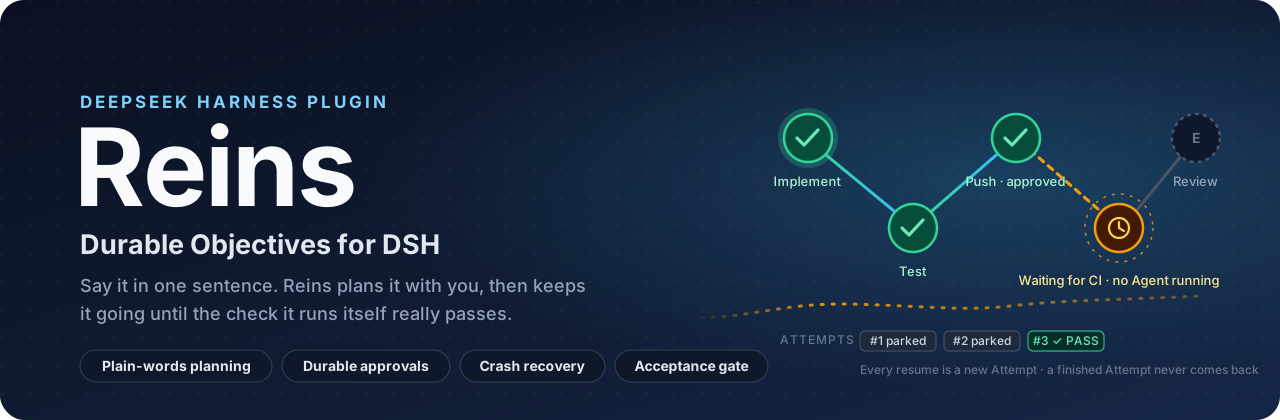
Harness executes. Reins holds the reins.
Tell Reins what you want in one sentence. It plans it with you, keeps it moving across Tasks, sessions,
approvals, CI, failures and restarts, and calls it done only when the check it runs itself passes.
Install ·
Quick start ·
Commands ·
Configuration ·
Architecture ·
Security model ·
Tests ·
Development
---
## Why Reins
An Agent conversation is good at "do this now". Real engineering goals take longer: change the code, run the tests, **wait for someone to approve** a push, **wait for CI**, fix what CI found, **wait for review**… and somewhere in between the process crashes or the machine restarts.
Keeping an Agent loop spinning while it waits wastes resources, and it makes it easy to mistake "the model said it is done" for "it is done". Reins moves all of that into a **durable orchestration layer**:
- Describe the goal in plain words; **your conversation's model plans it with you** and asks when there is a real choice to make.
- Waiting is **durable state**, not an idle Agent loop; when the event arrives, a **new Attempt** continues.
- A sensitive call **is denied when no one approves it**; an approval authorizes **exactly that one call**.
- A Task is complete only when it passes the **acceptance gate**. A finished Goal or a successful Attempt is not enough, and tests are run **by Reins itself**, never taken from the Agent's word.
- Everything lives in SQLite. After a crash, Reins **reconciles conservatively**: nothing uncertain is ever treated as success.
## How it works
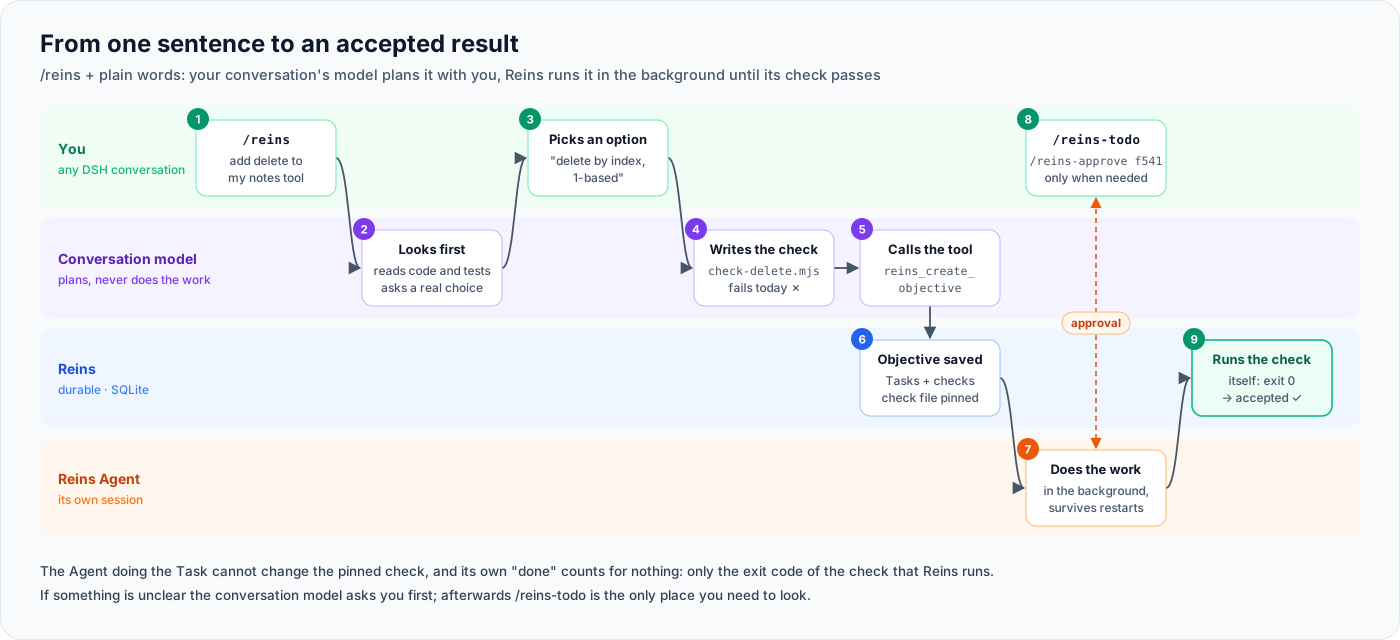
```text
/reins add a delete command to my notes tool
```
1. The model of **the conversation you typed this in** looks at the project first.
2. When the request leaves a real choice open, it asks you (DSH's question card with options). Things it can find out itself, it does not ask.
3. If no existing test covers the change, it **writes the check first** and confirms that the check fails today.
4. It calls `reins_create_objective` with the Tasks, their order and a check command per Task. Reins **pins the check files by hash**, so the Agent doing a Task cannot rewrite its own exam.
5. Reins' own Agents do the work in the background, in their own sessions. When one needs approval, `/reins-todo` lists it, and `/reins-approve ` lets the Task continue where it stopped.
6. Reins runs the check itself. **Exit code 0 is the only way to "done".**
This was verified with a real DeepSeek model in DSH Web. Asked for "a delete function for the notes tool", the model asked whether to delete by index or by text, wrote `check-delete.mjs` and saw it fail, and created the Objective. A Reins Agent implemented delete-by-index, and Reins ran the pinned check: exit 0, accepted.
## Features
| | Capability | What it means |
|---|---|---|
| 💬 | **Plain-words planning** | `/reins `: the conversation's model plans with you, asks about real choices, writes the check first, then creates the Objective |
| 🧭 | **Task DAG** | An Objective holds several Tasks with dependencies; a downstream Task becomes ready only when its upstream Tasks are **accepted** |
| 🔁 | **Attempt boundary** | Every run is an immutable Attempt; a finished Attempt never comes back to life, every resume is a new Attempt |
| ✋ | **Durable approvals** | Sensitive tools are denied and parked when no one approves; an approval becomes a one-shot grant bound to Task / Attempt / session / Goal / tool / arguments / policy version / expiry and is consumed atomically, once |
| ⏳ | **Durable waits and events** | `awaiting_approval` / `awaiting_ci` / `awaiting_timer` / `awaiting_external_event`; immutable events, idempotent consumption, duplicate suppression |
| 📡 | **Polling watchers** | GitHub Checks, PR reviews, local/remote processes; backoff, timeouts, rate limits, offline handling, stale results refused; credentials never stored or logged |
| 🧩 | **Safe replanning** | Graph revisions; the DAG changes only at safe points, and an Attempt from an old revision cannot be accepted (enforced in the database) |
| 🌿 | **Parallel worktrees** | Parallel Tasks each get their own git worktree; orphan reconciliation, branch conflict avoidance, merging, acceptance bound to artifact hashes |
| 🤖 | **Subagents / session fork** | Route a Task to a normal session, a read-only subagent or a session fork; seeing a tool is not permission to use it |
| 🧪 | **Acceptance gate** | Frozen criteria and deterministic validators (file checks, durable `reins.*` facts, and `reins.command_succeeds`, where **Reins runs the test command itself**); only a pass receipt completes a Task |
| 📉 | **No-progress detection** | Deterministic failure fingerprints; repeated identical failures, a stalled acceptance, repeated denials or tool errors put the Task on hold for you |
| 💥 | **Crash recovery** | Leases and epoch fencing; taking over needs an exit proof bound to owner / Objective / epoch / execution; one live Reins process per database |
## Install
### Requirements
- **Node.js ≥ 22.13** (for the built-in `node:sqlite`)
- **DeepSeek Harness `@deepseek-ai/dsh@0.2.0-rc.1`** (Reins pins its peer dependencies to this version)
```bash
npm install -g @deepseek-ai/dsh@0.2.0-rc.1
```
Below, `` is the Harness data directory (the `DSH_HOME` environment variable, `~/.dsh` when unset) and `web` is the profile to install into.
### 1. Get a fixed copy
Install from a **fixed snapshot directory**, so that later changes to a working copy do not change what is installed:
```bash
git clone --branch v0.4.0 https://github.com/dreamfarer-space/dsh-reins.git reins-0.4.0
```
### 2. Install the plugin
Reins is a DSH **plugin bundle**. Either:
- **In DSH Web**: sidebar **Plugins** → **Add plugin**, enter the absolute path of the snapshot directory (for example `D:/plugins/reins-0.4.0`), then **Enable now**.
- **From the command line**:
```bash
dsh plugin --profile web add file:/absolute/path/to/reins-0.4.0
```
Reins then appears under **Plugins → Installed** with its icon and description; the switch on the right **starts and stops** it. You do not need to edit `cordis.patch.yml`.
### 3. Settings on the Plugins page
Open **Reins** on the Plugins page. Settings are edited right there and apply as soon as you save, without a restart:
| Setting | What it does |
|---|---|
| **Approval policy** | **Strict**: every tool needs approval. **Recommended** (default): reading and editing files is trusted; commands, network, subagents and unknown tools need approval. **Custom**: the recommended set plus tools you tick (`pwsh`, `bash`, `web_fetch`, …), and a list of tools that **always** need approval. **Trust all**: everything except the always-ask list (only for directories you can roll back) |
| **Continue automatically** | Continue after events, retries or a finished Task without waiting for `/reins-tick` (the Objective must allow it too: ask for it in `/reins`, or `/reins-goal --auto`) |
| **Approval wait in the page** | How long an approval may wait in the conversation before the Agent is released and it moves to `/reins-todo` |
| **Default workspace** | Where Objectives without their own `workspace` work |
| **Desktop notification / reminder in conversation** | How Reins tells you that it needs you or that something finished |
These settings are stored in the profile's `cordis.patch.yml` (`config:` under `- id: reins`) and can be edited by hand as well; the rest of the options are under [Configuration](#configuration).
### 4. Check
Type `/reins` in a conversation: the usage text lists all commands. Typing `/reins` also shows them in DSH's command menu. Reins only governs the Attempts **it starts**; your own conversations with an Agent are not affected.
### Update, roll back, uninstall
- **Update**: prepare a new snapshot directory and run `dsh plugin --profile web add file:` again, or add it again on the Plugins page.
- **Roll back**: before installing, back up `package.json`, `pnpm-lock.yaml` and `cordis.patch.yml` under `/profiles/web`; to roll back, copy them back and run `dsh plugin --profile web install`.
- **Stop / uninstall**: switch it off on the Plugins page to stop Reins (database and settings are kept); **Uninstall** removes the bundle.
- **From before 0.3.0**: older versions needed a hand-written `- insert: - id: reins ...` in `cordis.patch.yml`. The bundle now declares that entry itself; change the old `insert` block into a settings override (`- id: reins` with `config:`), or `reins` is loaded twice.
- **From 0.3.x**: every `/reins ` is now its own command (`/reins todo` → `/reins-todo`, `/reins dag ` → `/reins-status `, …). The old forms still work and print the new name; `/reins` followed by anything else is now a plain-words request.
## Quick start
### Say what you want
```text
/reins the login endpoint crashes with a null pointer, fix it
/reins add CSV export to the report page, keep the current JSON export
```
The conversation's model plans it with you as described in [How it works](#how-it-works). It works in any conversation, including as the first message of a new one. If the project is not the conversation's directory, name the directory in the request.
### One sentence, your own check
When you already know the command that proves the work is done, skip the planning:
```text
/reins-goal fix the clamp edge cases
/reins-goal make lint pass --test "npm run lint" --workspace D:/work/app
/reins-goal fix clamp --dry-run # preview only
/reins-goal fix clamp --auto # continue on its own after events / retries (also needs unattendedEnabled)
```
Without `--test`, Reins detects the test command (`package.json` `test` script, Node test files, Cargo, Go, pytest) and tells you to pass `--test` if it finds none.
### Then two commands are enough
```text
/reins-todo # everything waiting for you: approvals, held Tasks (with the last error), Tasks waiting for a tick
/reins-approve 3f9c1a2b # approve with the short id shown by /reins-todo
```
After an approval, the Task continues **in its previous session** (the Agent remembers where it was). You do not need `/reins-tick`. Reading and editing files is trusted by default; running commands (`pwsh` / `bash`), network access and subagents still need approval (see `trustPreset` under [Configuration](#configuration)).
### In DSH Web
- **Reins sessions are in the sidebar**: the Agent conversation of each Task appears under "未分组" (Ungrouped), named after the Task. Open it to see what the Agent did.
- **Approve either way**: a session that needs approval is marked "待审批" (awaiting approval), and you can click "允许一次 / 拒绝" (allow once / deny) there. If you do not, after `interactiveApprovalTimeoutMs` (5 minutes by default) the Agent is released and the request moves to `/reins-todo` with a short id. DSH's own approvals (for example `pwsh` asking to widen the sandbox) follow the same rule.
- **Reins tells you**: when something needs you (an approval, a held Task, a finished or failed Objective), Windows shows a notification, and the next time you talk to any DSH conversation the Agent mentions it briefly, with the command to run.
- **After DSH was force-stopped**: if nothing was running, Reins takes over on restart by itself. If an Objective had an Attempt running, Reins cannot prove it stopped, so it **holds only that Objective** (no takeover, no changes) and runs everything else. `/reins-todo`, the reminder and the notification all point to it. Once you are sure the old DSH is gone, run `/reins-recover --confirm`: the unfinished Attempt is recorded as interrupted, side effects with an unknown result wait for you, and the Objective continues.
### Several Tasks by hand: get a PR mergeable
For full control over Tasks, dependencies and criteria, write the Task graph yourself with `/reins-objective`: implement, test, then wait for CI.
```text
/reins-objective {"id":"pr-7","summary":"Get PR #7 mergeable","workspace":"D:/work/app","tasks":[
{"id":"fix","title":"Implement the fix","criteria":[{"kind":"file_contains","spec":{"path":"src/fix.js","substring":"FIXED"}}]},
{"id":"tests","title":"Run the tests","dependsOn":["fix"],"criteria":[{"kind":"reins.command_succeeds","spec":{"argv":["node","--test"],"timeoutMs":300000}}]},
{"id":"ci","title":"Wait for CI","dependsOn":["tests"],"criteria":[{"kind":"reins.wait_satisfied","spec":{"waitKind":"ci","eventType":"ci.passed"}}]}
]}
```
What happens next:
1. Reins starts an Attempt for `fix`. The Agent gets a **structured handoff** (goal, current Task, criteria, last failure, budget, …) and calls `task_complete` when done.
2. The acceptance gate checks the criteria; only a pass completes `fix`, which makes `tests` ready. For `tests`, Reins runs `node --test` itself and looks only at the exit code; no test report written by the Agent counts.
3. In `ci`, the Agent pushes and calls `reins_wait` (`kind: "ci"`). The Attempt ends, the Agent stops, and a watcher starts polling.
4. Pushing is sensitive: with no one there it is denied and parked. `/reins-todo` shows the request, `/reins-approve ` approves it, and the Task continues in its previous session.
5. If CI fails, a new Attempt continues with a compact failure context (failed checks, failure fingerprint); once CI passes, the Task is accepted.
See everything at any time:
```text
/reins-status pr-7
```
> [!IMPORTANT]
> **Unattended runs are off by default.** Attempts started by an event, a timer, an automatic retry or "the previous Task was accepted" are unattended; they do not start on their own, `/reins-todo` lists them and `/reins-tick ` runs them. **Approvals you gave are not in that group**: an approval authorizes the call and the Task continues by itself. To let Reins continue on its own all the way, set both the configuration `unattendedEnabled: true` and the Objective field `"unattendedOptIn": true` (`--auto` for `/reins-goal`; say so in a `/reins` request).
## Commands
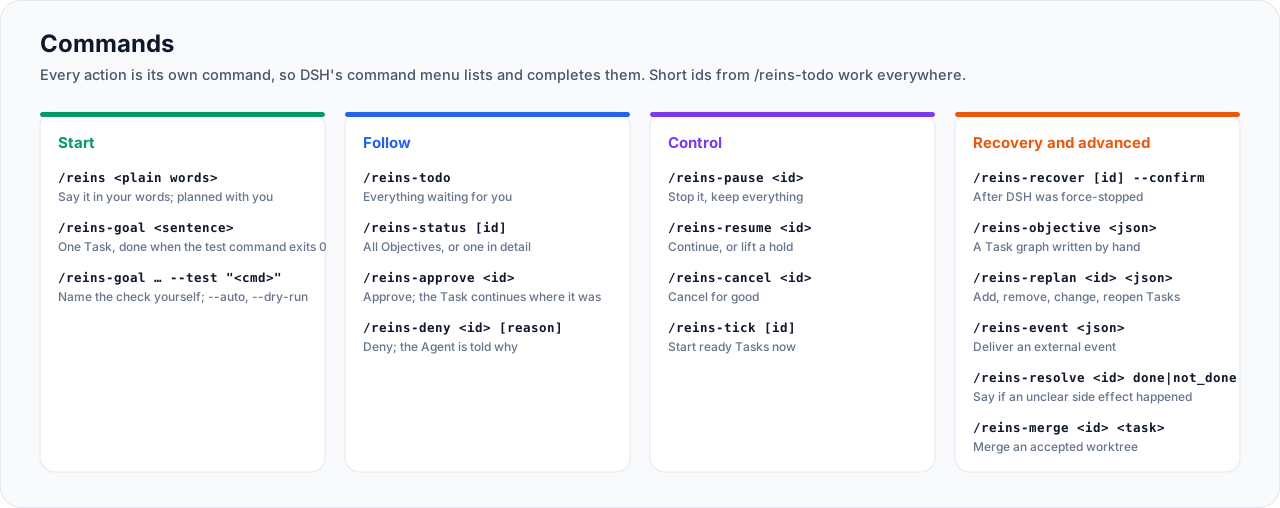
Every action is its own top-level command, so DSH's command menu lists and completes it. `approve`, `deny` and `resolve` accept the short id shown by `/reins-todo` (a unique prefix of at least 4 characters; an ambiguous prefix is refused).
| Command | What it does |
|---|---|
| `/reins ` | Plain-words request: this conversation's model plans it with you and creates the Objective. Without text: usage |
| `/reins-goal [--test ""] [--workspace ] [--id ] [--auto] [--dry-run]` | One-Task Objective that is done when the test command exits 0 |
| `/reins-todo` | Everything waiting for you: approvals (with short ids), approvals waiting in a DSH conversation, side effects with an unknown result, held Tasks and their last error, Tasks waiting for a tick, Objectives held after a forced stop |
| `/reins-status [objectiveId]` | Without an id: all Objectives, unfinished first. With an id: Objective, Task DAG, current Attempts, acceptance, waits, approvals, watchers, budget, lease, recent events |
| `/reins-approve [reason]` | Approve a durable approval request |
| `/reins-deny [reason]` | Deny it; the Agent is told why |
| `/reins-pause ` | Pause; running Attempts stop, state is kept |
| `/reins-resume ` | Resume a paused Objective; also lifts held Tasks inside an active one (no progress, approval loop, wait timeout) and restarts no-progress counting |
| `/reins-cancel ` | Cancel; unused grants are revoked first |
| `/reins-tick [objectiveId]` | Run scheduling now (counts as attended) |
| `/reins-recover [objectiveId] [--confirm]` | After a forced stop of DSH: list Objectives held by the old process; `--confirm` releases them once the old process is gone (also works when Reins could not start) |
| `/reins-objective ` | Create an Objective from a hand-written Task graph (fields below) |
| `/reins-replan ` | Replan at a safe point: `{"add":[…],"remove":[…],"modify":[…],"reopen":[…],"reason":"…"}` |
| `/reins-event ` | Deliver an external durable event |
| `/reins-resolve done\|not_done` | Say whether a side effect with an unknown result happened |
| `/reins-merge ` | Merge an accepted Task's worktree into the current branch |
Objective and Task fields
| Field | Meaning |
|---|---|
| `id` | Objective id (optional, random by default) |
| `summary` | What the Objective is about |
| `workspace` | The Objective's directory (absolute, must exist). Agents work there, and file criteria and acceptance commands run there. Default: `evidenceRoot` / `repoRoot` |
| `tasks[]` | Tasks, at least one |
| `tasks[].id` / `title` / `description` | Task id, title and instructions |
| `tasks[].dependsOn` | Ids of Tasks that must be accepted first (no cycles) |
| `tasks[].required` | Whether the Objective needs this Task, default `true` |
| `tasks[].criteria[]` | Acceptance criteria: `{"kind","spec","required"}` |
| `tasks[].capability` | Routing, see below |
| `tasks[].maxAttempts` / `maxWallTime` | Task budget |
| `maxAttempts` / `maxWallTime` | Objective budget; `maxWallTime` defaults to 7 days and **includes** waiting |
| `maxActiveMs` | Limit on actual running time, **excluding** waiting |
| `maxParallel` | Parallel Attempts of one Objective (above 1 needs worktree isolation) |
| `noProgressLimit` | No-progress threshold (default: `noProgressAttemptLimit`) |
| `unattendedOptIn` | Whether it may continue unattended |
Routing: capability
| Field | Meaning |
|---|---|
| `route` | `session` (default, normal Agent + Goal), `subagent` (in-process child Agent), `fork` (forked from the previous Attempt's session) |
| `readOnly` | Default `true` for `subagent` / `fork`: sensitive tools are always denied |
| `isolation` | `none` or `worktree`; a subagent that writes code must use `worktree` |
| `provider` | Subagent provider (default `spawn`, `fork` for forks) |
| `model` / `modelProvider` | Model and model provider |
| `tools.allow` / `tools.deny` | Limit visible tools. **Visible is not allowed**: sensitive calls still need approval |
| `maxGoalRounds` | Goal rounds per Attempt, default 3 |
Acceptance criteria
| kind | spec | Passes when |
|---|---|---|
| `file_exists` / `file_absent` | `{"path"}` | the file exists / does not exist |
| `file_contains` | `{"path","substring"}` | the file contains the text |
| `file_sha256_equals` | `{"path","sha256"}` | the file has this hash |
| `json_field_equals` | `{"path","pointer","expected"}` | the JSON field equals the value; `pointer` is a dotted path (`a.b`) |
| `marker_count_equals` | `{"path","marker","count"}` | the marker occurs that many times |
| `reins.wait_satisfied` | `{"waitKind","eventType"}` | the Task's last wait was satisfied by a durable event of that type, and the current Attempt is newer than the event |
| `reins.output_contains` | `{"substring"}` | the subagent's output contains the text |
| `reins.no_ambiguous_side_effects` | `{}` | the Task has no side effect with an unknown result |
| `reins.command_succeeds` | `{"argv","cwd","timeoutMs","expectExitCode","pins","env"}` | Reins runs the command itself at acceptance and the exit code equals `expectExitCode` (default 0) |
File paths are relative to the Attempt's directory (the Objective's `workspace`, `evidenceRoot` or the worktree); absolute paths and `..` are refused.
> [!WARNING]
> File criteria check files in the working directory, and **the Agent can write those files too**. In a real-model test, after a failing test run the model rewrote `test-report.json` to `{"passed":true}`, and `json_field_equals` passed. For "tests pass" or "the build succeeds", use `reins.command_succeeds`, never a report file.
Rules of `reins.command_succeeds`:
- `argv` is an argument array and never goes through a shell; when `argv[0]` is `node`, the Node that runs the Harness is used. On Windows `.cmd` / `.bat` cannot be run directly; write `["node", "