




> Portable operating instructions for AI agents controlling Android and iOS devices—locally or in the cloud.
Mobile Harness is a compact Markdown harness, not an agent runtime. Its primary
control path is Python's `mobilerun_core`, with optional client apps where
needed.
## Benchmarks
We evaluated mobile-harness on AndroidWorld and iOSWorld using a standard coding
agent with **GPT-6 Astra low**, app cards, and persistent memory.
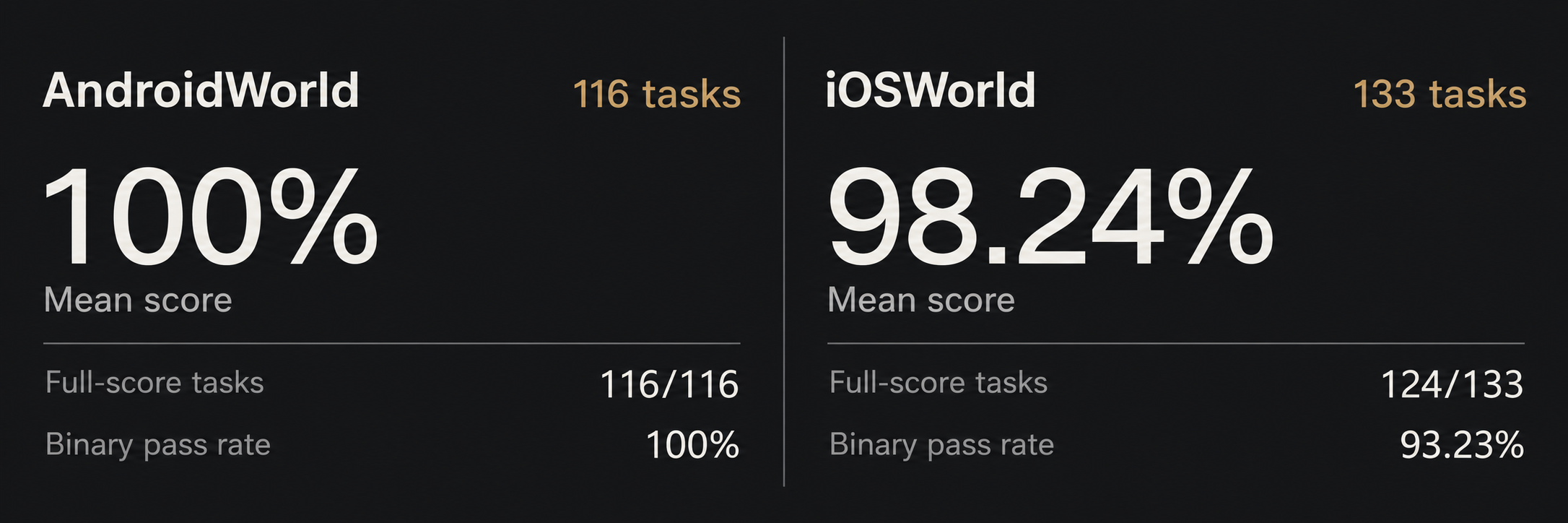
[AndroidWorld tasks](https://mobilerun.ai/benchmark/?platform=android#tasks) · [iOSWorld tasks](https://mobilerun.ai/benchmark/?platform=ios#tasks)
**Mean score** averages the task scores. **Binary pass rate** counts only tasks
that received a full score of **1.0**.
Explore the [results and task replays](https://mobilerun.ai/benchmark/) for
screenshots and recorded interactions, or read the
[methodology](https://mobilerun.ai/benchmark/method/) for evaluation details.
## Agent Setup Prompt
Copy paste it into your agent:
```text
Set up https://github.com/droidrun/mobile-harness for me.
Read `install.md` and follow the steps to install `mobile-harness`.
```
## Scope
- Android through `mobilerun-core` using local ADB with optional Portal, Portal HTTP-only, or cloud.
- iOS through `mobilerun-core` using `mobilerun-ios` local HTTP, cloud, or the `ios-portal` app on Simulator.
## Skill Install via npx (skills.sh)
Install the harness as an agent skill with the [skills CLI](https://skills.sh):
```bash
npx skills add droidrun/mobile-harness
```
When you want to update an installed copy, run `npx skills update` from the same
project. First use still requires the Python setup in `install.md`.
## Claude Code Plugin
```text
/plugin marketplace add droidrun/mobile-harness
/plugin install mobile-harness@mobile-harness
```
The plugin keeps `.venv/` and `local/` in its data directory, which plugin
updates leave in place. First use still requires the Python setup in
`install.md`.
## Manual Install
Install the full public control API:
```bash
cd /path/to/mobile-harness
"$(command -v python3.13 || command -v python3.12 || command -v python3.11)" -m venv .venv
.venv/bin/python -m pip install "mobilerun-core[local]"
.venv/bin/python -c "from mobilerun_core import Mobilerun; from importlib.metadata import version; print('mobilerun-core', version('mobilerun-core'), '/ mobilerun-core-local', version('mobilerun-core-local'))"
```
Needs Python 3.11-3.13; if none is on `PATH`, `uv python find '>=3.11,<3.14'` prints one.
Tell agents which Python runtime to use:
```text
Use /path/to/mobile-harness/.venv/bin/python for mobile-harness.
```
Normal sessions check the installed dependencies and use the existing versions.
Updates happen only when requested or needed to fix a confirmed compatibility
problem. See `UPDATE.md`; pinned versions stay fixed unless you approve a change.
Base `mobilerun-core` includes cloud support through `mobilerun-sdk`. The
`local` extra installs `mobilerun-core-local`, which `mobilerun-core` uses
internally for local Android and iOS backends.
## Primary API
```python
from mobilerun_core import Mobilerun
m = Mobilerun()
device = m.connect("", backend="cloud")
device = m.connect("R5CT123456", backend="local-android-adb")
device = m.connect(backend="local-ios-http", url="http://127.0.0.1:8080")
device = m.connect(
backend="local-android-http",
url="http://127.0.0.1:18080",
token="...",
)
device.ui()
device.screenshot()
device.start_app("com.android.settings")
```
After connecting, agents should use `device.supports(...)` before optional
operations.
`device.execute_script("")` runs JavaScript in the device's foreground
Chrome tab and returns its JSON result. Cloud devices only; local backends
raise `UnsupportedOperation`. Gate it with
`device.supports("execute_script")`; the platform guides describe this key's
network-probe behavior and its two server-side errors.
## Common Device Helpers
Use these helpers through the `device` returned by `Mobilerun.connect(...)`:
- `device.find_nodes(...)` searches the accessibility tree. `any_contains=`
matches case-insensitive substrings across text, content description,
resource id, and accessibility identifier. Nodes may carry `offscreen: True`
(outside the viewport; scroll to reach it) and `hidden: True` (reported not
visible; scrolling alone may not reveal it). A missing flag is not proof of
visibility.
- `device.tap_node(node)` taps the center of an accessibility node and raises
if the node has no usable bounds. Before any bounds check, it raises a
distinct error for a node flagged hidden unless the node is also offscreen.
- `device.tap_text("label")` taps the first on-screen, non-hidden match across
text, description, resource id, and accessibility identifier. It raises a
distinct error when matches exist but none are tappable on-screen.
- `device.scroll(direction, distance=0.5, ms=..., verify=False)` scrolls
content-relative; `verify=True` returns whether the viewport actually moved.
- `device.scroll_until(text_contains=..., direction="down", max_swipes=10)`
scrolls until a match is on-screen, returning the node or `None`. It stops
early with `None` when the viewport stops moving; do not re-call it blindly.
- `device.type("text", clear=True)` clears the focused field before typing
when the backend supports text input. `device.clear_input()` is available on
cloud and every local backend.
- `device.list_apps()` excludes system apps by default. Pass
`include_system_apps=True` when a full inventory is needed and supported.
- `device.open_deep_link(...)`, `device.get_clipboard()`,
`device.set_clipboard(...)`, `device.grant_permission(...)` and
`device.stop_app(..., clear_data=True)` depend on the backend; check
`device.supports(...)` first.
- `device.ui(filter=False)` returns the unfiltered tree, including off-screen
nodes.
## Cloud Mode
Cloud devices use the same `Mobilerun` facade:
```bash
export MOBILERUN_CLOUD_API_KEY="..."
export MOBILERUN_API_BASE_URL="https://api.mobilerun.ai/v1"
```
```python
from mobilerun_core import Mobilerun
m = Mobilerun()
device = m.connect("", backend="cloud")
device.ui()
device.screenshot()
device.start_app("com.android.settings")
```
## Loading Model
Skill-based runtimes can load `SKILL.md`; all runtimes should start with
`AGENTS.md`. It routes agents to the smallest needed file:
- `platforms/android/GUIDE.md` for Android work.
- `platforms/ios/GUIDE.md` for iOS work.
- `platforms//recovery/GUIDE.md` only when control fails.
- the credentials guide under `core/credentials` only when a credential or human-gated screen appears.
- `core/memory/GUIDE.md` only when reading or writing local agent-owned memory.
- `apps/android//CARD.md` or `apps/ios//CARD.md` only for the foreground app.
- the same path under `local/apps/` after the shipped card, and prefer it where the two disagree.
- `UPDATE.md` when an update is requested or a confirmed version incompatibility blocks the task.
## Local Android Modes
| ADB | Android Portal HTTP | Mode |
| --- | --- | --- |
| yes | yes | `backend="local-android-adb"`: core uses ADB and automatically uses Portal features when available. |
| yes | no | `backend="local-android-adb"`: core uses ADB-native control, UI, text input, screenshots, and app lifecycle. |
| no | yes | `backend="local-android-http"` with the user-provided Portal base URL and bearer token. |
| no | no | Blocked: ask the user to enable ADB or provide reachable Portal HTTP access. |
Android Portal HTTP-only means the agent already has both:
- a base URL such as `http://127.0.0.1:18080`
- a bearer token for `Authorization: Bearer `
Without ADB, the harness cannot install, enable, port-forward, or fetch a token
for Portal.
Android Mobilerun Portal: https://github.com/droidrun/mobilerun-portal
## Local iOS Modes
| Target | Server | Mode |
| --- | --- | --- |
| iPhone or iPad over USB | `mobilerun-ios --local ` | `backend="local-ios-http"`, default `http://127.0.0.1:8080`. |
| iOS Simulator | `ios-portal` app | `backend="local-ios-http"`, default `http://127.0.0.1:6643`. |
`backend="local-ios-http"` detects which server answers. `stop_app`,
`list_apps`, `install_app`, and the `back`, `enter`, `delete`, and
`app_switch` keys need `mobilerun-ios`.
`mobilerun-ios` cannot drive Simulators.
- mobilerun-ios local mode: https://docs.mobilerun.ai/framework/guides/device-setup (iOS tab)
- iPhone preparation and WDA signing: https://docs.mobilerun.ai/guides/connect-iphone
- ios-portal: https://github.com/droidrun/ios-portal
## Local State
Everything the user or the agent owns lives under one git-ignored root, `local/`: `local/memory/` for agent-written memory, `local/credentials/` for optional credential notes, and `local/apps/` for your own app cards or overrides of shipped ones. The repository tracks only their rules and templates, keeping your own content separate from `git pull` and plugin updates. In a Claude Code plugin install, `local/` lives in the plugin's data directory instead. See `local/README.md`. Agents may write operational memory after reading `core/memory/GUIDE.md`.