# Blue
[](https://github.com/dsh-blue/blue/actions/workflows/ci.yml)
[](#用法)
[](#用法)
[](LICENSE)
[](https://dsh-blue.dev/)
[](https://github.com/dsh-blue/blue/issues/106)
[English](README.md) | 中文
Blue 是 [DeepSeek Harness](https://github.com/deepseek-ai/deepseek-harness)
(`dsh`)的交互式终端界面。它是叠加在 `dsh-base` 上的树外 Cordis
bundle,针对 Harness `0.1.2-alpha.3` 构建。Blue `0.2.0-alpha.1`
刻意与 dsh Web 使用同一种插件模型:插件是普通 Cordis sibling,直接消费
dsh 原生服务。
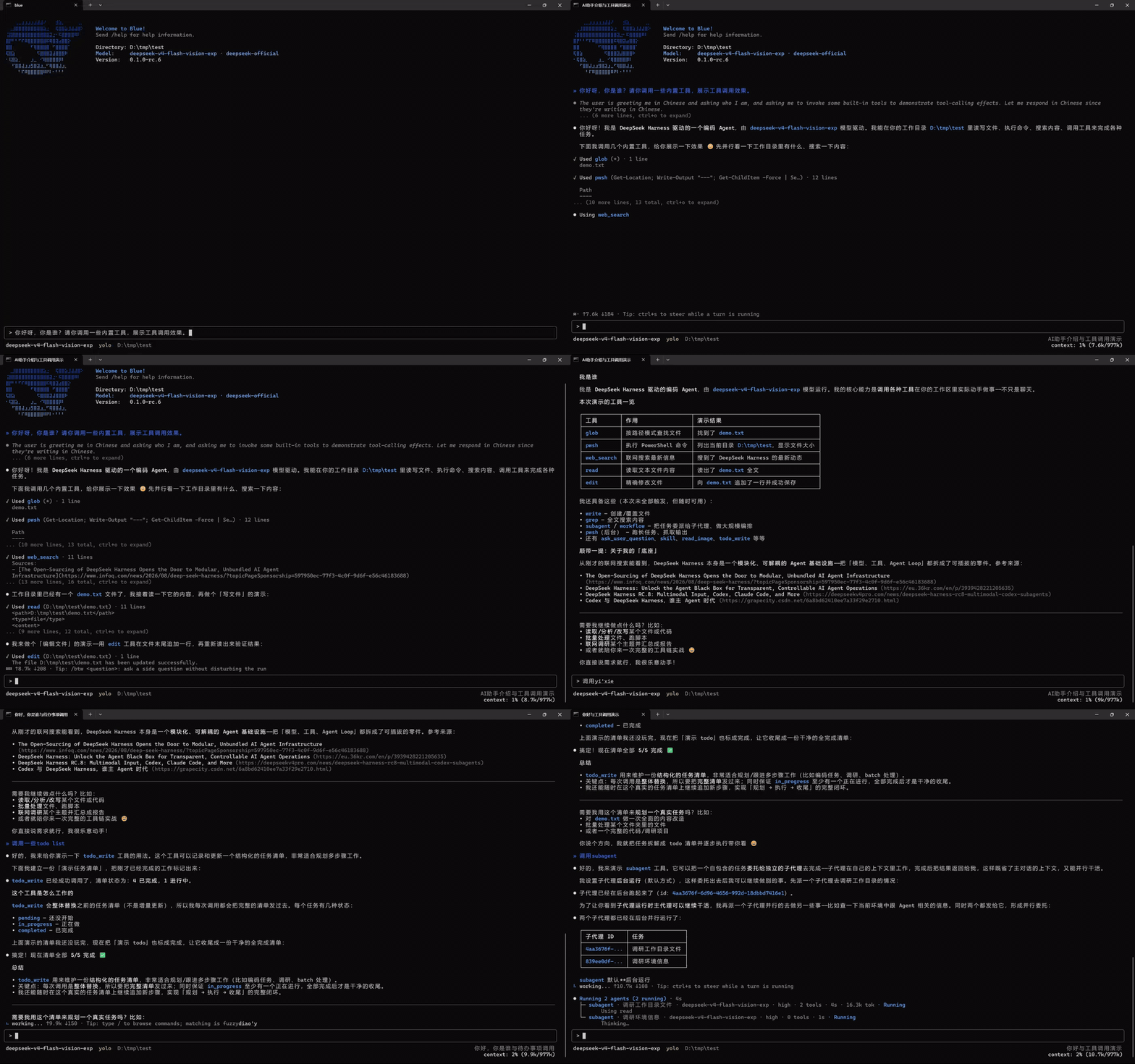
Blue 可以直接在终端显示 Markdown 表格、assistant 消息中的闭合 Mermaid fence,
以及 renderer-neutral 的 line、point、bar、sparkline 与 heatmap 节点;超宽或不支持
的内容会安全回退为源码或文本。
## 插件模型
插件通过 `inject` 声明服务,然后直接从 Cordis context 使用:
- `ctx.commands`、`ctx.sessionProjections`、`ctx.tools` 以及其他有文档的
dsh 服务直接复用,不经过 Blue 适配。
- `ctx.bluePanes`、`ctx.blueStatus`、`ctx.blueOverlays` 与
`ctx.blueEditorExtensions` 是仅有的 Blue 专属 UI 贡献服务。
- Agent-scoped 原生服务需要当前对象时,通过
`ctx.blueCurrentAgent.current()` 获取这个 Blue frontend 当前选择的精确
Agent。
- 每次注册都属于调用方的 Cordis Fiber;插件卸载会移除命令和 UI 贡献。
Blue 不再有专用插件 manifest、能力协商、适配 facade、私有插件域或独立的
插件作者 CLI。Blue 官方功能与外部插件注册到完全相同的服务。
插件始终只返回普通的 renderer-neutral 节点。Blue 会自动窗口化大型 `list`
节点,并延迟隐藏的响应式分支;插件无需管理 viewport range、overscan、renderer
cache 或 scroll controller。数据库与网络取数仍由插件负责。
```ts
import type { Context } from '@deepseek-ai/cordis'
import type {} from '@deepseek-ai/dsh-commands'
import type {} from '@dsh-blue/blue-api'
import { ui } from '@dsh-blue/blue-ui'
export const name = '@acme/build-health'
export const inject = ['commands', 'bluePanes']
export function apply(ctx: Context): void {
ctx.commands.register({
name: 'health',
description: 'Show build health',
handler: () => ({ kind: 'success', text: 'healthy' }),
})
ctx.bluePanes.register({
id: 'acme.build-health',
placement: 'right',
narrow: 'bottom',
render: () => ui.text('healthy'),
})
}
```
## 用法
前置条件为 Node `^22.19 || >=24` 与 pnpm 11。
```sh
npm i -g @deepseek-ai/dsh
dsh plugin --profile blue add @dsh-blue/blue@alpha
dsh --profile blue
```
也可以安装包含已测试 dsh runtime 的独立启动器:
```sh
npm i -g @dsh-blue/blue-cli@alpha
blue
```
首次运行前设置 `DEEPSEEK_API_KEY`。`/help` 会列出当前有效的命令和键位。
## 架构
```mermaid
flowchart TB
ROOT["一个 dsh 进程 · 一张 Cordis service graph"]
DSH["dsh 原生服务
commands · sessionProjections · tools · agents"]
PLUGIN["普通 Cordis 插件
Blue 官方行与外部 sibling"]
AGENT["blueCurrentAgent
当前选择的精确 Agent"]
UI["Blue 直接 UI 服务
bluePanes · blueStatus
blueOverlays · blueEditorExtensions"]
CORE["blue-core renderer
唯一 pi-tui 与原始终端 owner"]
TERM["终端"]
ROOT --> DSH
ROOT --> PLUGIN
DSH --> PLUGIN
AGENT --> PLUGIN
PLUGIN --> UI
UI --> CORE
CORE --> TERM
```
只有 `packages/core` 可以导入 pi-tui 或处理原始终端行为。API/UI 包定义
renderer-neutral 节点和直接 registry;app 选择当前 Agent 并协调启动;
transcript 与 interaction 消费 dsh 原生服务并发布 UI 贡献。
进一步阅读:[架构](docs/blue-architecture.md)、[服务 seam](docs/blue-seams.md)、
[开发手册](https://dsh-blue.dev/plugins/)。
## 社区
欢迎加入 Blue 官方飞书群——反馈、排障、功能讨论与版本动态的第一线。入群链接 7 天过期,请从置顶的[群组 issue](https://github.com/dsh-blue/blue/issues/106) 最新评论获取当前链接;bug 仍请通过 [issue](https://github.com/dsh-blue/blue/issues) 提交追踪。
## 许可证
[MIT](LICENSE)。