# Ullage: Every AI Subscription's Remaining Quota on One Screen
Languages: [English](README.md) · [简体中文](README-CN.md)
A local daemon and CLI. It periodically checks subscription usage for Claude, ChatGPT, Grok, Cursor, OpenCode Go, Devin, codex2api, and sub2api, and gathers the remaining quota and reset time of every window into one terminal view.
When you subscribe to several AI coding tools, each one shows usage in its own web dashboard, with different windows (5 hours, weekly, monthly) and units (percent, tokens, dollars). With Ullage, one command tells you **how much is left, when it comes back, and which account is about to run out**.
> 💡 Credentials stay in the platform credential store by default, and the configuration never contains secrets. By default the daemon talks only over a private local control channel and listens on no TCP port.
---
## Why Ullage?
**The usual way:**
> Sign in to each provider's dashboard one by one. Check the 5-hour and weekly quota for Claude, the weekly quota for ChatGPT, the monthly quota and dollar spend for Cursor. Repeat for every account.
**With Ullage:**
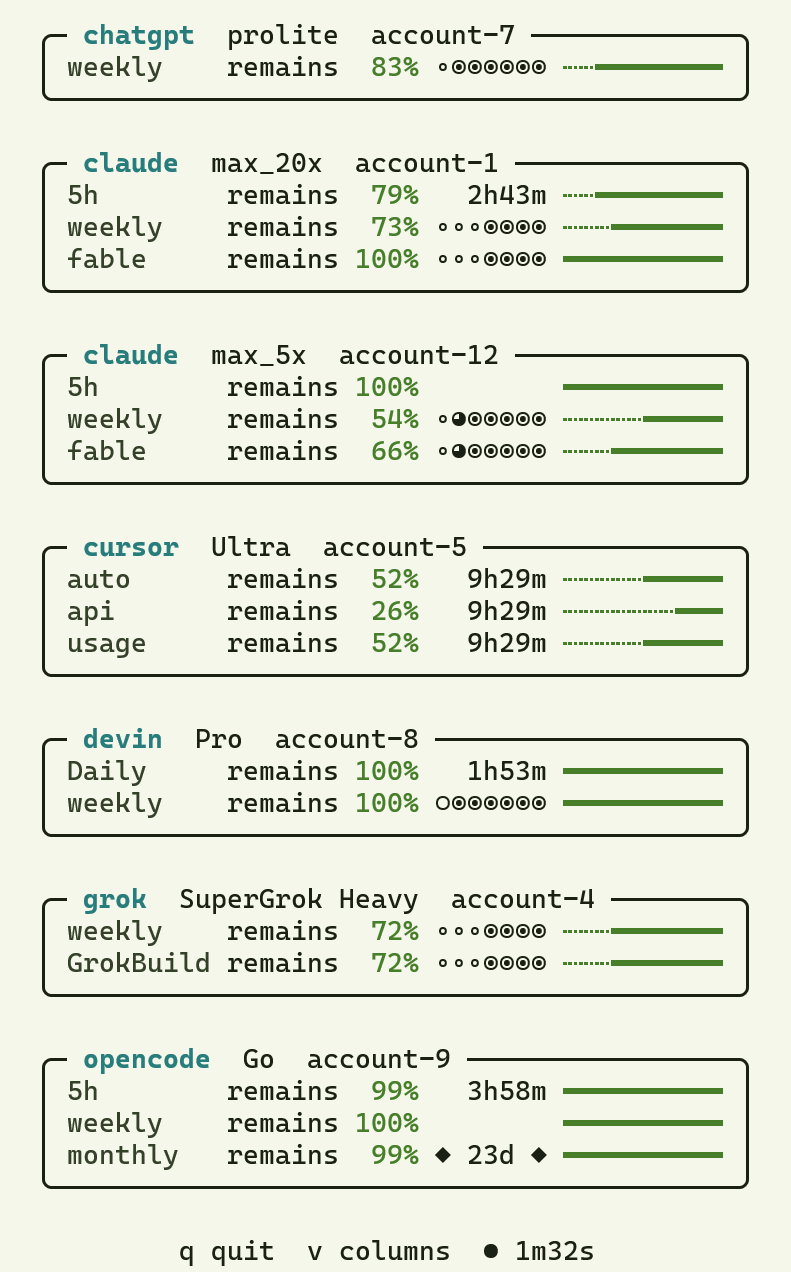 One box per subscription. Each row is one window: the remaining share, the time until reset, and a ten-cell bar. An exhausted window shows `used up`.
---
## Key Features
- **Eight providers, multiple accounts**: add several accounts for the same provider; credentials and snapshots are isolated per account.
- **Background probing**: the daemon queries each account on a schedule (every 300 seconds by default). `show` and `tui` read saved snapshots and never call the provider.
- **Terminal board**: `ullage tui` shows bars and reset countdowns. As the terminal narrows, fields drop in order, so a phone-sized terminal still shows when quota comes back.
- **Credential safety**: credentials live in macOS Keychain, Windows Credential Manager, or Linux Secret Service. Account labels, authorization URLs, and similar personal values are redacted by default.
- **Scriptable**: JSON output, plus an optional HTTP API that clients reach with a device token after a one-time pairing code.
---
## Install
The command is `ullage`. The crates.io package name is `ullage-cli`.
**Homebrew** (macOS and Linux)
```sh
brew install dualface/tap/ullage
```
Linux needs [Homebrew on Linux](https://docs.brew.sh/Homebrew-on-Linux) first.
The formula installs the GitHub Release binary for the current OS and CPU,
then runs `ullage daemon install` and `ullage daemon start`.
**WinGet** (Windows)
```powershell
winget install Dualface.Ullage
```
The installer copies `ullage.exe` to `%LOCALAPPDATA%\Ullage`, adds that
directory to the user `PATH`, then runs `ullage daemon install` and
`ullage daemon start`. Open a new terminal after install so `PATH` updates.
The GitHub Release zip is still a portable copy that does not register the
task.
**GitHub Releases**
Download the archive for your OS from
[Releases](https://github.com/dualface/ullage-cli/releases).
**From git** (Rust 1.85 or newer)
```sh
cargo install --git https://github.com/dualface/ullage-cli --locked ullage-cli
```
**From this workspace**
```sh
cargo build --release -p ullage-cli
```
The binary is `target/release/ullage`. Place it on your `PATH` if you want the
user-level service commands to find it at a stable location.
## Quick Start
1. Sign in to an account. The command walks you through choosing a provider and authorizing (see "Authentication" below):
```sh
ullage auth login
```
2. Show usage for all accounts:
```sh
ullage show --all
```
3. Open the terminal board. Press `v` to switch the layout and `q` to quit:
```sh
ullage tui
```
Homebrew and WinGet installs set up and start the daemon for you. For other install methods, run `ullage daemon install` first (see "Daemon lifecycle" below).
---
## Working with Kander
[Kander](https://github.com/dualface/kander) is a multi-agent kanban orchestrator. The executor and reviewer agents it schedules (Claude Code, Codex, Cursor, Grok, Devin, OpenCode, and others) each draw on a different subscription.
- **Check quota before dispatching**: glance at `ullage tui` and send large cards to agents with quota to spare.
- **Stay clear of window limits**: when a 5-hour window is nearly used up, read the reset countdown and decide whether to wait or switch agents.
- **All accounts on one screen**: multiple accounts for the same provider are shown separately, with no dashboard sign-ins.
---
The rest of this README is the full reference.
## Authentication
Interactive login needs a terminal (stdin and stderr). It selects a provider,
creates or reuses an account, prints the authorization URL, waits for the
callback value the provider asks for (or polls a device-code flow), verifies
the stored credential, then asks for an account label:
```sh
ullage auth login
```
You do not need the internal account ID. Each provider says what to paste:
- Claude: the full callback URL or `code#state`
- ChatGPT: the `code` query value
- Grok: device-code flow; nothing to paste. Opens a page and finishes on its
own
- Cursor: browser sign-in; nothing to paste. Opens a page and finishes on its
own. `--method api-token` keeps the older path: create a User API Key at
cursor.com/dashboard and type it without echo
- OpenCode: the OpenCode Go API key issued at opencode.ai/auth
- Devin: browser sign-in; nothing to paste. `--method api-token` accepts a
Devin API key instead
- codex2api: the gateway base URL, admin key, and the upstream account id or
email, separated by spaces (`base_url admin_key upstream_ref`)
- sub2api: `base_url admin_key upstream_ref` — the gateway base URL (HTTPS or
loopback HTTP), the admin API key from the gateway settings, and the
upstream account id or name — typed without echo as one line
After login, `ullage show --all` looks like this:
```console
$ ullage show --all
==== claude - max_20x ====
5h remains 91% - 3h - [-#########]
weekly used up ------* [----------]
fable remains 25% ------* [-------###]
==== chatgpt - pro ====
weekly used up ----*** [----------]
```
## Data paths
Default paths:
| Platform | Config | State | Control |
| -------- | ----------------------------------------------------------------------- | ---------------------------------------------------------------------------------------------------------------------------- | -------------------------------------- |
| Linux | `$XDG_CONFIG_HOME/ullage/config.json` or `~/.config/ullage/config.json` | `$XDG_STATE_HOME/ullage/state.json` or `~/.local/state/ullage/state.json`; paired devices in `devices.json` beside that file | `$XDG_RUNTIME_DIR/ullage/control.sock` |
| macOS | `~/Library/Application Support/Ullage/config.json` | `~/Library/Application Support/Ullage/state.json`; paired devices in `devices.json` beside that file | `$TMPDIR/ullage-/control.sock` |
| Windows | `%APPDATA%\Ullage\config.json` | `%LOCALAPPDATA%\Ullage\state.json`; paired devices in `devices.json` beside that file | `\\.\pipe\ullage-` |
Overrides: `ULLAGE_CONFIG_FILE`, `ULLAGE_STATE_FILE`, `ULLAGE_CONTROL_SOCKET`
(Unix), `ULLAGE_CONTROL_PIPE` (Windows), `ULLAGE_TUI_STATE_FILE` (the TUI's
remembered layout, `tui.json` beside the state file by default).
Optional file-credential directory, used only when `credentials.file_fallback`
is true and the native store is unavailable: Linux
`$XDG_DATA_HOME/ullage/credentials` or `~/.local/share/ullage/credentials`;
macOS `~/Library/Application Support/Ullage/credentials`; Windows
`%LOCALAPPDATA%\Ullage\credentials`.
## Configuration
Version 1 JSON. Secret material is not part of the schema. A missing file loads
built-in provider endpoints and an empty account list.
Rejected on load:
- unknown fields
- duplicate account IDs
- zero timings
- symbolic links
- files larger than 1 MiB
```json
{
"version": 1,
"daemon": {
"maximum_concurrency": 8,
"default_provider_concurrency": 2,
"provider_limits": []
},
"providers": {},
"credentials": {
"file_fallback": false
},
"http": {
"enabled": false,
"bind": "127.0.0.1:7878",
"allowed_origins": [],
"probe_min_interval_seconds": 60
},
"accounts": [
{
"id": "claude-work",
"provider": "claude",
"label": "work",
"enabled": true,
"interval_seconds": 300,
"timeout_seconds": 30,
"jitter_seconds": 5,
"backoff_initial_seconds": 30,
"backoff_maximum_seconds": 1800
}
]
}
```
`provider` must be one of `claude`, `chatgpt`, `grok`, `cursor`, `opencode`,
`devin`, `codex2api`, or `sub2api`. Provider OAuth and billing endpoints are
compiled in and cannot be redirected here; the codex2api and sub2api gateways
are the exception — their base URL arrives with the credential pasted at
login.
### Credentials
`credentials.file_fallback` is off by default. Ullage then uses only the
platform credential store (macOS Keychain, Windows Credential Manager, or Linux
Secret Service). On a machine without Secret Service, authentication fails with
a distinct error; re-run with `--diagnose` to see that this host has no Secret
Service and that file fallback is enabled by setting
`credentials.file_fallback` to `true`.
When the switch is on, Ullage still prefers the native store if that backend is
available. Only when the native backend reports itself unavailable does Ullage
create the platform file-credential directory above.
- Credentials in that directory are stored as plaintext. Any process that can
read the current user's files can read them.
- The directory is created private (`0700` / current-user DACL).
- A permission check failure stops the daemon instead of silently downgrading.
- Old configuration files that omit the `credentials` object still load with
the switch off.
### HTTP bind
`http.enabled` is false by default. While it is off the daemon does not listen
on any TCP port.
When enabled, `http.bind` accepts `auto:` or one explicit loopback,
Tailscale, or private LAN address:
| Value | Behavior |
| ----- | -------- |
| `auto:7878` | Discover every eligible local address and listen on each |
| `:7878` | Single Tailscale address |
| `:7878` | Single private LAN address |
Wildcard, link-local, multicast, and public addresses refuse to start and name
`http.bind`.
In `auto` mode, startup logs one `http.bind listening ()` line
per listener. If no Tailscale or LAN address is initially available, discovery
retries for up to 60 seconds and then starts with loopback. A failed
non-loopback bind emits a warning and is skipped. If HTTP setup fails
outright — including a failed loopback bind — the daemon keeps running and
serves the control socket only; the error is reported on the daemon's stderr,
which a CLI-launched daemon captures in its per-user `daemon-error-*.log`.
## HTTP API
Authentication, account mutation, and workspace control stay on the private
control socket. The HTTP server is a query and pairing surface only.
### Routes
| Method | Path | Notes |
| ------ | ---- | ----- |
| `POST` | `/v1/pair` | Pairing; no Bearer token |
| `GET` | `/v1/status` | |
| `GET` | `/v1/providers` | |
| `GET` | `/v1/accounts` | |
| `GET` | `/v1/accounts/{id}` | |
| `GET` | `/v1/usage[?account={id}]` | Cached snapshots of every account, or of one; does not contact providers |
| `GET` | `/v1/usage[?account={id}]&metric={display-name}` | Optional keep-list filter |
| `POST` | `/v1/accounts/{id}/probe[?wait=true\|false]` | Rate-limited by `http.probe_min_interval_seconds` (default 60) |
`account` is optional on `/v1/usage`; an empty or repeated `account` returns
`400 bad_request`. `wait` defaults to `true`: the probe runs to completion and
the response is `200` with its result. `wait=false` starts the probe and
returns `202` at once. Every route except `/v1/pair` also accepts
`diagnose=0|1` (see [Errors](#errors)). A query key the route does not accept,
a repeated key, or a malformed value returns `400 bad_request`.
Repeat `metric=` to keep the union of several display names. This one-shot list
is a keep list, unlike the persisted per-account `metrics` field, which names
rows to hide.
- Names are trimmed. Matching is then exact, ASCII case-insensitive, and
ignores the window a row belongs to. Duplicate names are merged.
- Only display rows are filtered. Hidden bookkeeping such as `limit_reached`
still reaches the client, so a reached limit stays visible.
- A valid but unknown name returns `200` with no visible measurements.
- An empty or whitespace-only name, a name over 128 characters, more than 64
names, or a name with control or bidirectional formatting characters returns
`400 invalid_metric`. A value that is not valid UTF-8 after percent-decoding
returns `400 bad_request`.
- `metric` is accepted on `/v1/usage` only; other routes reject it as
`400 bad_request`.
- Probe requests for the same account within the minimum interval return
`429 rate_limited` with `Retry-After` set to the remaining seconds (at least
1), in both `wait` modes. Only existing accounts are rate-limited; a probe for
an unknown account returns `404`.
### Authentication and pairing
Requests are checked in this order: `Host`, then `OPTIONS`, then
`/v1/pair`, then the Bearer token, then the body, then the route, method, and
query. So:
- A request with a missing or disallowed `Host` gets `403` before anything
else, including `OPTIONS` and pairing.
- `OPTIONS` needs no token. It returns `204` for a known path and `404` for an
unknown one.
- Every method on `/v1/pair` skips the token check; only `POST` is allowed.
- Every other request requires `Authorization: Bearer `. The
scheme is case-sensitive. A failure returns `401` with
`WWW-Authenticate: Bearer`.
- The token is checked before route matching, so an unauthenticated request to
an unknown path or with the wrong method gets `401`, not `404` or `405`.
Pairing request (`Content-Type: application/json`, no query string):
```json
{"pair_code":"ABC-DEF","device_name":"client-host"}
```
The response is `{"device_id":"...","device_token":"...","device_name":"..."}`:
the device ID, the sanitized name, and a 256-bit base64url device token (43
characters, no padding). That response is the only time the raw token is
exposed. A name that is empty after sanitizing becomes `unknown`; a sanitized
name over 64 characters returns `400 bad_request`.
Pairing code rules:
- Six characters from `23456789ABCDEFGHJKMNPQRSTVWXYZ`
- Case-insensitive on input
- Hyphen allowed only in the displayed position, or omitted entirely
- Expires after 300 seconds
- Succeeds once; generating a new code replaces the pending one and resets its
failure count
- Invalidated after five failed validations; a code that cannot be parsed
counts as a failure
- One attempt per source IP per second; excess attempts return `429` with
`Retry-After`. The attempt is counted before the body is validated, so a
malformed request also uses up the slot. The limiter tracks at most 4096
addresses at a time; when it is full, new addresses get `429`.
### Device records
`devices.json` sits beside the state file with current-user-only access
(`0600` / protected DACL). Revoked devices stay in the file, marked with
`revoked_at`, and can no longer authenticate. Each record contains:
- 12-character device ID
- sanitized name
- SHA-256 token hash
- creation time
- last-seen time
It never contains the raw token. Authentication hashes the presented token and
compares it with every record in constant time without returning early; only
an active record can match.
Last-seen writes are limited to once per device per 60 seconds. A corrupt or
unsafe device file refuses daemon startup and is never repaired in place. The
legacy `http-token` file is ignored and is not deleted automatically.
### Host, CORS, and transport
Accepted `Host` values: `127.0.0.1:`, `localhost:`, and the actual
listener addresses. Any IPv6 listener additionally enables `[::1]:`.
Matching ignores case; a `Host` without a port is rejected.
`http.allowed_origins` is empty by default:
- Matching origins are echoed with `Vary: Origin`, on error responses as well.
A preflight also gets `Access-Control-Allow-Methods: GET, POST, OPTIONS` and
`Access-Control-Allow-Headers: Authorization, Content-Type`.
- Unmatched origins get no CORS headers.
- `*` is rejected as a configured origin, both when the configuration loads and
when the server binds.
- The server never returns `Access-Control-Allow-Origin: *` or
`Access-Control-Allow-Credentials: true`.
Every response carries `Cache-Control: no-store`,
`X-Content-Type-Options: nosniff`, and `Referrer-Policy: no-referrer`. Each
listener serves at most 256 connections; further connections are closed at
once. Request headers must arrive within 10 seconds.
Remote access may use a direct Tailscale or LAN address, or an SSH tunnel.
Ullage does not offer TLS. Tailscale traffic is encrypted by WireGuard, but LAN
traffic and its device token are plaintext.
### Errors
Response bodies stay sanitized. `?diagnose=1` adds a `diagnostic` field to
provider errors from `/v1/usage` and probe only; every other response is
unchanged. Request bodies larger than 1 MiB, pairing bodies larger than 4 KiB,
or bodies that take longer than 10 seconds to read are rejected without
affecting other connections.
Errors use one of two body shapes. Errors raised by the HTTP layer are
`{"error":""}`. Errors returned by the daemon are
`{"version":...,"request_id":"...","kind":"...","detail":...}`, plus
`diagnostic` when requested. A protocol version mismatch is
`{"version":...,"request_id":"...","error":"protocol_mismatch","supported_version":...}`.
| Condition | Status |
| --------- | ------ |
| Missing or disallowed `Host` | `403 forbidden` |
| Missing or invalid Bearer token | `401 unauthorized` with `WWW-Authenticate: Bearer` |
| Unknown route | `404 not_found` |
| Wrong method | `405 method_not_allowed` with `Allow` |
| Bad path encoding or query | `400 bad_request` |
| Bad metric name | `400 invalid_metric` |
| Protocol version mismatch | `400 protocol_mismatch` |
| Unsupported command | `400` |
| Body over the size limit | `413 payload_too_large` |
| Body read timeout | `408 request_timeout` |
| Probe cooldown | `429 rate_limited` with `Retry-After` |
| `AccountNotFound`, `AccountSelectorNotFound`, unknown account or provider | `404` |
| `AuthenticationInvalid` | `409` |
| Provider `RateLimited` | `429` with `Retry-After` (the provider's value, or `1`) |
| `Timeout` | `504` |
| `Storage`, device store failure, or any other daemon error | `500` |
Pairing uses `403`, `405`, `408`, `413`, `429`, `500 storage`,
`401 pair_code_invalid`, and `400 bad_request`. Pairing returns
`400 bad_request` for a query string, a `Content-Type` other than
`application/json`, a body that does not parse, or a name that is too long.
## Daemon lifecycle
Detached process. The command returns once the daemon is ready:
```sh
ullage daemon run
```
User-level service (current login session only; no system Administrator
service):
```sh
ullage daemon install
ullage daemon start
ullage daemon status
ullage daemon stop
ullage daemon uninstall
```
`brew install` and `brew upgrade` run `ullage daemon install` and
`ullage daemon start` themselves so the LaunchAgent (or systemd user unit)
pins the current Cellar keg path. `winget install Dualface.Ullage` does
the same pair from the Inno installer `[Run]` entries so the current-user
scheduled task pins `%LOCALAPPDATA%\Ullage\ullage.exe`.
`install` registers the startup entry and starts the daemon; when the service
is already installed it stops the running daemon and rewrites the entry first.
`uninstall` stops the daemon and removes only the startup entry. Configuration,
credentials, snapshots, and logs remain. `status` reports a live daemon when
the authenticated local endpoint is reachable; otherwise it distinguishes
installed-but-stopped from not-installed. Live table output includes
`CREDENTIAL_BACKEND` (`linux_secret_service`, `macos_keychain`,
`windows_credential_manager`, `file_fallback`, or `other_platform`). JSON uses
the same identifiers on `payload.credential_backend`.
Linux uses a systemd user unit, macOS a LaunchAgent, and Windows a current-user
Task Scheduler task. See `docs/architecture.md` for platform path and permission
details.
## Devices
Use the private local control channel to pair and administer HTTP API clients:
```sh
ullage device pair
ullage device list
ullage device revoke
```
`device pair` prints a one-use code and its expiry, then tells you to enter the
HTTP API address and code in the client. The code expires after 300 seconds;
creating another code immediately invalidates the previous one. `device list`
shows only the device ID, name, creation time, and last-seen time. It never
prints device tokens or token hashes. `device revoke` takes effect immediately
and does not prompt for confirmation.
## Accounts
```sh
ullage provider list
ullage account add claude --label work
ullage account list
ullage account show
ullage account enable
ullage account disable
ullage account label [label]
ullage account metrics [metric]...
ullage account remove
```
The same provider may have multiple accounts. Credentials and snapshots are
isolated per account. `account label` renames an account in place; omit the
label to clear it. Interactive login also asks for a label after a successful
authentication.
`account list` shows a `METRICS` column and `account show` a `METRICS` line,
both reading `-` when nothing is stored. `account metrics` replaces the stored
hide list; omit every name to clear it. The stored names are hidden from that
account's readable summary, so `--metric` and HTTP `metric=` stay the one-shot
keep list, naming rows to show. Names match by exact, case-insensitive display
name and ignore the window a row belongs to. An invalid name exits `64`
without contacting the daemon.
## Probe and show
```sh
ullage probe
ullage probe --no-wait
ullage show
ullage show --metric usage
ullage show --all
ullage show --all --no-metric-filter
ullage tui
ullage tui --vertical
```
`probe` queries the provider and persists a snapshot. `show` reads persisted
snapshots and does not call the provider.
`tui` reads all persisted snapshots into an alternate-screen view. Each
subscription is a rounded box with `provider plan account` embedded in the
top border, a blank row between bands, and rows that read exactly as `show`
does plus the wait until each window resets:
```console
╭─ claude max_20x personal ────────────╮
│ 5h remains 91% 3h05m ┄━━━━━━━━━ │
│ weekly used up ◦◉◉◉◉◉◉ ┄┄┄┄┄┄┄┄┄┄ │
│ fable remains 25% ◆ 12d ◆ ┄┄┄┄┄┄┄━━━ │
╰────────────────────────────────────────╯
```
A window whose name every row of a box repeats loses it: Cursor reports all
of its windows as `monthly-…`, so the box shows `auto` and `Codex`. The name
stays whenever dropping it would leave a row with nothing of its own.
The bar is ten cells (`━` left, `┄` spent) with no brackets, colored by how
much is left: red at or under 10%, yellow at or under 25%, green otherwise.
The countdown has three forms: under a day the exact wait is spelled out
(`3h05m`, `12m`, `<1m`); within a week each remaining day lights one of seven
dots (`◦◦◦◦◦◉◉`). A partial day appears before the whole-day dots: `○` for
less than 2 hours, `◔` from 2 to less than 6 hours, `◕` from 6 through 16
hours, and `◉` above 16 hours. For example, 26 hours appears as
`◦◦◦◦◦◔◉`. Beyond a week the rounded-up day count sits centered between two
diamonds (`◆ 23d ◆`), still seven cells wide.
Every box shares one set of columns, measured across the whole screen, so a
reading under a short window name lines up with the one under a long name on
another provider's box. The boxes are as wide as those columns need, up to
seventy-two cells; a terminal narrower than that gives what it has, and the
rows give up their widest fields in turn.
Boxes are ordered by provider, then by account, ignoring case. They flow from
left to right and wrap onto new rows; a row holding a single box keeps the
box's own width and centers it rather than stretching it across the terminal.
`v` switches to one box per row and back, and the choice is remembered for the
next run; `--vertical` forces one box per row for a single run without
changing what is saved. The setting lives in `tui.json` beside the state file,
and losing that file only costs the remembered layout.
As the terminal narrows, every row of a box gives up its widest field first:
the ten-cell bar shrinks to four cells (`┄┄━━`), then the verb goes, then the
small bar, then the countdown, leaving the window and its reading. The
countdown outlives the bar on purpose, so a phone-sized terminal still says
when the quota comes back. The frame, rules, and diamonds are East Asian
ambiguous glyphs — one cell wide to this program, but a terminal set to a CJK
locale may render them two cells wide and misalign the box; the blocks of the
card bars and the partial-day `○` are ambiguous too. The countdown dots
`◉`, `◦`, `◔`, and `◕` are neutral width and stay one cell in either locale.
The view reads the snapshots again every two minutes, which catches each of
the daemon's five-minute probe rounds without polling it for nothing. The
status line counts down the wait to that next read: one circle filled by
quarter, `○ ◔ ◑ ◕ ●`, beside the wait in whole seconds (`2m00s`, `0m45s`).
The circle is the coarse shape of the wait — a quarter every thirty seconds —
and the seconds carry the rest. The line sits in the middle of the terminal
whatever the boxes do — a centered band and a full-width row put it in the
same place — with a blank row between it and the boxes, and a blank row above
the boxes at the top of the screen; a terminal too short for both blank rows
spends its rows on the cards and the hints first, giving up the top margin,
then the gap, and the status line last. A refresh the daemon cannot answer
shows as a circle that empties and stays there: the readings stay put and the
next interval tries again.
The view also scrolls: the mouse wheel moves three rows, `PgUp` and `PgDn` move half a screen, `Up`/`Down` (or `k`
and `j`) move one row, and `Home`/`End` jump to the ends. The status line
also carries the keys and the position, giving up the wait in words first,
then the position, the layout hint and the scroll keys, and the circle last.
Press `q`, `Q`, `Esc`, or `Ctrl+C` to exit; the terminal, including mouse
capture, is restored on the way out.
`--metric ` keeps only the summary rows whose display name matches
exactly, ignoring case and the window a row belongs to; repeat the flag to keep
the union of several names. `--no-metric-filter` ignores the account's stored
filter for one invocation. Without either flag, the readable summary hides the
rows each account's stored `account.metrics` list names: `show --all` follows
each account's own list, and `probe` applies the stored list of the account it
queried. An invalid metric name exits `64` without contacting the daemon. Both
flags affect the readable summary only: `--raw` and JSON output keep every
measurement.
When either filter leaves no row to show but the account still has
summarizable metrics, the account heading stays, a
`! no rows match the metric filter: ` line names the filter's names, and
the stale, limit, and partial notices still print; the raw table is not used
as a fallback. An account with no summarizable measurements still falls back to
raw output as before.
Table output defaults to a readable summary: one line per usable measurement,
with the window, the metric, how much quota is left, when the window resets,
and a ten-cell progress bar as the last column. A row with nothing left reads
`used up` rather than `remains 0%`, which looks like a measurement that came
back empty, and a row under half a percent reads `remains <1%` rather than
rounding down to that same zero. The reset column always occupies seven
characters: under a day it shows whole hours between dashes (`- 3h -`), up to
a week it counts the remaining days as stars after dash padding (`-******`),
and beyond a week it puts the day count between stars (`* 23d *`), so the
column never shifts and the wait is readable at a glance.
Two kinds of provider bookkeeping never become summary rows. The status booleans
`allowed`, `limit_reached`, `has_credits`, `unlimited`, `on_demand_enabled`, and
`enabled` are hidden as rows, but never as state: a reached limit becomes a
`! limit reached` line, unmetered credits become a `credits unlimited` row, and
a switched-off feature is marked `(off)` on the amount it applies to, or given
its own `disabled` row when the provider reported no such amount. Cursor's
`total_spend`, `included_spend`, and `bonus_spend` are excluded from the
mapping unconditionally — they are a dollar ledger next to the quota rows,
not remaining quota.
Both kinds still appear in the raw table, which you reach with `--raw` or,
without it, when no measurement survives the mapping: the account block then
falls back to the raw table with a note, and still carries the stale, limit,
and partial notices.
```text
==== claude - pro ====
5h usage remains 97% - 3h - [##########]
weekly usage remains 89% --***** [-#########]
Weekly Opus usage remains 89% --***** [-#########]
```
Global output flags: `--output table|json|pretty-json`, `--color auto|always|never`,
`--raw`, and `--reveal`. `--color` defaults to `auto`, which colors table stdout
when it is a terminal and `NO_COLOR` is unset or empty. JSON and pretty-json
output is never colored. `--raw` replaces the summary with the untranslated
provider table (`WINDOW`, `MEASUREMENT`, `USED`, `LIMIT`, `UNIT`, `RESETS_AT`);
it affects table output only and is a no-op for `--output json` and
`--output pretty-json`. Without `--reveal`, account labels, auth URIs, flow IDs,
and similar personal values are replaced with `[redacted]`. `--raw` does not
change what is redacted. Error details stay redacted even with `--reveal`.
`--diagnose` (or `ULLAGE_DIAGNOSE=1`) shows sanitized partial-failure scope and
category on `show` and `probe`. On authentication and probe command failures it
also asks the daemon to attach the provider's own error text. Default error
output is still a stable kind. Without that opt-in, a diagnostic on the daemon
response is rejected as invalid.
## JSON schema
Successful JSON is a tagged `ControlResult`. Compact
`ullage --output json show ` looks like:
```json
{
"result": "snapshots",
"payload": [
{
"account_id": "claude-work",
"usage": {
"outcome": "complete",
"data": {
"provider": "claude",
"account_label": "[redacted]",
"plan": "pro",
"subscription_expires_at": null,
"observed_at": "2026-08-27T12:00:00Z",
"windows": [
{
"window": { "kind": "five_hours" },
"resets_at": "2026-08-27T17:00:00Z",
"measurements": [
{
"name": "tokens",
"used": 12.0,
"limit": 100.0,
"unit": { "kind": "tokens" }
}
]
}
]
}
},
"last_success_at": "2026-08-27T12:00:00Z",
"stale": false,
"last_error": null,
"last_error_at": null,
"metrics": []
}
]
}
```
### Usage fields
| Field | Rule |
| ----- | ---- |
| `window.kind` | `five_hours`, `weekly`, `monthly`, or `{"kind":"other","id":"...","label":"..."}` |
| Missing 5h or weekly window | Omitted; never filled with synthetic zeros |
| `unit.kind` | `requests`, `tokens`, `percent`, `credits`, `{"kind":"currency","code":"..."}`, or `{"kind":"other","id":"...","label":"..."}` |
| `limit` | Always present; `null` when the vendor reports no cap |
| `resets_at`, `plan`, `account_label` | `null` when unknown. A non-null `account_label` is `[redacted]` without `--reveal` |
| `subscription_expires_at` | `null` when the provider has no expiry |
| `"outcome":"partial"` | Includes `failures`, a list of `{"scope":"...","message":"..."}`. Both values are `[redacted]` without `--diagnose`. CLI exit status `2` means partial success |
| `last_error` | `null`, a string (`network`, `authentication_invalid`, `protocol_incompatible`, `unsupported_capability`, `timeout`, `cancelled`, `provider_not_found`, `account_not_found`, `storage`), or `{"rate_limited":{"retry_after_seconds":}}` |
| `metrics` | Always present. The account's stored list of display names hidden from the readable summary; it does not filter the JSON |
`probe` returns `{"result":"probe","payload":{"account_id":"...","usage":...,"metrics":[...]}}`
with the same `usage` shape. Other commands use other `result` tags, such as
`daemon_status`, `providers`, `accounts`, `account`, `auth_challenge`,
`auth_state`, `workspaces`, and `workspace`.
One command prints JSON that is not a `ControlResult`. When the daemon is not
running, `daemon status` prints `{"service":"installed","status":"stopped"}` (or
`"not_installed"`) and exits `0`.
JSON and pretty-json always carry this raw `ControlResult`. `--raw` does not
change their structure or their bytes, so parsers built on this schema keep
working whether or not the flag is passed.
### Device commands
Same tagged shape. Device list payloads contain no token or token-hash field.
| Command | Result |
| ------- | ------ |
| `device pair` | `{"result":"pair_code","payload":{"code":"ABC-DEF","expires_at":"..."}}` |
| `device list` | `{"result":"devices","payload":[{"id":"...","name":"...","created_at":"...","last_seen_at":"..."}]}` |
| `device revoke` (success) | `{"result":"ack"}` |
### Errors
Errors are written to stderr, with one exception: when an `auth` command reports
the credentials invalid, it prints a normal `{"result":"auth_state",...}` result
on stdout and exits `3`. Its `reason` is `[redacted]` without `--diagnose`.
| Output | Shape |
| ------ | ----- |
| Table, runtime error | `error: `, then the message and a `hint:` line when present |
| Table, parse error | clap's own message (see below) |
| JSON / pretty-json | `{ "status": "error", "error": { "kind": "usage", "message": "..." } }` |
When the running daemon is older than the CLI, a
`warning: the running daemon (...) is older than this CLI (...)` notice comes
first on stderr, ahead of the error or the JSON envelope.
Example runtime error:
```json
{ "status": "error", "error": { "kind": "timeout" } }
```
- `message` carries parse-error text when present.
- `hint` carries static guidance for selected kinds: `daemon_unavailable`,
`provider_registry_error`, `account_not_found`,
`account_selector_not_found`, `invalid_account_metrics`,
`invalid_control_socket`, and `usage` for rejected control characters.
Table output prints the same text as a `hint:` line.
- `detail` carries the provider's own error text on authentication and probe
failures, only with `--diagnose`. Table output prints it as a `detail:` line.
- Omitted fields are not serialized.
- JSON never includes ANSI color sequences.
Parse mistakes print clap's own message, sanitized so they never echo terminal
control characters. In JSON output they become kind `usage` with that text in
`message`.
- Missing subcommands show that layer's full help.
- Unknown flags, missing arguments, and invalid enum values include the
parameter name and, when available, a did-you-mean suggestion or the allowed
values.
Arguments that contain disallowed control characters are rejected with kind
`usage`, no `message`, and a static `hint`. The hint names the option for
recognized value options such as `--method` or `--account`, and uses a generic
message for positional arguments and other flags.
| Situation | Exit | Destination |
| --------- | ---- | ----------- |
| `--help`, `-h`, `help`, `--version` | `0` | stdout |
| Success | `0` | stdout |
| Other failure | `1` | stderr |
| `probe` or `show` with any partial snapshot | `2` | stdout |
| Credentials invalid | `3` | stderr, or stdout for an `auth_state` result |
| Network failure | `4` | stderr |
| Daemon unavailable | `5` | stderr |
| Protocol mismatch with the daemon | `6` | stderr |
| Parse and usage mistakes, invalid metric names | `64` | stderr |
## Live credentials
This release has no live-credential tests. `cargo test` never sends user
credentials or paid model requests to vendors. If a later suite adds live
smoke, it must be explicit opt-in, must not log account usage numbers, and
must not send paid model requests.
## Documentation
- `docs/architecture.md` — crate graph, storage, hosting, and security
boundaries
- `docs/development.md` — provider extension, vendor DTO compatibility,
security, and pre-release checks
## Security
Report vulnerabilities to dualface@gmail.com. See [`SECURITY.md`](SECURITY.md).
## License
MIT. See [`LICENSE`](LICENSE).
---
## More Projects by the Author
Other projects by [dualface](https://github.com/dualface), the author of Ullage:
- [Kander](https://github.com/dualface/kander): rule-driven multi-agent kanban orchestration, with independent review and delivery gates.
- [ste-zh](https://github.com/dualface/ste-zh): an agent skill that makes agents report results in Chinese by ASD-STE100 principles: conclusion first, fixed status words, explicit verification state.
- [QuickTUI](https://quicktui.ai/): a full terminal for any coding agent, on your phone. Self-hosted, direct connection. Free for a single host.
One box per subscription. Each row is one window: the remaining share, the time until reset, and a ten-cell bar. An exhausted window shows `used up`.
---
## Key Features
- **Eight providers, multiple accounts**: add several accounts for the same provider; credentials and snapshots are isolated per account.
- **Background probing**: the daemon queries each account on a schedule (every 300 seconds by default). `show` and `tui` read saved snapshots and never call the provider.
- **Terminal board**: `ullage tui` shows bars and reset countdowns. As the terminal narrows, fields drop in order, so a phone-sized terminal still shows when quota comes back.
- **Credential safety**: credentials live in macOS Keychain, Windows Credential Manager, or Linux Secret Service. Account labels, authorization URLs, and similar personal values are redacted by default.
- **Scriptable**: JSON output, plus an optional HTTP API that clients reach with a device token after a one-time pairing code.
---
## Install
The command is `ullage`. The crates.io package name is `ullage-cli`.
**Homebrew** (macOS and Linux)
```sh
brew install dualface/tap/ullage
```
Linux needs [Homebrew on Linux](https://docs.brew.sh/Homebrew-on-Linux) first.
The formula installs the GitHub Release binary for the current OS and CPU,
then runs `ullage daemon install` and `ullage daemon start`.
**WinGet** (Windows)
```powershell
winget install Dualface.Ullage
```
The installer copies `ullage.exe` to `%LOCALAPPDATA%\Ullage`, adds that
directory to the user `PATH`, then runs `ullage daemon install` and
`ullage daemon start`. Open a new terminal after install so `PATH` updates.
The GitHub Release zip is still a portable copy that does not register the
task.
**GitHub Releases**
Download the archive for your OS from
[Releases](https://github.com/dualface/ullage-cli/releases).
**From git** (Rust 1.85 or newer)
```sh
cargo install --git https://github.com/dualface/ullage-cli --locked ullage-cli
```
**From this workspace**
```sh
cargo build --release -p ullage-cli
```
The binary is `target/release/ullage`. Place it on your `PATH` if you want the
user-level service commands to find it at a stable location.
## Quick Start
1. Sign in to an account. The command walks you through choosing a provider and authorizing (see "Authentication" below):
```sh
ullage auth login
```
2. Show usage for all accounts:
```sh
ullage show --all
```
3. Open the terminal board. Press `v` to switch the layout and `q` to quit:
```sh
ullage tui
```
Homebrew and WinGet installs set up and start the daemon for you. For other install methods, run `ullage daemon install` first (see "Daemon lifecycle" below).
---
## Working with Kander
[Kander](https://github.com/dualface/kander) is a multi-agent kanban orchestrator. The executor and reviewer agents it schedules (Claude Code, Codex, Cursor, Grok, Devin, OpenCode, and others) each draw on a different subscription.
- **Check quota before dispatching**: glance at `ullage tui` and send large cards to agents with quota to spare.
- **Stay clear of window limits**: when a 5-hour window is nearly used up, read the reset countdown and decide whether to wait or switch agents.
- **All accounts on one screen**: multiple accounts for the same provider are shown separately, with no dashboard sign-ins.
---
The rest of this README is the full reference.
## Authentication
Interactive login needs a terminal (stdin and stderr). It selects a provider,
creates or reuses an account, prints the authorization URL, waits for the
callback value the provider asks for (or polls a device-code flow), verifies
the stored credential, then asks for an account label:
```sh
ullage auth login
```
You do not need the internal account ID. Each provider says what to paste:
- Claude: the full callback URL or `code#state`
- ChatGPT: the `code` query value
- Grok: device-code flow; nothing to paste. Opens a page and finishes on its
own
- Cursor: browser sign-in; nothing to paste. Opens a page and finishes on its
own. `--method api-token` keeps the older path: create a User API Key at
cursor.com/dashboard and type it without echo
- OpenCode: the OpenCode Go API key issued at opencode.ai/auth
- Devin: browser sign-in; nothing to paste. `--method api-token` accepts a
Devin API key instead
- codex2api: the gateway base URL, admin key, and the upstream account id or
email, separated by spaces (`base_url admin_key upstream_ref`)
- sub2api: `base_url admin_key upstream_ref` — the gateway base URL (HTTPS or
loopback HTTP), the admin API key from the gateway settings, and the
upstream account id or name — typed without echo as one line
After login, `ullage show --all` looks like this:
```console
$ ullage show --all
==== claude - max_20x ====
5h remains 91% - 3h - [-#########]
weekly used up ------* [----------]
fable remains 25% ------* [-------###]
==== chatgpt - pro ====
weekly used up ----*** [----------]
```
## Data paths
Default paths:
| Platform | Config | State | Control |
| -------- | ----------------------------------------------------------------------- | ---------------------------------------------------------------------------------------------------------------------------- | -------------------------------------- |
| Linux | `$XDG_CONFIG_HOME/ullage/config.json` or `~/.config/ullage/config.json` | `$XDG_STATE_HOME/ullage/state.json` or `~/.local/state/ullage/state.json`; paired devices in `devices.json` beside that file | `$XDG_RUNTIME_DIR/ullage/control.sock` |
| macOS | `~/Library/Application Support/Ullage/config.json` | `~/Library/Application Support/Ullage/state.json`; paired devices in `devices.json` beside that file | `$TMPDIR/ullage-/control.sock` |
| Windows | `%APPDATA%\Ullage\config.json` | `%LOCALAPPDATA%\Ullage\state.json`; paired devices in `devices.json` beside that file | `\\.\pipe\ullage-` |
Overrides: `ULLAGE_CONFIG_FILE`, `ULLAGE_STATE_FILE`, `ULLAGE_CONTROL_SOCKET`
(Unix), `ULLAGE_CONTROL_PIPE` (Windows), `ULLAGE_TUI_STATE_FILE` (the TUI's
remembered layout, `tui.json` beside the state file by default).
Optional file-credential directory, used only when `credentials.file_fallback`
is true and the native store is unavailable: Linux
`$XDG_DATA_HOME/ullage/credentials` or `~/.local/share/ullage/credentials`;
macOS `~/Library/Application Support/Ullage/credentials`; Windows
`%LOCALAPPDATA%\Ullage\credentials`.
## Configuration
Version 1 JSON. Secret material is not part of the schema. A missing file loads
built-in provider endpoints and an empty account list.
Rejected on load:
- unknown fields
- duplicate account IDs
- zero timings
- symbolic links
- files larger than 1 MiB
```json
{
"version": 1,
"daemon": {
"maximum_concurrency": 8,
"default_provider_concurrency": 2,
"provider_limits": []
},
"providers": {},
"credentials": {
"file_fallback": false
},
"http": {
"enabled": false,
"bind": "127.0.0.1:7878",
"allowed_origins": [],
"probe_min_interval_seconds": 60
},
"accounts": [
{
"id": "claude-work",
"provider": "claude",
"label": "work",
"enabled": true,
"interval_seconds": 300,
"timeout_seconds": 30,
"jitter_seconds": 5,
"backoff_initial_seconds": 30,
"backoff_maximum_seconds": 1800
}
]
}
```
`provider` must be one of `claude`, `chatgpt`, `grok`, `cursor`, `opencode`,
`devin`, `codex2api`, or `sub2api`. Provider OAuth and billing endpoints are
compiled in and cannot be redirected here; the codex2api and sub2api gateways
are the exception — their base URL arrives with the credential pasted at
login.
### Credentials
`credentials.file_fallback` is off by default. Ullage then uses only the
platform credential store (macOS Keychain, Windows Credential Manager, or Linux
Secret Service). On a machine without Secret Service, authentication fails with
a distinct error; re-run with `--diagnose` to see that this host has no Secret
Service and that file fallback is enabled by setting
`credentials.file_fallback` to `true`.
When the switch is on, Ullage still prefers the native store if that backend is
available. Only when the native backend reports itself unavailable does Ullage
create the platform file-credential directory above.
- Credentials in that directory are stored as plaintext. Any process that can
read the current user's files can read them.
- The directory is created private (`0700` / current-user DACL).
- A permission check failure stops the daemon instead of silently downgrading.
- Old configuration files that omit the `credentials` object still load with
the switch off.
### HTTP bind
`http.enabled` is false by default. While it is off the daemon does not listen
on any TCP port.
When enabled, `http.bind` accepts `auto:` or one explicit loopback,
Tailscale, or private LAN address:
| Value | Behavior |
| ----- | -------- |
| `auto:7878` | Discover every eligible local address and listen on each |
| `:7878` | Single Tailscale address |
| `:7878` | Single private LAN address |
Wildcard, link-local, multicast, and public addresses refuse to start and name
`http.bind`.
In `auto` mode, startup logs one `http.bind listening ()` line
per listener. If no Tailscale or LAN address is initially available, discovery
retries for up to 60 seconds and then starts with loopback. A failed
non-loopback bind emits a warning and is skipped. If HTTP setup fails
outright — including a failed loopback bind — the daemon keeps running and
serves the control socket only; the error is reported on the daemon's stderr,
which a CLI-launched daemon captures in its per-user `daemon-error-*.log`.
## HTTP API
Authentication, account mutation, and workspace control stay on the private
control socket. The HTTP server is a query and pairing surface only.
### Routes
| Method | Path | Notes |
| ------ | ---- | ----- |
| `POST` | `/v1/pair` | Pairing; no Bearer token |
| `GET` | `/v1/status` | |
| `GET` | `/v1/providers` | |
| `GET` | `/v1/accounts` | |
| `GET` | `/v1/accounts/{id}` | |
| `GET` | `/v1/usage[?account={id}]` | Cached snapshots of every account, or of one; does not contact providers |
| `GET` | `/v1/usage[?account={id}]&metric={display-name}` | Optional keep-list filter |
| `POST` | `/v1/accounts/{id}/probe[?wait=true\|false]` | Rate-limited by `http.probe_min_interval_seconds` (default 60) |
`account` is optional on `/v1/usage`; an empty or repeated `account` returns
`400 bad_request`. `wait` defaults to `true`: the probe runs to completion and
the response is `200` with its result. `wait=false` starts the probe and
returns `202` at once. Every route except `/v1/pair` also accepts
`diagnose=0|1` (see [Errors](#errors)). A query key the route does not accept,
a repeated key, or a malformed value returns `400 bad_request`.
Repeat `metric=` to keep the union of several display names. This one-shot list
is a keep list, unlike the persisted per-account `metrics` field, which names
rows to hide.
- Names are trimmed. Matching is then exact, ASCII case-insensitive, and
ignores the window a row belongs to. Duplicate names are merged.
- Only display rows are filtered. Hidden bookkeeping such as `limit_reached`
still reaches the client, so a reached limit stays visible.
- A valid but unknown name returns `200` with no visible measurements.
- An empty or whitespace-only name, a name over 128 characters, more than 64
names, or a name with control or bidirectional formatting characters returns
`400 invalid_metric`. A value that is not valid UTF-8 after percent-decoding
returns `400 bad_request`.
- `metric` is accepted on `/v1/usage` only; other routes reject it as
`400 bad_request`.
- Probe requests for the same account within the minimum interval return
`429 rate_limited` with `Retry-After` set to the remaining seconds (at least
1), in both `wait` modes. Only existing accounts are rate-limited; a probe for
an unknown account returns `404`.
### Authentication and pairing
Requests are checked in this order: `Host`, then `OPTIONS`, then
`/v1/pair`, then the Bearer token, then the body, then the route, method, and
query. So:
- A request with a missing or disallowed `Host` gets `403` before anything
else, including `OPTIONS` and pairing.
- `OPTIONS` needs no token. It returns `204` for a known path and `404` for an
unknown one.
- Every method on `/v1/pair` skips the token check; only `POST` is allowed.
- Every other request requires `Authorization: Bearer `. The
scheme is case-sensitive. A failure returns `401` with
`WWW-Authenticate: Bearer`.
- The token is checked before route matching, so an unauthenticated request to
an unknown path or with the wrong method gets `401`, not `404` or `405`.
Pairing request (`Content-Type: application/json`, no query string):
```json
{"pair_code":"ABC-DEF","device_name":"client-host"}
```
The response is `{"device_id":"...","device_token":"...","device_name":"..."}`:
the device ID, the sanitized name, and a 256-bit base64url device token (43
characters, no padding). That response is the only time the raw token is
exposed. A name that is empty after sanitizing becomes `unknown`; a sanitized
name over 64 characters returns `400 bad_request`.
Pairing code rules:
- Six characters from `23456789ABCDEFGHJKMNPQRSTVWXYZ`
- Case-insensitive on input
- Hyphen allowed only in the displayed position, or omitted entirely
- Expires after 300 seconds
- Succeeds once; generating a new code replaces the pending one and resets its
failure count
- Invalidated after five failed validations; a code that cannot be parsed
counts as a failure
- One attempt per source IP per second; excess attempts return `429` with
`Retry-After`. The attempt is counted before the body is validated, so a
malformed request also uses up the slot. The limiter tracks at most 4096
addresses at a time; when it is full, new addresses get `429`.
### Device records
`devices.json` sits beside the state file with current-user-only access
(`0600` / protected DACL). Revoked devices stay in the file, marked with
`revoked_at`, and can no longer authenticate. Each record contains:
- 12-character device ID
- sanitized name
- SHA-256 token hash
- creation time
- last-seen time
It never contains the raw token. Authentication hashes the presented token and
compares it with every record in constant time without returning early; only
an active record can match.
Last-seen writes are limited to once per device per 60 seconds. A corrupt or
unsafe device file refuses daemon startup and is never repaired in place. The
legacy `http-token` file is ignored and is not deleted automatically.
### Host, CORS, and transport
Accepted `Host` values: `127.0.0.1:`, `localhost:`, and the actual
listener addresses. Any IPv6 listener additionally enables `[::1]:`.
Matching ignores case; a `Host` without a port is rejected.
`http.allowed_origins` is empty by default:
- Matching origins are echoed with `Vary: Origin`, on error responses as well.
A preflight also gets `Access-Control-Allow-Methods: GET, POST, OPTIONS` and
`Access-Control-Allow-Headers: Authorization, Content-Type`.
- Unmatched origins get no CORS headers.
- `*` is rejected as a configured origin, both when the configuration loads and
when the server binds.
- The server never returns `Access-Control-Allow-Origin: *` or
`Access-Control-Allow-Credentials: true`.
Every response carries `Cache-Control: no-store`,
`X-Content-Type-Options: nosniff`, and `Referrer-Policy: no-referrer`. Each
listener serves at most 256 connections; further connections are closed at
once. Request headers must arrive within 10 seconds.
Remote access may use a direct Tailscale or LAN address, or an SSH tunnel.
Ullage does not offer TLS. Tailscale traffic is encrypted by WireGuard, but LAN
traffic and its device token are plaintext.
### Errors
Response bodies stay sanitized. `?diagnose=1` adds a `diagnostic` field to
provider errors from `/v1/usage` and probe only; every other response is
unchanged. Request bodies larger than 1 MiB, pairing bodies larger than 4 KiB,
or bodies that take longer than 10 seconds to read are rejected without
affecting other connections.
Errors use one of two body shapes. Errors raised by the HTTP layer are
`{"error":""}`. Errors returned by the daemon are
`{"version":...,"request_id":"...","kind":"...","detail":...}`, plus
`diagnostic` when requested. A protocol version mismatch is
`{"version":...,"request_id":"...","error":"protocol_mismatch","supported_version":...}`.
| Condition | Status |
| --------- | ------ |
| Missing or disallowed `Host` | `403 forbidden` |
| Missing or invalid Bearer token | `401 unauthorized` with `WWW-Authenticate: Bearer` |
| Unknown route | `404 not_found` |
| Wrong method | `405 method_not_allowed` with `Allow` |
| Bad path encoding or query | `400 bad_request` |
| Bad metric name | `400 invalid_metric` |
| Protocol version mismatch | `400 protocol_mismatch` |
| Unsupported command | `400` |
| Body over the size limit | `413 payload_too_large` |
| Body read timeout | `408 request_timeout` |
| Probe cooldown | `429 rate_limited` with `Retry-After` |
| `AccountNotFound`, `AccountSelectorNotFound`, unknown account or provider | `404` |
| `AuthenticationInvalid` | `409` |
| Provider `RateLimited` | `429` with `Retry-After` (the provider's value, or `1`) |
| `Timeout` | `504` |
| `Storage`, device store failure, or any other daemon error | `500` |
Pairing uses `403`, `405`, `408`, `413`, `429`, `500 storage`,
`401 pair_code_invalid`, and `400 bad_request`. Pairing returns
`400 bad_request` for a query string, a `Content-Type` other than
`application/json`, a body that does not parse, or a name that is too long.
## Daemon lifecycle
Detached process. The command returns once the daemon is ready:
```sh
ullage daemon run
```
User-level service (current login session only; no system Administrator
service):
```sh
ullage daemon install
ullage daemon start
ullage daemon status
ullage daemon stop
ullage daemon uninstall
```
`brew install` and `brew upgrade` run `ullage daemon install` and
`ullage daemon start` themselves so the LaunchAgent (or systemd user unit)
pins the current Cellar keg path. `winget install Dualface.Ullage` does
the same pair from the Inno installer `[Run]` entries so the current-user
scheduled task pins `%LOCALAPPDATA%\Ullage\ullage.exe`.
`install` registers the startup entry and starts the daemon; when the service
is already installed it stops the running daemon and rewrites the entry first.
`uninstall` stops the daemon and removes only the startup entry. Configuration,
credentials, snapshots, and logs remain. `status` reports a live daemon when
the authenticated local endpoint is reachable; otherwise it distinguishes
installed-but-stopped from not-installed. Live table output includes
`CREDENTIAL_BACKEND` (`linux_secret_service`, `macos_keychain`,
`windows_credential_manager`, `file_fallback`, or `other_platform`). JSON uses
the same identifiers on `payload.credential_backend`.
Linux uses a systemd user unit, macOS a LaunchAgent, and Windows a current-user
Task Scheduler task. See `docs/architecture.md` for platform path and permission
details.
## Devices
Use the private local control channel to pair and administer HTTP API clients:
```sh
ullage device pair
ullage device list
ullage device revoke
```
`device pair` prints a one-use code and its expiry, then tells you to enter the
HTTP API address and code in the client. The code expires after 300 seconds;
creating another code immediately invalidates the previous one. `device list`
shows only the device ID, name, creation time, and last-seen time. It never
prints device tokens or token hashes. `device revoke` takes effect immediately
and does not prompt for confirmation.
## Accounts
```sh
ullage provider list
ullage account add claude --label work
ullage account list
ullage account show
ullage account enable
ullage account disable
ullage account label [label]
ullage account metrics [metric]...
ullage account remove
```
The same provider may have multiple accounts. Credentials and snapshots are
isolated per account. `account label` renames an account in place; omit the
label to clear it. Interactive login also asks for a label after a successful
authentication.
`account list` shows a `METRICS` column and `account show` a `METRICS` line,
both reading `-` when nothing is stored. `account metrics` replaces the stored
hide list; omit every name to clear it. The stored names are hidden from that
account's readable summary, so `--metric` and HTTP `metric=` stay the one-shot
keep list, naming rows to show. Names match by exact, case-insensitive display
name and ignore the window a row belongs to. An invalid name exits `64`
without contacting the daemon.
## Probe and show
```sh
ullage probe
ullage probe --no-wait
ullage show
ullage show --metric usage
ullage show --all
ullage show --all --no-metric-filter
ullage tui
ullage tui --vertical
```
`probe` queries the provider and persists a snapshot. `show` reads persisted
snapshots and does not call the provider.
`tui` reads all persisted snapshots into an alternate-screen view. Each
subscription is a rounded box with `provider plan account` embedded in the
top border, a blank row between bands, and rows that read exactly as `show`
does plus the wait until each window resets:
```console
╭─ claude max_20x personal ────────────╮
│ 5h remains 91% 3h05m ┄━━━━━━━━━ │
│ weekly used up ◦◉◉◉◉◉◉ ┄┄┄┄┄┄┄┄┄┄ │
│ fable remains 25% ◆ 12d ◆ ┄┄┄┄┄┄┄━━━ │
╰────────────────────────────────────────╯
```
A window whose name every row of a box repeats loses it: Cursor reports all
of its windows as `monthly-…`, so the box shows `auto` and `Codex`. The name
stays whenever dropping it would leave a row with nothing of its own.
The bar is ten cells (`━` left, `┄` spent) with no brackets, colored by how
much is left: red at or under 10%, yellow at or under 25%, green otherwise.
The countdown has three forms: under a day the exact wait is spelled out
(`3h05m`, `12m`, `<1m`); within a week each remaining day lights one of seven
dots (`◦◦◦◦◦◉◉`). A partial day appears before the whole-day dots: `○` for
less than 2 hours, `◔` from 2 to less than 6 hours, `◕` from 6 through 16
hours, and `◉` above 16 hours. For example, 26 hours appears as
`◦◦◦◦◦◔◉`. Beyond a week the rounded-up day count sits centered between two
diamonds (`◆ 23d ◆`), still seven cells wide.
Every box shares one set of columns, measured across the whole screen, so a
reading under a short window name lines up with the one under a long name on
another provider's box. The boxes are as wide as those columns need, up to
seventy-two cells; a terminal narrower than that gives what it has, and the
rows give up their widest fields in turn.
Boxes are ordered by provider, then by account, ignoring case. They flow from
left to right and wrap onto new rows; a row holding a single box keeps the
box's own width and centers it rather than stretching it across the terminal.
`v` switches to one box per row and back, and the choice is remembered for the
next run; `--vertical` forces one box per row for a single run without
changing what is saved. The setting lives in `tui.json` beside the state file,
and losing that file only costs the remembered layout.
As the terminal narrows, every row of a box gives up its widest field first:
the ten-cell bar shrinks to four cells (`┄┄━━`), then the verb goes, then the
small bar, then the countdown, leaving the window and its reading. The
countdown outlives the bar on purpose, so a phone-sized terminal still says
when the quota comes back. The frame, rules, and diamonds are East Asian
ambiguous glyphs — one cell wide to this program, but a terminal set to a CJK
locale may render them two cells wide and misalign the box; the blocks of the
card bars and the partial-day `○` are ambiguous too. The countdown dots
`◉`, `◦`, `◔`, and `◕` are neutral width and stay one cell in either locale.
The view reads the snapshots again every two minutes, which catches each of
the daemon's five-minute probe rounds without polling it for nothing. The
status line counts down the wait to that next read: one circle filled by
quarter, `○ ◔ ◑ ◕ ●`, beside the wait in whole seconds (`2m00s`, `0m45s`).
The circle is the coarse shape of the wait — a quarter every thirty seconds —
and the seconds carry the rest. The line sits in the middle of the terminal
whatever the boxes do — a centered band and a full-width row put it in the
same place — with a blank row between it and the boxes, and a blank row above
the boxes at the top of the screen; a terminal too short for both blank rows
spends its rows on the cards and the hints first, giving up the top margin,
then the gap, and the status line last. A refresh the daemon cannot answer
shows as a circle that empties and stays there: the readings stay put and the
next interval tries again.
The view also scrolls: the mouse wheel moves three rows, `PgUp` and `PgDn` move half a screen, `Up`/`Down` (or `k`
and `j`) move one row, and `Home`/`End` jump to the ends. The status line
also carries the keys and the position, giving up the wait in words first,
then the position, the layout hint and the scroll keys, and the circle last.
Press `q`, `Q`, `Esc`, or `Ctrl+C` to exit; the terminal, including mouse
capture, is restored on the way out.
`--metric ` keeps only the summary rows whose display name matches
exactly, ignoring case and the window a row belongs to; repeat the flag to keep
the union of several names. `--no-metric-filter` ignores the account's stored
filter for one invocation. Without either flag, the readable summary hides the
rows each account's stored `account.metrics` list names: `show --all` follows
each account's own list, and `probe` applies the stored list of the account it
queried. An invalid metric name exits `64` without contacting the daemon. Both
flags affect the readable summary only: `--raw` and JSON output keep every
measurement.
When either filter leaves no row to show but the account still has
summarizable metrics, the account heading stays, a
`! no rows match the metric filter: ` line names the filter's names, and
the stale, limit, and partial notices still print; the raw table is not used
as a fallback. An account with no summarizable measurements still falls back to
raw output as before.
Table output defaults to a readable summary: one line per usable measurement,
with the window, the metric, how much quota is left, when the window resets,
and a ten-cell progress bar as the last column. A row with nothing left reads
`used up` rather than `remains 0%`, which looks like a measurement that came
back empty, and a row under half a percent reads `remains <1%` rather than
rounding down to that same zero. The reset column always occupies seven
characters: under a day it shows whole hours between dashes (`- 3h -`), up to
a week it counts the remaining days as stars after dash padding (`-******`),
and beyond a week it puts the day count between stars (`* 23d *`), so the
column never shifts and the wait is readable at a glance.
Two kinds of provider bookkeeping never become summary rows. The status booleans
`allowed`, `limit_reached`, `has_credits`, `unlimited`, `on_demand_enabled`, and
`enabled` are hidden as rows, but never as state: a reached limit becomes a
`! limit reached` line, unmetered credits become a `credits unlimited` row, and
a switched-off feature is marked `(off)` on the amount it applies to, or given
its own `disabled` row when the provider reported no such amount. Cursor's
`total_spend`, `included_spend`, and `bonus_spend` are excluded from the
mapping unconditionally — they are a dollar ledger next to the quota rows,
not remaining quota.
Both kinds still appear in the raw table, which you reach with `--raw` or,
without it, when no measurement survives the mapping: the account block then
falls back to the raw table with a note, and still carries the stale, limit,
and partial notices.
```text
==== claude - pro ====
5h usage remains 97% - 3h - [##########]
weekly usage remains 89% --***** [-#########]
Weekly Opus usage remains 89% --***** [-#########]
```
Global output flags: `--output table|json|pretty-json`, `--color auto|always|never`,
`--raw`, and `--reveal`. `--color` defaults to `auto`, which colors table stdout
when it is a terminal and `NO_COLOR` is unset or empty. JSON and pretty-json
output is never colored. `--raw` replaces the summary with the untranslated
provider table (`WINDOW`, `MEASUREMENT`, `USED`, `LIMIT`, `UNIT`, `RESETS_AT`);
it affects table output only and is a no-op for `--output json` and
`--output pretty-json`. Without `--reveal`, account labels, auth URIs, flow IDs,
and similar personal values are replaced with `[redacted]`. `--raw` does not
change what is redacted. Error details stay redacted even with `--reveal`.
`--diagnose` (or `ULLAGE_DIAGNOSE=1`) shows sanitized partial-failure scope and
category on `show` and `probe`. On authentication and probe command failures it
also asks the daemon to attach the provider's own error text. Default error
output is still a stable kind. Without that opt-in, a diagnostic on the daemon
response is rejected as invalid.
## JSON schema
Successful JSON is a tagged `ControlResult`. Compact
`ullage --output json show ` looks like:
```json
{
"result": "snapshots",
"payload": [
{
"account_id": "claude-work",
"usage": {
"outcome": "complete",
"data": {
"provider": "claude",
"account_label": "[redacted]",
"plan": "pro",
"subscription_expires_at": null,
"observed_at": "2026-08-27T12:00:00Z",
"windows": [
{
"window": { "kind": "five_hours" },
"resets_at": "2026-08-27T17:00:00Z",
"measurements": [
{
"name": "tokens",
"used": 12.0,
"limit": 100.0,
"unit": { "kind": "tokens" }
}
]
}
]
}
},
"last_success_at": "2026-08-27T12:00:00Z",
"stale": false,
"last_error": null,
"last_error_at": null,
"metrics": []
}
]
}
```
### Usage fields
| Field | Rule |
| ----- | ---- |
| `window.kind` | `five_hours`, `weekly`, `monthly`, or `{"kind":"other","id":"...","label":"..."}` |
| Missing 5h or weekly window | Omitted; never filled with synthetic zeros |
| `unit.kind` | `requests`, `tokens`, `percent`, `credits`, `{"kind":"currency","code":"..."}`, or `{"kind":"other","id":"...","label":"..."}` |
| `limit` | Always present; `null` when the vendor reports no cap |
| `resets_at`, `plan`, `account_label` | `null` when unknown. A non-null `account_label` is `[redacted]` without `--reveal` |
| `subscription_expires_at` | `null` when the provider has no expiry |
| `"outcome":"partial"` | Includes `failures`, a list of `{"scope":"...","message":"..."}`. Both values are `[redacted]` without `--diagnose`. CLI exit status `2` means partial success |
| `last_error` | `null`, a string (`network`, `authentication_invalid`, `protocol_incompatible`, `unsupported_capability`, `timeout`, `cancelled`, `provider_not_found`, `account_not_found`, `storage`), or `{"rate_limited":{"retry_after_seconds":}}` |
| `metrics` | Always present. The account's stored list of display names hidden from the readable summary; it does not filter the JSON |
`probe` returns `{"result":"probe","payload":{"account_id":"...","usage":...,"metrics":[...]}}`
with the same `usage` shape. Other commands use other `result` tags, such as
`daemon_status`, `providers`, `accounts`, `account`, `auth_challenge`,
`auth_state`, `workspaces`, and `workspace`.
One command prints JSON that is not a `ControlResult`. When the daemon is not
running, `daemon status` prints `{"service":"installed","status":"stopped"}` (or
`"not_installed"`) and exits `0`.
JSON and pretty-json always carry this raw `ControlResult`. `--raw` does not
change their structure or their bytes, so parsers built on this schema keep
working whether or not the flag is passed.
### Device commands
Same tagged shape. Device list payloads contain no token or token-hash field.
| Command | Result |
| ------- | ------ |
| `device pair` | `{"result":"pair_code","payload":{"code":"ABC-DEF","expires_at":"..."}}` |
| `device list` | `{"result":"devices","payload":[{"id":"...","name":"...","created_at":"...","last_seen_at":"..."}]}` |
| `device revoke` (success) | `{"result":"ack"}` |
### Errors
Errors are written to stderr, with one exception: when an `auth` command reports
the credentials invalid, it prints a normal `{"result":"auth_state",...}` result
on stdout and exits `3`. Its `reason` is `[redacted]` without `--diagnose`.
| Output | Shape |
| ------ | ----- |
| Table, runtime error | `error: `, then the message and a `hint:` line when present |
| Table, parse error | clap's own message (see below) |
| JSON / pretty-json | `{ "status": "error", "error": { "kind": "usage", "message": "..." } }` |
When the running daemon is older than the CLI, a
`warning: the running daemon (...) is older than this CLI (...)` notice comes
first on stderr, ahead of the error or the JSON envelope.
Example runtime error:
```json
{ "status": "error", "error": { "kind": "timeout" } }
```
- `message` carries parse-error text when present.
- `hint` carries static guidance for selected kinds: `daemon_unavailable`,
`provider_registry_error`, `account_not_found`,
`account_selector_not_found`, `invalid_account_metrics`,
`invalid_control_socket`, and `usage` for rejected control characters.
Table output prints the same text as a `hint:` line.
- `detail` carries the provider's own error text on authentication and probe
failures, only with `--diagnose`. Table output prints it as a `detail:` line.
- Omitted fields are not serialized.
- JSON never includes ANSI color sequences.
Parse mistakes print clap's own message, sanitized so they never echo terminal
control characters. In JSON output they become kind `usage` with that text in
`message`.
- Missing subcommands show that layer's full help.
- Unknown flags, missing arguments, and invalid enum values include the
parameter name and, when available, a did-you-mean suggestion or the allowed
values.
Arguments that contain disallowed control characters are rejected with kind
`usage`, no `message`, and a static `hint`. The hint names the option for
recognized value options such as `--method` or `--account`, and uses a generic
message for positional arguments and other flags.
| Situation | Exit | Destination |
| --------- | ---- | ----------- |
| `--help`, `-h`, `help`, `--version` | `0` | stdout |
| Success | `0` | stdout |
| Other failure | `1` | stderr |
| `probe` or `show` with any partial snapshot | `2` | stdout |
| Credentials invalid | `3` | stderr, or stdout for an `auth_state` result |
| Network failure | `4` | stderr |
| Daemon unavailable | `5` | stderr |
| Protocol mismatch with the daemon | `6` | stderr |
| Parse and usage mistakes, invalid metric names | `64` | stderr |
## Live credentials
This release has no live-credential tests. `cargo test` never sends user
credentials or paid model requests to vendors. If a later suite adds live
smoke, it must be explicit opt-in, must not log account usage numbers, and
must not send paid model requests.
## Documentation
- `docs/architecture.md` — crate graph, storage, hosting, and security
boundaries
- `docs/development.md` — provider extension, vendor DTO compatibility,
security, and pre-release checks
## Security
Report vulnerabilities to dualface@gmail.com. See [`SECURITY.md`](SECURITY.md).
## License
MIT. See [`LICENSE`](LICENSE).
---
## More Projects by the Author
Other projects by [dualface](https://github.com/dualface), the author of Ullage:
- [Kander](https://github.com/dualface/kander): rule-driven multi-agent kanban orchestration, with independent review and delivery gates.
- [ste-zh](https://github.com/dualface/ste-zh): an agent skill that makes agents report results in Chinese by ASD-STE100 principles: conclusion first, fixed status words, explicit verification state.
- [QuickTUI](https://quicktui.ai/): a full terminal for any coding agent, on your phone. Self-hosted, direct connection. Free for a single host.