# dsh-restart
English | [简体中文](README.zh-CN.md)
[DeepSeek Harness](https://github.com/deepseek-ai/deepseek-harness) (DSH) web-GUI plugin that adds a **Settings → Restart** section: restart the `dsh web` process in one click, enable/disable installed plugins, and jump straight to the Community plugins tab to install more. Bilingual UI (English / Simplified Chinese) that follows the host's global language setting and switches live.
## Features
- **Restart dsh web** — one button restarts the host web process. The restarter is a detached helper that polls until the port is actually released (up to 20 s) before relaunching, so a slow-shutting-down old process cannot make the new one die with `EADDRINUSE`; the new instance inherits the original terminal's stdio and the page reloads itself once the server is back.
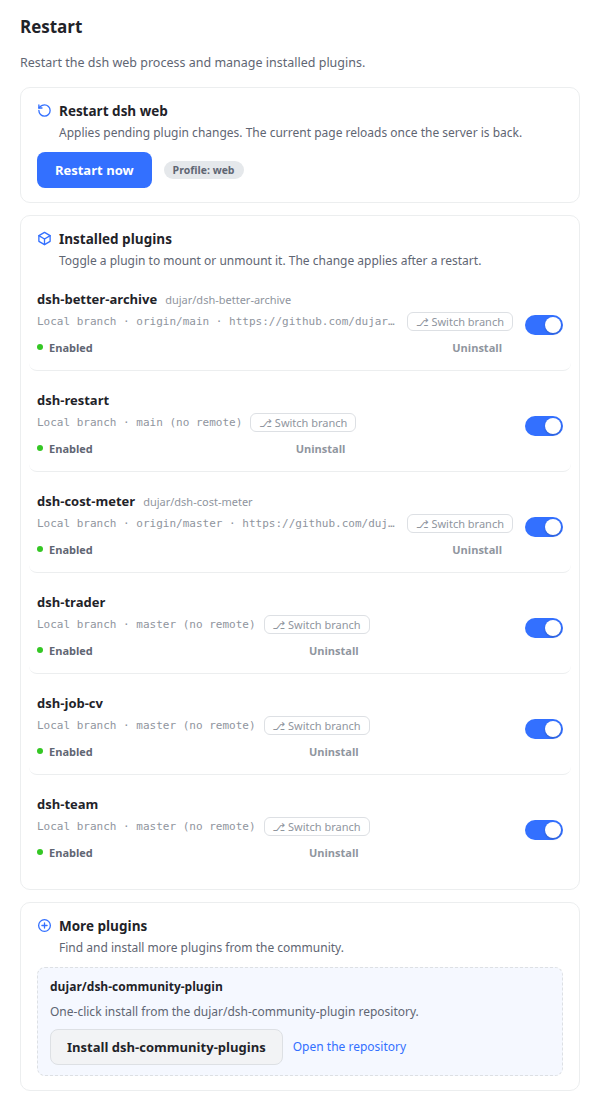
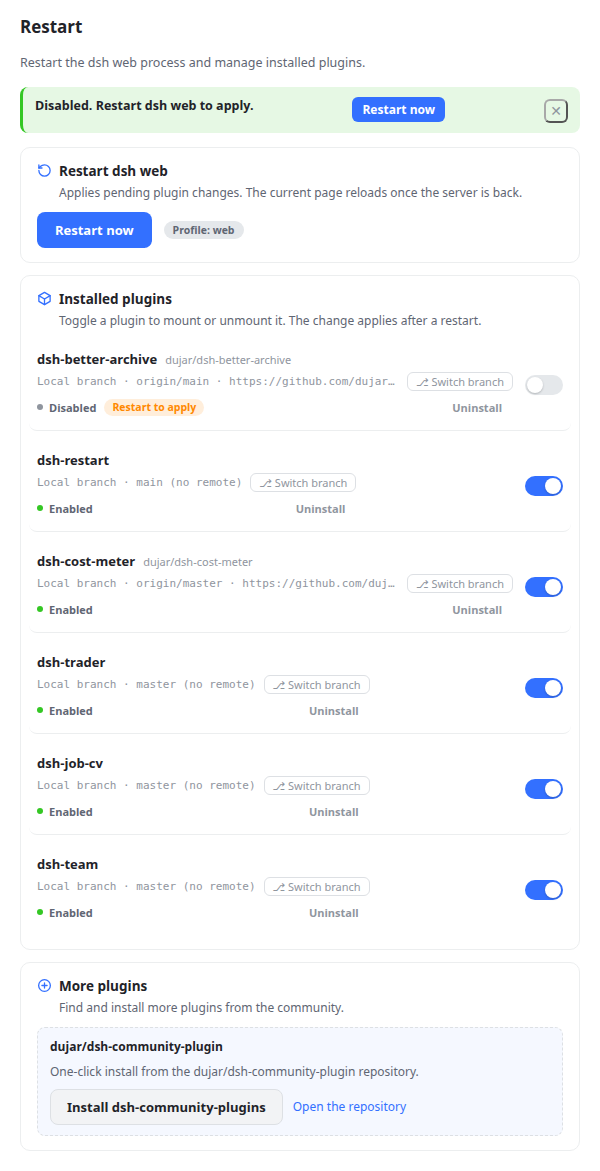
- **Enable / disable installed plugins** — lists every third-party plugin of the active profile (union of `dsh.profile.bundles` and `dependencies`, excluding `@deepseek-ai/*` and `cordis:*` built-ins) with a toggle per plugin that edits the profile manifest (`dsh.profile.bundles`); changes apply after a restart. Enabled state shows as a status dot (green / gray), and every async action (restart, install, branch switch, uninstall, …) carries a spinner. Rows with a pending change show a **Restart to apply** chip, and a notice bar offers a one-click restart. Plugins installed from a local checkout (`link:`/`file:` specs) additionally show git metadata when it is already present on disk — **local build** vs **local branch**, the current branch, the first remote's name/URL (e.g. `Local branch · origin/main · https://github.com/dujar/dsh-pocket.git`) — read from `.git` only, no network, worktrees included.
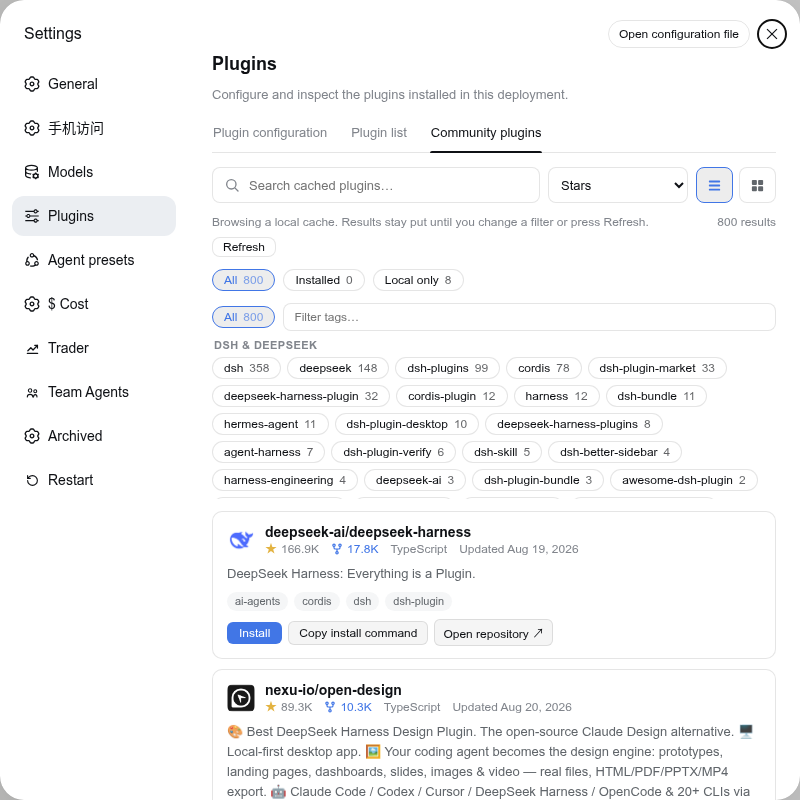
- **More plugins** — when dsh-community-plugins is installed and enabled, a button jumps straight to **Settings → Plugins → Community plugins**; otherwise the card advertises **dujar/dsh-community-plugins** with a one-click install (runs `dsh plugin --profile add github:dujar/dsh-community-plugins`) and a link to the repository.
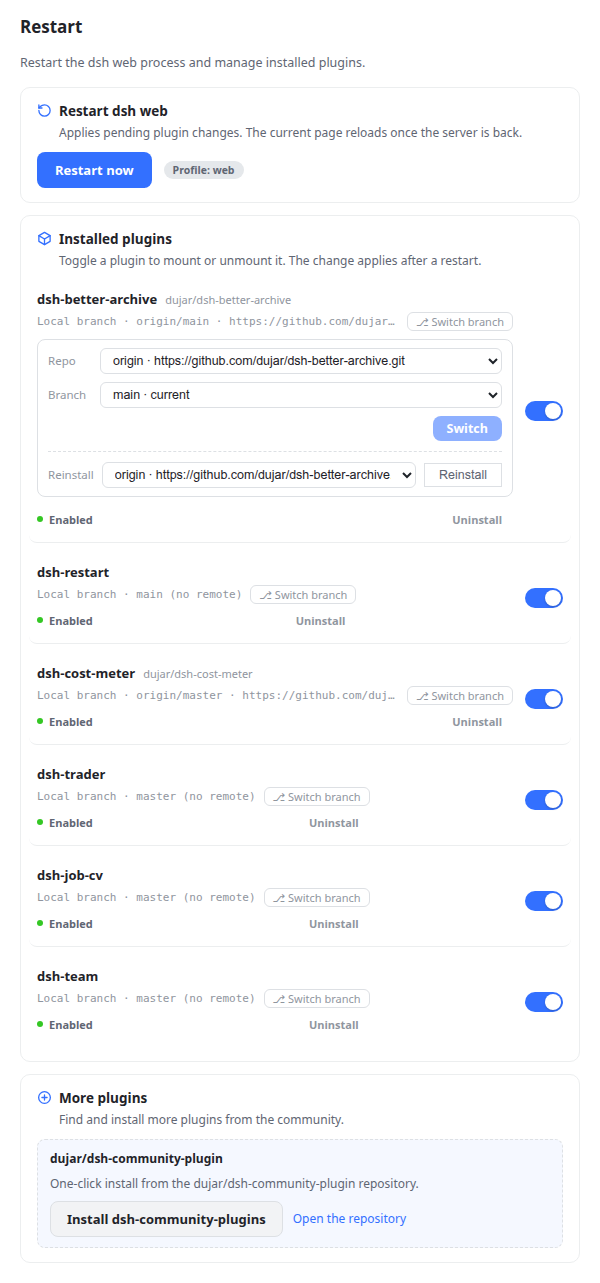
- **Switch branches & reinstall** — local git checkouts get a git panel (⎇): switch branch across repos (Local / origin / upstream, with tracking retargeting for same-name branches). *Reinstall* sits in its own dashed-divider group; the button is neutral until the two-step confirmation, then turns red. Fresh-clean the checkout from one of three sources: **Local** (`git reset --hard` + `git clean -fdx`), any of its own remotes (`fetch` + hard-reset to the default branch), or **Plugin (npm)** (runs `dsh plugin --profile
add @latest`, replacing the `link:` spec — the checkout stays on disk but DSH loads the npm release after a restart; run `dsh plugin --profile add link:` to go back). Local/remote reinstalls automatically restore the checkout's runtime dependencies (`git clean -fdx` wipes node_modules; picked by lockfile — `package-lock.json` → npm, `pnpm-lock.yaml` → pnpm, deps without a lockfile → npm) and auto-repair a broken link.
- **Link health & one-click repair** — state checks `node_modules/` against its `link:`/`file:` manifest spec: a real directory, a missing entry, or a symlink pointing elsewhere shows a **Link broken — DSH is loading a stale copy** warning (the typical cause: a `dsh plugin add github:...` replaced the local link with a tarball copy). **Repair link** runs `dsh plugin --profile install`, and pnpm re-materializes the symlink from the manifest and rewrites the lockfile.
- **Uninstall** — every plugin row offers a two-step-confirmed removal from `dsh.profile.bundles` and `dependencies` (builtin packages are refused); files on disk stay untouched.
- **Fail-closed trust guard** — all routes reuse the same-origin/localhost check shared with dsh-trader and dsh-community-plugins.
## Screenshots
Settings → Restart section (English):
Toggling a plugin shows the pending state and a restart shortcut:
The *More plugins* button redirects in-app to the Community plugins tab:
The git panel — switch branch across repos (local / origin / upstream), and reinstall (fresh cleanup) from the same sources:
## Install
> Requires Node.js 22.19+ and pnpm (`dsh plugin` installs through pnpm under the hood).
```sh
# local checkout (development)
dsh plugin --profile web add /path/to/dsh-restart
# from GitHub
dsh plugin --profile web add github:dujar/dsh-restart
```
Then **restart `dsh web`** and refresh the browser page. The install adds `dsh-restart` to the profile's `dsh.profile.bundles` automatically; if it is not added, append `"dsh-restart"` to that array in `$DSH_HOME/profiles/web/package.json` and restart. A **Restart** section then appears at the bottom of the Settings sidebar.
## Usage
1. Open **Settings → Restart**.
2. **Restart now** restarts the dsh web process; the page reloads once the new instance answers.
3. Toggle any plugin to mount/unmount it — the profile manifest is updated immediately, and the change is applied after a restart. The **Restart to apply** chip and the notice bar's *Restart* button show you exactly what is pending.
4. **Browse more plugins** opens **Settings → Plugins → Community plugins**, where you can search and install from the community catalog (via dsh-community-plugins).
5. For local checkouts, **⎇ Switch branch** opens the git panel: pick a repo (Local / each remote) and a branch — the same branch name from a different repo retargets tracking (`git branch --set-upstream-to` / `--unset-upstream`) instead of being a no-op. The **Reinstall** row below it is a fresh cleanup from one of three sources (all two-step confirmed): *Local* discards every local change and untracked file (`git reset --hard` + `git clean -fdx`), a remote fetches and hard-resets the checkout to that remote's default branch, and *Plugin (npm)* reinstalls the latest release from the registry (`dsh plugin add @latest` — the local checkout stays on disk but stops being loaded). Local/remote reinstalls automatically restore the node_modules that `git clean -fdx` wiped and repair a broken link. Link health shows per row: when the **Link broken** warning appears, click **Repair link** to fix it.
6. **Uninstall** (row meta) removes the plugin from `dsh.profile.bundles` and `dependencies` — restart to apply; the checkout files on disk are left untouched.
## Host routes
| Method | Path | Purpose |
| --- | --- | --- |
| GET | `/dsh-restart/state` | profile, installed plugins (with enabled state, local git metadata, and link health), dsh-community-plugins availability |
| POST | `/dsh-restart/plugin` | `{ name, enabled }` — add/remove a `dsh.profile.bundles` entry |
| POST | `/dsh-restart/community` | one-click install of `github:dujar/dsh-community-plugins` (`DSH_BIN` overrides the executable) |
| GET | `/dsh-restart/git-refs` | `?name=` — branch + remote refs of a local checkout (no network) |
| POST | `/dsh-restart/git-checkout` | `{ name, branch, remote }` — switch branch (repo-aware tracking) |
| POST | `/dsh-restart/uninstall` | `{ name }` — remove the plugin from bundles + dependencies (builtins refused) |
| POST | `/dsh-restart/relink` | `{ name }` — re-sync the profile install so a clobbered `link:`/`file:` dep points at its checkout again |
| POST | `/dsh-restart/reinstall` | `{ name, remote }` — fresh-clean a local checkout (Local, or its own git remote; `remote: "plugin"` re-adds from the registry and de-links); then restore the checkout's dependencies and repair a broken link |
| POST | `/dsh-restart` | schedule a self-restart; responds `{ ok, restarting }`, then the process exits ~400 ms later |
All routes use the fail-closed same-origin/localhost trust check shared with dsh-trader and dsh-community-plugins: a cross-origin or malformed `Origin`/`Referer` rejects, a CORS-simple content type rejects, and only then does a localhost host count as trusted.
## Configuration
Environment variables (all optional):
| Variable | Default | Purpose |
| --- | --- | --- |
| `DSH_RESTART_CMD` | original command line | Custom restart command (e.g. `systemctl restart dsh-web`) for supervised setups. |
| `DSH_RESTART_PROFILE` | auto-detected | Explicit profile; falls back to `DSH_PROFILE`, then auto-detection of the profile that mounted this plugin, then `web`. |
## Development
Zero-build plugin (same pattern as dsh-community-plugins / dsh-better-archive):
```sh
npm test # host routes + client contract/dict balance + real-React SSR
node --check lib/index.js && node --check lib/client.js
```
- Client: `lib/client.js` (CJS factory + ModuleLoader; React comes from the host).
- Host: `lib/index.js` (`ctx.webServer.register` mounts the routes).
- i18n: `ctx.locale.register('restart', { zh, en })` — the host enforces zh/en key parity, so every new string must land in both dictionaries.
## Structure
```
dsh-restart/
package.json # manifest (dsh.bundle.patch / dsh.client declarations)
cordis.patch.yml # host-half mount line (applied by the profile bundle mechanism)
lib/
index.js # host half: restart scheduler + toggle/git-panel routes
client.js # browser half: settings section UI (React, zero-build, i18n)
test/
host.test.mjs # routes, trust guard, restart handoff
client.test.mjs # bundle contract, dict key parity, pollRestart
render.test.mjs # real-React server-side rendering
LICENSE
README.md # English (this file)
README.zh-CN.md # Simplified Chinese
```
## Publishing
Before publishing your fork to GitHub: add the [`dsh-plugin`](https://github.com/topics/dsh-plugin) topic to the repository for discoverability in the community catalog (per the DeepSeek Harness README).
## License
[MIT](./LICENSE)