---
title: SpringBoot 之发送邮件
date: 2019-11-20 15:20:44
order: 03
categories:
- Java
- 框架
- Spring
- SpringIO
tags:
- Java
- 框架
- Spring
- SpringBoot
- 邮件
permalink: /pages/21302e7e/
---
# SpringBoot 之发送邮件
## 简介
Spring Boot 收发邮件最简便方式是通过 `spring-boot-starter-mail`。
```xml
org.springframework.boot
spring-boot-starter-mail
```
spring-boot-starter-mail 本质上是使用 JavaMail(javax.mail)。如果想对 JavaMail 有进一步了解,可以参考: [JavaMail 使用指南](https://dunwu.github.io/java-tutorial/#/javalib/javamail)
## API
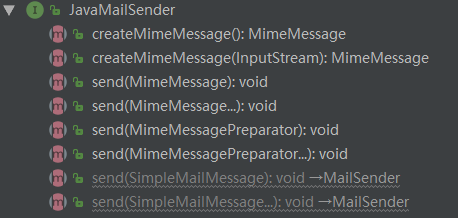
Spring Framework 提供了一个使用 `JavaMailSender` 接口发送电子邮件的简单抽象,这是发送邮件的核心 API。
`JavaMailSender` 接口提供的 API 如下:
## 配置
Spring Boot 为 `JavaMailSender` 提供了自动配置以及启动器模块。
如果 `spring.mail.host` 和相关库(由 spring-boot-starter-mail 定义)可用,则 Spring Boot 会创建默认 `JavaMailSender`(如果不存在)。可以通过 `spring.mail` 命名空间中的配置项进一步自定义发件人。
特别是,某些默认超时值是无限的,您可能希望更改它以避免线程被无响应的邮件服务器阻塞,如以下示例所示:
```properties
spring.mail.properties.mail.smtp.connectiontimeout=5000
spring.mail.properties.mail.smtp.timeout=3000
spring.mail.properties.mail.smtp.writetimeout=5000
```
也可以使用 JNDI 中的现有会话配置 `JavaMailSender`:
```
spring.mail.jndi-name=mail/Session
```
以下为 Spring Boot 关于 Mail 的配置:
有关更多详细信息,请参阅 [`MailProperties`](https://github.com/spring-projects/spring-boot/tree/v2.1.1.RELEASE/spring-boot-project/spring-boot-autoconfigure/src/main/java/org/springframework/boot/autoconfigure/mail/MailProperties.java)。
```properties
# Email (MailProperties)
spring.mail.default-encoding=UTF-8 # Default MimeMessage encoding.
spring.mail.host= # SMTP server host. For instance, `smtp.example.com`.
spring.mail.jndi-name= # Session JNDI name. When set, takes precedence over other Session settings.
spring.mail.password= # Login password of the SMTP server.
spring.mail.port= # SMTP server port.
spring.mail.properties.*= # Additional JavaMail Session properties.
spring.mail.protocol=smtp # Protocol used by the SMTP server.
spring.mail.test-connection=false # Whether to test that the mail server is available on startup.
spring.mail.username= # Login user of the SMTP server.
```
## 实战
### 引入依赖
```xml
org.springframework.boot
spring-boot-starter-mail
org.springframework.boot
spring-boot-starter-test
test
org.projectlombok
lombok
com.github.dozermapper
dozer-spring-boot-starter
6.4.0
```
### 配置邮件属性
在 `src/main/resources` 目录下添加 `application-163.properties` 配置文件,内容如下:
```properties
spring.mail.host = smtp.163.com
spring.mail.username = xxxxxx
spring.mail.password = xxxxxx
spring.mail.properties.mail.smtp.auth = true
spring.mail.properties.mail.smtp.starttls.enable = true
spring.mail.properties.mail.smtp.starttls.required = true
spring.mail.default-encoding = UTF-8
mail.domain = 163.com
mail.from = ${spring.mail.username}@${mail.domain}
```
注:需替换有效的 `spring.mail.username`、`spring.mail.password`。
`application-163.properties` 配置文件表示使用 163 邮箱时的配置,为了使之生效,需要通过 `spring.profiles.active = 163` 来激活它。
在 `src/main/resources` 目录下添加 `application.properties` 配置文件,内容如下:
```properties
spring.profiles.active = 163
```
### Java 代码
首先,需要读取部分配置属性,方法如下:
```java
import org.springframework.boot.context.properties.ConfigurationProperties;
import org.springframework.stereotype.Component;
import org.springframework.validation.annotation.Validated;
@Validated
@Component
@ConfigurationProperties(prefix = "mail")
public class MailProperties {
private String domain;
private String from;
public String getDomain() {
return domain;
}
public void setDomain(String domain) {
this.domain = domain;
}
public String getFrom() {
return from;
}
public void setFrom(String from) {
this.from = from;
}
}
```
接着,定义一个邮件参数实体类(使用 lombok 简化了 getter、setter):
```java
import lombok.Data;
import java.util.Date;
@Data
public class MailDTO {
private String from;
private String replyTo;
private String[] to;
private String[] cc;
private String[] bcc;
private Date sentDate;
private String subject;
private String text;
private String[] filenames;
}
```
接着,实现发送邮件的功能接口:
```java
import com.github.dozermapper.core.Mapper;
import org.apache.commons.lang3.StringUtils;
import org.slf4j.Logger;
import org.slf4j.LoggerFactory;
import org.springframework.beans.factory.annotation.Autowired;
import org.springframework.mail.SimpleMailMessage;
import org.springframework.mail.javamail.JavaMailSender;
import org.springframework.mail.javamail.MimeMessageHelper;
import org.springframework.stereotype.Service;
import javax.mail.MessagingException;
import javax.mail.internet.MimeBodyPart;
import javax.mail.internet.MimeMessage;
import javax.mail.internet.MimeMultipart;
import java.io.IOException;
@Service
public class MailService {
private final Logger log = LoggerFactory.getLogger(this.getClass());
@Autowired
private MailProperties mailProperties;
@Autowired
private JavaMailSender javaMailSender;
@Autowired
private Mapper mapper;
public void sendSimpleMailMessage(MailDTO mailDTO) {
SimpleMailMessage simpleMailMessage = mapper.map(mailDTO, SimpleMailMessage.class);
if (StringUtils.isEmpty(mailDTO.getFrom())) {
mailDTO.setFrom(mailProperties.getFrom());
}
javaMailSender.send(simpleMailMessage);
}
public void sendMimeMessage(MailDTO mailDTO) {
MimeMessage mimeMessage = javaMailSender.createMimeMessage();
MimeMessageHelper messageHelper;
try {
messageHelper = new MimeMessageHelper(mimeMessage, true);
if (StringUtils.isEmpty(mailDTO.getFrom())) {
messageHelper.setFrom(mailProperties.getFrom());
}
messageHelper.setTo(mailDTO.getTo());
messageHelper.setSubject(mailDTO.getSubject());
mimeMessage = messageHelper.getMimeMessage();
MimeBodyPart mimeBodyPart = new MimeBodyPart();
mimeBodyPart.setContent(mailDTO.getText(), "text/html;charset=UTF-8");
// 描述数据关系
MimeMultipart mm = new MimeMultipart();
mm.setSubType("related");
mm.addBodyPart(mimeBodyPart);
// 添加邮件附件
for (String filename : mailDTO.getFilenames()) {
MimeBodyPart attachPart = new MimeBodyPart();
try {
attachPart.attachFile(filename);
} catch (IOException e) {
e.printStackTrace();
}
mm.addBodyPart(attachPart);
}
mimeMessage.setContent(mm);
mimeMessage.saveChanges();
} catch (MessagingException e) {
e.printStackTrace();
}
javaMailSender.send(mimeMessage);
}
}
```
## 示例源码
> 示例源码:[spring-boot-mail](https://github.com/dunwu/spring-boot-tutorial/tree/master/codes/spring-boot-mail)
## 参考资料
- [Spring Boot 官方文档之 Sending Email](https://docs.spring.io/spring-boot/docs/2.1.1.RELEASE/reference/htmlsingle/#boot-features-email)