---
title: Shiro 快速入门
date: 2022-02-17 22:34:30
order: 01
categories:
- Java
- 框架
- 安全
tags:
- Java
- 框架
- 安全
- Shiro
permalink: /pages/35e2d3ba/
---
# Shiro 快速入门
> Shiro 是一个安全框架,具有认证、授权、加密、会话管理功能。
## 一、Shiro 简介
### Shiro 特性
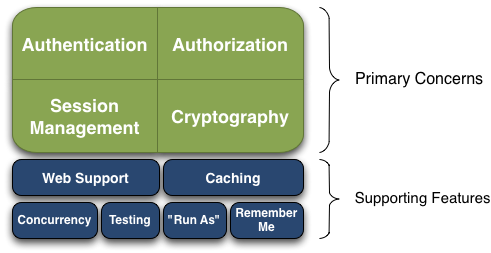
核心功能:
- **Authentication** - **认证**。验证用户是不是拥有相应的身份。
- **Authorization** - **授权**。验证某个已认证的用户是否拥有某个权限;即判断用户是否能做事情,常见的如:验证某个用户是否拥有某个角色。或者细粒度的验证某个用户对某个资源是否具有某个权限。
- **Session Manager** - **会话管理**。即用户登录后就是一次会话,在没有退出之前,它的所有信息都在会话中。会话可以是普通 JavaSE 环境的,也可以是如 Web 环境的。
- **Cryptography** - **加密**。保护数据的安全性,如密码加密存储到数据库,而不是明文存储。
辅助功能:
- **Web Support** - **Web 支持**。可以非常容易的集成到 Web 环境;
- **Caching** - **缓存**。比如用户登录后,其用户信息、拥有的角色 / 权限不必每次去查,这样可以提高效率;
- **Concurrency** - **并发**。Shiro 支持多线程应用的并发验证,即如在一个线程中开启另一个线程,能把权限自动传播过去;
- **Testing** - **测试**。提供测试支持;
- **Run As** - **运行方式**。允许一个用户假装为另一个用户(如果他们允许)的身份进行访问;
- **Remember Me** - **记住我**。即一次登录后,下次再访问免登录。
> :bell: 注意:Shiro 不会去维护用户、维护权限;这些需要我们自己去提供;然后通过相应的接口注入给 Shiro 即可。
### Shiro 架构概述
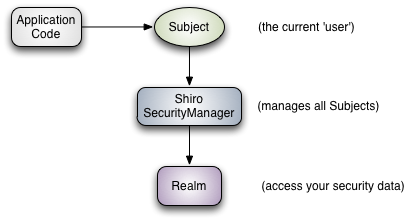
- **Subject** - **主题**。它代表当前用户,`Subject` 可以是一个人,但也可以是第三方服务、守护进程帐户、时钟守护任务或者其它——当前和软件交互的任何事件。`Subject` 是 Shiro 的入口。
- `Principals` 是 `Subject` 的“识别属性”。`Principals` 可以是任何可以识别 `Subject` 的东西,例如名字(姓氏),姓氏(姓氏或姓氏),用户名,社会保险号等。当然,`Principals` 在应用程序中最好是惟一的。
- `Credentials` 通常是仅由 `Subject` 知道的秘密值,用作他们实际上“拥有”所主张身份的佐证 凭据的一些常见示例是密码,生物特征数据(例如指纹和视网膜扫描)以及 X.509 证书。
- **SecurityManager** - **安全管理**。它是 Shiro 的核心,所有与安全有关的操作(认证、授权、及会话、缓存的管理)都与 `SecurityManager` 交互,且它管理着所有 `Subject`。
- **Realm** - **域**。用于访问安全相关数据,可以视为应用自身的数据源,需要开发者自己实现。Shiro 会通过 `Realm` 获取安全数据(如用户、角色、权限),就是说 `SecurityManager` 要验证用户身份,那么它需要从 `Realm` 获取相应的用户进行比较以确定用户身份是否合法;也需要从 Realm 得到用户相应的角色/权限进行验证用户是否能进行操作;可以把 `Realm` 看成 DataSource,即安全数据源。
### SecurityManager
`SecurityManager` 是 Shiro 框架核心中的核心,它相当于 Shiro 的总指挥,负责调度所有行为,包括:认证、授权、获取安全数据(调用 `Realm`)、会话管理等。
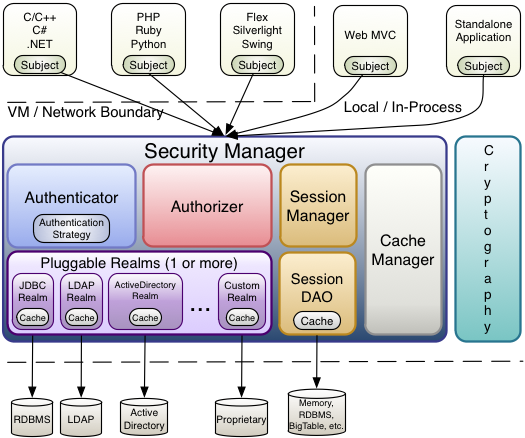
`SecurityManager` 聚合了以下组件:
- **Authenticator** - 认证器,负责认证。如果用户需要定制认证策略,可以实现此接口。
- **Authorizer** - 授权器,负责权限控制。用来决定主体是否有权限进行相应的操作;即控制着用户能访问应用中的哪些功能;
- **SessionManager** - 会话管理器。Shiro 抽象了一个自己的 Session 来管理主体与应用之间交互的数据。
- **SessionDAO** - 会话 DAO 用于存储会话,需要用户自己实现。
- **CacheManager** - 缓存控制器。用于管理如用户、角色、权限等信息的缓存。
- **Cryptography** - 密码器。用于对数据加密、解密。
## 二、Shiro 认证
### 认证 Subject
验证 Subject 的过程可以有效地分为三个不同的步骤:
(1)收集 `Subject` 提交的 `Principals` 和 `Credentials`
```java
//Example using most common scenario of username/password pair:
UsernamePasswordToken token = new UsernamePasswordToken(username, password);
//"Remember Me" built-in:
token.setRememberMe(true);
```
(2)提交 `Principals` 和 `Credentials` 以进行身份验证。
```java
Subject currentUser = SecurityUtils.getSubject();
currentUser.login(token);
```
(3)如果提交成功,则允许访问,否则重试身份验证或阻止访问。
```java
try {
currentUser.login(token);
} catch ( UnknownAccountException uae ) { ...
} catch ( IncorrectCredentialsException ice ) { ...
} catch ( LockedAccountException lae ) { ...
} catch ( ExcessiveAttemptsException eae ) { ...
} ... catch your own ...
} catch ( AuthenticationException ae ) {
//unexpected error?
}
```
### Remembered 和 Authenticated
- `Remembered` - 记住我。被记住的 `Subject` 不是匿名的,并且具有已知的身份(即 `subject.getPrincipals()` 是非空的)。 但是,在先前的会话期间,通过先前的身份验证会记住此身份。 如果 `subject.isRemembered()` 返回 `true`,则认为该主题已被记住。
- `Authenticated` - 已认证。已认证的 `Subject` 是在当前会话期间已成功认证的 `Subject`。 如果 `subject.isAuthenticated()` 返回 `true`,则认为该 `Subject` 已通过身份验证。
### 登出
当 Subject 与应用程序完成交互后,可以调用 `subject.logout()` 登出,即放弃所有标识信息。
```java
currentUser.logout();
```
### 认证流程
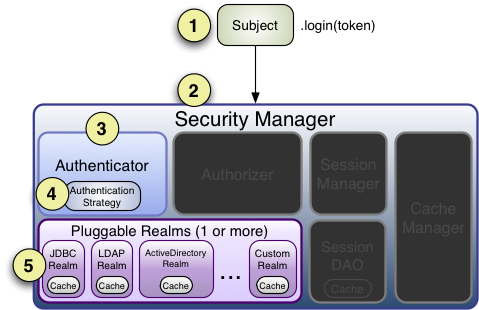
1. 应用程序代码调用 `Subject.login` 方法,传入构造的 `AuthenticationToken` 实例,该实例代表最终用户的 `Principals` 和 `Credentials`。
2. `Subject` 实例(通常是 `DelegatingSubject`(或子类))通过调用 `securityManager.login`(token)委托应用程序的 `SecurityManager`,在此处开始实际的身份验证工作。
3. `SecurityManager` 接收令牌,并通过调用 `authenticator.authenticate`(token)来简单地委派给其内部 `Authenticator` 实例。这几乎总是一个 `ModularRealmAuthenticator` 实例,它支持在身份验证期间协调一个或多个 `Realm` 实例。
4. 如果为该应用程序配置了多个 `Realm`,则 `ModularRealmAuthenticator` 实例将利用其配置的 `AuthenticationStrategy` 发起多域验证尝试。在调用领域进行身份验证之前,期间和之后,将调用 `AuthenticationStrategy` 以使其对每个领域的结果做出反应。
5. 请咨询每个已配置的 `Realm`,以查看其是否支持提交的 `AuthenticationToken`。 如果是这样,将使用提交的令牌调用支持 `Realm` 的 `getAuthenticationInfo` 方法。 `getAuthenticationInfo` 方法有效地表示对该特定 `Realm` 的单个身份验证尝试。
### 认证策略
当为一个应用程序配置两个或多个领域时,`ModularRealmAuthenticator` 依赖于内部 `AuthenticationStrategy` 组件来确定认证尝试成功或失败的条件。
例如,如果只有一个 Realm 成功地对 AuthenticationToken 进行身份验证,而所有其他 Realm 都失败了,那么该身份验证尝试是否被视为成功?还是必须所有领域都成功进行身份验证才能将整体尝试视为成功?或者,如果某个领域成功通过身份验证,是否有必要进一步咨询其他领域? AuthenticationStrategy 根据应用程序的需求做出适当的决定。
`AuthenticationStrategy` 是无状态组件,在尝试进行身份验证时会被查询 4 次(这 4 种交互所需的任何必要状态都将作为方法参数给出):
- 在任何领域被调用之前
- 在调用单个 `Realm` 的 `getAuthenticationInfo` 方法之前
- 在调用单个 `Realm` 的 `getAuthenticationInfo` 方法之后
- 在所有领域都被调用之后
`AuthenticationStrategy` 还负责汇总每个成功 `Realm` 的结果,并将它们“捆绑”成单个 `AuthenticationInfo` 表示形式。最终的聚合 `AuthenticationInfo` 实例是 `Authenticator` 实例返回的结果,也是 Shiro 用来表示主体的最终身份(也称为委托人)的东西。
| `AuthenticationStrategy` | 描述 |
| :-------------------------------------------------------------------------------------------------------------------------------------------- | :----------------------------------------------------------------------------- |
| [`AtLeastOneSuccessfulStrategy`](http://shiro.apache.org/static/current/apidocs/org/apache/shiro/authc/pam/AtLeastOneSuccessfulStrategy.html) | 只要有一个 `Realm` 成功认证,则整个尝试都被视为成功。 |
| [`FirstSuccessfulStrategy`](http://shiro.apache.org/static/current/apidocs/org/apache/shiro/authc/pam/FirstSuccessfulStrategy.html) | 仅使用从第一个成功通过身份验证的 `Realm` 返回的信息,所有其他 Realm 将被忽略。 |
| [`AllSuccessfulStrategy`](http://shiro.apache.org/static/current/apidocs/org/apache/shiro/authc/pam/AllSuccessfulStrategy.html) | 只有所有 `Realm` 成功认证,则整个尝试才被视为成功。 |
> :link: 更多认证细节可以参考:[Apache Shiro Authentication](http://shiro.apache.org/authentication.html#apache-shiro-authentication)
## 三、Shiro 授权
授权,也称为访问控制,是管理对资源的访问的过程。 换句话说,控制谁有权访问应用程序中的内容。
### 授权元素
授权有三个核心要素:权限、角色和用户。
#### 权限
权限示例:
- 打开一个文件
- 查看 `/user/list` web 页面
- 查询记录
- 删除一条记录
- ...
大多数资源都支持一般的 CRUD 操作。除此以外,对于一些特定的资源,任何有意义的行为都是可以的。基本的设计思路是:权限控制,至少是基于资源和行为。
#### 角色
角色是一个命名实体,通常代表一组行为或职责。这些行为会转化为:谁可以在应用程序中执行哪些行为?谁不可以在程序中执行哪些行为?
角色通常是分配给用户帐户的,因此通过关联,用户可以获得自身角色所赋予的权限。
#### 用户
用户本质上是应用程序的“用户”。
用户(即 Shiro 的 `Subject`)通过与角色或直接权限的关联在应用程序中执行某些行为。
### 基于角色的授权
如果授权是基于角色赋予权限的数据模型,编程模式如下:
【示例一】
```
Subject currentUser = SecurityUtils.getSubject();
if (currentUser.hasRole("administrator")) {
//show the admin button
} else {
//don't show the button? Grey it out?
}
```
【示例二】
```
Subject currentUser = SecurityUtils.getSubject();
// 检查当前 Subject 是否有某种权限
// 如果有,直接跳过;如果没有,Shiro 会抛出 AuthorizationException
currentUser.checkRole("bankTeller");
openBankAccount();
```
> 提示:方式二相比方式一,代码更简洁
### 基于权限的授权
**更好的授权策略通常是基于权限的授权**。基于权限的授权,由于它和应用程序的原始功能(针对具体资源上的行为)紧密相关,所以基于权限的授权源代码会在功能更改时同步更改(而不是在安全策略发生更改时)。 这意味着与类似的基于角色的授权代码相比,修改代码的影响面要小得多。
【示例】基于对象的权限检查
```java
Permission printPermission = new PrinterPermission("laserjet4400n", "print");
Subject currentUser = SecurityUtils.getSubject();
if (currentUser.isPermitted(printPermission)) {
//show the Print button
} else {
//don't show the button? Grey it out?
}
```
在对象中存储权限控制信息,但这种方式较为繁重
【示例】字符串定义权限控制信息
```java
Subject currentUser = SecurityUtils.getSubject();
if (currentUser.isPermitted("printer:print:laserjet4400n")) {
//show the Print button
} else {
//don't show the button? Grey it out?
}
```
使用 : 分隔,表示资源类型、行为、资源 ID,Shiro 提供了默认实现: `org.apache.shiro.authz.permission.WildcardPermission`。
这种权限控制方式的好处在于:轻量、灵活。
### 基于注解的授权
Shiro 提供了一些用于授权的注解,来进一步简化授权代码。
#### `@RequiresAuthentication`
`@RequiresAuthentication` 注解要求当前 `Subject` 必须是已认证用户才可以访问被修饰的方法。
【示例】
```java
@RequiresAuthentication
public void updateAccount(Account userAccount) {
//this method will only be invoked by a
//Subject that is guaranteed authenticated
...
}
```
#### `@RequiresGuest`
`@RequiresGuest` 注解要求当前 `Subject` 的角色是 `guest` 才可以访问被修饰的方法。
### 授权流程
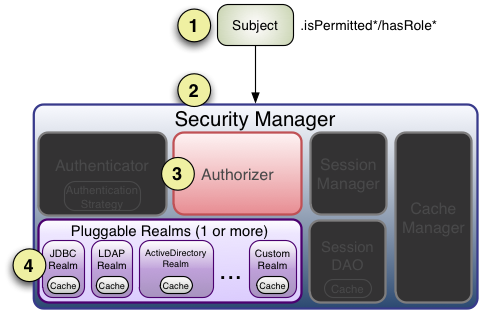
1. 应用程序或框架代码调用任何 `Subject` 的 `hasRole*`,`checkRole*`,`isPermitted*` 或 `checkPermission*` 方法,并传入所需的权限或角色。
2. `Subject` 实例,通常是 `DelegatingSubject`(或子类),通过调用 `securityManager` 几乎相同的各自 `hasRole*`,`checkRole*`,`isPermitted*` 或 `checkPermission*` 方法来委托 `SecurityManager` (实现了 [`org.apache.shiro.authz.Authorizer`](http://shiro.apache.org/static/current/apidocs/org/apache/shiro/authz/Authorizer.html) 接口)处理授权。
3. `SecurityManager` 通过调用授权者各自的 `hasRole*`,`checkRole*`,`isPermitted*` 或 `checkPermission*` 方法来中继/委托其内部的 `org.apache.shiro.authz.Authorizer` 实例。默认情况下,`authorizer` 实例是 `ModularRealmAuthorizer` 实例,该实例支持在任何授权操作期间协调一个或多个 `Realm` 实例。
4. 检查每个已配置的 `Realm`,以查看其是否实现相同的 `Authorizer` 接口。如果是这样,则将调用 `Realm` 各自的 `hasRole*`,`checkRole*`,`isPermitted*` 或 `checkPermission*` 方法。
> :link: 更多授权细节可以参考:[Apache Shiro Authorization](http://shiro.apache.org/authorization.html#apache-shiro-authorization)
## 四、Shiro 会话管理
Shiro 提供了一套独特的会话管理方案:其 Session 可以使用 Java SE 程序,也可以使用于 Java Web 程序。
在 Shiro 中,[SessionManager](http://shiro.apache.org/session-management.html#the-sessionmanager) 负责管理应用所有 `Subject` 的会话,如:创建、删除、失效、验证等。
【示例】会话使用示例
```java
Subject currentUser = SecurityUtils.getSubject();
Session session = currentUser.getSession();
session.setAttribute( "someKey", someValue);
```
### 会话超时
默认情况下,Shiro 中的会话有效期为 30 分钟,超时后,该会话将被 Shiro 视为无效。
可以通过 `globalSessionTimeout` 方法设置 Shiro 会话超时时间。
### 会话监听
Shiro 提供了 `SessionListener` 接口(或 `SessionListenerAdapter` 接口),用于监听重要的会话事件,并允许使用者在事件触发时做定制化处理。
【示例】
```java
public class ShiroSessionListener implements SessionListener {
private final Logger log = LoggerFactory.getLogger(this.getClass());
private final AtomicInteger sessionCount = new AtomicInteger(0);
@Override
public void onStart(Session session) {
sessionCount.incrementAndGet();
}
@Override
public void onStop(Session session) {
sessionCount.decrementAndGet();
}
@Override
public void onExpiration(Session session) {
sessionCount.decrementAndGet();
}
}
```
### 会话存储
大多数情况下,应用需要保存会话信息,以便在稍后可以使用它。
Shiro 提供了 `SessionManager` 接口,负责将针对会话的 CRUD 操作委派给内部组件 `SessionDAO`,该组件反映了数据访问对象(DAO)设计模式。
> :bell: 注意:由于会话通常具有时效性,所以一般会话天然适合存储于缓存中。存储于 Redis 中是一个不错的选择。
## 五、Realm
`Realm` 是 Shiro 访问程序安全相关数据(如:用户、角色、权限)的接口。
`Realm` 是有开发者自己实现的,开发者可以通过实现 Realm 接口,接入应用的数据源,如:JDBC、文件、Nosql 等等。
### 认证令牌
Shiro 支持身份验证令牌。在咨询 Realm 进行认证尝试之前,将调用其支持方法。 如果返回值为 true,则仅会调用其 [getAuthenticationInfo(token)](http://shiro.apache.org/static/current/apidocs/org/apache/shiro/realm/Realm.html#getAuthenticationInfo-org.apache.shiro.authc.AuthenticationToken-) 方法。通常,Realm 会检查所提交令牌的类型(接口或类),以查看其是否可以处理它。
令牌认证处理流程如下:
1. 检查用于标识 principal 的令牌(帐户标识信息)。
2. 根据 principal,在数据源中查找相应的帐户数据。
3. 确保令牌提供的凭证与数据存储中存储的凭证匹配。
4. 如果 credentials 匹配,则返回 `AuthenticationInfo` 实例。
5. 如果 credentials 不匹配,则抛出 `AuthenticationException` 异常。
### 加密
通过前文,可以了解:Shiro 需要通过一对 principal 和 credentials 来确认身份是否匹配(即认证)。
一般来说,成熟软件是不允许存储账户、密码这些敏感数据时,使用明文存储。所以,通常要将密码加密后存储。
Shiro 提供了一些加密器,其思想就是用 MD5、SHA 这种数字签名算法,加 Salt,然后转为 Base64 字符串。为了避免被暴力破解,Shiro 使用多次加密的方式获得最终的 credentials 字符串。
【示例】Shiro 加密密码示例
```java
import org.apache.shiro.crypto.hash.Sha256Hash;
import org.apache.shiro.crypto.RandomNumberGenerator;
import org.apache.shiro.crypto.SecureRandomNumberGenerator;
...
//We'll use a Random Number Generator to generate salts. This
//is much more secure than using a username as a salt or not
//having a salt at all. Shiro makes this easy.
//
//Note that a normal app would reference an attribute rather
//than create a new RNG every time:
RandomNumberGenerator rng = new SecureRandomNumberGenerator();
Object salt = rng.nextBytes();
//Now hash the plain-text password with the random salt and multiple
//iterations and then Base64-encode the value (requires less space than Hex):
String hashedPasswordBase64 = new Sha256Hash(plainTextPassword, salt, 1024).toBase64();
User user = new User(username, hashedPasswordBase64);
//save the salt with the new account. The HashedCredentialsMatcher
//will need it later when handling login attempts:
user.setPasswordSalt(salt);
userDAO.create(user);
```
## 六、配置
### 过滤链
运行 Web 应用程序时,Shiro 将创建一些有用的默认 Filter 实例。
| Filter Name | Class |
| :---------------- | :--------------------------------------------------------------------------------------------------------------------------------------------------------------------------------------- |
| anon | [org.apache.shiro.web.filter.authc.AnonymousFilter](http://shiro.apache.org/static/current/apidocs/org/apache/shiro/web/filter/authc/AnonymousFilter.html) |
| authc | [org.apache.shiro.web.filter.authc.FormAuthenticationFilter](http://shiro.apache.org/static/current/apidocs/org/apache/shiro/web/filter/authc/FormAuthenticationFilter.html) |
| authcBasic | [org.apache.shiro.web.filter.authc.BasicHttpAuthenticationFilter](http://shiro.apache.org/static/current/apidocs/org/apache/shiro/web/filter/authc/BasicHttpAuthenticationFilter.html) |
| logout | [org.apache.shiro.web.filter.authc.LogoutFilter](http://shiro.apache.org/static/current/apidocs/org/apache/shiro/web/filter/authc/LogoutFilter.html) |
| noSessionCreation | [org.apache.shiro.web.filter.session.NoSessionCreationFilter](http://shiro.apache.org/static/current/apidocs/org/apache/shiro/web/filter/session/NoSessionCreationFilter.html) |
| perms | [org.apache.shiro.web.filter.authz.PermissionsAuthorizationFilter](http://shiro.apache.org/static/current/apidocs/org/apache/shiro/web/filter/authz/PermissionsAuthorizationFilter.html) |
| port | [org.apache.shiro.web.filter.authz.PortFilter](http://shiro.apache.org/static/current/apidocs/org/apache/shiro/web/filter/authz/PortFilter.html) |
| rest | [org.apache.shiro.web.filter.authz.HttpMethodPermissionFilter](http://shiro.apache.org/static/current/apidocs/org/apache/shiro/web/filter/authz/HttpMethodPermissionFilter.html) |
| roles | [org.apache.shiro.web.filter.authz.RolesAuthorizationFilter](http://shiro.apache.org/static/current/apidocs/org/apache/shiro/web/filter/authz/RolesAuthorizationFilter.html) |
| ssl | [org.apache.shiro.web.filter.authz.SslFilter](http://shiro.apache.org/static/current/apidocs/org/apache/shiro/web/filter/authz/SslFilter.html) |
| user | [org.apache.shiro.web.filter.authc.UserFilter](http://shiro.apache.org/static/current/apidocs/org/apache/shiro/web/filter/authc/UserFilter.html) |
### RememberMe
```java
UsernamePasswordToken token = new UsernamePasswordToken(username, password);
token.setRememberMe(true);
SecurityUtils.getSubject().login(token);
```
## 参考资料
- [Shiro 官方文档](http://shiro.apache.org/reference.html)
- [跟我学 Shiro](http://jinnianshilongnian.iteye.com/category/305053)
- [The New RBAC: Resource-Based Access Control](https://stormpath.com/blog/new-rbac-resource-based-access-control)