# Notes on _Douglas Crockford's_ Javascript the Good Parts :rocket:
> These are _notes_ on the book `Javascript the Good Parts` which was published
in **2008, before es6**. There have not been any revised editions of the book published at the time of writing,
see https://www.github.com/dwyl/Javascript-the-Good-Parts-notes/issues/33 for the
ongoing conversation on this.
This book calls out the best parts of Javascript and tells you what to avoid (the 'bad parts').
It's about making sure you **know the really important parts of the language**
and **create good habits** instead of having to break bad ones down the line.
The idea of these notes is to collect the excellent information from an already
dense book into note form, **translating these ideas into _'plain English'_**
where possible and _adding explanations_ throughout where the book might not make
things obvious as it assumes prior knowledge.
You can [buy the book](https://amzn.to/2HfF5CR) or follow [Douglas Crockford on Github](https://github.com/douglascrockford).
[](https://github.com/iteles/Javascript-the-Good-Parts-notes/issues)
**Please don't hesitate to submit PRs** to improve these notes wherever you feel
something can be clarified, improved on or have an example added to it.
## Table of Contents
* [Chapter 1 - Good Parts](#chapter1)
* [Chapter 2 - Grammar](#chapter2)
* [Chapter 3 - Objects](#chapter3)
* [Chapter 4 - Functions](#chapter4)
* [Chapter 5 - Inheritance](#chapter5)
* [Chapter 6 - Arrays](#chapter6)
* [Chapter 7 - Regular Expressions](#chapter7)
* [Chapter 8 - Methods](#chapter8)
* [Chapter 9 - Style](#chapter9)
* [Chapter 10 - Beautiful Features](#chapter10)
* [Appendix A - the Awful Parts](#AppendixA)
* [Appendix B - the Bad Parts](#AppendixB)
* [Appendix C - JSLint](#AppendixC)
## Chapter 1 - Good Parts
> Most programming languages contain good parts and bad parts. I discovered that I could be a better programmer by using only the good parts and avoiding the bad parts. After all, how can you build something good out of bad parts?
The best parts of Javascript include:
* functions
* loose typing (variables are declared as variables, without a type)
* dynamic objects
* object literal notation (where you can create an object already with a list of key/value pairs inside curly braces)
The worst parts include global variables - there is a common _global object_ namespace where they're all lumped together and they're essential to the language.
Javascript has a _class free_ object makeup, relying instead on objects inheriting properties directly from other objects - this is **prototypal inheritance**.
## Chapter 2 - Grammar
Always use // for comments, even multi-line ones to avoid having to escape `/*` characters.
### Numbers
* There is a single, 64-bit floating point number type.
* `NaN` (Not-a-Number) is not equal to any value (including itself) and is essentially an **illegal number value**, but _typeOf(NaN)===number is true_
* Use `isNaN(number)` to check for NaNs
Number methods are discussed in [Chapter 8](#chapter8).
### Strings
* 16-bit character set and don't have character types.
* Backslashes (\\\) are used for **escaping characters** that could cause problems in strings.
* Strings are **immutable**.
Single quotes are often used to define a String in JavaScript, but if a person's name has an apostrophe
(and the developer does not know the difference between an apostrophe and single quote) it is useful to "escape"
the apostrophe character:
```javascript
var name = 'Patrick O\'Brian'; // using a backslash in front of the apostrophe
console.log('name:', name); // name: Patrick O'Brian
```
further reading: https://webdesignledger.com/common-typography-mistakes-apostrophes-versus-quotation-marks

String methods are discussed in [Chapter 8](#chapter8).
### Statements
* _Inside_ a function, the var statement creates variables local to that function
* _switch, while, for_ and _do_ statements can have an optional **label** which can be used with `break` and `continue` to provide more precise [control over exactly which statement to break or continue](http://www.tutorialspoint.com/cgi-bin/practice.cgi?file=javascript_19). Format: `labelname: statement` and then `continue labelname;`
* ES2015 presents two new keywords for declaring variables, _let_ and _const_. Whereas the _var_ keyword is function scoped (the variables are local to the function), _let_ and _const_ are both block scoped, which means they are local to any statement with {}.
* _falsy_ values:
* false
* null
* undefined
* Empty string ' '
* The number 0
* The number NaN
* All other values are _truthy_ including all objects & the string 'false'
* If no matches are found in `case` statements, the optional default statement is executed, otherwise the matching case statement is carried out
* When using a _for in_ loop, usually a good idea to use `hasOwnProperty(variable)` to **make sure the property belongs to the object you want** and is not instead an inherited property from the prototype chain:
```javascript
for (myvariable in object) {
if (object.hasOwnProperty(myvariable)) {
... //statements to be executed
}
}
```
* A _do while_ statement is always executed at least once as the while condition is only checked after the first iteration of the loop
* `catch` clause in a _try_ statement **must create a new variable** that will catch the exception object
* Scope of `throw` statement is the `try` block it's in, or the `try` of the function it's in
* If there is no `return` statement, `return===undefined`
* `break` exits the statement and `continue` forces a new iteration of the loop, both with the optional _label_ mentioned above
### Expressions
* For `expression ? expression2 : expression3`, if expression is _truthy_, execute expresion2; if it's _falsy_, execute expression3
* _Invocation_ is `(expression1, expression2, etc)`
* _refinement_ is either `.name` or `[expression]` as used in an array
### Literals
* _Names_ or _strings_ used for specifying new objects ([**object literals**](#chapter3)) or arrays ([**array literals**](#chapter6))
* Properties of the object are expressions and must be known at compile time
### Functions
* A function literal defines a function value
* More details in [Chapter 4](#chapter4)
## Chapter 3 - Objects
Javascript simple types:
* numbers _(has object-like methods but they are immutable)_
* strings _(has object-like methods but they are immutable)_
* booleans _(has object-like methods but they are immutable)_
* null
* undefined
**All other values are _objects_** including arrays and functions.
Objects are **class free**, can contain other objects and can inherit properties from their prototypes (which can _reduce object initialisation time and memory consumption_).
### Object Literals
* An object literal is _zero or more comma-separated name/value pairs surrounded by curly braces_ {}
```javascript
var empty_object = {};
var today = {
day: "Wednesday",
month: "April",
year: 2014,
weather: { //objects can contain nested objects like this one
morning: "sunny",
afternoon: "cloudy"
}
}
```
### Retrieval
* Can be done with either dot notation `today.weather.morning` or with square brackets `today['month']`
* Or operand (||) can be used to fill in default values for nonexistent data to prevent and _undefined_ error: `var weath = today.weather.evening || "unknown"`
### Update
* Assigning a property value to an object **overwrites** any existing property values with that property name
### Reference
* Objects refer to each other, they don't hold duplicate copies of data
### Prototype
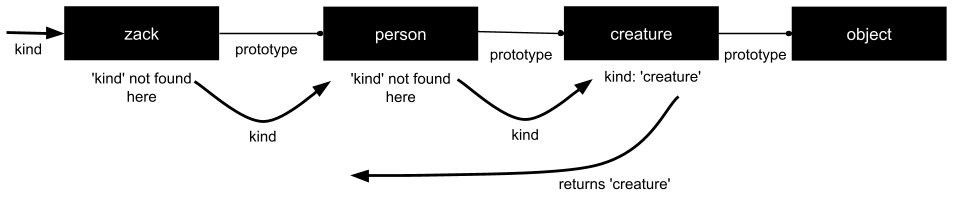
* Every object has a prototype object from which it inherits properties
* _Object.prototype_ comes standard with Javascript and is almost like a 'root parent'
* The `Object.create` method is now available in ES5 (but the method is in the book if required for older versions)
* If an object does not have a property you ask it for, it will **keep looking up the prototype chain until it finds it**
* If the property *does note exist* anywhere in the chain, it will return _undefined_
* A new property is _immediately visible_ to all of the objects below it in the chain once created
More details in [Chapter 6](#chapter6)
### Reflection
* Determining what properties an object has
* Using `typeof` **includes all properties in the prototype chain** including functions
* To avoid inherited properties, use `hasOwnProperty(type);` which returns _true_ if that property exists only in that object itself (not the chain)
```javascript
today.hasOwnProperty('number') //will return true
today.hasOwnProperty('constructor') //will return false
```
### Enumeration
* Best way to enumerate all the properties you want is a for loop:
```javascript
var i;
var properties = [
'day', 'month', 'year'
];
var today = {
day: '5',
month: 'September',
year: '2001'
};
for (i = 0; i < properties.length; i++) {
document.writeIn(properties[i] + ':' + today[properties[i]]);
}
//OUTPUT
// day:5
// month:September
// year:2001
```
* This ensures you get the **properties you want** (i.e. not up the prototype chain) and in the **order you want**, as opposed to a _for in_ loop which achieves neither of these
### Delete
* Removes property from object, but also **reveals property from further up the prototype chain** if it exists
* Format: `delete today.month`
### Global Abatement
* One way to mitigate the risks of global variables is to _create a single global variable_ which then contains your whole application
```javascript
var MYAPP = {}
MYAPP.today = {
day: "Wednesday",
month: "April",
year: 2014,
weather: { //objects can contain nested objects like this one
morning: "sunny",
afternoon: "cloudy"
}
}
//Making sure all other variables (like today) are contained within this one global variable (MYAPP) means none of them have global scope and therefore the risk of naming conflicts, etc in your application is reduced
```
* [Closures](#chapter4) are also a way of mitigating the risks of global variables
* Note: **Most [Javascript MVCs](https://coding.smashingmagazine.com/2012/07/27/journey-through-the-javascript-mvc-jungle/) these days (2014) will take care of wrapping your app for you**
## Chapter 4 - Functions
> The best thing about JavaScript is its implementation of functions.
### Function Objects
* Functions are objects linked to _function.prototype_ (which is linked to _Object.prototype_).
* As well as usual object behaviour, they can be **invoked**.
### Function Literal
* A function literal has 4 parts:
* The (reserved) word `function` itself
* An _optional_ name (un-named functions are considered _anonymous_ functions)
* Comma-seperated parameters of the function, in parentheses - `(parameters)`
* Set of statements in curly brackets to be carried out when the function is invoked - `{statements}`
```javascript
//Format of a function
function name (parameterA, parameterB){
statements;
}
```
* Functions can be nested within functions and the inner function can access all the parameters of the outer function as well as its own
### Invocation
* Stops the current function from running and tells the function you have invoked both to start and to use the arguments (values in parentheses) you have passed it in the invocation `function (parameters)`
* If arguments > number of arguments expected, the **extra values will be ignored**
* If arguments < number of arguments expected, the function will assume **undefined in place of the missing arguments**
* No error is thrown
* **Note:** The difference between an _argument_ and a _parameter_ is that a parameter is usually what is used in the function literal, when you're setting up the function (almost like the placeholder for the actual values that the function will use when it is active) and an argument is usually the value passed to a function at the time it is invoked
* Parameters `this` and `arguments` are also passed to the function when it is invoked, but their value depends on how the function is invoked
#### Method Invocation Pattern
* When a function is **stored as the property of the object** (invoked with a dot . expression) it is called on and is called a _method_
```javascript
myObject.incrementFunction();
```
* The method is **bound to the object** and therefore can use `this` to **retrieve or update values from the object**
* These methods are **highly reusable**
* Because their _object context_ comes from `this` they are considered _public methods_
#### Function Invocation Pattern
* When a function is _not_ the property of an object, it is invoked as a _function_
```javascript
var sum = add(3, 4);
```
* These functions are **bound to the global object** (_a "mistake in the design of the language" according to Douglas Crockford)_ and consequently so is `this`[even in inner functions](#nestedFunctions)
* Invoking `this` within an inner function will therefore refer to its _own_ `this` and **not** the one in global scope
**Workaround:** Artificially create a new `this`:
```javascript
myObject.double = function() {
//in the book, the var here is called `that` but name changed for clarity
var globalScopeThis = this; //workaround
var innerFunc = function() {
globalScopeThis.value = add(globalScopeThis.value, globalScopeThis.value);
};
innerFunc(); //invoke innerFunc as function
};
myObject.double();
console.log(myObject.value);
```
#### Constructor Invocation Pattern
* When a function is created with `new`, that function contains a link to the function's prototype
* This means that methods that were created for the **prototype function are also available** to the function created using `new`
```javascript
//create a function Quo that takes a string - Quo will be our prototype function as we will see
var Quo = function (string){
this.status = string;
}
//Now create a get_status method for Quo - this will be a public method
Quo.prototype.get_status = function () {
return this.status;
}
//create a new instance of Quo using the prefix NEW
var myQuo = new Quo("happy");
//because of the use of the new prefix, myQuo is an instance of Quo which means it can access the public method get_status from it's prototype
document.writeIn(myQuo.get_status()); //returns 'happy'
```
* **This style of constructor pattern is not recommended**, there will be better examples in [Chapter 5](#chapter5) - this is noted again in [Appendix B](#new)
* The first letter of a constructor function (in this case Quo) **must _always_ be capitalized**
#### Apply Invocation Pattern
* The `apply` method lets you **choose the value to be bound to `this`**
* It also takes the parameters for a function in an array
* Format: `function.apply(valueForThis, arrayOfParamentersForFunction);`
```javascript
var array = [5, 2] //will be the parameters for our function
var sum = add.apply(null, array); //value of 'this' is null and value of sum is 7 as the 'apply' method passes 5 and 2 to the 'add' method
```
### Arguments
* Another default parameter of functions is the `arguments` array which contains all the arguments that were supplied when the function was invoked
* This means you don't have to know the exact number of arguments when you build a function because you can loop through all the arguments provided at invocation with the use of the default `arguments` array
```javascript
//inside the function
for (i = 0; i < arguments.length; i++) {
dosomething; //e.g. sum +=arguments[i]
}
```
* `arguments` **lacks all the array methods except .length** because of a bug
### Return
* When a function gets to a `return` statement, it returns immediately **without carrying out the remaining statements in the function**
* A function **always returns a `value`** or if unspecified, it returns `undefined`
* "If the function was invoked with the `new` prefix (used when creating a new object so it **must** return an object) and the `return` value is not an object, then `this` (the new object) is returned instead."
### Exceptions
* A `throw` statement interrupts the execution of the code is used to handle expected exceptions like an incorrect type of argument (e.g. a string where a number is expected)
* Each `throw` statement should have an **exception object** with a `name` holding the type of exception and a `message` with an explanation of it + any other properties you like
```javascript
//Thinking through what exceptions could happen in an add function, the main function contains the throw statement with the exception object
var add = function (a,b) {
if (typeof a !== 'number' || typeof b !== 'number'){
throw {
name: 'TypeError';
message: 'The add function requires numbers';
}
}
return a + b;
}
```
* When you write a function to use _add()_, you include a `try` block where the exception object from the `throw` statement in _add()_ will pass control to a **single catch clause for all exceptions**
```javascript
//When you use the function later on, add a try block with a catch clause to catch the exception object
var try_it = function () {
try{
add("seven"); //will throw an exception as it is not a number
}
catch (e) {
document.writeIn(e.name + ':' + e.message);
}
}
try_it(); //you could rewrite this function so the argument is passed in here where it is invoked
```
### Augmenting Types
* Adding a method to the prototype of an object `Object.prototype` (or function, array, string, number, regular expression or boolean), you make it available to all the instances of that object so you don't have to use the `prototype` property again
* By augmenting the _basic types_ (essentially the root prototypes), we can improve Javascript overall
* For example, adding a method named _trim_ to remove spaces from the end of strings, available to all String instances in your code:
```javascript
String.method ('trim', function () {
return this.replace(/ˆ\s+|\s+$/g, ''); //uses regular expression
});
```
* To be on the safe side, create a method conditionally, **only when you know the method is missing**
```javascript
//Makes a method available to all functions, ONLY when it definitely does not already exist
Function.prototype.method (methodName, func) {
if (!this.prototype[methodName]){
this.prototype[methodName] = func;
return this;
}
};
```
* Remember that **_for in_ statements don't work well with prototypes**
### Recursion
* Used when a task can be divided into **simple sub-problems** and a function can _call itself repeatedly_ to solve them
Takes the format:
```javascript
var variable = function functionName (parameters){
//wrap the statements to be executed and the recursive call in a loop statement so it doesn't recurse forever
//statements to be executed in the function;
functionName(arguments);
};
functionName (initialArguments); //initial call to the function
```
* Javascript **does not have _tail recursion optimization_** and therefore does not optimize recursive functions - this also means they sometimes fail if they "recurse very deeply"; On a side note, _tail call optimization_ is now supported in [ECMA-262](https://www.ecma-international.org/ecma-262/7.0/index.html#sec-tail-position-calls)
### Scope
* A _block_ is a set of statements contained in curly brackets {}
* Javascript **does not have block scope** but **does have function scope**
* All variables declared _anywhere_ within a function are **available everywhere in that function** - i.e. and inner function will have access to the variables of the outer function in which it is defined
* A variable can be _overwritten_ with a new value in an inner function and that new value's scope will be just the body of the inner function - as soon as you're back out to the outer function, the value of that variable will revert to what it was before the inner function began its execution
* All variable should be **declared at the top of the function body**
### Closure
* Inner functions have **access to the actual parameters of the outer functions (not copies)**
* If an object is created as a result of a function and assigned to myObject, myObject continues to share access to the variables in the functions that created it (actual variables, not copies)
* It has access to _the context in which it was created_ - this is _closure_
* This includes later on, even if _the outer function has completed its execution and returned_, when the inner function is called, it will still have **access to all the variables it had access to at the time it was defined** (i.e. the variables that were _in context_ when the inner function was defined)
### Callbacks
* A _callback function_ is a function passed to another function as a parameter and executed in this other function
* When making a request to a server, use an _asynchronous request_ as asynchronous functions return immediately, therefore freeing up the client
* In this example, we pass the callback function to the asynchronous request as a parameter so the callback function will only be called when a response is available
```javascript
request = prepare_the_request();
send_request_asynchronously(request, function(response){ //function being passed in as a parameter
display(response);
});
```
### Module
* A module is a function or object whose contents can be used, but its state and implementation are hidden
* It is essentially using function scope and closures keep the variables and functions contained within as private as well as binding them to a non-global object - **whilst still being accessible**
* Using the _module pattern_ is **widely used and good practice** as it promotes information hiding (avoiding naming conflicts, etc) and encapsulation
* This is a [good article on how to use the module pattern](https://css-tricks.com/how-do-you-structure-javascript-the-module-pattern-edition/) with examples
* It can also be used to produce **secure objects** (see [durable objects](#DurableObject) below)
* Methods contained in the object do not make use of `this` or `that` so it becomes impossible to change them from outside of the object except in ways explicitly permitted by the methods (like passing them a parameter)
* The methods can be _replaced_ but the secrets of how these methods function (like how they generate a number for example) can't be revealed because they are not tied to a global object
```javascript
var Serial_maker = function() {
//all variables defined in this object are now fixed and hidden from anything outside this function
//see page 42 of book for full example
};
//calls to methods passing them parameters are made here
```
* **Note:** Whilst Javascript variables are usually lowercase, there is some convention around capitalizing the first letter of a Module
### Cascade
* Some methods return nothing, albeit `undefined`
* If we alter these methods to **return `this` instead of `undefined`**, they return the object which can then be passed to the next method, e.g `getElement(myBox).move(350,150)` gets the element and then passes is to the _move_ function for the next action
* This enables _cascades_, where you **call many methods on the same object in sequence because the object is passed from one method to the next** (usually separated by `.` as above)
* Cascades also stop you from trying to do too much in one method and makes your code more descriptive
### Curry
* A `curry` method allows you to _partially evaluate_ an existing function
* An example is below where the function _expects **two** arguments_, but it is first invoked with only **one** (in this case using `curry` as in `add.curry(10);`) and then later passed the second argument
* It can also be explained as transforming a function that takes multiple arguments (`add(a,b)`) into a chain of functions that take a single argument each (`addA = add(A); addA(B);` where the two functions are now `add()` & `addA()`)
```javascript
//set up a simple function that we will customise with curry
var add = function (a,b){
return a + b;
}
var addTen = add.curry(10); //passes 10 as the first argument to the add() function
addTen(20); //The use of the curry method in addTen means addTen === add(10, 20);
```
* Javascript **does not have a `curry` method** natively but this can be added to the `Function.protoype`:
```javascript
Function.method('curry', function() {
var slice = Array.prototype.slice,
args = slice.apply(arguments),
that = this;
return function () {
return that.apply(null, args.concat(slice.apply(arguments)));
}
});
```
### Memoization
* Storing the results of previous operations in objects (such as arrays) allows them to be reused **without having to keep recalculating the value** - this optimization is called _memoization_
* Adding an object to store the results _memoizes the function_
* Particularly useful when a function is **recursive** and uses the results of its previous iteration in the current iteration
* A _memoizer_ function can be created to help memoize future functions:
```javascript
var memoizer = function (memo, fundamental) {
var shell = function (n) {
var result = memo[n];
if (typeof result !== 'number') {
result = fundamental(shell, n);
memo[n] = result;
}
return result;
}
return shell;
}
```
## Chapter 5 - Inheritance
>Javascript is a prototypal language, which means that objects inherit directly from other objects
Main benefit of inheritance is **code reuse** - you only have to specify differences.
Javascript can _mimic_ classical inheritance but has a much **richer set of code reuse patterns**
* This chapter looks at the more straightforward patterns but it is always best to **keep it simple**
### Pseudoclassical
* The pseudoclassical code reuse pattern essentially has constructor functions (functions invoked using the `new` prefix) work like classes to mimic the classical structure
* All properties are public
* If you forget to use the `new` prefix, `this` is not bound to the new object - it is instead bound to the global object and you'll be unwittingly altering these instead!
* There is no need to use it, **there are better code reuse patterns in JavaScript**
### Object Specifiers
Rather than: `var myObject = maker (f, l, m, c, s)` which has too many parameters to remember in the right order, use an _object specifier_:
```javascript
var myObject = maker ({ //note curly braces
first: f,
last: l,
state: s,
city: c
}
;)
```
to contain them. They can now be **listed in any order**
Also useful to pass object specifiers to JSON ([see Appendix E notes](#AppendixE))
### Prototypal
* Zero classes, **one object inherits from another**
* Create an object literal of a useful object and then make an instance of it using the format `var myObject = Object.create(originalObjectName)`
* When you then customise the new object (adding properties or methods through the dot notation for example), this is _differential inheritance_, where you specify the **differences from the original object**
### Functional
* **All properties of an object are visible** (Javascript has no classes so there is no such thing as a 'private variable' which can only be seen within a class as per other languages)
* When you use a _function_ to create your original object and the same with the object instances, you're essentially utilising Javascript functional scope to create private properties and methods
The below is an example of how you would create an original object, the `name` and `saying` properties are now completely private and only accessible to the `get_name` and `says` method
```javascript
var mammal = function (spec) {
var that = {}; //that is a new object which is basically a container of 'secrets' shared to the rest of the inheritance chain
that.get_name = function () {
return spec.name;
};
that.says = function () {
return spec.saying || ''; //returns an empty string if no 'saying' argument is passed through the spec object when calling mammal
};
return that; //returns the object that contains the now private properties and methods (under functional scope)
}
var myMammal = mammal({name: 'Herb'});
```
Creating an object 'cat' can now inherit from the `mammal` constructor and only pay attention to the differences between it and `mammal`:
```javascript
var cat = function (spec) {
spec.saying = spec.saying || 'meow'; //if spec.saying doesn't already exists, make it 'meow'
var that = mammal(spec); //here the object 'container of secrets' is set up inheriting from mammal already
//functions and property augmentations happen here
return that; //as above
}
```
* Requires less effort and gives **better encapsulation** and **information hiding** than the pseudoclassical pattern, as well as **access to super methods** (see page 54 of book for super method example)
* An **object** created using the functional pattern _and_ making **no use of `this` or `that`** is a _durable object_ and cannot be compromised by attackers
* Briefly also discussed in [Module](#Module) section above
* If you do want something to have access to the object's private properties and methods, you pass it the `that` bundle (i.e. your 'container of secrets')
### Parts
* An object can be composed out of a set of parts
* For example, you can create a function that provides the object it is passed with a number of methods (which are defined in this function), where each method is a part that is added to the object
## Chapter 6 - Arrays
Javascript only has **array-like objects** which are slower than 'real' arrays.
**Retrieval and updating** of properties works the **same as with an object _except with integer property names_**.
Arrays have their **own literal format** and their own set of methods ([Chapter 8 - Methods](#chapter8)).
### Array Literals
* An array literal is a **pair of square brackets surrounding zero or more comma-seperated values** `[a, b, c, etc]`
* The first value will get the property name '0', the second will be '1' and so on
* Javascript allows an array to contain **any mixture of values**
### Length
* If you add to the array, the `length` property will increase to contain the new element - it will not give an error
* If you set the `.length` to a smaller number than the current length of the array, it will **delete any properties with a subscript >= the new `length`**
* The `push()` method is sometimes useful to add an element to the end of an array
`numbers.push('go') //adds the element 'go' to the end of the numbers array`
### Delete
* Elements can be deleted from the array object using `delete` but this **leaves a hole in the array**
* Use `array.splice(keyInArray, howManyElementsToDelete)` which changes the keys for the remaining values in the array so there is no hole left
* May be _slow_
### Enumeration
* A `for` statement can be used to iterate over all the properties of an array (as it is an object)
* **Do not use `for in`** as it does not iterate through the properties in order and sometimes pulls in from further up the prototype chain
### Confusion
> The rule is simple: when the property names [keys] are small sequential integers, you should use an array. Otherwise, use an object.
* Arrays are most useful when property names are integers _but_ they can also accept strings as property names
* Javascript doesn't have a good way of telling an object from an array as `typeof array === object`
* To accurately detect arrays, have to define our own function:
```javascript
var is_array = function (value) {
return Object.prototype.toString.apply(value) === '[object Array]';
//apply(value) binds `value` to `this` & returns true if `this` is an array
}
```
### Methods
* Array methods are stored in `Array.prototype` which can be augmented using the format:
```javascript
//capital A in Array means this refers to the prototype
Array.method('reduce', function (parameters){
//define variables and function
//return a value
});
```
* Remember, **every array inherits and can use the methods you add to `Array.prototype`**
* You can also add methods _directly to an array_ because they are objects
* `myArray.total = function () { //statements to execute; }` adds a 'total' function to the array `myArray`
* **DO NOT USE:** `Object.create()` will create an object - lacking the `length` property - not an array.
### Dimensions
* Using `[]` will create an empty array as they are not initialized in JavaScript
* Accessing a missing element will give you `undefined`
* If you have an algorithm that relies on the array not being empty and not having `undefined` values, you can write a function that will prep your array to have a certain number of defined values, essentially initializing it with certain values in place
* An `Array.dim` function is outlined on page 63 which will allow `var myArray = Array.dim(10,0)` to make an array with 10 zeroes starting from the first position in the array(0)
* Javascript only has **one dimensional arrays** but **_can_ have array of arrays**
* Two dimensional arrays (matrices) will have to be set up by the programmer
* page 63 gives a method for this and for explicitly setting cell values so as not to have an empty matrix
## Chapter 7 - Regular Expressions
> A _regular expression_ is the specification of the syntax of a simple language
Used with `regexp.exec`, `regexp.test`, `string.match`, `string.replace`, `string.search` and `string.split` to interact with string (more in [Chapter 8 - Methods](#chapter8))
Quite convoluted and difficult to read as they **do not allow comments or whitespace** so a JavaScript regular expression **must be on a single line**
### An Example
`/ˆ(?:([A-Za-z]+):)?(\/{0,3})([0-9.\-A-Za-z]+)(?::(\d+))?(?:\/([ˆ?#]*))?(?:\?([ˆ#]*))?(?:#(.*))?$/`
Breaking it down one portion ([factor](#Factors)) at a time:
* Note that the string starts and ends with a slash `/`
* `ˆ` indicates the beginning of a string
* `(?:([A-Za-z]+):)?`
* `(?:...)` indicates a [_noncapturing group_](#Noncapturing), where the '...' is replaced by the group that you wish to match, but not save to anywhere
* Suffix `?` indicates the group is optional, so it could or could not exist in the string - it could even exist more than once
* `()` around the _([A-Za-z]+)_ indicates a [_capturing group_](#Capturing) which is therefore captured and placed in the `result` array
* They groups are placed in the array in order, so the first will appear in `result[1]`
* **Noncapturing groups are preferred to capturing groups** because capturing groups have a performance penalty (on account of saving to the result array)
* You can also have **capturing groups _within_ noncapturing groups** such as [`(?:Bob says: (\w+))`](https://www.rexegg.com/regex-disambiguation.html)
* `[...]` indicates a character class
* `A-Za-z` is a character class containing all 26 letters of the alphabet in both upper and lower case
* Suffix `+` means character class will be matched _one or more times_
* Suffix `:` is matched literally (so the letters will be followed by a colon in this case)
* `(\/{0,3})`
* `\/` The backslash `\` _escapes_ the forward slash `/` (which traditionally symbolises the end of the regular expression literal) and together they indicate that the forward slash `/` should be matched
* Suffix `{0,3}` means the slash `/` will be matched between 0 and 3 times
* `([0-9.\-A-Za-z]+)`
* String made up of one or more (note the `+` at the end denoting possible multiple occurrences) digits, letters (upper or lower case), full stops (.) or hyphens (-)
* Note that the hyphen was escaped with a backslash `\-` as hyphens usually denote a _range_ but in this case is a hyphen within the expression
* `(?::(\d+))?`
* `\d` represents a _digit character_ so this will be a sequence of _one or more_ digit characters (as per the `+`)
* The digit characters will be immediately preceded by a colon `:`
* `(\d+)` will be the fourth capturing group in this expression, it is also _optional_ (`?`) and inside a non-capturing group `(?:...)`
* `(?:\/([ˆ?#]*))?`
* Another optional group (`?`), beginning with a literal slash `/` (escaped by the backslash)
* The `ˆ` at the beginning of character class `[ˆ?#]` means it includes _all_ characters _except_ ? and #
* This actually leaves the regexp open to attack because too many characters are included in the character class
* The `*` indicates the character class will appear _zero or more_ times
* `(?:\?([ˆ#]*))?`
* We've seen everything here before: An optional capturing group starting with a literal `?` (escaped by the backslash) with zero or more characters that are not #
* `(?:#(.*))?`
* Final optional group beginning with a `#`
* `.` matches any character _except a line ending character_
* `$` represents the end of a string
* Note: **`ˆ` and `$` are important because they anchor the regexp** and checks whether the string matched against it contains _only_ what is in the regexp
* If `ˆ` and `$` weren't present, it would check that the string _contained_ the regexp but wouldn't necessarily be only made up of this
* Using only `ˆ` checks the string _starts_ with the regexp
* Using only `$` checks the string _ends_ with the regexp
**Another example**
`/ˆ-?\d+(?:\.\d*)?(?:e[+\-]?\d+)?$/i;`
Most of this we have seen before but here are the new bits:
* The `i` at the end means _ignore case_ when matching letters
* `-?` means the minus sign is optional
* `(?:\.\d*)` matches a decimal point followed by _zero or more_ digits (123.6834.4442284 _does not match_)
* Note this expression only uses _noncapturing_ groups
### Construction
3 flags exist in regular expressions: `i` means insensitive - ignore the character case, `g` means global - to match multiple items and `m` means multiline - where ˆ and $ can match line-ending characters
Two ways to build a regular expression:
1. _Regular Expression literals_ as per the examples above start and end with a slash `/`
* Here the flags are appended after the final slash, for example `/i`
* Be careful: `RegExp` objects made by regular expression literals share a single instance
2. Use `RegExp` constructor
* The first parameter is the string to be made into a `RegExp` object, the second is the flag
* Useful when all information for creating the regular expression is not available at time of programming
* Backslashes mean something in the constructor, so these must be doubled and quotes must be escaped
```javascript
//example creating a regular expression object that matches a JavaScript string
var my_regexp = new RegExp("'(?:\\\\.|[ˆ\\\\\\'])*'", 'g');
```
### Elements
#### Regexp Choice
`|` provides a match if any of the sequences provided match.
In `"into".match(/in|int/);`, the _in_ will be a match so it doesn't even look at the _int_.
#### Regexp Sequence
A _regexp sequence_ is made up of one or more regexp [factors](#Factors). If there are no quantifiers after the factor (like `?`, `*` or `+`), the factor will be **matched one time**.
#### Regexp Factor
> A _regexp factor_ can be a character, a parenthesized group, a character class, or an escape sequence.
It's essentially a portion of the full `RegExp`, like what we broke down the regexp above into.
* The following special characters must all be _escaped_ with a backslash `\` to be taken literally, or they will take on an alternative meaning: \ / [ ] ( ) { } ? + * | . ˆ$
* The `\` prefix **does not make letters or digits literal**
* When unescaped:
* `.` matches any character except line-ending
* `ˆ` matches the beginning of the text when `lastIndex` property is zero, or matches line-ending character when the `m` flag is present
* Having `ˆ` inside a [character class](#RegexpClass) means NOT, so [ˆ0-9] means _does not_ match a digit
* `$` matches the beginning of the text or a line-ending character when the `m` flag is present
#### Regexp Escape
As well as escaping special characters in regexp factors, the backslash has additional uses:
* As in strings, `\f` is the formfeed character, `\n` is new line, `\r` is carriage return, `\t` is tab and `\u` specifies Unicode as a 16-bit hex. But **`\b` is _not_ a backspace character**
* `\d` === [0-9] and `\D` is the opposite, NOT (ˆ) a digit, [ˆ0-9]
* `\s` matches is a partial set of Unicode whitespace characters and `\S` is the opposite
* `\w` === [0-9A-Za-z] and `\W` === [ˆ0-9A-Za-z] but **useless for any real world language** (because of accents on letters, etc)
* `\1` refers to the text captured in group 1 so it is matched again later on in the regexp
* `\2` refers to group 2, `\3` to group 3 and so on
*`\b` is a _bad part_. It was supposed to be a word-boundary anchor but is useless for multilingual applications
#### Regexp Group
Four kinds of groups:
* **Capturing:** `(...)` where each group is captured into the `result` array - the first capturing group in the regexp goes into `result[1]`, the second into `result[2]` and so on
* **Noncapturing** `(?:...)` where the text is matched, but not captured and saved anywhere, making is _slightly faster_ than a capturing group (has no bearing on numbering of capturing groups)
* _Positive lookahead_, a **bad** part: `(?=...)` acts like a noncapturing group except after the match is made, it goes back to where text started
* _Negative lookahead_, a **bad** part: `(?!...)` is like a positive lookahead but only matches if there is no match with what is in it
#### Regexp Class
* Conveniently and easily specifies one of a set of characters using square brackets `[]`, for example vowels: `[aeiou]`
* Can shorten specification of all 32 ASCII special characters to **[!-\/:-@\[-\`{-˜]** (note that the \` in this piece of code is a back-tick)
* Also allows `ˆ` as the first character after the opening `[` to mean _NOT_ the characters in the character set
#### Regexp Class Escape
There are **_specific_ characters that must be escaped in a character class**: - / [ \ ] ˆ
#### Regexp Quantifier
A _quantifier_ at the end of a factor indicates how many times the factor should be matched
* A number in curly braces means the factor should match that many times, so `/o{3}` matches _ooo_
* Two comma-seperated numbers in curly braces provide the _range_ of times a factor should match, so `{3,5}` indicates it will match 3, 4 or 5 times
* _Zero or **one**_ times (same thing as saying something is optional) can be `?` or `{0,1}`
* _Zero or **more**_ times can be `*` or `{0,}`
* _One or **more**_ times can be `+` or `{1,}`
**Prefer to use 'zero or more' or 'one or more' matching over the 'zero or one' matching** - i.e. prefer _greedy_ matching over _lazy_ matching
## Chapter 8 - Methods
### Arrays
#### _array_.concat(_item..._)
Produces **new array** copying the original array with the `items` appended to it (does not modify the original array like `array.push(item)` does). If the `item` is an array, its elements are appended.
#### _array_.join(_separator_)
Creates a string of all the array's elements, separated by the `separator`. Use an empty string `separator` ('') to join without separation.
#### _array_.pop()
Removes _last element_ of array. Returns `undefined` for empty arrays.
#### _array_.push(_item..._)
**Modifies the _array_**, appending `items` onto the end. Returns the new `length` of the array.
#### _array_.reverse()
_Modifies_ the array by **reversing the order of the elements**.
#### _array_.shift()
Removes the _first_ element of the array (does not leave a hole in the array - same effect as using the `.splice(a,b)` method) and returns that first element.
#### _array_.slice(_start, end_)
Different to `splice`.
'slice' creates a **new array**, copying from the `start` element and stopping at the element _before_ the `end` value given. If no `end` is given, default is `array.length`.
Negative values for `start` and `end` will have `array.length` added to them and if `start`>`end`, it will return an **empty** array.
#### _array_.sort(_comparefn_)
JavaScript has a `sort()` method which was created only to compare strings and therefore sorts numbers incorrectly (it will sort them as 1, 15, 2, 23, 54 for example). Therefore, we have to write a comparison function which returns _0_ if the two elements you are comparing are equal, a _positive number_ if the first element should come first and a _negative number_ if the second element should come first. Then pass this comparison function to `sort()` as a parameter to allow it to sort array elements _intelligently_.
Page 80-82 in the book takes you through various iterations of the comparison functions - for numbers, simple strings, objects and objects with multiple keys (for example if you want to sort objects by first _and_ last names). These should be taken from the book when required.
#### _array_.splice(_start, deleteCount, item..._)
Removes elements from the array making sure there are no holes left in the array. It is most popularly used for deleting elements from an array.
It removes the `deleteCount` number of elements from the array starting from the `start` position. If there are `item` parameters passed to it, it will replace the deleted elements in the array with the `items`.
It returns an **array containing the deleted elements**.
#### _array_.unshift(_item..._)
Works like `push` but adds items **to the front of the array** instead of the end. Returns the new `length` of the array.
### Function
#### _function_.apply(_thisArg, [argArray]_)
The `apply` method invokes a function, passing in the object that will be bound to `this` and _optional_ array of arguments.
### Number
#### _number_.toExponentional(_fractionDigits_)
Converts _number_ to a string in **exponential form** (e.g. 3.14e+0). `fractionDigits` (from 0 to 20) gives the number of decimal places.
#### _number_.toFixed(_fractionDigits_)
Converts _number_ to a string in **decimal form** (e.g. 3.1415927). `fractionDigits` (from 0 to 20) gives the number of decimal places.
#### _number_.toPrecision(_precision_)
Converts _number_ to a string in decimal form (e.g. 3.1415927). The difference from `toFixed` is that `precision` (from 0 to 21) gives the number of **total digits**.
#### _number_.toString(_radix_)
Converts _number_ to a **string**. `radix` is an _optional_ parameter between 2 and 36 and gives the _base_. The default radix is 10.
### Object
#### _object_.hasOwnProperty(_name_)
**Does not look at the property chain**. Returns true if the _object_ contains the property `name`.
### RegExp
#### _regexp_.exec(_string_)
Most powerful (and _slowest_) regexp method.
Checks the `string` against the _regexp_ (starting at position 0) and returns an **array** containing the matches.
The _regexp_ is set up with various capturing groups and these determine the elements that go in the array:
* the 0 element of the array will contain the part of `string` that matched the _regexp_
* element 1 of the array will contain the text captured by the first capturing group in _regexp_
* element 2 of the array will contain the text captured by the second capturing group in _regexp_ and so on
* if the match fails, it returns `null`
If the **_regexp_ contains a `g` flag** (e.g. `var regexp = /[ˆ<>]+|<(\/?)([A-Za-z]+)([ˆ<>]*)>/g;`), there is a lot more to look out for:
* Searching begins at `regexp.lastIndex` (initially zero)
* If a match is found, `lastIndex` becomes the position of the _first character of the match_
* If **no** match is found, `lastIndex` is reset to zero
* If searching for multiple occurrences of a pattern by calling `exec` in a loop, ensure you _reset `lastIndex`_ when exiting the loop and remember `ˆ` only matches _when `lastIndex` is equal to zero_
Example on page 87 of the book is worth reading to improve understanding.
#### _regexp_.test(_string_)
Simplest (and _fastest_) regexp method.
If _regexp_ matches the `string` it returns _true_. Otherwise it returns _false_.
**Do not use the `g` flag with this method**.
### String
#### _string_.charAt(_pos_)
Returns character at position `pos` in the string _starting from 0_. If `pos` is less than zero or bigger than the string itself it return an **empty string**.
#### _string_.charCodeAt(_pos_)
Same as `charAt` except it returns the **integer** that represents the _code point value of the character at position `pos`_.
Returns `NaN` if _string_.length < `pos` < 0.
#### _string_.concat(_string..._)
Creates **new string** concatenating various strings. `+` tends to be used instead of this method (e.g. `var cat = 'c'+'a'+'t';`)
#### _string_.indexOf(_searchString, position_)
Searches for `searchString` within _string_ starting at position `position` (an optional parameter). If `position` is not provided, search starts at the beginning of the _string_.
Returns the integer _position of the first matched character_ or _-1_ if no match is found.
#### _string_.lastIndexOf(_searchString, position_)
Same as `indexOf` but searches **from the end of the string** instead of the beginning.
#### _string_.localeCompare(_that_)
Compares _string_ to `that` parameter and returns:
* 0 if _string_ === `that`
* -1 if _string_ < `that`
_NB. 'a' < 'A', comparison is not just in length._
#### _string_.match(_regexp_)
Works the same way as `regexp.exec(string)` **if** there is no `g` flag in the `regexp`.
If there is a `g` flag in teh `regexp`, it produces an array of the matches **but excludes the capturing groups**
#### _string_.replace(_searchValue, replaceValue_)
Searches for the `searchValue` in _string_ and replaces it with the `replaceValue`.
If `searchValue` is a:
* **string**, only its _first occurrence_ will be replaced with the `replaceValue`
* **regexp with a g flag**, _all occurrences_ will be replaced with the `replaceValue`; otherwise, only the _first occurrence_ will be replaced
If `replaceValue` is a:
* **string**, a `$` value has a special meaning when used in the `replaceValue` that conveys what to replace - see table on page 90 for possible variations on `$`
* **function**, it is called for each match and the _string result of the function_ is used as the replacement text
* string result of the first call will replace capture group 1 of the _string_ and so on
#### _string_.search(_regexp_)
Similar to `.indexOf(string)` but takes a `regexp` instead of a `string`, returning the **position of the first match** (or -1 if there is no match).
The `g` flag is **ignored**.
#### _string_.slice(_start, end_)
Creates a **new string** by copying the characters from the `start` position to the character before the `end` position in _string_.
The `end` parameter is _optional_ and defaults to _string_.length. If either parameter is negative, _string_.length is added to it.
#### _string_.split(_separator, limit_)
Creates an **array of strings** by splitting apart _string_ at the points where the `separator` appears (e.g. if the separator is '.', ab.cd' becomes ['ab', 'cd']).
* If separator is an _empty string_, an array of single characters is produced.
* `limit` is _optional_ and determines how many pieces are to be split off from the original _string_.
* The `separator` can be a `regexp` but
* text from capturing groups within the regexp will be included in the split - e.g. in `var e = text.split(/\s*(,)\s*/);` the commas (,) will each be included as a separate element in the resulting array
* some systems _ignore empty strings_ when the `separator` is a `regexp`
#### _string_.substring(_start, end_)
No reason to use, **use `slice` instead**.
#### _string_.toLocaleLowerCase()
Produces a **new string** converted to lower case, _using the rules for the particular locale_ (geography).
#### _string_.toLocaleUpperCase()
Produces a **new string** converted to upper case, _using the rules for the particular locale_ (geography).
#### _string_.toLowerCase()
Produces a **new string** converted to lower case.
#### _string_.toUpperCase()
Produces a **new string** converted to upper case.
#### String.fromCharCode(_char..._)
Produces a **new string** from a series of numbers.
`var a = String.fromCharCode(67, 97, 116); //a === 'Cat'`
_NB. You're calling the prototype here, not replacing 'String' with your own variable._
## Chapter 9 - Style
> JavaScripts's loose typing and excessive error tolerance provide little compile-time assurance of our programs' quality, so to compensate, we should code with strict discipline.
* We should **avoid** the _bad parts_ of JavaScript, but also the **useful parts that can be occasionally dangerous**
>the likelihood a program will work [as intended] is significantly enhanced by our ability to read it
* Must be written in a clear, consistent style, including:
* Good use of whitespace
* Put at most one statement on a line
* If you have to break a statement into 2 or more lines, indent the 2nd line onwards (an extra four spaces)
* _Always_ use blocks (curly braces {}) with structured statements like `if` and `while` to avoid confusion on what the statement is actually doing
* Put the opening brace `{` on the same (first) line as the statement to avoid JavaScript's [semicolon insertion](#SemicolonInsertion) issues - i.e `if (a) { ...`
* Use line comments `//comment` and not block commenting (unless you're _commenting out_ code)
* Declare all your variables at the **beginning of the function**, due to JavaScript's functional scope
> I use a single global variable to contain an application or library. Every object has its own namespace, so it is easy to use objects to organize my code. Use of closure provides further information hiding, increasing the strength of my modules.
## Chapter 10 - Beautiful Features
Each feature you add to something has a lot of different costs (documentation costs, specification, design, testing and development costs) and these are often not properly accounted for.
> Features that offer value to a minority of users impose a cost on all users
> We cope with the complexity of feature-driven design by finding and sticking with the good parts. For example, microwaves do a ton of different things, but most people just use one setting, the timer and the clock. So why not design with just the good parts?
## Appendix A - the Awful Parts
**Need to know what all the pitfalls are with these parts.**
### Global variables
These are variables that are visible throughout the code in any scope. They can be **changed at any time** by any part of the program which makes them **unreliable in larger complex programs**. This can also lead to naming conflicts which can cause your code to fail or you to accidentally overwrite a global variable.
Defined in three ways:
* Using a `var` statement **outside** of any function; `var foo = value`;
* By adding a property to the global object (container of all global variables), such as `window` in browsers; `window.foo = value;`
* Using a variable without declaring it with `var`, which makes it an _implied global_; `foo = value`
### Scope
Although JavaScript has block _syntax_ (i.e. is written in blocks) like a lot of other programming languages, it has **functional scope** and _not_ block scope.
Variables should all be declared at the top of the function and not littered throughout the block.
### Semicolon Insertion
Attempts to correct faulty programs by automatically inserting semicolons. **Do not depend on this** as it can hide underlying issues.
Also ensure opening curly braces ({) are on the first line of a statement, otherwise semicolons will be erroneously inserted and cause problems:
```javascript
//Ensure curly braces open on the first line of a statement
return {
status: true //for example
};
//instead of
return
{
status:true
};
```
### Reserved Words
Most JavaScript reserved words are not used in the language but **cannot be used to name variables or parameters**.
If used as the key in object literals, they _must_ be quoted. For example `object - {'case' : value};` or `object['final'] = value;` as _case_ and _final_ are both reserved words.
### Unicode
JavaScript characters are 16 bits which only cover the original Unicode Basic Multilingual Place.
### typeof
Watch out for:
* `typeof null` which returns 'object' instead of 'null'
* incorrect reporting on typeof regular expressions, with some implementations returning 'object' and some returning 'function'
* arrays are objects in JavaScript so `typeof array` will return 'object'
All `object`s are _truthy_ and `null` is _falsy_, so you can use the following to tell them apart:
```javascript
if (my_value && typeof my_value === 'object') {
//then my value is definitely an object or an array because not only is its 'typeof' an object but it's also truthy (first statement)
}
```
### NaN
* `typeof NaN === 'number'` even though it stands for _not-a-number_
* If you have a chain of formulas that together produce a `NaN` then at least _one_ of them will have generated `NaN`
* Surprisingly `NaN !=== NaN`
* `isNaN(value)` can be used to distinguish numbers from NaN
For numbers, best use your own isNumber formula:
```javascript
var isNumber = function isNumber(value) {
return typeof value === 'number' && isFinite(value); //isFinite() rejects NaN and Infinity, but is only good for numbers, not strings
}
```
### Phony Arrays
JavaScript **doesn't have real arrays**, it has _array-like objects_.
* Good: No need to give them dimensions and don't generate out-of-bounds errors
* Bad: Slower than 'real' arrays
To test if value is an array:
```javascript
if (my_value && typeof my_value === 'object' && typeof my_value.length === 'number' &&
!(my_value.propertyIsEnumerable('length'))) {
//my_value is definitely an array!
}
```
The `arguments` array isn't an array, just an object with a length property.
### Falsy Values
`0`, `NaN`, `''`, `false`, `null` and `undefined` are all _falsy_ values, but **they are not interchangeable**. When testing for a missing member of an object for example, you need to use `undefined` and not `null`.
`undefined` and `NaN` are actually global variables instead of constants but **don't change their values**.
### Object
JavaScript objects inherit members from the prototype chain so they are _never truly empty_.
To test for membership without prototype chain involvement, use the `hasOwnProperty` method or limit your results (for example, to specific types like number so you know you're not dragging in object members from up the prototype for example if that's what's causing the problem).
## Appendix B - the Bad Parts
**Avoid these altogether**
* `==` **and** `!=`: Don't function properly when result is false, use `===` or `!==` instead
* `with` **statement**: Intended to provide a shortcut to properties of an object but results vary every time it is run
* `eval`: Adds unnecessary complication and compromises the security of the application
* Giving string arguments to `setTimeout` and `setInterval` should also be avoided as this makes them act like `eval`
* `continue` **statement**: Forces a loop into its next iteration but the code is usually much improved when re-written _without_ `continue`
* `switch` **fall through**: In a `switch` statement, each `case` falls through to the next `case` unless you explicitly disrupt the flow, but using these _intentional_ fall throughs makes the _unintentional_ ones that are causing errors basically impossible to find
* This is one of those parts of JavaScript that appears useful but you're better off avoiding because it's occasionally very dangerous
* **Block-less statements**: _Always_ use curly braces `{}` to block in statements so as to avoid misinterpretation and aid error finding
* **Bitwise operators**: Shouldn't really be doing this kind of manipulations because they are quite slow in JavaScript, therefore there shouldn't be a need to use `&`, `|`, `ˆ`, `˜`, `>>`, `>>>` or `<<`
* This doesn't mean you can't use `&&` for example
* `++` **and** `--`: This one seems debatable to me; Douglas Crockford finds it makes his coding style much more cryptic and difficult to read (the book uses `+=1` and `-=1` instead)
**The function statement vs the function expression:**
To use JavaScript well, important to understand that **functions are values**.
* A function _statement_ is shorthand for a var statement with a function value, so `function foo() {}` (a function statement) means pretty much the same as `var foo = function foo(){};` (a function expression)
* Logically, to write the language well you should define a function before using it, but in JavaScript, function statements (using just `function foo(){}`) are _hoisted_ to the top of the scope in which they are defined - this encourages sloppy programming and should be avoided
* function statements also don't function consistently in `if` statements
* if you need to start a function expression with the word _function_, **wrap it in parentheses** (), or JavaScript assumes it's a function _statement_
**Typed wrappers:**
**Don't use `new Boolean` or `new String` or `new Number`**, it's completely unnecessary. Also avoid `new Object` and `new Array` and use `{}` and `[]` instead.
**`new` operator:**
Functions that are intended to be used with `new` (conventionally starting with a capital letter) should be avoided (don't define them) as they can cause all kinds of issues and complex bugs which are difficult to catch.
**void**:
In JavaScript, this actually _takes_ a value and _returns_ `undefined`, which is hugely confusing and not helpful. **Don't use it**.
## Appendix C - JSLint
JSLint is a **code quality tool** for JavaScript which checks your syntax.
Having read through this appendix (you can read more about [JSLint here](https://www.jslint.com)), I tend more towards [**_JSHint_**](http://jshint.com/about/), a _fork_ of JSLint. It allows programmers to customise for themselves which the good parts and bad parts are and define their own subset, although naturally there are a number of pre-defined options. [This is a really fantastic article on using JSHint](https://github.com/nelsonic/learn-jshint); it's simple and aimed at having you using JSHint in a few minutes as well as providing various sources for pre-defined subsets.
Interesting article on prototypes: https://sporto.github.io/blog/2013/02/22/a-plain-english-guide-to-javascript-prototypes/