# BOSS Zhipin Scraper · Job Crawler v2.3 (Chrome/Edge CDP / Plaintext Salary)
> 🌐 中文文档:[README.md](./README.md)




A lightweight **BOSS Zhipin scraper / crawler** (a.k.a. spider) for job listings on [zhipin.com](https://www.zhipin.com). Instead of driving a heavy Selenium/Playwright browser, it connects to your **already-logged-in Chrome or Microsoft Edge** via the Chrome DevTools Protocol (CDP), reuses the real session, and calls the in-page search API directly — bypassing the front-end font-based anti-scraping so you get the **plaintext salary** in every record. Output goes to JSON / CSV, plus an aggregated salary/skill analysis and a copy-paste prompt for polishing your job-application materials. Also ships as a Hermes Agent Skill.
> 📌 **In one sentence**: no Selenium/Playwright — connect to your logged-in Chrome over CDP, hit the search API with the real session, get JSON/CSV with plaintext salaries, plus salary-distribution, skill-frequency stats and a résumé-optimization prompt.
---
## ⚠️ Disclaimer
This project is for **learning and technical research purposes only**. It is intended to explore Chrome DevTools Protocol, front-end anti-scraping mechanisms, and data-collection techniques. Do **not** use it for any purpose that violates the [BOSS Zhipin Terms of Service](https://www.zhipin.com/about/protocol.html) or applicable laws and regulations, including commercial resale, malicious scraping, or any activity that imposes undue load on the target site. Users are solely responsible for the consequences of using this project; the author is not liable for any misuse.
---
## 🚀 30-Second Quick Start
```bash
# 1. Clone + install deps
git clone https://github.com/eatmoreduck/boss-zhipin-scraper.git
cd boss-zhipin-scraper
pip install -r requirements.txt # or: uv sync
# 2. Launch an isolated Chrome and log in (only once; session persists)
python3 scripts/boss_cdp_raw.py --setup-chrome
# Or explicitly use Microsoft Edge:
# python3 scripts/boss_cdp_raw.py --setup-edge
# 3. Scrape + analyze
python3 scripts/boss_cdp_raw.py --keyword "AI Agent" --city 上海 --pages 3 --analysis
# Cities nationwide are supported (incl. tier-3/4/5), e.g.:
python3 scripts/boss_cdp_raw.py --keyword "前端" --city 赣州 --pages 3
# List supported cities: --list-cities [keyword]
python3 scripts/boss_cdp_raw.py --list-cities 江
# 4. Generate an aggregated summary + prompt after scraping (reads the latest result)
python3 scripts/job_summary.py
```
Right after scraping you get: salary ranges, experience requirements, top skill keywords, and a job-application optimization prompt. The prompt is based solely on the scraped job data — it never reads your local résumé file and never scores personal-job match.
## ✨ Features
- Plaintext salary (API mode, bypasses font-based obfuscation)
- Boss activity status as a separate field (`boss_active_status`): list maps `bossOnline`→"在线"; detail can provide finer labels like "刚刚活跃"
- Cross-run new-job flag (`is_new`): every job carries a boolean marking whether it is new to this run (also shown as 🆕 in the terminal); the baseline defaults to the most recent prior result with the same keyword and city whose filename date is before today; multiple runs on the same day fold into one round; use `--diff-base` to override
- Dual JSON / CSV output
- Detail-page JD scraping + skill analysis
- Aggregated summary + copy-paste prompt after scraping
- Incremental writes (no data loss on crash)
- One-shot environment check + persistent isolated Chrome/Chromium CDP profile
- Multi-dimension filters (scale, funding, salary, experience, degree, industry)
- macOS + Linux + Windows support; macOS automatically detects Google Chrome or Chromium; Windows is verified by unit tests and basic CLI checks (GBK console crash fixed) and supports Chrome or Microsoft Edge CDP; real scraping flows still welcome feedback
🔍 Why not a Selenium / Playwright crawler?
- Selenium/Playwright spins up a full instrumented browser — it's heavy, has an obvious fingerprint, and is easily flagged by BOSS Zhipin's risk-control / CAPTCHA.
- This tool connects to your own already-logged-in Chrome (via CDP), reusing a real fingerprint and session, and calls the same legitimate search API the page uses. The `salaryDesc` it returns is already plaintext — no need to parse font-obfuscated DOM salaries.
- The result is more stable than traditional DOM-scraping crawlers and harder to flag as automated traffic.
## Installation
### Option 1: Clone then install locally (recommended)
Because `hermes skills install` may not reach GitHub directly in some environments, clone the repo first and install locally:
```bash
# 1. Clone the repo
git clone https://github.com/eatmoreduck/boss-zhipin-scraper.git
cd boss-zhipin-scraper
# 2. Copy into the Hermes skills directory
mkdir -p ~/.hermes/skills/data-science/boss-zhipin-scraper/scripts
cp SKILL.md ~/.hermes/skills/data-science/boss-zhipin-scraper/
cp scripts/boss_cdp_raw.py ~/.hermes/skills/data-science/boss-zhipin-scraper/scripts/
cp scripts/job_summary.py ~/.hermes/skills/data-science/boss-zhipin-scraper/scripts/
mkdir -p ~/.hermes/skills/data-science/boss-zhipin-scraper/data
cp data/city_codes.json ~/.hermes/skills/data-science/boss-zhipin-scraper/data/
```
### Option 2: One-line curl install
No need to clone the whole repo — download just the files you need:
```bash
mkdir -p ~/.hermes/skills/data-science/boss-zhipin-scraper/scripts && \
curl -sL https://raw.githubusercontent.com/eatmoreduck/boss-zhipin-scraper/master/SKILL.md \
-o ~/.hermes/skills/data-science/boss-zhipin-scraper/SKILL.md && \
curl -sL https://raw.githubusercontent.com/eatmoreduck/boss-zhipin-scraper/master/scripts/boss_cdp_raw.py \
-o ~/.hermes/skills/data-science/boss-zhipin-scraper/scripts/boss_cdp_raw.py && \
curl -sL https://raw.githubusercontent.com/eatmoreduck/boss-zhipin-scraper/master/scripts/job_summary.py \
-o ~/.hermes/skills/data-science/boss-zhipin-scraper/scripts/job_summary.py && \
mkdir -p ~/.hermes/skills/data-science/boss-zhipin-scraper/data && \
curl -sL https://raw.githubusercontent.com/eatmoreduck/boss-zhipin-scraper/master/data/city_codes.json \
-o ~/.hermes/skills/data-science/boss-zhipin-scraper/data/city_codes.json
```
### Option 3: `hermes skills install` (requires direct GitHub access)
```bash
hermes skills install https://raw.githubusercontent.com/eatmoreduck/boss-zhipin-scraper/master/SKILL.md --category data-science
```
> Note: this depends on the hermes process being able to reach GitHub directly. If you hit a timeout or connection failure, use Option 1 or 2.
### Option 4: One-line install via skills.sh (Claude Code and other Agent Skills-compatible agents)
```bash
npx skills add eatmoreduck/boss-zhipin-scraper
```
The skill is listed on [skills.sh](https://skills.sh). Any agent that supports the Agent Skills format (Claude Code, Codex, Gemini CLI, Cursor, etc.) can install it with this one command — SKILL.md, the scripts, and the city code table ship with the skill. Pick the target agent when the CLI asks.
### Option 5: ClawHub install (OpenClaw / clawhub CLI)
The skill is published on [ClawHub](https://clawhub.ai), the skill registry of the OpenClaw ecosystem. OpenClaw users can install it with one command:
```bash
npx clawhub@latest install @eatmoreduck/boss-zhipin-scraper
```
### Verify the installation
```bash
# Check that the files exist
ls ~/.hermes/skills/data-science/boss-zhipin-scraper/SKILL.md
ls ~/.hermes/skills/data-science/boss-zhipin-scraper/scripts/boss_cdp_raw.py
ls ~/.hermes/skills/data-science/boss-zhipin-scraper/scripts/job_summary.py
ls ~/.hermes/skills/data-science/boss-zhipin-scraper/data/city_codes.json
```
After installing, just say in a Hermes conversation: "Search BOSS Zhipin for AI Agent jobs in Shanghai."
## Use as a CLI tool
You don't have to install it as a Skill — use it as a plain CLI:
```bash
# 1. Clone + install deps
git clone https://github.com/eatmoreduck/boss-zhipin-scraper.git
cd boss-zhipin-scraper
pip install -r requirements.txt
# 2. Start Chrome CDP (or use --setup-edge)
python3 scripts/boss_cdp_raw.py --setup-chrome
# macOS automatically selects an installed Google Chrome or /Applications/Chromium.app
# First run won't copy your main Chrome session; log in to zhipin.com in the dedicated BOSS browser that pops up
# setup waits for login to finish and confirms the API returns plaintext salaries
# 3. Check the environment
python3 scripts/boss_cdp_raw.py --check
# Optional: real browser/API smoke test (writes no result files)
python3 scripts/boss_cdp_raw.py --smoke-test
# 4. Scrape
python3 scripts/boss_cdp_raw.py --keyword "AI Agent" --city 上海 --pages 3 --format csv --analysis
# 5. Summary + prompt after scraping
python3 scripts/job_summary.py --top 15
```
## Parameters
| Parameter | Description |
|-----------|-------------|
| `--keyword` | Search keyword (default "AI Agent") |
| `--city` | City (Chinese name or 9-digit code, default Shanghai). **Supports cities nationwide** (300+, incl. tier-3/4/5); city codes auto-sync from BOSS at runtime. See [`data/city_codes.json`](data/city_codes.json), or run `--list-cities`. An unrecognized city name now exits with an error instead of silently producing zero results |
| `--list-cities [keyword]` | Print the supported city list, optional keyword filter, e.g. `--list-cities 江` |
| `--pages` | Number of pages (max 10) |
| `--format` | json / csv; csv also exports list and detail CSVs |
| `--detail` | Scrape detail-page JD (on by default) |
| `--no-detail` | Do not scrape detail pages |
| `--analysis` | Analysis report |
| `--merge FILE` | Merge existing data (deduped by job_id) |
| `--diff-base FILE` | Explicit baseline file for `is_new` (defaults to the most recent prior result with the same keyword and city whose filename date is before today; with no baseline, all jobs are treated as new) |
| `--allow-dom-fallback` | Allow DOM extraction fallback when the API has no data; off by default, salaries may be unreliable |
| `--check` | Environment check (CDP + deps + login state) |
| `--smoke-test` | Run one real Chrome/CDP BOSS search API smoke test, writes no result files |
| `--setup-chrome` | One-shot launch of Chrome CDP (persistent isolated profile) |
| `--setup-edge` | One-shot launch of Microsoft Edge CDP (persistent isolated profile) |
| `--browser` | Select `chrome` or `edge` for `--setup-chrome` (defaults to `chrome`); `--setup-edge` always launches Edge — an explicit `--browser chrome` yields to `--setup-edge` with a notice |
| `--copy-login-state` | Manually import the main browser's Local State + cookie-related files into the isolated profile (main Chrome for `--setup-chrome`, main Edge for `--setup-edge`; never copied by default, on first run, or on repeated runs) |
| `--reset-chrome-profile` | Rebuild the dedicated BOSS Chrome profile; clears the login state inside this dedicated browser |
| `--no-wait-login` | With `--setup-chrome`, do not wait for login to finish |
| `--login-timeout` | Seconds to wait for login under `--setup-chrome` (default 300) |
| `--stop-chrome` | Close the dedicated BOSS CDP Chrome (matched precisely by the isolated profile; never touches your main Chrome) |
| `--stop-edge` | Close the dedicated browser CDP process (shares the isolated profile with `--stop-chrome`) |
| `--close-chrome` | Auto-close the dedicated Chrome after a scrape finishes normally (off by default; not triggered on errors, so the login state is kept) |
| `--output` | List output path (default `~/.boss-zhipin-scraper/job-result/`) |
| `--detail-output` | Detail output path (default `~/.boss-zhipin-scraper/job-result/`) |
| `--cdp-port` | CDP port (default 9222) |
| `--scale/--salary/--experience/--degree` | Filters |
## Post-Scrape Summary & Prompt
`scripts/job_summary.py` only reads the already-scraped `boss_jobs_*.json` and `boss_details_*.json`, does simple aggregation, and produces a copy-paste prompt. It never reads your local résumé file, pulls in no PDF dependency, and never scores a person against a job.
```bash
# Read the newest boss_jobs_*.json under the default result dir and auto-match the same-timestamp or newest detail file
python3 scripts/job_summary.py
# Specify list and detail files
python3 scripts/job_summary.py \
--input ~/.boss-zhipin-scraper/job-result/boss_jobs_20260625_1200.json \
--details ~/.boss-zhipin-scraper/job-result/boss_details_20260625_1200.json \
--top 15
# Only emit the prompt
python3 scripts/job_summary.py --prompt-only
```
After installing the package you can also use the entry command:
```bash
uv run boss-summary --top 15
```
The summary covers: salary ranges, experience requirements, degree requirements, regional distribution, top companies, skill tags, frequent JD terms. The prompt asks the model to use these stats to fill in résumé keywords, suggest project-story rewrite directions, and produce an interview-prep checklist — while explicitly instructing it not to fabricate experience.
## File Structure
```
boss-zhipin-scraper/
├── SKILL.md # Hermes Skill definition
├── README.md # Chinese docs
├── README.en.md # English docs
├── CHANGELOG.md
├── LICENSE
├── pyproject.toml
├── data/
│ └── city_codes.json # Full city-code map
├── scripts/
│ ├── boss_cdp_raw.py # Main scraping script
│ └── job_summary.py # Post-scrape summary + prompt
└── requirements.txt
```
## How It Works
This is a Chrome-CDP-based BOSS Zhipin crawler. Core flow:
1. Connect to an already-open Chrome via the Chrome DevTools Protocol (CDP)
2. Navigate to the real search page and **passively capture the page's own search-API responses** via the CDP `Network` domain (no injected requests, avoiding BOSS risk-control flags on injected XHRs)
3. Pagination scrolls the page to trigger its own infinite-scroll loading and keeps listening; the API returns plaintext `salaryDesc`, bypassing the front-end font obfuscation
4. The list API preserves `securityId` / `lid` context, carried into the detail page
5. Each page is written to disk immediately, deduped by `job_id`
DOM extraction is not used for the list by default, since DOM salaries may be hit by font-based obfuscation. Only when `--allow-dom-fallback` is explicitly passed will it fall back to DOM when the API returns no data.
For detail pages, the scraper only extracts a section containing the job-description heading. Full-page `body` text is diagnostic input for detecting login walls and navigation shells and is never written directly as a JD. If the page contains the login-to-view-full-content marker, the crawl fails explicitly and stops before truncated text, recruiter metadata, company sections, or recommended jobs can be saved as a complete JD.
`--input ... --analysis --no-detail` first loads `--detail-output`, then the `boss_details_*.json` with the same timestamp in the same dir as the input list, and finally the newest detail file under `~/.boss-zhipin-scraper/job-result`.
## Browser Profile Security Policy
`--setup-chrome` uses a persistent isolated profile by default — it neither symlinks nor copies your main Chrome data. First launch and subsequent launches only create or reuse this dedicated profile:
- `~/.boss-zhipin-scraper/chrome-profile`
Without an explicit `--output` or `--detail-output`, scraping results are saved under:
- `~/.boss-zhipin-scraper/job-result`
On first use you must log in to BOSS Zhipin manually inside this dedicated browser. `--setup-chrome` and `--setup-edge` wait for login to finish and confirm that the API returns plaintext `salaryDesc`. The session is stored inside the dedicated profile and survives reboots; re-running either setup command does not wipe it and does not affect your main Chrome, Edge, Gmail, GitHub, or other accounts.
Login probing injects no requests into the page: while `--setup-chrome` waits for login, it rotates across keyword/city targets by navigating real search pages and passively captures the page's own search responses, backing off from 3 seconds to at most 15 seconds. Those page-issued requests count toward the same 500-request global budget. A regular scrape no longer sends a separate fixed-keyword probe — login/risk-control checks are done with the first real search response. Logged-out sessions, empty probe samples, API restrictions, and malformed responses are reported separately. A confirmed restriction such as `code: 31` or `code: 37` ("您的环境存在异常" / abnormal environment) stops probing immediately instead of prompting for another login or continuing frequent retries. Unknown risk-control codes are also recognized as restrictions via message keywords (abnormal environment, too-frequent access, security check, etc.), so an authenticated session that is merely rate-limited is no longer misreported as a login failure.
The interactive login page opened by `--setup-chrome` is the only temporary page intentionally brought to the foreground. Temporary tabs used by environment checks, list/detail scraping, and the smoke test run in the background so automation does not repeatedly steal focus. “Background” here only means the tab is not activated; the dedicated Chrome still runs with a visible UI and can be opened manually for inspection.
If you really need to import the BOSS session from your main Chrome, run explicitly:
```bash
python3 scripts/boss_cdp_raw.py --setup-chrome --copy-login-state
```
`--copy-login-state` overwrites the corresponding cookie-related files inside the isolated profile on every run; do not pass this for daily launches. It only copies `Local State` and `Default/Cookies*`, `Default/Network/Cookies*`-style cookie database files — not password stores, history, extensions, or a full profile.
On macOS, the import source matches the browser selected automatically: Google Chrome uses `~/Library/Application Support/Google/Chrome`, while Chromium uses `~/Library/Application Support/Chromium`.
To wipe the dedicated browser's login state:
```bash
python3 scripts/boss_cdp_raw.py --setup-chrome --reset-chrome-profile
```
### Tearing down when you're done
After a scrape/analysis finishes, the dedicated Chrome is **not** closed automatically (the login state is kept by default so you can run the next scrape right away). When you're sure you no longer need it, tear it down manually:
```bash
python3 scripts/boss_cdp_raw.py --stop-chrome
```
`--stop-chrome`/`--stop-edge` only close Chrome or Edge process(es) that belong to the scraper's isolated profile (`--user-data-dir`). They **never** kill by port or process name, so they cannot accidentally take down your main Chrome, Edge, Gmail, GitHub, or other signed-in sessions.
If you'd rather have a particular scrape close the dedicated Chrome once it finishes normally, add `--close-chrome`:
```bash
python3 scripts/boss_cdp_raw.py --keyword "AI Agent" --city 上海 --pages 3 --close-chrome
```
`--close-chrome` is off by default, and it only fires on the **success path** of a completed scrape — login failures, crashes, and other early exits leave the Chrome running so the login state is preserved.
## 📌 TODO
- [ ] Strengthen the detail-page `Referer` and request fingerprinting to further reduce risk-control triggers
## License
MIT
## ☕ Buy Me a Coffee
Every line of this project was written by AI agents burning tokens — so a tip doesn't buy coffee, it buys the next round of conversation. If it helped your job search, feel free to refill:
## Friends
- [LINUX DO](https://linux.do/) — A sincere, friendly, and vibrant tech community. This project endorses and recommends it.
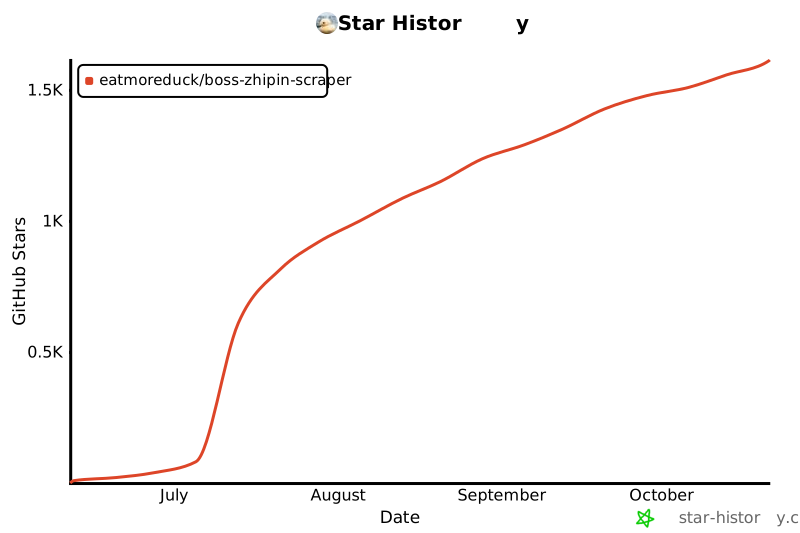
## Star History
[](https://www.star-history.com/?type=date&repos=eatmoreduck%2Fboss-zhipin-scraper)