
rhwp
알(R), 모두의 한글 — 알에서 시작하다
All HWP, Open for Everyone









한국어 | English
---
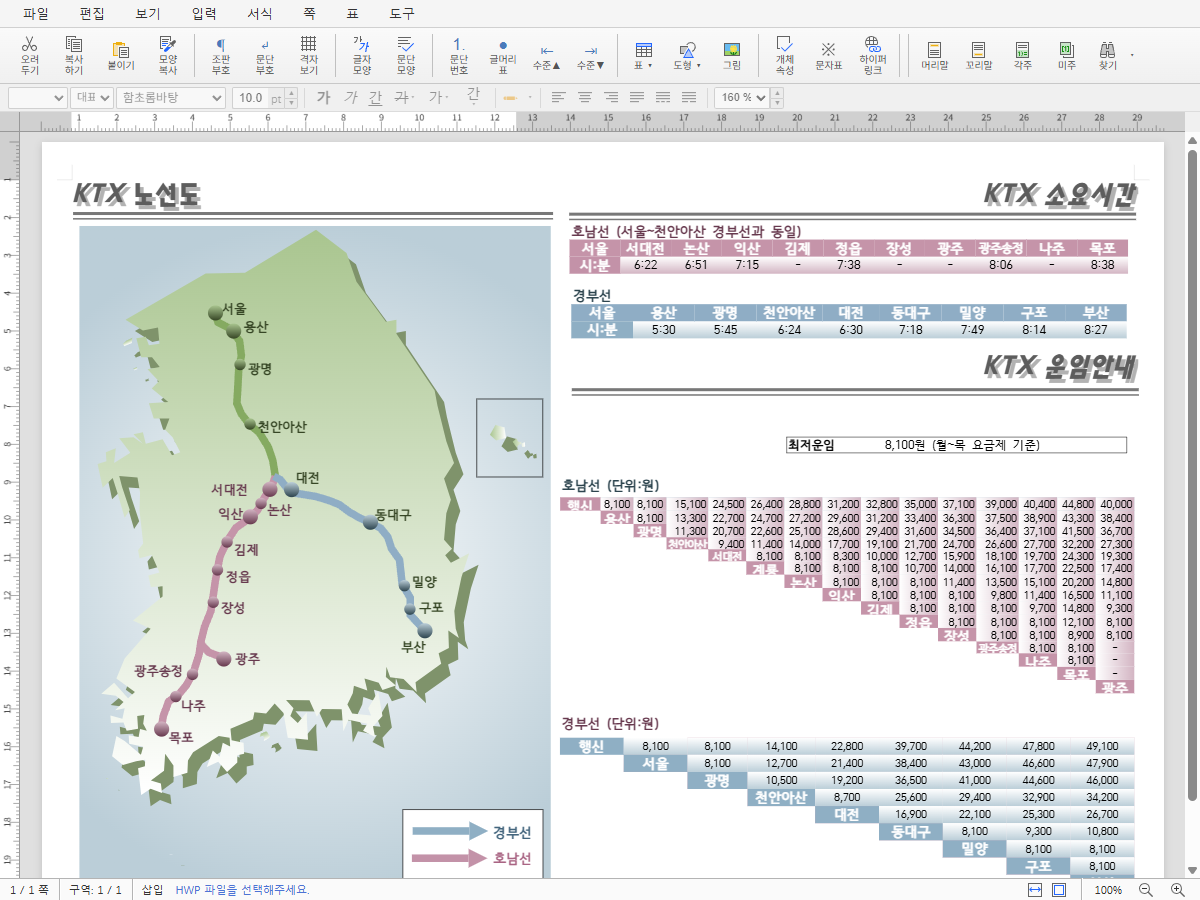
HWP 파일을 **어디서든** 열어보세요. 무료, 설치 없이.
rhwp는 Rust + WebAssembly 기반의 오픈소스 HWP/HWPX 뷰어/에디터입니다. 닫힌 포맷의 벽을 깨고, 모든 사람, 모든 AI, 모든 플랫폼에서 한글 문서를 자유롭게 읽고 쓸 수 있게 합니다.
> **[온라인 데모](https://edwardkim.github.io/rhwp/)** | **[VS Code 확장](https://marketplace.visualstudio.com/items?itemName=edwardkim.rhwp-vscode)** | **[Open VSX](https://open-vsx.org/extension/edwardkim/rhwp-vscode)**
## 로드맵
혼자 뼈대를 세우고, 함께 살을 붙이고, 모두의 것으로 완성한다.
```
0.5 ──── 1.0 ──── 2.0 ──── 3.0
뼈대 조판 협업 완성
```
| 단계 | 방향 | 전략 |
|------|------|------|
| **0.5 → 1.0** | 읽기/쓰기 기반 위에 조판 엔진 체계화 | 핵심 아키텍처를 혼자 견고하게 |
| **1.0 → 2.0** | AI 조판 파이프라인 위에 커뮤니티 참여 개방 | 기여 진입 장벽을 낮추는 구조 |
| **2.0 → 3.0** | 커뮤니티가 채운 기능 위에 공공 자산화 | 한컴 대등 수준 달성 |
> 0.5.0까지 혼자 뼈대를 완성하고 공개하는 이유 — 커뮤니티가 붙었을 때 방향이 흔들리지 않으려면 핵심 아키텍처가 먼저 견고해야 합니다.
## 이정표
### v0.5.0 ~ v0.7.x — 뼈대 (현재)
> 역공학 완성, 읽기/쓰기 기반 구축
- HWP 5.0 / HWPX 파서, 문단·표·수식·이미지·차트 렌더링
- 페이지네이션 (다단 분할, 표 행 분할), 머리말/꼬리말/바탕쪽/각주
- SVG 내보내기 (CLI) + Canvas 렌더링 (WASM/Web)
- 웹 에디터 + hwpctl 호환 API (30 Actions, Field API)
- 1,100+ 테스트
#### v0.7.9 사이클 (2026-05-01 ~ 2026-05-02)
> Task #501 (cell.padding 한컴 방어 로직 모방) + Task #509 (PUA 글머리표 회귀) + PR #428/#494/#478/#498/#506/#510 cherry-pick + 외부 기여자 6명 흡수
**회귀 정정 (메인테이너)**
- mel-001.hwp 2쪽 표 셀 높이 회귀 정정 ([#501](https://github.com/edwardkim/rhwp/issues/501)) — 비정상 큰 cell.padding (1700 HU vs cell.height 1280 HU) 의 한컴 자체 방어 로직 모방 가드 추가. 트러블슈팅 + 위키 ([HWP 셀 Padding 방어 로직](https://github.com/edwardkim/rhwp/wiki/HWP-%EC%85%80-Padding-%EB%B0%A9%EC%96%B4-%EB%A1%9C%EC%A7%81)) 작성
- PUA (Private Use Area) 글머리표 글리프 회귀 정정 ([#509](https://github.com/edwardkim/rhwp/issues/509)) — Option F (PR #251 draw_text 영역 보존 + 매핑 표 한컴 PDF 정답지 정확화). 정정 매핑 2건 + 신규 매핑 10건 + `gen-pua` 검증 도구 추가
**외부 PR cherry-pick (5 건)**
- 그룹 내 그림(Picture) 직렬화 구현 (외부 기여 by [@oksure](https://github.com/oksure) — PR [#428](https://github.com/edwardkim/rhwp/pull/428))
- `Paragraph::utf16_pos_to_char_idx` 외부 노출 ([#484](https://github.com/edwardkim/rhwp/issues/484)) — 외부 기여 by [@DanMeon](https://github.com/DanMeon), PR [#494](https://github.com/edwardkim/rhwp/pull/494)
- Layout 정합 + 수식 정정 합본 (7 Task / 10 commits — #488/#490/#483/#489/#495/#480/#476) — 외부 기여 by [@planet6897](https://github.com/planet6897), PR [#478](https://github.com/edwardkim/rhwp/pull/478)
- HWP 3.0 파서 + Square wrap 어울림 렌더링 (Task #417 + Task #460, 51 commits) — 외부 기여 by [@jangster77](https://github.com/jangster77), PR [#506](https://github.com/edwardkim/rhwp/pull/506)
- PageLayerTree image paint op 에 brightness/contrast JSON 필드 추가 ([#508](https://github.com/edwardkim/rhwp/issues/508)) — alhangeul-macos downstream 의 backend replay contract 보강. 외부 기여 by [@postmelee](https://github.com/postmelee), PR [#510](https://github.com/edwardkim/rhwp/pull/510)
**회귀 검증 인프라 (외부 기여)**
- Canvas visual diff 파이프라인 (legacy Canvas ↔ PageLayerTree replay 픽셀 diff 자동 검증, relates [#364](https://github.com/edwardkim/rhwp/issues/364)) — 외부 기여 by [@seo-rii](https://github.com/seo-rii), PR [#498](https://github.com/edwardkim/rhwp/pull/498)
#### v0.7.8 사이클 (2026-04-29)
> 외부 컨트리뷰터 다수 + 메인테이너 회귀 정정 + 위키/README 정비 — 외부 PR 15건 cherry-pick
- 다단 섹션 누적 공식 회귀 정정 ([#391](https://github.com/edwardkim/rhwp/issues/391)) — 외부 기여 by [@planet6897](https://github.com/planet6897)
- 수식 렌더링 개선 ([#174](https://github.com/edwardkim/rhwp/issues/174), [#175](https://github.com/edwardkim/rhwp/issues/175)) + 그림 밝기/대비 효과 ([#150](https://github.com/edwardkim/rhwp/issues/150)) — 외부 기여 by [@oksure](https://github.com/oksure)
- 수식 ATOP 파싱 + HWPX 수식 직렬화 보존 ([#286](https://github.com/edwardkim/rhwp/issues/286)) — 외부 기여 by [@cskwork](https://github.com/cskwork) (본 저장소 첫 외부 컨트리뷰터)
- Canvas → PageLayerTree replay 전환 P2 — 외부 기여 by [@seo-rii](https://github.com/seo-rii) (PR [#456](https://github.com/edwardkim/rhwp/pull/456))
- WASM API 확장 (insertParagraph / deleteParagraph, [#269](https://github.com/edwardkim/rhwp/issues/269), [#271](https://github.com/edwardkim/rhwp/issues/271)) + set_field 라운드트립 정정 — 외부 기여 by [@oksure](https://github.com/oksure)
#### v0.7.7 사이클 (2026-04-27)
> v0.7.6 회귀 정정 — TypesetEngine 페이지네이션 fit drift / page_num 갱신 / PartialTable + Square wrap 처리 8항목 누적 정정 ([#354](https://github.com/edwardkim/rhwp/issues/354), [#359](https://github.com/edwardkim/rhwp/issues/359), [#361](https://github.com/edwardkim/rhwp/issues/361), [#362](https://github.com/edwardkim/rhwp/issues/362))
#### v0.7.6 사이클 (2026-04-26)
**외부 기여자 다수 + 조판 정밀화**
- 목차 리더 도트 + 페이지번호 우측 탭 정렬 ([#279](https://github.com/edwardkim/rhwp/issues/279)) — 외부 기여 by [@seanshin](https://github.com/seanshin), PR [#282](https://github.com/edwardkim/rhwp/pull/282)
- form-002 인너 표 페이지 분할 결함 ([#324](https://github.com/edwardkim/rhwp/issues/324)) — 외부 기여 by [@planet6897](https://github.com/planet6897), PR [#327](https://github.com/edwardkim/rhwp/pull/327)
- typeset 경로 PageHide / Shape / 중복 emit 결함 ([#340](https://github.com/edwardkim/rhwp/issues/340)) — 외부 기여 by [@planet6897](https://github.com/planet6897), PR [#341](https://github.com/edwardkim/rhwp/pull/341)
- Task #321~#332 누적 정리 + vpos / cell padding 회귀 해소 ([#342](https://github.com/edwardkim/rhwp/issues/342)) — 외부 기여 by [@planet6897](https://github.com/planet6897), PR [#343](https://github.com/edwardkim/rhwp/pull/343)
**API · 출력 (외부 기여 by [@oksure](https://github.com/oksure))**
- `replaceOne(query, newText, caseSensitive)` WASM API 추가 ([#268](https://github.com/edwardkim/rhwp/issues/268), PR [#334](https://github.com/edwardkim/rhwp/pull/334))
- SVG/HTML `draw_image` base64 임베딩 (PR [#335](https://github.com/edwardkim/rhwp/pull/335))
**Firefox AMO (외부 기여 by [@postmelee](https://github.com/postmelee) — PR [#339](https://github.com/edwardkim/rhwp/pull/339))**
- AMO 검증 워닝 해소 + viewer 번들 보안 sanitize → rhwp-firefox 0.2.2
---
#### 최근 변경 (v0.7.3 / 확장 v0.2.1, 2026-04-19)
**rhwp-studio (라이브러리 0.7.3)**
- HWPX 출처 문서 저장 비활성화 + 사용자 안내 ([#196](https://github.com/edwardkim/rhwp/issues/196)) — 데이터 손상 방지 (HWPX→HWP 완전 변환기 [#197](https://github.com/edwardkim/rhwp/issues/197) 완성 시까지)
- HWPX→HWP IR 매핑 어댑터 자산 보존 ([#178](https://github.com/edwardkim/rhwp/issues/178)) — rhwp 자기 호환 100% 회복, 한컴 호환은 #197 후속
- 회전된 도형 리사이즈 커서 개선 + Flip 처리 (외부 기여 by [@bapdodi](https://github.com/bapdodi) — PR [#192](https://github.com/edwardkim/rhwp/pull/192))
- HWP 그림 효과(그레이스케일/흑백) SVG 반영 (외부 기여 by [@marsimon](https://github.com/marsimon) — PR [#149](https://github.com/edwardkim/rhwp/pull/149))
- Windows 환경의 CFB 경로 구분자 오류 수정 (외부 기여 by [@dreamworker0](https://github.com/dreamworker0) — PR [#152](https://github.com/edwardkim/rhwp/pull/152))
- HWPX Serializer 구현 — Document IR → HWPX 저장 (외부 기여 by [@seunghan91](https://github.com/seunghan91) — PR [#170](https://github.com/edwardkim/rhwp/pull/170))
- HWPX ZIP 엔트리 압축 한도 + strikeout shape 화이트리스트 (외부 기여 by [@seunghan91](https://github.com/seunghan91) — PR [#153](https://github.com/edwardkim/rhwp/pull/153), PR [#154](https://github.com/edwardkim/rhwp/pull/154))
- 도형 리사이즈 시 너비/높이 클램프 (외부 기여 by [@seunghan91](https://github.com/seunghan91) — PR [#163](https://github.com/edwardkim/rhwp/pull/163))
- 모바일 드롭다운 메뉴 아이콘/라벨 겹침 수정 (외부 기여 by [@seunghan91](https://github.com/seunghan91) — PR [#161](https://github.com/edwardkim/rhwp/pull/161))
**rhwp-chrome / Edge 확장 (v0.2.1)**
- Chrome 확장 활성 시 일반 파일 다운로드의 마지막 위치 기억 동작 복원 ([#198](https://github.com/edwardkim/rhwp/issues/198))
- 옵션 페이지 CSP 호환 수정 ([#166](https://github.com/edwardkim/rhwp/issues/166))
- HWP 파일 `Ctrl+S` 시 같은 파일 직접 덮어쓰기 (외부 기여 by [@ahnbu](https://github.com/ahnbu) — PR [#189](https://github.com/edwardkim/rhwp/pull/189))
- 썸네일 로딩 스피너 정리 + options CSP 호환 (외부 기여 by [@postmelee](https://github.com/postmelee) — PR [#168](https://github.com/edwardkim/rhwp/pull/168))
- DEXT5 류 핸들러 다운로드 시 빈 뷰어 탭 차단
**기여자 감사**
v0.7.x 배포 주기 누적 외부 기여자: [@ahnbu](https://github.com/ahnbu), [@bapdodi](https://github.com/bapdodi), [@cskwork](https://github.com/cskwork), [@DanMeon](https://github.com/DanMeon), [@dreamworker0](https://github.com/dreamworker0), [@jangster77](https://github.com/jangster77), [@marsimon](https://github.com/marsimon), [@oksure](https://github.com/oksure), [@planet6897](https://github.com/planet6897), [@postmelee](https://github.com/postmelee), [@seanshin](https://github.com/seanshin), [@seo-rii](https://github.com/seo-rii), [@seunghan91](https://github.com/seunghan91)
### v1.0.0 — 조판 엔진
> AI 조판 파이프라인, 뼈대 완성
- 편집 시 동적 재조판 체계화 (LINE_SEG 재계산 + 페이지네이션 연동)
- AI 기반 문서 생성/편집 파이프라인
- 문서 조판 품질 한컴 뷰어 수준 도달
### v2.0.0 — 협업
> 커뮤니티가 기능을 채워가는 단계, 살 붙이기
- 플러그인/확장 아키텍처, 실시간 협업 편집
- 다양한 출력 포맷 (PDF, DOCX 등)
### v3.0.0 — 완성
> 한컴과 대등한 수준, 완전한 공공 자산
- 전체 HWP 기능 커버리지, 접근성(a11y), 모바일 대응
- 공공기관 실무 투입 가능 수준
자세한 내용은 [로드맵 문서](mydocs/report/rhwp-milestone.md)를 참조하세요.
---
## Features
### Parsing (파싱)
- HWP 5.0 binary format (OLE2 Compound File)
- HWPX (Open XML-based format)
- Sections, paragraphs, tables, textboxes, images, equations, charts
- Header/footer, master pages, footnotes/endnotes
### Rendering (렌더링)
- **Paragraph layout**: line spacing, indentation, alignment, tab stops
- **Tables**: cell merging, border styles (solid/double/triple/dotted), cell formula calculation
- **Multi-column layout** (2-column, 3-column, etc.)
- **Paragraph numbering/bullets**
- **Vertical text** (영문 눕힘/세움)
- **Header/footer** (odd/even page separation)
- **Master pages** (Both/Odd/Even, is_extension/overlap)
- **Object placement**: TopAndBottom, treat-as-char (TAC), in-front-of/behind text
### Equation (수식)
- Fractions (OVER), square roots (SQRT/ROOT), subscript/superscript
- Matrices: MATRIX, PMATRIX, BMATRIX, DMATRIX
- Cases, alignment (EQALIGN), stacking (PILE/LPILE/RPILE)
- Large operators: INT, DINT, TINT, OINT, SUM, PROD
- Relations (REL/BUILDREL), limits (lim), long division (LONGDIV)
- 15 text decorations, full Greek alphabet, 100+ math symbols
### Pagination (페이지 분할)
- Multi-column document column/page splitting
- Table row-level page splitting (PartialTable)
- shape_reserved handling for TopAndBottom objects
- vpos-based paragraph position correction
### Output (출력)
- SVG export (CLI, legacy + layer replay)
- Canvas rendering (WASM/Web)
- Debug overlay (paragraph/table boundaries + indices + y-coordinates)
### Multi-Renderer Backends (멀티 렌더러 백엔드)
- `PageRenderTree` can be lowered into a `PageLayerTree` paint IR before backend replay.
- P1 public surfaces are Rust native `DocumentCore::build_page_layer_tree(page)` and WASM `getPageLayerTree(page)`.
- Layer JSON starts at `schemaVersion: 1`, uses `unit: "px"`, and uses `coordinateSystem: "page-top-left"` to match the existing page render coordinates.
- Compatible schema changes should be additive; incompatible JSON shape changes require a schema version bump.
- **Legacy SVG** remains the default compatibility output.
- **Layered SVG** can be exercised with `RHWP_RENDER_PATH=layer-svg`.
- The layered SVG path is a transition adapter that expands `PageLayerTree` back into the existing SVG renderer.
- Browser/native Canvas paths render through `PageLayerTree` replay by default.
- Legacy Canvas remains available through `renderPageCanvasLegacy` / `renderPageToCanvasLegacy` for parity checks.
- P3 visual regression coverage runs `npm run e2e:render-diff:ci` in `rhwp-studio` to compare legacy Canvas and layer Canvas in Chromium; CI uploads render-diff artifacts and writes a summary.
- The default render-diff fixtures cover basic text/table output, business-document layout, and treat-as-char object placement; override with `RHWP_RENDER_DIFF_FILES`, `RHWP_RENDER_DIFF_MAX_PAGES`, or `RHWP_RENDER_DIFF_ALL=1`.
- P4 adds native-only `DocumentCore::render_page_png_native(page)` behind `--features native-skia`; it renders `PageLayerTree` to encoded PNG through `SkiaLayerRenderer`.
- P5 adds native Skia equation replay from `EquationNode.layout_box`, so equations are no longer placeholder boxes in the PNG path.
- P5 replays the existing equation layout tree directly; it does not add CanvasKit equation replay or native form replay.
- P6 adds native Skia `RawSvg` fragment rasterization through `resvg`, with external file href loading disabled.
- CI covers the native Skia path with `cargo test --features native-skia skia --lib`; the feature is not available on `wasm32` targets.
- The initial native Skia path is a PNG raster backend with core image/equation/raw-svg replay; CanvasKit, resource interning/cache, complex text shaping, advanced image parity, and native form replay stay as follow-up work.
- C ABI export is intentionally left for a later PR.
- `ResourceArena` is reserved in `PageLayerTree`; binary resource interning is not implemented yet.
- This phase establishes the frontend/backend boundary for later CanvasKit and fuller native Skia backends.
### Web Editor (웹 에디터)
- Text editing (insert, delete, undo/redo)
- Character/paragraph formatting dialogs
- Table creation, row/column insert/delete, cell formula
- hwpctl-compatible API layer (한컴 웹기안기 호환)
### hwpctl Compatibility (한컴 호환 레이어)
- 30 Actions: TableCreate, InsertText, CharShape, ParagraphShape, etc.
- ParameterSet/ParameterArray API
- Field API: GetFieldList, PutFieldText, GetFieldText
- Template data binding support
## npm 패키지 — 웹에서 바로 사용하기
### 에디터 임베드 (3줄)
웹 페이지에 HWP 에디터를 통째로 임베드합니다. 메뉴, 툴바, 서식, 표 편집 — 모든 기능을 그대로 사용할 수 있습니다.
```bash
npm install @rhwp/editor
```
```html
```
### HWP 뷰어/파서 (직접 API 호출)
WASM 기반 파서/렌더러를 직접 사용하여 HWP 파일을 SVG로 렌더링합니다.
```bash
npm install @rhwp/core
```
```javascript
import init, { HwpDocument } from '@rhwp/core';
globalThis.measureTextWidth = (font, text) => {
const ctx = document.createElement('canvas').getContext('2d');
ctx.font = font;
return ctx.measureText(text).width;
};
await init({ module_or_path: '/rhwp_bg.wasm' });
const resp = await fetch('document.hwp');
const doc = new HwpDocument(new Uint8Array(await resp.arrayBuffer()));
document.getElementById('viewer').innerHTML = doc.renderPageSvg(0);
```
| 패키지 | 용도 | 설치 |
|--------|------|------|
| [@rhwp/editor](https://www.npmjs.com/package/@rhwp/editor) | 완전한 에디터 UI (iframe) | `npm i @rhwp/editor` |
| [@rhwp/core](https://www.npmjs.com/package/@rhwp/core) | WASM 파서/렌더러 (API) | `npm i @rhwp/core` |
## Quick Start (소스 빌드)
처음 프로젝트에 참여하는 개발자는 [온보딩 가이드](mydocs/manual/onboarding_guide.md)를 먼저 읽어보세요. 프로젝트 아키텍처, 디버깅 도구, 개발 워크플로우를 한눈에 파악할 수 있습니다.
### Requirements
- Rust 1.75+
- Docker (for WASM build)
- Node.js 18+ (for web editor)
### Native Build
```bash
cargo build # Development build
cargo build --release # Release build
cargo test # Run tests (1,100+ tests)
```
### WASM Build
WASM 빌드는 Docker를 사용합니다. 플랫폼에 관계없이 동일한 `wasm-pack` + Rust 툴체인 환경을 보장하기 위함입니다.
```bash
cp .env.docker.example .env.docker # 최초 1회: 환경변수 템플릿 복사
docker compose --env-file .env.docker run --rm wasm
```
빌드 결과물은 `pkg/` 디렉토리에 생성됩니다.
### Web Editor
```bash
cd rhwp-studio
npm install
npx vite --host 0.0.0.0 --port 7700
```
Open `http://localhost:7700` in your browser.
## CLI Usage
### SVG Export
```bash
rhwp export-svg sample.hwp # Export to output/
rhwp export-svg sample.hwp -o my_dir/ # Export to custom directory
rhwp export-svg sample.hwp -p 0 # Export specific page (0-indexed)
rhwp export-svg sample.hwp --debug-overlay # Debug overlay (paragraph/table boundaries)
```
### Document Inspection
```bash
rhwp dump sample.hwp # Full IR dump
rhwp dump sample.hwp -s 2 -p 45 # Section 2, paragraph 45 only
rhwp dump-pages sample.hwp -p 15 # Page 16 layout items
rhwp info sample.hwp # File info (size, version, sections, fonts)
```
### Debugging Workflow
1. `export-svg --debug-overlay` → Identify paragraphs/tables by `s{section}:pi={index} y={coord}`
2. `dump-pages -p N` → Check paragraph layout list and heights
3. `dump -s N -p M` → Inspect ParaShape, LINE_SEG, table properties
No code modification needed for the entire debugging process.
## Project Structure
```
src/
├── main.rs # CLI entry point
├── parser/ # HWP/HWPX file parser
├── model/ # HWP document model
├── document_core/ # Document core (CQRS: commands + queries)
│ ├── commands/ # Edit commands (text, formatting, tables)
│ ├── queries/ # Queries (rendering data, pagination)
│ └── table_calc/ # Table formula engine (SUM, AVG, PRODUCT, etc.)
├── renderer/ # Rendering engine
│ ├── layout/ # Layout (paragraph, table, shapes, cells)
│ ├── pagination/ # Pagination engine
│ ├── equation/ # Equation parser/layout/renderer
│ ├── svg.rs # SVG output
│ └── web_canvas.rs # Canvas output
├── serializer/ # HWP file serializer (save)
└── wasm_api.rs # WASM bindings
rhwp-studio/ # Web editor (TypeScript + Vite)
├── src/
│ ├── core/ # Core (WASM bridge, types)
│ ├── engine/ # Input handlers
│ ├── hwpctl/ # hwpctl compatibility layer
│ ├── ui/ # UI (menus, toolbars, dialogs)
│ └── view/ # Views (ruler, status bar, canvas)
├── e2e/ # E2E tests (Puppeteer + Chrome CDP)
│ └── helpers.mjs # Test helpers (headless/host modes)
mydocs/ # Project documentation (Korean)
├── orders/ # Daily task tracking
├── plans/ # Task plans and implementation specs
├── feedback/ # Code review feedback
├── tech/ # Technical documents
└── manual/ # Manuals and guides
scripts/ # Build & quality tools
├── metrics.sh # Code quality metrics collection
└── dashboard.html # Quality dashboard with trend tracking
```
## AI 페어 프로그래밍으로 개발합니다
> **이것은 바이브 코딩이 아닙니다.** AI가 주는 코드를 읽지도 않고 수락하는 것이 아닙니다. 모든 계획은 검토되고, 모든 결과물은 검증되며, 모든 결정의 뒤에는 사람이 있습니다.
바이브 코딩 — AI 출력을 읽지 않고 수락하고, AI에게 아키텍처 결정을 맡기고, 이해하지 못하는 코드를 배포하는 것 — 은 함정입니다. 겉보기에는 동작하지만, 이해하지 못했기 때문에 문제가 생겨도 진단할 수 없는 코드가 만들어집니다.
이 프로젝트는 정반대의 접근을 취합니다. 사람 **작업지시자**가 방향, 품질, 아키텍처 결정의 완전한 소유권을 유지하고, AI는 혼자서는 불가능한 속도와 규모로 구현을 수행합니다. 핵심 차이: **사람은 절대 생각을 멈추지 않습니다.**
### 바이브 코딩 vs. AI 주도 개발
| | 바이브 코딩 | 이 프로젝트 |
|--|-----------|-----------|
| **사람의 역할** | AI 출력 수락 | 지시, 검토, 결정 |
| **계획** | 없음 — "그냥 만들어" | 계획서 작성 → 승인 → 실행 |
| **품질 관문** | 동작하길 바람 | 1,100+ 테스트 + Clippy + CI + 코드 리뷰 |
| **디버깅** | AI에게 AI 버그 수정 요청 | 사람이 진단, AI가 구현 |
| **아키텍처** | 우연히 형성 | 의도적 설계 (CQRS, 의존성 방향) |
| **문서** | 없음 | 2,200+개 파일의 프로세스 기록 |
| **결과물** | 취약, 유지보수 어려움 | 프로덕션 수준, 100K+ 라인 |
AI는 배율기입니다. 하지만 배율기는 기존 프로세스를 증폭시킵니다. 프로세스 없음 × AI = 빠른 혼돈. 좋은 프로세스 × AI = 비범한 결과물.
### 개발 프로세스
이 프로젝트는 **[Claude Code](https://claude.ai/code)** (Anthropic AI 코딩 에이전트)를 페어 프로그래밍 파트너로 사용하여 개발합니다. 전체 개발 과정이 투명하게 문서화되어 있습니다.
```
작업지시자 (사람) AI 페어 프로그래머 (Claude Code)
──────────────── ─────────────────────────────
방향 설정, 우선순위 결정 → 분석, 계획, 구현
계획 검토, 승인 ← 구현 계획서 작성
도메인 피드백 제공 → 디버깅, 테스트, 반복
아키텍처 결정 → 정밀하게 실행
품질 및 정확성 판단 ← 코드, 문서, 테스트 생성
```
`mydocs/` 디렉토리(2,200+개 파일, 영문 번역: `mydocs/eng/`)에 전체 개발 기록이 있습니다: 일일 작업 기록, 구현 계획서, 코드 리뷰 피드백, 기술 연구 문서, 트러블슈팅 기록.
> `mydocs/`는 코드에 대한 문서가 아닙니다 — **AI로 소프트웨어를 만드는 방법**에 대한 문서입니다. 오픈소스 방법론입니다.
**[Hyper-Waterfall 방법론](mydocs/manual/hyper_waterfall.md)** — 거시적 워터폴 + 미시적 애자일, AI가 이 둘을 동시에 가능하게 한다.
### Git 워크플로우
```
local/task{N} ──커밋──커밋──┐
├─→ devel merge (관련 타스크 묶어서)
├─→ main merge + 태그 (릴리즈 시점)
```
| 브랜치 | 용도 |
|--------|------|
| `main` | 릴리즈 (태그: v0.5.0 등) |
| `devel` | 개발 통합 |
| `local/task{N}` | GitHub Issue 번호 기반 타스크 브랜치 |
### 타스크 관리
- **GitHub Issues**로 타스크 번호 자동 채번 — 중복 방지
- **GitHub Milestones**로 타스크 그룹화
- 마일스톤 표기: `M{버전}` (예: M100=v1.0.0, M05x=v0.5.x)
- 오늘할일: `mydocs/orders/yyyymmdd.md` — `M100 #1` 형식으로 참조
- 커밋 메시지: `Task #1: 내용` — `closes #1`로 Issue 자동 종료
### 타스크 진행 절차
1. `gh issue create` → GitHub Issue 등록 (마일스톤 지정)
2. `local/task{issue번호}` 브랜치 생성
3. 수행계획서 작성 → 승인 → 구현 → 테스트
4. devel merge → `closes #{번호}`
### 디버깅 프로토콜
1. `export-svg --debug-overlay` → 문단/표 식별
2. `dump-pages -p N` → 배치 목록과 높이
3. `dump -s N -p M` → ParaShape, LINE_SEG 상세
> `mydocs/`의 문서는 AI 기반 소프트웨어 개발의 교육 자료로 활용됩니다.
### 문서 생성 규칙
모든 문서는 **한국어**로 작성합니다.
```
mydocs/
├── orders/ # 오늘 할일 (yyyymmdd.md)
├── plans/ # 수행 계획서, 구현 계획서
│ └── archives/ # 완료된 계획서 보관
├── working/ # 단계별 완료 보고서
├── report/ # 기본 보고서
├── feedback/ # 코드 리뷰 피드백
├── tech/ # 기술 사항 정리 문서
├── manual/ # 매뉴얼, 가이드 문서
└── troubleshootings/ # 트러블슈팅 관련 문서
```
| 문서 유형 | 위치 | 파일명 규칙 |
|----------|------|------------|
| 오늘 할일 | `orders/` | `yyyymmdd.md` — 마일스톤(M100)+Issue(#1) 형식 |
| 수행 계획서 | `plans/` | Issue 번호 참조 |
| 완료 보고서 | `working/` | Issue 번호 참조 |
| 기술 문서 | `tech/` | 주제별 자유 명명 |
## Architecture
```mermaid
graph TB
HWP[HWP/HWPX File] --> Parser
Parser --> Model[Document Model]
Model --> DocumentCore
DocumentCore --> |Commands| Edit[Edit Operations]
DocumentCore --> |Queries| Render[Rendering Pipeline]
Render --> Pagination
Pagination --> Layout
Layout --> SVG[SVG Output]
Layout --> Canvas[Canvas Output]
DocumentCore --> WASM[WASM API]
WASM --> Studio[rhwp-studio Web Editor]
Studio --> hwpctl[hwpctl Compatibility Layer]
```
## HWPUNIT
- 1 inch = 7,200 HWPUNIT
- 1 inch = 25.4 mm
- 1 HWPUNIT ≈ 0.00353 mm
## Contributing
기여 환영합니다. 다음 핵심 사항을 먼저 확인해 주세요:
- **PR base 는 `devel`** 입니다 (`main` 아님). GitHub 기본 브랜치는 `main` 이지만 기여 PR 은 모두 `devel` 로 받습니다.
- **이슈 먼저 확인**: 동일 영역에 진행 중인 작업이 있는지 [열린 이슈](https://github.com/edwardkim/rhwp/issues) 와 [열린 PR](https://github.com/edwardkim/rhwp/pulls) 을 먼저 확인해 주세요. 중복 작업을 방지합니다.
- **이슈 close 는 메인테이너**: 작업 완료 후 PR 만 제출해 주세요. 이슈는 PR 머지 시 메인테이너가 close 합니다.
- **한컴 PDF 는 정답지가 아닙니다**: 한컴 도구 (편집기 / Viewer / 한컴독스), 버전 (2010 / 2020 / 2022), 출력 경로 (한컴 자체 / OS 인쇄) 별로 PDF 결과가 다릅니다. 자세한 내용과 환경별 비교 자료는 [한컴 PDF 환경 의존성 위키](https://github.com/edwardkim/rhwp/wiki/한컴-PDF-환경-의존성) 를 참고하세요.
상세한 기여 절차 (Fork → 브랜치 → 커밋 → PR) 는 [CONTRIBUTING.md](CONTRIBUTING.md) 를 참고하세요.
### 위키 자료 (Wiki)
기여자와 fork 사용자에게 도움이 되는 권위 자료를 [Wiki](https://github.com/edwardkim/rhwp/wiki) 에 정리하고 있습니다:
- [한컴 PDF 환경 의존성](https://github.com/edwardkim/rhwp/wiki/한컴-PDF-환경-의존성) — 한컴 도구 / 버전 / OS 별 PDF 차이 정황 및 PR 검증 시 참고 사항
- [HWP 5.0 Spec Errata](https://github.com/edwardkim/rhwp/wiki/HWP-5.0-Spec-Errata) — HWP 5.0 스펙 정오표
- [HWP LINE_SEG vpos 이해](https://github.com/edwardkim/rhwp/wiki/HWP-LINE_SEG-vpos-이해) — 줄 분할 vpos 이해
- [HWP Tab Leader Rendering](https://github.com/edwardkim/rhwp/wiki/HWP-Tab-Leader-Rendering) — Tab leader 렌더링
- [Export API 사용 가이드](https://github.com/edwardkim/rhwp/wiki/Export-API-사용-가이드) — exportHwp / exportHwpx API
- [Cloudflared 로 rhwp-studio 외부 HTTPS 접근](https://github.com/edwardkim/rhwp/wiki/Cloudflared-로-rhwp-studio-외부-HTTPS-접근)
- [Hyper-Waterfall 문서 체계 가이드](https://github.com/edwardkim/rhwp/wiki/Hyper‐Waterfall-문서-체계-가이드)
- [Investigation PR 가이드](https://github.com/edwardkim/rhwp/wiki/Investigation-PR-가이드)
- [Legal FAQ](https://github.com/edwardkim/rhwp/wiki/Legal-FAQ)
## Notice
본 제품은 한글과컴퓨터의 한글 문서 파일(.hwp) 공개 문서를 참고하여 개발하였습니다.
## Trademark
"한글", "한컴", "HWP", "HWPX"는 주식회사 한글과컴퓨터의 등록 상표입니다.
본 프로젝트는 한글과컴퓨터와 제휴, 후원, 승인 관계가 없는 독립적인 오픈소스 프로젝트입니다.
"Hangul", "Hancom", "HWP", and "HWPX" are registered trademarks of Hancom Inc.
This project is an independent open-source project with no affiliation, sponsorship, or endorsement by Hancom Inc.
## License
[MIT License](LICENSE) — Copyright (c) 2025-2026 Edward Kim