## OuteTTS
🌐 [Website (outeai.com)](https://www.outeai.com) | 🤗 [Hugging Face](https://huggingface.co/OuteAI) | 💬 [Discord](https://discord.gg/vyBM87kAmf) | 𝕏 [X (Twitter)](https://twitter.com/OuteAI) | 📰 [Blog](https://www.outeai.com/blog)
[](https://huggingface.co/OuteAI/Llama-OuteTTS-1.0-1B)
[](https://huggingface.co/OuteAI/OuteTTS-1.0-0.6B)
[](https://pypi.org/project/outetts/)
[](https://www.npmjs.com/package/outetts)
## Compatibility
#### OuteTTS supports the following backends:
| **Backend** | **Language** | **Installation** | **Model Version Support** |
|-----------------------------|---------|----------------------------|---------|
| [Llama.cpp Python Bindings](https://github.com/abetlen/llama-cpp-python) | Python | ✅ Installed by default | `All` |
| [Llama.cpp Server](https://github.com/ggml-org/llama.cpp/tree/master/tools/server) | Python | ✅ Installed by default | `All` |
| [Llama.cpp Server Async (Batched)](https://github.com/ggml-org/llama.cpp/tree/master/tools/server) | Python | ✅ Installed by default | `1.0` |
| [Hugging Face Transformers](https://github.com/huggingface/transformers) | Python | ✅ Installed by default | `All` |
| [ExLlamaV2](https://github.com/turboderp/exllamav2) | Python | ❌ Requires manual installation | `All` |
| [ExLlamaV2 Async (Batched)](https://github.com/turboderp/exllamav2) | Python | ❌ Requires manual installation | `1.0` |
| [VLLM (Batched) **Experimental support**](https://github.com/vllm-project/vllm) | Python | ❌ Requires manual installation | `1.0` |
| [Transformers.js](https://github.com/huggingface/transformers.js) | JavaScript | NPM package | `0.2` |
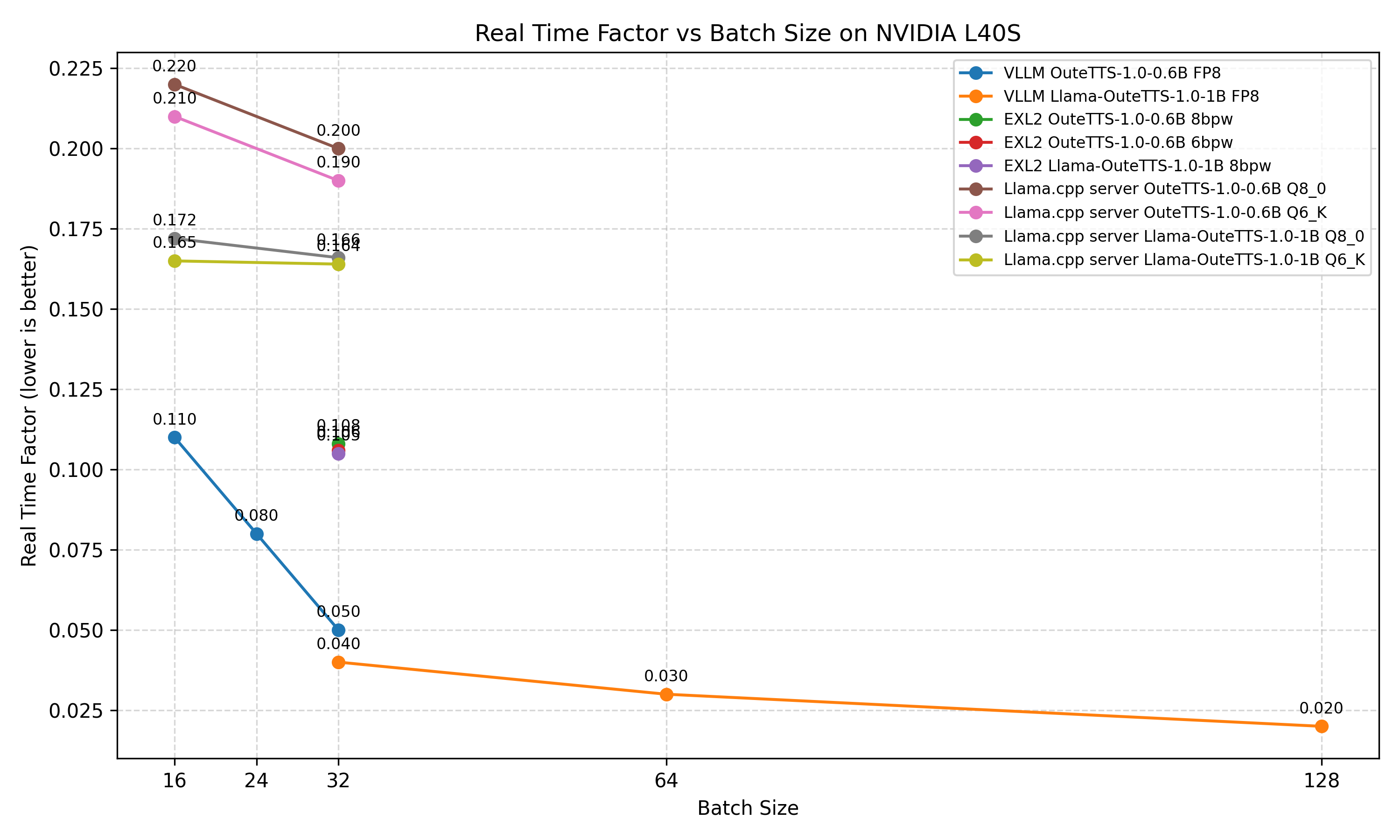
### ⚡ **Batched RTF Benchmarks**
Tested with **NVIDIA L40S GPU**
## Installation
### OuteTTS Installation Guide
OuteTTS now installs the llama.cpp Python bindings by default. Therefore, you must specify the installation based on your hardware. For more detailed instructions on building llama.cpp, refer to the following resources: [llama.cpp Build](https://github.com/ggml-org/llama.cpp/blob/master/docs/build.md) and [llama.cpp Python](https://github.com/abetlen/llama-cpp-python?tab=readme-ov-file#supported-backends)
### Pip:
Transformers + llama.cpp CPU
```bash
pip install outetts --upgrade
```
Transformers + llama.cpp CUDA (NVIDIA GPUs)
For systems with NVIDIA GPUs and CUDA installed:
```bash
CMAKE_ARGS="-DGGML_CUDA=on" pip install outetts --upgrade
```
Transformers + llama.cpp ROCm/HIP (AMD GPUs)
For systems with AMD GPUs and ROCm (specify your DAMDGPU_TARGETS) installed:
```bash
CMAKE_ARGS="-DGGML_HIPBLAS=on" pip install outetts --upgrade
```
Transformers + llama.cpp Vulkan (Cross-platform GPU)
For systems with Vulkan support:
```bash
CMAKE_ARGS="-DGGML_VULKAN=on" pip install outetts --upgrade
```
Transformers + llama.cpp Metal (Apple Silicon/Mac)
For macOS systems with Apple Silicon or compatible GPUs:
```bash
CMAKE_ARGS="-DGGML_METAL=on" pip install outetts --upgrade
```
## Usage
## 📚 Documentation
For a complete usage guide, refer to the interface documentation here:
[](https://github.com/edwko/OuteTTS/blob/main/docs/interface_usage.md)
### Basic Usage
> [!TIP]
> Currently, only **one default English voice** is available for testing.
>
> You can easily create your own speaker profiles in just a few lines by following this guide:
>
> 👉 [Creating Custom Speaker Profiles](https://github.com/edwko/OuteTTS/blob/main/docs/interface_usage.md#creating-custom-speaker-profiles)
```python
import outetts
# Initialize the interface
interface = outetts.Interface(
config=outetts.ModelConfig.auto_config(
model=outetts.Models.VERSION_1_0_SIZE_1B,
# For llama.cpp backend
backend=outetts.Backend.LLAMACPP,
quantization=outetts.LlamaCppQuantization.FP16
# For transformers backend
# backend=outetts.Backend.HF,
)
)
# Load the default speaker profile
speaker = interface.load_default_speaker("EN-FEMALE-1-NEUTRAL")
# Or create your own speaker profiles in seconds and reuse them instantly
# speaker = interface.create_speaker("path/to/audio.wav")
# interface.save_speaker(speaker, "speaker.json")
# speaker = interface.load_speaker("speaker.json")
# Generate speech
output = interface.generate(
config=outetts.GenerationConfig(
text="Hello, how are you doing?",
speaker=speaker,
)
)
# Save to file
output.save("output.wav")
```
## External Libraries with OuteTTS Model Support
These are third-party tools that support running the OuteTTS model.
| **Library** | **Language** | **Model Version Support** |
|-------------|--------------|----------------------------|
| [Llama.cpp TTS Example](https://github.com/ggml-org/llama.cpp/tree/master/tools/tts) | C++ | `0.2` |
| [KoboldCPP](https://github.com/LostRuins/koboldcpp) | C++ | `0.2`, `0.3` |
| [MLX-Audio](https://github.com/Blaizzy/mlx-audio) | Python (MLX) | `1.0` |
| [ChatLLM.cpp](https://github.com/foldl/chatllm.cpp) | C++ | `1.0` |
## Usage Recommendations for OuteTTS version 1.0
> [!IMPORTANT]
> **Important Sampling Considerations**
>
> When using OuteTTS version 1.0, it is crucial to use the settings specified in the [Sampling Configuration](#sampling-configuration) section.
> The **repetition penalty implementation** is particularly important - this model requires penalization applied to a **64-token recent window**,
> rather than across the entire context window. Penalizing the entire context will cause the model to produce **broken or low-quality output**.
>
> To address this limitation, all necessary samplers and patches for all backends are set up automatically in the **outetts** library.
> If using a custom implementation, ensure you correctly implement these requirements.
### Speaker Reference
The model is designed to be used with a speaker reference. Without one, it generates random vocal characteristics, often leading to lower-quality outputs.
The model inherits the referenced speaker's emotion, style, and accent.
Therefore, when transcribing to other languages with the same speaker, you may observe the model retaining the original accent.
For example, if you use a Japanese speaker and continue speech in English, the model may tend to use a Japanese accent.
### Multilingual Application
It is recommended to create a speaker profile in the language you intend to use. This helps achieve the best results in that specific language, including tone, accent, and linguistic features.
While the model supports cross-lingual speech, it still relies on the reference speaker. If the speaker has a distinct accent—such as British English—other languages may carry that accent as well.
### Optimal Audio Length
- **Best Performance:** Generate audio around **42 seconds** in a single run (approximately 8,192 tokens). It is recomended not to near the limits of this windows when generating. Usually, the best results are up to 7,000 tokens.
- **Context Reduction with Speaker Reference:** If the speaker reference is 10 seconds long, the effective context is reduced to approximately 32 seconds.
### Temperature Setting Recommendations
Testing shows that a temperature of **0.4** is an ideal starting point for accuracy (with the sampling settings below). However, some voice references may benefit from higher temperatures for enhanced expressiveness or slightly lower temperatures for more precise voice replication.
### Verifying Speaker Encoding
If the cloned voice quality is subpar, check the encoded speaker sample.
```python
interface.decode_and_save_speaker(speaker=your_speaker, path="speaker.wav")
```
The DAC audio reconstruction model is lossy, and samples with clipping, excessive loudness, or unusual vocal features may introduce encoding issues that impact output quality.
### Sampling Configuration
For optimal results with this TTS model, use the following sampling settings.
| Parameter | Value |
|-------------------|----------|
| Temperature | 0.4 |
| Repetition Penalty| 1.1 |
| **Repetition Range** | **64** |
| Top-k | 40 |
| Top-p | 0.9 |
| Min-p | 0.05 |
## Acknowledgments
[DAC (Descript Audio Codec)](https://github.com/descriptinc/descript-audio-codec)
[WavTokenizer](https://github.com/jishengpeng/WavTokenizer)
[CTC Forced Alignment](https://docs.pytorch.org/audio/stable/tutorials/ctc_forced_alignment_api_tutorial.html)
[Uroman](https://github.com/isi-nlp/uroman) *"This project uses the universal romanizer software 'uroman' written by Ulf Hermjakob, USC Information Sciences Institute (2015-2020)"*
[mecab-python3](https://github.com/SamuraiT/mecab-python3)