DOCX Editor by EigenPal

npm version npm downloads license Demo Documentation

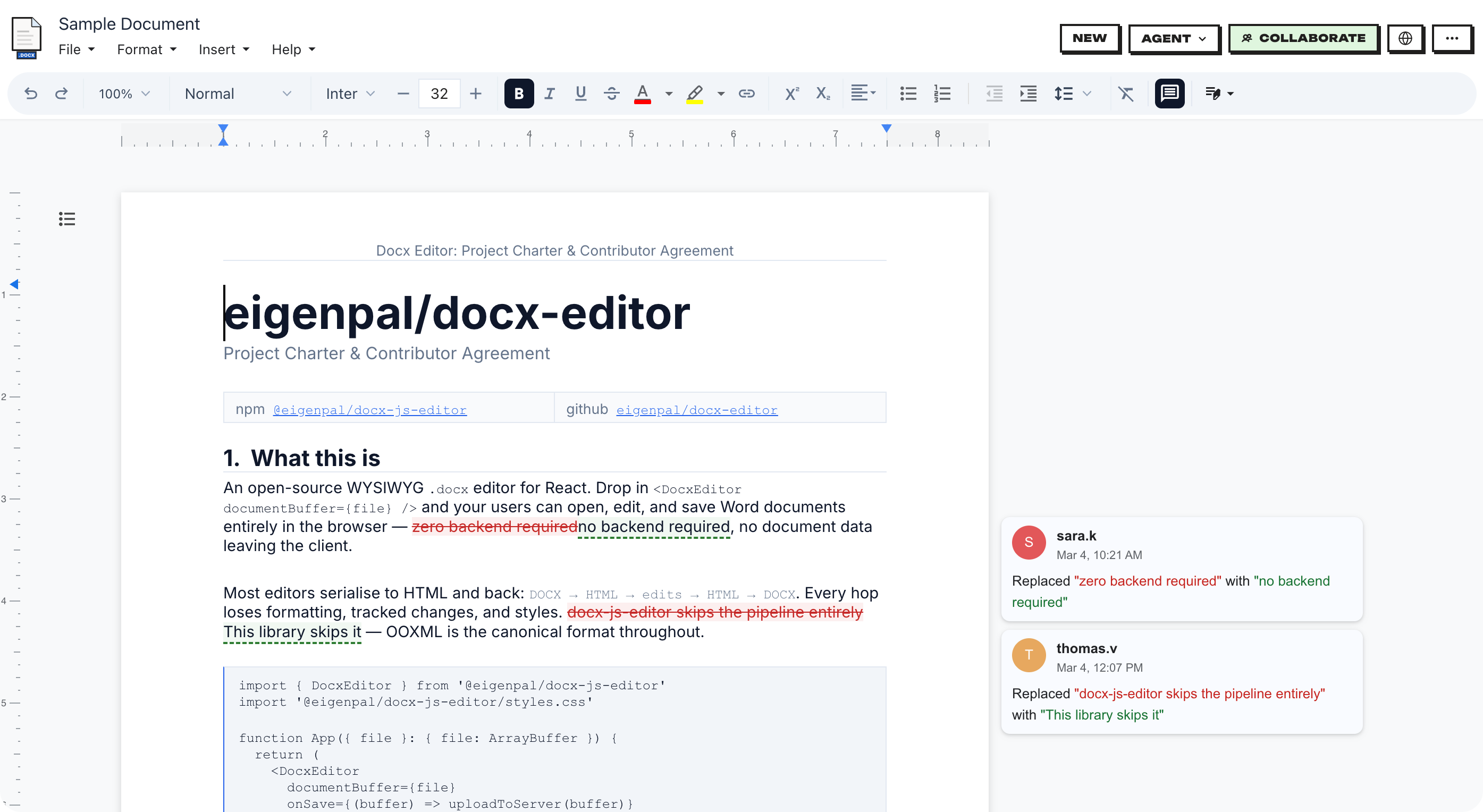
**DOCX Editor** is a complete document ecosystem featuring a **WYSIWYG editor** with real-time collaboration, tracked changes, and rich editing capabilities, a **headless layout engine** that runs on both client and server, and a **PDF generation engine**. Together, they provide a unified foundation for document editing, rendering, and export. [Live demo](https://docx-editor.dev/editor) | [Documentation](https://www.docx-editor.dev/docs) | [Roadmap](https://github.com/orgs/eigenpal/projects/2) ## Quick start Install the adapter for your framework and its required engine peer: ```bash npm install @docx-editor.dev/react @docx-editor.dev/core # React npm install @docx-editor.dev/vue @docx-editor.dev/core # Vue ``` See the [React](#react) or [Vue](#vue) quick start. For Node.js, use `^20.16.0 || >=22.3.0`. Browser applications can use the packages with their build tool.

docx-editor screenshot

## Features | Feature | Description | | --- | --- | | [Editor API](https://www.docx-editor.dev/docs/2.x/editor-api) | Automate documents in a browser or server with a supported subset of Word Office.js. | | [Review workflow](https://www.docx-editor.dev/docs/2.x/pro/tracked-changes) | Add comments and tracked changes with the review module. | | [Word fidelity](https://www.docx-editor.dev/docs/2.x/word-fidelity) | Check rendering and editing support for document features. | | [Save and reopen](https://www.docx-editor.dev/docs/2.x/guides/loading-and-saving) | Preserve document structure, unsupported OOXML, and embedded files. | | [Collaboration](https://www.docx-editor.dev/docs/2.x/pro/collaboration) | Edit together with remote cursors, shared changes, and personal undo. | | [Custom UI](https://www.docx-editor.dev/docs/2.x/guides/chrome-slots) | Build controls with shared commands, components, and styles. | | [React and Vue](https://www.docx-editor.dev/docs/2.x/installation) | Use either adapter with the same document engine. | | [Right-to-left support](https://www.docx-editor.dev/docs/2.x/guides/right-to-left) | Use a mirrored Arabic or Hebrew interface and edit mixed-direction documents. | | [Chinese, Japanese, and Korean text](https://www.docx-editor.dev/docs/2.x/guides/cjk) | Configure interface translations, document fonts, and PDF fonts. | | [DrawingML rendering](https://www.docx-editor.dev/docs/2.x/pro/drawing) | Configure charts, SmartArt, and drawing effects. Check rendering and interface limits. | | [Translations](https://www.docx-editor.dev/docs/2.x/i18n) | Translate editor controls in 14 languages with locale catalogs and custom strings. | | [PDF export](https://www.docx-editor.dev/docs/2.x/export/pdf) | Convert DOCX to PDF on a Node.js server. | | [Markdown export](https://www.docx-editor.dev/docs/2.x/export/markdown) | Convert DOCX to Markdown with page references and images. | | [Telemetry](https://www.docx-editor.dev/docs/2.x/telemetry) | Send anonymous diagnostics and metrics to Sentry, OpenTelemetry, Prometheus, or a log service. No document content or personal data is sent. | ## Packages | Package | Description | Docs | | --- | --- | --- | | [`@docx-editor.dev/react`](https://www.npmjs.com/package/@docx-editor.dev/react) | React editor components and hooks. | [React adapter](https://www.docx-editor.dev/docs/2.x/react) | | [`@docx-editor.dev/vue`](https://www.npmjs.com/package/@docx-editor.dev/vue) | Vue 3 editor components and composables. | [Vue adapter](https://www.docx-editor.dev/docs/2.x/vue) | | [`@docx-editor.dev/core`](https://www.npmjs.com/package/@docx-editor.dev/core) | DOCX parsing, editing, and rendering. | [Core engine](https://www.docx-editor.dev/docs/2.x/core) | | [`@docx-editor.dev/i18n`](https://www.npmjs.com/package/@docx-editor.dev/i18n) | Translations and locale types. | [Translations](https://www.docx-editor.dev/docs/2.x/i18n) | | [`@docx-editor.dev/fonts`](https://www.npmjs.com/package/@docx-editor.dev/fonts) | Open-licensed substitutes for Word fonts. | [Fonts and measurement](https://www.docx-editor.dev/docs/2.x/guides/fonts) | | [`@docx-editor.dev/docx-to-markdown`](https://www.npmjs.com/package/@docx-editor.dev/docx-to-markdown) | Convert DOCX to Markdown with page and image output. | [Markdown export](https://www.docx-editor.dev/docs/2.x/export/markdown) | | [`@docx-editor.dev/docx-to-pdf`](https://www.npmjs.com/package/@docx-editor.dev/docx-to-pdf) | Convert DOCX to PDF on Node.js. | [PDF export](https://www.docx-editor.dev/docs/2.x/export/pdf) | | [`@docx-editor.dev/fonts-cjk`](https://www.npmjs.com/package/@docx-editor.dev/fonts-cjk) | Optional Chinese, Japanese, and Korean font for the editor and PDF export. | [CJK font setup](https://www.docx-editor.dev/docs/2.x/guides/cjk#packaged-browser-fallback) | | [`@docx-editor.dev/pro`](https://www.npmjs.com/package/@docx-editor.dev/pro) | Tracked changes, comments, collaboration, custom nodes, and advanced drawing rendering. | [Pro modules](https://www.docx-editor.dev/docs/2.x/pro) | | [`@docx-editor.dev/editor-api`](https://www.npmjs.com/package/@docx-editor.dev/editor-api) | A supported subset of Word Office.js for browser and server editing. | [Document automation](https://www.docx-editor.dev/docs/2.x/editor-api) | | [`@docx-editor.dev/telemetry`](https://www.npmjs.com/package/@docx-editor.dev/telemetry) | Anonymous diagnostics, metrics, and error reporting for editors and collaboration servers. | [Telemetry](https://www.docx-editor.dev/docs/2.x/telemetry) | `@docx-editor.dev/editor-api`, `@docx-editor.dev/pro`, `@docx-editor.dev/docx-to-pdf`, and `@docx-editor.dev/telemetry` use the EigenPal Pro License. See the license terms for [editor-api](packages/editor-api/LICENSE.md), [pro](packages/pro/LICENSE.md), [docx-to-pdf](packages/docx-to-pdf/LICENSE.md), and [telemetry](packages/telemetry/LICENSE.md). Compare license and support options on the [pricing page](https://www.docx-editor.dev/pricing). ## React Import the stylesheet once and pass the selected file to the editor: ```tsx import { useState } from 'react'; import { DocxEditor } from '@docx-editor.dev/react'; import '@docx-editor.dev/core/styles/editor.css'; export function App() { const [doc, setDoc] = useState(); return (
{ const file = e.target.files?.[0]; setDoc(file ? new Uint8Array(await file.arrayBuffer()) : undefined); }} />
{doc && }
); } ``` For Next.js and server-side rendering (SSR), use `dynamic(..., { ssr: false })` in a Client Component. The editor requires browser APIs. Full docs: [React adapter](https://www.docx-editor.dev/docs/2.x/react) · [Props and ref methods](https://www.docx-editor.dev/docs/2.x/react/props). ## Vue Import the stylesheet once and pass the selected file to the editor: ```vue ``` For Nuxt and server-side rendering, load the editor in a client-only component. The editor requires browser APIs. Full docs: [Vue adapter](https://www.docx-editor.dev/docs/2.x/vue) · [Props and ref methods](https://www.docx-editor.dev/docs/2.x/vue/props). ## Font measurement Pass usable font bytes to measure text for line and page breaks. Fallback measurement can change wrapping and pagination. Use `packagedFonts()` from `@docx-editor.dev/fonts` for packaged substitutes. Use `customFonts()` from `@docx-editor.dev/core/editor` for your own font files. Add `googleFonts()` when your application accepts third-party font requests. See [Fonts and measurement](https://www.docx-editor.dev/docs/2.x/guides/fonts). ## Development Use the toolchain in [Contributing](CONTRIBUTING.md#prerequisites), then run these commands from the repository root: ```bash bun install bun run dev # localhost:5173 bun run dev:markdown # Markdown demo: localhost:5177 bun run build bun run typecheck ``` Try unreleased changes in the [preview of `main`](https://latest.docx-editor.dev/). Examples: [Vite](examples/vite) | [DOCX to Markdown](examples/docx-to-markdown) | [DOCX to PDF](examples/docx-to-pdf) | [Next.js](examples/nextjs) | [Remix](examples/remix) | [Astro](examples/astro) | [Vue](examples/vue) | [Collaboration](examples/collaboration) | [Server agent review](examples/server-agent-review) | [Document refresh](examples/document-refresh) | [Telemetry](examples/telemetry-single-user) | [Collaboration telemetry](examples/telemetry-collaboration) [Documentation](https://www.docx-editor.dev/docs) | [React props and ref methods](https://www.docx-editor.dev/docs/2.x/react/props) | [Vue props and ref methods](https://www.docx-editor.dev/docs/2.x/vue/props) ## Contributing See [Contributing](CONTRIBUTING.md) for setup, tests, and the Contributor License Agreement (CLA). ## Translations | Locale | Language | | ------- | -------------------- | | `en` | English | | `ar` | Arabic | | `de` | German | | `es` | Spanish | | `fr` | French | | `he` | Hebrew | | `hi` | Hindi | | `id` | Indonesian | | `ja` | Japanese | | `pl` | Polish | | `pt-BR` | Portuguese (Brazil) | | `ru` | Russian | | `tr` | Turkish | | `zh-CN` | Chinese (Simplified) | To add a locale, see the [i18n contribution guide](docs/i18n.md). ```bash bun run i18n:new it # Scaffold an Italian locale. bun run i18n:status # check translation coverage ``` ## License The repository uses [Apache 2.0](LICENSE), except for the Pro packages. These packages use the EigenPal Pro License: - [`@docx-editor.dev/pro`](packages/pro/LICENSE.md): tracked changes, comments, collaboration, and custom nodes. - [`@docx-editor.dev/editor-api`](packages/editor-api/LICENSE.md): document automation in a browser or on a server. - [`@docx-editor.dev/docx-to-pdf`](packages/docx-to-pdf/LICENSE.md): PDF export on Node.js. - [`@docx-editor.dev/telemetry`](packages/telemetry/LICENSE.md): anonymous diagnostics, metrics, and error reporting. Production use of a Pro package requires a commercial agreement. Compare options on the [pricing page](https://www.docx-editor.dev/pricing). Bundled fonts retain their own licenses. ## Commercial support For commercial support or custom features, [email the support team](mailto:docx-editor@eigenpal.com). ## Roadmap See the [public roadmap](https://github.com/orgs/eigenpal/projects/2) for planned work and priorities.