# Roblox Studio MCP
Let an AI agent drive Roblox Studio: read your place, edit scripts, build geometry, run playtests, take screenshots. 35 tools. MIT.
## Install
**1. The plugin**
```bash
npx -y @el4cteo/rbx-studio-mcp --install-plugin
```
Or drop `StudioMCP.rbxmx` from [Releases](https://github.com/EL4CTEO/rbx-studio-mcp/releases) into your Studio plugins folder.
**2. The server**
```bash
claude mcp add roblox-studio -- npx -y @el4cteo/rbx-studio-mcp
```
Other clients
Codex CLI:
```bash
codex mcp add roblox-studio -- npx -y @el4cteo/rbx-studio-mcp
```
Cursor, Claude Desktop, Gemini CLI, Windsurf — add to their config file:
```json
{
"mcpServers": {
"roblox-studio": {
"command": "npx",
"args": ["-y", "@el4cteo/rbx-studio-mcp"]
}
}
}
```
VS Code / Copilot (`.vscode/mcp.json`) uses `"servers"` instead of `"mcpServers"`, plus `"type": "stdio"`.
opencode (`opencode.json`):
```json
{
"mcp": {
"roblox-studio": {
"type": "local",
"command": ["npx", "-y", "@el4cteo/rbx-studio-mcp"],
"enabled": true
}
}
}
```
**3.** Open Studio and accept the `127.0.0.1` prompt. Check it works with `studio_status`.
Something wrong? Run `npx -y @el4cteo/rbx-studio-mcp doctor` — it says what is broken and how to fix it.
Port is **44755**, loopback only. Change it with `--port` and match it in the plugin.
## Tools
| | |
|---|---|
| **Session** | `studio_status` `list_studios` `set_active_studio` |
| **Discover** | `tree` `inspect` `find` `api` |
| **Scripts** | `script_read` `script_edit` `script_grep` `script_create` `sync` |
| **Instances** | `create` `modify` `delete` `move` |
| **World** | `geometry` `terrain` `generate` `assets` `collision` `audio` `undo` |
| **Data & live game** | `datastore` `universe` |
| **Run & debug** | `playtest` `execute_luau` `character` `input` `console` `debug` `performance` |
| **Look** | `screenshot` `viewport` `device` |
Write tools take arrays — ten script edits is one call, one **Ctrl+Z**, and all-or-nothing.
## Inspect the running client
During a playtest, readers can run in the player's own VM (use the playtest server's `studioId`; add `player="Name"` with several players):
```
tree target="client" path="Players.Alice.PlayerGui" handles=true
inspect target="client" paths=[""] properties=["Text","AbsoluteSize"]
find target="client" className="TextButton"
viewport op="ui" target="client"
viewport op="uisnap" target="client"
viewport op="pick" x=0.5 y=0.5 target="client"
performance op="snapshot" target="client"
debug op="watch" path=... target="client" properties=["Text"] seconds=5
debug op="collisions" path="Workspace.Ball" minSpeed=5 seconds=5
```
- **Handles** (`handles=true`) are session references that replace paths. They survive renames and moves, and fail instead of pointing at the wrong object once deleted or expired.
- **`pick`** returns the object under a screen point (normalized over the full viewport).
- **`watch`** records property, attribute and child changes for 1-15 seconds. Send input in parallel to see a reaction.
- **`collisions`** reports what a part, or every part in a model, hit: contact point, normal, impact speed and area, hardest first. Sliding is not counted as a hit. Needs a running playtest.
- **`uisnap`** snapshots a UI. Call it again with `compareTo=""` after an edit to see every added, removed and changed element, property by property.
- **Clipped `execute_luau` results** return a `resultId`. Page through it with `source` omitted; nothing reruns. Results are kept for 120 seconds.
## Work on files
`sync` mirrors your scripts into a folder, so an agent can edit code with its own file tools and use Studio to test.
```
sync op="pull" # Studio -> ./studio
sync op="push" # ./studio -> Studio
sync op="watch" # both ways, live, until op="stop"
```
- Rojo-style layout: `Main.server.luau`, `.client.luau`, `.luau`; a script with children is a folder with `init`. A `sourcemap.json` is written for luau-lsp.
- Rename or move a file and the script moves with it, keeping its attributes and references.
- Edited on both sides? It's a conflict and neither side is touched. Studio's version waits in `.rbx-sync/conflicts/`; merge into the file and sync again, or pass `prefer: "studio"` / `"disk"`.
- Deleting a file deletes the script (one Ctrl+Z). A script deleted in Studio sends its file to `.rbx-sync/trash`.
- `export` writes UI or any instance tree as a `.build.json` file; edit it and `build` rebuilds it, keeping its scripts. Edits made in Studio flow back into the file.
- `watch` only works when something changes: about 0.5s each way, even with 2,000 scripts. Conflicts show up in the agent's next reply.
## Open Cloud
Some calls reach past Studio to Roblox itself. All need one API key; everything else works without it.
| | |
|---|---|
| `assets op="upload"` | send a local audio/image/model/video file, get an asset id |
| `datastore target="live"` | the running game's real player data |
| `execute_luau target="live"` | run a script on the published place |
| `universe` | restart servers, message them, ban players, read server logs, sell products and passes, read analytics, schedule events |
| also | `assets op="grant"`, `op="publish"`, `script_read`/`script_edit target="live"` |
Make a key at [Creator Dashboard → Credentials](https://create.roblox.com/dashboard/credentials), adding the permissions you want: `assets`, `universe-datastores`, `ordered-data-stores`, `luau-execution-sessions`, `universe-places`, `universe-place-instances`, `universe`, `messaging-service`, `user-restrictions`, `inventory`, `users`, `asset-permissions`, `developer-products`, `game-passes`, `universe-analytics`. Scheduling events needs the `universe.event:read` and `:write` permissions.
Then in the Studio panel:
```
cloud key
cloud user
cloud place
```
`cloud place` works out the universe for you. The typed key is masked in the log and in the history, and stored at `~/.rbx-studio-mcp/credentials.json` (mode 0600) — never in the place file, never in the conversation. `cloud` shows what is set, `cloud test` re-checks it, `cloud forget` deletes it. `ROBLOX_API_KEY` and friends in the environment work too and take priority.
Two things to watch: a playtest connects a second session, so pass `studioId` and use the edit one for changes that must last; `device` emulation stays on until `device op="stop"`.
## The console panel
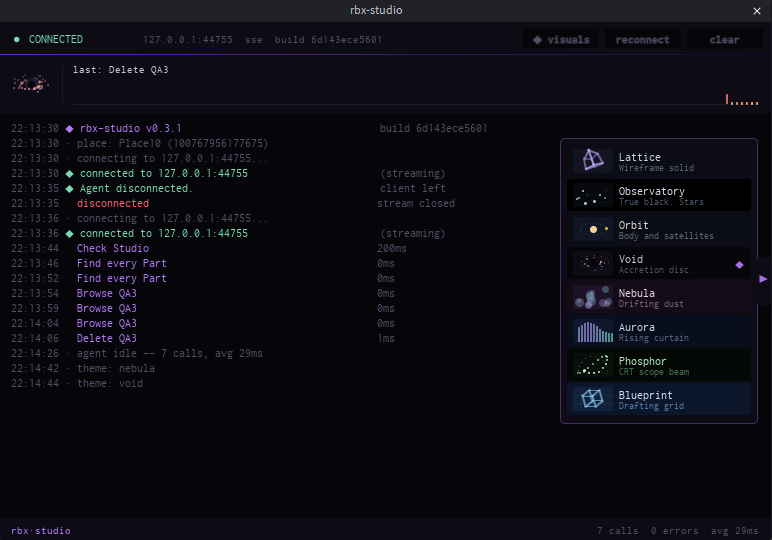
Every call is logged with how long it took. At the foot of the panel is a command line. Type a command — or run `chat on` and type a sentence to have a coding agent answer it.
| | |
|---|---|
| `help` | list everything |
| `doctor` | check the setup |
| `status` `version` `place` `clients` | what this session is |
| `studios` `use ` | which Studio window calls go to |
| `theme [name]` `visuals` `autoopen [on\|off]` `log [level]` `clear` `copy` | the panel |
| `port [n]` `reconnect` | the connection |
| `cloud [key\|user\|group\|test\|forget]` | the Open Cloud key `upload` uses |
| `chat [on\|off]` | let an agent answer sentences (off by default) |
| `agent [use \|new]` | which agent runs your prompts |
| anything else | sent to that agent, once `chat` is on |
Click the bar and every command is listed with what it does. Keep typing to filter, scroll for the rest, click one to fill it in.
**With `chat on`, prompts start a real agent** — whichever you have on PATH: Claude Code, Codex, opencode, Gemini, Cursor, Amp, Qwen Code, Factory Droid, goose, Copilot CLI, Aider, Crush, DeepSeek Harness. It runs headless, drives the same Studio, and its work appears in the log. It is a separate session from your terminal, billed separately, and allowed the `rbx-studio` tools only. The **stop** button beside the prompt cancels it.
Eight themes behind the tab on the right edge. Your pick is remembered.
## Why this one
- **Push, not poll** — 13.6 ms per call against 25.8 ms.
- **Safe script edits** — writes go through the script editor, so unsaved work survives.
- **Stale edits are refused** — line-range and whole-file edits need the `rev` from `script_read`, and land only if nobody else touched the file.
- **Property names are checked** against the running engine, so `Anchorred` comes back as a suggestion, not a runtime error.
## DeepSeek Harness (dsh)
This server registers as a dsh plugin. Append this row to `$DSH_HOME/cordis.patch.yml`,
or to `$DSH_HOME/profiles//cordis.patch.yml` for one profile only:
```yaml
- insert:
- id: mcp-rbx-studio
name: '@deepseek-ai/dsh-mcp-client'
config:
serverName: rbx-studio
transport: stdio
command: npx
args: ['-y', '@el4cteo/rbx-studio-mcp']
cwd: !!js process.cwd()
```
Then `dsh --profile headless "what is in workspace"`. Needs `DEEPSEEK_API_KEY`.
The same row, commented, is in `config/dsh.cordis.yml` for use with `dsh --patch`.
## Security
Loopback only. Requests need a header a browser cannot set cross-origin and a loopback `Host`, so a web page cannot reach it, even through DNS rebinding. Your experience's "Allow HTTP Requests" setting is untouched.
## Development
```bash
npm install
npm run build # TypeScript -> dist/
npm run install:plugin # build the plugin and copy it into Studio
npm test
```
Needs `luau`, `luau-compile` and `luau-analyze` from [the Luau releases](https://github.com/luau-lang/luau/releases) on `PATH` or in `tools/`.
With Studio open and the plugin loaded, `node scripts/test-live.mjs` checks the transport and `node scripts/test-live-tools.mjs [--playtest]` runs every tool, `node scripts/test-live-sync.mjs` checks `sync`, and `node scripts/test-live-sync-scale.mjs` times it on 2,000 scripts. All clean up after themselves.
## Licence
MIT.