# Open WebUI Kubernetes Integration
[](https://docs.docker.com/compose/)
[](https://kubernetes.io/)
[](https://github.com/open-webui/open-webui)
[](https://ollama.ai/)
[](https://www.anthropic.com/news/introducing-mcp)
[](https://kind.sigs.k8s.io/)
[](https://helm.sh/)
[](https://kubernetes.io/docs/reference/kubectl/)
[](https://opensource.org/licenses/MIT)
## TL;DR
**Chat with your Kubernetes cluster using natural language!**
This project connects OpenWebUI to Kubernetes, letting you manage your cluster through conversational AI. Ask questions like "What pods are running?" or "Scale my deployment to 5 replicas" and get instant results.
---
## Table of Contents
- [TL;DR](#tldr)
- [Quick Start](#quick-start)
- [Configure Open-WebUI](#configure-open-webui)
- [Step 1: Access Open-WebUI](#step-1-access-open-webui)
- [Step 2: Add the MCP Bridge Tool Server](#step-2-add-the-mcp-bridge-tool-server)
- [Step 3: Add Connections to Models](#step-3-add-connections-to-models)
- [Step 4: Verify Tool Integration](#step-4-verify-tool-integration)
- [Step 5: Test the Integration](#step-5-test-the-integration)
- [Troubleshooting Configuration](#troubleshooting-configuration)
- [Architecture Overview](#architecture-overview)
- [Architecture Diagram](#architecture-diagram)
- [Data Flow](#data-flow)
- [Network Architecture](#network-architecture)
- [Repository Structure](#-repository-structure)
- [Components](#components)
- [1. Open WebUI](#1-open-webui)
- [2. Ollama](#2-ollama)
- [3. MCP-Bridge](#3-mcpo-mcp-bridge)
- [4. Kubernetes Cluster](#4-kubernetes-cluster)
- [Usage](#usage)
---
### Quick Start
**One-command setup:**
```bash
./install.sh
```
**Componentes installed:**
- Kind (Kubernetes in Docker)
- Open Web UI
- Ollama
- MCP bridge
**After successful installation, you'll see:**
✅ Docker Compose startup complete!
Services available at:
- Open WebUI: http://localhost:3000
- MCP Bridge: http://localhost:9000
- Ollama API: http://localhost:11434
Configure Open WebUI to use the MCP tools
## Configure Open-WebUI
After running the installation script, you need to configure Open-WebUI to use the Kubernetes tools:
### Step 1: Access Open-WebUI
1. Open your browser and go to **http://localhost:3000**
2. **Create an admin account** on first visit
3. **Sign in** with your new account
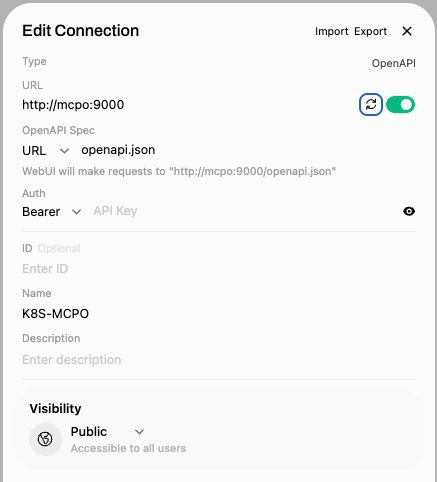
### Step 2: Add the MCP Bridge Tool Server
1. Click on your **profile icon** (top right)
2. Go to **Settings**
3. Navigate to **Admin Panel** → **Tools**
4. Click **"+ Add Tool Server"**
5. Enter the following details:
- **Name**: `Kubernetes Tools`
- **URL**: `http://mcpo:9000`
- **Description**: `Kubernetes management via kubectl and helm`
6. Click **"Add"**
---
 ---
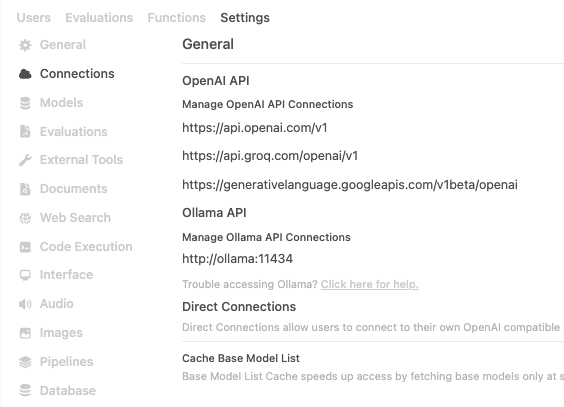
### Step 3: Add Connections to Models
Configure your AI model connections - use the local Ollama or add remote connections:
1. In **Settings**, go to **Admin Panel** → **Connections**
2. **For Local Ollama** (recommended):
- The local Ollama server should be automatically detected
- Verify connection to `http://ollama:11434`
3. **For Remote Connections** (optional):
- Add OpenAI, Anthropic, or other model providers
- Configure API keys and endpoints as needed
---
### Step 3: Add Connections to Models
Configure your AI model connections - use the local Ollama or add remote connections:
1. In **Settings**, go to **Admin Panel** → **Connections**
2. **For Local Ollama** (recommended):
- The local Ollama server should be automatically detected
- Verify connection to `http://ollama:11434`
3. **For Remote Connections** (optional):
- Add OpenAI, Anthropic, or other model providers
- Configure API keys and endpoints as needed
 ### Step 4: Verify Tool Integration
1. Go back to the **chat interface**
2. Look for the **tools icon** (🔧) in the chat input area
3. You should see available tools like:
- `kubectl_get` - List Kubernetes resources
- `kubectl_apply` - Apply manifests
- `kubectl_describe` - Describe resources
- `helm_install` - Install Helm charts
- And more...
### Step 5: Test the Integration
Try asking these questions to verify everything works (copy and paste into the chat):
**Copy & Paste these queries:**
```
What pods are running in the kube-system namespace?
```
```
Show me all services in the default namespace
```
```
List all deployments across all namespaces
```
```
Create a new namespace called production
```
```
Install Jenkins using Helm in the jenkins namespace
```
## Troubleshooting Configuration
**If tools don't appear:**
- Check that the MCP Bridge is running: `curl http://localhost:9000/health`
- Verify the tool server URL is exactly: `http://mcpo:9000`
- Restart Open-WebUI: `docker-compose restart open-webui`
**If you get connection errors:**
- Ensure all containers are running: `docker-compose ps`
- Check container logs: `docker-compose logs mcpo`
- Verify network connectivity between containers
**Then open http://localhost:3000 and start chatting with your cluster!**
**Example queries:**
- "What pods are running in kube-system?"
- "Show me all services in default namespace"
- "Create a new namespace called production"
- "Install Jenkins using Helm in the jenkins namespace"
---
## Architecture Overview
This project integrates Open WebUI with Kubernetes management capabilities through a bridge architecture that connects multiple components to provide AI-powered Kubernetes operations.
### Architecture Diagram
```mermaid
graph TB
subgraph "External AI Services"
Gemini[Google Gemini
### Step 4: Verify Tool Integration
1. Go back to the **chat interface**
2. Look for the **tools icon** (🔧) in the chat input area
3. You should see available tools like:
- `kubectl_get` - List Kubernetes resources
- `kubectl_apply` - Apply manifests
- `kubectl_describe` - Describe resources
- `helm_install` - Install Helm charts
- And more...
### Step 5: Test the Integration
Try asking these questions to verify everything works (copy and paste into the chat):
**Copy & Paste these queries:**
```
What pods are running in the kube-system namespace?
```
```
Show me all services in the default namespace
```
```
List all deployments across all namespaces
```
```
Create a new namespace called production
```
```
Install Jenkins using Helm in the jenkins namespace
```
## Troubleshooting Configuration
**If tools don't appear:**
- Check that the MCP Bridge is running: `curl http://localhost:9000/health`
- Verify the tool server URL is exactly: `http://mcpo:9000`
- Restart Open-WebUI: `docker-compose restart open-webui`
**If you get connection errors:**
- Ensure all containers are running: `docker-compose ps`
- Check container logs: `docker-compose logs mcpo`
- Verify network connectivity between containers
**Then open http://localhost:3000 and start chatting with your cluster!**
**Example queries:**
- "What pods are running in kube-system?"
- "Show me all services in default namespace"
- "Create a new namespace called production"
- "Install Jenkins using Helm in the jenkins namespace"
---
## Architecture Overview
This project integrates Open WebUI with Kubernetes management capabilities through a bridge architecture that connects multiple components to provide AI-powered Kubernetes operations.
### Architecture Diagram
```mermaid
graph TB
subgraph "External AI Services"
Gemini[Google Gemini
External API]
end
subgraph "User Interface"
User[User]
end
subgraph "UI Layer"
OpenWebUI[Open WebUI
Port: 3000]
Ollama[Ollama
LLM Server
Port: 11434]
end
subgraph "Bridge Layer"
MCP-Bridge[MCP-Bridge
OpenAPI Bridge
Port: 9000]
end
subgraph "Target Infrastructure"
K8s[Kubernetes Cluster
kubectl, helm, istioctl]
end
subgraph "Configuration"
KubeConfig[kubeconfig
./kube/config]
end
%% User interactions
User -->|Chat & Commands| OpenWebUI
%% AI Layer connections
OpenWebUI -->|LLM Requests| Ollama
OpenWebUI -.->|External API Calls| Gemini
OpenWebUI -->|Tool Calls
OpenAPI/REST| MCP-Bridge
%% Bridge Layer to Kubernetes
MCP-Bridge -->|kubectl commands| K8s
MCP-Bridge -->|helm operations| K8s
MCP-Bridge -->|istioctl commands| K8s
%% Configuration
KubeConfig -.->|Mounted Volume| MCP-Bridge
%% Styling
classDef userLayer fill:#e1f5fe
classDef aiLayer fill:#f3e5f5
classDef externalLayer fill:#fff8e1
classDef bridgeLayer fill:#fff3e0
classDef mcpLayer fill:#e8f5e8
classDef k8sLayer fill:#fce4ec
classDef configLayer fill:#f1f8e9
class User userLayer
class OpenWebUI,Ollama aiLayer
class Gemini,OpenAI,Anthropic externalLayer
class MCP-Bridge bridgeLayer
class K8s k8sLayer
class KubeConfig configLayer
```
---
### Data Flow
1. **User Query**: User asks a Kubernetes-related question in Open WebUI
2. **AI Processing**: Ollama processes the query and determines if tools are needed
3. **Tool Selection**: Open WebUI identifies the appropriate kubectl_get tool
4. **API Call**: Open WebUI makes REST API call to MCPO bridge
5. **Protocol Translation**: MCPO translates REST call to MCP protocol
6. **Response Chain**: Results flow back through the same chain to the user
### Network Architecture
```mermaid
graph LR
subgraph "Docker Network: mcp-lab-network"
subgraph "External Access"
Host[Host Machine
localhost:3000
localhost:9000]
end
subgraph "Internal Services"
OW[open-webui:8080]
MC[mcpo:9000]
K8S[Kubernetes:6443]
OL[ollama:11434]
end
end
Host -->|Port 3000| OW
Host -->|Port 9000| MC
OW --> OL
OW --> MC
MC --> K8S
```
---
## 📂 Repository Structure
```
openwebui-k8s-bridge/
├── mcp-bridge/ # Bridge service code
├── scripts/ # Setup and utility scripts
├── tests/ # Test scripts and examples
├── docs/ # Documentation
├── kube/ # Kubernetes configuration
├── docker-compose.yml # Complete stack setup
└── README.md # Main documentation
```
## Components
### 1. **Open WebUI**
- **Purpose**: Web-based chat interface for AI interactions
- **Port**: 3000
- **Role**: Provides the user interface and orchestrates AI conversations with tool calling capabilities
- **Key Features**:
- Chat interface for natural language Kubernetes queries
- Tool server integration for external API calls
- Model management and conversation history
### 2. **Ollama**
- **Purpose**: Local LLM server
- **Port**: 11434
- **Role**: Provides the AI language model (llama3.2:latest) for understanding user queries and generating responses
- **Key Features**:
- Local model hosting
- Function calling capabilities
- Integration with Open WebUI
### 3. **MCP Bridge**
- **Purpose**: Protocol bridge between OpenAPI and MCP
- **Port**: 9000
- **Role**: Translates REST API calls from Open WebUI into MCP protocol calls
- **Key Features**:
- OpenAPI specification generation for Open WebUI
- REST to MCP protocol translation
- Tool parameter validation and formatting
### 4 **Kubernetes Cluster**
- **Purpose**: Target infrastructure for management operations
- **Role**: The actual Kubernetes cluster being managed
- **Access**: Through kubeconfig mounted as volume
## Usage
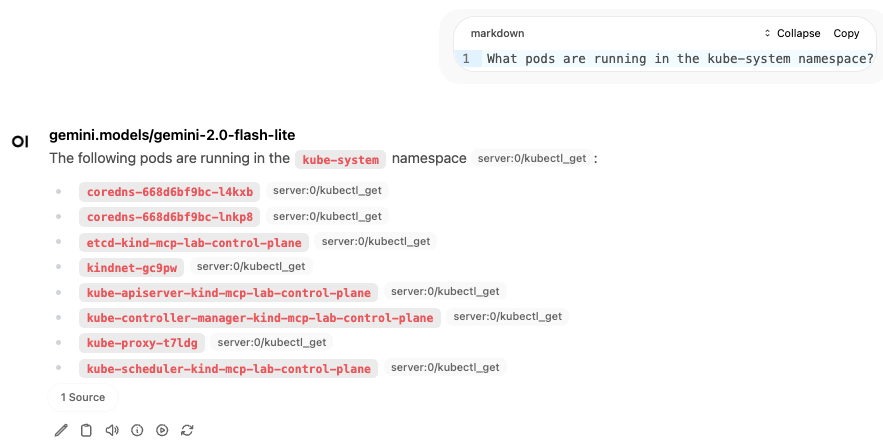
Once configured, you can ask natural language questions about your Kubernetes cluster:
- "What pods are running in the kube-system namespace?"
- "Show me all services in the default namespace"
- "List all deployments across all namespaces"
- "Get the logs from the nginx pod"
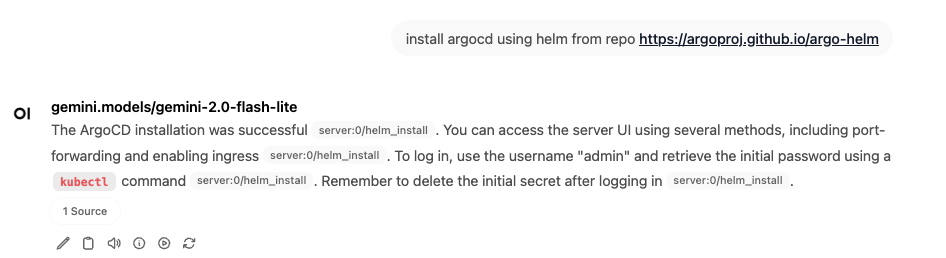
- install argocd using helm from repo https://argoproj.github.io/argo-helm
---
 ---
---
 ---
---
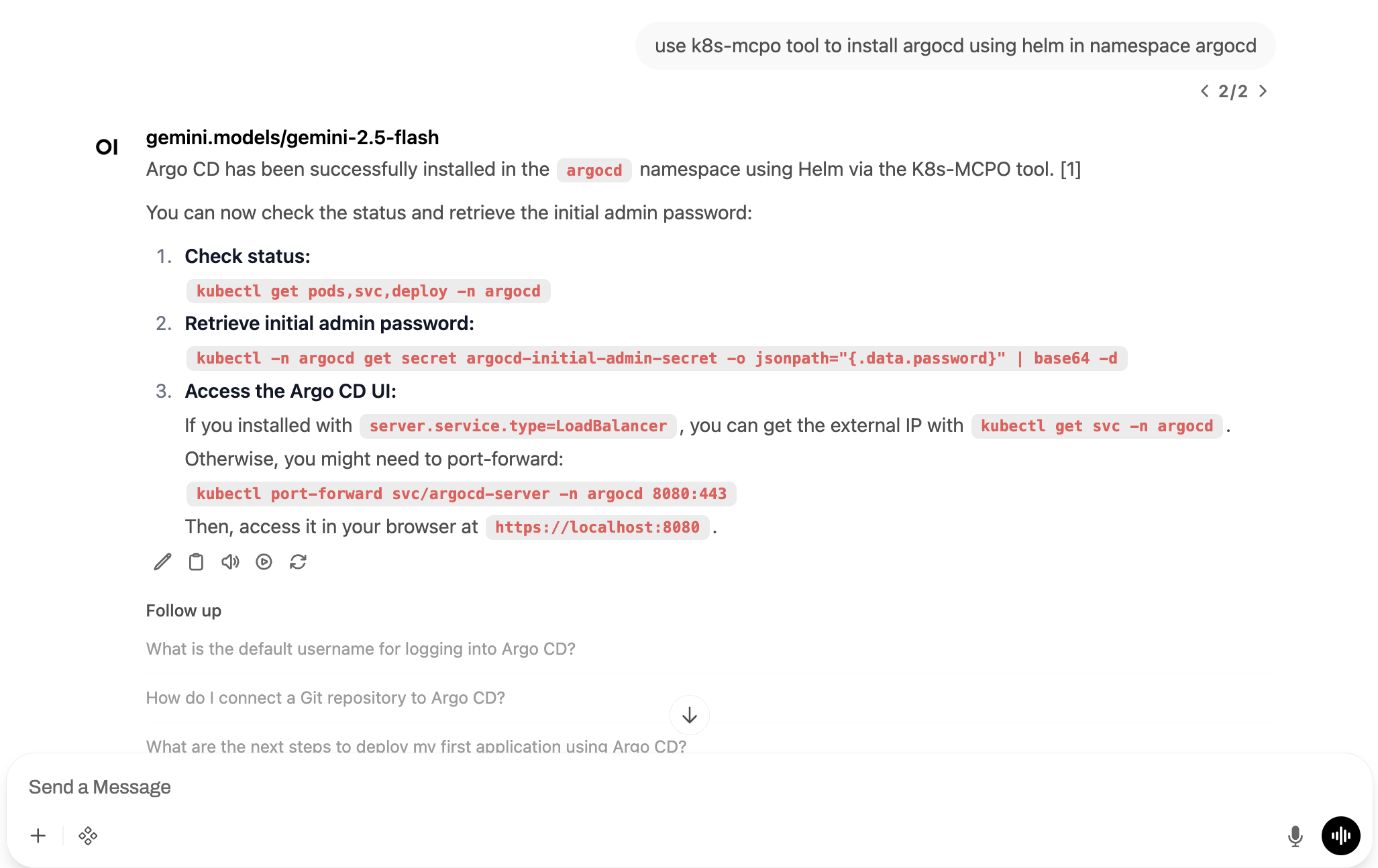 The AI will automatically use the appropriate Kubernetes tools to execute commands and provide formatted responses.
---
## Open in Google Cloud Shell
You can directly open this repository in Google Cloud Shell to start exploring the examples:
[](https://shell.cloud.google.com/cloudshell/editor?cloudshell_git_repo=https://github.com/elevy99927/devops-mcp-webui)
---
## Contact
For questions or feedback, feel free to reach out:
- **Email**: eyal@levys.co.il
- **GitHub**: [https://github.com/elevy99927](https://github.com/elevy99927)
The AI will automatically use the appropriate Kubernetes tools to execute commands and provide formatted responses.
---
## Open in Google Cloud Shell
You can directly open this repository in Google Cloud Shell to start exploring the examples:
[](https://shell.cloud.google.com/cloudshell/editor?cloudshell_git_repo=https://github.com/elevy99927/devops-mcp-webui)
---
## Contact
For questions or feedback, feel free to reach out:
- **Email**: eyal@levys.co.il
- **GitHub**: [https://github.com/elevy99927](https://github.com/elevy99927)