
 You can test the latest features before the official release by adding the [Beta repository](https://pcapdroid.org/fdroid/repo/) to the F-Droid app.
## User Guide
Check out the [quick start instructions](https://emanuele-f.github.io/PCAPdroid/quick_start) or the full [User Guide](https://emanuele-f.github.io/PCAPdroid).
## Sponsors
The PCAPdroid project is sponsored by [AVEQ GmbH](https://aveq.info).
If you want to sponsor this project [drop me an email](mailto:black.silver@hotmail.it?subject=PCAPdroid%20sponsorship).
## Community
You can help the PCAPdroid project in many ways:
- [Make a donation](https://emanuele-f.github.io/PCAPdroid/donate)
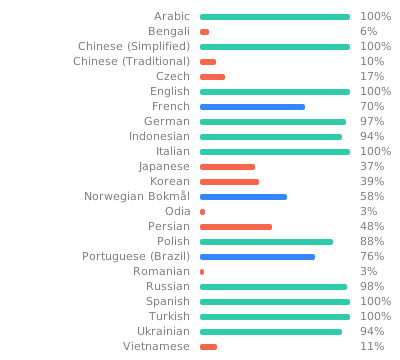
- Translate the app on [Weblate](https://hosted.weblate.org/engage/pcapdroid/)
You can test the latest features before the official release by adding the [Beta repository](https://pcapdroid.org/fdroid/repo/) to the F-Droid app.
## User Guide
Check out the [quick start instructions](https://emanuele-f.github.io/PCAPdroid/quick_start) or the full [User Guide](https://emanuele-f.github.io/PCAPdroid).
## Sponsors
The PCAPdroid project is sponsored by [AVEQ GmbH](https://aveq.info).
If you want to sponsor this project [drop me an email](mailto:black.silver@hotmail.it?subject=PCAPdroid%20sponsorship).
## Community
You can help the PCAPdroid project in many ways:
- [Make a donation](https://emanuele-f.github.io/PCAPdroid/donate)
- Translate the app on [Weblate](https://hosted.weblate.org/engage/pcapdroid/)
 - [Discuss](https://github.com/emanuele-f/PCAPdroid/discussions) new features
- Improve the app theme and layout
- Star the project on Github and on [Google Play](https://play.google.com/store/apps/details?id=com.emanuelef.remote_capture)
- Of course provide code pull requests!
Join the international PCAPdroid community [on Telegram](https://t.me/PCAPdroid) or [on Matrix](https://matrix.to/#/#pcapdroid:matrix.org).
## Integrating into your APP
Some features of PCAPdroid can be integrated into a third-party app to provide packet capture capabilities.
- For rooted devices, the [pcapd daemon](https://github.com/emanuele-f/PCAPdroid/tree/master/app/src/main/jni/pcapd) can be directly integrated into your APK to capture network packets.
- For all the devices, PCAPdroid [exposes an API](https://github.com/emanuele-f/PCAPdroid/blob/master/docs/app_api.md) to control the packet capture and send the captured packets via UDP to your app. This requires to install PCAPdroid along with your app.
## Open Source
PCAPdroid is powered by open source technologies.
- [nDPI](https://github.com/ntop/nDPI): deep packet inspection library, provides the connections metadata
- [mitmproxy](https://github.com/mitmproxy/mitmproxy): a local proxy for the TLS decryption
- [zdtun](https://github.com/emanuele-f/zdtun): minimal TCP/IP stack for the non-root capture
For the complete list of third party libraries check out the "About" page in the app.
## Building
1. On Windows, install [gitforwindows](https://gitforwindows.org)
2. Clone this repo
3. Inside the repo dir, run `git submodule update --init`. The `submodules` directory should get populated.
4. Open the project in Android Studio, install the appropriate SDK and the NDK
5. Build the app
*Note*: If you get "No valid CMake executable was found", be sure to install the CMake version used by PCAPdroid (currently [3.22.1](https://github.com/emanuele-f/PCAPdroid/blob/master/app/build.gradle)) from the SDK manager
- [Discuss](https://github.com/emanuele-f/PCAPdroid/discussions) new features
- Improve the app theme and layout
- Star the project on Github and on [Google Play](https://play.google.com/store/apps/details?id=com.emanuelef.remote_capture)
- Of course provide code pull requests!
Join the international PCAPdroid community [on Telegram](https://t.me/PCAPdroid) or [on Matrix](https://matrix.to/#/#pcapdroid:matrix.org).
## Integrating into your APP
Some features of PCAPdroid can be integrated into a third-party app to provide packet capture capabilities.
- For rooted devices, the [pcapd daemon](https://github.com/emanuele-f/PCAPdroid/tree/master/app/src/main/jni/pcapd) can be directly integrated into your APK to capture network packets.
- For all the devices, PCAPdroid [exposes an API](https://github.com/emanuele-f/PCAPdroid/blob/master/docs/app_api.md) to control the packet capture and send the captured packets via UDP to your app. This requires to install PCAPdroid along with your app.
## Open Source
PCAPdroid is powered by open source technologies.
- [nDPI](https://github.com/ntop/nDPI): deep packet inspection library, provides the connections metadata
- [mitmproxy](https://github.com/mitmproxy/mitmproxy): a local proxy for the TLS decryption
- [zdtun](https://github.com/emanuele-f/zdtun): minimal TCP/IP stack for the non-root capture
For the complete list of third party libraries check out the "About" page in the app.
## Building
1. On Windows, install [gitforwindows](https://gitforwindows.org)
2. Clone this repo
3. Inside the repo dir, run `git submodule update --init`. The `submodules` directory should get populated.
4. Open the project in Android Studio, install the appropriate SDK and the NDK
5. Build the app
*Note*: If you get "No valid CMake executable was found", be sure to install the CMake version used by PCAPdroid (currently [3.22.1](https://github.com/emanuele-f/PCAPdroid/blob/master/app/build.gradle)) from the SDK manager