# MCP Analytics Suite
**The statistical analyst in your AI chat.** Bring a CSV (or connect a live source) and a question. A standing team of specialist agents builds a custom analysis specific to your data, validates the methodology, and ships back a citable, interactive report. The analysis is **yours** — it lives in your library, reruns on fresh data for a fraction of the creation cost, and is queryable from Claude, Cursor, or any MCP client. The work compounds.
> **This is the public listing and documentation repository.** Issues, feature requests, and examples live here. The API server code is maintained separately.
[Sample Reports →](https://mcpanalytics.ai/sample-reports.html) • [Try Demo →](https://mcpanalytics.ai/demo.html) • [Pricing →](https://mcpanalytics.ai/pricing.html)
[](https://glama.ai/mcp/servers/embeddedlayers/mcp-analytics)
[](https://www.npmjs.com/package/@mcp-analytics/mcp-analytics)
[](LICENSE)
[](https://mcpanalytics.ai/install)
[](https://mcpanalytics.ai/docs)
**Hire the team. Own the analysis. Rerun forever.**
[🚀 Quick Start](#quick-start) • [🔄 How It Works](#how-it-works) • [🛠️ MCP Tools](#mcp-tools) • [🛡️ Security](#security--compliance) • [📖 Documentation](#documentation)
[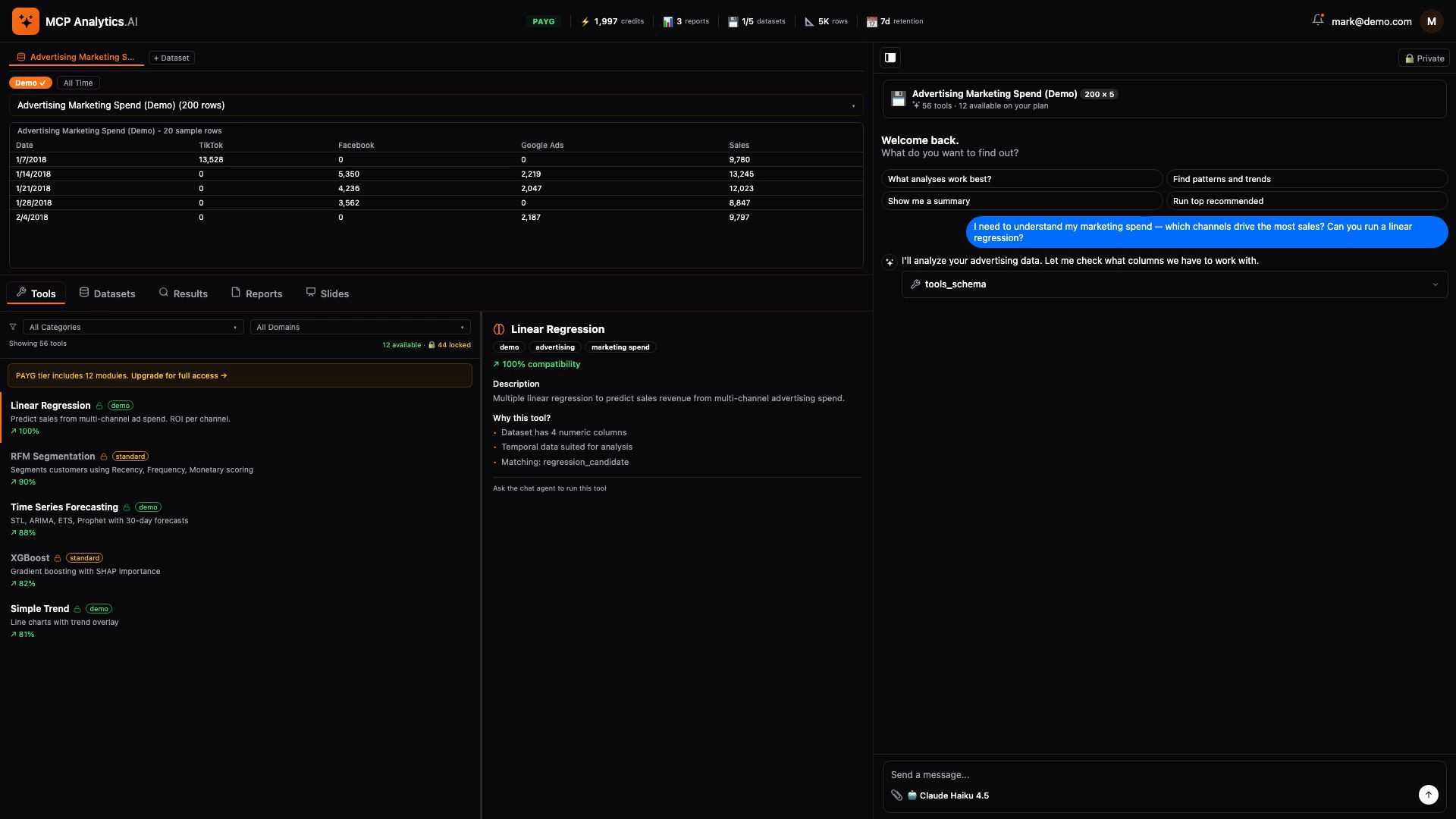](https://github.com/embeddedlayers/mcp-analytics/releases/download/v1.0.4/demo.mp4)
*Click to watch: Ask a question → upload data → get an interactive report with AI insights*
---
## Overview
You bring data and a question. A pipeline of specialist agents — spec drafter, builder, verifier, fixer, deployer — turns your question into a custom analysis for your data. The result is an interactive report: charts, AI-narrated insights, exportable PDF, embedded source code, citable. Every commissioned analysis joins your private library — query it from any MCP client, rerun on fresh data with one call, share with collaborators on your terms.
**Cornerstone modules** ship pre-built (t-tests, regression, churn, segmentation, forecasting, customer LTV, A/B testing, time series, survival analysis, and more) so you can see a finished report in under a minute and verify the team can build things that work. **Custom analysis creation** is the named revenue event — pay once to build the capability, own it, rerun for a fraction of the creation price. A build that fails is never billed.
Connect data however it lives: CSV upload, public URL, or live OAuth connectors for Google Analytics 4 and Google Search Console (more coming). Once a connector is linked, every rerun pulls fresh data automatically — no re-export step.
### Choose Your Depth — Four Tiers
Every analysis runs through the same validated pipeline — you choose how far it goes:
| Tier | What you get | Time |
|------|-------------|------|
| **Snapshot** | One chart and a verified insight — an instant read of your data, covered by your welcome credits | ~2 min |
| **JSON** | One computed statistical answer — the numbers and the method — deployed as a tool you re-run on fresh data | ~5 min |
| **Brief** | The computed answer, presented — chart, key figures, and method on a single shareable page | ~7 min |
| **Deck** | The full study — a complete statistical report built to your brief and independently verified; a durable module you own and re-run forever | 30–45 min |
More rigor outranks more charts: going deeper buys real statistical methods — hypothesis tests, regression, diagnostics — not just more cards. You pay for depth, and only if the build succeeds. [How the tiers work →](https://mcpanalytics.ai/tiers.html)
### Why MCP Analytics
- **Citable** — APA / MLA / Chicago / BibTeX in one click, ready for papers, decks, and regulatory filings
- **Sourceable** — R source code embedded in every report; a skeptical reader can run it and get the same answer
- **Reproducible** — fixed seeds, Docker isolation, validated methods; same input → same output, forever
- **Yours** — every commissioned module is private to your account; rerun on fresh data, query across your portfolio
- **MCP-native** — query the library from Claude, Cursor, Windsurf, or any MCP client
- **Secure** — OAuth2, encryption at rest, isolated container processing per analysis
- **Honest** — when an analysis has issues, the team gives you a free re-run; the relationship is built on the report being right
## Quick Start
### 1. Get an API Key
Sign up free at [account.mcpanalytics.ai](https://account.mcpanalytics.ai), go to account settings, and copy your API key (starts with `mcp_`). You get **2,000 welcome credits** — no credit card required.
### 2. Connect
Three options — all connect to the same platform with the same tools.
#### Option A: npx Install (Recommended)
Works with Claude Desktop, Cursor, Windsurf, and any stdio MCP client. Requires Node.js 18+.
**Claude Desktop** — add to `~/Library/Application Support/Claude/claude_desktop_config.json` (macOS) or `%APPDATA%\Claude\claude_desktop_config.json` (Windows):
```json
{
"mcpServers": {
"mcpanalytics": {
"command": "npx",
"args": ["-y", "@mcp-analytics/mcp-analytics"],
"env": {
"MCP_ANALYTICS_API_KEY": "mcp_your_key_here"
}
}
}
}
```
**Cursor / Windsurf** — add to `.cursor/mcp.json`:
```json
{
"mcpServers": {
"mcpanalytics": {
"command": "npx",
"args": ["-y", "@mcp-analytics/mcp-analytics"],
"env": {
"MCP_ANALYTICS_API_KEY": "mcp_your_key_here"
}
}
}
}
```
**Claude Code** — run in your terminal:
```bash
claude mcp add mcpanalytics -- npx -y @mcp-analytics/mcp-analytics
# Then set MCP_ANALYTICS_API_KEY in your environment
```
#### Option B: Direct API Key (No npm)
For MCP clients that support Streamable HTTP transport with custom headers:
```json
{
"mcpServers": {
"mcpanalytics": {
"url": "https://api.mcpanalytics.ai/mcp/api-key",
"headers": {
"X-API-Key": "mcp_your_key_here"
}
}
}
}
```
#### Option C: OAuth2 (No API Key)
Zero-config — a browser opens for login on first connection:
```json
{
"mcpServers": {
"mcpanalytics": {
"url": "https://api.mcpanalytics.ai/auth0"
}
}
}
```
#### Browse Tools First (No Account Needed)
Explore the full tool catalog before signing up:
```bash
# Static metadata (tool names, descriptions, all transport options)
curl https://api.mcpanalytics.ai/.well-known/mcp.json
# MCP protocol discovery (no auth — works with any MCP client)
curl -X POST https://api.mcpanalytics.ai/mcp/discover \
-H 'Content-Type: application/json' \
-d '{"jsonrpc":"2.0","method":"tools/list","id":1,"params":{}}'
```
### 3. Start Analyzing
Restart your MCP client. Ask:
- *"Upload sales.csv and find what drives revenue"*
- *"What statistical test should I use for this survey data?"*
- *"Forecast next quarter's sales from this time series"*
## How It Works
### The MCP Analytics Workflow
1. **Upload your data** — `datasets_upload` securely processes your CSV (or reuse an existing dataset / connected source)
2. **Commission the analysis** — `create_analysis` takes your question in plain language, your dataset, and the tier you choose (snapshot, json, brief, or deck)
3. **Watch it build** — `build_status` reports progress, queue position, and the report link when done
4. **Get the report** — `reports_view` delivers the interactive report; `report_cards` displays individual cards inline
5. **Rerun forever** — `run_analysis` re-runs any analysis you own on fresh data for a fraction of the creation cost
```
User: "What drives our sales growth?"
MCP Analytics:
→ Scopes the right statistical method for your data's shape
→ Writes validated R in an isolated container — deterministic, fixed seeds
→ Runs it, then independently verifies numbers and narrative
→ Returns a citable, interactive report you own
```
## MCP Tools
The platform provides a complete suite of MCP tools for end-to-end analytics:
### Analysis
- **`create_analysis`** - Commission a new analysis from a plain-language question, at the tier you choose
- **`build_status`** - Track a build: progress, queue position, report link
- **`run_analysis`** - Re-run an analysis you own (or one discovered via `discover_tools`) on fresh data
- **`modify_analysis`** - Request changes to an existing analysis
- **`module_request`** - Request a new analysis capability
### Discovery
- **`discover_tools`** - Natural language tool discovery (semantic search)
- **`tools_info`** - Get tool documentation and schema
- **`tools_schema`** - Inspect column requirements for a tool
### Data Management
- **`datasets_upload`** - Secure data upload with encryption
- **`datasets_list`** - List your uploaded datasets
- **`datasets_read`** - Preview dataset contents
- **`datasets_download`** - Download a dataset
- **`datasets_update`** - Update dataset metadata
### Connectors
- **`connectors_list`** - List available data source connections
- **`connectors_query`** - Pull live data from a connected source
### Reporting & Insights
- **`reports_view`** - Open an interactive HTML report
- **`reports_list`** - List your reports
- **`reports_search`** - Semantic search across past analyses
- **`report_cards`** / **`cards_list`** / **`cards_customize`** / **`cards_reset`** - Display and customize individual report cards
- **`agent_advisor`** - Conversational AI that guides analysis and interprets results
### Platform Tools
- **`billing`** - Usage and credit management
- **`account_link`** - Link your MCP client to your account
- **`about`** - Platform information and status
## Features
### Natural Language Interface
Just describe what you need:
```
"What drives our revenue growth?"
"Find customer segments in our data"
"Forecast next quarter's sales"
"Did our marketing campaign work?"
```
### Comprehensive Analysis Suite
|
**Statistical Methods**
- Regression Analysis
- Advanced Modeling
- Hypothesis Testing
- Survival Analysis
- Bayesian Methods
|
**Machine Learning**
- Ensemble Methods
- Boosting Algorithms
- Neural Networks
- Clustering
- Dimensionality Reduction
|
|
**Time Series**
- Forecasting
- Seasonal Analysis
- Trend Detection
- Multivariate Models
- Causal Analysis
|
**Business Analytics**
- Customer Analytics
- Market Analysis
- Pricing Models
- Predictive Analytics
- Experimental Design
|
### Seamless Workflow
```mermaid
graph LR
A[Ask in Claude/Cursor] --> B[MCP Analytics]
B --> C[Secure Processing]
C --> D[Interactive Report]
D --> E[Share Results]
```
## Example Usage
### Basic Regression
```
User: "I have a CSV with house prices. Can you predict price based on size and location?"
Claude: [Runs linear regression, provides R², coefficients, and diagnostic plots]
```
### Customer Segmentation
```
User: "Segment my customers in sales_data.csv into meaningful groups"
Claude: [Performs k-means clustering, creates segment profiles with visualizations]
```
### Time Series Forecasting
```
User: "Forecast next quarter's revenue using our historical data"
Claude: [Applies ARIMA, generates predictions with confidence intervals]
```
## Security & Compliance
### Enterprise Security Features
- **Authentication**: OAuth2 via Auth0 with PKCE
- **Encryption**: TLS 1.3 for all data transfers
- **Processing**: Isolated Docker containers per analysis
- **Data Handling**: Ephemeral processing, no persistence
- **Access Control**: OAuth 2.0 scoped permissions with usage limits
- **Audit Trail**: Complete logging for compliance
### Privacy & Data Handling
- **Data Privacy**: Ephemeral processing, no data retention
- **User Rights**: Data deletion upon request
- **Secure Processing**: Isolated containers per analysis
- **Enterprise Options**: Contact us for compliance requirements
[**Read full security documentation →**](SECURITY.md)
## Architecture
```mermaid
flowchart TB
subgraph "Client Integration"
CLI[CLI/SDK]
Claude[Claude Desktop]
Cursor[Cursor IDE]
MCP[MCP Protocol]
end
subgraph "API Gateway"
LB[Load Balancer]
Auth[OAuth 2.0/Auth0]
Rate[Rate Limiting]
end
subgraph "Processing Layer"
Router[Request Router]
Queue[Job Queue]
Workers[Processing Workers]
Docker[Docker Containers]
end
subgraph "Analytics Engine"
Stats[Statistical Methods]
ML[Machine Learning]
TS[Time Series]
Report[Report Generation]
end
subgraph "Data Layer"
Cache[Results Cache]
Storage[Secure Storage]
Encrypt[Encryption Layer]
end
CLI --> LB
Claude --> LB
Cursor --> LB
MCP --> LB
LB --> Auth
Auth --> Rate
Rate --> Router
Router --> Queue
Queue --> Workers
Workers --> Docker
Docker --> Stats
Docker --> ML
Docker --> TS
Stats --> Report
ML --> Report
TS --> Report
Report --> Cache
Cache --> Storage
Storage --> Encrypt
style Auth fill:#e8f5e9
style Docker fill:#fff3e0
style Report fill:#e3f2fd
```
## Performance
- **Dataset Size**: Handles large datasets
- **Processing Time**: Fast cloud-based processing
- **Secure Infrastructure**: Isolated Docker containers
- **API Access**: RESTful API with authentication
## Getting Started
[**Visit our website for pricing and signup →**](https://mcpanalytics.ai)
## Documentation
- [**Quick Start Guide**](docs/quickstart.md) - Get running in under a minute
- [**Architecture**](docs/ARCHITECTURE.md) - How the platform works
- [**Connectors**](docs/connectors.md) - GA4, GSC, and CSV data sources
- [**Pricing**](docs/pricing.md) - Credits, tiers, and plans
- [**How Credits Work**](https://mcpanalytics.ai/how-credits-work.html) - The credit model explained
- [**Security**](SECURITY.md) - Security & compliance details
- [**Tutorials**](https://mcpanalytics.ai/tutorials) - Step-by-step guides
## Support
- **Issues**: [GitHub Issues](https://github.com/embeddedlayers/mcp-analytics/issues)
- **Email**: support@mcpanalytics.ai
- **Docs**: [mcpanalytics.ai/docs](https://mcpanalytics.ai/docs)
- **Enterprise**: sales@mcpanalytics.ai
## Comparison with Other MCP Servers
| Feature | MCP Analytics | Google Analytics MCP | PostgreSQL MCP | Filesystem MCP |
|---------|--------------|---------------------|----------------|----------------|
| **Use Case** | Statistical Analysis | Web Metrics | Database Queries | File Access |
| **Setup Time** | 30 seconds | OAuth + Config | Connection string | Path config |
| **Data Sources** | Any CSV/JSON/URL | GA4 Only | PostgreSQL Only | Local files |
| **Analysis Tools** | Full Suite | GA4 Metrics | SQL Only | Read/Write |
| **Machine Learning** | ✅ Full Suite | ❌ | ❌ | ❌ |
| **Visualizations** | ✅ Interactive | ✅ Dashboards | ❌ | ❌ |
| **Shareable Reports** | ✅ | ❌ | ❌ | ❌ |
[**Detailed comparison →**](https://mcpanalytics.ai/compare.html)
## About MCP Analytics
MCP Analytics is built by data scientists and engineers passionate about making advanced statistical analysis accessible through AI assistants. The platform runs validated, deterministic analysis modules — the same data and tool produce the same result every time, unlike LLM code generation.
## Testing & Support
### Testing Your Connection
After installation, restart your MCP client and look for "MCP Analytics" in the available tools. You should see tools like `create_analysis`, `discover_tools`, `datasets_upload`, etc.
```bash
# Test the stdio proxy directly:
MCP_ANALYTICS_API_KEY=mcp_your_key npx -y @mcp-analytics/mcp-analytics
# Should output a "[mcp-analytics] Connected to https://api.mcpanalytics.ai" line with the tool count
```
### Troubleshooting
If MCP Analytics doesn't appear after installation:
1. Ensure your config file is valid JSON
2. Restart your MCP client completely
3. Verify your API key starts with `mcp_`
4. Check the client's developer console for errors
5. Try running the npx command in a terminal to see errors
For support: support@mcpanalytics.ai
## Contributing
While the core server is proprietary, we welcome contributions to:
- Documentation improvements
- Example notebooks and use cases
- Bug reports and feature requests
- Community tools and integrations
See [CONTRIBUTING.md](CONTRIBUTING.md) for guidelines.
## License
Copyright © 2026 PeopleDrivenAI LLC. All Rights Reserved.
MCP Analytics is a product of PeopleDrivenAI LLC.
This is commercial software. Use of the MCP Analytics service is subject to our:
- [Terms of Service](https://mcpanalytics.ai/terms)
- [Privacy Policy](https://mcpanalytics.ai/privacy)
---
**Ready to transform your data analysis workflow?**
[**Get Started Free**](https://mcpanalytics.ai/signup) | [**Read Docs**](https://mcpanalytics.ai/docs) | [**View Demo**](https://mcpanalytics.ai/demo.html)
Built by [MCP Analytics](https://mcpanalytics.ai) | Powered by R & Python
---
If MCP Analytics saves you time, a ⭐ on GitHub helps others find it.
**Tags**: `mcp` `mcp-server` `model-context-protocol` `analytics` `data-analytics` `shopify-analytics` `stripe-analytics` `csv-analysis` `statistics` `machine-learning` `time-series` `clustering` `regression` `business-intelligence` `claude` `cursor` `ai-tools` `no-code-analytics` `forecasting` `customer-analytics`