 [](https://github.com/emqx/mqttx/releases)


[](https://mqttx.app/downloads)
[](https://hub.docker.com/r/emqx/mqttx-web)
[](https://hub.docker.com/r/emqx/mqttx-cli)
[](https://github.com/emqx/MQTTX/discussions)
[](https://slack-invite.emqx.io/)
[](https://discord.gg/xYGf3fQnES)
[](https://www.youtube.com/channel/UC5FjR77ErAxvZENEWzQaO5Q)
[](https://twitter.com/EMQTech)
---
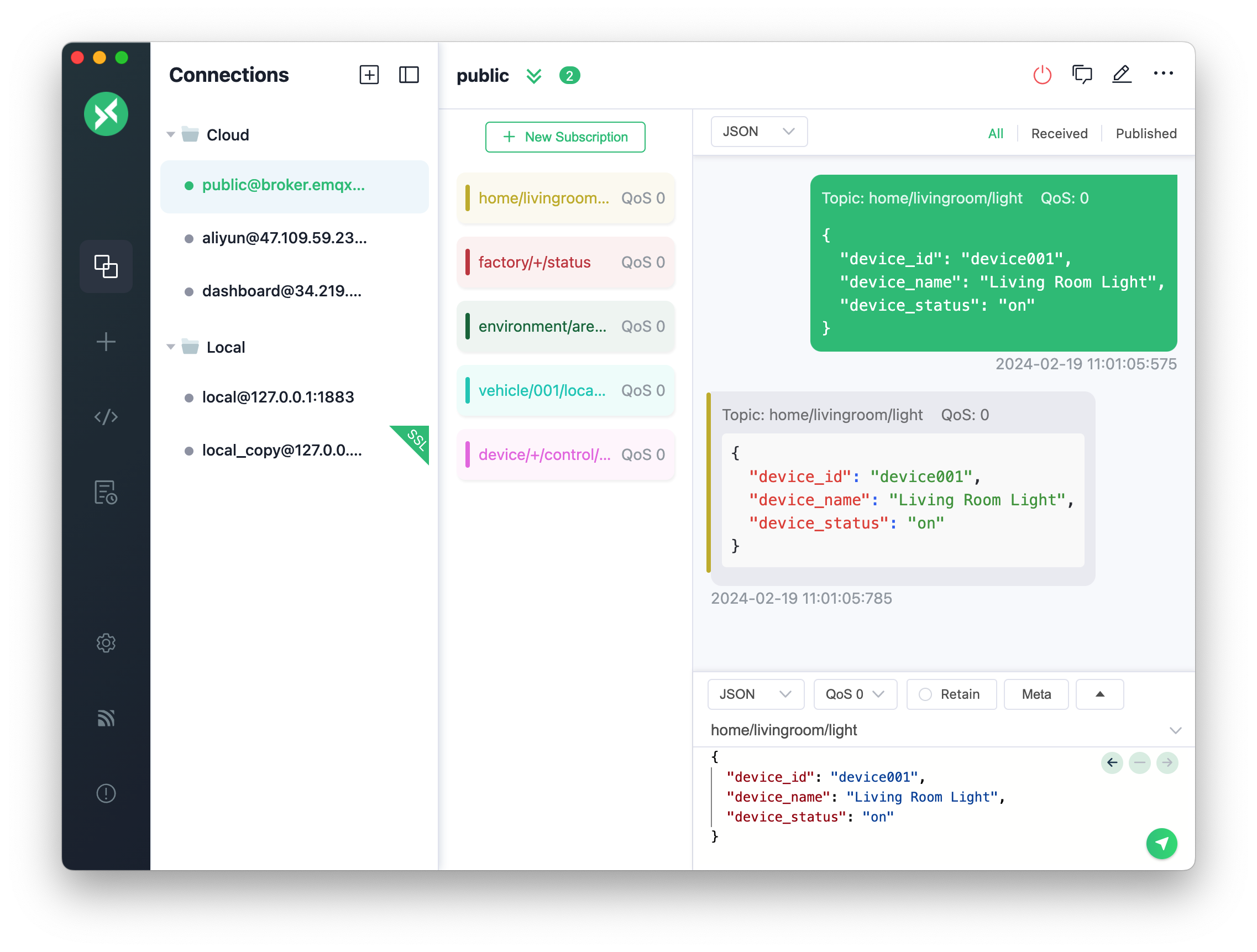
[MQTTX](https://mqttx.app) is a cross-platform [MQTT 5.0](https://www.emqx.com/en/blog/introduction-to-mqtt-5) client tool open sourced by [EMQ](https://www.emqx.com/en), which can run on macOS, Linux and Windows, and supports formatting MQTT payload.
[MQTTX](https://mqttx.app) simplifies test operation with the help of a familiar, chat-like interface. It’s easy and quick to create multiple, simultaneous online MQTT client connections, and can test the connection, publishing, and subscription functions of MQTT/TCP, MQTT/TLS, MQTT/WebSocket as well as other MQTT protocol features.
> [MQTT](https://www.emqx.com/en/blog/the-easiest-guide-to-getting-started-with-mqtt) stands for MQ Telemetry Transport. It is a publish/subscribe, extremely simple and lightweight messaging protocol, designed for constrained devices and low-bandwidth, high-latency or unreliable networks.
## Preview
## Installation
Currently available for download from these app stores
### macOS App Store
[](https://apps.apple.com/us/app/mqttx/id1514074565?mt=12)
### Homebrew
The macOS users can install MQTTX using [brew cask](https://formulae.brew.sh/cask/mqttx)
```shell
brew install --cask mqttx
```
### Linux
[](https://snapcraft.io/mqttx)
[](https://github.com/emqx/mqttx/releases)


[](https://mqttx.app/downloads)
[](https://hub.docker.com/r/emqx/mqttx-web)
[](https://hub.docker.com/r/emqx/mqttx-cli)
[](https://github.com/emqx/MQTTX/discussions)
[](https://slack-invite.emqx.io/)
[](https://discord.gg/xYGf3fQnES)
[](https://www.youtube.com/channel/UC5FjR77ErAxvZENEWzQaO5Q)
[](https://twitter.com/EMQTech)
---
[MQTTX](https://mqttx.app) is a cross-platform [MQTT 5.0](https://www.emqx.com/en/blog/introduction-to-mqtt-5) client tool open sourced by [EMQ](https://www.emqx.com/en), which can run on macOS, Linux and Windows, and supports formatting MQTT payload.
[MQTTX](https://mqttx.app) simplifies test operation with the help of a familiar, chat-like interface. It’s easy and quick to create multiple, simultaneous online MQTT client connections, and can test the connection, publishing, and subscription functions of MQTT/TCP, MQTT/TLS, MQTT/WebSocket as well as other MQTT protocol features.
> [MQTT](https://www.emqx.com/en/blog/the-easiest-guide-to-getting-started-with-mqtt) stands for MQ Telemetry Transport. It is a publish/subscribe, extremely simple and lightweight messaging protocol, designed for constrained devices and low-bandwidth, high-latency or unreliable networks.
## Preview

## Installation
Currently available for download from these app stores
### macOS App Store
[](https://apps.apple.com/us/app/mqttx/id1514074565?mt=12)
### Homebrew
The macOS users can install MQTTX using [brew cask](https://formulae.brew.sh/cask/mqttx)
```shell
brew install --cask mqttx
```
### Linux
[](https://snapcraft.io/mqttx)
 ### Released Packages
Download from [GitHub Releases](https://github.com/emqx/MQTTX/releases) and install it.
Alternative, you can download [here](https://www.emqx.com/downloads/MQTTX/).
## Usage
See our [documentation](https://mqttx.app/docs) or [manual](./docs/manual.md) for details.
1. Get MQTT Broker Ready.
- If you do not need to deploy the MQTT Broker locally, you can use the [public MQTT 5.0 Broker](https://www.emqx.com/en/mqtt/public-mqtt5-broker) provided by [EMQX Cloud](https://www.emqx.com/en/cloud) for testing:
```shell
Broker IP: broker.emqx.io
Broker TCP Port: 1883
Broker SSL Port: 8883
```
- To run MQTT Broker locally, [EMQX](https://www.emqx.com/en/products/emqx) is recommended: An Open-Source, Cloud-Native, Distributed MQTT Broker for IoT.
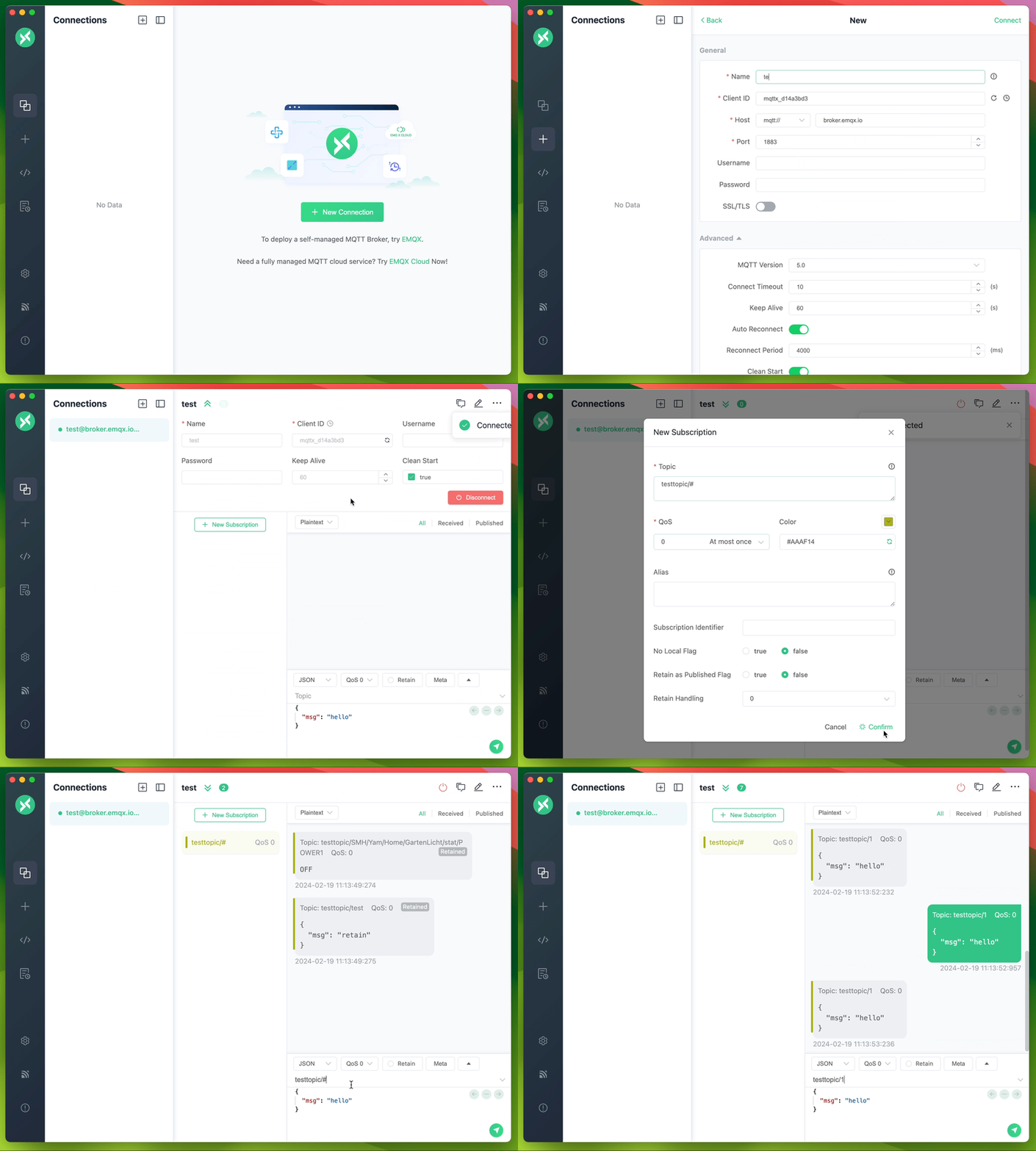
2. Connection configuration. Click the `+` button in the left menu bar and fill in the corresponding required fields in the form.
3. After the connection information is configured, click the `Connect` button in the upper right corner to create a connection and connect to MQTT Broker.
4. After the MQTT is connected successfully, you can perform MQTT publish and subscription tests.
## Better Together with EMQX
MQTTX is designed to connect to test MQTT Brokers such as EMQX, The one-click connection and simple graphical interface make it easy to connect to EMQX or EMQX Cloud to debug and explore functional features.
[Sign up EMQX Cloud for 14 days free trial](https://www.emqx.com/en/try?product=cloud)
[Download EMQX locally right now](https://www.emqx.com/en/try?product=enterprise)
## Get Involved
- Follow [@EMQTech on Twitter](https://twitter.com/EMQTech).
- If you have a specific question, check out our [discussion forums](https://github.com/emqx/emqx/discussions).
- For general discussions, join us on the [official Discord](https://discord.gg/xYGf3fQnES) team.
- Keep updated on [EMQX YouTube](https://www.youtube.com/channel/UC5FjR77ErAxvZENEWzQaO5Q) by subscribing.
## Develop
Recommended version for Node environment:
- v18.\*.\*
``` shell
# Clone
git clone git@github.com:emqx/MQTTX.git
# Install dependencies
cd MQTTX
yarn install
# Compiles and hot-reloads for development
yarn run electron:serve
# Compiles and minifies for production
yarn run electron:build
```
After the building is successful, the corresponding installation file for the successful build ing will appear in the `dist_electron` directory.
If you need to package it as an installation package for an independent operating system, please refer to the following command:
```shell
# For Windows
yarn run electron:build-win
# For Linux
yarn run electron:build-linux
# For macOS
yarn run electron:build-mac
```
## Contributing
Please make sure to read the [Contributing Guide](https://github.com/emqx/MQTTX/blob/main/.github/CONTRIBUTING.md) before making a pull request.
## Technology Stack
- [Electron](https://electronjs.org/)
- [Vue](https://vuejs.org/) + [Element](https://element.eleme.io)
- [TypeScript](https://www.typescriptlang.org/)
- [TypeORM](https://github.com/typeorm/typeorm)
- [SQLite](https://github.com/mapbox/node-sqlite3)
- [MQTT.js](https://github.com/mqttjs/MQTT.js)
## Resources
- [MQTT Programming](https://www.emqx.com/en/blog/category/mqtt-programming)
A series of blogs to help developers get started quickly with MQTT in PHP, Node.js, Python, Golang, and other programming languages.
- [MQTT SDKs](https://www.emqx.com/en/mqtt-client-sdk)
We have selected popular MQTT client SDKs in various programming languages and provided code examples to help you quickly understand the use of MQTT clients.
## License
Apache License 2.0, see [LICENSE](https://github.com/emqx/MQTTX/blob/main/LICENSE).
### Released Packages
Download from [GitHub Releases](https://github.com/emqx/MQTTX/releases) and install it.
Alternative, you can download [here](https://www.emqx.com/downloads/MQTTX/).
## Usage
See our [documentation](https://mqttx.app/docs) or [manual](./docs/manual.md) for details.
1. Get MQTT Broker Ready.
- If you do not need to deploy the MQTT Broker locally, you can use the [public MQTT 5.0 Broker](https://www.emqx.com/en/mqtt/public-mqtt5-broker) provided by [EMQX Cloud](https://www.emqx.com/en/cloud) for testing:
```shell
Broker IP: broker.emqx.io
Broker TCP Port: 1883
Broker SSL Port: 8883
```
- To run MQTT Broker locally, [EMQX](https://www.emqx.com/en/products/emqx) is recommended: An Open-Source, Cloud-Native, Distributed MQTT Broker for IoT.
2. Connection configuration. Click the `+` button in the left menu bar and fill in the corresponding required fields in the form.
3. After the connection information is configured, click the `Connect` button in the upper right corner to create a connection and connect to MQTT Broker.
4. After the MQTT is connected successfully, you can perform MQTT publish and subscription tests.

## Better Together with EMQX
MQTTX is designed to connect to test MQTT Brokers such as EMQX, The one-click connection and simple graphical interface make it easy to connect to EMQX or EMQX Cloud to debug and explore functional features.
[Sign up EMQX Cloud for 14 days free trial](https://www.emqx.com/en/try?product=cloud)
[Download EMQX locally right now](https://www.emqx.com/en/try?product=enterprise)
## Get Involved
- Follow [@EMQTech on Twitter](https://twitter.com/EMQTech).
- If you have a specific question, check out our [discussion forums](https://github.com/emqx/emqx/discussions).
- For general discussions, join us on the [official Discord](https://discord.gg/xYGf3fQnES) team.
- Keep updated on [EMQX YouTube](https://www.youtube.com/channel/UC5FjR77ErAxvZENEWzQaO5Q) by subscribing.
## Develop
Recommended version for Node environment:
- v18.\*.\*
``` shell
# Clone
git clone git@github.com:emqx/MQTTX.git
# Install dependencies
cd MQTTX
yarn install
# Compiles and hot-reloads for development
yarn run electron:serve
# Compiles and minifies for production
yarn run electron:build
```
After the building is successful, the corresponding installation file for the successful build ing will appear in the `dist_electron` directory.
If you need to package it as an installation package for an independent operating system, please refer to the following command:
```shell
# For Windows
yarn run electron:build-win
# For Linux
yarn run electron:build-linux
# For macOS
yarn run electron:build-mac
```
## Contributing
Please make sure to read the [Contributing Guide](https://github.com/emqx/MQTTX/blob/main/.github/CONTRIBUTING.md) before making a pull request.
## Technology Stack
- [Electron](https://electronjs.org/)
- [Vue](https://vuejs.org/) + [Element](https://element.eleme.io)
- [TypeScript](https://www.typescriptlang.org/)
- [TypeORM](https://github.com/typeorm/typeorm)
- [SQLite](https://github.com/mapbox/node-sqlite3)
- [MQTT.js](https://github.com/mqttjs/MQTT.js)
## Resources
- [MQTT Programming](https://www.emqx.com/en/blog/category/mqtt-programming)
A series of blogs to help developers get started quickly with MQTT in PHP, Node.js, Python, Golang, and other programming languages.
- [MQTT SDKs](https://www.emqx.com/en/mqtt-client-sdk)
We have selected popular MQTT client SDKs in various programming languages and provided code examples to help you quickly understand the use of MQTT clients.
## License
Apache License 2.0, see [LICENSE](https://github.com/emqx/MQTTX/blob/main/LICENSE).