enowx
An open-source AI coding agent for your terminal.
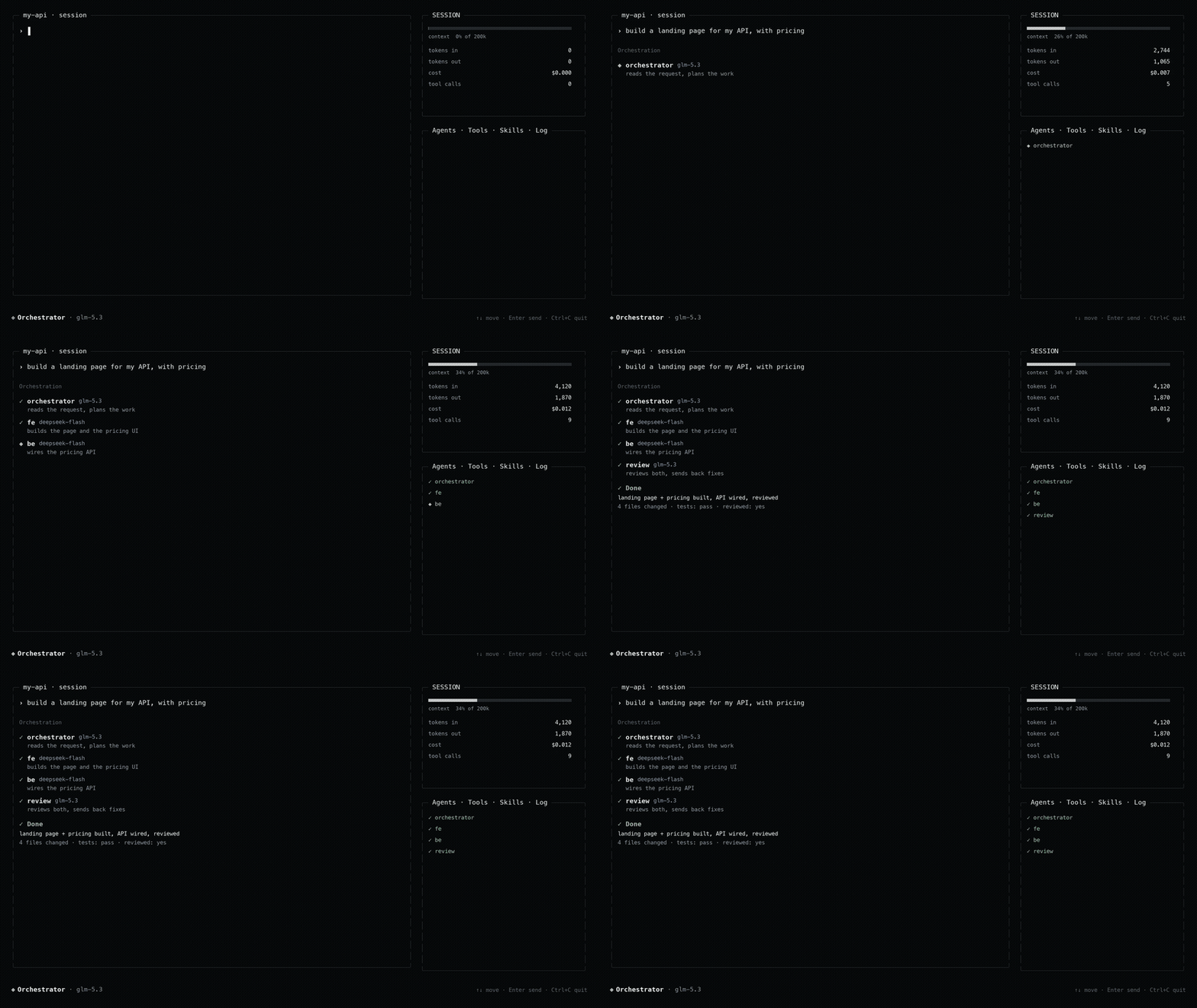
Specialist agents that plan, build, review and test each other's work, with
built-in code search and any model provider. One binary.




Website ·
Docs ·
Changelog ·
Discord
```sh
curl -fsSL https://enowx.ai/install.sh | sh # macOS / Linux
irm https://enowx.ai/install.ps1 | iex # Windows (PowerShell)
```
Then run `enowx`.
## Why enowx
Most coding agents are one model editing your files, locked to one vendor. enowx
is different:
- **A team, not one model.** It splits a task across specialist agents (plan,
build, review, test) that message each other and review each other's work
before it reports back.
- **Any provider, no lock-in.** Bring any OpenAI-compatible endpoint, including
local or cheaper models (DeepSeek and others). Give each agent its own model.
- **It finds things.** Built-in code search (RAG) over your project, cut along
the code's syntax, so a function is never split in half.
- **It is honest.** It reports what it changed and how it checked it, and says
plainly when something was not tested.
- **One binary.** Written in Rust, no runtime to install. Runs on macOS, Linux
and Windows, on Intel and ARM.
> **Early release.** It runs and is used daily, but the surface is still
> moving. Bug reports, ideas and PRs are welcome.
```
enowx # open the terminal interface (default)
enowx auth login deepseek # store a provider's API key (typed, not echoed)
enowx config set model.default deepseek/deepseek-flash # pin the model to start on
enowx models list # the connected providers and their models
```
## Install
**Early release.** v0.1.0 is the first public build; expect bugs and please
[report them](https://github.com/enowdev/enowxcli/issues).
Prebuilt binaries are published on the [releases page](https://github.com/enowdev/enowxcli/releases)
for macOS, Linux and Windows, on Intel/AMD (x86_64) and ARM (aarch64). The
installers are served from [enowx.ai](https://enowx.ai) and download the
binary from those releases. The command is `enowx`, and it also answers to
`enx`, its earlier name: both run the same binary, so habits and scripts that
use `enx` keep working.
### macOS (Apple Silicon and Intel)
```sh
curl -fsSL https://enowx.ai/install.sh | sh
```
The script picks the right build, checks its SHA-256, installs to
`~/.local/bin/enowx` with `enx` linked beside it, signs it ad hoc so
Gatekeeper lets it run, and adds
`~/.local/bin` to `PATH` in your shell's rc file (`.zshrc`, `.bash_profile`,
fish's `config.fish`, or `.profile`). Open a new terminal and run `enowx`.
### Linux (x86_64 and ARM64)
The same script. The Linux builds are static (musl), so they run on any
distribution, including Alpine, without extra libraries.
```sh
curl -fsSL https://enowx.ai/install.sh | sh
```
### Windows (x64 and ARM64)
In PowerShell:
```powershell
irm https://enowx.ai/install.ps1 | iex
```
It installs to `%LOCALAPPDATA%\Programs\enowx\enowx.exe`, with `enx.exe` as a
copy beside it, and adds that folder to
your user `PATH`; open a new terminal afterwards. The `bash` tool runs commands
with the `sh` from [Git for Windows](https://git-scm.com/download/win) when it
is installed, and with PowerShell otherwise. Windows Terminal renders the
interface best.
### Options and manual install
Both scripts read `ENX_VERSION` (a release tag such as `v0.1.0`; default the
latest) and `ENX_INSTALL_DIR`. `ENX_NO_MODIFY_PATH=1` stops `install.sh` from
touching your shell config:
```sh
curl -fsSL https://enowx.ai/install.sh | ENX_VERSION=v0.1.0 ENX_INSTALL_DIR=/usr/local/bin sh
```
To install by hand, download the archive for your platform from the releases
page, check it against its `.sha256` file, and put `enowx` (`enowx.exe`) on your
`PATH`:
| Platform | Archive |
|---|---|
| macOS, Apple Silicon | `enowx-aarch64-apple-darwin.tar.gz` |
| macOS, Intel | `enowx-x86_64-apple-darwin.tar.gz` |
| Linux, x86_64 | `enowx-x86_64-unknown-linux-musl.tar.gz` |
| Linux, ARM64 | `enowx-aarch64-unknown-linux-musl.tar.gz` |
| Windows, x64 | `enowx-x86_64-pc-windows-msvc.zip` |
| Windows, ARM64 | `enowx-aarch64-pc-windows-msvc.zip` |
### Updating
```sh
enowx update # install the latest release in place of this one
enowx update --check # only say whether there is one
```
The interface also looks for a new release when it starts and says so in
the status bar; `/update` installs it. Settings > Updates turns the check
off, or has it install updates by itself (`[update]` in `config.toml`,
or `ENX_NO_UPDATE_CHECK=1`).
Updating keeps both names on the new version, whichever one you ran. The
install scripts also point an older `enowx` or `enx` found elsewhere on your
`PATH` (one `cargo install` put in `~/.cargo/bin`, say) at the new one, so no
old version is left to start; a program named `enx` that is not enowx is
left alone. Releases before v0.2.3 updated themselves from archives named
`enx-`; releases still publish those, holding both names, so
`enx update` from v0.2.1 and `enowx update` from v0.2.2 work too.
### Uninstalling
```sh
curl -fsSL https://enowx.ai/install.sh | ENOWX_UNINSTALL=1 sh
```
In PowerShell: `$env:ENOWX_UNINSTALL = 1; irm https://enowx.ai/install.ps1 | iex`.
Both remove `enowx` and `enx` (and links an install made elsewhere). Your
settings, keys and sessions in `~/.enx` are kept; delete that folder yourself
to remove them too.
### From source
With a Rust toolchain:
```sh
cargo install --git https://github.com/enowdev/enowxcli enowx-cli
```
Or build it yourself (see [Build](#build)). Check the install with
`enowx --version`.
enowxcli opens on a home screen: the wordmark, `enow` in pixel letters with the
mark (an X of lit cells, its centre in orange) as the X, and the composer under
it. Until a provider and a model are set, the line under the composer says
which one is missing. Open `/provider`, choose a provider, then enter only its
API key. Built-in providers: **enxapi**, OpenAI, OpenRouter, Groq, and DeepSeek;
"Add a custom provider" takes any OpenAI-compatible endpoint. Any number of
providers stay connected side by side, each with its own key.
## What is inside
| Piece | Notes |
|---|---|
| Agent loop, tools, sessions | Streaming model calls, paired tool results, JSONL sessions |
| Terminal interface | Framed layout, thought/tool cards, paged right sidebar, theme picker |
| Roles | Three shipped: Orchestrator, Writer, Researcher |
| Specialists | A roster the orchestrator delegates to, including an authorized-assessment security team |
The binary opens the terminal interface, with five selectable palettes.
## Roles
| Role | Tools | Purpose |
|---|---|---|
| Orchestrator | read, write, edit, glob, grep, bash, fetch, todo | Owns a task end to end, then verifies it |
| Writer | read, write, edit, glob, grep, todo | Documentation and prose. No shell |
| Researcher | read, glob, grep, fetch, todo | Read-only investigation |
Role filtering runs twice: unavailable tools are never advertised to the model,
and a call that arrives anyway is refused before dispatch.
## Specialists
The orchestrator hands work to a roster of specialists, grouped in the sidebar:
- **LEAD**: `orchestrator` (the default: answers quick questions, delegates the
rest, never edits files) and `maestro`, an all-rounder with every tool that
both builds and delegates, for a job that mixes doing and handing out. Pick
it with `/agent maestro`.
- **BUILD**: `fe` (frontend/interface), `motion`, `canvas` (standalone
single-file HTML pages and tools), `be` (backend), `db`,
`devops`, `mobile`, `systems`.
- **SECURITY**: `security`, the lead of an authorized security assessment, and
its team.
- **SUPPORT**: `research`, `review`, `test`, `docs`, `perf`, `librarian`,
`general`.
### The security assessment team
`security` is the single security role a user selects. It leads an authorized
penetration test: it confirms the scope and written authorization first, then
delegates recon and each testing area to a specialist, consolidates the
findings, and finds the chains an individual surface cannot see. Its thirteen
specialists are reachable only through it (a `Lead` delegation, so an ordinary
request never lands one directly):
| Agent | Tests |
|---|---|
| `sec-recon` | Maps the target: hosts, services, versions, stack, input surface |
| `sec-osint` | Passive intelligence, no active touch on the target |
| `sec-webapp` | Web application against the OWASP categories |
| `sec-api` | REST/GraphQL/gRPC: authorization, injection, mass assignment, tokens |
| `sec-cloud` | AWS/Azure/GCP/Kubernetes posture |
| `sec-internal` | Authorized internal hosts, post-foothold |
| `sec-mobile` | Android/iOS applications and their backend |
| `sec-intercept` | Proxy-driven request tampering |
| `sec-reverse` | Binary and firmware analysis |
| `sec-threat-model` | Attack surface and trust boundaries |
| `sec-ir` | Incident triage and response |
| `sec-vibecoder` | Scores how likely a site was AI/boilerplate generated, and reports the gaps it left |
| `sec-report` | The write-up |
Active testing of a domain requires verifiable authorization, not a claim in
the chat. `authorize_target` checks that a connected Cloudflare account controls
the domain's DNS zone, which proves control of the domain, and records the
domain, its subdomains and the addresses it resolves to as the scope the team
may test. A domain the account does not control is refused. Connect the account with `enowx auth login cloudflare`: it asks which scope
(minimal `Zone:Read`, medium, or full, all read-only), opens the Cloudflare
token page with that template pre-filled, verifies the token you paste reads
zones, and saves it. For the longest-lived token leave its validity
as no expiry (the default, and longer than any end date). The token is read from `auth.json` or `CLOUDFLARE_API_TOKEN`.
Every role tests only authorized targets, reads over writes, proves a finding
with a benign payload (never a destructive one), and never prints a real
secret. Each confirmed issue is recorded with the `report_finding` tool, which
shapes it the same way every time: severity, location, reproduction, impact and
fix. The distinct `security` audit remains as the `security` skill family, which
reads code rather than testing a running target. This is for assessing systems
you are authorized to test, such as your own project before release.
## Built-in MCP servers
enowx ships four MCP servers of its own, served by the `enowx` binary (no Node
or Python needed). All four are always listed in `/mcp`, **off by default**.
Turn one on with `Tab`; a server with no credentials opens its config form
instead, which you also reach with `c`. Changes take effect in the running
session, no restart.
| Server | Gives agents |
|---|---|
| `coolify` | Applications, servers, databases, services and projects; deploy, start, stop, restart; logs; deployments; env var names |
| `dokploy` | Projects with their applications, compose stacks and databases; deploy, redeploy, start, stop; logs; deployments; servers; containers |
| `vps` | Your VPSes over SSH: run a command, or a read-only status (load, disk, memory, Docker) |
| `rag` | Code search over the workspace: `index`, `search`, `status`, `forget` (set up in Settings > RAG, see below) |
Fill a server in from the TUI (`c` on its row), or from the CLI, which an
agent can run for you: enowx reloads MCP the moment the credentials land, so you
never restart the session.
```sh
enowx mcp set coolify --url https://coolify.example.com --token
enowx mcp set dokploy --url https://dokploy.example.com --token
enowx vps add prod --host 203.0.113.5 --user root --key ~/.ssh/id_ed25519
enowx vps add db --host 203.0.113.6 --user root --password
enowx vps add lab # an alias from ~/.ssh/config, keys or ssh-agent
enowx mcp list
enowx vps list
enowx vps remove db
enowx mcp clear dokploy # forget its setup and turn it off
```
A VPS signs in the way `ssh` would, trying in turn: the key file you gave
it (OpenSSH, PEM or PuTTY `.ppk`; an encrypted one with its passphrase,
asked for or given with `--passphrase`), the keys in ssh-agent (Pageant or
the OpenSSH agent on Windows), the `IdentityFile`s from `~/.ssh/config` or
else the default `~/.ssh/id_*` keys, the password, and keyboard-interactive
answered with that password. `--host` may be an alias from `~/.ssh/config`,
whose `HostName`, `User` and `Port` are used; `--user` defaults to the
config's. A server that asks for a one-time code is reported, not answered:
use a key there. In the TUI, `c` on the vps row has the same fields.
URLs, hosts and users are kept in `~/.enx/builtin-mcp.json`; tokens and VPS
passwords and key passphrases in `~/.enx/auth.json` (readable by you alone), never in the
transcript. Ask the agent to set one up ("connect my Coolify at … with this
token") and it runs `enowx mcp set` for you, then the server is live without a
restart. Secret-looking fields and environment variable values are
redacted from what the tools return. A VPS's host key is recorded on the
first connection (`~/.enx/vps_known_hosts`) and a different key later is
refused before any password is sent. A server you declared yourself under
the same name (for example in `~/.claude/mcp.json`) keeps the name.
Other MCP clients can run them too: the command is `enowx mcp serve coolify`
(or `dokploy`, `vps`, `rag`) over stdio.
### Code search (`rag`)
`rag` indexes the workspace into Postgres with the pgvector extension and
lets agents search it by meaning. It has a section of its own in Settings
(`Ctrl+P`, then RAG, or `/rag`):
| Field | Choices |
|---|---|
| Code search (RAG) | on or off (off by default) |
| Database | a Postgres with pgvector, local (`postgres://localhost/enowx`) or cloud (Neon, Supabase, RDS, with `?sslmode=require`) |
| Embedding provider | Voyage AI, OpenAI, or Custom: any OpenAI-compatible `/embeddings` endpoint (Ollama, LM Studio, Jina, Mistral, a gateway) |
| API key | the provider's; optional for a local endpoint |
| Embedding model | picked from the provider's (`voyage-code-3`, `voyage-3.5`, `text-embedding-3-small`, ...), typed for a custom endpoint |
| Dimension | picked from the widths the model offers, typed for a custom endpoint |
| Reranker | `rerank-2.5`, `rerank-2.5-lite` or off for Voyage; for a custom endpoint, a model its `/rerank` serves, or blank for none |
| Index automatically | on (the default): the workspace is indexed when a session starts, a file an agent writes or edits is indexed at once, other changes every half minute, and everything before each search |
The same from the CLI, which an agent can run for you:
```sh
enowx mcp set rag --dsn postgres://localhost/enowx --token
enowx mcp set rag --provider openai --model text-embedding-3-large --dimension 1024 --token
enowx mcp set rag --provider custom --url http://localhost:11434/v1 --model nomic-embed-text --dimension 768
```
Files are cut along their syntax (tree-sitter for Rust, TypeScript,
JavaScript, Python, Go, JSON and CSS): a function, a type, a class method or
a config key is one chunk with the comments above it, small neighbours are
merged, and only an item larger than about 4,000 characters is split, along
its own body (the methods of a class, the statements of a function). Markdown
is cut at its headings, other text at its paragraphs; nothing is cut
mid-line. Each chunk records where it sits (`in impl Store`, `in Install >
macOS`) and what it defines, and a search shows both. Code that only moved
keeps its embedding and gets its new line numbers.
Indexing runs at low priority (nice 10 on Linux and macOS, below normal on
Windows) and holds its full scan of the workspace while a turn is running;
the files the turn edits are still indexed at once.
Chunks go to a table per width (`enx_rag_chunks_1024`, ...) and record the
model that embedded them: after a change of model or width, the next `index`
embeds the project again instead of mixing vectors, and a search only
compares vectors of the model in use. A search fuses vector and keyword
matches, then reranks them when a reranker is set. Indexing is incremental
(only changed chunks are embedded again), honours `.gitignore`, and never
reads `.env` files, keys or lockfiles. Each checkout is its own project.
The `rag` skill, which tells agents when to index and how to search,
reaches them only while the server is on.
## Agents working together
Off by default; turn it on in Settings > Team (or `/team`). Each part can
then be turned off on its own:
- **Messages.** Agents at work at the same time (parallel delegations, the
lead that delegated to them) can message each other with `message_agent`:
ask a question, agree on an interface, or point out a mistake in another
agent's part. A message reaches its agent at its next step.
- **Shared board.** `team_board` holds what one run decided (an endpoint's
shape, a token's name, a file that moved): agents post to it and read it
before work that touches another agent's part.
- **Cross-review.** When a delegate's work changed files, a reviewer (the
`review` agent unless you pick another) checks it against the task. Its
corrections go back to the delegate, in the same session, and the work is
checked again, until it passes or the correction rounds (1 to 5, 2 by
default) are spent. The caller's report ends with the outcome:
`CROSS-REVIEW by review: PASS after 1 correction round(s)`, or the
corrections still open.
The same settings live in `config.toml` under `[agent.comms]`: `enabled`,
`messages`, `board`, `review`, `review_rounds`, `reviewer`.
## Claude Code, Codex and other ACP agents
enowx can run on another coding agent instead of the configured model:
Claude Code, Codex, Gemini CLI, Kiro CLI, or any program that speaks the
[Agent Client Protocol](https://agentclientprotocol.com) on stdio. The agent
runs with your own sign-in and subscription; enowx is its client, the way an
editor is, and gives it enowx's prompt for each role, its skills, delegation
to enowx's specialists and questions to you, over a local MCP server.
```text
/acp claude run this session on Claude Code: the lead and every specialist
/acp kiro the same on Kiro CLI (or codex, gemini, a custom agent's name)
/model pick one of Claude Code's models (arrows, Enter); its efforts follow
/effort pick its thinking effort
/acp off back to enowx's own model (/native does the same)
/acp list the agents with where each stands, and pick one
```
`/acp ` gets the agent ready first: it installs the adapter into
`~/.enx/acp` with npm if it is missing (never globally; Node.js 20 or newer is
needed), checks that you are signed in, and starts it. If you are not, it says
how: `claude` then `/login`, `codex login`, `kiro-cli login`, or run `gemini`
once. Names complete as you type: `/acp c` offers `claude` and `codex`.
Kiro CLI speaks ACP itself (`kiro-cli acp`, version 1.25 or newer), so there
is no adapter: enowx finds `kiro-cli` on your `PATH` and never installs it.
Get it from [kiro.dev/downloads](https://kiro.dev/downloads) and sign in with
`kiro-cli login`; the card shows its version and the account type you signed
in with. enowx runs it as its own Kiro agent, `enowx`, kept in
`~/.kiro/agents/enowx.json` (never in your project), so Kiro loads only
enowx's MCP server and not the ones in your own Kiro config, with their
sign-in prompts; a file of that name you wrote yourself is left alone and not
used. Kiro offers models but no effort setting. If its default model is not
available on your plan, the error says so: pick another with `/model`
(`auto`, for one).
While an agent runs the session, `/model` and `/effort` list what that agent
offers, read from it, and the choice is kept per agent. Specialists use the
same agent and the same model. The status bar always says which brain is in
use: `ACP Claude Code · Opus 5.5 · effort high · ask me`, or `enowx native`.
Settings > ACP agents has a card for each agent: whether its adapter is
installed and you are signed in (Enter on Status installs it, or checks again
and reads its models), its default model and effort, chosen from its list,
how its permission prompts are answered, and a button that runs the session
on it. A row adds a custom ACP agent: its command, arguments and environment.
Permissions, per agent:
- **ask me** (the default): each prompt comes to you as a question. A
delegated specialist has no one to ask, so its prompts are refused there.
- **enowx's rules**: allowed as enowx's own tools are; with the decision
model on, a risky shell command goes through its shell gate.
- **bypass**: the agent's own bypass mode, nothing is asked. Only when you
choose it, and saving says so.
For mixing agents, `/agent`, select one, and `e` puts that agent alone on
another engine (or back on enowx's model) while the rest follow `/acp`.
From a shell, `enowx acp status` shows what is installed and signed in, and
`enowx acp install claude` (or `codex`, `gemini`) installs an adapter.
How it runs: one process per agent stays warm, and each enowx session gets its
own agent session, so later turns are fast and the agent remembers the
conversation. Claude Code is started with only enowx's MCP server
(`strictMcpConfig`), so slow servers in your own Claude config do not hold
back its first answer, and with summarised thinking, which enowx shows as
reasoning. Its messages, tool calls, diffs and plan appear as enowx's own; Esc
cancels its turn. In `config.toml`: `[acp] active` (the agent in use),
`[acp.engines.]` (`model`, `effort`, `permission`), `[acp.agents]`
(per-agent exceptions) and `[acp.custom.]` (`command`, `args`, `env`).
## Decision model
A decision model answers small typed questions (yes or no, one of a set, a
level on a scale) with a probability for each answer, in milliseconds. enowx
can hand it the small judgements a long prompt or a rule makes now. Off by
default; with it off, nothing below runs and enowx behaves exactly as without
it. Turn it on in Settings > Decision model (or `/decision`).
Providers:
- **Clef** on Cloudflare Workers AI (`@cf/cloudflare/clef-flash`, the
default, or `@cf/cloudflare/clef`). Needs your Cloudflare account ID and an
API token with Workers AI access (`CLOUDFLARE_ACCOUNT_ID` and
`CLOUDFLARE_API_TOKEN` are read when the fields are blank).
- **Jev** from TypeSafe (`jev-latest`). Needs a TypeSafe API key
(`TYPESAFE_API_KEY` is read when none is stored).
- **A custom endpoint** that speaks the same API as Jev and Clef: its URL, a
model name if it wants one, and a key if it needs one.
- **A model configured in enowx**, asked for JSON. Slower and less calibrated
than a model built for this, but needs nothing new: give it a
`provider/model`, or leave it blank for the one in use, and raise the
timeout to a few seconds.
Keys go to `~/.enx/auth.json` and are never shown. `Test the connection`
saves the section and asks the provider one question.
What it decides, each use on its own switch with its own threshold (how sure
the model must be before its answer is acted on):
- **Brainstorm or build** (0.8). For a new message to the lead: whether you
asked to brainstorm. Sure either way, the lead is told for that message;
unsure, or a large product whose purpose cannot be read, it decides as
before.
- **Which specialist** (0.7). For the same message: which one specialist the
work is for, and whether it needs a security review. Sure, the lead is told
to delegate to it directly.
- **When to ask the user** (0.8). Before a question reaches you: whether it
is yours to answer (taste nothing hints at, money, something that cannot
be undone, credentials). Sure it is not, the agent is told to decide and
state its assumption; unsure, the question is asked once a turn.
- **Keep tool results whole or cut** (0.85). A long tool result that the
model is sure is not needed in detail is carried into later turns as its
opening lines or its two ends, saying what was left out. Errors and short
results are always kept whole, and so is anything the model calls
essential.
- **Risky shell commands** (0.9). Before a `bash` command: what is the worst
it does. Only a sure "only reads" or "only changes files in the project"
runs as before; anything destructive, networked or touching production,
and anything the model is unsure of, asks you first. A sub-agent, which
cannot ask, does not run it and reports it instead.
Every judgement has a hard timeout (300 ms by default). A late or failed
answer takes the path enowx takes without a decision model, and never holds
up the turn. **Shadow mode** decides and records but changes nothing, for
comparing the model's decisions with what happens before trusting it.
Every decision is written to `~/.enx/decisions.jsonl`: the use, the provider
and model, the answers and their probabilities, how long it took, and what
was done (applied, shadow, unsure, timeout, error, or what you did when
asked). The Log tab lists them under `decisions`, and `enowx decisions [N]`
prints the last N.
The settings live in `config.toml` under `[decision]`: `enabled`,
`provider`, `model`, `account_id`, `base_url`, `timeout_ms`, `shadow`, and
`[decision.uses.