# Skill MCP Server 🚀
Turn any AI agent into a specialist — just drop in a skill folder.
📖 What is it? •
🌟 Why Choose It? •
✨ Features •
🚀 Quick Start •
📝 Creating Skills •
📚 Documentation
## 📖 What is Skill MCP Server?
Skill MCP Server is a standard [Model Context Protocol (MCP)](https://modelcontextprotocol.io/) server that bridges Claude Skills to any AI agent that supports MCP.
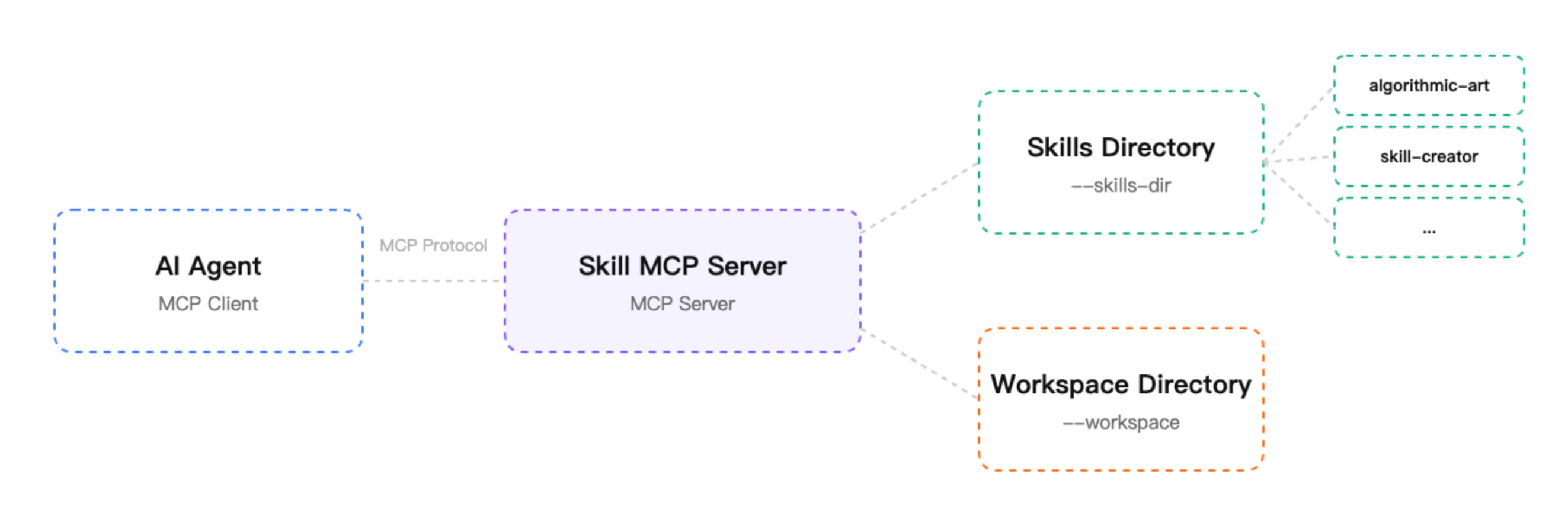
Previously, Claude Skills were mainly used in Anthropic's official tools. If your AI application doesn't support Skills, you'd have to implement your own parsing and execution logic, which is a hassle. With this project, you can simply configure it and let any MCP-compatible Agent use standard Skill files directly.
---
## 🎬 Demo

## 💡 Core Concepts
- 🔌 **MCP (Model Context Protocol)**: Think of it as a "USB interface" for AI. As long as your AI assistant supports this interface, it can connect to various tools and services.
- 📦 **Claude Skills**: Think of them as "skill packages" for AI. They're not just documentation — they include instructions (`SKILL.md`), accompanying scripts (Python/JS), and reference materials.
Skill MCP Server is a "converter" that helps various agents use the Skill ecosystem, enabling plug-and-play functionality.
## 🌟 Why Choose Skill MCP Server?
If your Agent doesn't support Skills yet, this project can help you quickly integrate:
| Dimension | Natively Supported Agents (e.g., Claude Code) | Other Agents (with this project) |
|-----------|------------------------------------------------|----------------------------------|
| Access Barrier | Deep integration, usually non-portable | Low barrier, standard MCP protocol |
| Development Burden | Official implementation complete | Zero code, no need to build Skill parser |
| Flexibility | Tied to specific clients | Cross-platform, works with any MCP-compatible agent |
| Feature Parity | Full script, resource & file stream support | Perfect alignment, same dynamic execution & resource access |
## ✨ Features
- 🛠️ **Highly Standardized**: Strictly follows MCP protocol
- 🌍 **Universal Compatibility**: Not tied to any vendor, works with all MCP-compatible AI clients
- ⚡ **Zero-Code Integration**: Helps agents without native Skill support quickly access the Skill ecosystem
- 📦 **Fully Compatible**: Supports `SKILL.md` format and `scripts/`, `references/` resource directories
- 📂 **Workspace Isolation**: Supports `--workspace` parameter to specify where Skill output files are stored
- 🔄 **Hot Reload**: Add new skills without restarting the server
- 🔒 **Secure by Design**: Path validation, sandboxed file operations
## 🚀 Quick Start
Recommended: Use `uvx` to run without manual installation.
### 📥 Installation
```bash
# Using pip
pip install skill-mcp-server
# Using uv (recommended)
uv pip install skill-mcp-server
```
### ⚙️ Configure MCP
Add Skill MCP Server to your MCP client configuration. All MCP-compatible clients use the same configuration format:
**Using uvx (recommended, no installation needed):**
```json
{
"mcpServers": {
"skill-server": {
"command": "uvx",
"args": [
"skill-mcp-server",
"--skills-dir", "/path/to/your/skills",
"--workspace", "/path/to/workspace"
]
}
}
}
```
**Using local installation:**
```json
{
"mcpServers": {
"skill-server": {
"command": "python",
"args": [
"-m", "skill_mcp_server",
"--skills-dir", "/path/to/your/skills",
"--workspace", "/path/to/workspace"
]
}
}
}
```
**Configuration file locations:**
- Claude Desktop: `claude_desktop_config.json` (location varies by OS)
- Claude Code: `~/.claude.json`
- Other MCP clients: Refer to your client's documentation
**Parameter Explanation:**
- `--skills-dir`: Core parameter. Set to the root directory containing all Skill folders you want your agent to use.
- `--workspace`: Important parameter. Specifies where Skill execution output files (code, reports, etc.) are saved.
## 🛠️ Available Tools (MCP Tools)
Once connected, your AI agent can use the following tools:
1. 🔍 `list_skills`: List all available skills
2. 📚 `skill`: Load a specific skill to get detailed instructions from its `SKILL.md`
3. 📄 `skill_resource`: Read reference documents or templates from skill packages
4. ▶️ `skill_script`: Execute scripts bundled with skills in a secure environment
5. 📖 `file_read`: Read files from the specified workspace
6. ✍️ `file_write`: Write files to the specified workspace
7. ✏️ `file_edit`: Edit existing files in the workspace
## 📝 Creating Skills
A standard Skill structure looks like this:
```
my-skills/
└── deploy-helper/ # Skill folder
├── SKILL.md # Core documentation (required)
├── scripts/ # Executable scripts
└── references/ # Reference materials
```
**SKILL.md Example:**
```markdown
---
name: deploy-helper
description: Help users deploy applications to production with one click
---
# Deploy Helper Usage Guide
When users request deployment, follow these steps:
1. Use `skill_resource` to read the deployment template.
2. Modify local configuration files.
3. Call `skill_script` to execute the deployment script.
```
### SKILL.md Format
```markdown
---
name: my-skill
description: Brief description of what this skill does and when to use it
---
# My Skill
## Overview
Explain what this skill enables the AI to do.
## Usage
Step-by-step instructions for the AI agent...
## Available Resources
- `scripts/process_data.py` - Process input data
- `assets/report_template.md` - Output template
```
## 💼 Use Cases
- 📊 **Data Analysis**: Enable agents to perform data analysis
- 📝 **Document Generation**: Enable agents to create professional documents
- 🔗 **API Integration**: Enable agents to integrate with specific APIs
- 🔍 **Code Review**: Enable agents to follow team standards
- 🚀 **DevOps Tasks**: Enable agents to automate deployment workflows
## 📚 Documentation
- 📖 [Getting Started Guide](docs/getting-started.md)
- ✨ [Creating Skills](docs/creating-skills.md)
- 📋 [Skill Format Reference](docs/skill-format.md)
- 📤 [Publishing Guide](docs/publishing.md)
## 🛠️ Development
```bash
# Clone the repository
git clone https://github.com/ephemeraldew/skill_mcp.git
cd skill_mcp
# Install development dependencies
uv pip install -e ".[dev]"
# Run tests
pytest
# Run linting
ruff check src/
```
## 🤝 Contributing
Contributions are welcome! Please see [CONTRIBUTING.md](CONTRIBUTING.md) for guidelines.
If this project helps you, please give it a ⭐️ Star.
## 📄 License
MIT License - see [LICENSE](LICENSE) for details.
## 🔗 Related Resources
- [MCP Official Documentation](https://modelcontextprotocol.io/)
- [Claude Skills Official Guide](https://code.claude.com/docs/en/skills)
- [Agent Skills Open Standard](https://agentskills.io/)
---
Built with the Model Context Protocol