A cross-platform SQL Server execution plan analyzer with built-in MCP server for AI-assisted analysis. Parses `.sqlplan` XML, identifies performance problems, suggests missing indexes, and provides actionable warnings — from the command line or a desktop GUI.
Built for developers and DBAs who want fast, automated plan analysis without clicking through SSMS.
## Screenshots
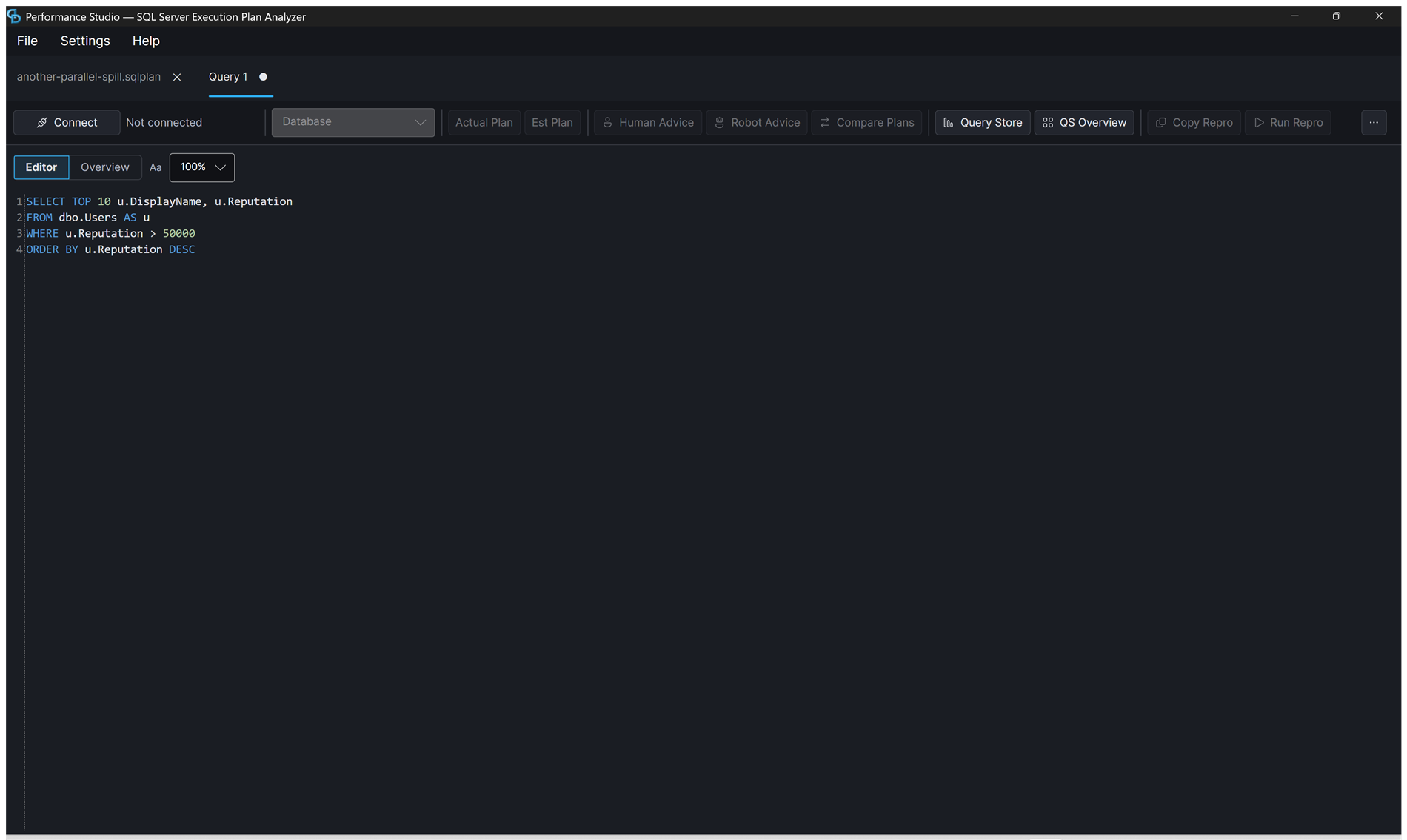
### Query Editor
Write queries with syntax highlighting and SQL keyword completion, connect to any SQL Server, and capture plans with one click.
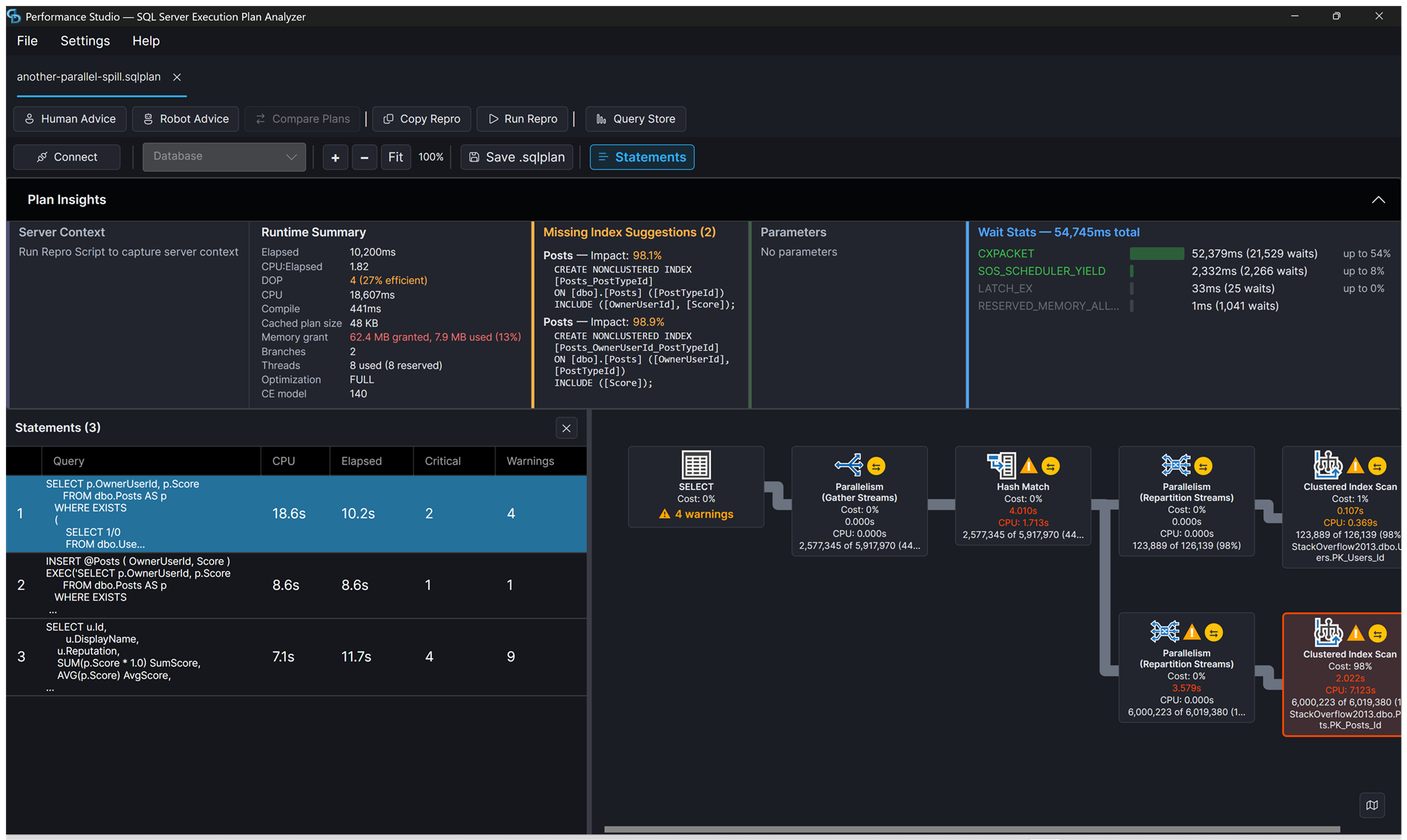
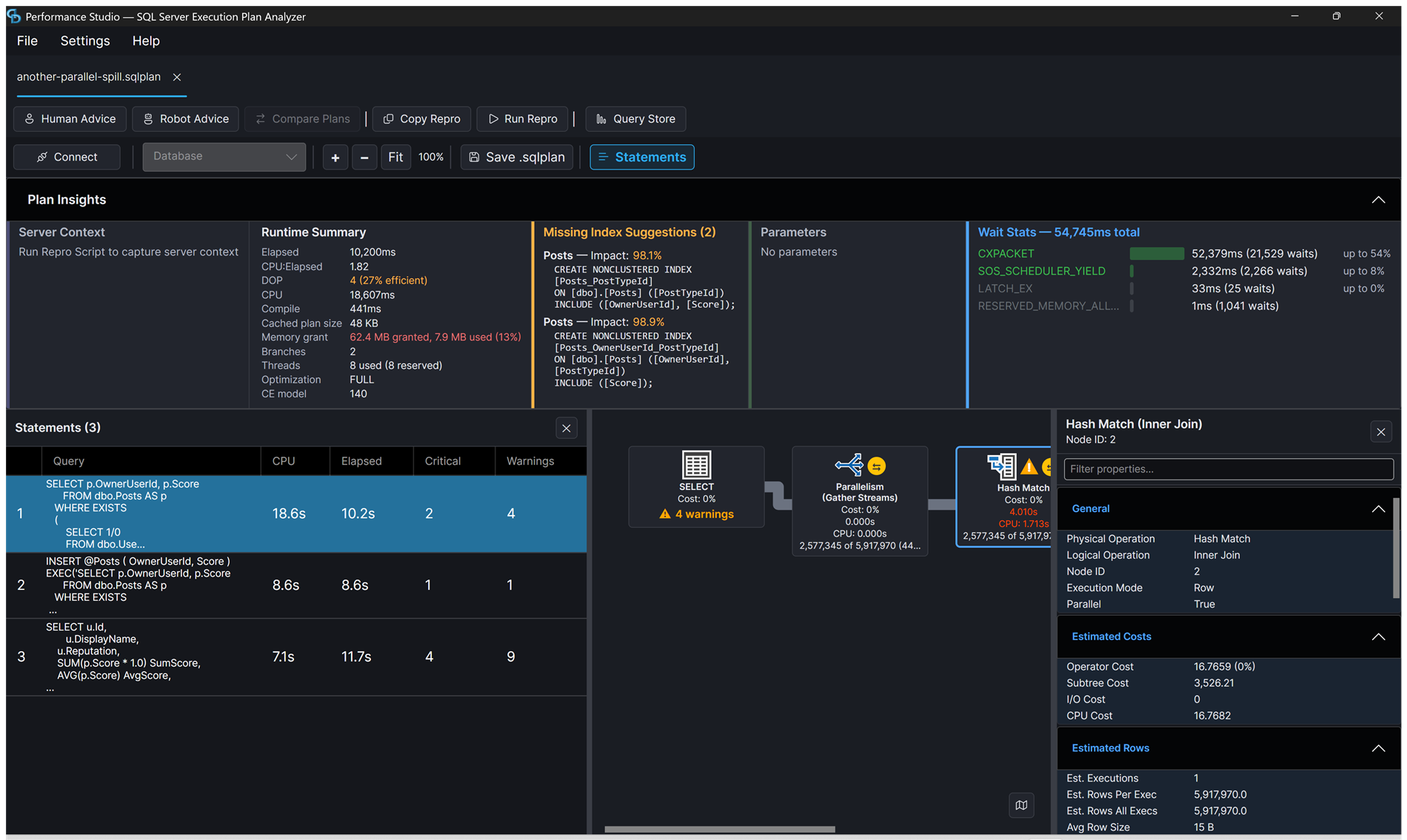
### Actual Execution Plan with Plan Insights
Graphical plan tree with SSMS-style operator icons, cost percentages, row counts, and warning badges. The Plan Insights panel shows runtime summary, missing indexes, parameters, and wait stats at a glance.
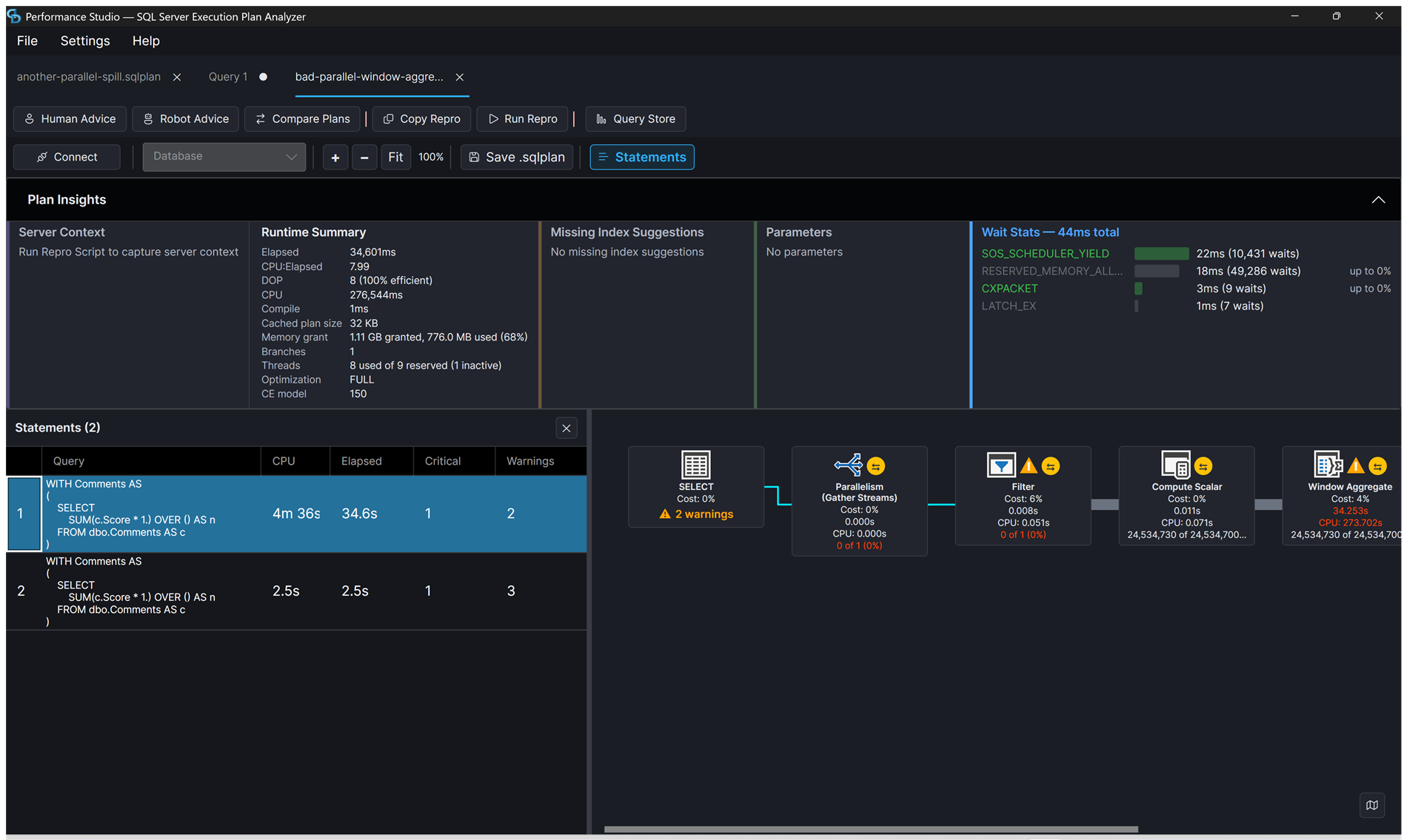
### Multi-Statement Navigation
Navigate stored procedures and batches with multiple statements. Click any statement in the grid to jump to its plan. Plan Insights shows parameters with compiled vs runtime values.
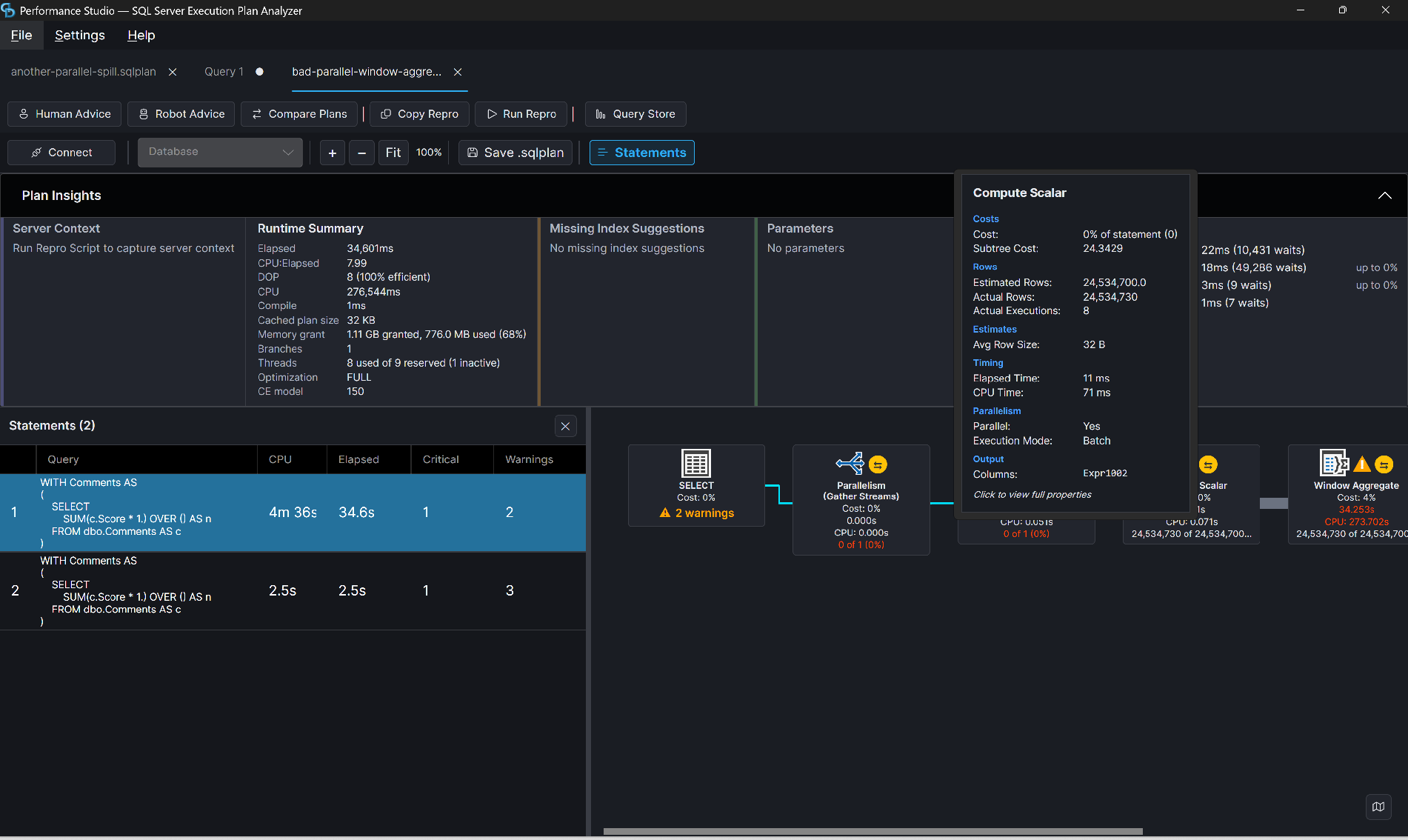
### Operator Tooltip and Properties
Hover any operator for a grouped tooltip with costs, rows, timing, and parallelism. Click for the full properties panel, which has a filter box and folds per-thread stats into one expander per section instead of hundreds of rows.
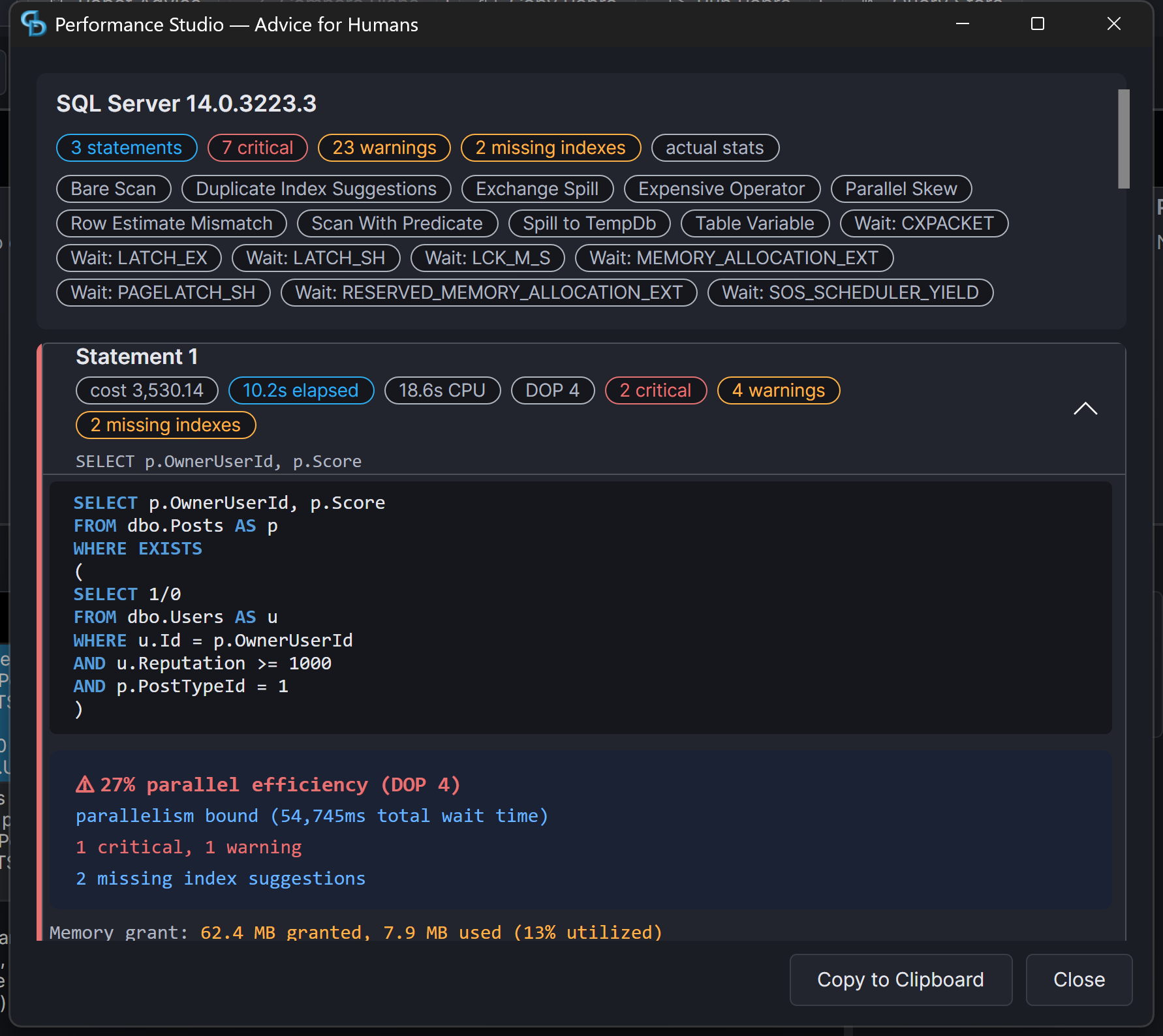
### Advice for Humans
Severity-scored cards for each statement: the warnings that fired, wait stats, memory grant, and missing indexes. Copy to clipboard gives you the plain-text version to paste into a ticket.
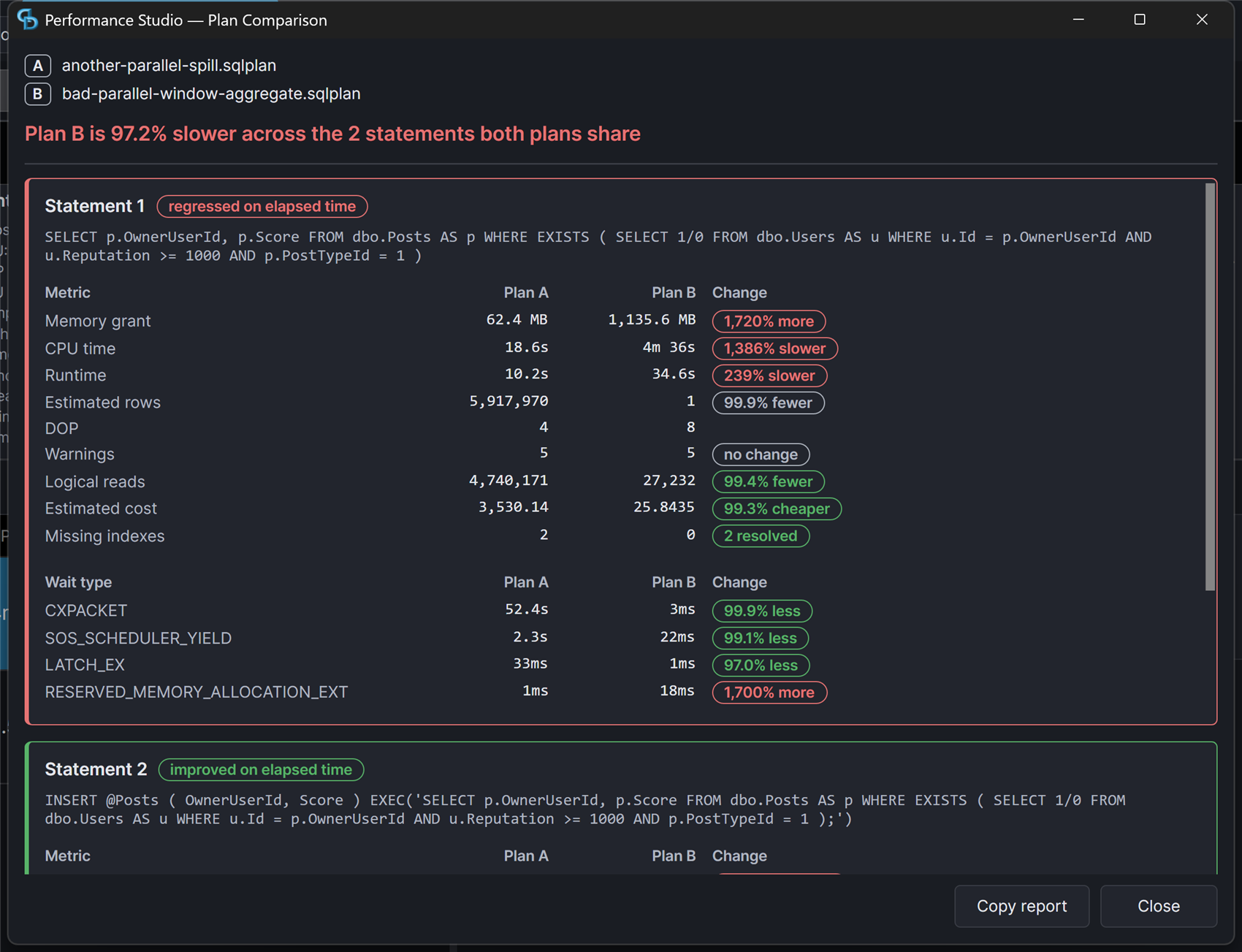
### Plan Comparison
A real metric diff. Each statement is scored as regressed or improved, every metric carries its own delta chip, and the direction that counts as better is declared per metric rather than guessed from the sign.
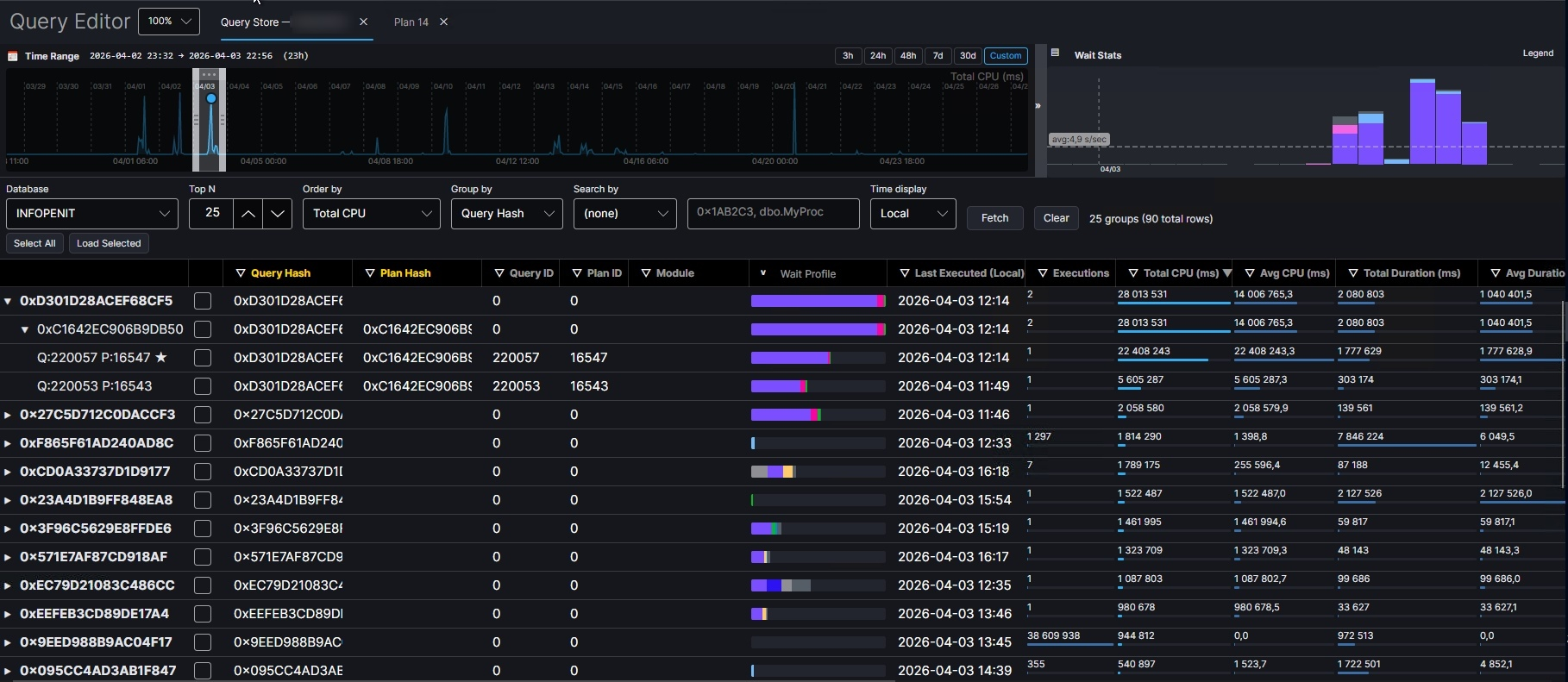
### Query Store Integration
Fetch top queries by CPU, duration, logical reads, physical reads, writes, memory, or executions from Query Store and load their plans directly into the analyzer.
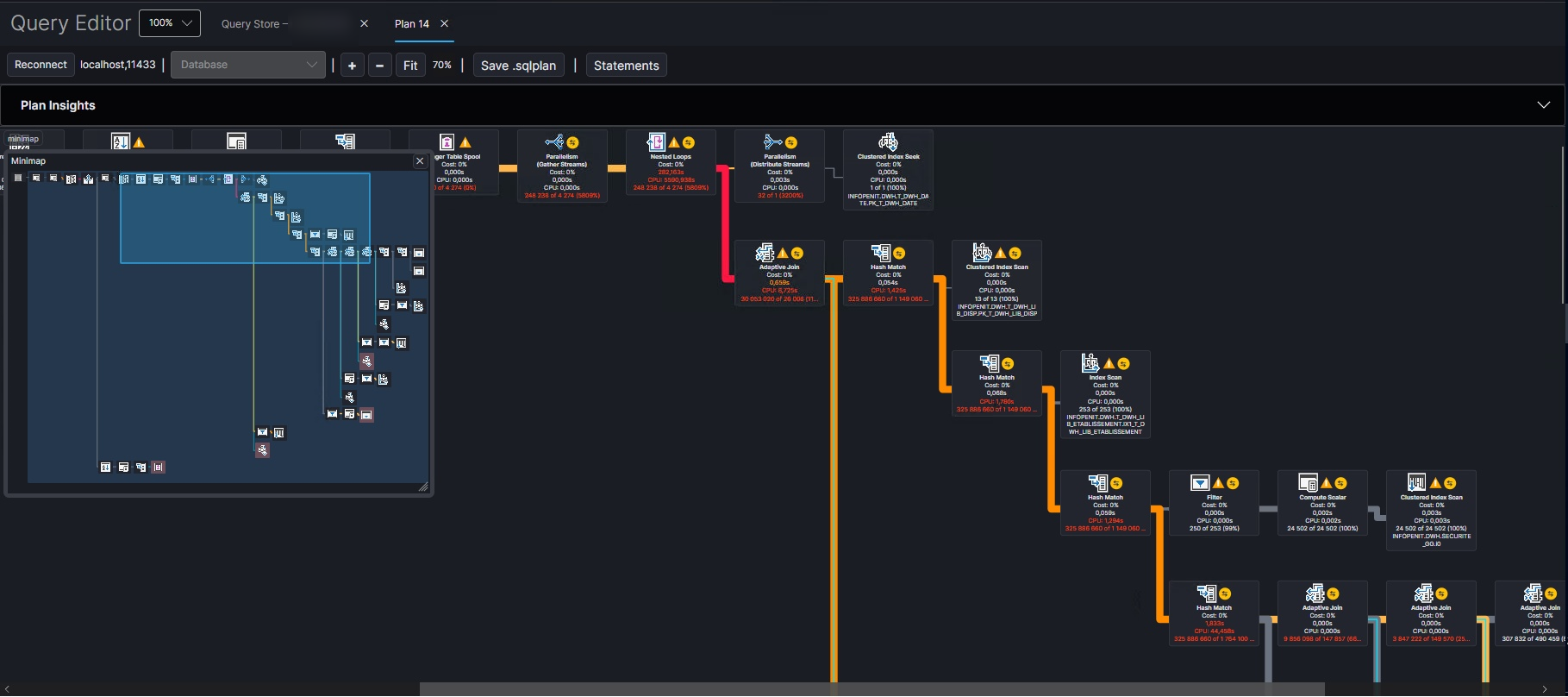
### Minimap and colored links by accuracy ratio divergence
The minimap provides a high-level overview of the entire plan, allowing you to quickly navigate to areas of interest. Colored links between operators indicate accuracy ratio divergence, helping you identify where estimates are most off from actuals.
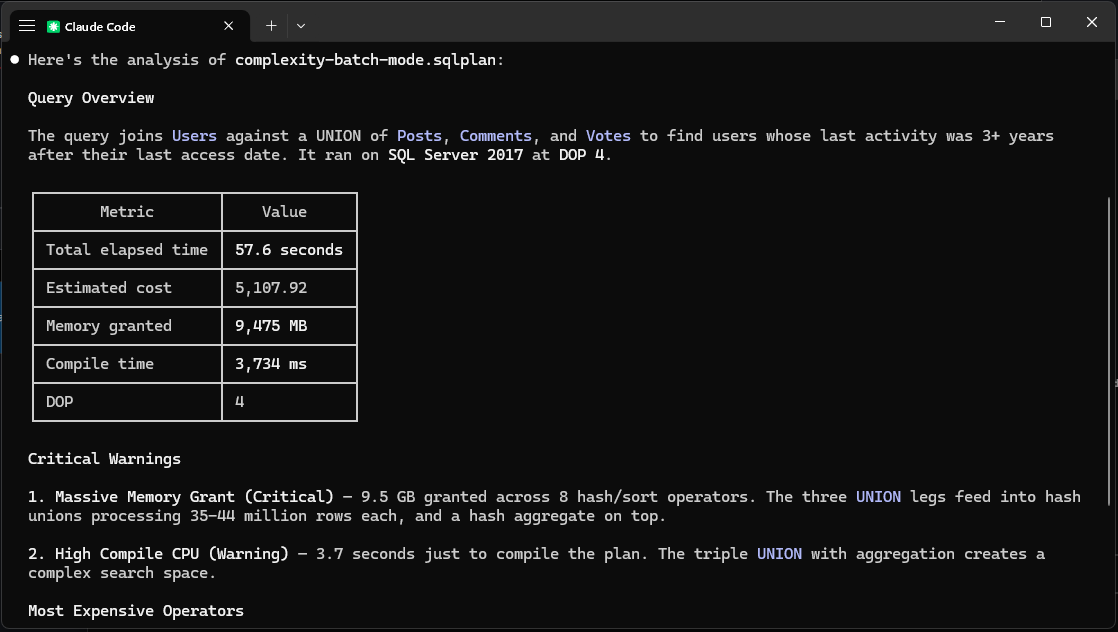
### MCP Integration
Ask Claude Code to analyze loaded plans, identify warnings, suggest indexes, and compare plans — all through the built-in MCP server.
#### Compact output (GCF)
Set `PLANVIEWER_OUTPUT_FORMAT=gcf` to have the MCP server return tool results as [GCF](https://gcformat.com) instead of JSON. GCF factors the repeated field names of record-heavy results (Query Store plan lists, connection and statement listings) into a single header, so a model spends roughly a third fewer tokens reading them. The substitution is opt-in and conservative: a result is re-encoded only when the wire is both smaller than the JSON and decodes back to the same value, so anything it cannot losslessly shrink is returned as the original JSON.
## What It Does
Feed it a query plan and it tells you what's wrong:
- **Large memory grants** — flags queries hoarding memory they don't use
- **Row estimate mismatches** — finds operators where estimates are 10x+ off from actuals
- **Missing indexes** — extracts SQL Server's index suggestions with ready-to-run CREATE statements
- **Hash, sort, and exchange spills** — identifies operators spilling to TempDB with severity based on volume
- **Parallel skew** — detects threads doing all the work while others sit idle
- **Scan predicates** — warns when scans filter rows with residual predicates
- **Key and RID lookups** — flags lookups back to the base table, distinguishes heaps from clustered indexes
- **Late filters** — finds Filter operators discarding rows deep in the plan
- **Nested loop concerns** — flags high-execution nested loops that might be better as hash joins
- **Parameter sniffing** — compares compiled vs runtime parameter values
- **Scalar UDFs** — warns about T-SQL and CLR scalar functions in execution paths
- **Implicit conversions** — detects type mismatches, upgrades severity when a seek plan is prevented
- **Anti-patterns** — OPTIMIZE FOR UNKNOWN, NOT IN with nullable columns, leading wildcards, function-wrapped predicates, and more
Each warning includes severity (Info, Warning, or Critical), the operator node ID, and enough context to act on immediately.
## Prerequisites
- [.NET 10 SDK](https://dotnet.microsoft.com/download/dotnet/10.0) (only needed to build from source — the pre-built binaries below are self-contained and require no SDK)
- SQL Server instance (optional — only needed for live plan capture; file analysis works without one)
- Docker (optional — macOS/Linux users can run SQL Server locally via Docker)
## Download
Pre-built binaries are available on the [Releases](https://github.com/erikdarlingdata/PerformanceStudio/releases/latest) page:
| Platform | Download |
|----------|----------|
| Windows (x64) | [PerformanceStudio-win-x64.zip](https://github.com/erikdarlingdata/PerformanceStudio/releases/latest/download/PerformanceStudio-win-x64.zip) |
| macOS (Apple Silicon) | [PerformanceStudio-osx-arm64.zip](https://github.com/erikdarlingdata/PerformanceStudio/releases/latest/download/PerformanceStudio-osx-arm64.zip) |
| macOS (Intel) | [PerformanceStudio-osx-x64.zip](https://github.com/erikdarlingdata/PerformanceStudio/releases/latest/download/PerformanceStudio-osx-x64.zip) |
| Linux (x64) | [PerformanceStudio-linux-x64.zip](https://github.com/erikdarlingdata/PerformanceStudio/releases/latest/download/PerformanceStudio-linux-x64.zip) |
These are self-contained — no .NET SDK required. Extract the zip and run.
**macOS note:** macOS may block the app because it isn't signed with an Apple Developer certificate. If you see a warning that the app "can't be opened," run this after extracting:
```bash
xattr -cr PerformanceStudio.app
```
Then open the app normally.
## Install the CLI
The `planview` command is a .NET tool on nuget.org. It needs the .NET 10 runtime.
```bash
dotnet tool install -g PerformanceStudio.Cli
planview analyze --help
```
For a CI pipeline, install into a folder and pin the version. A `dotnet-tools.json` manifest works too.
```bash
dotnet tool install --tool-path ./tools PerformanceStudio.Cli --version
./tools/planview analyze plan.sqlplan --compact
```
To update:
```bash
dotnet tool update -g PerformanceStudio.Cli
```
## Build from Source
Clone and build:
```bash
git clone https://github.com/erikdarlingdata/PerformanceStudio.git
cd PerformanceStudio
dotnet build
```
To verify the build:
```bash
dotnet test PlanViewer.sln
dotnet run --project src/PlanViewer.Cli -- analyze --help
```
## Quick Start
### Analyze an existing .sqlplan file
If you already have a `.sqlplan` file (saved from SSMS, Azure Data Studio, or another tool):
```bash
# JSON output (default) — full operator tree, suitable for automation
planview analyze my_query.sqlplan
# Human-readable text output
planview analyze my_query.sqlplan --output text
# Text output, warnings and missing indexes only (skip operator tree)
planview analyze my_query.sqlplan --output text --warnings-only
```
### Explore plans interactively (Repl pilot)
Run `planview repl` to start a long-lived plan-exploration session. Zero arguments and the
existing `analyze`, `query-store`, and `credential` commands continue to use the legacy
System.CommandLine graph.
```text
planview repl
> open slow-query.sqlplan
[plan slow-query-]> summary
[plan slow-query-]> warnings --severity critical
[plan slow-query-]> operators --top 10
[plan slow-query-]> missing-indexes --json
[plan slow-query-]> close
```
The same graph also works in one-shot and MCP modes:
```bash
planview plan open slow-query.sqlplan --json --no-logo
planview repl # explicit interactive alias
planview mcp serve # stdio MCP server generated from the graph
```
Bare `planview` preserves the legacy System.CommandLine behavior. Interactive exploration is
entered only through `planview repl`; scripts can use explicit legacy or one-shot `plan` commands.
The pilot uses the stable `Repl` `0.11.0` release. Loaded plans live only for the lifetime of
the process; `open` and `close` change only that in-memory catalog and never write the
source plan. MCP `plan_open` validates and reads the same opened file handle inside client
roots, accepts only `.sqlplan` files, and uses the server launch directory only when native
roots are unsupported and no soft roots exist. Advertised empty roots deny access. MCP and
local mode share the 16 MiB file/2-concurrent-open/32-session resource limits. See
[`docs/repl-pilot.md`](docs/repl-pilot.md) for architecture, security, and compatibility notes.
### Capture and analyze plans from a live server
Connect to a SQL Server instance, run queries, and capture their execution plans automatically.
**Quickest way** — pass credentials directly:
```bash
# Capture an actual execution plan (the query WILL run)
planview analyze --server sql2022 --database AdventureWorks \
--login sa --password YourPassword \
--query "SELECT * FROM Sales.SalesOrderHeader WHERE OrderDate > '2024-01-01'" \
--trust-cert --output-dir ./results/
# Capture an estimated plan (safe for production — query is NOT executed)
planview analyze --server sql2022 --database AdventureWorks \
--login sa --password YourPassword \
--query "SELECT * FROM Sales.SalesOrderHeader" \
--estimated --trust-cert --output-dir ./results/
```
**Using a .env file** — drop a `.env` in your working directory to avoid repeating connection details:
```bash
# .env
PLANVIEW_SERVER=sql2022
PLANVIEW_DATABASE=AdventureWorks
PLANVIEW_LOGIN=sa
PLANVIEW_PASSWORD=YourPassword
PLANVIEW_TRUST_CERT=true
```
Then just run:
```bash
planview analyze --query "SELECT * FROM Sales.SalesOrderHeader"
planview analyze ./queries/ --output-dir ./results/
```
CLI arguments override `.env` values when both are provided.
When the `.env` file supplies a setting, the CLI prints one line to stderr. The line names the file and those settings, and it never shows their values:
```text
Using settings from /work/.env: PLANVIEW_SERVER, PLANVIEW_TRUST_CERT
```
The CLI takes a setting from the file only when the setting has an effect:
- With no server from either place, `analyze` reads the plan file offline and takes nothing from the `.env` file.
- `PLANVIEW_PASSWORD` is used only with a login.
If a `PLANVIEW_` value holds a control character, the CLI stops and names the setting. The CLI prints the server and database names later. A control character in them moves the cursor and erases text, such as the `Using settings` line.
**Using the credential store** — for longer-term use, store credentials in your OS keychain:
```bash
# Store credentials (once per server)
planview credential add sql2022 --user sa
# You'll be prompted for the password — it's stored in your OS credential store
# Now connect without --login/--password
planview analyze --server sql2022 --database AdventureWorks \
--query "SELECT * FROM Sales.SalesOrderHeader" \
--trust-cert --output-dir ./results/
```
**Batch processing** a folder of .sql files:
```bash
planview analyze ./queries/ --server sql2022 --database StackOverflow2013 \
--login sa --password YourPassword \
--trust-cert --output-dir ./results/
```
Batch mode produces three files per query:
- `query_name.sqlplan` — the raw execution plan XML (openable in SSMS or the Performance Studio GUI)
- `query_name.analysis.json` — structured analysis with warnings, missing indexes, and operator tree
- `query_name.analysis.txt` — human-readable text report
### Manage credentials
```bash
planview credential add my-server --user sa # prompts for password
planview credential add my-server --user sa -p pwd # non-interactive
planview credential list # show stored credentials
planview credential remove my-server # delete credential
```
Credentials are stored in the OS credential store: Windows Credential Manager on Windows, Apple Keychain on macOS. Nothing is written to disk in plaintext. Linux has no credential store, so `planview credential` exits with an error there. Pass `--login` and `--password-stdin`, or put `PLANVIEW_LOGIN` and `PLANVIEW_PASSWORD` in a `.env` file.
## Example Output
These examples were generated against StackOverflow2013 on SQL Server 2022. Source queries are in [`examples/queries/`](examples/queries/), plans and analysis in [`examples/output/`](examples/output/).
### Text output (`--output text`)
```
Plan: 04_comment_heavy_posts.sqlplan
SQL Server: 1.564 (build 16.0.4222.2)
Statements: 1
--- Statement 1: SELECT ---
Query: SELECT p.Id, p.Title, p.Score, COUNT(c.Id) AS CommentCount
FROM dbo.Posts AS p JOIN dbo.Comments AS c ON c.PostId = p.Id
WHERE p.PostTypeId = 1 GROUP BY p.Id, p.Title, p.Score
HAVING COUNT(c.Id) > 20 ORDER BY CommentCount DESC
Estimated cost: 4069.8700
DOP: 8
Runtime: 4551ms elapsed, 15049ms CPU
Memory grant: 8,022,664 KB granted, 2,514,944 KB used
Warnings:
[Critical] Large Memory Grant: Query granted 7835 MB of memory.
Operator warnings:
[Critical] Parallelism (Node 0): Estimated 1 rows, actual 2,889 (2889x underestimated).
[Critical] Sort (Node 1): Estimated 1 rows, actual 2,889 (2889x underestimated).
[Warning] Sort (Node 1): Thread 1 processed 100% of rows. Work is heavily skewed.
[Warning] Filter (Node 2): Filter discards rows late in the plan.
Missing indexes:
StackOverflow2013.dbo.Posts (impact: 74%)
CREATE NONCLUSTERED INDEX [IX_Posts_PostTypeId]
ON dbo.Posts (PostTypeId) INCLUDE (Score, Title)
StackOverflow2013.dbo.Comments (impact: 19%)
CREATE NONCLUSTERED INDEX [IX_Comments_PostId]
ON dbo.Comments (PostId)
=== Summary ===
Warnings: 8 (4 critical)
Missing indexes: 2
Actual stats: yes
Warning types: Filter Operator, Large Memory Grant, Parallel Skew,
Row Estimate Mismatch, Scan With Predicate
```
### JSON output (default)
The default JSON output includes the full operator tree, making it suitable for CI pipelines, LLM consumption, or further processing. See [`examples/output/`](examples/output/) for complete examples.
### Batch processing
```
$ planview analyze ./examples/queries/ --server sql2022 \
--database StackOverflow2013 --trust-cert --output-dir ./results/
Capturing actual plans from sql2022/StackOverflow2013
[1/5] 01_top_users_by_posts ... OK (1.8s)
[2/5] 02_recent_questions ... OK (0.8s)
[3/5] 03_unanswered_high_score ... OK (0.7s)
[4/5] 04_comment_heavy_posts ... OK (4.7s)
[5/5] 05_user_vote_summary ... OK (4.3s)
Processed 5 files: 5 succeeded, 0 failed
Output: ./results/
```
## Desktop GUI
The Avalonia-based GUI renders execution plans visually with the same operator icons as SSMS. Open `.sqlplan` files via File > Open or drag-and-drop.
Features:
- Graphical plan tree with cost percentages and row counts
- Warning badge on root node showing total warning count
- Plan Insights panel — three-column view with runtime summary, missing indexes, and wait stats visualization
- Zoom and pan (mouse wheel + middle-click drag)
- Minimap for quick navigation of large plans
- Color-coded links between operators based on accuracy ratio divergence (estimates vs actuals)
- Click any operator to see full properties (30 sections)
- Statement grid with sortable columns (cost, rows, DOP, warnings)
- Tooltips on hover with key operator metrics
- **Advice for Humans** — one-click text analysis report you can read or share
- **Advice for Robots** — one-click JSON export designed for LLMs and automation
- **Plan Comparison** — compare two plans side-by-side (cost, runtime, I/O, memory, wait stats)
- **Copy Repro Script** — extracts parameters, SET options, and query text into a runnable `sp_executesql` script
- **Get Actual Plan** — connect to a server and re-execute the query to capture runtime stats
- **Query Store Analysis** — connect to a server and analyze top queries by CPU, duration, or reads
- **Query History** — view a history of executed queries with their plans along the timeline and metrics from query store
- **MCP Server** — built-in Model Context Protocol server for AI-assisted plan analysis (opt-in)
- Dark theme
```bash
dotnet run --project src/PlanViewer.App
```
## SSMS Extension
A VSIX extension that adds **"Open in Performance Studio"** to the execution plan right-click context menu in SSMS 18-22.
### How it works
1. Right-click on any execution plan in SSMS
2. Click "Open in Performance Studio"
3. The extension extracts the plan XML via reflection and saves it to a temp file
4. Performance Studio opens with the plan loaded
### Installation
1. Download `PlanViewer.Ssms.vsix` and `InstallSsmsExtension.exe` from the [latest release](https://github.com/erikdarlingdata/PerformanceStudio/releases/latest)
2. Place them in the same folder
3. Double-click `InstallSsmsExtension.exe` and approve the UAC prompt
4. The installer auto-detects SSMS 21 and/or SSMS 22 and installs into both
5. Restart SSMS to activate the extension
Release builds are signed. A signed installer installs only a `PlanViewer.Ssms.vsix` that has the same signature, so use the two files from the same release. You can also double-click `PlanViewer.Ssms.vsix` to install the extension without the installer.
### First run
On first use, if Performance Studio isn't found automatically, the extension will prompt you to locate `PlanViewer.App.exe`. The path is saved to the registry (`HKCU\SOFTWARE\DarlingData\SQLPerformanceStudio\InstallPath`) so you only need to do this once.
The extension searches for the app in this order:
1. Registry key (set automatically after first browse)
2. Common install locations: `%LOCALAPPDATA%\PerformanceStudio\current\` (the release installer's folder), then older install folders under `%LOCALAPPDATA%\Programs\` and `Program Files`
3. System PATH
## MCP Server (LLM Integration)
The desktop GUI includes an embedded [Model Context Protocol](https://modelcontextprotocol.io) server that exposes loaded execution plans and Query Store data to LLM clients like Claude Code and Cursor.
### Setup
1. Enable the MCP server in `~/.planview/settings.json`:
```json
{
"mcp_enabled": true,
"mcp_port": 5152
}
```
2. Register with Claude Code:
```
claude mcp add --transport http --scope user performance-studio http://localhost:5152/
```
3. Open a new Claude Code session and ask questions like:
- "What plans are loaded in the application?"
- "Analyze the execution plan and tell me what's wrong"
- "Are there any missing index suggestions?"
- "Compare these two plans — which is better?"
- "Fetch the top 10 queries by CPU from Query Store"
### Available Tools
13 tools for plan analysis and Query Store data:
| Category | Tools |
|---|---|
| Discovery | `list_plans`, `get_connections` |
| Plan Analysis | `analyze_plan`, `get_plan_summary`, `get_plan_warnings`, `get_missing_indexes`, `get_plan_parameters`, `get_expensive_operators`, `get_plan_xml`, `compare_plans`, `get_repro_script` |
| Query Store | `check_query_store`, `get_query_store_top` |
Plan analysis tools work on plans loaded in the app (via file open, paste, query execution, or Query Store fetch). Query Store tools use a built-in read-only DMV query — no arbitrary SQL can be executed.
The MCP server binds to `localhost` only and does not accept remote connections. Disabled by default.
## Project Structure
```
PerformanceStudio/
├── src/
│ ├── PlanViewer.Core/ # Analysis engine (parser, 30 rules, layout)
│ ├── PlanViewer.App/ # Avalonia desktop GUI
│ ├── PlanViewer.Cli/ # CLI tool (planview command)
│ ├── PlanViewer.Ssms/ # SSMS extension (.vsix, .NET Framework 4.7.2)
│ └── PlanViewer.Ssms.Installer/ # SSMS extension installer (auto-detects SSMS 21/22)
├── tests/
│ └── PlanViewer.Core.Tests/ # 37 xUnit tests with real .sqlplan fixtures
├── examples/
│ ├── plans/ # Sample .sqlplan files for testing
│ ├── queries/ # Sample .sql files
│ └── output/ # Generated .sqlplan, .analysis.json, .txt
└── PlanViewer.sln
```
## CLI Reference
### `planview analyze`
```
Usage: planview analyze [] [options]
Arguments:
.sqlplan file, .sql file, or directory of .sql files
Options:
--stdin Read plan XML from stdin
-o, --output json (default), text, or both (with --server, both writes .json and .txt files)
--compact Compact JSON (no indentation)
--warnings-only Skip operator tree, only output warnings and indexes
-s, --server SQL Server name (matches credential store key)
-d, --database Database context for execution
-q, --query Inline SQL text to execute
--output-dir Directory for output files
--estimated Estimated plan only (query is NOT executed)
--auth windows, sql, or entra (default: auto-detect)
--trust-cert Trust server certificate
--timeout Query timeout (default: 60)
--login SQL Server login (bypasses credential store)
--password SQL Server password (bypasses credential store)
--config Path to a .planview.json config file (overrides auto-discovery)
```
### `planview credential`
```
planview credential add --user [-p ]
planview credential list
planview credential remove
```
On Linux, `planview credential` exits with an error. See [Platform Support](#platform-support).
### Configuration file (.planview.json)
A `.planview.json` file changes what the analyzer reports. The CLI commands `analyze`, `query-store` and `repl` read it. The desktop app reads it each time it opens a plan. The MCP server does not read it and always uses the defaults.
The file is looked for in this order, and the first one found wins:
1. The path given to `--config`. If that file does not exist, the command stops with an error.
2. `.planview.json` in the current directory.
3. `.planview.json` in your home directory.
If none exists, the analyzer uses its defaults. The file is JSON. Comments and trailing commas are allowed.
```jsonc
{
"rules": {
"disabled": [3],
"severity_overrides": { "10": "Info" }
},
"suppressions": [
{
"query_hash": "0x00E1987CD1C28B4C",
"rule": 10,
"operator": "eventuous.Messages",
"reason": "Library procedure. The library owns the clustered index."
},
{
"query_hash": "00e1987cd1c28b4c",
"type": "Implicit Conversion",
"reason": "Accepted. A vendor fixes the column type."
}
]
}
```
The `rules.disabled` list holds rule numbers. A disabled rule never runs.
The `rules.severity_overrides` map gives a rule number a new severity. The allowed values are `Info`, `Warning` and `Critical`.
The `suppressions` list marks single findings as accepted. Use it when a finding is correct but you cannot or will not act on it. A suppressed finding is not removed. It stays in the output with `"suppressed": true` and its reason. The text output tags it as `[suppressed: ]` and the HTML output shows a `suppressed: ` badge. A suppressed finding keeps its severity, including one set by `severity_overrides`.
A suppressed finding does not count toward `total_warnings`, `critical_warnings` or `warning_types`. The summary reports it in `suppressed_warnings` instead. The same rule applies to the counts in the desktop app.
Each suppression has these fields:
| Field | Required | Meaning |
|-------|----------|---------|
| `query_hash` | Yes | The query hash of the statement. Leading `0x` is optional and case does not matter, so `0x00E1987CD1C28B4C` and `00e1987cd1c28b4c` are the same hash. The suppression applies to that statement only, including statements inside a stored procedure body. |
| `rule` | One of `rule` or `type` | A rule number. It matches findings from that rule. It never matches a warning that SQL Server wrote into the plan, because no rule produced it. |
| `type` | One of `rule` or `type` | A warning type, such as `Implicit Conversion`. The whole type must match and case does not matter. Use it for warnings that have no rule number. If you give both `rule` and `type`, both must match. |
| `operator` | No | Text that must appear in the operator label. Case does not matter. Use the label from the `operator` field of the JSON output, such as `Key Lookup on eventuous.Messages (Node 1)`. A partial match works, so `eventuous.Messages` is enough. A finding on the statement as a whole has no operator, so a suppression that sets `operator` never matches it. |
| `reason` | Yes | Why the finding is accepted. It must not be empty. |
A suppression that is missing a field is an error. The command prints one line that names the file, for example `Suppression 2 in C:\work\team.json has no "reason".`, and exits with code 1. The number is the zero-based position in the list. The desktop app does not stop. It opens the plan with the defaults and shows the message in the toolbar.
To find the `query_hash` of a statement, run `planview analyze` with JSON output and read `statements[].query_hash`. Each warning in the JSON also shows its `rule` number when a rule produced it, and its `operator` label when it belongs to an operator.
## Authentication
There are three ways to authenticate, in order of precedence:
1. **`--login` / `--password`** — passed directly on the command line (or via `.env` file). Simplest for dev/test.
2. **Credential store** — stored in Windows Credential Manager or Apple Keychain via `planview credential add`. Best for repeated use.
3. **Windows Authentication** — used automatically when no SQL credentials are found. Requires a valid Kerberos ticket.
Override the auto-detection with `--auth windows`, `--auth sql`, or `--auth entra`.
**macOS note:** Windows Authentication does not work on macOS (no Kerberos ticket by default). Use `--login`/`--password`, the credential store, or `--auth entra` instead.
## Platform Support
| Platform | GUI | CLI | Credential Store |
|----------|-----|-----|-----------------|
| Windows | Yes | Yes | Windows Credential Manager |
| macOS | Yes | Yes | Apple Keychain |
| Linux | Yes | Yes | None. Use `--login` with `--password-stdin`, or a `.env` file |
### macOS: SQL Server via Docker
macOS users need a SQL Server instance to use the live capture features. The easiest path is Docker:
```bash
docker run -e "ACCEPT_EULA=Y" -e "MSSQL_SA_PASSWORD=YourPassword123" \
-p 1433:1433 --name sql_server \
-d mcr.microsoft.com/mssql/server:2022-latest
# Store the credential
planview credential add localhost --user sa -p YourPassword123
# Test connectivity
planview analyze --server localhost --database master --trust-cert \
--query "SELECT @@VERSION" -o text
```
Always use `--trust-cert` with local Docker instances.
## Analysis Rules
The analyzer runs 30 rules against each plan, covering:
| Category | Rules |
|----------|-------|
| Memory | Large grants, grant vs used ratio, spills to TempDB (including exchange spills) |
| Estimates | Row estimate mismatches (10x+), zero-row actuals, row goals |
| Indexes | Missing index suggestions, key lookups, RID lookups, scan with residual predicates |
| Parallelism | Serial plan reasons, thread skew, ineffective parallelism, DOP reporting |
| Joins | Nested loop high executions, many-to-many merge join worktables |
| Filters | Late filter operators with impact quantification, function-wrapped predicates |
| Functions | Scalar UDF detection (T-SQL and CLR), UDF timing |
| Parameters | Compiled vs runtime values, sniffing issue detection |
| Patterns | Leading wildcards, implicit conversions (with seek plan severity upgrade), OPTIMIZE FOR UNKNOWN, NOT IN with nullable columns, OR expansion, CASE in predicates |
| Compilation | High compile CPU, compile memory exceeded, early abort |
| Objects | Table variables, table-valued functions, CTE multiple references, eager index spools, lazy spools, row count spools |
| Operators | Operator self-time calculation with per-thread awareness for parallel plans |
Rules can be disabled, have their severity overridden, or have single findings suppressed per statement via a `.planview.json` config file. See [Configuration file](#configuration-file-planviewjson).
## Sponsors
## License
MIT — see [LICENSE](LICENSE).
Execution plan operator icons are from Microsoft's [vscode-mssql](https://github.com/microsoft/vscode-mssql) extension (MIT). See [THIRD_PARTY_NOTICES.md](THIRD_PARTY_NOTICES.md) for details.