
Reasonix

English  ·  简体中文  ·  指南  ·  ACP  ·  扩展开发  ·  规格  ·  官方网站  ·  Discord

Reasonix Studio 2.x npm version CI license downloads GitHub stars AtomGit stars contributors Discussions Discord

esengine/DeepSeek-Reasonix | Trendshift esengine/DeepSeek-Reasonix | Trendshift


开源 · MIT · 单个 Go 二进制

可以一直开着跑的编码 Agent。

一套本地引擎,四个入口——终端、桌面端、浏览器,或通过 ACP 接入你的编辑器。计划模式、权限、工作区沙箱与逐轮 checkpoint,让长时间自治运行始终可读、可撤销。

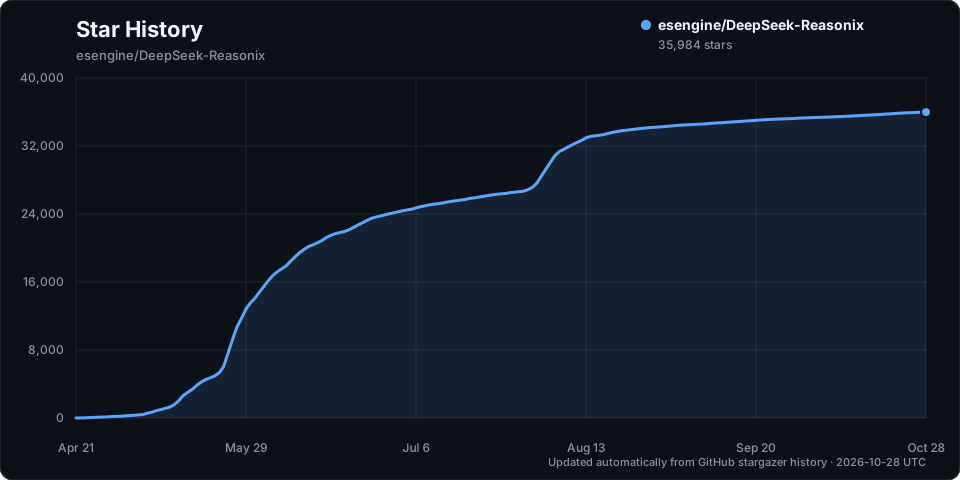
> [!IMPORTANT] > **加入社区 · Community** — 双语 Discord,提供安装答疑(`#help` / `#求助`)、工作流展示与功能想法。→ **** ## 版本 Reasonix 分为两条版本线,调整的原因见[版本路线公告](https://github.com/esengine/DeepSeek-Reasonix/discussions/10748)。 | 版本线 | 分支 | 状态 | 获取方式 | | --- | --- | --- | --- | | **Reasonix 2.x** | `studio`(当前分支) | 活跃开发,预发布 | [Studio 发布页](https://github.com/esengine/DeepSeek-Reasonix/releases?q=studio-v&expanded=true) | | **Reasonix 1.x** | [`main-v2`](https://github.com/esengine/DeepSeek-Reasonix/tree/main-v2) | 维护 / 稳定 | `npm i -g reasonix` · [桌面端下载](https://reasonix.io/?download=desktop#start) | - **想要稳定**:继续使用 1.x。它会持续收到 Bug 修复、Provider / API 兼容、 更新器和安全修复,但不再扩展核心架构。 - **想体验新架构**:使用 2.x Reasonix Studio。它仍在快速迭代,欢迎反馈问题。 1.x 中有价值的修复、测试和行为会逐项 review,适合新架构的会迁移或重新实现到 2.x。 - [从 1.x 迁移到 2.x](./docs/MIGRATING.md)(英文):两条线共用哪些数据,以及如何在同一台 机器上同时使用而不丢会话。 - [2.x 路线图](./docs/ROADMAP.md)(英文):2.x 还要交付什么、如何发布、哪些决定尚未做出。 ## 特性 - **配置驱动**:provider、agent、启用的工具、插件全部在 `reasonix.toml` 中声明, 内核无硬编码模型。 - **多模型 · 可组合**:DeepSeek 作为预设内置;任何 OpenAI 兼容 端点都只是一条配置。可选让两个模型协同(执行器 + 规划器),各自独立、缓存稳定的 session。 - **插件驱动**:MCP server 提供工具、提示词和资源;Extension Protocol v1 Sidecar 还可以拦截运行时事件、提供 Provider 与结构化 UI,并通过版本化插件包分发。 - **缓存友好的上下文维护**:启动时注入稳定的环境摘要;旧工具输出会先 snip/prune, 再进入摘要 compaction;内置工具 schema 合约有文档和回归测试保护。 - **零摩擦分发**:`CGO_ENABLED=0` 单二进制;一条命令交叉编译到六个目标平台。 产物是完全自包含的静态二进制——目标机器上除二进制本身外无需安装任何东西。 ## 安装 当前分支是 **Reasonix 2.x**,桌面端是 Reasonix Studio;CLI、Studio 和编辑器集成 都运行同一套本地 Reasonix 引擎。 ### Reasonix Studio(2.x) 从最新的 [Studio 发布](https://github.com/esengine/DeepSeek-Reasonix/releases?q=studio-v&expanded=true) 下载对应平台的安装包(标签为 `studio-v2.*`,2.x 活跃开发期间以预发布形式发布): | 平台 | 安装包 | 架构 | | --- | --- | --- | | macOS | `.dmg` 或 `.zip` | Apple Silicon(`arm64`)/ Intel(`amd64`) | | Windows | 安装器 `-installer.exe` 或便携 `.zip` | x64 | | Linux | `.deb` | x64 | 每个安装包都附带 `.minisig` 签名,发布页另有 `SHA256SUMS`。安装后 Studio 会在 应用内自行更新。 同一个发布页也提供 2.x 的 `reasonix` CLI 归档(`darwin|linux|windows × amd64|arm64`)。 ### Reasonix 1.x(稳定版) 1.x CLI 在任意支持的平台上都可以通过 npm 安装,macOS 也可以使用 Homebrew: ```sh npm i -g reasonix # 任意系统;自动拉取对应平台的原生二进制 brew install esengine/reasonix/reasonix # macOS ``` 1.x 桌面端请前往[官方下载页](https://reasonix.io/?download=desktop#start)。 Windows 安装器通过 [SignPath.io](https://signpath.io/) 完成代码签名,证书由 [SignPath 基金会](https://signpath.org/) 免费提供。 ### VS Code 扩展 扩展不内置 CLI,而是启动本机的 `reasonix acp` 后端,并提供原生聊天、编辑器 上下文、工具调用审批、模型选择和工作区会话。请先安装 1.x CLI。 - **VS Code:** [从 Visual Studio Marketplace 安装](https://marketplace.visualstudio.com/items?itemName=SivanLiu.reasonix-agent) - **VSCodium / Eclipse Theia:** [从 Open VSX Registry 安装](https://open-vsx.org/extension/SivanLiu/reasonix-agent) - **扩展 ID:** `SivanLiu.reasonix-agent` · [源码与使用说明](https://github.com/SivanCola/reasonix-vscode) ### 从源码构建 克隆仓库;`studio` 构建 2.x,`main-v2` 构建 1.x: ```sh git clone https://github.com/esengine/DeepSeek-Reasonix.git cd DeepSeek-Reasonix git switch studio ``` #### CLI CLI 构建需要 **Go 1.25+**。模块固定了 `toolchain`,保持 `GOTOOLCHAIN=auto` 即可让 Go 自动下载对应工具链,也可以手动安装。 ```sh make build # -> bin/reasonix(.exe) make cross # -> dist/(darwin|linux|windows × amd64|arm64) ``` #### Studio Studio 的前端还需要 **Node 24+ 与 pnpm 10**(`npm install -g pnpm@10`)。 ```sh make studio ``` 各平台的 webview 依赖和 Linux 构建标签见 [Studio 构建指南](desktop/README.md#prerequisites)。 ## 快速开始 ### Reasonix Studio 安装并启动 Studio,然后在应用内连接 provider 和模型即可使用,无需配置 CLI。 ### CLI / TUI ```sh reasonix setup # 配置 provider 和模型 reasonix # 启动交互式会话 reasonix run "把 main.go 里的 TODO 实现掉" ``` 需要项目指令时,可在交互式会话中运行 `/init`。 CLI 进阶用法和详细配置见 **[CLI 命令参考](./docs/CLI.zh-CN.md)**、 **[指南](./docs/GUIDE.zh-CN.md)** 和 **[配置路径](./docs/CONFIG_PATHS.md)**。 ## 文档 - **开始使用:** [指南](./docs/GUIDE.zh-CN.md) · [CLI 命令参考](./docs/CLI.zh-CN.md) · [配置路径](./docs/CONFIG_PATHS.md) · [ACP 编辑器接入](./docs/ACP.md) - **功能与排障:** [子智能体 Profile](./docs/SUBAGENT_PROFILES.md) · [Context Engine v2](./docs/SESSION_MEMORY_RETRIEVAL.md) · [能力诊断](./docs/CAPABILITY_DIAGNOSTICS.md) · [恢复与安全模式](./docs/RECOVERY.md) · [Checkpoints 与 rewind](./docs/CHECKPOINTS.md) - **工程与迁移:** [规格](./docs/SPEC.md) · [任务合约与暂停策略](./docs/TASK_CONTRACT.md) · [工具合约](./docs/TOOL_CONTRACT.md) · [从 1.x 迁移到 2.x](./docs/MIGRATING.md) · [2.x 路线图](./docs/ROADMAP.md) - **扩展开发:** [扩展概览](./docs/EXTENSIONS.md) · [插件包与 Manifest v1](./docs/PLUGIN_PACKAGES.md) · [Extension Protocol](./docs/EXTENSION_PROTOCOL.md) · [Go SDK 与 starter](./sdk/go/README.md) ## Star 趋势 Star History Chart
## 致谢 下面这些朋友的工作塑造了 Reasonix 今天的样子 —— 当前按 commit 数统计的前 20 名贡献者。 完整贡献者列表在 [GitHub](https://github.com/esengine/DeepSeek-Reasonix/graphs/contributors?all=1)。 | Contributor | Contributor | Contributor | Contributor | | --- | --- | --- | --- | | [**SivanCola**](https://github.com/SivanCola) | [**esengine**](https://github.com/esengine) | [**ttmouse**](https://github.com/ttmouse) | [**lifu963**](https://github.com/lifu963) | | **reasonix** | [**HUQIANTAO**](https://github.com/HUQIANTAO) | [**GTC2080**](https://github.com/GTC2080) | [**light-front-theory**](https://github.com/light-front-theory) | | **merge-order-check** | [**Li-Charles-One**](https://github.com/Li-Charles-One) | [**eghrhegpe**](https://github.com/eghrhegpe) | **wufengfan** | | [**CVEngineer66**](https://github.com/CVEngineer66) | [**dependabot\[bot\]**](https://github.com/apps/dependabot) | [**lanshi17**](https://github.com/lanshi17) | [**SuMuxi66**](https://github.com/SuMuxi66) | | [**CnsMaple**](https://github.com/CnsMaple) | [**cyq1017**](https://github.com/cyq1017) | [**JesonChou**](https://github.com/JesonChou) | [**XTLine**](https://github.com/XTLine) | 特别感谢 [**Bernardxu123**](https://github.com/Bernardxu123) 设计的项目 logo和开场视频。

esengine/DeepSeek-Reasonix 贡献者


---

MIT —— 见 LICENSE
由 esengine/DeepSeek-Reasonix 社区共建

---

支持本项目

如果 Reasonix 帮你省了时间或 token,欢迎请杯咖啡。捐助不会换来 feature 优先级,也不会影响 issue 的处理顺序——就是「谢谢」。 - **国内** — 微信支付(扫下方二维码) - **海外** — PayPal: [paypal.me/yuhuahui](https://paypal.me/yuhuahui)

微信支付收款码