简体中文 ·
English

DSH Studio
A local development workbench for DeepSeek Harness
Conversations, files, Git review, terminals, and plugins — in one project workspace.




Download the latest release
·
Usage guide
·
Design guide
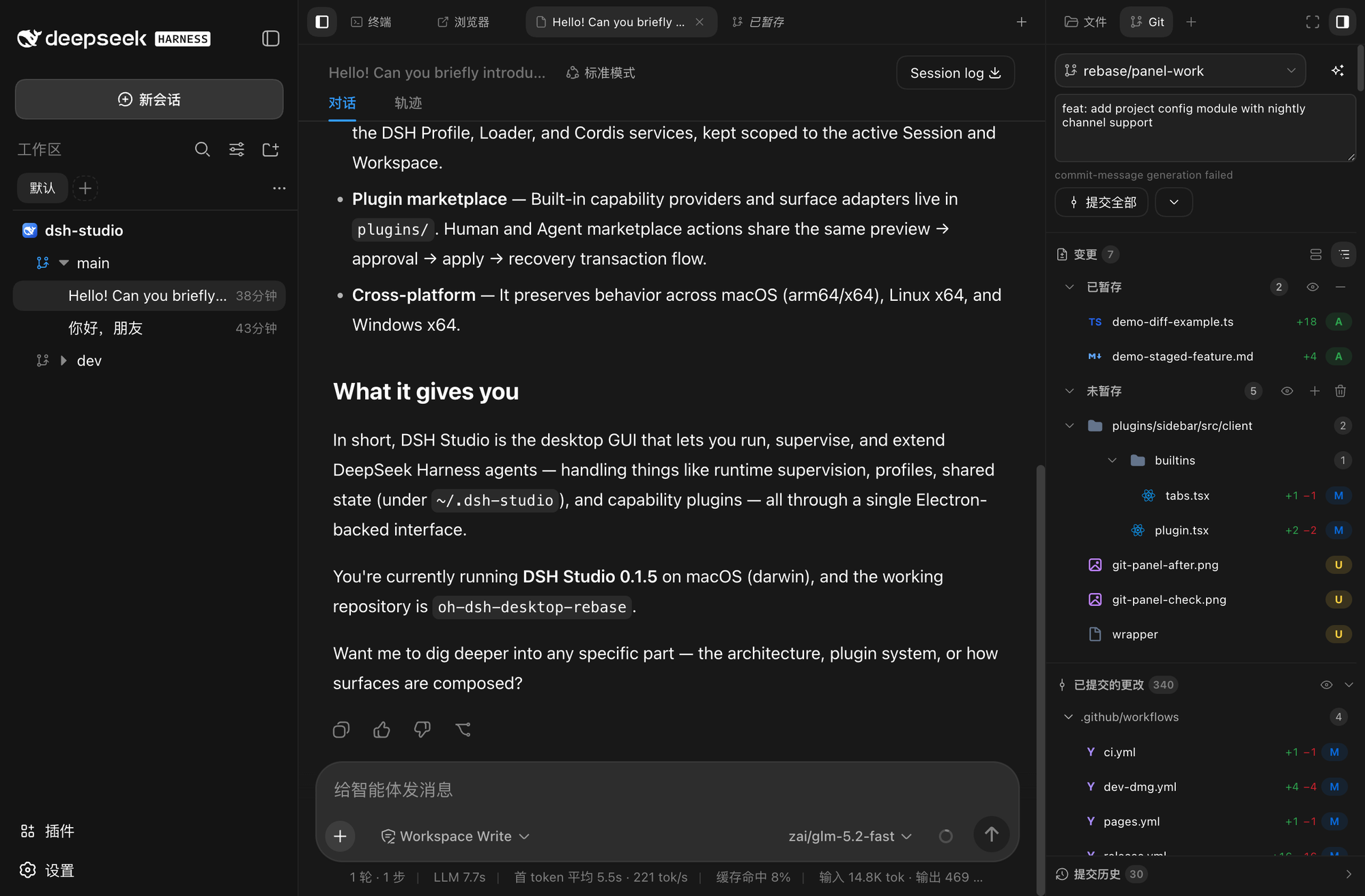
Left rail project tree · Center multi-tab area (conversation / terminal / browser) · Right rail Git panel
DSH Studio is built on the DeepSeek Harness runtime. It brings AI agents, workspaces, local development tools, and the plugin ecosystem into one installable Desktop / Web workbench. Model services still run in the cloud on demand; projects, sessions, terminals, files, Git review, browser state, and plugin state are all organized by one local workspace.
## Key features
🗂️ Multi-project workspace
Project → Worktree → Session tree with groups, aliases, and automatic project icon detection. |
🧰 All-in-one tool area
Project-scoped PTY, file browsing and preview, browser, and subagent tools — no window switching. |
🔍 Git review
Staged / unstaged / untracked sections, commit history, commit file trees, and line-level review targets. |
🤖 Smart commit
Generate commit messages from current changes in one click, with configurable model and reasoning effort. |
🖥️ Desktop + Web parity
Same runtime, Profiles, plugins, and data boundaries; Desktop adds a native window and PTY. |
🧩 Plugin marketplace
Browse and install plugins from multiple sources with preview, approval, source locking, and restore. |
## Interface preview
🗂️ Project tree with automatic icons
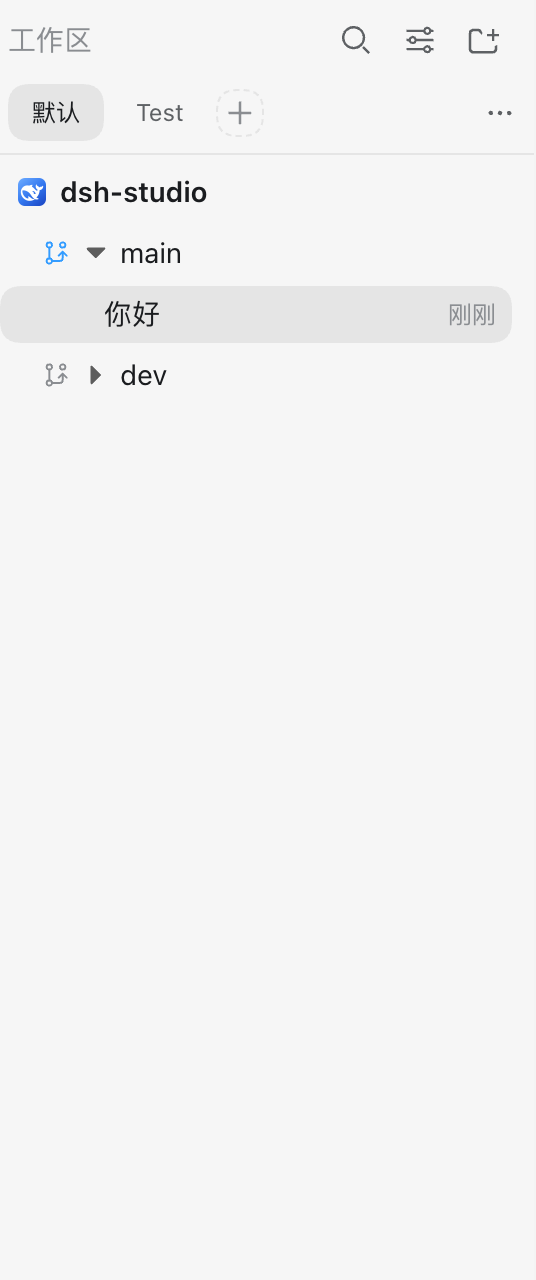
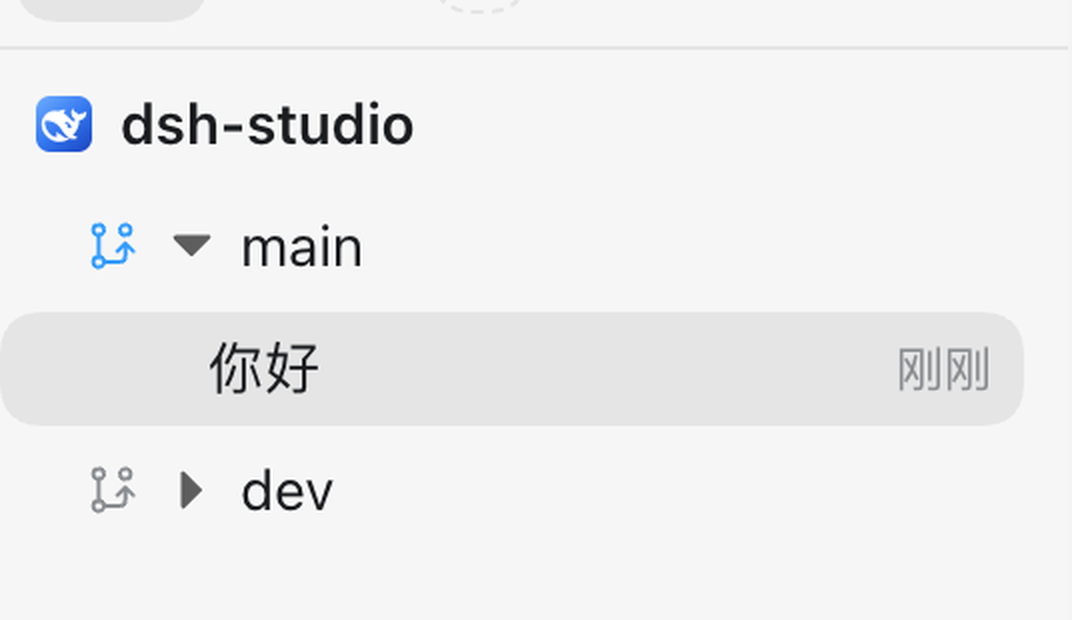
The left rail organizes context in a Project → Worktree → Session tree. Each project's icon is automatically detected from static assets inside the project — it first reads the icon field declared in package.json, then searches for PNG files in the project, and can also pull from the project homepage favicon or the Git provider avatar — no manual configuration needed.
|
|
| Project tree: main / dev branches under the dsh-studio project |
Project icons: detected from project static assets |
If automatic detection misses, right-click the project to pick a built-in icon or upload a custom PNG. Multiple projects, branches, groups, aliases, search, and view state are all persisted.
🔍 Git review and smart commit
The right-rail Git panel brings staged, unstaged, untracked sections and commit history together in one panel. Click "Generate commit message" and the model writes a commit title and body from the current changes; edit the result inline and commit all staged changes with one click.
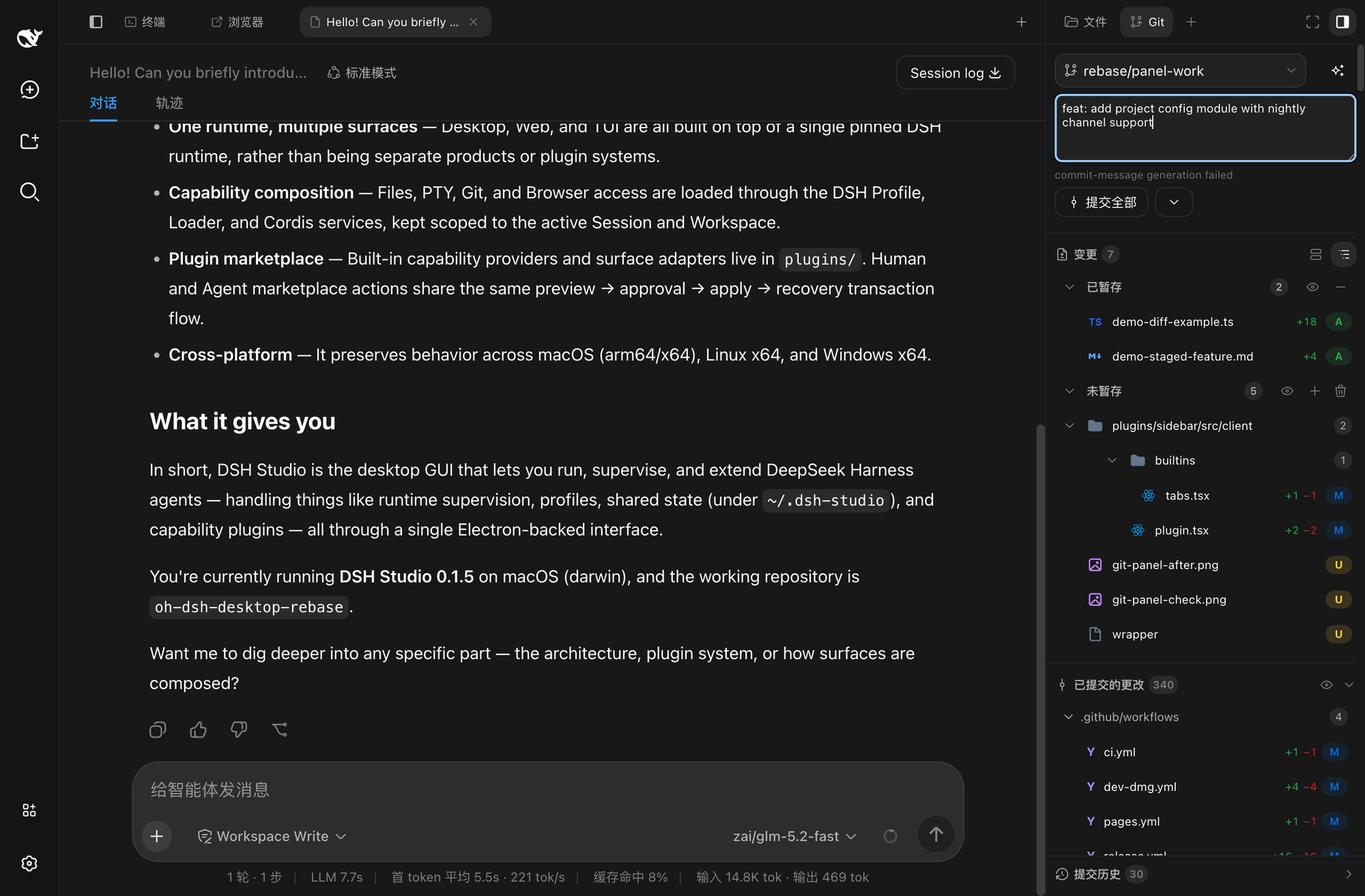
2 files staged; the commit message is generated by the model from the changes
Every section has a "View all" action: clicking it opens the staged files as a standalone center tab with the file tree on the left, making code and diffs easier to compare side by side.
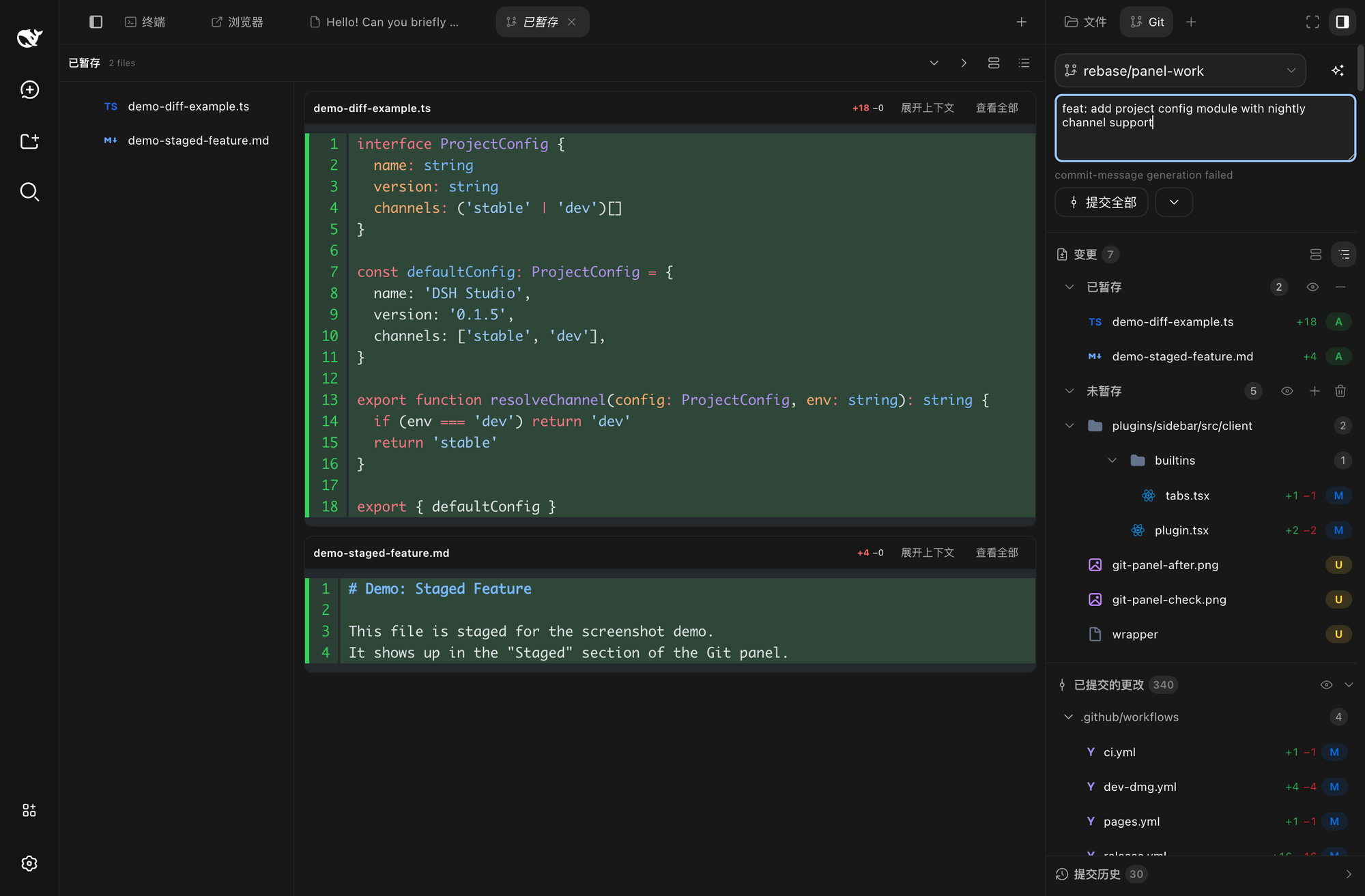
The "view all" center tab for staged files, with the file tree on the left
📄 Diff viewer
Click any file in the Git panel and the diff viewer opens in the right rail: line-level diff, image diff, conflict view, and inline comment targets, comparing both committed and unpushed changes.
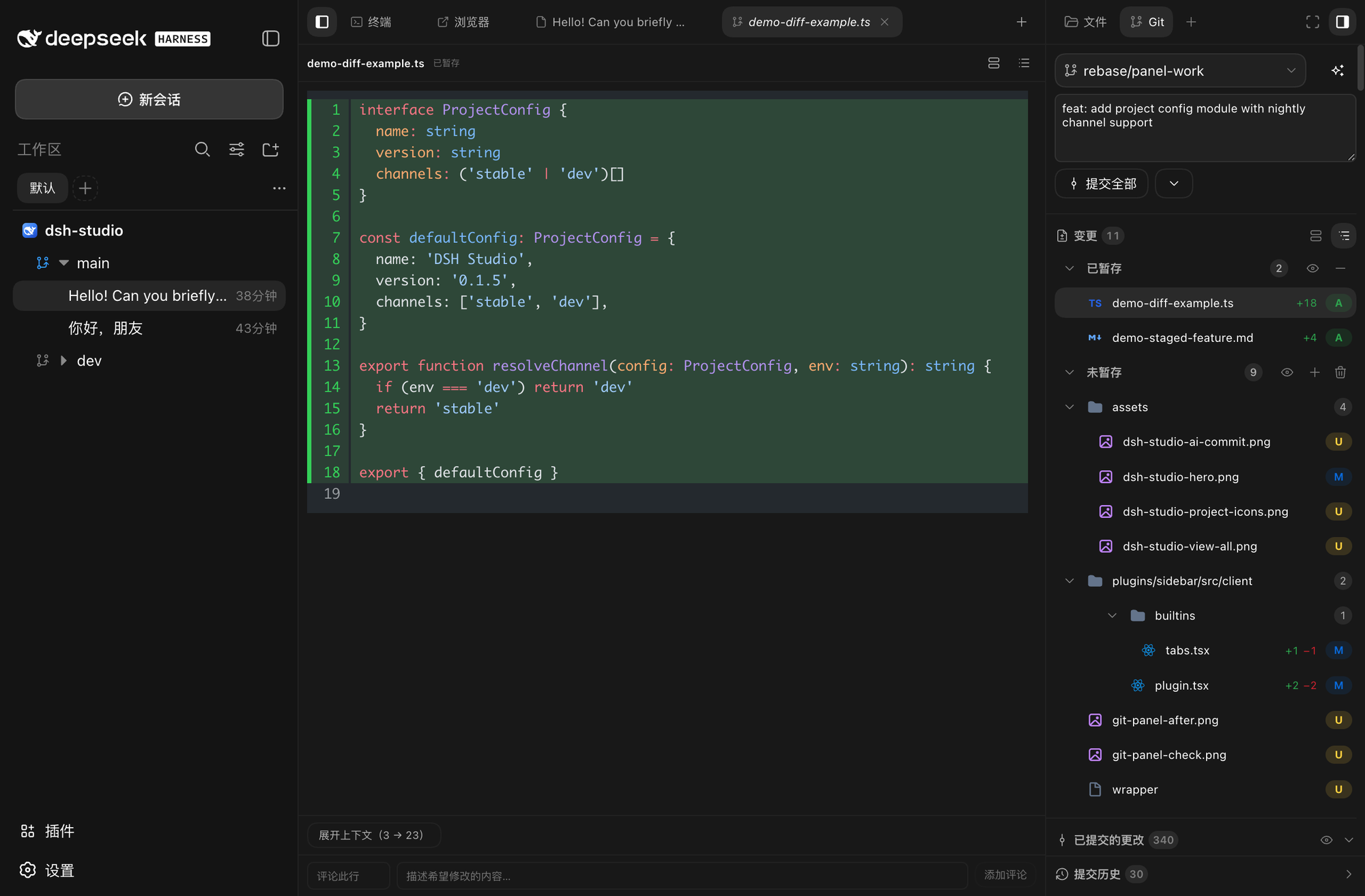
Line-level diff with added / removed highlighting and inline comments
📁 File browsing
Switch the right rail to the Files tab to browse the project file tree and preview files, with search, sort, and quick navigation. The center conversation tab stays open, so browsing files never interrupts the chat.
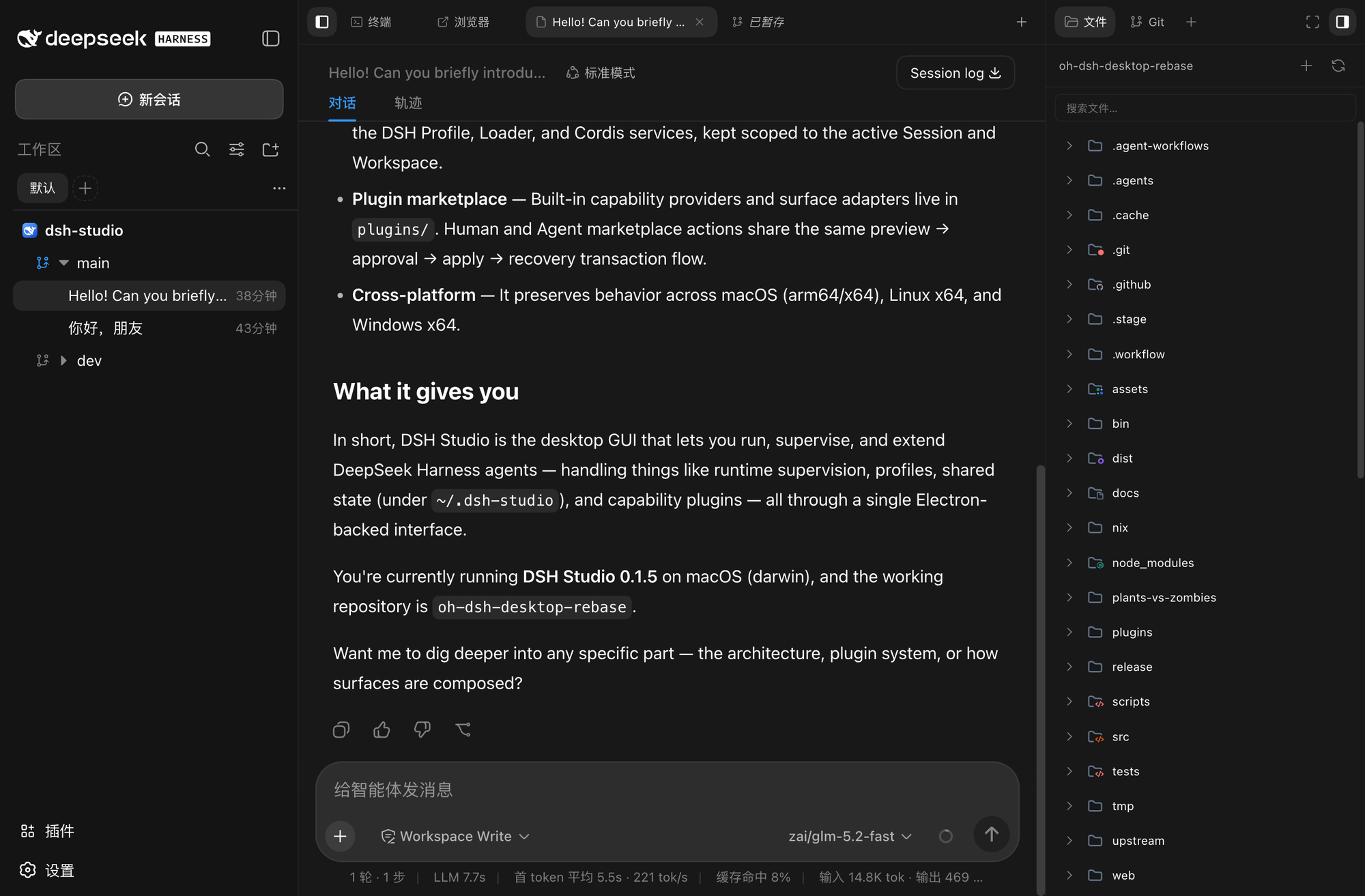
Project file tree and file preview, with the conversation tab still open
🖥️ Project terminal
The terminal opens as a center tab: native PTY, unified shell resolution, project-scoped sessions, streaming output, and replay. Conversation and browser tabs stay in the tab bar for instant switching.
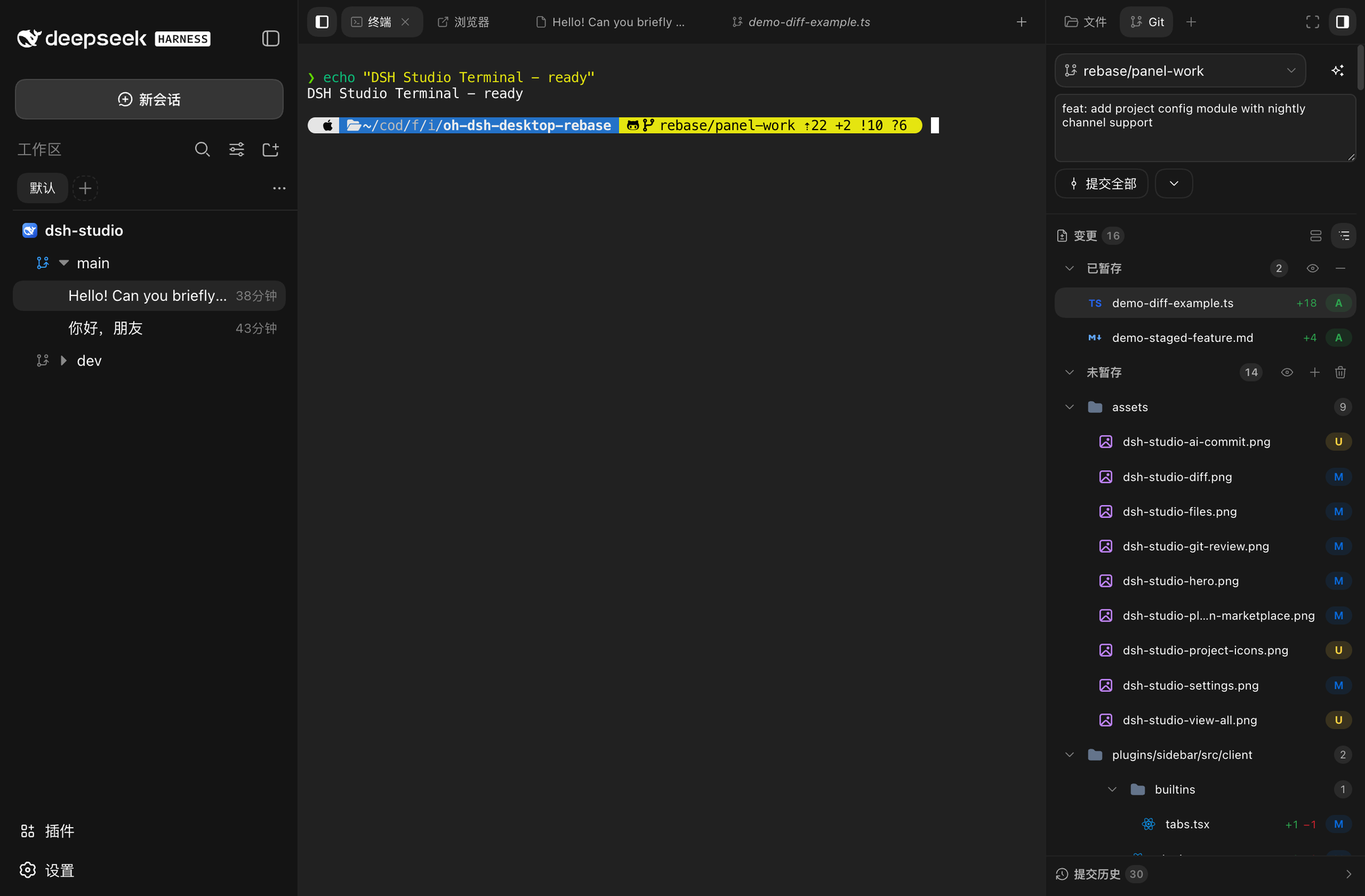
The center terminal tab, alongside conversation and browser tabs
⚙️ Settings
General settings, model config, Agent presets, sidebar options, and skin switching share one panel across Desktop and Web.
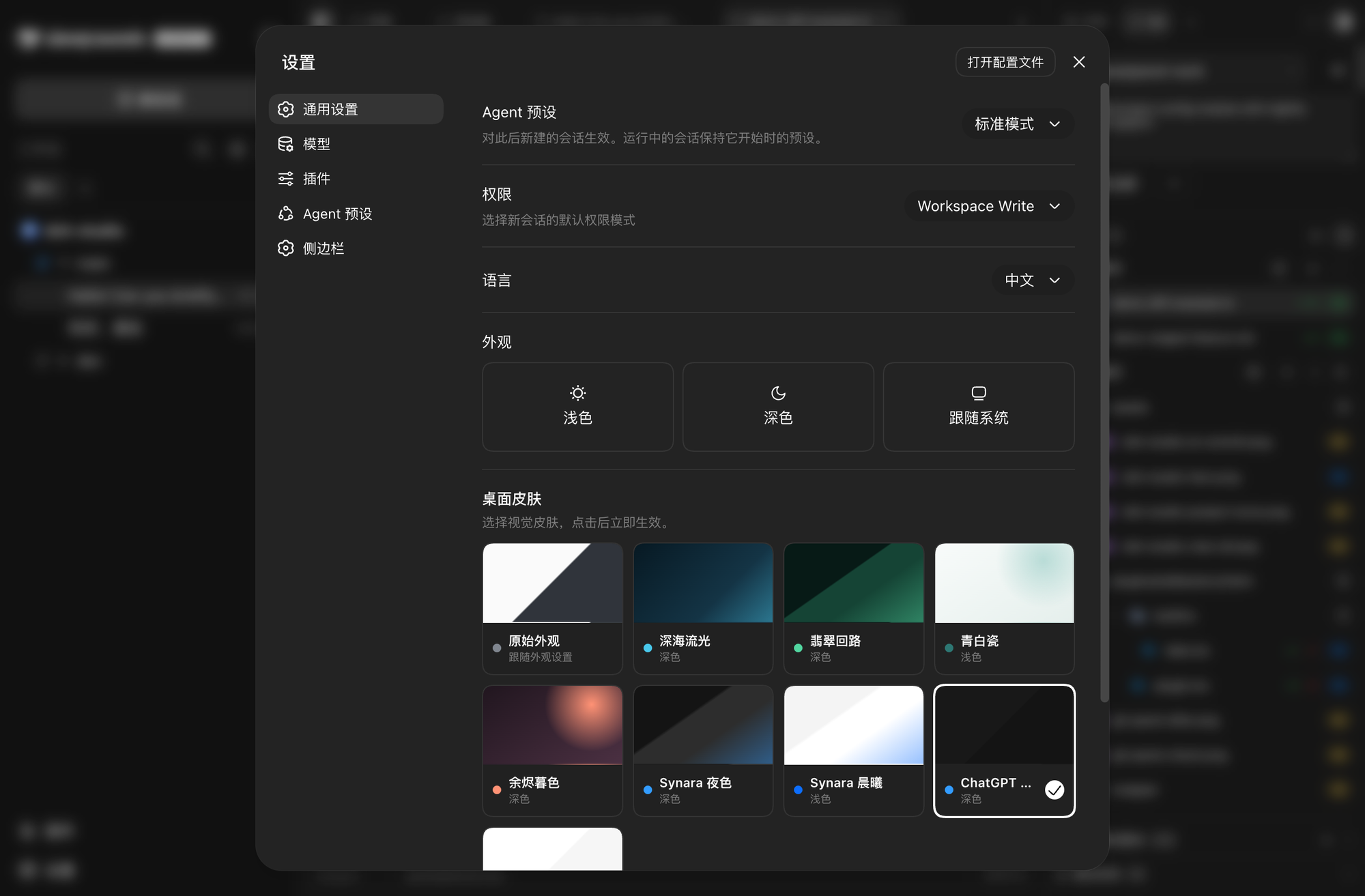
Settings: general / models / plugins / agent presets / sidebar / theme skins
🧩 Plugin marketplace
Browse and manage DSH plugins from multiple sources. Candidates go through preview and approval, with source locking, bundle validation, apply, and restore flows.
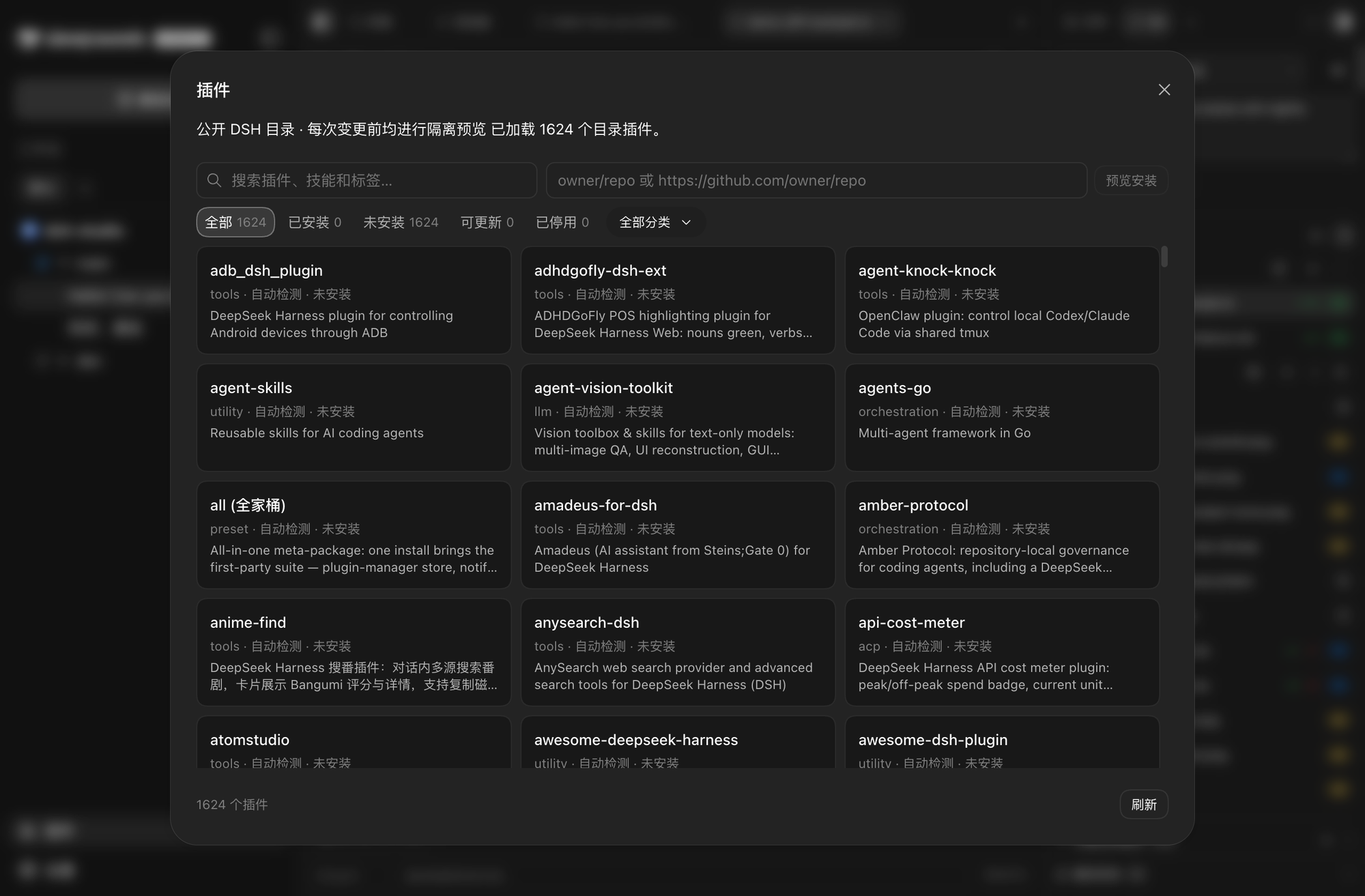
Marketplace: installed / not-installed categories with search and source filters
> **Experimental** · Source Control AI is under active development: it generates commit messages from project changes and supports configurable models, reasoning effort, and prompt templates. It is not yet a stable release promise.
## Download and install
Choose a distribution from [DSH Studio Releases](https://github.com/euanguo/dsh-studio-app/releases/latest):
| Distribution | Includes | Best for |
| --- | --- | --- |
| Full | **DSH Studio**, Web, Node runtime, and bundled plugins | Local development workbench |
| Web-only | **DSH Studio Web**, Node runtime, and Web plugins; no Electron | Browser, server, or small installs |
Platform install steps
- **macOS:** open the DMG and drag **DSH Studio** into Applications.
- **Windows:** run the installer, or extract and launch the portable package.
- **Linux:** run the AppImage, or install the deb with apt.
The Web-only package is ready after extraction:
```sh
# Web UI, listening on http://127.0.0.1:3080 by default
./bin/dsh-studio web
```
Install the unified command (optional)
The macOS full distribution contains a launcher that can be added to PATH:
```sh
sudo ln -sf \
"/Applications/DSH Studio.app/Contents/Resources/bin/dsh-studio" \
/usr/local/bin/dsh-studio
```
The Web-only package can run ./bin/dsh-studio directly or be added to PATH.
## Usage
```sh
dsh-studio desktop # Start DSH Studio
dsh-studio gui # Desktop alias
dsh-studio web # Start DSH Studio Web
dsh-studio web --port 3080 # Choose the Web port
```
**Data directory:** Installed Desktop and Web share `~/.dsh-studio` for caches, configuration, sessions, credentials, and plugin state by default. Source launches via `pnpm start` / `pnpm dev` use `~/.dsh-studio-dev` instead, so a packaged app and a verification instance can run side by side. Set `DSH_STUDIO_HOME` to move the shared data root, or use `--channel stable|dev` / `DSH_STUDIO_CHANNEL` to choose the default pair.
## What this project is built on
DSH Studio is a downstream fork of [hust-open-atom-club/oh-dsh](https://github.com/hust-open-atom-club/oh-dsh) and continues to use [DeepSeek Harness](https://github.com/deepseek-ai/deepseek-harness) for the DSH runtime, Profiles, sessions, workspaces, and plugin contracts.
| Area | Source and boundary |
| --- | --- |
| DSH runtime | Runs on a pinned runtime from [deepseek-ai/deepseek-harness](https://github.com/deepseek-ai/deepseek-harness) |
| Project source | Continued development from [hust-open-atom-club/oh-dsh](https://github.com/hust-open-atom-club/oh-dsh) |
| Left rail | Forks the official `packages/client/ui-workspace` and reshapes it into Project → Worktree → Session; the official row is disabled and DSH Studio mounts its own desktop-left-rail |
| Right-rail Host | Adapted and vendored from [omdsh-dev/DSH-better-sidebar](https://github.com/omdsh-dev/DSH-better-sidebar) |
| Right-rail client/UI | Not a verbatim copy of the upstream UI; DSH Studio owns the file, Git review, Center Surface, project scope, plugin registration, and desktop layout implementations |
| Diff / terminal references | Public implementations and algorithms from [pierre](https://github.com/pierrecomputer/pierre) and [orca](https://github.com/stablyai/orca), with attribution preserved |
DSH Studio is not a simple reskin, nor a verbatim copy of Better Sidebar: it reuses clearly attributed runtime, Host, protocol, and third-party foundations, then builds its own project workspace, Git review, Center Surface, plugin marketplace, and Desktop/Web distribution layer on top.
## Documentation and ecosystem
- [Installation, operations, and troubleshooting](./docs/usage.en.md) · [Architecture and plugin boundaries](./docs/design.en.md)
- [DeepSeek Harness](https://github.com/deepseek-ai/deepseek-harness) — DSH runtime, sessions, and plugin loader
- [DSH-better-sidebar](https://github.com/omdsh-dev/DSH-better-sidebar) — source of the right-rail Host file, Git, and PTY capabilities
- [dshfind](https://dshfind.com/) — DSH plugin marketplace and ecosystem community
- [LINUX DO](https://linux.do/) — a real developer community
More reference projects
- [plugin-registry](https://github.com/vlln/plugin-registry): plugin sources, locking, and lifecycle reference
- [dsh-hub](https://github.com/omdsh-dev/dsh-hub): marketplace aggregation, trust, and candidate preview reference
- [dsh-suite](https://github.com/whyihaveyou/dsh-suite): plugin classification and management reference
- [pierre](https://github.com/pierrecomputer/pierre): diff, inline comments, and virtualized rendering reference
- [orca](https://github.com/stablyai/orca): terminal scrollback and commit-generation reference
For the complete third-party license, pinned revision, and adaptation boundaries, see [THIRD_PARTY_NOTICES](./THIRD_PARTY_NOTICES.md).
## License
[MIT](./LICENSE)