---
Eventum produces synthetic events and delivers them anywhere — in real time or in batch. Generate a continuous stream of logs for your SIEM, seed a staging database with realistic data, or stress-test a pipeline with high-throughput traffic.
## Highlights
- **Realistic data** — Jinja2 templates with [Faker](https://faker.readthedocs.io/) and [Mimesis](https://mimesis.name/) generate believable names, IPs, timestamps, and domain-specific values
- **Flexible scheduling** — cron expressions, fixed intervals, or statistical time patterns that mimic real-world traffic curves
- **Multiple destinations** — fan-out to stdout, files, ClickHouse, OpenSearch, or any HTTP endpoint simultaneously
- **Two modes** — stream events in real time at their scheduled timestamps, or generate everything as fast as possible
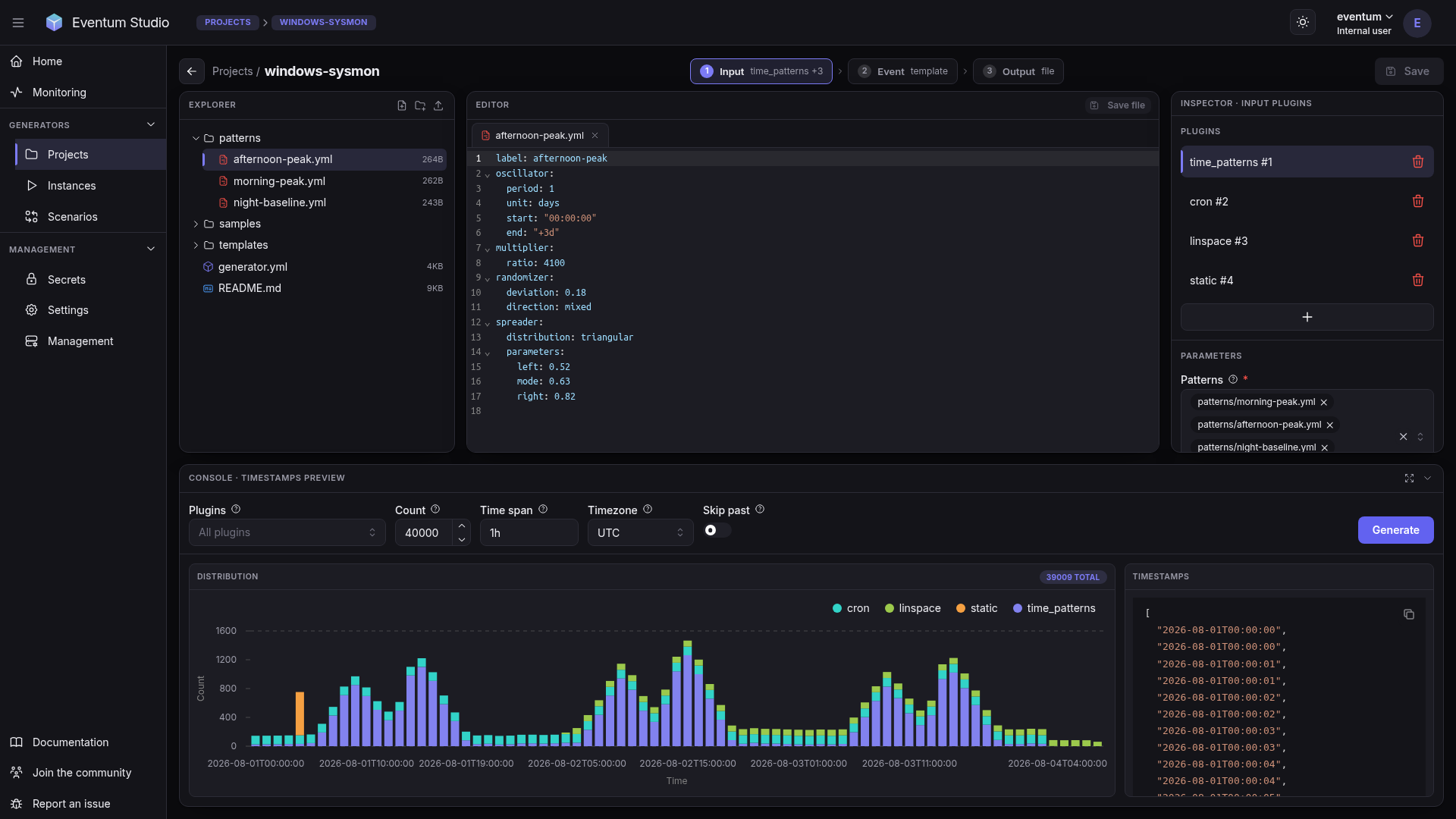
- **Built-in web UI** — [Eventum Studio](https://eventum.run) for visual editing, event preview, and monitoring
- **Ready-made generators** — connect a git repository that publishes generators and install one as a project; the repositories published on GitHub under the `eventum-generators` topic are listed in Studio
- **REST API** — start, stop, and manage generators programmatically
- **MCP server** — manage generators and author configurations from AI assistants via the Model Context Protocol
- **Encrypted secrets** — credentials stored securely via an encrypted keyring
- **Docker ready** — multi-stage builds, runs anywhere
## Quick start
**Install**
```bash
pip install eventum-generator
```
> Also available via [uv](https://docs.astral.sh/uv/) (`uv tool install eventum-generator`) or [Docker](https://hub.docker.com/r/rnv812/eventum-generator) (`docker pull rnv812/eventum-generator`).
**Create a template** — `events.jinja`
```jinja
{{ timestamp }} INFO user={{ module.faker.locale.en.user_name() }} action=login ip={{ module.faker.locale.en.ipv4() }}
```
**Create a config** — `generator.yml`
```yaml
input:
- cron:
expression: "* * * * * *"
count: 1
event:
template:
mode: all
templates:
- my_event:
template: events.jinja
output:
- stdout: {}
```
**Run**
```bash
eventum generate --path generator.yml --id demo
```
```
2026-02-23 12:00:01+00:00 INFO user=jsmith action=login ip=192.168.44.12
2026-02-23 12:00:02+00:00 INFO user=amiller action=login ip=10.0.128.55
2026-02-23 12:00:03+00:00 INFO user=kwilson action=login ip=172.16.0.91
```
## Plugins
Each part of the pipeline is a plugin. Swap, combine, or extend — change the schedule without touching templates, add new outputs without modifying anything else. See the [plugin reference](https://eventum.run/docs/plugins) for the full list.
## Application mode
Run multiple generators with a web UI and REST API:
```bash
eventum run -c eventum.yml
```
Starts on port **9474** with **Eventum Studio** (web UI), **REST API**, and **multi-generator orchestration** — each generator runs independently with its own schedule, templates, and outputs.
## Eventum Studio
**Eventum Studio** is the web UI included in application mode: edit generator configurations and templates, preview rendered events, and monitor running generators.
## Documentation
Full documentation at **[eventum.run](https://eventum.run)**:
- [Getting started](https://eventum.run/docs) — overview and first example
- [Installation](https://eventum.run/docs/core/introduction/installation) — pip, Docker, or from source
- [Core concepts](https://eventum.run/docs/core/concepts/generator) — pipeline, plugins, scheduling
- [Plugin reference](https://eventum.run/docs/plugins) — every plugin with full parameter tables
- [Tutorials](https://eventum.run/docs/tutorials) — end-to-end walkthroughs (SIEM, clickstream, IoT, and more)
## Activity