# Cephalopod, a sound fader for AvAudioPlayer written in Swift - iOS, tvOS and macOS
[](https://github.com/Carthage/Carthage)
[](http://cocoadocs.org/docsets/Cephalopod)
[](LICENSE)
[](http://cocoadocs.org/docsets/Cephalopod)
This library can help fading sounds in and out with AvAudioPlayer. One can set duration, velocity of the fade and a completion function. Velocity can vary from linear to exponential.
```Swift
cephalopod = Cephalopod(player: player)
cephalopod?.fadeIn()
```
 *Juvenile cuttlefish camouflaged against the seafloor. Photo taken by [Raul654](https://en.wikipedia.org/wiki/User:Raul654). Source: [Wikimedia Commons](https://en.wikipedia.org/wiki/File:Camouflage.jpg).*
## Setup
There are three ways you can add Cephalopod to your Xcode project.
#### Add source (iOS 7+)
Simply add the [CephalopodDistrib.swift](https://github.com/evgenyneu/Cephalopod/blob/master/Distrib/CephalopodDistrib.swift) file to your project.
#### Setup with Carthage (iOS 8+)
Alternatively, add `github "evgenyneu/Cephalopod" ~> 4.0` to your Cartfile and run `carthage update`.
#### Setup with CocoaPods (iOS 8+)
If you are using CocoaPods add this text to your Podfile and run `pod install`.
```
use_frameworks!
target 'Your target name'
pod 'Cephalopod', '~> 4.0'
```
### Legacy Swift versions
Setup a [previous version](https://github.com/evgenyneu/Cephalopod/wiki/Legacy-Swift-versions) of the library if you use an older version of Swift.
## Usage
The following example shows how to play an mp3 file with a fade in effect.
```Swift
import AVFoundation
import Cephalopod // For CocoaPods and Carthage
// ---
var playerInstance: AVAudioPlayer?
var cephalopod: Cephalopod?
override func viewDidLoad() {
super.viewDidLoad()
// Create a player instance
guard let path = Bundle.main.path(forResource: "squid", ofType: "mp3") else { return }
guard let player = try? AVAudioPlayer(contentsOf: URL(fileURLWithPath: path)) else { return }
playerInstance = player
// Start audio playback
player.play()
player.volume = 0
// Fade in the sound
cephalopod = Cephalopod(player: player)
cephalopod?.fadeIn()
}
```
### Fade in / fade out
```Swift
cephalopod?.fadeIn()
cephalopod?.fadeOut()
// Supply fade duration and velocity, in seconds
cephalopod?.fadeIn(duration: 3, velocity: 2)
cephalopod?.fadeOut(duration: 3, velocity: 2)
// Supply finish closure
cephalopod?.fadeIn(duration: 3, velocity: 2) { finished in }
cephalopod?.fadeOut(duration: 3, velocity: 2) { finished in }
```
### Supply fade start/end volume and completion callback
```Swift
cephalopod?.fade(fromVolume: 0.3, toVolume: 0.7, duration: 3, velocity: 2) { finished in
print("Finished fading")
}
```
**Arguments**:
`fromVolume` - the start volume, a number between 0 and 1.
`toVolume` - the end volume, a number between 0 and 1.
`duration` - duration of the fade, in seconds. Default duration: 3 seconds.
`velocity` - a number specifying how fast the sound volume is changing. Velocity of 0 creates a linear fade. Values greater than zero produce more exponential fade affect. Exponential fade sounds more gradual to a human ear. The fade sounds most natural with velocity parameter from 2 to 5. Default value: 2.
`onFinished` - an optional closure that will be called after the fade has ended. The closure will be passed a boolean parameter `finished` indicating whether the fading has reached its end value (`true`) or if the fading has been cancelled (`false`).
### Set the quality of fade
```Swift
cephalopod?.volumeAlterationsPerSecond = 20
```
Larger numbers will produce finer fade effect at expense of CPU juice. Default value: `30`.
### Stop the volume change
One can cancel the ongoing volume change by calling the `stop()` method. Note that it stops changing the volume but does not stop the playback.
```Swift
cephalopod?.stop()
```
## Volume functions
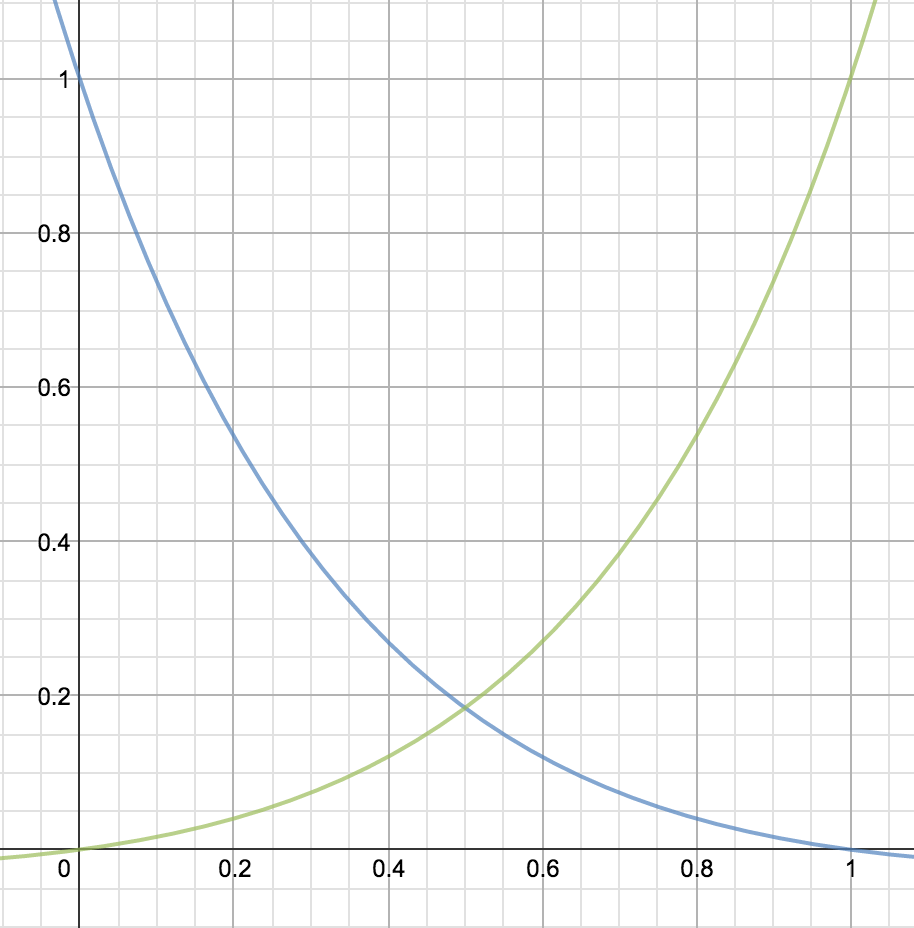
The following graph shows how sound volume changes during the fade.
*Juvenile cuttlefish camouflaged against the seafloor. Photo taken by [Raul654](https://en.wikipedia.org/wiki/User:Raul654). Source: [Wikimedia Commons](https://en.wikipedia.org/wiki/File:Camouflage.jpg).*
## Setup
There are three ways you can add Cephalopod to your Xcode project.
#### Add source (iOS 7+)
Simply add the [CephalopodDistrib.swift](https://github.com/evgenyneu/Cephalopod/blob/master/Distrib/CephalopodDistrib.swift) file to your project.
#### Setup with Carthage (iOS 8+)
Alternatively, add `github "evgenyneu/Cephalopod" ~> 4.0` to your Cartfile and run `carthage update`.
#### Setup with CocoaPods (iOS 8+)
If you are using CocoaPods add this text to your Podfile and run `pod install`.
```
use_frameworks!
target 'Your target name'
pod 'Cephalopod', '~> 4.0'
```
### Legacy Swift versions
Setup a [previous version](https://github.com/evgenyneu/Cephalopod/wiki/Legacy-Swift-versions) of the library if you use an older version of Swift.
## Usage
The following example shows how to play an mp3 file with a fade in effect.
```Swift
import AVFoundation
import Cephalopod // For CocoaPods and Carthage
// ---
var playerInstance: AVAudioPlayer?
var cephalopod: Cephalopod?
override func viewDidLoad() {
super.viewDidLoad()
// Create a player instance
guard let path = Bundle.main.path(forResource: "squid", ofType: "mp3") else { return }
guard let player = try? AVAudioPlayer(contentsOf: URL(fileURLWithPath: path)) else { return }
playerInstance = player
// Start audio playback
player.play()
player.volume = 0
// Fade in the sound
cephalopod = Cephalopod(player: player)
cephalopod?.fadeIn()
}
```
### Fade in / fade out
```Swift
cephalopod?.fadeIn()
cephalopod?.fadeOut()
// Supply fade duration and velocity, in seconds
cephalopod?.fadeIn(duration: 3, velocity: 2)
cephalopod?.fadeOut(duration: 3, velocity: 2)
// Supply finish closure
cephalopod?.fadeIn(duration: 3, velocity: 2) { finished in }
cephalopod?.fadeOut(duration: 3, velocity: 2) { finished in }
```
### Supply fade start/end volume and completion callback
```Swift
cephalopod?.fade(fromVolume: 0.3, toVolume: 0.7, duration: 3, velocity: 2) { finished in
print("Finished fading")
}
```
**Arguments**:
`fromVolume` - the start volume, a number between 0 and 1.
`toVolume` - the end volume, a number between 0 and 1.
`duration` - duration of the fade, in seconds. Default duration: 3 seconds.
`velocity` - a number specifying how fast the sound volume is changing. Velocity of 0 creates a linear fade. Values greater than zero produce more exponential fade affect. Exponential fade sounds more gradual to a human ear. The fade sounds most natural with velocity parameter from 2 to 5. Default value: 2.
`onFinished` - an optional closure that will be called after the fade has ended. The closure will be passed a boolean parameter `finished` indicating whether the fading has reached its end value (`true`) or if the fading has been cancelled (`false`).
### Set the quality of fade
```Swift
cephalopod?.volumeAlterationsPerSecond = 20
```
Larger numbers will produce finer fade effect at expense of CPU juice. Default value: `30`.
### Stop the volume change
One can cancel the ongoing volume change by calling the `stop()` method. Note that it stops changing the volume but does not stop the playback.
```Swift
cephalopod?.stop()
```
## Volume functions
The following graph shows how sound volume changes during the fade.
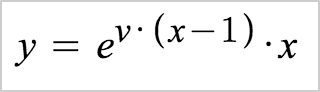
 ### Fade in formula
 ### Fade out formula
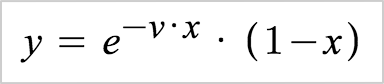 Where `x` is time and `v` is velocity.
Velocity of 0 creates a linear fade. Values greater than zero produce more exponential fade affect. Exponential fade sounds more gradual to a human ear. I personally use velocity values from 2 to 5.
Live graph demo: https://www.desmos.com/calculator/wnstesdf0h
## Demo app
Where `x` is time and `v` is velocity.
Velocity of 0 creates a linear fade. Values greater than zero produce more exponential fade affect. Exponential fade sounds more gradual to a human ear. I personally use velocity values from 2 to 5.
Live graph demo: https://www.desmos.com/calculator/wnstesdf0h
## Demo app
 ## Alternative solutions
Here is a list of other sound libraries for iOS.
* [AudioPlayerSwift](https://github.com/tbaranes/AudioPlayerSwift)
* [AudioPlayer](https://github.com/delannoyk/AudioPlayer)
## Thanks 👍
* [nschucky](https://github.com/nschucky) for updating to Swift 2.2 selector syntax.
## Credits
* The lovely music was recorded by [Carlos Vallejo](http://www.flashkit.com/loops/Easy_Listening/Ill_Be_-Carlos_V-10012/index.php).
* "*Juvenile cuttlefish camouflaged against the seafloor*" photo was taken by [Raul654](https://en.wikipedia.org/wiki/User:Raul654). Source: [Wikimedia Commons](https://en.wikipedia.org/wiki/File:Camouflage.jpg).
## License
Cephalopod is released under the [MIT License](LICENSE).
## Feedback is welcome
If you notice any issue, got stuck or just want to chat feel free to create an issue. I will be happy to help you.
## Alternative solutions
Here is a list of other sound libraries for iOS.
* [AudioPlayerSwift](https://github.com/tbaranes/AudioPlayerSwift)
* [AudioPlayer](https://github.com/delannoyk/AudioPlayer)
## Thanks 👍
* [nschucky](https://github.com/nschucky) for updating to Swift 2.2 selector syntax.
## Credits
* The lovely music was recorded by [Carlos Vallejo](http://www.flashkit.com/loops/Easy_Listening/Ill_Be_-Carlos_V-10012/index.php).
* "*Juvenile cuttlefish camouflaged against the seafloor*" photo was taken by [Raul654](https://en.wikipedia.org/wiki/User:Raul654). Source: [Wikimedia Commons](https://en.wikipedia.org/wiki/File:Camouflage.jpg).
## License
Cephalopod is released under the [MIT License](LICENSE).
## Feedback is welcome
If you notice any issue, got stuck or just want to chat feel free to create an issue. I will be happy to help you.