# LogLead
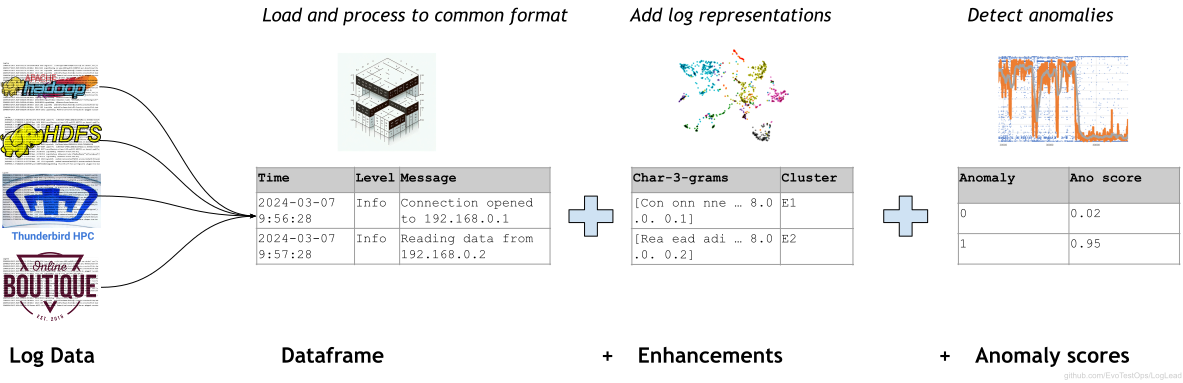
LogLead is designed to efficiently benchmark log anomaly detection algorithms and log representations. LogLead is also used as a backend for projects such as [LogDelta](https://github.com/EvoTestOps/LogDelta) and [VisualLogAnalyzer](https://github.com/EvoTestOps/VisualLogAnalyzer), which offer a more user-friendly approach to log analysis and log anomaly detection. MCP-server of Loglead allow AI agents like Claude code to perform log analysis with loglead.
## Table of contents
- [LogLead](#loglead)
* [Installing LogLead](#installing-loglead)
+ [Known issues](#known-issues)
* [Demos](#demos)
+ [Thunderbird Supercomputer Log Demo](#thunderbird-supercomputer-log-demo)
+ [Hadoop Distributed File System (HDFS) Log Demo](#hadoop-distributed-file-system-hdfs-log-demo)
* [Loading](#loading)
* [MCP server](#mcp-server)
+ [Registering it with an MCP client](#registering-it-with-an-mcp-client)
* [Testing](#testing)
* [Example of Anomaly Detection results](#example-of-anomaly-detection-results)
* [Functional overview](#functional-overview)
* [Reference](#reference)
 ## Installing LogLead
Install with [`uv`](https://docs.astral.sh/uv/):
```
uv add loglead
```
Or with `pip`:
```
python -m pip install loglead
```
Then clone the project, move to demo folder and run some demos
```
git clone https://github.com/EvoTestOps/LogLead.git
cd LogLead
uv run demo/HDFS_samples.py
uv run demo/TB_samples.py
```
Or with `pip` (after installing LogLead into your environment):
```
cd LogLead/demo
python HDFS_samples.py
python TB_samples.py
```
`uv run` syncs the environment from `pyproject.toml`/`uv.lock` on first use, so there's no separate install step before running anything.
To start working with your own data, it is easiest to begin with the [RawLoader](https://github.com/EvoTestOps/LogLead/blob/main/loglead/loaders/raw.py). To try out RawLoader, run the [RawLoaderDemo](https://github.com/EvoTestOps/LogLead/blob/main/demo/RawLoader_NoLabels.py). For this, you will need the original [BGL](https://zenodo.org/records/8196385/files/BGL.zip?download=1) and [HDFS](https://zenodo.org/records/8196385/files/HDFS_v1.zip?download=1) datasets. You will also need to edit the [RawLoaderDemo script](https://github.com/EvoTestOps/LogLead/blob/main/demo/RawLoader_NoLabels.py) or add a ".env" file to your LogLead root so that the demo knows where the data is located on your machine. See [.env.sample](https://github.com/EvoTestOps/LogLead/blob/main/.env.sample) as an example of how the ".env" file should look. After that run the demo
```
uv run demo/RawLoader_NoLabels.py
```
Or with `pip`:
```
python RawLoader_NoLabels.py
```
Finally, you can try downloading data. The [downloader](https://github.com/EvoTestOps/LogLead/blob/main/downloader/download_data.py) script fetches the public datasets listed in [downloader/datasets.yml](https://github.com/EvoTestOps/LogLead/blob/main/downloader/datasets.yml). See what's on offer, then pick what you want with `--datasets`:
```
uv run downloader/download_data.py --list
uv run downloader/download_data.py --datasets openstack-line-labels-22 hdfs
```
`--datasets` is a whitelist: **only** the datasets you name are fetched and every other entry in the
config is skipped, whatever its `download:` flag says. Conversely a dataset you do name is fetched
even if its entry says `download: false`. An unknown name stops the script before anything is
downloaded, and the run starts by printing what it selected and how many entries it ignored. Leave `--datasets` off to download **everything** the config
enables — that's ~104 GB unzipped for `datasets.yml`, so check the disk space note below first:
```
uv run downloader/download_data.py
```
Or with `pip` (after cloning the repo):
```
python downloader/download_data.py --datasets openstack-line-labels-22
```
If you've cloned the repo and want to run the test suite too, point it at one of the
[tests/datasets_*.yml](https://github.com/EvoTestOps/LogLead/tree/main/tests) configs instead — e.g.
[tests/datasets_mid_labels.yml](https://github.com/EvoTestOps/LogLead/blob/main/tests/datasets_mid_labels.yml),
the one `tests/main.py` uses by default — which also controls what gets loaded and how it's used in testing:
```
uv run downloader/download_data.py --config tests/datasets_mid_labels.yml
```
Or with `pip`:
```
python downloader/download_data.py --config tests/datasets_mid_labels.yml
```
**Disk space:** downloading everything in [downloader/datasets.yml](https://github.com/EvoTestOps/LogLead/blob/main/downloader/datasets.yml) transfers roughly 7 GB and the datasets expand to about 104 GB once unzipped. Make sure you have **at least ~110 GB free** before running the full downloader. The three supercomputer logs — Liberty, Spirit, and Thunderbird — account for most of it, at 30-38 GB each once unzipped.
If you're short on space, pass `--datasets ...` to fetch only what you need, or edit the `datasets:` list in [downloader/datasets.yml](https://github.com/EvoTestOps/LogLead/blob/main/downloader/datasets.yml) (or the relevant `tests/datasets_*.yml` if you're using `--config tests/datasets_*.yml`) and set `download: false` for datasets you don't need.
| Dataset | Download size | Unzipped size |
|---|---|---|
| BGL | 58 MB | 709 MB |
| Hadoop | 3 MB | 49 MB |
| HDFS | 187 MB | 1.8 GB |
| Liberty | 672 MB | 30 GB |
| Spirit | 906 MB | 38 GB |
| Thunderbird | 2.0 GB | 30 GB |
| Nezha (git clone) | ~2.9 GB | 2.9 GB |
| ADFA-LD | 2.4 MB | 26 MB |
| AWSCTD | 10 MB | 559 MB |
| **Total** | **~6.7 GB** | **~104 GB** |
### Known issues
- If `scikit-learn` wheel fails to compile, check that you can `gcc` and `g++` installed.
- pip version does not have the `tensorflow` dependencies necessary for `BertEmbeddings`.
Install them manually (preferably in a conda enviroment).
## Demos
In the following demonstrations, you'll notice a significant aspect of LogLead's design efficiency: code reusability. Both demos, while analyzing different datasets, share a substantial amount of their underlying code. This not only showcases LogLead's versatility in handling various log formats but also its ability to streamline the analysis process through reusable code components.
### Thunderbird Supercomputer Log Demo
- **Script**: [TB_samples.py](https://github.com/EvoTestOps/LogLead/blob/main/demo/TB_samples.py)
- **Description**: This demo presents a Thunderbird supercomputer log, labeled at the line (event) level. A first column marked with “-” indicates normal behavior, while other markings represent anomalies.
- **Log Snapshot**: View the log [here](https://github.com/logpai/loghub/blob/master/Thunderbird/Thunderbird_2k.log_structured.csv).
- **Dataset**: The demo includes a parquet file containing a subset of 263,408 log events, with 21,955 anomalies.
- **Predictors shown**: event lengths, words, Drain parsing, and — since Thunderbird lines carry `component`, `userid`, `month`, `day`, `date` — prediction from those categorical fields alone, with no message text.
- **Screencast**: For an overview of the demo, watch our [5-minute screencast on YouTube](https://www.youtube.com/watch?v=8stdbtTfJVo).
### Hadoop Distributed File System (HDFS) Log Demo
- **Script**: [HDFS_samples.py](https://github.com/EvoTestOps/LogLead/blob/main/demo/HDFS_samples.py)
- **Description**: This demo showcases logs from the Hadoop Distributed File System (HDFS), labeled at the sequence level (a sequence is a collection of multiple log events).
- **Log Snapshot**: View the log [here](https://github.com/logpai/loghub/blob/master/HDFS/HDFS_2k.log_structured.csv).
- **Anomaly Labels**: Provided in a separate file.
- **Dataset**: The demo includes a parquet file containing a subset of 222,579 log events, forming 11,501 sequences with 350 anomalies.
- **Predictors shown**: sequence length and duration, words, PL-IPLoM parsing, and per-sequence counts of the `level`/`component` fields — the sequence-level counterpart of the categorical prediction in the Thunderbird demo, since HDFS labels sit on sequences while those fields sit on events.
## Loading
A key strength of LogLead is its custom loader system, which efficiently isolates the unique aspects of logs from different systems. This design allows for a reduction in redundant code, as the same enhancement and anomaly detection code can be applied universally once the logs are loaded.
**Don't know which loader you need?** [`AutoLoader`](https://github.com/EvoTestOps/LogLead/blob/main/loglead/loaders/auto.py) samples a file, works out its format, and builds the loader that reads it — JSON, web access log, syslog, logfmt, generic timestamped text, or plain text as the fallback. It also recognizes the public datasets that have their own loader (HDFS, Hadoop, ADFA, AWSCTD, Nezha, BGL, Thunderbird) from the label file sitting *beside* the log, so an auto-loaded dataset keeps its anomaly labels and its sequence-level frame. **JSON logs** are handled by a single configurable [`JsonLoader`](https://github.com/EvoTestOps/LogLead/blob/main/loglead/loaders/json.py) rather than a class per dataset, since what differs between JSON logs is only the field mapping, not the read itself.
See [`loglead/loaders/README.md`](https://github.com/EvoTestOps/LogLead/blob/main/loglead/loaders/README.md) for the full list of loaders, worked examples, and a per-dataset landing-page table.
## MCP server
LogLead ships an MCP server so an AI agent can drive log
analysis conversationally. For a full walkthrough of an MCP client session end-to-end, with screenshots, see the
[Goose MCP client demo](MCP_client_demo_script.md).
### Registering it with an MCP client
The server runs as a plain command-line program — the MCP client (Goose, Claude Code) launches it and
talks to it over stdin/stdout. That means `loglead-mcp` has to be a command the MCP client can actually
find. Pick one:
Install globally — fetches the [published PyPI release](https://pypi.org/project/LogLead/), **not**
this clone, so local/uncommitted changes won't be included:
```
uv tool install "loglead[mcp]" # or: pip install "loglead[mcp]"
```
Or point at the venv script directly — runs this clone's code, whatever state it's in:
```
/path/to/LogLead/.venv/bin/loglead-mcp
```
Or let `uv` run it from the clone — also this clone's code:
```
uv run --directory /path/to/LogLead --extra mcp loglead-mcp
```
Below, `loglead-mcp` stands for **whichever of the three you picked** — the plain word only works if
you installed it globally (option one). If you used the venv path or `uv run --directory`, use that
full command wherever `loglead-mcp` appears in the examples that follow, in place of the bare word.
**Goose** — `goose configure` → *Add Extension* → *Command-line Extension*, name it `loglead`, give
your command from above (e.g. `/path/to/LogLead/.venv/bin/loglead-mcp`) as the command to run, `1800`
for the timeout, and any description (e.g. "log comparison and anomaly analysis") — it's a free-text
label shown in the extensions list, not functional. That writes an entry into
`~/.config/goose/config.yaml`, which you can equally well add by hand. The wizard also asks whether
to add environment variables — answer no, none are required.
```yaml
extensions:
loglead:
enabled: true
type: stdio
name: loglead
description: log comparison and anomaly analysis
cmd: /path/to/LogLead/.venv/bin/loglead-mcp # or plain "loglead-mcp" if installed globally
args: [] # if cmd is "uv": ["run", "--directory", "/path/to/LogLead", "--extra", "mcp", "loglead-mcp"]
timeout: 1800
```
Give it a generous `timeout`: the *first* `open_log_root` on a large log root reads, masks and
parses everything, which can take minutes and would otherwise be killed mid-call. Every later
question — and every restart, via the parquet cache — is seconds.
To try it without touching the config, add the extension for one session (again, your command from
above, not necessarily the bare word):
```
goose session --with-extension "loglead-mcp"
```
Or run the server over HTTP and attach to it (Goose 1.4x dropped SSE; use streamable HTTP) — this one
does need `loglead-mcp` resolvable in the shell you launch it from, since it isn't wrapped by an MCP
client:
```
loglead-mcp --transport streamable-http --port 8000
goose session --with-streamable-http-extension "http://127.0.0.1:8000/mcp"
```
**Claude Code**
```
claude mcp add loglead -- loglead-mcp
```
Either way, ask Goose to *open a log root* to get started — the tool names below are what it will
call.
**Claude Desktop Extension**
Alternatively, you can install loglead-mcp as an extension in the Claude Desktop app.
1. Download [`loglead-mcp.mcpb`](./loglead-mcp.mcpb).
2. Claude Desktop → Settings → Extensions → Advanced settings → Install Extension → select the file.
3. Restart Claude Desktop.
4. Start a new chat, e.g., "With loglead-mcp, find the log root at C:\Datasets\hadoop".
When installing the bundle, the most recent version is automatically fetched from GitHub. The bundle can be repackaged with `npm`:
```
npm install -g @anthropic-ai/mcpb
cd mcpb
mcpb validate manifest.json
mcpb pack . ../loglead-mcp.mcpb
```
Try it against LogDelta's Hadoop demo data:
```
uv run demo/mcp_demo.py --log-root /path/to/Hadoop
```
The underlying analyses are also importable directly, without MCP — see
[`loglead/delta/`](loglead/delta/).
## Testing
Typically, our test procedure includes running the following. The demos can reveal obvious errors quickly, while the full test set takes a bit longer to run—up to 30minutes.
Basic demos
```
uv run demo/HDFS_samples.py
uv run demo/TB_samples.py
```
Or with `pip`:
```
cd demo
python HDFS_samples.py
python TB_samples.py
```
Parser benchmark
```
uv run demo/parser_benchmark/ano_detection.py
uv run demo/parser_benchmark/parsing_speed.py
```
Or with `pip`:
```
cd demo/parser_benchmark
python ano_detection.py
python parsing_speed.py
```
Run full tests
```
uv run tests/main.py
```
Or with `pip`:
```
cd tests
python main.py
```
## Example of Anomaly Detection results
Below you can see anomaly detection results (F1-Binary) trained on 0.5% subset of HDFS data.
We use 5 different log message enhancement strategies: [Words](https://en.wikipedia.org/wiki/Bag-of-words_model), [Drain](https://github.com/logpai/Drain3), [LenMa](https://github.com/keiichishima/templateminer), [Spell](https://github.com/logpai/logparser/tree/main/logparser/Spell), and [BERT](https://github.com/google-research/bert)
The enhancement strategies are tested with 5 different machine learning algorithms: DT (Decision Tree), SVM (Support Vector Machine), LR (Logistic Regression), RF (Random Forest), and XGB (eXtreme Gradient Boosting).
| | Words | Drain | Lenma | Spell | Bert | Average |
|---------|--------|--------|--------|--------|--------|---------|
| DT | 0.9719 | 0.9816 | 0.9803 | 0.9828 | 0.9301 | 0.9693 |
| SVM | 0.9568 | 0.9591 | 0.9605 | 0.9559 | 0.8569 | 0.9378 |
| LR | 0.9476 | 0.8879 | 0.8900 | 0.9233 | 0.5841 | 0.8466 |
| RF | 0.9717 | 0.9749 | 0.9668 | 0.9809 | 0.9382 | 0.9665 |
| XGB | 0.9721 | 0.9482 | 0.9492 | 0.9535 | 0.9408 | 0.9528 |
|---------|--------|--------|--------|--------|--------|---------|
| Average | 0.9640 | 0.9503 | 0.9494 | 0.9593 | 0.8500 | |
## Functional overview
LogLead is composed of distinct modules: the Loader, Enhancer, and Anomaly Detector. We use [Polars](https://www.pola.rs/) dataframes as its notably faster than Pandas.
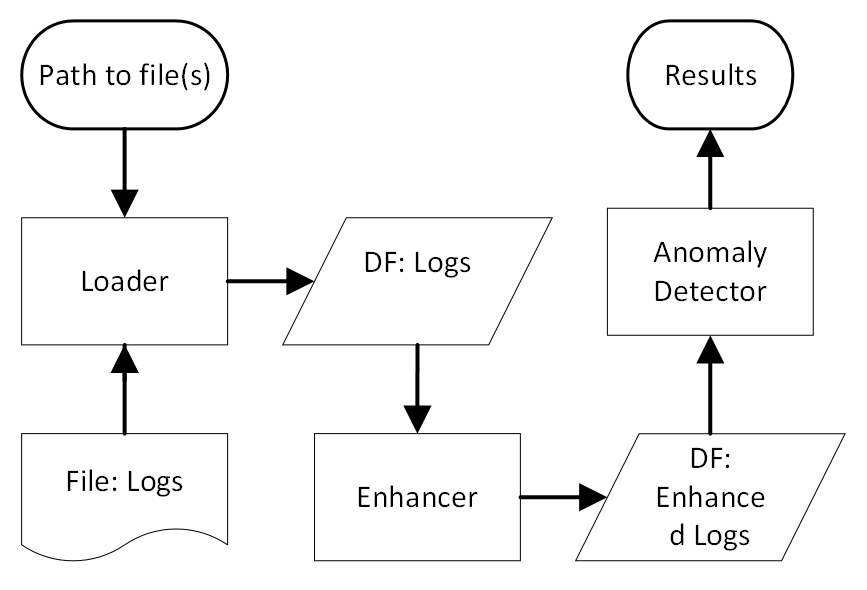 **Loader:** This module reads in the log files and deals with the specifics features of each log file. It produces a dataframe with certain semi-mandatory fields. These fields enable actions in the subsequent stages. Point [`AutoLoader`](https://github.com/EvoTestOps/LogLead/blob/main/loglead/loaders/auto.py) at a file or a directory and it detects the format and builds the right loader for you; [`RawLoader`](https://github.com/EvoTestOps/LogLead/blob/main/loglead/loaders/raw.py) is the no-assumptions fallback that can load any log file. It also has custom loaders to the following public datasets from 10 different systems. Custom loaders should result in more accurate anomaly detection:
* 3: [HDFS_v1](https://github.com/logpai/loghub/tree/master/HDFS#hdfs_v1), [Hadoop](https://github.com/logpai/loghub/tree/master/Hadoop), [BGL](https://github.com/logpai/loghub/tree/master/BGL) thanks to amazing [LogHub team](https://github.com/logpai/loghub). For full data see [Zenodo](https://zenodo.org/records/3227177).
* 3: [Sprit, Thunderbird and Liberty](https://www.usenix.org/cfdr-data#hpc4) can be found from Usenix site.
* 2: [Nezha](https://github.com/IntelligentDDS/Nezha) has data from two systems [TrainTicket](https://github.com/FudanSELab/train-ticket) and [Google Cloud Webshop demo](https://github.com/GoogleCloudPlatform/microservices-demo). It is the first dataset of microservice-based systems. Like other traditional log datasets it has Log data but additionally there are Traces and Metrics.
* 2: [ADFA](https://github.com/verazuo/a-labelled-version-of-the-ADFA-LD-dataset) and [AWSCTD](https://github.com/DjPasco/AWSCTD) are two datasets designed for intrusion detection.
Beyond those, five *spec-driven* loaders read a whole format family from a YAML spec instead of a bespoke class -- [`JsonLoader`](https://github.com/EvoTestOps/LogLead/blob/main/loglead/loaders/json.py), [`SyslogLoader`](https://github.com/EvoTestOps/LogLead/blob/main/loglead/loaders/syslog.py), [`LogfmtLoader`](https://github.com/EvoTestOps/LogLead/blob/main/loglead/loaders/logfmt.py), [`AccessLogLoader`](https://github.com/EvoTestOps/LogLead/blob/main/loglead/loaders/access_log.py) and [`DelimitedLoader`](https://github.com/EvoTestOps/LogLead/blob/main/loglead/loaders/delimited.py) -- with shipped specs for GELF, nginx, Windows events, Zeek, IIS, OpenStack and loghub. [`ProLoader`](https://github.com/EvoTestOps/LogLead/blob/main/loglead/loaders/pro.py) and [`LO2Loader`](https://github.com/EvoTestOps/LogLead/blob/main/loglead/loaders/lo2.py) cover further formats. Every loader, the formats it reads and its shipped specs are listed in [loglead/loaders/README.md](https://github.com/EvoTestOps/LogLead/blob/main/loglead/loaders/README.md).
**Enhancer:** This module extracts additional data from logs. The enhancement takes place directly within the dataframes, where new columns are added as a result of the enhancement process. For example, log parsing, the creation of tokens from log messages, and measuring log sequence lengths are all considered forms of log enhancement. Enhancement can happen at the event level or be aggregated to the sequence level. Some of the enhancers available: Event Length (chracters, words, lines), Sequence Length, Sequence [Duration](https://pola-rs.github.io/polars/py-polars/html/reference/api/polars.Duration.html), following "NLP" enhancers: [Regex](https://crates.io/crates/regex), [Words](https://en.wikipedia.org/wiki/Bag-of-words_model), [Character n-grams](https://en.wikipedia.org/wiki/N-gram). Log parsers: [Drain](https://github.com/logpai/Drain3), [LenMa](https://github.com/keiichishima/templateminer), [Spell](https://github.com/bave/pyspell), [IPLoM](https://github.com/EvoTestOps/LogLead/tree/main/parsers/iplom), [AEL](https://github.com/EvoTestOps/LogLead/tree/main/parsers/AEL), [Brain](https://github.com/EvoTestOps/LogLead/tree/main/parsers/Brain), [Fast-IPLoM](https://github.com/EvoTestOps/LogLead/tree/main/parsers/fast_iplom), [Tipping](https://pypi.org/project/tipping/), and [BERT](https://github.com/google-research/bert). [NextEventPrediction](https://arxiv.org/abs/2202.09214) including its probablities and perplexity. Next event prediction can be computed on top of any of the parser output.
**Anomaly Detector:** This module uses the enhanced log data to perform Anomaly Detection. It is mainly using SKlearn at the moment but there are few customer algorithms as well. Predictors can be a tokenized/parsed representation of the message (`item_list_col`), numeric columns (`numeric_cols`), embeddings (`emb_list_col`), or the log's own categorical fields (`categorical_cols`, one-hot encoded) — and these can be combined, since they all land in the same sparse matrix. LogLead has been integrated and tested with following models:
* Supervised (5): [Decision Tree](https://en.wikipedia.org/wiki/Decision_tree), [Support Vector Machine](https://en.wikipedia.org/wiki/Support_vector_machine), [Logistic Regression](https://en.wikipedia.org/wiki/Logistic_regression), [Random Forest](https://en.wikipedia.org/wiki/Random_forest), [eXtreme Gradient Boosting](https://en.wikipedia.org/wiki/XGBoost)
* Unsupervised (4): [One-class SVM](https://en.wikipedia.org/wiki/Support_vector_machine#One-class_SVM), [Local Outlier Factor](https://en.wikipedia.org/wiki/Local_outlier_factor), [Isolation Forest](https://en.wikipedia.org/wiki/Isolation_forest), [K-Means](https://en.wikipedia.org/wiki/K-means_clustering)
* Custom Unsupervised (4): [Out-of-Vocabulary Detector](https://github.com/EvoTestOps/LogLead/blob/main/loglead/OOV_detector.py) counts amount words or character n-grams that are novel in test set. [Rarity Detector](https://github.com/EvoTestOps/LogLead/blob/main/loglead/rarity_detector.py), scores seen words or character n-grams based on their rarity in training set. See our public [preprint](https://arxiv.org/abs/2312.01934) for more details. [Next Event Prediction](https://github.com/EvoTestOps/LogLead/blob/main/loglead/sequence_anomaly_detectors.py) scores a sequence with an n-gram model of event order, and [Lookahead Pairs](https://github.com/EvoTestOps/LogLead/blob/main/loglead/sequence_anomaly_detectors.py) flags event pairs never seen within a window in the training set. Both need parsed event sequences.
## Reference
Mäntylä MV, Wang Y, Nyyssölä J. Loglead-fast and integrated log loader, enhancer, and anomaly detector. In2024 IEEE International Conference on Software Analysis, Evolution and Reengineering (SANER) 2024 Mar 12 (pp. 395-399). IEEE. [PDF](https://ieeexplore.ieee.org/abstract/document/10589612), [preprint](https://arxiv.org/abs/2311.11809)