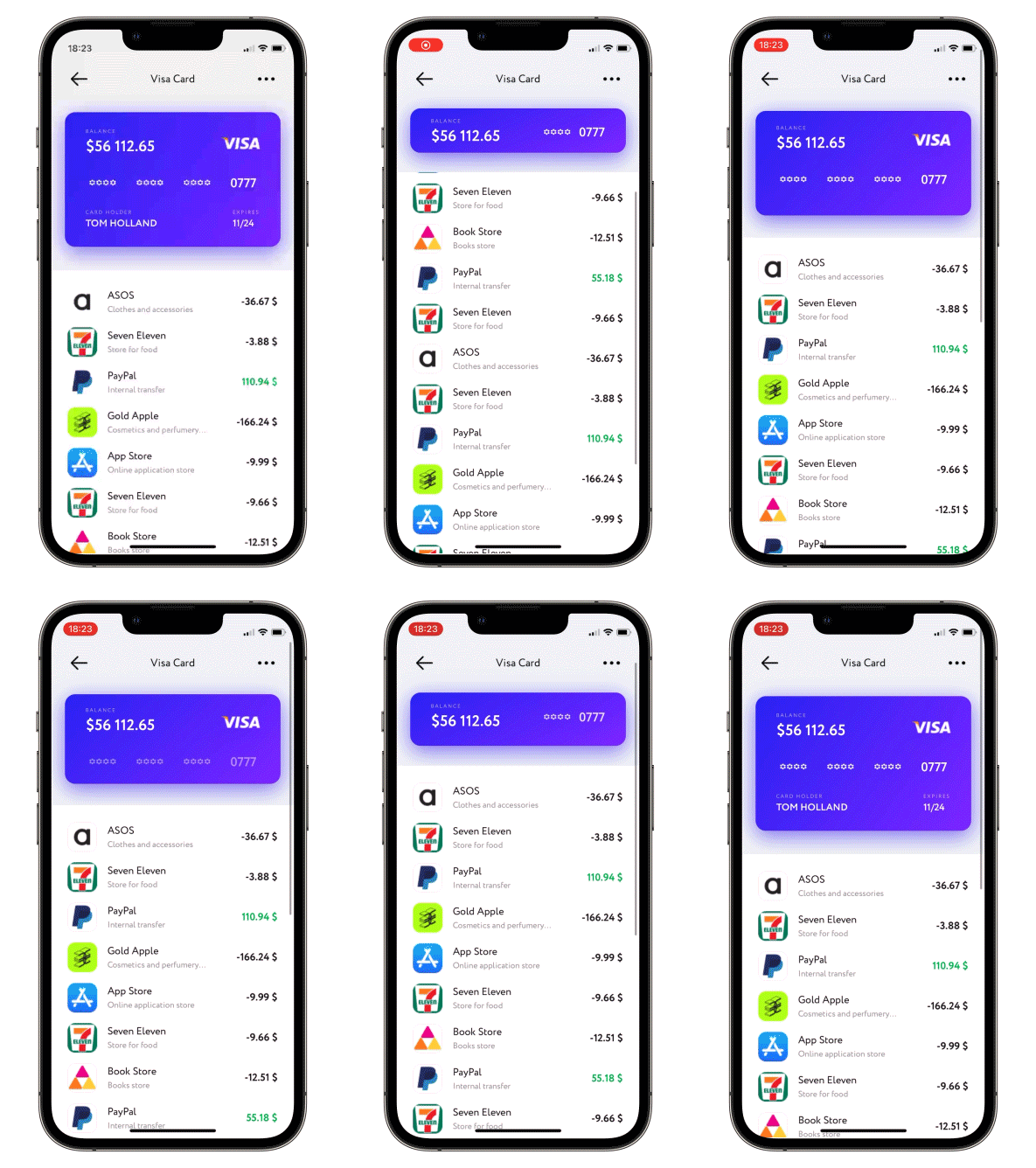
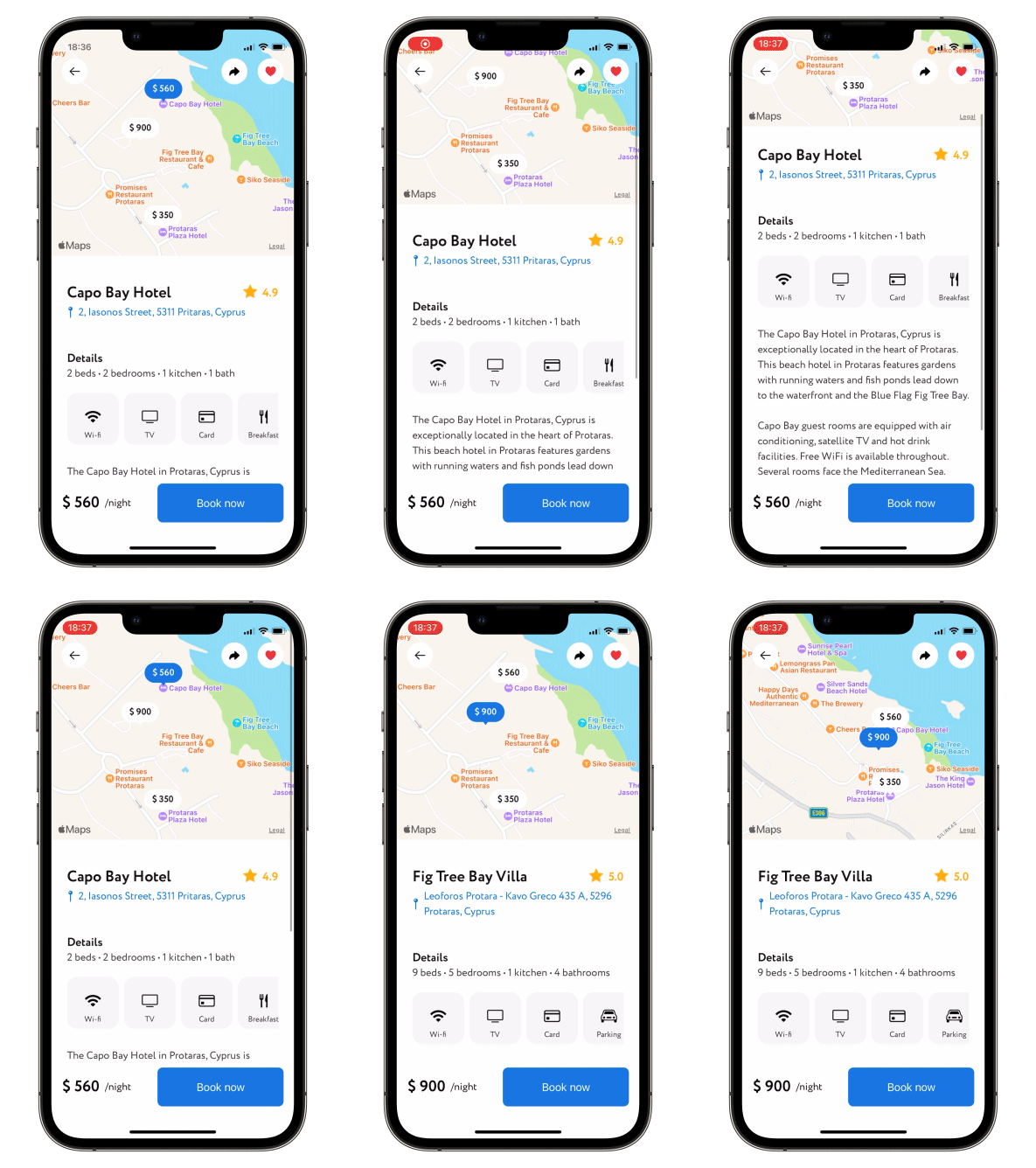
A scroll view with a sticky header which shrinks as you scroll. Written with SwiftUI.
Read Article »

[](https://swiftpackageindex.com/exyte/ScalingHeaderScrollView)
[](https://swiftpackageindex.com/exyte/ScalingHeaderScrollView)
[](https://swiftpackageindex.com/exyte/ScalingHeaderScrollView)
[](https://cocoapods.org/pods/ScalingHeaderScrollView)
[](https://opensource.org/licenses/MIT)
# What's new in version 3
- `ScalingHeaderTabView` — a new component for tab-based layouts with a shared scaling header. Each tab page scrolls independently and preserves its scroll position while the header collapses and expands in sync across all tabs.
- The header closure now receives the current height and collapse progress directly, so you no longer need an external `@State` variable and `.collapseProgress` to animate the header content.
- New modifiers: `.scrollOffset`, `.headerIsClipped`, `.headerAlignment`.
- New custom petal-style loading spinner for pull-to-refresh and pull-to-load-more.
# Update to version 3
`minHeight` and `maxHeight` are now initializer parameters instead of a modifier, and the header closure now receives `(height: CGFloat, progress: CGFloat)`.
Instead of:
```swift
@State var progress: CGFloat = 0
ScalingHeaderScrollView {
Image("header")
.resizable()
.aspectRatio(contentMode: .fill)
.clipped()
.opacity(1 - progress)
} content: {
...
}
.height(min: 110, max: 372)
.collapseProgress($progress)
```
use:
```swift
ScalingHeaderScrollView(minHeight: 110, maxHeight: 372) { height, progress in
Image("header")
.resizable()
.aspectRatio(contentMode: .fill)
.frame(height: height)
.clipped()
.opacity(1 - progress)
} content: {
...
}
```
# Usage
1. Put your header and content bodies code into a ScalingHeaderScrollView constructor.
2. Set the necessary modifiers, see below.
```swift
struct ContentView: View {
var body: some View {
ScalingHeaderScrollView { progress in
ZStack {
Rectangle()
.fill(.gray.opacity(0.15))
Image("header")
.opacity(1 - progress)
}
} content: {
Text("↓ Pull to refresh ↓")
.multilineTextAlignment(.center)
.padding()
}
}
}
```
### Required parameters
`header` - `@ViewBuilder` for your header; receives `progress` — a `CGFloat` collapse value (0 = fully expanded, 1 = fully collapsed)
`content` - `@ViewBuilder` for your content
### Available modifiers, optional
passes current collapse progress value into binding: 0 for not collapsed at all, 1 for fully collapsed
```swift
.collapseProgress(_ progress: Binding)
```
passes current scroll offset into binding
```swift
.scrollOffset(_ offset: Binding)
```
allows content scroll reset, set Binding to `true` to trigger
```swift
.scrollToTop(resetScroll: Binding)
```
when scrolling down - enable (disabled by default) header growth beyond maxHeight
```swift
.allowsHeaderGrowth()
```
hide scroll indicators (false by default)
```swift
.hideScrollIndicators()
```
controls whether the header clips its content (true by default)
```swift
.headerIsClipped(_ isClipped: Bool)
```
sets the alignment of content inside the header frame
```swift
.headerAlignment(_ alignment: Alignment)
```
allows to set up callback for ScrollView reaching the bottom
```swift
.scrollViewDidReachBottom(perform: @escaping () -> Void)
```
allows to change current header height programmatically; possible values are `.collapsed`, `.expanded` or `.custom(CGFloat)`
```swift
.snapHeaderToState(_ state: Binding, animated: Bool)
```
allows to set up an action for pull-to-refresh; if not set up loading indicator on pull-to-refresh will never be displayed
```swift
.pullToRefresh(isActive: Bool, perform: () async -> Void)
```
`isActive` - dynamically enable/disable pull-to-refresh, if disabled, loading indicator won't be displayed on pull-to-refresh
`perform` - async closure to be performed on pull-to-refresh, after the closure is done loading indicator will be hidden automatically
allows to set up an action for pull-to-load-more; if not set up loading indicator on pull-to-load-more will never be displayed
```swift
.pullToLoadMore(isActive: Bool, contentOffset: CGFloat, perform: () async -> Void)
```
`isActive` - dynamically enable/disable pull-to-load-more, if disabled, loading indicator won't be displayed on pull-to-load-more
`contentOffset` - padding value of the content from the bottom edge when pull-to-load is active
`perform` - async closure to be performed on pull-to-load-more, after the closure is done loading indicator will be hidden automatically
when scrolling up - switch between actual header collapse and simply moving it up (by default moving up)
```swift
.allowsHeaderCollapse()
```
enable/disable (disabled by default) header snap. Available modes:
- `.disabled` - Disable header snap.
- `.immediately` - Once you lift your finger header snaps either to min or max height automatically.
- `.afterFinishAccelerating` - At the end of scroll view deceleration the header snaps either to min or max height automatically.
```swift
.setHeaderSnapMode(.immediately)
```
set custom positions for header snap; specify any amount of values in 0...1, where 0 = fully collapsed, 1 = fully expanded
```swift
.headerSnappingPositions(snapPositions: [CGFloat])
```
set custom initial scroll position; specify a value in 0...1, where 0 = fully collapsed, 1 = fully expanded
```swift
.initialSnapPosition(initialSnapPosition: CGFloat)
```
## ScalingHeaderTabView
Use `ScalingHeaderTabView` when you need a scaling header with independently scrollable tab pages. Each tab preserves its own scroll position, and the header collapses and expands in sync across all tabs.
```swift
enum Tab: String, CaseIterable {
case photos, videos
var title: String { rawValue.capitalized }
}
struct ContentView: View {
@State private var selectedTab: Tab = .photos
var body: some View {
ScalingHeaderTabView(
selection: $selectedTab,
minHeight: 100,
maxHeight: 300
) { progress in
ZStack(alignment: .bottom) {
Image("header")
.resizable()
.aspectRatio(contentMode: .fill)
.opacity(1 - progress)
tabBar
}
} pageContent: { tab in
TabContentView(tab: tab)
}
}
}
```
### Required parameters
`selection` - `Binding` to the currently selected tab
`header` - `@ViewBuilder` for your header; receives `progress` — a `CGFloat` collapse value (0 = fully expanded, 1 = fully collapsed)
`pageContent` - `@ViewBuilder` producing the scroll content for each tab
### Available modifiers, optional
```swift
.collapseProgress(_ progress: Binding)
.scrollOffset(_ offset: Binding)
.scrollToTop(resetScroll: Binding)
.allowsHeaderGrowth()
.hideScrollIndicators()
.headerIsClipped(_ isClipped: Bool)
.headerAlignment(_ alignment: Alignment)
```
## Examples
To try the ScalingHeaderScrollView examples:
- Clone the repo `https://github.com/exyte/ScalingHeaderScrollView.git`
- Open `ScalingHeaderScrollViewExample.xcodeproj` in the Xcode
- Try it!
## Installation
### [Swift Package Manager](https://swift.org/package-manager/)
```swift
dependencies: [
.package(url: "https://github.com/exyte/ScalingHeaderScrollView.git")
]
```
## Requirements
* iOS 15+
* Xcode 13+
## Our other open source SwiftUI libraries
[PopupView](https://github.com/exyte/PopupView) - Toasts and popups library
[AnchoredPopup](https://github.com/exyte/AnchoredPopup) - Anchored Popup grows "out" of a trigger view (similar to Hero animation)
[Grid](https://github.com/exyte/Grid) - The most powerful Grid container
[AnimatedTabBar](https://github.com/exyte/AnimatedTabBar) - A tabbar with a number of preset animations
[MediaPicker](https://github.com/exyte/mediapicker) - Customizable media picker
[Chat](https://github.com/exyte/chat) - Chat UI framework with fully customizable message cells, input view, and a built-in media picker
[CalendarView](https://github.com/exyte/CalendarView) - Calendar view with fully customizable month/day cells
[OpenAI](https://github.com/exyte/OpenAI) Wrapper lib for [OpenAI REST API](https://platform.openai.com/docs/api-reference/introduction)
[AnimatedGradient](https://github.com/exyte/AnimatedGradient) - Animated linear gradient
[ConcentricOnboarding](https://github.com/exyte/ConcentricOnboarding) - Animated onboarding flow
[FloatingButton](https://github.com/exyte/FloatingButton) - Floating button menu
[ActivityIndicatorView](https://github.com/exyte/ActivityIndicatorView) - A number of animated loading indicators
[ProgressIndicatorView](https://github.com/exyte/ProgressIndicatorView) - A number of animated progress indicators
[FlagAndCountryCode](https://github.com/exyte/FlagAndCountryCode) - Phone codes and flags for every country
[SVGView](https://github.com/exyte/SVGView) - SVG parser
[LiquidSwipe](https://github.com/exyte/LiquidSwipe) - Liquid navigation animation