# Usage4Claude
[English](README.md) | [日本語](docs/README.ja.md) | [简体中文](docs/README.zh-CN.md) | [繁體中文](docs/README.zh-TW.md) | [한국어](docs/README.ko.md) | [Français](docs/README.fr.md) | [Deutsch](docs/README.de.md)

[](https://www.apple.com/macos/)
[](https://swift.org)
[](https://developer.apple.com/xcode/swiftui/)
[](LICENSE)
[](https://github.com/f-is-h/Usage4Claude/releases)
[](https://github.com/f-is-h/Usage4Claude/releases)
**Track your Claude (and Codex) subscription quota — beautifully, in your menu bar.**
✨ **Monitors all Claude platforms: Web • Claude Code • Desktop • Mobile App • Cowork** ✨
[Features](#-features) • [Installation](#-installation) • [User Guide](#-user-guide) • [FAQ](#-faq) • [Support](#-support)
---
## ✨ Features
### 🎯 Core Features
- **📊 Real-time Monitoring** - Display Claude subscription (Free/Pro/Team/Max) usage quota in menu bar, with optional Codex monitoring
- **🎯 Multi-Limit Support** - Claude supports 5-hour, 7-day, and Extra Usage limits plus weekly per-model usage for any number of models (e.g. Opus, Sonnet, Fable), while Codex supports 5-hour, 7-day, and Extra Usage/credits
- **🎨 Smart Display Mode** - Auto-detect and display all limit types with available data
- **⚙️ Custom Display** - Manually select which limit types to display, supports any combination
- **🎨 Smart Colors** - Automatic color changes based on usage, each limit type has its own color scheme
- **🔔 Usage Notifications** - Warning notification at 90% usage, reset notification when quota resets
- **👥 Multi-Account Management** - Support multiple Claude accounts / multiple organizations per account, plus independent Codex account management and quick switching
- **🧩 Codex Support** - Optional Codex quota monitoring; use Codex alone or show it alongside Claude in a dual-column view (add a Codex account in settings to enable)
- **🌐 Built-in Browser Login** - Claude login automatically extracts Session Key; Codex uses built-in browser login for ChatGPT authentication
- **🎨 Appearance Settings** - Support system default / light / dark appearance modes
- **🕐 Time Format** - Support system default / 12-hour / 24-hour format
- **⏰ Precise Timing** - Quota reset time displayed with minute precision
- **🔄 Smart Refresh System** - Intelligent 4-level adaptive refresh or fixed intervals (1/3/5/10 min)
- **⚡ Manual Refresh** - Click refresh button to update data instantly (10-second debounce protection)
- **💻 Native Experience** - Pure native macOS app, lightweight and elegant
### 🌐 Cross-Platform Support
Works seamlessly with all Claude products:
- 🌐 **Claude.ai** (Web interface)
- 💻 **Claude Code** (CLI tool for developers)
- 🖥️ **Desktop App** (macOS/Windows)
- 📱 **Mobile App** (iOS/Android)
- 🤝 **Cowork** (AI Agent)
All platforms share the same usage quota, monitored in one place!
### 🧩 Codex Support
- Monitor Codex alone or together with Claude
- Supports Codex 5-hour, 7-day, and Extra Usage/credits information
- Add a Codex account by logging in to ChatGPT with the built-in browser
- Claude-only users need no extra setup; the existing experience stays unchanged until a Codex account is added
### 🎨 Personalization
- **🕓 Multiple Display Modes**
- Percentage Only - Clean and intuitive, view at a glance
- Icon Only - Subtle and elegant, detailed info on click
- Icon + Percentage - Complete information, quick visual identification
- **🌍 Multilingual Support**
- English
- 日本語
- 简体中文
- 繁体中文
- 한국어
- Français (contributed by [@mtreize](https://github.com/mtreize))
- Deutsch (contributed by [@schaitl](https://github.com/schaitl))
- More languages coming soon... (Localization PRs are welcome!)
### 🔧 Convenient Features
- **⚙️ Visual Settings** - No code modification needed, GUI configuration for all options
- **🆕 Smart Update Alerts** - Menu bar badge and rainbow animation notify new versions
- **🚀 Launch at Login** - Optional automatic startup when system boots
- **⌨️ Keyboard Shortcuts** - Common operations support shortcuts (⌘R | ⌘, | ⌘Q)
- **👋 Friendly Onboarding** - Detailed setup wizard on first launch
- **… Menu Display** - Multiple menu access methods, detail view and right-click
- **🔔 Usage Notifications** - Claude usage warning and reset notifications, configurable in settings
- **🛠️ Debug Mode** - Developer options: Claude/Codex fake data testing, simulated updates, instant refresh
### 🔒 Security & Privacy
- 🏠 **Local Storage Only** - All data stored locally only, never collect or upload any personal information
- 🔐 **Keychain Protection** - Claude Session Key and Codex authentication token secured in Keychain, no plain text keys
- 📖 **Open Source Transparency** - Code fully public, anyone can audit
- 🛡️ **Sandbox Protection** - App Sandbox enabled for enhanced security
---
## 📸 Screenshots
### Menu Bar Display
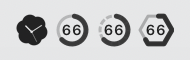
- Claude and Codex menu bar icons and limit indicators are shown below
- Dual indicators through shape and color ensure easy identification even in monochrome themes
| Icon | 5-Hour | 7-Day | Extra | 7-Day Opus | 7-Day Sonnet | Monochrome (Adaptive) |
|:---:|:---:|:---:|:---:|:---:|:---:|-----|
|  |
|  |
|  |
|  |
|  |
|  |
| 
 |
|
|
|  |
|  |
|  |
|  | — | — |
 |
**Color Indicators**:
Claude current colors:
- **5-Hour Limit (incl. detail window)**:  →  → 
- **7-Day Limit (incl. detail window)**:  →  → 
- **Extra Usage**:  →  → 
- **7-Day Opus Limit**:  →  → 
- **7-Day Sonnet Limit**:  →  → 
Codex current colors:
- **Codex 5-Hour Limit**:  →  → 
- **Codex 7-Day Limit**:  →  → 
- **Codex Extra Usage / credits**:  →  → 
### Detail Window
|
**Color Indicators**:
Claude current colors:
- **5-Hour Limit (incl. detail window)**:  →  → 
- **7-Day Limit (incl. detail window)**:  →  → 
- **Extra Usage**:  →  → 
- **7-Day Opus Limit**:  →  → 
- **7-Day Sonnet Limit**:  →  → 
Codex current colors:
- **Codex 5-Hour Limit**:  →  → 
- **Codex 7-Day Limit**:  →  → 
- **Codex Extra Usage / credits**:  →  → 
### Detail Window
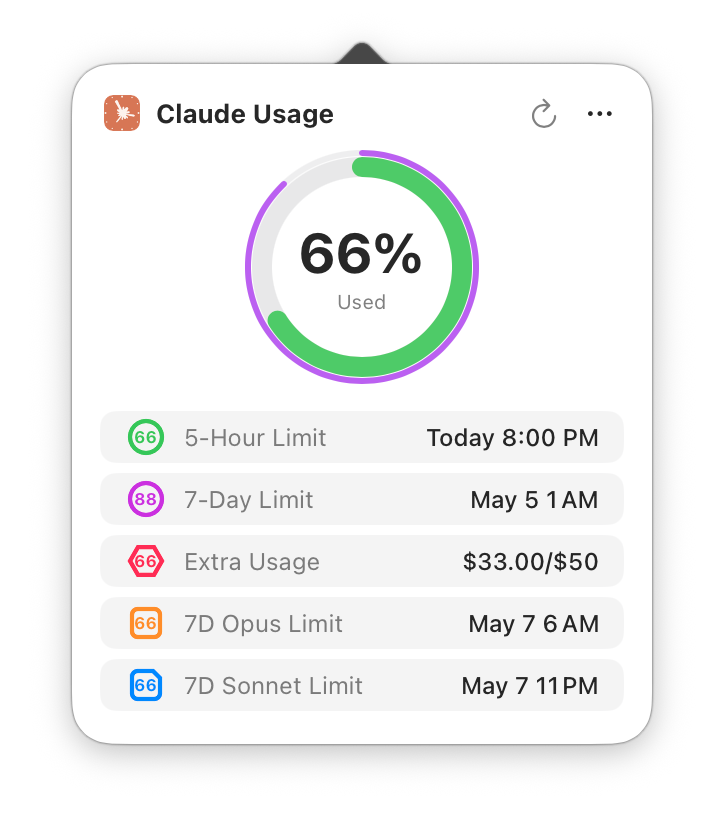
Claude-only mode
|
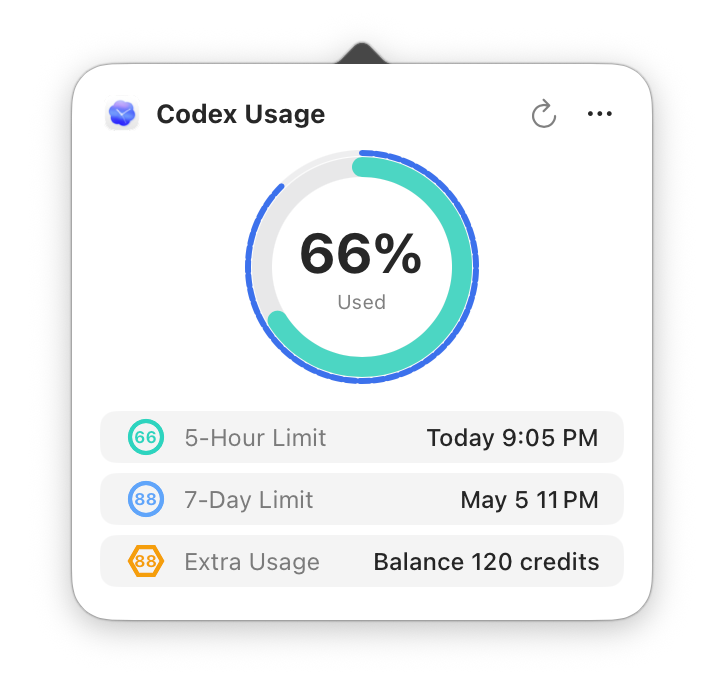
Codex-only mode
|
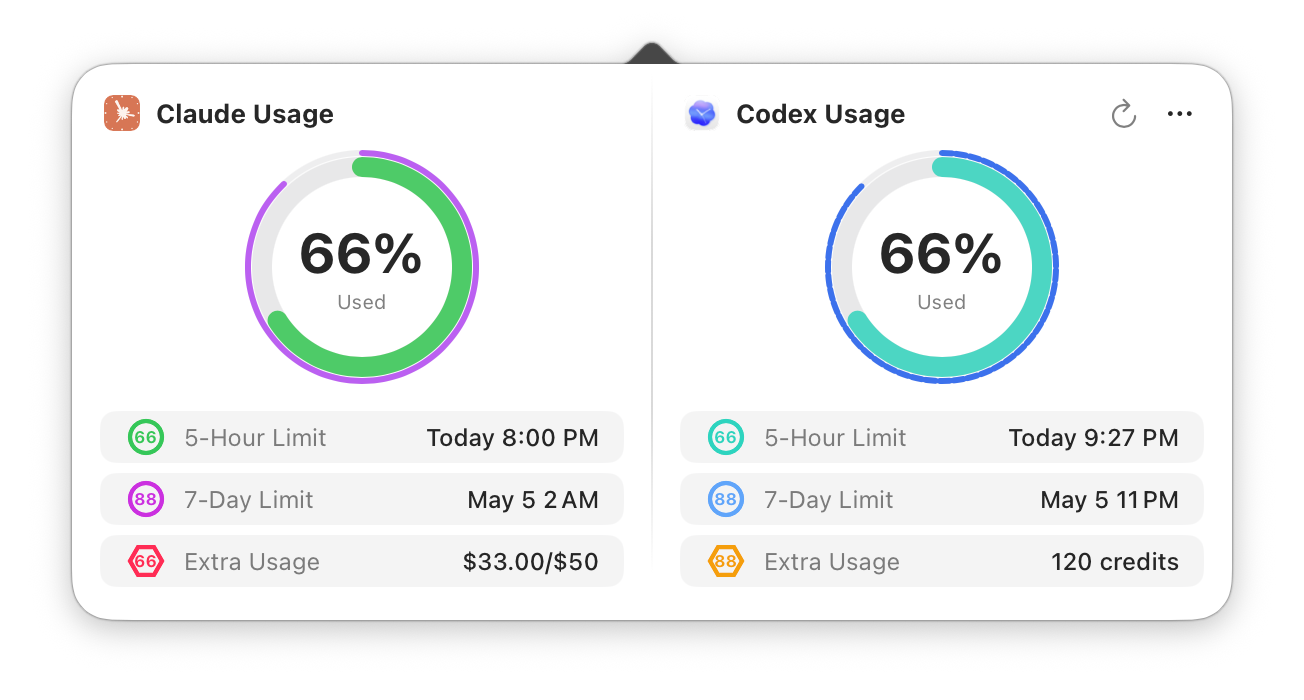
Claude + Codex mode
|
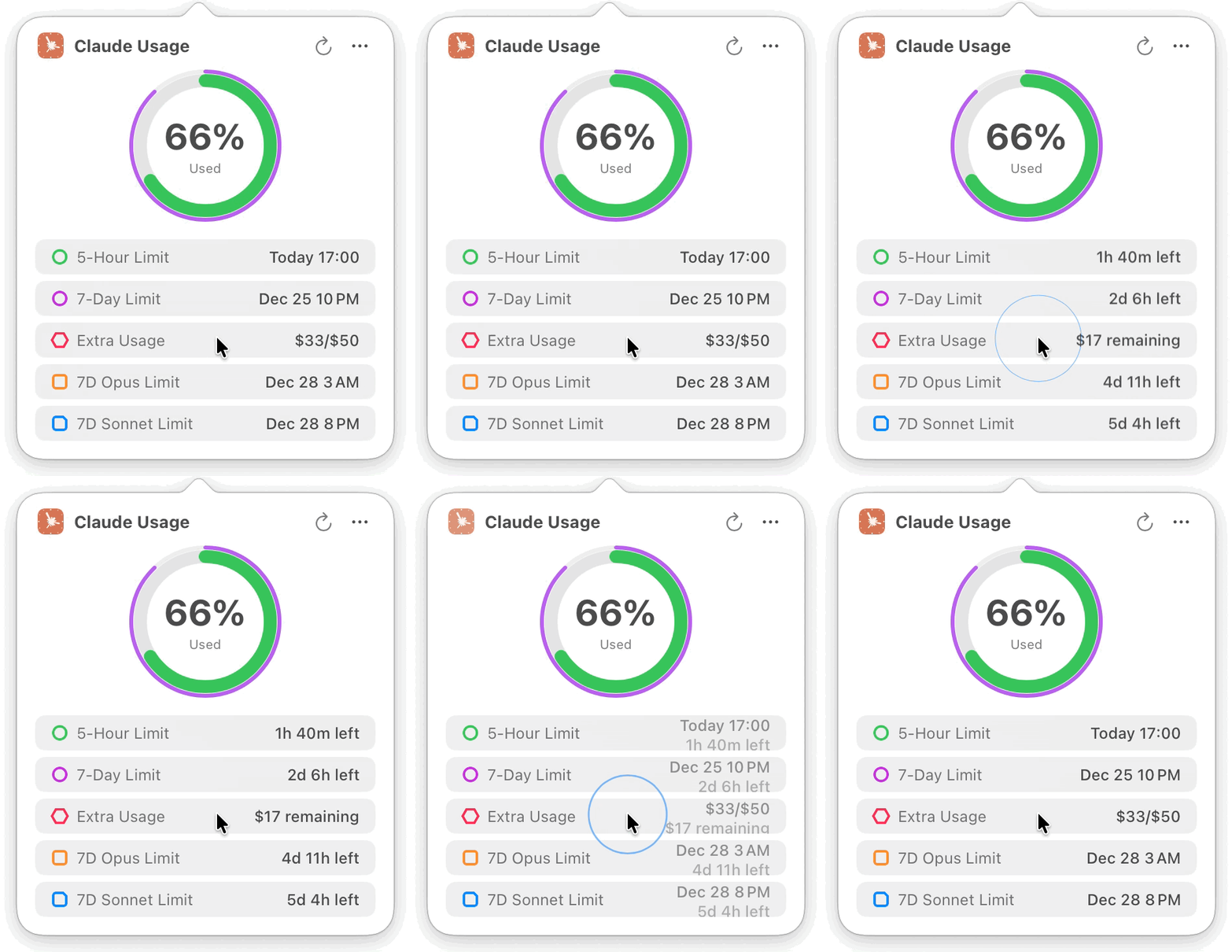
Time Remaining Toggle Animation
|
### Settings
**General** - Display options, menu bar theme, notification settings, appearance (system/light/dark), refresh mode, time format, language options, launch at login
**Authentication** - Claude/Codex account management (add/delete/switch/alias editing), built-in browser login, Claude manual input, connection diagnostics
**About** - Version info and related links
### Welcome Screen
**Configure Authentication** - Claude supports built-in browser one-click login (recommended) or manual Session Key input, auto-retrieves Organization ID, and auto-creates multiple organizations under the same Session Key; Codex can be added later in settings through built-in browser login to ChatGPT
**Configure Display Options** - Menu bar theme, display content, display mode (smart/custom) selection with live preview
**Set Up Later** - Close welcome screen, configure later in settings
---
## 💾 Installation
### Option 1: Download Pre-built (Recommended)
1. Go to [Releases page](https://github.com/f-is-h/Usage4Claude/releases)
2. Download the latest `.dmg` file
3. Double-click to open, drag app to Applications folder
4. Right-click the app and select "Open" on first launch (allow unsigned app)
5. Allow Keychain access for authentication info (you may need to allow again after version updates; the prompt shows the relevant authentication token name)
> **Updates after the first install are in-app.** Sparkle checks for new versions automatically (and on demand via Menu → Check for Updates), then downloads, verifies the EdDSA signature, and installs with one click — no need to re-download the DMG for future releases.
### Option 2: Build from Source
#### Requirements
- macOS 13.0 or later
- Xcode 15.0 or later
- Git
#### Build Steps
```bash
# Clone repository
git clone https://github.com/f-is-h/Usage4Claude.git
cd Usage4Claude
# Open in Xcode
open Usage4Claude.xcodeproj
# Press Cmd + R to run in Xcode
```
---
## 📖 User Guide
### Initial Setup
1. **Launch App**
Welcome screen will appear on first run
2. **Configure Authentication**
- **Claude Option 1: Browser Login (Recommended)**
- Click the "Browser Login" button
- Log in to your Claude account in the built-in browser
- Session Key will be automatically extracted after successful login
- **Claude Option 2: Manual Input**
- Open browser and visit the Claude usage page
- Open developer tools (F12 or Cmd + Option + I)
- Switch to "Network" tab, refresh the page
- Find the `usage` request, extract `sessionKey=sk-ant-...` from Cookie
- Paste into the input field
- **Codex Account (Optional)**
- Open Settings → Authentication
- Click "Browser Login" for Codex
- Log in to your ChatGPT account in the built-in browser
- Authentication info is saved automatically after successful login
- Codex does not currently support manual Session Key input
### Daily Usage
- **Default Display** - Menu bar icon shows usage percentage
- **View Details** - Click the menu bar icon to view details; when only Claude/Codex is configured, the detail window shows a Claude/Codex single column, and when both are configured it shows a dual-column view
- **Manual Refresh** - Click refresh button in detail window or use shortcut ⌘R (data also auto-refreshes when opening the main window); in the dual-column view, Claude and Codex can also be refreshed separately
- **Switch Account** - Click "…" menu in detail window or right-click menu bar icon to select a Claude / Codex account
- **Keyboard Shortcuts**
- ⌘R - Manual refresh data
- ⌘, - Open General Settings
- ⌘⇧A - Open Authentication Settings
- ⌘U - Check for updates
- ⌘Q - Quit app
- **Update Alerts** - When a new version is available, the menu bar icon shows a badge and menu items display rainbow text
- **Check Updates** - Menu → Check for Updates. New versions download, verify (EdDSA signature), and install in-app — no manual re-download needed (powered by [Sparkle](https://sparkle-project.org))
### Refresh Mode
**Smart Frequency (Recommended)**
- Automatically adjusts refresh rate based on usage patterns
- Active mode (1 min) - Fast refresh when actively using Claude or Codex
- Idle modes (3/5/10 min) - Progressively slower refresh when idle
- Significantly reduces API calls during idle periods (up to 10x)
- Instantly returns to 1-minute refresh when usage detected
- Automatically refreshes after system wake to avoid stale data
**Fixed Frequency**
- **1 minute** - Recommended for consistent monitoring
- **3 minutes** - Balanced monitoring
- **5 minutes** - Low frequency monitoring
- **10 minutes** - Minimal API calls
---
## ❓ FAQ
Q: What if the app shows "Session Expired"?
A: Claude Session Keys or Codex authentication tokens expire periodically (usually weeks to months), and you need to log in again:
1. Open Settings → Authentication
2. For Claude, click "Browser Login" to log in again (recommended), or manually re-obtain Session Key
3. For Codex, click Codex "Browser Login" and log in to ChatGPT in the built-in browser
4. Done, monitoring will resume
Q: How to enable auto-launch on startup?
A: Two methods:
**Method 1: Using built-in option (Recommended)**
1. Open Settings → General
2. Check "Launch at Login" option
**Method 2: Via System Settings**
1. Open System Settings → General → Login Items
2. Click "+" to add Usage4Claude
Q: How much system resources does it use?
A: Very lightweight:
- CPU Usage: < 0.1% (idle)
- Memory: ~20MB
- Network: Refreshes at the configured smart frequency; when both Claude and Codex are configured, each service is requested separately
Q: Which macOS versions are supported?
A: Requires macOS 13.0 (Ventura) or later. Supports both Intel and Apple Silicon (M1/M2/M3/M4/M5) chips.
Q: Why does it need Keychain permission?
A:
- Keychain is macOS's system-level password manager
- Claude Session Key and Codex authentication token are encrypted in Keychain
- Claude Organization ID is stored in local config (non-sensitive identifier)
- This is Apple's recommended secure storage method
- Only this app can access the information, other apps cannot view it
Q: Is my data safe? How is privacy protected?
**Completely safe!**
**Data Storage:**
- All data stored **only** on your local Mac
- No collection, no tracking, no statistics of any information
- No network requests except Claude and Codex usage-related API calls
- No third-party services used
**Authentication Security:**
- Claude Session Key and Codex authentication token encrypted via macOS Keychain (system-level encryption)
- Keychain uses AES-256 encryption + hardware protection (T2 / Secure Enclave)
- Only this app can access your credentials, other apps cannot read them
- You can revoke access anytime via "Keychain Access" app
**Code Transparency:**
- 100% open source
- No obfuscation or hidden features
- Community can audit and verify
**Additional Protection:**
- App Sandbox enabled (limits system access)
- No access to your files, contacts, or other apps
- Minimal permissions (only network + Keychain)
You can verify all of this by reviewing the source code on GitHub!
Q: Does it work with Claude Code / Desktop App / Mobile App?
A: **Yes, it works with all Claude platforms!**
Since all Claude products (Web, Claude Code, Desktop App, Mobile App, Cowork) share the same usage quota, Usage4Claude monitors your combined usage across all platforms.
Whether you're:
- Coding in terminal with `claude code`
- Chatting on claude.ai
- Using the desktop app
- Using mobile apps
- Using Cowork agents
You'll see your real-time total usage in the menu bar. No platform-specific configuration needed!
Q: How do I enable Codex support? Can I use Codex only?
A: Yes. Open Settings → Authentication, click Codex "Browser Login", and log in to ChatGPT in the built-in browser.
- Codex only: the menu bar and detail window show Codex usage
- Claude + Codex: the detail window shows both providers side by side
- Codex currently supports browser login only, not manual Session Key input
Q: Can't see the icon in menu bar?
A: macOS system or third-party software (like Bartender, Hidden Bar, etc.) may automatically hide menu bar icons.
**Solution:**
1. Hold **Command (⌘) key**
2. Drag icons in the menu bar with mouse
3. Drag Usage4Claude icon to the visible area on the right side of menu bar
4. Release mouse
**Note:**
- macOS Sonoma (14.0+) automatically hides infrequently used icons to "Control Center"
- You can adjust menu bar icon display in "System Settings" → "Control Center"
Q: How to manage multiple accounts?
A: Usage4Claude supports multiple Claude accounts, multiple organizations under the same Claude account, and independent Codex account management:
- **Add Account** - Add via Claude browser login, Claude manual input, or Codex browser login in Settings → Authentication
- **Switch Account** - Click "…" menu in detail window or right-click menu bar icon, select the Claude / Codex account to switch to
- **Edit Alias** - Set easily recognizable aliases for each account
- **Delete Account** - Swipe left or use edit mode to remove unwanted accounts
Q: How to enable usage notifications?
A: Toggle Claude usage notifications in Settings → General:
- **Usage Warning** - System notification when Claude usage reaches 90%
- **Reset Notification** - Notification when Claude quota resets
- macOS notification permission required on first enable
---
## 🛠 Tech Stack
Built with modern macOS native technologies:
- **Language**: Swift 5.0+
- **UI Framework**: SwiftUI + AppKit hybrid
- **Architecture**: MVVM
- **Networking**: URLSession
- **Reactive**: Combine Framework
- **Localization**: Built-in i18n support
- **Platform**: macOS 13.0+
---
## 🗺 Roadmap
### ✅ Completed
- [x] Basic monitoring features
- [x] Menu bar real-time display
- [x] Circular progress indicator
- [x] Smart color alerts
- [x] Real-time countdown
- [x] Multiple menu bar display modes
- [x] Visual settings interface
- [x] Multilingual support
- [x] First-launch onboarding
- [x] Update checking with visual alerts
- [x] Keychain authentication storage
- [x] Shell auto-package DMG
- [x] GitHub Actions auto-release
- [x] Settings interface display optimization
- [x] Launch at login option
- [x] Keyboard shortcuts support
- [x] Manual refresh feature
- [x] Three-dot menu dark mode adaptation
- [x] Dual limit mode support (5-hour + 7-day)
- [x] Dual-ring menu bar icon
- [x] Unified color scheme management
- [x] Debug mode (fake data, simulated updates)
- [x] Detail window remove Focus state
- [x] Multi-limit type support (5 types)
- [x] Smart/custom display mode
- [x] Auto-retrieve Organization ID
- [x] Optimized welcome flow
- [x] Monochrome theme icon display
- [x] Korean language support
- [x] GitHub Actions check online version
- [x] Appearance settings (system/light/dark)
- [x] Built-in browser auto-authentication
- [x] Automatic credential configuration
- [x] Usage notifications
- [x] Multi-account management
- [x] Unified time format settings
- [x] Settings interface dark mode adaptation
- [x] Codex usage monitoring support
- [x] Codex-only mode
- [x] Claude + Codex dual-column detail window
- [x] Codex account management and browser login
- [x] French localization
- [x] Automatic refresh after system wake
### Mid-term Plans
1. **Feature Addition**
- More language localizations
### Long-term Vision
2. **More Display Methods**
- Desktop widgets
- Browser extension icon usage display
3. **Data Analysis**
- Usage history records
- Trend charts
4. **Multi-platform Support**
- iOS / iPadOS version
- Apple Watch version
- Windows version
---
## 🤝 Contributing
All contributions are welcome! Whether it's new features, bug fixes, or documentation improvements.
For detailed contribution guidelines, please see [CONTRIBUTING.md](CONTRIBUTING.md).
### How to Contribute
1. Fork this repository
2. Create your feature branch (`git checkout -b feature/AmazingFeature`)
3. Commit your changes (`git commit -m 'Add some AmazingFeature'`)
4. Push to the branch (`git push origin feature/AmazingFeature`)
5. Open a Pull Request
### Contributors
Thanks to all who have contributed to this project!
---
## 📝 Changelog
For detailed version history and updates, please see [CHANGELOG.md](CHANGELOG.md).
---
## 💖 Support
If this project helps you, please support in the following ways:
### ⭐ Star the Project
Giving a star is the biggest encouragement!
### ☕ Buy Me a Coffee

 ### 📢 Share the Project
If you like this project, please share it with more people!
---
## 📄 License
This project is licensed under the MIT License - see [LICENSE](LICENSE) file for details
```
MIT License
Copyright (c) 2025-2026 f-is-h
You are free to use, copy, modify, merge, publish, distribute, sublicense,
and/or sell copies of the Software.
```
---
## 🙏 Acknowledgments
- Thanks to Claude/Codex - Most code written by AI
- Thanks to all contributors and users for their support
- Icon design inspired by Claude/Codex official branding
---
## 📞 Contact
- **Issues**: [Submit issues or suggestions](https://github.com/f-is-h/Usage4Claude/issues)
- **Discussions**: [Join discussions](https://github.com/f-is-h/Usage4Claude/discussions)
- **GitHub**: [@f-is-h](https://github.com/f-is-h)
---
## ⚖️ Disclaimer
This project is an independent third-party tool with no official affiliation with Anthropic, Claude AI, OpenAI, or Codex. Please comply with the relevant Terms of Service when using this software.
---
### 📢 Share the Project
If you like this project, please share it with more people!
---
## 📄 License
This project is licensed under the MIT License - see [LICENSE](LICENSE) file for details
```
MIT License
Copyright (c) 2025-2026 f-is-h
You are free to use, copy, modify, merge, publish, distribute, sublicense,
and/or sell copies of the Software.
```
---
## 🙏 Acknowledgments
- Thanks to Claude/Codex - Most code written by AI
- Thanks to all contributors and users for their support
- Icon design inspired by Claude/Codex official branding
---
## 📞 Contact
- **Issues**: [Submit issues or suggestions](https://github.com/f-is-h/Usage4Claude/issues)
- **Discussions**: [Join discussions](https://github.com/f-is-h/Usage4Claude/discussions)
- **GitHub**: [@f-is-h](https://github.com/f-is-h)
---
## ⚖️ Disclaimer
This project is an independent third-party tool with no official affiliation with Anthropic, Claude AI, OpenAI, or Codex. Please comply with the relevant Terms of Service when using this software.
---
**If this project helps you, please give it a ⭐ Star!**
Made with ❤️ by [f-is-h](https://github.com/f-is-h)
[⬆ Back to Top](#usage4claude)