`GeoLift`: And end-to-end solution to Measure Lift at a Geo Level
=================================================================
Introduction
------------
### What is Lift?
Lift is a scientific measurement technique which allows users to
accurately understand and compare the value of their strategies. Lift,
which is grounded on experimental design, is typically used to measure
the true or *causal* effect that an ad campaign had on business metrics
such as Sales, App Installs, or Leads. By estimating the *incremental*
effect that these strategies provide, analysts are able to understand,
analyze, and optimize their cross-channel strategies through data and
science.
### What is Geo Experimentation?
There are many ways to measure Lift and Geo Experimentation is one that
has been rapidly gaining popularity. In general, Geo Experimentation
refers to any test where the treatment is administered at the geo-level.
In practice, this often means that ad campaigns are geo-targeted in such
a way that the test regions are eligible to see ads while the control
ones aren’t. Geo Experimental methods use this information to calculate
the true value that this strategy had on your audience. Moreover, since
they rely on aggregated data they’re privacy-safe, can work across
channels, and are very robust against signal-loss.
### Why GeoLift?
GeoLift is Meta’s open-source solution to measure Lift at a geographical
level. By leveraging the latest advances in Synthetic Control Methods,
GeoLift empowers you to start making decisions grounded in
incrementality and measure the true value of your marketing campaigns.
This tool offers an end-to-end solution to geo-experimentation which
spans data ingestion, power analyses, market selection, and inference in
this easy-to-use R package. Moreover, the tool’s open-source nature
makes it transparent and fully reproducible!
Installation
------------
You can install `GeoLift` from our [GitHub
repository](https://github.com/facebookincubator/GeoLift/) using the
`remotes` package.
``` r
## Install remotes if noy already installed
install.packages("remotes", repos='http://cran.us.r-project.org')
## Install augsynth & GeoLift from GitHub
remotes::install_github("ebenmichael/augsynth")
remotes::install_github("facebookincubator/GeoLift")
```
``` r
library(GeoLift)
library(gridExtra)
library(ggplot2)
```
Example - Data
--------------
To show an end-to-end implementation of GeoLift we will use simulated
data of 40 US cities across 90 days to: design a test, select test
markets, run power calculations, and finally calculate the Lift caused
by the campaign. As with every GeoLift test, we start analyzing pre-test
historical information. We will use the data included in the `GeoLift`
package.
``` r
data(GeoLift_PreTest)
```
The `GeoLift_PreTest` data set contains three variables:
1. location (city)
2. date (in “yyyy-mm-dd” format)
3. Y (number of conversions/KPI in each day/location).
Every GeoLift experiment should contain at least these three variables
that reflect when, where, and how much of the KPI was measured.
Nevertheless, if you have more data available, you can include
covariates to GeoLift to improve our results through the `X` parameter
of all GeoLift functions.
The first step to run a `GeoLift` test is to read the data into the
proper format using the `GeoDataRead` function.
``` r
GeoTestData_PreTest <- GeoDataRead(data = GeoLift_PreTest,
date_id = "date",
location_id = "location",
Y_id = "Y",
X = c(), #empty list as we have no covariates
format = "yyyy-mm-dd",
summary = TRUE)
```
``` r
#> ##################################
#> ##### Summary #####
#> ##################################
#>
#> * Raw Number of Locations: 40
#> * Time Periods: 90
#> * Final Number of Locations (Complete): 40
head(GeoTestData_PreTest)
#> location time Y
#> 1 atlanta 1 3384
#> 2 atlanta 2 3904
#> 3 atlanta 3 5734
#> 4 atlanta 4 4311
#> 5 atlanta 5 3686
#> 6 atlanta 6 3374
```
This function analyzes the data set, handles locations with missing
data, and returns a data frame with time-stamps instead of dates. In
this case, since we’re inputting daily data each time unit represents a
day.
#### **Note:** Before reading the data into this format, always make sure that there are no missing variables, `NAs`, or locations with missing time-stamps as those will be dropped by the `GeoDataRead()` function.
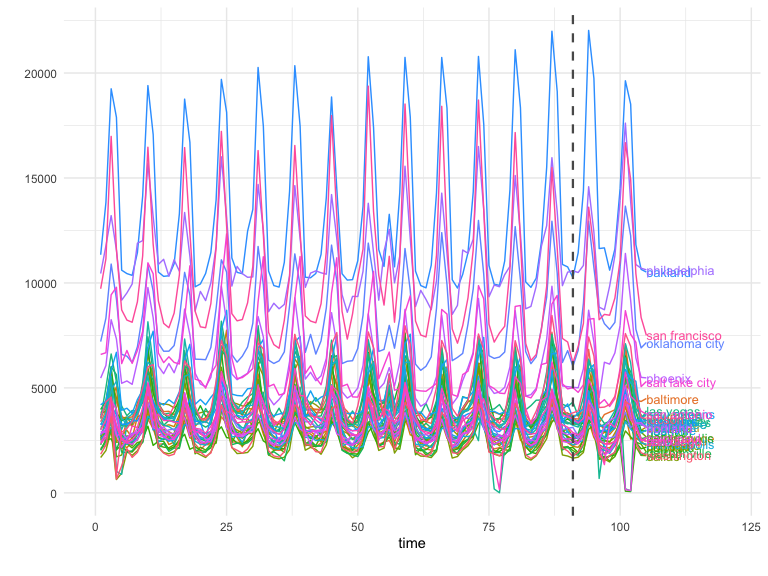
A good next step is to plot the panel data with `GeoPlot` to observe
it’s trend, contribution per location, and also to detect any data
anomalies before moving on to the data analysis.
``` r
GeoPlot(GeoTestData_PreTest,
Y_id = "Y",
time_id = "time",
location_id = "location")
```
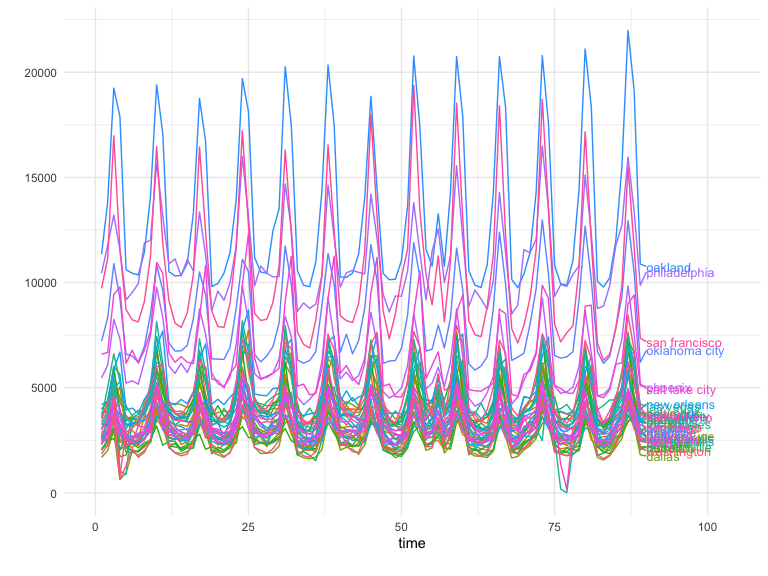 In this case we see a similar pattern that’s shared across all
locations. These structural similarities between regions are the key to
a successful test!
Example - Power Analysis
------------------------
Running a prospective power analysis is fundamental prior to executing a
test. It is only through a thorough statistical analysis of our data
that we can set it up for success. In general, through the power
analysis we can find:
- The optimal number of test locations.
- Best test duration.
- Select the ideal test and control markets.
- Get a good estimate of the budget needed to run the test.
- Determine which is the Minimum Detectable Effect to obtain
significant results.
- Align expectations.
Assessing the power and selecting the test markets for a GeoLift test
can be accomplished through the `GeoLiftMarketSelection()` function.
Through a series of simulations, this algorithm will find which are the
best combinations of test and control locations for the experiment.
Moreover, for each of these test market selections, the function will
display the Minimum Detectable Effect, minimum investment needed to run
a successful test, and other important model-fit metrics that will help
us select the test that best matches our goals and resources.
### Understanding Power Function Parameters
The key parameters needed to run this function are:
- `data`: A data frame containing the historical conversions by
geographic unit. This object must contain at least a “location”
column with the geo name, a “Y” column with the outcome data (such
as units), a “time” column with the indicator of the time period
(starting at 1), and covariates (if available). Using the data frame
generated by `GeoDataRead()` is the best way to make sure we have
the correct format. For this example, we will use
`GeoTestData_PreTest`.
- `treatment_periods`: List of treatment periods to calculate power
for. If we’re unsure of the ideal test duration, we can specify and
assess the power of different durations. The ideal test length
heavily depends on the product and vertical we are working with.
Nevertheless, a good rule of thumb when deciding duration is to make
sure that the test period can contain **at least** one full purchase
cycle. Given that we have daily data in our example, we will analyze
the power of 10 and 15-day tests by setting this parameter to
`c(10,15)`.
- `N`: List of number of test markets to calculate power for. The
values in this list represent the different test-market sizes we
want to explore. This parameter is often guided by the budget and
scope of the test we want to implement. For our example, we will
analyze smaller tests with two, three, and four test markets (the
remaining would be part of the control). We will do so by setting
this parameter to `c(2,3,4)`.
- `X` (Optional): List of the names of the covariates in the `data`.
In our example we don’t have any covariates so we’ll leave it empty.
- `Y_id`, `location_id`, and `time_id`: Names of the outcome,
location, and time variables (String). These parameters will let our
function know are the names of these variables in our data frame. If
left empty, this parameter will default to the defaults of
`GeoDataRead()` which are: `Y`, `location`, and `time`.
- `effect_size`: This parameter contains a vector of different effect
sizes (or lifts) we want to simulate. Since these are relative
values, they do depend on the product and vertical we’re analyzing.
For instance, while a small single-digit percent increase in volume
for a retailer can translate to millions of units, a large lift
might be required for an automotive company that sells fewer
products per day. By default this parameter is set to a sequence of
lifts between 0 and 25 percent with 5% increments, that is,
`seq(0,0.25,0.05)`.
- `lookback_window`: A number indicating how far back in time the
simulations for the power analysis should go. For instance, a value
equal to 5 would simulate power for the last five possible tests. In
general, when the historical data is stable (it doesn’t vary wildly
from one day/region to another) we can obtain a very robust and
reliable power analysis by just looking into the most recent
possible test (in other words, `lookback_window = 1`). It is
important to mention that increasing the values in this parameter
can significantly increase the algorithm’s run-time.
- `include_markets`: A list of markets or locations that should be
part of the test group. Assuming that we need to have Chicago as
part of our test regions, we will set this parameter to
`include_markets = c("chicago")`. Make sure the spelling of
locations in this lists matches with the data.
- `exclude_markets`: A list of markets or locations that won’t be
considered for the test market selection, but will remain in the
pool of controls. In our example, we will set
`exclude_markets = c("honolulu")` to make sure that only cities in
the continental US will be part of the test group. As with
`include_locations`, always make sure the spelling of locations in
this lists matches with the data.
- `holdout`: A vector with two values: the first one the smallest
desirable holdout and the second the largest desirable holdout. The
holdout represents the share of conversions from markets that will
not see our ad campaign. In our example, will specify that we’re OK
with a large holdout and will therefore set `holdout = c(0.5, 1)`.
If this parameter is left empty, all market selections will be
analyzed regardless of their size.
- `cpic`: Value indicating the Cost Per Incremental Conversion, that
is, on average how much do we typically need to spend to bring one
incremental conversion. CPIC estimates can typically be obtained
from Marketing Mix Models, Conversion Lifts, and previous
experiments/geo-experiments. This value is key to get a good
estimate of the budget that we will need to run a well-powered test.
If there is no reliable information about the Cost Per Incremental
Conversion, the default will be set to `cpic = 1`, in which case,
the investment results will output the incremental units needed for
a successful test.
- `budget`: Optional parameter that indicates the maximum budget
available for a GeoLift test. If no budget is provided, all market
selections will be analyzed by the algorithm.
- `alpha`: This parameter controls the significance Level that will be
used by our model. By default `alpha = 0.1` which is equivalent to a
90% confidence level.
- `model`: A string that indicates the outcome model used to augment
the Augmented Synthetic Control Method. Augmentation through a
prognostic function can improve fit and reduce L2 imbalance metrics.
The most common values used are: `model = "None"` (default) which
won’t augment the ASCM and `model = "Ridge"`. More information on
this parameter is given in the **Inference** section of this
walkthrough.
- `fixed_effects`: A logic flag indicating whether to include unit
Fixed Effects (FE) in the model. Fixed effects are an additional
parameter that we can include into our models which represents a
non-random component in our data. More specifically, in our model
the FE represents the “level” of each region’s time-series across
the data. By adding the FE we effectively remove this level - this
allows our model to focus on explaining the variations from that
level rather than the full value of Y. This is helpful when the
series are stable across time. However, if the series isn’t stable
(it has large spikes/valleys, has a clear trend, etc.), then it can
actually be a detriment to our model. By default, this parameter is
set to `fixed_effects = TRUE`. A close inspection of `GeoPlot`’s
output combined with knowledge of the data is key to specify this
parameter. In our example, we will set `fixed_effects = TRUE` given
that we can observe a stable behavior of sales across our markets in
the historical data.
- `Correlations`: A logic flag indicating whether an additional column
to the output with the correlations between the test regions and
control markets. Given that not all locations in the pool of
controls will contribute meaningfully to create our
counterfactual/synthetic test region, the correlations can be a
great resource to know how representative our test region is which
can inform other analyses such as Marketing Mix Model calibration.
By default this parameter is set to `Correlations = FALSE`.
- `print`: print A logic flag indicating whether to print the top
results. Set to TRUE by default.
- `parallel`: A logic flag indicating whether to use parallel
computing to speed up calculations. Set to TRUE by default.
- `parallel_setup`: A string indicating parallel workers set-up. Set
to `parallel_setup = "sequential"` by default but can also be
defined as `parallel_setup = "parallel"`.
- `side_of_test`: A string indicating whether confidence will be
determined using a one sided or a two sided test. These are the
following valid values for this parameter:
- `side_of_test = "two_sided"`: The test statistic is the sum of
all treatment effects, i.e. sum(abs(x)). Defualt.
- `side_of_test = "one_sided"`: One-sided test against positive or
negative effects i.e. If the effect being applied is negative,
then defaults to -sum(x). If the effect being applied is
positive, then defaults to sum(x).
Continuing with the example and in order to explore the function’s
capabilities let’s assume we have two restrictions: Chicago must be part
of the test markets and we have up to $100,000 to run the test. We can
include these constraints into `GeoLiftMarketSelection()` with the
`include_markets` and `budget` parameters and proceed with the market
selection. Moreover, after observing that the historical KPI values in
`GeoPlot()` have been stable across time we will proceed with a model
with Fixed Effects. Finally, given a CPIC = $7.50 obtained from a
previous Lift test, a range between two to five test markets, and a
duration between 10 and 15 days we obtain:
``` r
MarketSelections <- GeoLiftMarketSelection(data = GeoTestData_PreTest,
treatment_periods = c(10,15),
N = c(2,3,4,5),
Y_id = "Y",
location_id = "location",
time_id = "time",
effect_size = seq(0, 0.2, 0.05),
lookback_window = 1,
include_markets = c("chicago"),
exclude_markets = c("honolulu"),
cpic = 7.50,
budget = 100000,
alpha = 0.1,
Correlations = TRUE,
fixed_effects = TRUE,
side_of_test = "two_sided")
```
``` r
## Setting up cluster.
## Importing functions into cluster.
##
## Deterministic setup with 2 locations in treatment.
##
## Deterministic setup with 3 locations in treatment.
##
## Deterministic setup with 4 locations in treatment.
##
## Deterministic setup with 5 locations in treatment.
## ID location duration EffectSize
## 1 1 chicago, cincinnati, houston, portland 15 0.05
## 2 2 chicago, portland 15 0.10
## 3 3 chicago, cincinnati, houston, portland 10 0.10
## 4 4 chicago, portland 10 0.10
## 5 5 chicago, houston, portland 10 0.10
## 6 6 chicago, cincinnati, houston, nashville, san diego 15 0.05
## Power AvgScaledL2Imbalance Investment AvgATT Average_MDE ProportionTotal_Y
## 1 1 0.1971864 74118.38 159.3627 0.04829913 0.07576405
## 2 1 0.1738778 64563.75 290.0071 0.10117316 0.03306537
## 3 1 0.1966996 99027.75 316.6204 0.09552879 0.07576405
## 4 1 0.1682310 43646.25 300.9401 0.10378013 0.03306537
## 5 1 0.2305628 75389.25 350.3142 0.10502968 0.05797087
## 6 1 0.2699167 95755.50 146.7975 0.04282215 0.09801138
## abs_lift_in_zero Holdout rank correlation
## 1 0.002 0.9242359 1 0.9144814
## 2 0.001 0.9669346 1 0.9321104
## 3 0.004 0.9242359 3 0.9144814
## 4 0.004 0.9669346 3 0.9321104
## 5 0.005 0.9420291 5 0.9139549
## 6 0.007 0.9019886 6 0.8992280
```
### Power output - ranking variables
The results of the power analysis and market selection provide us with
several key metrics that we can use to select our test market. These
metrics are:
- **ID**: Numeric ID that identifies a combination of test markets for
a given duration. This variable will be useful to plot the results.
- **location**: Identifies the test locations.
- **duration**: Shows how many time-stamps the test will last for.
Since the data in our example had daily values, we will analyze
whether a 10 or 15 day test is ideal.
- **EffectSize**: The Effect Size represents minimum Lift needed to
have a well-powered test. These values depend on the `effect_size`
parameter of this function. Therefore, if you see multiple ties
across top candidates for our test markets, then it might be a good
idea to increase the granularity in this parameter (for example to
`seq(0, 0.25, 0.01)`).
- **Power**: The row’s average power across all simulations at the
specified `Effect Size`.
- **AvgScaledL2Imbalance**: The Scaled L2 Imbalance metric is a
goodness of fit metric between 0 and 1 that represents how well the
model is predicting the pre-treatment observed values through the
Synthetic Control. Scaled L2 Imbalance values of 0 show a perfect
match of pre-treatment values. Scaled L2 Imbalance values of 1 show
that the Synthetic Control algorithm is not adding much value beyond
what you could accomplish with a simple average of control locations
(naive model).
- **Investment**: The average investment needed to obtain a
well-powered test given a CPIC.
- **AvgATT**: The ATT is a metric of how many incremental units, on
average, our test markets will have across each time-stamp for the
duration of the test for a given set of test markets, duration, and
Effect Size.
- **Average\_MDE**: The average Minimum Detectable Effect across all
simulations.
- **ProportionTotal\_Y**: This proportion reflects the fraction of all
conversions that happen in our test regions compared to the
aggregation of all markets. For example, a value of 0.10 would
indicate that our test markets represent 10% of all conversions for
our KPI.
- **abs\_lift\_in\_zero**: This value represents the average estimated
lift our test markets had when we actually simulated a 0% Lift in
conversions. Great test market selections often have values of
abs\_lift\_in\_zero very close to zero.
- **Holdout**: The percent of total conversions in the control
markets. This value is complementary to **ProportionTotal\_Y**.
- **rank**: Ranking variable that summarizes the EffectSize, Power,
AvgScaledL2Imbalance, Average\_MDE, and abs\_lift\_in\_zero to help
you select the best combination of test markets. The ranking
variable allows for ties.
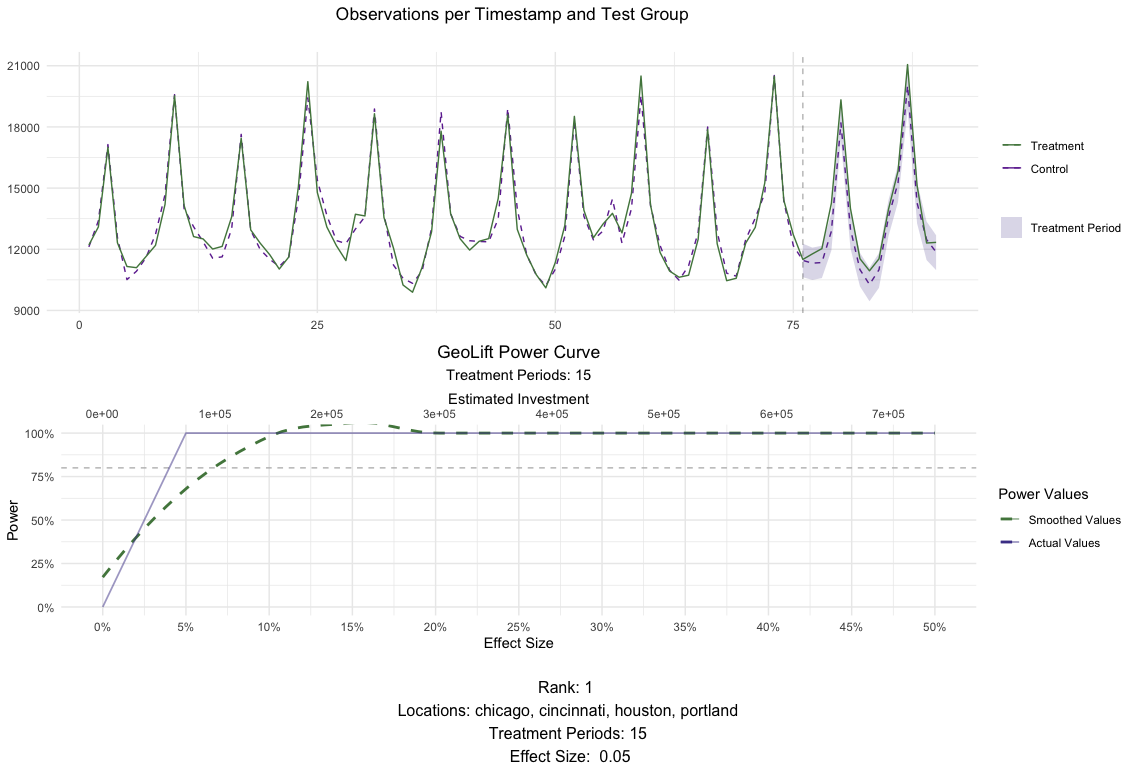
The results in `MarketSelection` show that the test markets with the
best ranks are: `(chicago, cincinnati, houston, portland)` and
`(chicago, portland)`, all of them tied at rank 1. We can `plot()` these
last two results to inspect them further. This plot will show how the
results of the `GeoLift()` model would look like with the latest
possible test period as well as the test’s power curve across a single
simulation.
``` r
# Plot for chicago, cincinnati, houston, portland for a 15 day test
plot(MarketSelections, market_ID = 1, print_summary = FALSE)
```
In this case we see a similar pattern that’s shared across all
locations. These structural similarities between regions are the key to
a successful test!
Example - Power Analysis
------------------------
Running a prospective power analysis is fundamental prior to executing a
test. It is only through a thorough statistical analysis of our data
that we can set it up for success. In general, through the power
analysis we can find:
- The optimal number of test locations.
- Best test duration.
- Select the ideal test and control markets.
- Get a good estimate of the budget needed to run the test.
- Determine which is the Minimum Detectable Effect to obtain
significant results.
- Align expectations.
Assessing the power and selecting the test markets for a GeoLift test
can be accomplished through the `GeoLiftMarketSelection()` function.
Through a series of simulations, this algorithm will find which are the
best combinations of test and control locations for the experiment.
Moreover, for each of these test market selections, the function will
display the Minimum Detectable Effect, minimum investment needed to run
a successful test, and other important model-fit metrics that will help
us select the test that best matches our goals and resources.
### Understanding Power Function Parameters
The key parameters needed to run this function are:
- `data`: A data frame containing the historical conversions by
geographic unit. This object must contain at least a “location”
column with the geo name, a “Y” column with the outcome data (such
as units), a “time” column with the indicator of the time period
(starting at 1), and covariates (if available). Using the data frame
generated by `GeoDataRead()` is the best way to make sure we have
the correct format. For this example, we will use
`GeoTestData_PreTest`.
- `treatment_periods`: List of treatment periods to calculate power
for. If we’re unsure of the ideal test duration, we can specify and
assess the power of different durations. The ideal test length
heavily depends on the product and vertical we are working with.
Nevertheless, a good rule of thumb when deciding duration is to make
sure that the test period can contain **at least** one full purchase
cycle. Given that we have daily data in our example, we will analyze
the power of 10 and 15-day tests by setting this parameter to
`c(10,15)`.
- `N`: List of number of test markets to calculate power for. The
values in this list represent the different test-market sizes we
want to explore. This parameter is often guided by the budget and
scope of the test we want to implement. For our example, we will
analyze smaller tests with two, three, and four test markets (the
remaining would be part of the control). We will do so by setting
this parameter to `c(2,3,4)`.
- `X` (Optional): List of the names of the covariates in the `data`.
In our example we don’t have any covariates so we’ll leave it empty.
- `Y_id`, `location_id`, and `time_id`: Names of the outcome,
location, and time variables (String). These parameters will let our
function know are the names of these variables in our data frame. If
left empty, this parameter will default to the defaults of
`GeoDataRead()` which are: `Y`, `location`, and `time`.
- `effect_size`: This parameter contains a vector of different effect
sizes (or lifts) we want to simulate. Since these are relative
values, they do depend on the product and vertical we’re analyzing.
For instance, while a small single-digit percent increase in volume
for a retailer can translate to millions of units, a large lift
might be required for an automotive company that sells fewer
products per day. By default this parameter is set to a sequence of
lifts between 0 and 25 percent with 5% increments, that is,
`seq(0,0.25,0.05)`.
- `lookback_window`: A number indicating how far back in time the
simulations for the power analysis should go. For instance, a value
equal to 5 would simulate power for the last five possible tests. In
general, when the historical data is stable (it doesn’t vary wildly
from one day/region to another) we can obtain a very robust and
reliable power analysis by just looking into the most recent
possible test (in other words, `lookback_window = 1`). It is
important to mention that increasing the values in this parameter
can significantly increase the algorithm’s run-time.
- `include_markets`: A list of markets or locations that should be
part of the test group. Assuming that we need to have Chicago as
part of our test regions, we will set this parameter to
`include_markets = c("chicago")`. Make sure the spelling of
locations in this lists matches with the data.
- `exclude_markets`: A list of markets or locations that won’t be
considered for the test market selection, but will remain in the
pool of controls. In our example, we will set
`exclude_markets = c("honolulu")` to make sure that only cities in
the continental US will be part of the test group. As with
`include_locations`, always make sure the spelling of locations in
this lists matches with the data.
- `holdout`: A vector with two values: the first one the smallest
desirable holdout and the second the largest desirable holdout. The
holdout represents the share of conversions from markets that will
not see our ad campaign. In our example, will specify that we’re OK
with a large holdout and will therefore set `holdout = c(0.5, 1)`.
If this parameter is left empty, all market selections will be
analyzed regardless of their size.
- `cpic`: Value indicating the Cost Per Incremental Conversion, that
is, on average how much do we typically need to spend to bring one
incremental conversion. CPIC estimates can typically be obtained
from Marketing Mix Models, Conversion Lifts, and previous
experiments/geo-experiments. This value is key to get a good
estimate of the budget that we will need to run a well-powered test.
If there is no reliable information about the Cost Per Incremental
Conversion, the default will be set to `cpic = 1`, in which case,
the investment results will output the incremental units needed for
a successful test.
- `budget`: Optional parameter that indicates the maximum budget
available for a GeoLift test. If no budget is provided, all market
selections will be analyzed by the algorithm.
- `alpha`: This parameter controls the significance Level that will be
used by our model. By default `alpha = 0.1` which is equivalent to a
90% confidence level.
- `model`: A string that indicates the outcome model used to augment
the Augmented Synthetic Control Method. Augmentation through a
prognostic function can improve fit and reduce L2 imbalance metrics.
The most common values used are: `model = "None"` (default) which
won’t augment the ASCM and `model = "Ridge"`. More information on
this parameter is given in the **Inference** section of this
walkthrough.
- `fixed_effects`: A logic flag indicating whether to include unit
Fixed Effects (FE) in the model. Fixed effects are an additional
parameter that we can include into our models which represents a
non-random component in our data. More specifically, in our model
the FE represents the “level” of each region’s time-series across
the data. By adding the FE we effectively remove this level - this
allows our model to focus on explaining the variations from that
level rather than the full value of Y. This is helpful when the
series are stable across time. However, if the series isn’t stable
(it has large spikes/valleys, has a clear trend, etc.), then it can
actually be a detriment to our model. By default, this parameter is
set to `fixed_effects = TRUE`. A close inspection of `GeoPlot`’s
output combined with knowledge of the data is key to specify this
parameter. In our example, we will set `fixed_effects = TRUE` given
that we can observe a stable behavior of sales across our markets in
the historical data.
- `Correlations`: A logic flag indicating whether an additional column
to the output with the correlations between the test regions and
control markets. Given that not all locations in the pool of
controls will contribute meaningfully to create our
counterfactual/synthetic test region, the correlations can be a
great resource to know how representative our test region is which
can inform other analyses such as Marketing Mix Model calibration.
By default this parameter is set to `Correlations = FALSE`.
- `print`: print A logic flag indicating whether to print the top
results. Set to TRUE by default.
- `parallel`: A logic flag indicating whether to use parallel
computing to speed up calculations. Set to TRUE by default.
- `parallel_setup`: A string indicating parallel workers set-up. Set
to `parallel_setup = "sequential"` by default but can also be
defined as `parallel_setup = "parallel"`.
- `side_of_test`: A string indicating whether confidence will be
determined using a one sided or a two sided test. These are the
following valid values for this parameter:
- `side_of_test = "two_sided"`: The test statistic is the sum of
all treatment effects, i.e. sum(abs(x)). Defualt.
- `side_of_test = "one_sided"`: One-sided test against positive or
negative effects i.e. If the effect being applied is negative,
then defaults to -sum(x). If the effect being applied is
positive, then defaults to sum(x).
Continuing with the example and in order to explore the function’s
capabilities let’s assume we have two restrictions: Chicago must be part
of the test markets and we have up to $100,000 to run the test. We can
include these constraints into `GeoLiftMarketSelection()` with the
`include_markets` and `budget` parameters and proceed with the market
selection. Moreover, after observing that the historical KPI values in
`GeoPlot()` have been stable across time we will proceed with a model
with Fixed Effects. Finally, given a CPIC = $7.50 obtained from a
previous Lift test, a range between two to five test markets, and a
duration between 10 and 15 days we obtain:
``` r
MarketSelections <- GeoLiftMarketSelection(data = GeoTestData_PreTest,
treatment_periods = c(10,15),
N = c(2,3,4,5),
Y_id = "Y",
location_id = "location",
time_id = "time",
effect_size = seq(0, 0.2, 0.05),
lookback_window = 1,
include_markets = c("chicago"),
exclude_markets = c("honolulu"),
cpic = 7.50,
budget = 100000,
alpha = 0.1,
Correlations = TRUE,
fixed_effects = TRUE,
side_of_test = "two_sided")
```
``` r
## Setting up cluster.
## Importing functions into cluster.
##
## Deterministic setup with 2 locations in treatment.
##
## Deterministic setup with 3 locations in treatment.
##
## Deterministic setup with 4 locations in treatment.
##
## Deterministic setup with 5 locations in treatment.
## ID location duration EffectSize
## 1 1 chicago, cincinnati, houston, portland 15 0.05
## 2 2 chicago, portland 15 0.10
## 3 3 chicago, cincinnati, houston, portland 10 0.10
## 4 4 chicago, portland 10 0.10
## 5 5 chicago, houston, portland 10 0.10
## 6 6 chicago, cincinnati, houston, nashville, san diego 15 0.05
## Power AvgScaledL2Imbalance Investment AvgATT Average_MDE ProportionTotal_Y
## 1 1 0.1971864 74118.38 159.3627 0.04829913 0.07576405
## 2 1 0.1738778 64563.75 290.0071 0.10117316 0.03306537
## 3 1 0.1966996 99027.75 316.6204 0.09552879 0.07576405
## 4 1 0.1682310 43646.25 300.9401 0.10378013 0.03306537
## 5 1 0.2305628 75389.25 350.3142 0.10502968 0.05797087
## 6 1 0.2699167 95755.50 146.7975 0.04282215 0.09801138
## abs_lift_in_zero Holdout rank correlation
## 1 0.002 0.9242359 1 0.9144814
## 2 0.001 0.9669346 1 0.9321104
## 3 0.004 0.9242359 3 0.9144814
## 4 0.004 0.9669346 3 0.9321104
## 5 0.005 0.9420291 5 0.9139549
## 6 0.007 0.9019886 6 0.8992280
```
### Power output - ranking variables
The results of the power analysis and market selection provide us with
several key metrics that we can use to select our test market. These
metrics are:
- **ID**: Numeric ID that identifies a combination of test markets for
a given duration. This variable will be useful to plot the results.
- **location**: Identifies the test locations.
- **duration**: Shows how many time-stamps the test will last for.
Since the data in our example had daily values, we will analyze
whether a 10 or 15 day test is ideal.
- **EffectSize**: The Effect Size represents minimum Lift needed to
have a well-powered test. These values depend on the `effect_size`
parameter of this function. Therefore, if you see multiple ties
across top candidates for our test markets, then it might be a good
idea to increase the granularity in this parameter (for example to
`seq(0, 0.25, 0.01)`).
- **Power**: The row’s average power across all simulations at the
specified `Effect Size`.
- **AvgScaledL2Imbalance**: The Scaled L2 Imbalance metric is a
goodness of fit metric between 0 and 1 that represents how well the
model is predicting the pre-treatment observed values through the
Synthetic Control. Scaled L2 Imbalance values of 0 show a perfect
match of pre-treatment values. Scaled L2 Imbalance values of 1 show
that the Synthetic Control algorithm is not adding much value beyond
what you could accomplish with a simple average of control locations
(naive model).
- **Investment**: The average investment needed to obtain a
well-powered test given a CPIC.
- **AvgATT**: The ATT is a metric of how many incremental units, on
average, our test markets will have across each time-stamp for the
duration of the test for a given set of test markets, duration, and
Effect Size.
- **Average\_MDE**: The average Minimum Detectable Effect across all
simulations.
- **ProportionTotal\_Y**: This proportion reflects the fraction of all
conversions that happen in our test regions compared to the
aggregation of all markets. For example, a value of 0.10 would
indicate that our test markets represent 10% of all conversions for
our KPI.
- **abs\_lift\_in\_zero**: This value represents the average estimated
lift our test markets had when we actually simulated a 0% Lift in
conversions. Great test market selections often have values of
abs\_lift\_in\_zero very close to zero.
- **Holdout**: The percent of total conversions in the control
markets. This value is complementary to **ProportionTotal\_Y**.
- **rank**: Ranking variable that summarizes the EffectSize, Power,
AvgScaledL2Imbalance, Average\_MDE, and abs\_lift\_in\_zero to help
you select the best combination of test markets. The ranking
variable allows for ties.
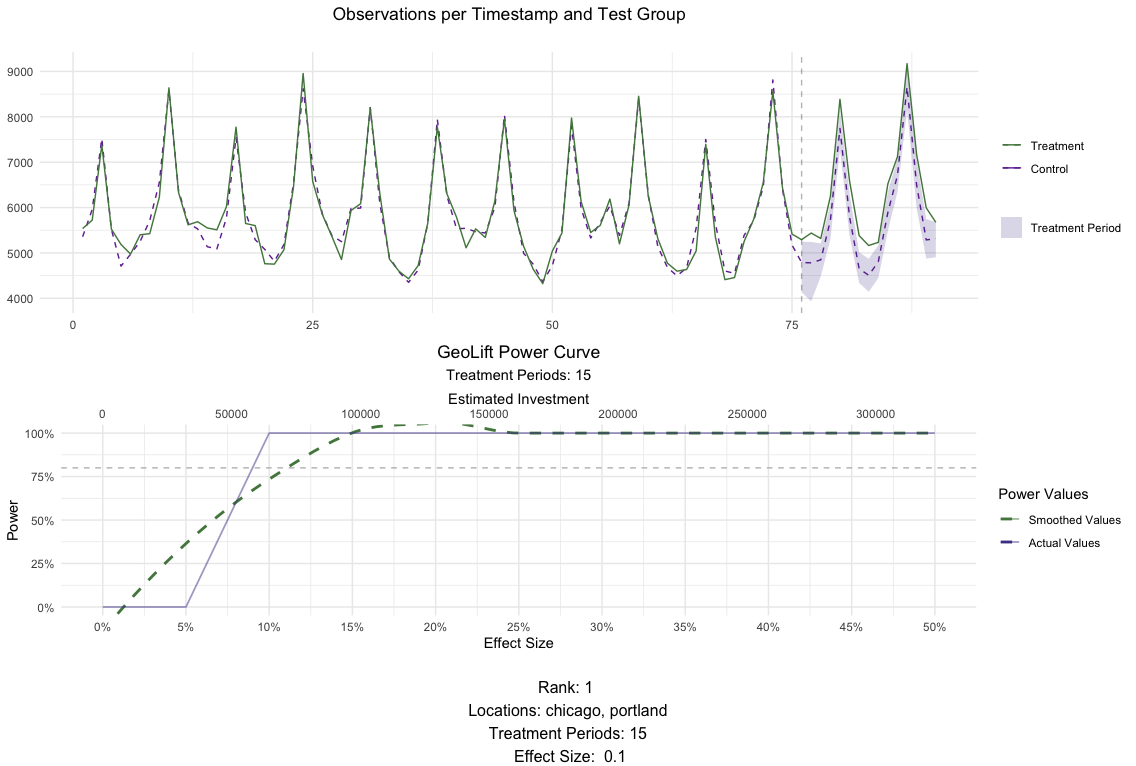
The results in `MarketSelection` show that the test markets with the
best ranks are: `(chicago, cincinnati, houston, portland)` and
`(chicago, portland)`, all of them tied at rank 1. We can `plot()` these
last two results to inspect them further. This plot will show how the
results of the `GeoLift()` model would look like with the latest
possible test period as well as the test’s power curve across a single
simulation.
``` r
# Plot for chicago, cincinnati, houston, portland for a 15 day test
plot(MarketSelections, market_ID = 1, print_summary = FALSE)
```
 ``` r
# Plot for chicago, portland for a 15 day test
plot(MarketSelections, market_ID = 2, print_summary = FALSE)
```
``` r
# Plot for chicago, portland for a 15 day test
plot(MarketSelections, market_ID = 2, print_summary = FALSE)
```
 ### Power output - deep dive into power curves
In order to ensure that power is consistent throughout time for these
locations, we can run more than 1 simulation for each of the top
contenders that came out of `GeoLiftMarketSelection`.
We will do this by running the `GeoLiftPower` method and expanding our
`lookback_window` to 10 days, only for this treatment combination and
plot their results.
#### NOTE: You could repeat this process for the top 5 treatment combinations that come out of GeoLiftMarketSelection, with increased lookback windows and compare their power curves. We will do it only for Chicago and Portland here.
``` r
market_id = 2
market_row <- MarketSelections$BestMarkets %>% dplyr::filter(ID == market_id)
treatment_locations <- stringr::str_split(market_row$location, ", ")[[1]]
treatment_duration <- market_row$duration
lookback_window <- 7
power_data <- GeoLiftPower(
data = GeoTestData_PreTest,
locations = treatment_locations,
effect_size = seq(-0.25, 0.25, 0.01),
lookback_window = lookback_window,
treatment_periods = treatment_duration,
cpic = 7.5,
side_of_test = "two_sided"
)
```
``` r
#> Setting up cluster.
#> Importing functions into cluster.
plot(power_data,
show_mde = TRUE,
smoothed_values = FALSE,
breaks_x_axis = 10,
notes = unique(power_data$location))
```
### Power output - deep dive into power curves
In order to ensure that power is consistent throughout time for these
locations, we can run more than 1 simulation for each of the top
contenders that came out of `GeoLiftMarketSelection`.
We will do this by running the `GeoLiftPower` method and expanding our
`lookback_window` to 10 days, only for this treatment combination and
plot their results.
#### NOTE: You could repeat this process for the top 5 treatment combinations that come out of GeoLiftMarketSelection, with increased lookback windows and compare their power curves. We will do it only for Chicago and Portland here.
``` r
market_id = 2
market_row <- MarketSelections$BestMarkets %>% dplyr::filter(ID == market_id)
treatment_locations <- stringr::str_split(market_row$location, ", ")[[1]]
treatment_duration <- market_row$duration
lookback_window <- 7
power_data <- GeoLiftPower(
data = GeoTestData_PreTest,
locations = treatment_locations,
effect_size = seq(-0.25, 0.25, 0.01),
lookback_window = lookback_window,
treatment_periods = treatment_duration,
cpic = 7.5,
side_of_test = "two_sided"
)
```
``` r
#> Setting up cluster.
#> Importing functions into cluster.
plot(power_data,
show_mde = TRUE,
smoothed_values = FALSE,
breaks_x_axis = 10,
notes = unique(power_data$location))
```
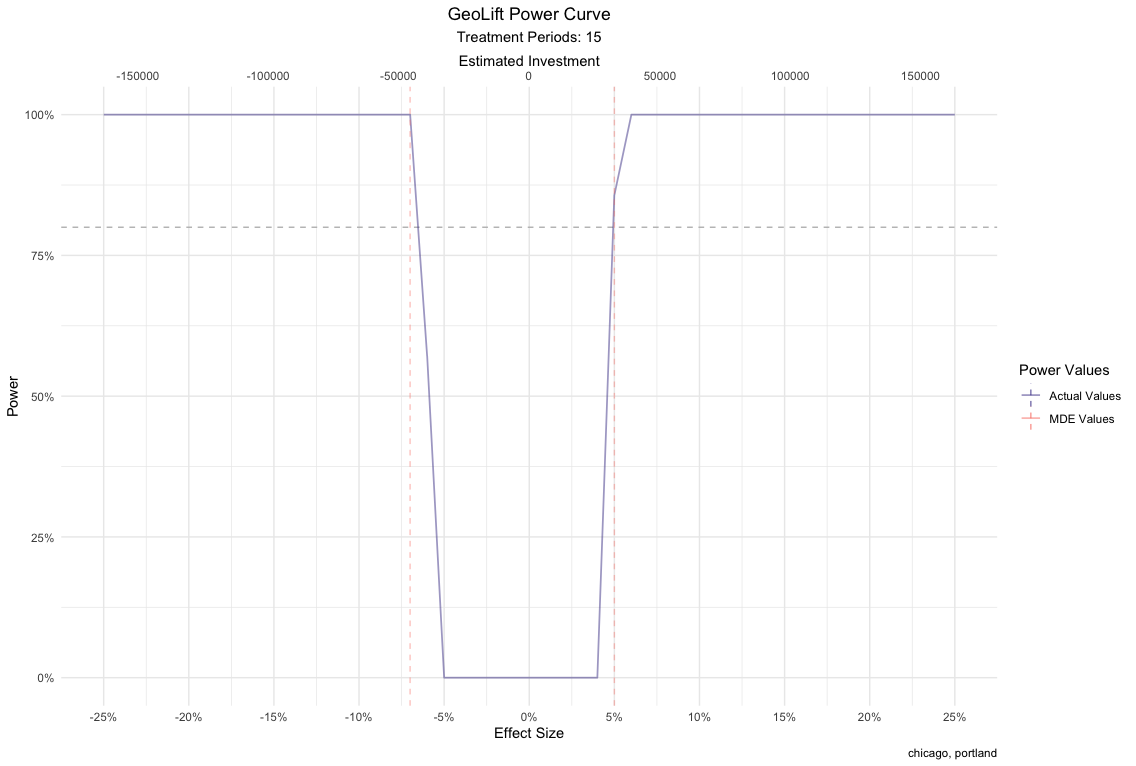 While both market selections perform excellent on all metrics, we will
move further with the latter since it allows us to run a successful test
with a smaller budget. Also, the power curve is symmetrical with respect
to the y axis, it has no power when the true effect is zero, and has a
similar behavior with more simulations. Finally, changing the
`print_summary` parameter of `plot()` to `TRUE` can provide us with
additional information about this market selection.
``` r
# Plot for chicago, portland for a 15 day test
plot(MarketSelections, market_ID = 2, print_summary = TRUE)
```
``` r
## ##################################
## ##### GeoLift Simulation #####
## #### Simulating: 10% Lift ####
## ##################################
##
## GeoLift Results Summary
## ##################################
## ##### Test Statistics #####
## ##################################
##
## * Average ATT: 290.007
## * Percent Lift: 10.1%
## * Incremental Y: 8700
## * P-value: 0
##
## ##################################
## ##### Balance Statistics #####
## ##################################
##
## * L2 Imbalance: 868.598
## * Scaled L2 Imbalance: 0.1739
## * Percent improvement from naive model: 82.61%
## * Average Estimated Bias: NA
##
## ##################################
## ##### Model Weights #####
## ##################################
##
## * Prognostic Function: NONE
##
## * Model Weights:
## * cincinnati: 0.2429
## * miami: 0.2056
## * baton rouge: 0.1511
## * honolulu: 0.0669
## * dallas: 0.0644
## * nashville: 0.0641
## * minneapolis: 0.0619
## * san diego: 0.0394
## * houston: 0.0292
## * austin: 0.0237
## * new york: 0.0216
## * los angeles: 0.0179
## * reno: 0.0113
```
#### **Note:** Given that we are not using the complete pre-treatment data to calculate the weights in our power analysis simulations, the ones displayed by the plotting function above are not the *final* values. However, you can easily obtain them with the `GetWeights()` function.
``` r
weights <- GetWeights(Y_id = "Y",
location_id = "location",
time_id = "time",
data = GeoTestData_PreTest,
locations = c("chicago", "portland"),
pretreatment_end_time = 90,
fixed_effects = TRUE)
```
``` r
#> One outcome and one treatment time found. Running single_augsynth.
# Top weights
```
``` r
head(dplyr::arrange(weights, desc(weight)))
```
``` r
#> location weight
#> 1 cincinnati 0.22717797
#> 2 miami 0.20276981
#> 3 baton rouge 0.13353743
#> 4 minneapolis 0.08997973
#> 5 dallas 0.07392298
#> 6 nashville 0.06853184
```
Example - Analyzing the Test Results
------------------------------------
Based on the results of the Power Calculations, a test is set-up in
which a $65,000 and 15-day marketing campaign was executed in the cities
of Chicago and Portland while the rest of the locations were put on
holdout. Following the completion from this marketing campaign, we
receive sales data that reflects these results. This new data-set
contains the same format and information as the pre-test one but
crucially includes results for the duration of the campaign. Depending
on the vertical and product, adding a post-campaign cooldown period
might be useful.
### Test Data
Data for the campaign results can be accessed at `GeoLift_Test`.
``` r
data(GeoLift_Test)
```
Similarly to the process executed at the beginning of the Power Analysis
phase, we read the data into GeoLift’s format using the `GeoDataRead`
function. You can observe in the summary output that additional 15
periods are contained in the new GeoLift data object.
``` r
GeoTestData_Test <- GeoDataRead(data = GeoLift_Test,
date_id = "date",
location_id = "location",
Y_id = "Y",
X = c(), #empty list as we have no covariates
format = "yyyy-mm-dd",
summary = TRUE)
```
``` r
#> ##################################
#> ##### Summary #####
#> ##################################
#>
#> * Raw Number of Locations: 40
#> * Time Periods: 105
#> * Final Number of Locations (Complete): 40
```
``` r
head(GeoTestData_Test)
#> location time Y
#> 1 atlanta 1 3384
#> 2 atlanta 2 3904
#> 3 atlanta 3 5734
#> 4 atlanta 4 4311
#> 5 atlanta 5 3686
#> 6 atlanta 6 3374
```
The results can also be plotted using the `GeoPlot` function. However,
for post-campaign data we can include the time-stamp at which the
campaign started through the `treatment_start` parameter to clearly
separate the two periods. Plotting the time-series is always useful to
detect any anomalies with the data and to start noticing patterns with
the test.
``` r
GeoPlot(GeoTestData_Test,
Y_id = "Y",
time_id = "time",
location_id = "location",
treatment_start = 91)
```
While both market selections perform excellent on all metrics, we will
move further with the latter since it allows us to run a successful test
with a smaller budget. Also, the power curve is symmetrical with respect
to the y axis, it has no power when the true effect is zero, and has a
similar behavior with more simulations. Finally, changing the
`print_summary` parameter of `plot()` to `TRUE` can provide us with
additional information about this market selection.
``` r
# Plot for chicago, portland for a 15 day test
plot(MarketSelections, market_ID = 2, print_summary = TRUE)
```
``` r
## ##################################
## ##### GeoLift Simulation #####
## #### Simulating: 10% Lift ####
## ##################################
##
## GeoLift Results Summary
## ##################################
## ##### Test Statistics #####
## ##################################
##
## * Average ATT: 290.007
## * Percent Lift: 10.1%
## * Incremental Y: 8700
## * P-value: 0
##
## ##################################
## ##### Balance Statistics #####
## ##################################
##
## * L2 Imbalance: 868.598
## * Scaled L2 Imbalance: 0.1739
## * Percent improvement from naive model: 82.61%
## * Average Estimated Bias: NA
##
## ##################################
## ##### Model Weights #####
## ##################################
##
## * Prognostic Function: NONE
##
## * Model Weights:
## * cincinnati: 0.2429
## * miami: 0.2056
## * baton rouge: 0.1511
## * honolulu: 0.0669
## * dallas: 0.0644
## * nashville: 0.0641
## * minneapolis: 0.0619
## * san diego: 0.0394
## * houston: 0.0292
## * austin: 0.0237
## * new york: 0.0216
## * los angeles: 0.0179
## * reno: 0.0113
```
#### **Note:** Given that we are not using the complete pre-treatment data to calculate the weights in our power analysis simulations, the ones displayed by the plotting function above are not the *final* values. However, you can easily obtain them with the `GetWeights()` function.
``` r
weights <- GetWeights(Y_id = "Y",
location_id = "location",
time_id = "time",
data = GeoTestData_PreTest,
locations = c("chicago", "portland"),
pretreatment_end_time = 90,
fixed_effects = TRUE)
```
``` r
#> One outcome and one treatment time found. Running single_augsynth.
# Top weights
```
``` r
head(dplyr::arrange(weights, desc(weight)))
```
``` r
#> location weight
#> 1 cincinnati 0.22717797
#> 2 miami 0.20276981
#> 3 baton rouge 0.13353743
#> 4 minneapolis 0.08997973
#> 5 dallas 0.07392298
#> 6 nashville 0.06853184
```
Example - Analyzing the Test Results
------------------------------------
Based on the results of the Power Calculations, a test is set-up in
which a $65,000 and 15-day marketing campaign was executed in the cities
of Chicago and Portland while the rest of the locations were put on
holdout. Following the completion from this marketing campaign, we
receive sales data that reflects these results. This new data-set
contains the same format and information as the pre-test one but
crucially includes results for the duration of the campaign. Depending
on the vertical and product, adding a post-campaign cooldown period
might be useful.
### Test Data
Data for the campaign results can be accessed at `GeoLift_Test`.
``` r
data(GeoLift_Test)
```
Similarly to the process executed at the beginning of the Power Analysis
phase, we read the data into GeoLift’s format using the `GeoDataRead`
function. You can observe in the summary output that additional 15
periods are contained in the new GeoLift data object.
``` r
GeoTestData_Test <- GeoDataRead(data = GeoLift_Test,
date_id = "date",
location_id = "location",
Y_id = "Y",
X = c(), #empty list as we have no covariates
format = "yyyy-mm-dd",
summary = TRUE)
```
``` r
#> ##################################
#> ##### Summary #####
#> ##################################
#>
#> * Raw Number of Locations: 40
#> * Time Periods: 105
#> * Final Number of Locations (Complete): 40
```
``` r
head(GeoTestData_Test)
#> location time Y
#> 1 atlanta 1 3384
#> 2 atlanta 2 3904
#> 3 atlanta 3 5734
#> 4 atlanta 4 4311
#> 5 atlanta 5 3686
#> 6 atlanta 6 3374
```
The results can also be plotted using the `GeoPlot` function. However,
for post-campaign data we can include the time-stamp at which the
campaign started through the `treatment_start` parameter to clearly
separate the two periods. Plotting the time-series is always useful to
detect any anomalies with the data and to start noticing patterns with
the test.
``` r
GeoPlot(GeoTestData_Test,
Y_id = "Y",
time_id = "time",
location_id = "location",
treatment_start = 91)
```
 ### GeoLift Inference
The next step in the process is to calculate the actual Lift caused by
the marketing campaigns on our test locations. To do so we make use of
the `GeoLift()` function, which will take as input the GeoLift dataframe
as well as information about the test such as which were the cities in
the treatment group, when the test started, and when it ended through
the `locations`, `treatment_start_time`, and `treatment_end_time`
parameters respectively.
``` r
GeoTest <- GeoLift(Y_id = "Y",
data = GeoTestData_Test,
locations = c("chicago", "portland"),
treatment_start_time = 91,
treatment_end_time = 105)
```
``` r
#> Running model with no prognostic function.
```
``` r
GeoTest
```
``` r
#>
#> GeoLift Output
#>
#> Test results for 15 treatment periods, from time-stamp 91 to 105 for test markets:
#> 1 CHICAGO
#> 2 PORTLAND
#> ##################################
#> ##### Test Statistics #####
#> ##################################
#>
#> Percent Lift: 5.4%
#>
#> Incremental Y: 4667
#>
#> Average Estimated Treatment Effect (ATT): 155.556
#>
#> The results are significant at a 95% level. (TWO-SIDED LIFT TEST)
#>
#> There is a 1.4% chance of observing an effect this large or larger assuming treatment effect is zero.
```
The results show that the campaigns led to a 5.4% lift in units sold
corresponding to 4667 incremental units for this 15-day test. Moreover,
the Average Estimated Treatment Effect is of 155.556 units every day of
the test. Most importantly, we observe that these results are
statistically significant at a 95% level. In fact, there’s only a 1.1%
chance of observing an effect of this magnitude or larger if the actual
treatment effect was zero. In other words, it is extremely unlikely that
these results are just due to chance. To dig deeper into the results, we
can run the `summary()` of our `GeoLift` object.
``` r
summary(GeoTest)
```
``` r
#>
#> GeoLift Results Summary
#> ##################################
#> ##### Test Statistics #####
#> ##################################
#>
#> * Average ATT: 155.556
#> * Percent Lift: 5.4%
#> * Incremental Y: 4667
#> * P-value: 0.01
#>
#> ##################################
#> ##### Balance Statistics #####
#> ##################################
#>
#> * L2 Imbalance: 909.489
#> * Scaled L2 Imbalance: 0.1636
#> * Percent improvement from naive model: 83.64%
#> * Average Estimated Bias: NA
#>
#> ##################################
#> ##### Model Weights #####
#> ##################################
#>
#> * Prognostic Function: NONE
#>
#> * Model Weights:
#> * cincinnati: 0.2272
#> * miami: 0.2028
#> * baton rouge: 0.1335
#> * minneapolis: 0.09
#> * dallas: 0.0739
#> * nashville: 0.0685
#> * honolulu: 0.0673
#> * austin: 0.0465
#> * san diego: 0.0451
#> * reno: 0.0306
#> * san antonio: 0.0054
#> * new york: 0.0046
#> * houston: 0.0046
```
The summary show additional test statistics such as the p-value which
was equal to 0.01 confirming the highly statistical significance of
these results. Moreover, the summary function provides Balance
Statistics which display data about our model’s fit. The main metric of
model fit used in GeoLift is the L2 Imbalance which represents how far
our synthetic control was from the actual observed values in the
pre-treatment period. That is, how similar the synthetic Chicago +
Portland unit we crated is from the observed values of these cities in
the period before the intervention. A small L2 Imbalance score means
that our model did a great job replicating our test locations while a
large one would indicate a poor fit. However, the L2 Imabalnce metric is
scale-dependent, meaning that it can’t be compared between models with
different KPIs or number of testing periods. For instance, the L2
Imbalance of a model run on grams of units sold will be significantly
larger than a model ran for tons of product sold even if they represent
the same basic underlying metric.
Therefore, given that it’s hard to tell whether the model had a good or
poor fit by simply looking at the value of the L2 Imbalance metric, we
also included the Scaled L2 Imbalance stat which is easier to interpret
as it’s bounded in the range between 0 and 1. A value close to zero
represents a good model fit while values nearing 1 indicate a poor
performance by the Synthetic Control Model. This scaling is accomplished
by comparing the Scaled L2 Imbalance of our Synthetic Control Method
with the Scaled L2 Imbalance obtained by a baseline/naive model (instead
of carefully calculating which is the optimal weighting scheme for the
Synthetic Control, we assign equal weights to each unit in the donor
pool). The latter provides an upper bound of L2 Imbalance, therefore,
the Scaled L2 Imbalance shows us how much better our GeoLift model is
from the baseline.
In fact, another way to look at the Scaled L2 Imbalance is the percent
improvement from a naive model which can be obtained by subtracting our
model’s Scaled L2 Imbalance from 100%. In this case, an improvement
close to 100% (which corresponds to a Scaled L2 Imbalance close to zero)
represents a good model fit. Finally, we also include the weights that
generate our Synthetic Control. In this test we note that the locations
that contribute the most to our GeoLift model are Cincinnati, Miami, and
Baton Rouge.
``` r
plot(GeoTest, type = "Lift")
#> You can include dates in your chart if you supply the end date of the treatment. Just specify the treatment_end_date parameter.
```
### GeoLift Inference
The next step in the process is to calculate the actual Lift caused by
the marketing campaigns on our test locations. To do so we make use of
the `GeoLift()` function, which will take as input the GeoLift dataframe
as well as information about the test such as which were the cities in
the treatment group, when the test started, and when it ended through
the `locations`, `treatment_start_time`, and `treatment_end_time`
parameters respectively.
``` r
GeoTest <- GeoLift(Y_id = "Y",
data = GeoTestData_Test,
locations = c("chicago", "portland"),
treatment_start_time = 91,
treatment_end_time = 105)
```
``` r
#> Running model with no prognostic function.
```
``` r
GeoTest
```
``` r
#>
#> GeoLift Output
#>
#> Test results for 15 treatment periods, from time-stamp 91 to 105 for test markets:
#> 1 CHICAGO
#> 2 PORTLAND
#> ##################################
#> ##### Test Statistics #####
#> ##################################
#>
#> Percent Lift: 5.4%
#>
#> Incremental Y: 4667
#>
#> Average Estimated Treatment Effect (ATT): 155.556
#>
#> The results are significant at a 95% level. (TWO-SIDED LIFT TEST)
#>
#> There is a 1.4% chance of observing an effect this large or larger assuming treatment effect is zero.
```
The results show that the campaigns led to a 5.4% lift in units sold
corresponding to 4667 incremental units for this 15-day test. Moreover,
the Average Estimated Treatment Effect is of 155.556 units every day of
the test. Most importantly, we observe that these results are
statistically significant at a 95% level. In fact, there’s only a 1.1%
chance of observing an effect of this magnitude or larger if the actual
treatment effect was zero. In other words, it is extremely unlikely that
these results are just due to chance. To dig deeper into the results, we
can run the `summary()` of our `GeoLift` object.
``` r
summary(GeoTest)
```
``` r
#>
#> GeoLift Results Summary
#> ##################################
#> ##### Test Statistics #####
#> ##################################
#>
#> * Average ATT: 155.556
#> * Percent Lift: 5.4%
#> * Incremental Y: 4667
#> * P-value: 0.01
#>
#> ##################################
#> ##### Balance Statistics #####
#> ##################################
#>
#> * L2 Imbalance: 909.489
#> * Scaled L2 Imbalance: 0.1636
#> * Percent improvement from naive model: 83.64%
#> * Average Estimated Bias: NA
#>
#> ##################################
#> ##### Model Weights #####
#> ##################################
#>
#> * Prognostic Function: NONE
#>
#> * Model Weights:
#> * cincinnati: 0.2272
#> * miami: 0.2028
#> * baton rouge: 0.1335
#> * minneapolis: 0.09
#> * dallas: 0.0739
#> * nashville: 0.0685
#> * honolulu: 0.0673
#> * austin: 0.0465
#> * san diego: 0.0451
#> * reno: 0.0306
#> * san antonio: 0.0054
#> * new york: 0.0046
#> * houston: 0.0046
```
The summary show additional test statistics such as the p-value which
was equal to 0.01 confirming the highly statistical significance of
these results. Moreover, the summary function provides Balance
Statistics which display data about our model’s fit. The main metric of
model fit used in GeoLift is the L2 Imbalance which represents how far
our synthetic control was from the actual observed values in the
pre-treatment period. That is, how similar the synthetic Chicago +
Portland unit we crated is from the observed values of these cities in
the period before the intervention. A small L2 Imbalance score means
that our model did a great job replicating our test locations while a
large one would indicate a poor fit. However, the L2 Imabalnce metric is
scale-dependent, meaning that it can’t be compared between models with
different KPIs or number of testing periods. For instance, the L2
Imbalance of a model run on grams of units sold will be significantly
larger than a model ran for tons of product sold even if they represent
the same basic underlying metric.
Therefore, given that it’s hard to tell whether the model had a good or
poor fit by simply looking at the value of the L2 Imbalance metric, we
also included the Scaled L2 Imbalance stat which is easier to interpret
as it’s bounded in the range between 0 and 1. A value close to zero
represents a good model fit while values nearing 1 indicate a poor
performance by the Synthetic Control Model. This scaling is accomplished
by comparing the Scaled L2 Imbalance of our Synthetic Control Method
with the Scaled L2 Imbalance obtained by a baseline/naive model (instead
of carefully calculating which is the optimal weighting scheme for the
Synthetic Control, we assign equal weights to each unit in the donor
pool). The latter provides an upper bound of L2 Imbalance, therefore,
the Scaled L2 Imbalance shows us how much better our GeoLift model is
from the baseline.
In fact, another way to look at the Scaled L2 Imbalance is the percent
improvement from a naive model which can be obtained by subtracting our
model’s Scaled L2 Imbalance from 100%. In this case, an improvement
close to 100% (which corresponds to a Scaled L2 Imbalance close to zero)
represents a good model fit. Finally, we also include the weights that
generate our Synthetic Control. In this test we note that the locations
that contribute the most to our GeoLift model are Cincinnati, Miami, and
Baton Rouge.
``` r
plot(GeoTest, type = "Lift")
#> You can include dates in your chart if you supply the end date of the treatment. Just specify the treatment_end_date parameter.
```
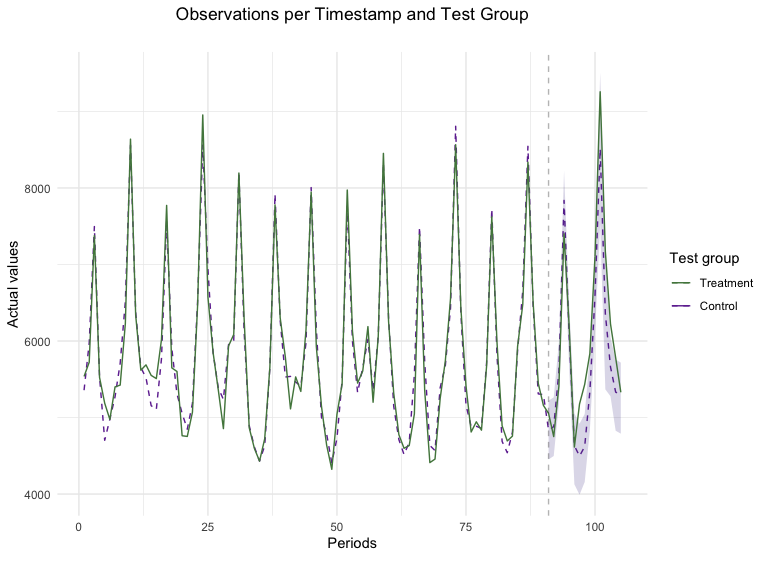 Plotting the results is a great way to assess the model’s fit and how
effective the campaign was. Taking a close look at the pre-treatment
period (period before the dotted vertical line) provides insight into
how well our Synthetic Control Model fitted our data. In this specific
example, we see that the observed values of the Chicago + Portland test
represented in the solid black line were closely replicated by our SCM
model shown as the dashed red line. Furthermore, looking at the test
period, we can notice the campaign’s incrementality shown as the
difference between the sales observed in the test markets and our
counterfactual synthetic location. This marked difference between an
almost-exact match in pre-treatment periods and gap in test time-stamps
provides strong evidence of a successful campaign.
``` r
plot(GeoTest, type = "ATT")
#> You can include dates in your chart if you supply the end date of the treatment. Just specify the treatment_end_date parameter.
```
Plotting the results is a great way to assess the model’s fit and how
effective the campaign was. Taking a close look at the pre-treatment
period (period before the dotted vertical line) provides insight into
how well our Synthetic Control Model fitted our data. In this specific
example, we see that the observed values of the Chicago + Portland test
represented in the solid black line were closely replicated by our SCM
model shown as the dashed red line. Furthermore, looking at the test
period, we can notice the campaign’s incrementality shown as the
difference between the sales observed in the test markets and our
counterfactual synthetic location. This marked difference between an
almost-exact match in pre-treatment periods and gap in test time-stamps
provides strong evidence of a successful campaign.
``` r
plot(GeoTest, type = "ATT")
#> You can include dates in your chart if you supply the end date of the treatment. Just specify the treatment_end_date parameter.
```
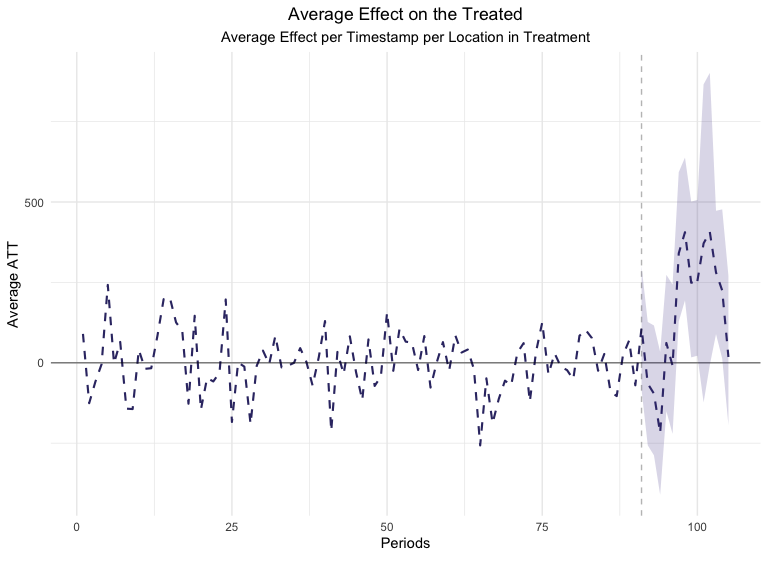 Looking at the Average Estimated Treatment Effect’s plot can also be
extremely useful. The ATT metric shows us the magnitude of the Average
Treatment Effect on a daily basis in contrast with the previous (Lift)
plot which focused on aggregated effects. Moreover, this is a great
example of a good GeoLift model as it has very small ATT values in the
pre-treatment period and large ones when the treatment is administered
to our test locations. Moreover, point-wise confidence intervals are
included in this chart which help us measure how significant each day’s
Lift has been.
### Improving The Model
While the results obtained from the test are robust and highly
significant, a useful feature of GeoLift is its ability to improve the
model fit even further and reduce bias through augmentation by a
prognostic function. There are several options for augmentation of the
standard GeoLift model such as regularization (specifically Ridge) and
an application of Generalized Synthetic Control Model (GSC). While each
of these approaches provide it’s own set of advantages, for instance
Ridge regularization usually performs well when the number of units and
time-periods isn’t large while GSC helps improve fit for situations with
many pre-treatment periods, GeoLift offers the option to let the model
decide which is the best approach by setting the model parameter to
“best”.
``` r
GeoTestBest <- GeoLift(Y_id = "Y",
data = GeoTestData_Test,
locations = c("chicago", "portland"),
treatment_start_time = 91,
treatment_end_time = 105,
model = "best")
```
``` r
#> Running model with no prognostic function.
#> Running model with ridge prognostic function.
#> Running model with GSYN prognostic function.
#> Selected Ridge as best model.
```
``` r
GeoTestBest
```
``` r
#>
#> GeoLift Output
#>
#> Test results for 15 treatment periods, from time-stamp 91 to 105 for test markets:
#> 1 CHICAGO
#> 2 PORTLAND
#> ##################################
#> ##### Test Statistics #####
#> ##################################
#>
#> Percent Lift: 5.5%
#>
#> Incremental Y: 4704
#>
#> Average Estimated Treatment Effect (ATT): 156.805
#>
#> The results are significant at a 95% level. (TWO-SIDED LIFT TEST)
#>
#> There is a 1.3% chance of observing an effect this large or larger assuming treatment effect is zero.
```
``` r
summary(GeoTestBest)
```
``` r
#>
#> GeoLift Results Summary
#> ##################################
#> ##### Test Statistics #####
#> ##################################
#>
#> * Average ATT: 156.805
#> * Percent Lift: 5.5%
#> * Incremental Y: 4704
#> * P-value: 0.01
#>
#> ##################################
#> ##### Balance Statistics #####
#> ##################################
#>
#> * L2 Imbalance: 903.525
#> * Scaled L2 Imbalance: 0.1626
#> * Percent improvement from naive model: 83.74%
#> * Average Estimated Bias: -1.249
#>
#> ##################################
#> ##### Model Weights #####
#> ##################################
#>
#> * Prognostic Function: RIDGE
#>
#> * Model Weights:
#> * cincinnati: 0.2273
#> * miami: 0.2029
#> * baton rouge: 0.1337
#> * minneapolis: 0.0901
#> * dallas: 0.0741
#> * nashville: 0.0687
#> * honolulu: 0.0674
#> * austin: 0.0467
#> * san diego: 0.0452
#> * reno: 0.0308
#> * san antonio: 0.0056
#> * houston: 0.0048
#> * new york: 0.0048
#> * oakland: -0.001
#> * oklahoma city: -7e-04
#> * boston: -4e-04
#> * philadelphia: -4e-04
#> * salt lake city: -3e-04
#> * atlanta: 3e-04
#> * milwaukee: -2e-04
#> * los angeles: 2e-04
#> * memphis: -2e-04
#> * new orleans: -2e-04
#> * saint paul: 2e-04
#> * san francisco: 1e-04
#> * denver: 1e-04
#> * tucson: -1e-04
#> * kansas city: -1e-04
#> * orlando: 1e-04
#> * indianapolis: 1e-04
#> * detroit: 1e-04
#> * jacksonville: -1e-04
#> * columbus: 1e-04
#> * baltimore: 1e-04
```
``` r
plot(GeoTestBest, type = "Lift")
#> You can include dates in your chart if you supply the end date of the treatment. Just specify the treatment_end_date parameter.
```
Looking at the Average Estimated Treatment Effect’s plot can also be
extremely useful. The ATT metric shows us the magnitude of the Average
Treatment Effect on a daily basis in contrast with the previous (Lift)
plot which focused on aggregated effects. Moreover, this is a great
example of a good GeoLift model as it has very small ATT values in the
pre-treatment period and large ones when the treatment is administered
to our test locations. Moreover, point-wise confidence intervals are
included in this chart which help us measure how significant each day’s
Lift has been.
### Improving The Model
While the results obtained from the test are robust and highly
significant, a useful feature of GeoLift is its ability to improve the
model fit even further and reduce bias through augmentation by a
prognostic function. There are several options for augmentation of the
standard GeoLift model such as regularization (specifically Ridge) and
an application of Generalized Synthetic Control Model (GSC). While each
of these approaches provide it’s own set of advantages, for instance
Ridge regularization usually performs well when the number of units and
time-periods isn’t large while GSC helps improve fit for situations with
many pre-treatment periods, GeoLift offers the option to let the model
decide which is the best approach by setting the model parameter to
“best”.
``` r
GeoTestBest <- GeoLift(Y_id = "Y",
data = GeoTestData_Test,
locations = c("chicago", "portland"),
treatment_start_time = 91,
treatment_end_time = 105,
model = "best")
```
``` r
#> Running model with no prognostic function.
#> Running model with ridge prognostic function.
#> Running model with GSYN prognostic function.
#> Selected Ridge as best model.
```
``` r
GeoTestBest
```
``` r
#>
#> GeoLift Output
#>
#> Test results for 15 treatment periods, from time-stamp 91 to 105 for test markets:
#> 1 CHICAGO
#> 2 PORTLAND
#> ##################################
#> ##### Test Statistics #####
#> ##################################
#>
#> Percent Lift: 5.5%
#>
#> Incremental Y: 4704
#>
#> Average Estimated Treatment Effect (ATT): 156.805
#>
#> The results are significant at a 95% level. (TWO-SIDED LIFT TEST)
#>
#> There is a 1.3% chance of observing an effect this large or larger assuming treatment effect is zero.
```
``` r
summary(GeoTestBest)
```
``` r
#>
#> GeoLift Results Summary
#> ##################################
#> ##### Test Statistics #####
#> ##################################
#>
#> * Average ATT: 156.805
#> * Percent Lift: 5.5%
#> * Incremental Y: 4704
#> * P-value: 0.01
#>
#> ##################################
#> ##### Balance Statistics #####
#> ##################################
#>
#> * L2 Imbalance: 903.525
#> * Scaled L2 Imbalance: 0.1626
#> * Percent improvement from naive model: 83.74%
#> * Average Estimated Bias: -1.249
#>
#> ##################################
#> ##### Model Weights #####
#> ##################################
#>
#> * Prognostic Function: RIDGE
#>
#> * Model Weights:
#> * cincinnati: 0.2273
#> * miami: 0.2029
#> * baton rouge: 0.1337
#> * minneapolis: 0.0901
#> * dallas: 0.0741
#> * nashville: 0.0687
#> * honolulu: 0.0674
#> * austin: 0.0467
#> * san diego: 0.0452
#> * reno: 0.0308
#> * san antonio: 0.0056
#> * houston: 0.0048
#> * new york: 0.0048
#> * oakland: -0.001
#> * oklahoma city: -7e-04
#> * boston: -4e-04
#> * philadelphia: -4e-04
#> * salt lake city: -3e-04
#> * atlanta: 3e-04
#> * milwaukee: -2e-04
#> * los angeles: 2e-04
#> * memphis: -2e-04
#> * new orleans: -2e-04
#> * saint paul: 2e-04
#> * san francisco: 1e-04
#> * denver: 1e-04
#> * tucson: -1e-04
#> * kansas city: -1e-04
#> * orlando: 1e-04
#> * indianapolis: 1e-04
#> * detroit: 1e-04
#> * jacksonville: -1e-04
#> * columbus: 1e-04
#> * baltimore: 1e-04
```
``` r
plot(GeoTestBest, type = "Lift")
#> You can include dates in your chart if you supply the end date of the treatment. Just specify the treatment_end_date parameter.
```
 ``` r
plot(GeoTestBest, type = "ATT")
#> You can include dates in your chart if you supply the end date of the treatment. Just specify the treatment_end_date parameter.
```
``` r
plot(GeoTestBest, type = "ATT")
#> You can include dates in your chart if you supply the end date of the treatment. Just specify the treatment_end_date parameter.
```
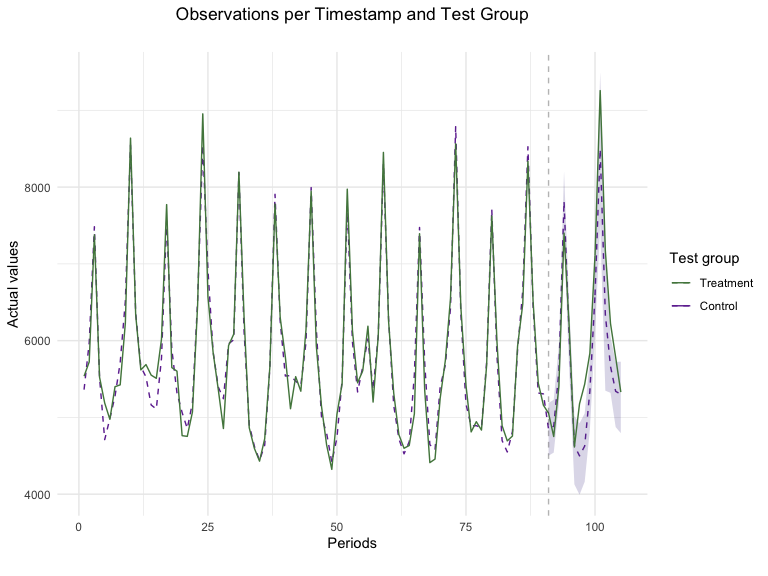
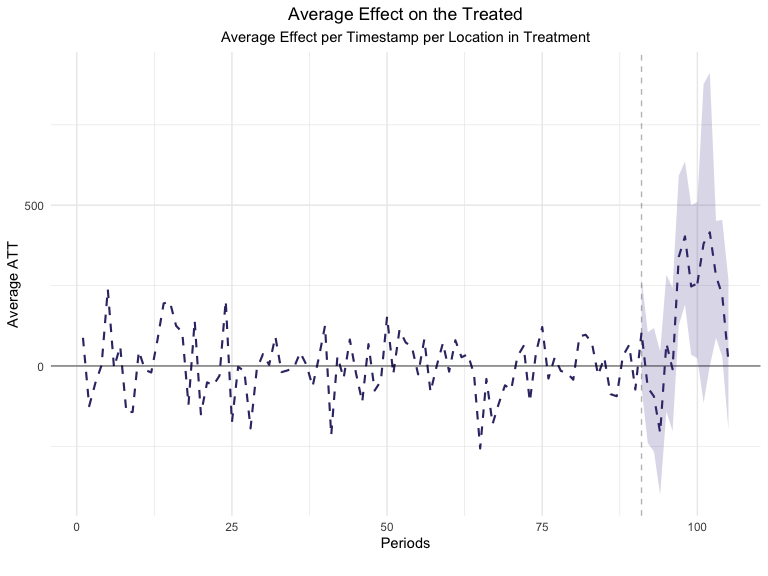 The new results augment the GeoLift model with a Ridge prognostic
function which improves the model fit as seen in the new L2 Imbalance
metrics. This additional robustness is translated in a small increase in
the Percent Lift. Furthermore, by augmenting the model with a prognostic
function, we have an estimate of the estimated bias that was removed by
the Augmented Synthetic Control Model.
The new results augment the GeoLift model with a Ridge prognostic
function which improves the model fit as seen in the new L2 Imbalance
metrics. This additional robustness is translated in a small increase in
the Percent Lift. Furthermore, by augmenting the model with a prognostic
function, we have an estimate of the estimated bias that was removed by
the Augmented Synthetic Control Model.