# Visual Cortex and CortexBench
[Website](https://eai-vc.github.io/) | [Blog post](https://ai.facebook.com/blog/robots-learning-video-simulation-artificial-visual-cortex-vc-1) | [Paper](https://arxiv.org/abs/2303.18240)
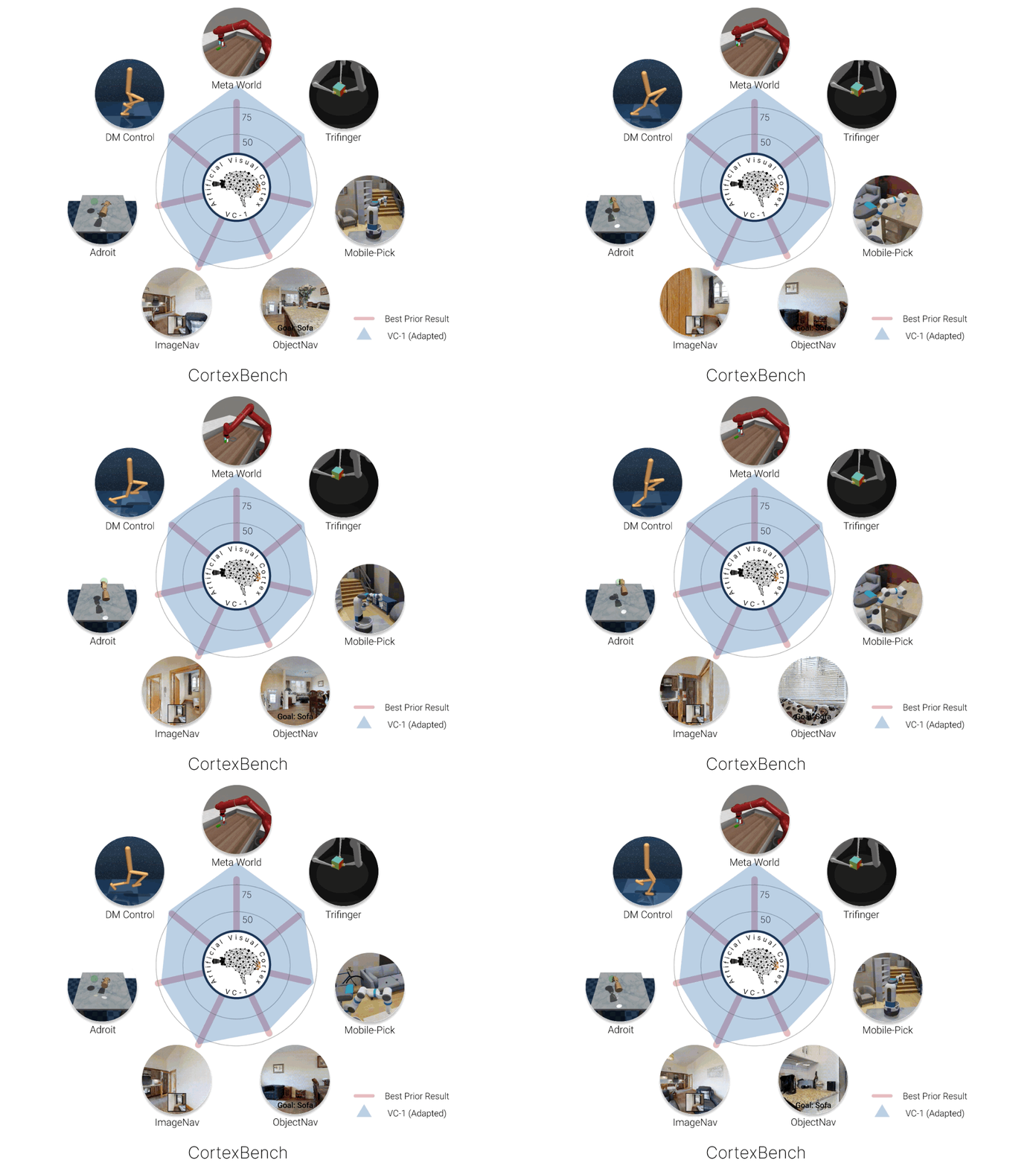



We're releasing CortexBench and our first Visual Cortex model: VC-1. CortexBench is a collection of 17 different EAI tasks spanning locomotion, navigation, dexterous and mobile manipulation. We performed the largest and most comprehensive empirical study of pre-trained visual representations (PVRs) for Embodied AI (EAI), and find that none of the existing PVRs perform well across all tasks. Next, we trained VC-1 on a combination of over 4,000 hours of egocentric videos from 7 different sources and ImageNet, totaling over 5.6 million images. We show that when adapting VC-1 (through task-specific losses or a small amount of in-domain data), VC-1 is competitive with or outperforms state of the art on all benchmark tasks.
## Open-Sourced Models
We're open-sourcing two visual cortex models ([model cards](./MODEL_CARD.md)):
* VC-1 (ViT-L): Our best model, uses a ViT-L backbone, also known simply as `VC-1` | [Download](https://dl.fbaipublicfiles.com/eai-vc/vc1_vitl.pth)
* VC-1-base (VIT-B): pre-trained on the same data as VC-1 but with a smaller backbone (ViT-B) | [Download](https://dl.fbaipublicfiles.com/eai-vc/vc1_vitb.pth)
## Installation
To install our visual cortex models and CortexBench, please follow the instructions in [INSTALLATION.md](INSTALLATION.md).
## Directory structure
- `vc_models`: contains config files for visual cortex models, the model loading code and, as well as some project utilities.
- See [README](./vc_models/README.md) for more details.
- `cortexbench`: embodied AI downstream tasks to evaluate pre-trained representations.
- `third_party`: Third party submodules which aren't expected to change often.
- `data`: Gitignored directory, needs to be created by the user. Is used by some downstream tasks to find (symlinks to) datasets, models, etc.
## Load VC-1
To use the VC-1 model, you can install the `vc_models` module with pip. Then, you can load the model with code such as the following or follow [our tutorial](./tutorial/tutorial_vc.ipynb):
```python
import vc_models
from vc_models.models.vit import model_utils
model,embd_size,model_transforms,model_info = model_utils.load_model(model_utils.VC1_LARGE_NAME)
# To use the smaller VC-1-base model use model_utils.VC1_BASE_NAME.
# The img loaded should be Bx3x250x250
img = your_function_here ...
# Output will be of size Bx3x224x224
transformed_img = model_transforms(img)
# Embedding will be 1x768
embedding = model(transformed_img)
```
## Reproducing Results with VC-1 Model
To reproduce the results with the VC-1 model, please follow the README instructions for each of the benchmarks in [`cortexbench`](./cortexbench/).
## Load Your Own Encoder Model and Run Across All Benchmarks
To load your own encoder model and run it across all benchmarks, follow these steps:
1. Create a configuration for your model `.yaml` in [the model configs folder](vc_models/src/vc_models/conf/model/) of the `vc_models` module.
1. In the config, you can specify the custom methods (as `_target_` field) for loading your encoder model.
1. Then, you can load the model as follows:
```python
import vc_models
from vc_models.models.vit import model_utils
model, embd_size, model_transforms, model_info = model_utils.load_model()
```
1. To run the CortexBench evaluation for your model, specify your model config as a parameter (`embedding=`) for each of the benchmarks in [`cortexbench`](./cortexbench/).
## Contributing
If you would like to contribute to Visual Cortex and CortexBench, please see [CONTRIBUTING.md](CONTRIBUTING.md).
## Citing Visual Cortex
If you use Visual Cortex in your research, please cite [the following paper](https://arxiv.org/abs/2303.18240):
```bibtex
@inproceedings{vc2023,
title={Where are we in the search for an Artificial Visual Cortex for Embodied Intelligence?},
author={Arjun Majumdar and Karmesh Yadav and Sergio Arnaud and Yecheng Jason Ma and Claire Chen and Sneha Silwal and Aryan Jain and Vincent-Pierre Berges and Pieter Abbeel and Jitendra Malik and Dhruv Batra and Yixin Lin and Oleksandr Maksymets and Aravind Rajeswaran and Franziska Meier},
year={2023},
eprint={2303.18240},
archivePrefix={arXiv},
primaryClass={cs.CV}
}
```
## License
The majority of Visual Cortex and CortexBench code is licensed under CC-BY-NC (see the [LICENSE file](/LICENSE) for details), however portions of the project are available under separate license terms: trifinger_simulation is licensed under the BSD 3.0 license; mj_envs, mjrl are licensed under the Apache 2.0 license; Habitat Lab, dmc2gym, mujoco-py are licensed under the MIT license.
The trained policies models and the task datasets are considered data derived from the correspondent scene datasets.
- Matterport3D based task datasets and trained models are distributed with [Matterport3D Terms of Use](http://kaldir.vc.in.tum.de/matterport/MP_TOS.pdf) and under [CC BY-NC-SA 3.0 US license](https://creativecommons.org/licenses/by-nc-sa/3.0/us/).
- Gibson based task datasets, the code for generating such datasets, and trained models are distributed with [Gibson Terms of Use](https://storage.googleapis.com/gibson_material/Agreement%20GDS%2006-04-18.pdf) and under [CC BY-NC-SA 3.0 US license](https://creativecommons.org/licenses/by-nc-sa/3.0/us/).