# 🐤 Watermark Anything
Implementation and pretrained models for the paper [**Watermark Anything**](https://arxiv.org/abs/2411.07231).
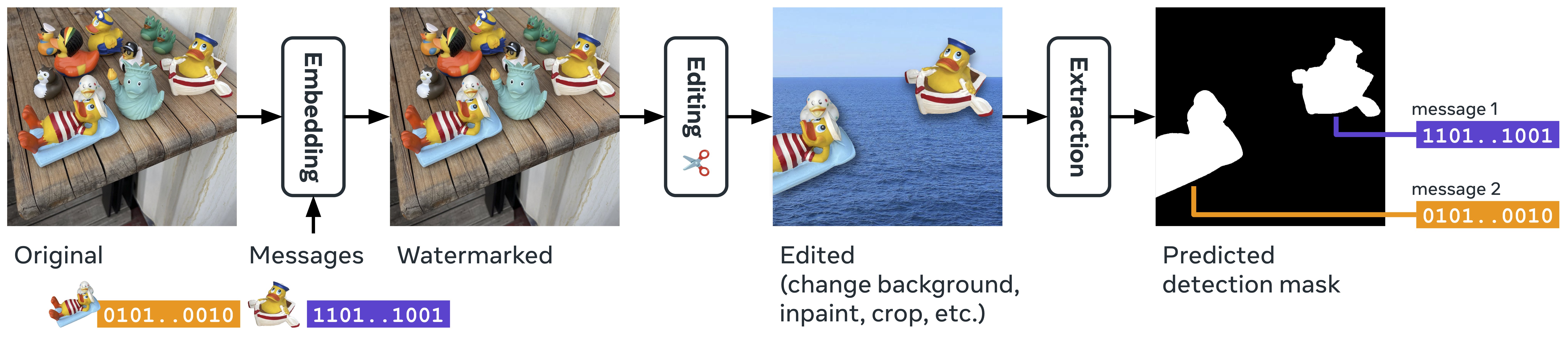
Our approach allows for embedding (possibly multiple) localized watermarks into images.
[[`arXiv`](https://arxiv.org/abs/2411.07231)]
[[`Colab`](https://colab.research.google.com/github/facebookresearch/watermark-anything/blob/main/notebooks/colab.ipynb)]
[[`HF Demo`]](https://huggingface.co/spaces/xiaoyao9184/watermark-anything)
[[`Podcast`](https://notebooklm.google.com/notebook/6c69b3f8-b1a6-41c4-92fb-c416903ceb49/audio)]
[[`Hacker News`](https://news.ycombinator.com/item?id=42113674)]
[[`Video`](https://youtu.be/gwnYmoVzJCo)]
## 📰 News
### [January 30, 2025] - Watermark Anything is [accepted](https://openreview.net/forum?id=IkZVDzdC8M) at ICLR 2025!
### [December 12, 2024] - New WAM Model Released Under MIT License!
- 📢 We are excited to announce the release of the weights for our new model, trained on a subset of the [SA-1B](https://ai.meta.com/datasets/segment-anything/) dataset, now available under the MIT License.
- We've also enhanced the model's robustness, particularly in handling moving watermarked objects in images, and for the rest it should yield similar results than the model in the publication.
## Requirements
### Installation
This repos was tested with Python 3.10.14, PyTorch 2.5.1, CUDA 12.4, Torchvision 0.20.1:
```cmd
conda create -n "watermark_anything" python=3.10.14
conda activate watermark_anything
conda install pytorch torchvision pytorch-cuda=12.4 -c pytorch -c nvidia
```
Install the required packages:
```cmd
pip install -r requirements.txt
```
### Weights
Download the latest pre-trained model weights - trained on [SA-1B](https://ai.meta.com/datasets/segment-anything/) and under MIT license - [here](https://dl.fbaipublicfiles.com/watermark_anything/wam_mit.pth), or via command line:
```cmd
wget https://dl.fbaipublicfiles.com/watermark_anything/wam_mit.pth -P checkpoints/
```
Download the weights of the model from the publication (Non commercial License)
The weights of the original model used in the publication are also available:
```cmd
wget https://dl.fbaipublicfiles.com/watermark_anything/wam_coco.pth -P checkpoints/
```
You can also download the model using Hugging Face via:
```python
from huggingface_hub import hf_hub_download
ckpt_path = hf_hub_download(
repo_id="facebook/watermark-anything",
filename="checkpoint.pth"
)
```
## Inference
See `notebooks/inference.ipynb` for a notebook with the following scripts as well as vizualizations.
Imports, load model and specify folder with images to watermark:
```py
import os
import numpy as np
from PIL import Image
import torch
import torch.nn.functional as F
from torchvision.utils import save_image
from watermark_anything.data.metrics import msg_predict_inference
from notebooks.inference_utils import (
load_model_from_checkpoint, default_transform, unnormalize_img,
create_random_mask, plot_outputs, msg2str
)
device = torch.device("cuda" if torch.cuda.is_available() else "cpu")
# Load the model from the specified checkpoint
exp_dir = "checkpoints"
json_path = os.path.join(exp_dir, "params.json")
ckpt_path = os.path.join(exp_dir, 'checkpoint.pth')
wam = load_model_from_checkpoint(json_path, ckpt_path).to(device).eval()
# Define the directory containing the images to watermark
img_dir = "assets/images" # Directory containing the original images
output_dir = "outputs" # Directory to save the watermarked images
os.makedirs(output_dir, exist_ok=True)
```
> [!TIP]
> You can specify the `wam.scaling_w` factor, which controls the imperceptibility/robustness trade-off. Increasing it will lead to worse images but more robust watermarks, and vice versa.
> By default, it is set to 2.0, feel free to increase or decrease it to test how it influences the metrics.
### Single Watermark
Example of script for watermark embedding, detection and decoding for one message:
```py
# Define a 32-bit message to be embedded into the images
wm_msg = torch.randint(0, 2, (32,)).float().to(device)
# Proportion of the image to be watermarked (0.5 means 50% of the image).
# This is used here to show the watermark localization property. In practice, you may want to use a predifined mask or the entire image.
proportion_masked = 0.5
# Iterate over each image in the directory
for img_ in os.listdir(img_dir):
# Load and preprocess the image
img_path = os.path.join(img_dir, img_)
img = Image.open(img_path).convert("RGB")
img_pt = default_transform(img).unsqueeze(0).to(device) # [1, 3, H, W]
# Embed the watermark message into the image
outputs = wam.embed(img_pt, wm_msg)
# Create a random mask to watermark only a part of the image
mask = create_random_mask(img_pt, num_masks=1,mask_percentage=proportion_masked) # [1, 1, H, W]
img_w = outputs['imgs_w'] * mask + img_pt * (1 - mask) # [1, 3, H, W]
# Detect the watermark in the watermarked image
preds = wam.detect(img_w)["preds"] # [1, 33, 256, 256]
mask_preds = F.sigmoid(preds[:, 0, :, :]) # [1, 256, 256], predicted mask
bit_preds = preds[:, 1:, :, :] # [1, 32, 256, 256], predicted bits
# Predict the embedded message and calculate bit accuracy
pred_message = msg_predict_inference(bit_preds, mask_preds).cpu().float() # [1, 32]
bit_acc = (pred_message == wm_msg).float().mean().item()
# Save the watermarked image and the detection mask
mask_preds_res = F.interpolate(mask_preds.unsqueeze(1), size=(img_pt.shape[-2], img_pt.shape[-1]), mode="bilinear", align_corners=False) # [1, 1, H, W]
save_image(unnormalize_img(img_w), f"{output_dir}/{img_}_wm.png")
save_image(mask_preds_res, f"{output_dir}/{img_}_pred.png")
save_image(mask, f"{output_dir}/{img_}_target.png")
# Print the predicted message and bit accuracy for each image
print(f"Predicted message for image {img_}: ", pred_message[0].numpy())
print(f"Bit accuracy for image {img_}: ", bit_acc)
```
### Multiple Watermarks
Example of script for watermark embedding, detection and decoding for multiple messages:
```py
from inference_utils import multiwm_dbscan
# DBSCAN parameters for detection
epsilon = 1 # min distance between decoded messages in a cluster
min_samples = 500 # min number of pixels in a 256x256 image to form a cluster
# multiple 32 bit message to hide (could be more than 2; does not have to be 1 minus the other)
wm_msgs = torch.randint(0, 2, (2, 32)).float().to(device)
proportion_masked = 0.1 # max proportion per watermark, randomly placed
for img_ in os.listdir(img_dir):
img = os.path.join(img_dir, img_)
img = Image.open(img, "r").convert("RGB")
img_pt = default_transform(img).unsqueeze(0).to(device)
# Mask to use. 1 values correspond to pixels where the watermark will be placed.
masks = create_random_mask(img_pt, num_masks=len(wm_msgs), mask_percentage=proportion_masked) # create one random mask per message
multi_wm_img = img_pt.clone()
for ii in range(len(wm_msgs)):
wm_msg, mask = wm_msgs[ii].unsqueeze(0), masks[ii]
outputs = wam.embed(img_pt, wm_msg)
multi_wm_img = outputs['imgs_w'] * mask + multi_wm_img * (1 - mask) # [1, 3, H, W]
# Detect the watermark in the multi-watermarked image
preds = wam.detect(multi_wm_img)["preds"] # [1, 33, 256, 256]
mask_preds = F.sigmoid(preds[:, 0, :, :]) # [1, 256, 256], predicted mask
bit_preds = preds[:, 1:, :, :] # [1, 32, 256, 256], predicted bits
# positions has the cluster number at each pixel. can be upsaled back to the original size.
centroids, positions = multiwm_dbscan(bit_preds, mask_preds, epsilon = epsilon, min_samples = min_samples)
centroids_pt = torch.stack(list(centroids.values()))
print(f"number messages found in image {img_}: {len(centroids)}")
for centroid in centroids_pt:
print(f"found centroid: {msg2str(centroid)}")
bit_acc = (centroid == wm_msgs).float().mean(dim=1)
# get message with maximum bit accuracy
bit_acc, idx = bit_acc.max(dim=0)
hamming = int(torch.sum(centroid != wm_msgs[idx]).item())
print(f"bit accuracy: {bit_acc.item()} - hamming distance: {hamming}/{len(wm_msgs[0])}")
```
## Training
### Pretraining
Pretraining for robustness:
```cmd
torchrun --nproc_per_node=2 train.py \
--local_rank -1 --output_dir \
--augmentation_config configs/all_augs.yaml --extractor_model sam_base --embedder_model vae_small \
--img_size 256 --batch_size 16 --batch_size_eval 32 --epochs 300 \
--optimizer "AdamW,lr=5e-5" --scheduler "CosineLRScheduler,lr_min=1e-6,t_initial=300,warmup_lr_init=1e-6,warmup_t=10" \
--seed 42 --perceptual_loss none --lambda_i 0.0 --lambda_d 0.0 --lambda_w 1.0 --lambda_w2 10.0 \
--nbits 32 --scaling_i 1.0 --scaling_w 0.3 \
--train_dir --train_annotation_file \
--val_dir --val_annotation_file
```
To run on 8 GPUs, start instead with:
```cmd
torchrun --nproc_per_node=8 train.py \
--local_rank 0 --debug_slurm --output_dir \
```
### Finetuning for Multiple Watermarks and Imperceptibility
Finetuning the model for handling multiple watermarks and ensuring imperceptibility:
```cmd
torchrun --nproc_per_node=8 train.py \
--local_rank 0 --debug_slurm --output_dir \
--augmentation_config configs/all_augs_multi_wm.yaml --extractor_model sam_base --embedder_model vae_small \
--resume_from /checkpoint.pth \
--attenuation jnd_1_3_blue --img_size 256 --batch_size 8 --batch_size_eval 16 --epochs 200 \
--optimizer "AdamW,lr=1e-4" --scheduler "CosineLRScheduler,lr_min=1e-6,t_initial=100,warmup_lr_init=1e-6,warmup_t=5" \
--seed 42 --perceptual_loss none --lambda_i 0 --lambda_d 0 --lambda_w 1.0 --lambda_w2 6.0 \
--nbits 32 --scaling_i 1.0 --scaling_w 2.0 --multiple_w 1 --roll_probability 0.2 \
--train_dir --train_annotation_file \
--val_dir --val_annotation_file
```
### Examples
Logs for the open-sourced models are available here:
- [Pretraining](https://dl.fbaipublicfiles.com/watermark_anything/logs/pretrain_coco.stdout)
- [Finetuning](https://dl.fbaipublicfiles.com/watermark_anything/logs/posttrain_coco.stdout)
Arguments for each of these runs are available at the beginning of the logs.
## License
The code and the new model trained on the [SA-1B dataset](https://ai.meta.com/datasets/segment-anything/) are under the [MIT License](LICENSE)!
> [!TIP]
> In the paper, the evaluated model was trained on the [COCO](https://cocodataset.org/#home) dataset (with additional safety filters and where faces are blurred). For reproducibility purposes, we also release the weights (see above "Weights" subsection), but this model is under the [CC-BY-NC License](LICENSE-COCO).
## Contributing
See [contributing](.github/CONTRIBUTING.md) and the [code of conduct](.github/CODE_OF_CONDUCT.md).
## See Also
- [**VideoSeal**](https://github.com/facebookresearch/videoseal).
If you need good models for image and video watermarking (without watermark localization and the ability to extract multiple messages). VideoSeal hides 256-bits in Y channel only.
- [**AudioSeal**](https://github.com/facebookresearch/audioseal)
- [**Segment Anything**](https://github.com/facebookresearch/segment-anything/)
## Citation
If you find this repository useful, please consider giving a star :star: and please cite as:
```bibtex
@inproceedings{sander2025watermark,
title={Watermark Anything with Localized Messages},
author={Sander, Tom and Fernandez, Pierre and Durmus, Alain and Furon, Teddy and Douze, Matthijs},
booktitle={International Conference on Learning Representations (ICLR)},
year={2025}
}