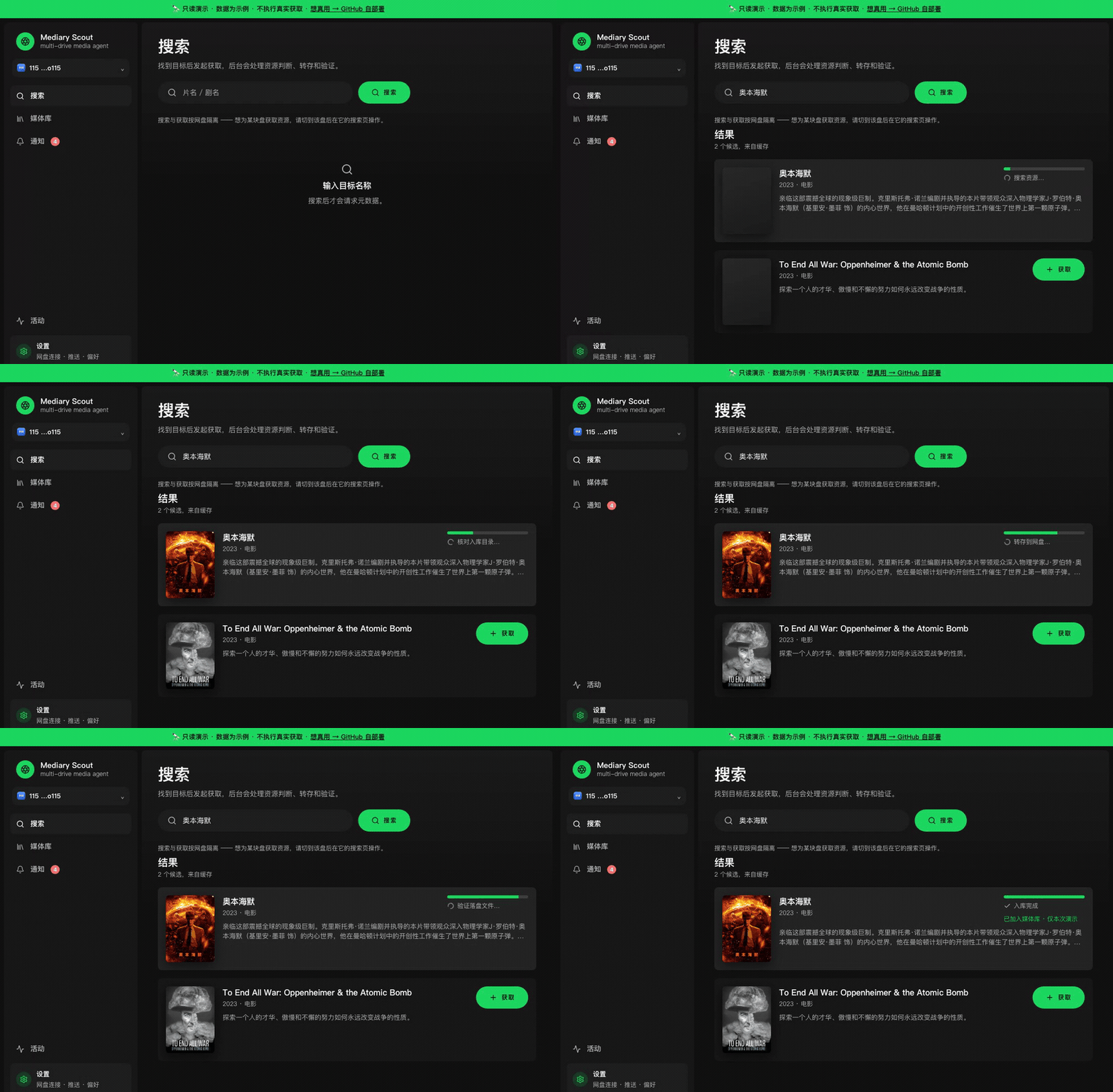
Ask for a movie, show or anime; an agent searches for it, transfers the best match into your own drive (Quark / 115 / GuangYaPan / 123 / Tianyi), reads the drive back to confirm it landed, and keeps filling in episodes that are still missing.
Download: [GitHub Releases](https://github.com/fancydirty/mediary-scout/releases/latest) (macOS / Windows desktop app)
Support the author: [buy me a coffee](docs/support/README.md)
Community: this project takes part in and endorses the [LINUX DO community](https://linux.do), where many users self-host, share drive tips, and get deployment questions answered fast. [](https://linux.do)
## Install
### Desktop app (easiest)
| Platform | Download | Notes |
|---|---|---|
| macOS (Apple Silicon) | [.dmg](https://github.com/fancydirty/mediary-scout/releases/latest) | Signed and notarized |
| Windows (x64) | [.exe](https://github.com/fancydirty/mediary-scout/releases/latest) | Unsigned: when SmartScreen prompts, click "Run anyway" |
Install, open it, connect a drive and add an AI model in Settings, then search a title and hit 获取. The app tells you when a new version is out.
### Docker (NAS / router / server)
```bash
git clone https://github.com/fancydirty/mediary-scout && cd mediary-scout
docker compose up -d
```
Open `http://:3000` and configure it in Settings. Later updates are one click in **Settings → 更新**, or daily on a schedule you set. Build mirrors for mainland China, remote access via Tailscale / Cloudflare Tunnel, multi-user, backups, and a prompt that lets an AI agent deploy it for you are all in the **[deploy guide](docs/deploy.md)** (Chinese).
| | Desktop app | Docker |
|---|---|---|
| Best for | Personal use on Mac / Windows | NAS or server, always on |
| Scheduled gap-fill | While the app is open | 24/7 |
| Multi-user | No | Yes |
| Phone / remote access | This machine only | Tailscale / Cloudflare Tunnel |
Either way you bring an OpenAI-compatible AI model endpoint (the key stays in your own instance). Metadata works out of the box. Resource search uses PanSou: Docker bundles one, the desktop app defaults to a public instance you can swap for your own in Settings; Prowlarr can be added for magnets.
## Supported drives
- **Quark**: share-link transfer; the largest pool on PanSou.
- **115**: share links + magnets.
- **123**: share links + magnets; free accounts can transfer; QR login. [Setup](docs/deploy.md#123网盘连接)
- **GuangYaPan (光鸭)**: share links + magnets; paste a token to log in. [Setup](docs/deploy.md#光鸭云盘guangyapan连接)
- **Tianyi (天翼)**: share-link transfer; QR login; few movies. [Setup](docs/deploy.md#天翼云盘连接)
Per-drive resource counts, and why only these five: [drive evaluations](docs/drive-brand-evaluations.md) (Chinese).
## More docs
- [Deploy guide](docs/deploy.md)
- [Agent API](docs/agent-api.md): let coding agents such as Claude Code or Codex drive Mediary Scout
- [Architecture overview](docs/architecture.md)
## Disclaimer
Mediary Scout is open-source, self-hosted software. It is not offered, and never will be offered, as a hosted service: you run your own instance and bring your own drive and AI model credentials. It performs the same file operations you could do by hand in your own cloud drive. See [project positioning](docs/distribution-and-legal-positioning.md). Not affiliated with 115, Quark, GuangYaPan, 123, Tianyi, TMDB, or any indexer.
## Credits
- [PanSou](https://github.com/fish2018/pansou-web): resource search backend
- [Prowlarr](https://github.com/Prowlarr/Prowlarr): indexer manager (optional)
- [p115client](https://github.com/ChenyangGao/p115client): 115 API reference
- [p123client](https://github.com/ChenyangGao/p123client): 123 API reference
- [AList](https://github.com/AlistGo/alist): GuangYaPan API reference (`drivers/guangyapan`)
- [cloud189-auto-save](https://github.com/1307super/cloud189-auto-save) / [cloudpan189-api](https://github.com/tickstep/cloudpan189-api): Tianyi API references
- [TMDB](https://www.themoviedb.org/): metadata (this product is not endorsed or certified by TMDB)
## Star History



