 Alpha
Alpha  ======================
[GDB] offers the best embedded software development experience by
allowing you to remotely load, debug and test your programs and
hardware/software interfaces. It feels like native programming thanks
to a similar smooth "Edit-Compile-Run" cycle.
[Alpha] is a system-level [GDB] server (aka "gdbstub" and "gdb stubs")
allowing you to dynamically debug anything running in your hardware
target, from bare metal software to OS-backed programs, including
their threads, the underlying drivers, etc. All with a single GDB
session and **without any JTAG probe**.
======================
[GDB] offers the best embedded software development experience by
allowing you to remotely load, debug and test your programs and
hardware/software interfaces. It feels like native programming thanks
to a similar smooth "Edit-Compile-Run" cycle.
[Alpha] is a system-level [GDB] server (aka "gdbstub" and "gdb stubs")
allowing you to dynamically debug anything running in your hardware
target, from bare metal software to OS-backed programs, including
their threads, the underlying drivers, etc. All with a single GDB
session and **without any JTAG probe**.
 This repository contains the freemium distribution of [Alpha] for any
version of the Raspberry Pi.
Table of Contents
=================
* [Use Cases](#use-cases)
* [Bare Metal Programming](#bare-metal-programming)
* [Benchmarking](#benchmarking)
* [Writing drivers](#writing-drivers)
* [High performance](#high-performance)
* [Learning by doing](#learning-by-doing)
* [Operating System Debugging](#operating-system-debugging)
* [Multi-core Debugging](#multi-core-debugging)
* [A convenient programming environment](#a-convenient-programming-environment)
* [A bare metal C library](#a-bare-metal-c-library)
* [List of delegated syscalls](#list-of-delegated-syscalls)
* [List of implemented syscalls](#list-of-implemented-syscalls)
* [A stack](#a-stack)
* [An address space](#an-address-space)
* [An extended GDB server](#an-extended-gdb-server)
* [Exiting GDB resets the SoC](#exiting-gdb-resets-the-soc)
* [Stopping the execution](#stopping-the-execution)
* [Alpha-specific commands](#alpha-specific-commands)
* [Installation](#installation)
* [Alpha](#alpha)
* [Wiring](#wiring)
* [Examples](#examples)
* [Hello World](#hello-world)
* [Compiling](#compiling)
* [Running](#running)
* [Raytracer](#raytracer)
* [Compiling](#compiling-1)
* [Running](#running-1)
* [Support](#support)
* [Licensing](#licensing)
Generated by [gh-md-toc](https://github.com/ekalinin/github-markdown-toc)
# Use Cases
## Bare Metal Programming
Bare metal programming is ideal for benchmarking, high-performance
programs & low-level prototyping.
[Alpha] provides a **modern** & **convenient** bare metal programming
environment:
- A ready-to-use hardware state thanks to more advanced hardware
initializations than what firmwares or bootloaders usually do,
including the floating point unit, caches and a convenient address
space. Note that only the 32-bit mode of the ARM architecture is
supported and that other modes are part of our business-level
plan. Please, [contact us for more
details][contact-us].
- The ability to run standard C programs bare metal. C library
functions involving syscalls (`malloc`, `printf`, etc.) are
delegated to [GDB] by [Alpha].
### Benchmarking
The hardest part of benchmarking is understanding the results. And
this is the main reason for running benchmarks bare metal:
1. Being alone running on the hardware to:
- Avoid interferences of concurrent or parallel programs.
- Be able to easily reach the best or worst cases.
1. Being at the closest possible level to the hardware/software
interface to:
- Understand perfectly what the hardware is doing.
- Get rid of too high-level abstractions possibly hiding
implementation details.
### Writing drivers
The Raspberry Pi has a nice set of I/O interfaces (SPI, I2C, GPIO,
USB, etc.) which makes it a good candidate to write the low-level
parts of your drivers.
You can easily write, debug and test your I/O peripheral driver just
its hardware documentation and [GDB]. You can then integrate it in any
OS driver API such as Linux, FreeRTOS, etc. Note that is a very good
practice to be able to easily test a driver.
Simply plug your I/O peripheral and get started:
1. You can start exploring the hardware/software interface through GDB
memory [read] and [write] commands.
1. Focus on what really matters thanks a ready-to-use execution
environment incluing supervisor-level execution privileges.
### High performance
The highest levels of performance and responsiveness can be easily
reached bare metal. Being alone on the machine, right above the
hardware/software interface, allows to avoid time-consuming calls and
to reach the fastest response times and throughputs.
### Learning by doing
Learning embedded software usually comes at a price you can now avoid
with this GDB-centric approach. No extra JTAG probe, no complex
firmware & bootloader dependency and no complex tools. Here, it's a
simple matter of powering on the Raspberry Pi and launching [GDB] to
load a program and run/debug/test it using the same tools (GCC) and
file formats (ELF) as usual native programming. [GDB] is the most
famous debugging tool which is [much more than a simple
debugger][time-to-blink-a-led].
Moreover, [Alpha] can catch common programming errors such as memory
access violations to stop the execution exactly where the mistake
happened:
```text
(gdb) monitor gdb/catch
RST : no : Reset Exception
UND : no : Undefined Instruction Exception
SWI : no : Software Interrupt Exception
PABRT : no : Prefetch Abort Exception
DABRT : no : Data Abort Exception
IRQ : no : IRQ (interrupt) Exception
FIQR : no : FIQ (fast interrupt) Exception
(gdb) monitor gdb/catch DABRT yes
DABRT : yes : Data Abort Exception
```
So have fun and enjoy exploring the GPU, enabling another core,
communicating through USB, or whatever comes to your mind.
## Operating System Debugging
OS-aware debugging is part of our business-level plan and is disabled
in this version. Please, [contact us for more details][contact-us].
## Multi-core Debugging
Multi-core debugging is part of our business-level plan and is
disabled in this version. Please, [contact us for more
details][contact-us].
# A convenient programming environment
## A bare metal C library
Running bare metal does not mean at all having to write everything
from scratch and in assembly. This repository shows program examples
written in C and involving calls to the C library, such as `printf()`
and `scanf()`.
The provided C library is the [newlib] (because it can be directly
integrated into GCC), which relies on the POSIX syscalls. Some of them
- the most useful ones when prototyping, benchmarking & testing - can
be handled by GDB (see below), while others are implemented bare metal
and others not at all.
### List of delegated syscalls
Syscalls are delegated to [GDB] by [Alpha] through its remote
protocol. Their number and their arguments are limited but it is
enough to print convenience logs, write benchmark results into CSV
files, etc.
- open
- close
- read
- write
- lseek
- rename
- unlink
- stat/fstat
- gettimeofday
- isatty
- system
![GDB File I/O][img-gdb-fileio]
### List of implemented syscalls
Syscalls that are implemented and can be used bare metal:
- brk: requires a global symbol `_end` as beginning of the free
area. We provide it through our linker script
[`sdk/link.ld`](sdk/link.ld) as the end of the program.
### A stack
The stack address is configured in the linker script through the
`__stack` symbol. Its maximum size is thus the configured address
minus the next non-free memory region.
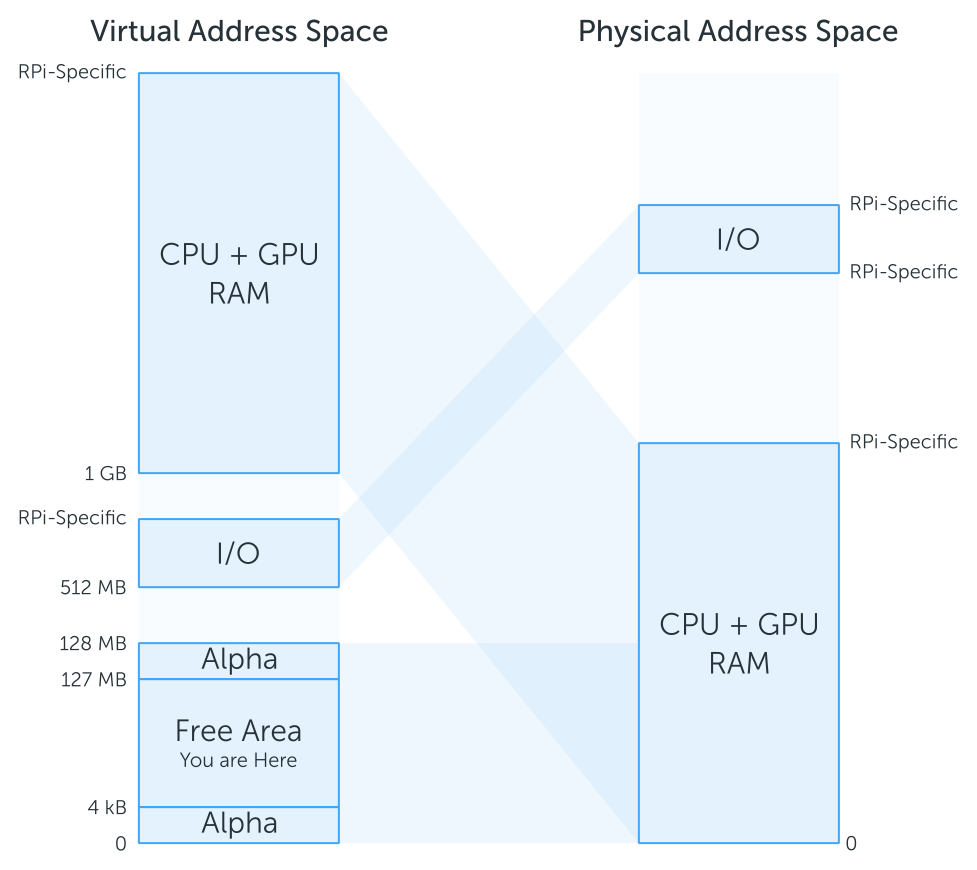
## An address space
[Alpha] maps a useful address space including the RAM and the
memory-mapped I/Os:
This repository contains the freemium distribution of [Alpha] for any
version of the Raspberry Pi.
Table of Contents
=================
* [Use Cases](#use-cases)
* [Bare Metal Programming](#bare-metal-programming)
* [Benchmarking](#benchmarking)
* [Writing drivers](#writing-drivers)
* [High performance](#high-performance)
* [Learning by doing](#learning-by-doing)
* [Operating System Debugging](#operating-system-debugging)
* [Multi-core Debugging](#multi-core-debugging)
* [A convenient programming environment](#a-convenient-programming-environment)
* [A bare metal C library](#a-bare-metal-c-library)
* [List of delegated syscalls](#list-of-delegated-syscalls)
* [List of implemented syscalls](#list-of-implemented-syscalls)
* [A stack](#a-stack)
* [An address space](#an-address-space)
* [An extended GDB server](#an-extended-gdb-server)
* [Exiting GDB resets the SoC](#exiting-gdb-resets-the-soc)
* [Stopping the execution](#stopping-the-execution)
* [Alpha-specific commands](#alpha-specific-commands)
* [Installation](#installation)
* [Alpha](#alpha)
* [Wiring](#wiring)
* [Examples](#examples)
* [Hello World](#hello-world)
* [Compiling](#compiling)
* [Running](#running)
* [Raytracer](#raytracer)
* [Compiling](#compiling-1)
* [Running](#running-1)
* [Support](#support)
* [Licensing](#licensing)
Generated by [gh-md-toc](https://github.com/ekalinin/github-markdown-toc)
# Use Cases
## Bare Metal Programming
Bare metal programming is ideal for benchmarking, high-performance
programs & low-level prototyping.
[Alpha] provides a **modern** & **convenient** bare metal programming
environment:
- A ready-to-use hardware state thanks to more advanced hardware
initializations than what firmwares or bootloaders usually do,
including the floating point unit, caches and a convenient address
space. Note that only the 32-bit mode of the ARM architecture is
supported and that other modes are part of our business-level
plan. Please, [contact us for more
details][contact-us].
- The ability to run standard C programs bare metal. C library
functions involving syscalls (`malloc`, `printf`, etc.) are
delegated to [GDB] by [Alpha].
### Benchmarking
The hardest part of benchmarking is understanding the results. And
this is the main reason for running benchmarks bare metal:
1. Being alone running on the hardware to:
- Avoid interferences of concurrent or parallel programs.
- Be able to easily reach the best or worst cases.
1. Being at the closest possible level to the hardware/software
interface to:
- Understand perfectly what the hardware is doing.
- Get rid of too high-level abstractions possibly hiding
implementation details.
### Writing drivers
The Raspberry Pi has a nice set of I/O interfaces (SPI, I2C, GPIO,
USB, etc.) which makes it a good candidate to write the low-level
parts of your drivers.
You can easily write, debug and test your I/O peripheral driver just
its hardware documentation and [GDB]. You can then integrate it in any
OS driver API such as Linux, FreeRTOS, etc. Note that is a very good
practice to be able to easily test a driver.
Simply plug your I/O peripheral and get started:
1. You can start exploring the hardware/software interface through GDB
memory [read] and [write] commands.
1. Focus on what really matters thanks a ready-to-use execution
environment incluing supervisor-level execution privileges.
### High performance
The highest levels of performance and responsiveness can be easily
reached bare metal. Being alone on the machine, right above the
hardware/software interface, allows to avoid time-consuming calls and
to reach the fastest response times and throughputs.
### Learning by doing
Learning embedded software usually comes at a price you can now avoid
with this GDB-centric approach. No extra JTAG probe, no complex
firmware & bootloader dependency and no complex tools. Here, it's a
simple matter of powering on the Raspberry Pi and launching [GDB] to
load a program and run/debug/test it using the same tools (GCC) and
file formats (ELF) as usual native programming. [GDB] is the most
famous debugging tool which is [much more than a simple
debugger][time-to-blink-a-led].
Moreover, [Alpha] can catch common programming errors such as memory
access violations to stop the execution exactly where the mistake
happened:
```text
(gdb) monitor gdb/catch
RST : no : Reset Exception
UND : no : Undefined Instruction Exception
SWI : no : Software Interrupt Exception
PABRT : no : Prefetch Abort Exception
DABRT : no : Data Abort Exception
IRQ : no : IRQ (interrupt) Exception
FIQR : no : FIQ (fast interrupt) Exception
(gdb) monitor gdb/catch DABRT yes
DABRT : yes : Data Abort Exception
```
So have fun and enjoy exploring the GPU, enabling another core,
communicating through USB, or whatever comes to your mind.
## Operating System Debugging
OS-aware debugging is part of our business-level plan and is disabled
in this version. Please, [contact us for more details][contact-us].
## Multi-core Debugging
Multi-core debugging is part of our business-level plan and is
disabled in this version. Please, [contact us for more
details][contact-us].
# A convenient programming environment
## A bare metal C library
Running bare metal does not mean at all having to write everything
from scratch and in assembly. This repository shows program examples
written in C and involving calls to the C library, such as `printf()`
and `scanf()`.
The provided C library is the [newlib] (because it can be directly
integrated into GCC), which relies on the POSIX syscalls. Some of them
- the most useful ones when prototyping, benchmarking & testing - can
be handled by GDB (see below), while others are implemented bare metal
and others not at all.
### List of delegated syscalls
Syscalls are delegated to [GDB] by [Alpha] through its remote
protocol. Their number and their arguments are limited but it is
enough to print convenience logs, write benchmark results into CSV
files, etc.
- open
- close
- read
- write
- lseek
- rename
- unlink
- stat/fstat
- gettimeofday
- isatty
- system
![GDB File I/O][img-gdb-fileio]
### List of implemented syscalls
Syscalls that are implemented and can be used bare metal:
- brk: requires a global symbol `_end` as beginning of the free
area. We provide it through our linker script
[`sdk/link.ld`](sdk/link.ld) as the end of the program.
### A stack
The stack address is configured in the linker script through the
`__stack` symbol. Its maximum size is thus the configured address
minus the next non-free memory region.
## An address space
[Alpha] maps a useful address space including the RAM and the
memory-mapped I/Os:
 ## An extended GDB server
### Exiting GDB resets the SoC
Resetting the hardware is a good practice to avoid side-effects and
make things repeatable. **Correctly leaving GDB** sends a `kill`
command to the target, which is translated by [Alpha] into a SoC
reset, so you don't have to bother turning it off and on again to
restart from scratch.
### Stopping the execution
Asynchronously interrupt the Raspberry Pi while it is executing your
program using the command `interrupt` or the `SIGINT` signal through
the ctrlc keystroke.
For example:
```text
(gdb) continue
Continuing.
^C
Program received signal SIGSTOP, Stopped (signal).
0x0000921c in __ieee754_sqrt ()
(gdb) # The execution is stopped
```
```text
(gdb) continue &
Continuing.
(gdb) interrupt
Program received signal SIGSTOP, Stopped (signal).
0x0000921c in __ieee754_sqrt ()
(gdb) # The execution is stopped
```
This feature requires external interrupts which must be unmasked
(enabled) to allow them. Here is an example using GDB's built-in
scripting:
```text
(gdb) print /x $cpsr &= ~(1 << 7)
$1 = 0x6000015f
```
The raytracer example below uses it to be able to interrupt endless
loop and quit GDB.
### Alpha-specific commands
[Alpha] provides extra GDB commands accessible through the `monitor`
command:
```text
(gdb) monitor help
help [COMMAND]
Print help of all or help of COMMAND in parameter
version
Print version of Alpha Target
mr8 ADDRESS [COUNT]
Read COUNT or 1 8bit word at ADDRESS
mr16 ADDRESS [COUNT]
Read COUNT or 1 16bit word at ADDRESS
mr32 ADDRESS [COUNT]
Read COUNT or 1 32bit word at ADDRESS
mw8 ADDRESS VALUE
Write the 8bit word VALUE at ADDRESS
mw16 ADDRESS VALUE
Write the 16bit word VALUE at ADDRESS
mw32 ADDRESS VALUE
Write the 32bit word VALUE at ADDRESS
fill32 ADDRESS COUNT VALUE
Fill at ADDRESS COUNT 32bit word with VALUE
gdb/wcet [yes|no]
Print or set Alpha WCET mode
gdb/catch
Print the list of exceptions that can be caught by Alpha
gdb/catch EXCEPTION [yes|no]
Print or set/unset the catching of EXCEPTION
```
# Installation
![GDB remote link with the Raspberry Pi][img-rpi-embedded-dev]
## Alpha
Installing [Alpha] into your Raspberry Pi is very easy. You simply
need to copy `boot/{Alpha.bin, config.txt}` into the boot partition of
your Raspberry Pi' SD card. [Alpha] is then started by the Raspberry
Pi's bootloader from its SD card according to `config.txt` directives
(load & start address).
The script [`scripts/install-rpi-boot.sh`](scripts/install-rpi-boot.sh)
creates a new SD card from scratch by:
1. Downloading the officially distributed firmware and bootloader into `boot/`.
1. Formatting the SD card in FAT32 (without partitioning it).
1. Copying every files in `boot/` into the SD card.
```text
$ ./scripts/install-rpi-boot.sh /dev/
[+] Downloading the Raspberry Pi's firmware version 1.20161215
######################################################################## 100.0%
######################################################################## 100.0%
[+] Temporarily mounting `/dev/` into `/tmp/rpi-sdcard-mountpoint`
[+] Installing the RPi firmware and the Alpha debugger
'boot/bootcode.bin' -> '/tmp/rpi-sdcard-mountpoint/bootcode.bin'
'boot/start.elf' -> '/tmp/rpi-sdcard-mountpoint/start.elf'
'boot/Alpha.bin' -> '/tmp/rpi-sdcard-mountpoint/Alpha.bin'
'boot/config.txt' -> '/tmp/rpi-sdcard-mountpoint/config.txt'
[+] Checking the integrity
/tmp/rpi-sdcard-mountpoint/bootcode.bin: OK
/tmp/rpi-sdcard-mountpoint/start.elf: OK
/tmp/rpi-sdcard-mountpoint/Alpha.bin: OK
[+] Un-mounting `/tmp/rpi-sdcard-mountpoint`
[+] Your SD card is ready!
[+] You can now insert it into the RPi and use Alpha through the RPI's Mini-UART
```
## Wiring
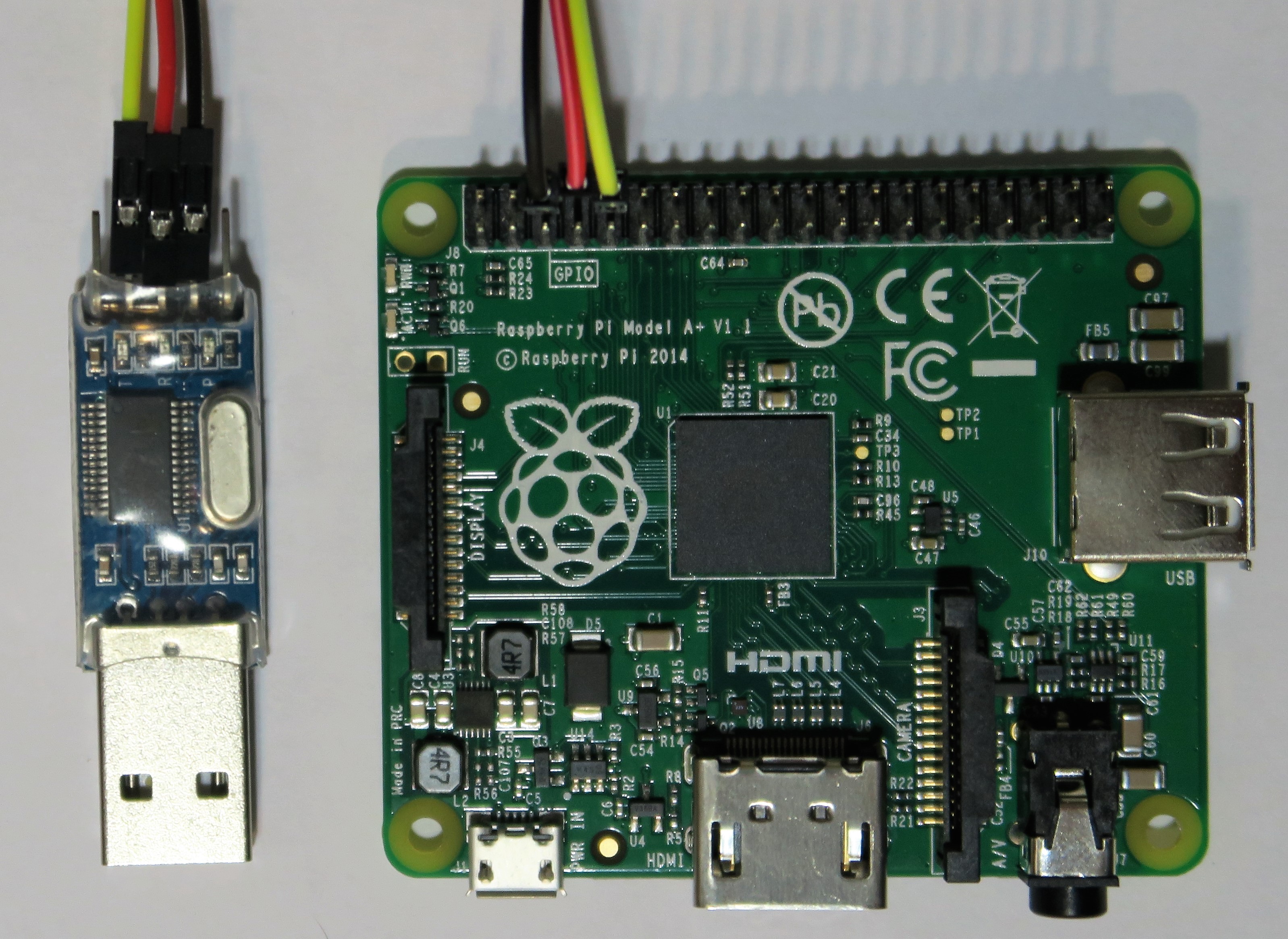
Using GDB in client/server mode requires a link between your
workstation and your Raspberry Pi. For portability reasons, we chose
the Raspberry Pi's Mini-UART. You can connect it to your workstation
using a USB-UART TTL **3.3V** (not 5V) converter.
Here are some random converter references:
- [Adafruit's TTL cable](https://www.adafruit.com/product/954)
- [FTDI's TTL cable `TTL-232R-3V3`](https://shop.clickandbuild.com/cnb/shop/ftdichip?productID=53&op=catalogue-product_info-null&prodCategoryID=296).
- Or do it yourself using a USB-UART TTL 3.3V converter, 3 jumper cables and 1 USB cable.
## An extended GDB server
### Exiting GDB resets the SoC
Resetting the hardware is a good practice to avoid side-effects and
make things repeatable. **Correctly leaving GDB** sends a `kill`
command to the target, which is translated by [Alpha] into a SoC
reset, so you don't have to bother turning it off and on again to
restart from scratch.
### Stopping the execution
Asynchronously interrupt the Raspberry Pi while it is executing your
program using the command `interrupt` or the `SIGINT` signal through
the ctrlc keystroke.
For example:
```text
(gdb) continue
Continuing.
^C
Program received signal SIGSTOP, Stopped (signal).
0x0000921c in __ieee754_sqrt ()
(gdb) # The execution is stopped
```
```text
(gdb) continue &
Continuing.
(gdb) interrupt
Program received signal SIGSTOP, Stopped (signal).
0x0000921c in __ieee754_sqrt ()
(gdb) # The execution is stopped
```
This feature requires external interrupts which must be unmasked
(enabled) to allow them. Here is an example using GDB's built-in
scripting:
```text
(gdb) print /x $cpsr &= ~(1 << 7)
$1 = 0x6000015f
```
The raytracer example below uses it to be able to interrupt endless
loop and quit GDB.
### Alpha-specific commands
[Alpha] provides extra GDB commands accessible through the `monitor`
command:
```text
(gdb) monitor help
help [COMMAND]
Print help of all or help of COMMAND in parameter
version
Print version of Alpha Target
mr8 ADDRESS [COUNT]
Read COUNT or 1 8bit word at ADDRESS
mr16 ADDRESS [COUNT]
Read COUNT or 1 16bit word at ADDRESS
mr32 ADDRESS [COUNT]
Read COUNT or 1 32bit word at ADDRESS
mw8 ADDRESS VALUE
Write the 8bit word VALUE at ADDRESS
mw16 ADDRESS VALUE
Write the 16bit word VALUE at ADDRESS
mw32 ADDRESS VALUE
Write the 32bit word VALUE at ADDRESS
fill32 ADDRESS COUNT VALUE
Fill at ADDRESS COUNT 32bit word with VALUE
gdb/wcet [yes|no]
Print or set Alpha WCET mode
gdb/catch
Print the list of exceptions that can be caught by Alpha
gdb/catch EXCEPTION [yes|no]
Print or set/unset the catching of EXCEPTION
```
# Installation
![GDB remote link with the Raspberry Pi][img-rpi-embedded-dev]
## Alpha
Installing [Alpha] into your Raspberry Pi is very easy. You simply
need to copy `boot/{Alpha.bin, config.txt}` into the boot partition of
your Raspberry Pi' SD card. [Alpha] is then started by the Raspberry
Pi's bootloader from its SD card according to `config.txt` directives
(load & start address).
The script [`scripts/install-rpi-boot.sh`](scripts/install-rpi-boot.sh)
creates a new SD card from scratch by:
1. Downloading the officially distributed firmware and bootloader into `boot/`.
1. Formatting the SD card in FAT32 (without partitioning it).
1. Copying every files in `boot/` into the SD card.
```text
$ ./scripts/install-rpi-boot.sh /dev/
[+] Downloading the Raspberry Pi's firmware version 1.20161215
######################################################################## 100.0%
######################################################################## 100.0%
[+] Temporarily mounting `/dev/` into `/tmp/rpi-sdcard-mountpoint`
[+] Installing the RPi firmware and the Alpha debugger
'boot/bootcode.bin' -> '/tmp/rpi-sdcard-mountpoint/bootcode.bin'
'boot/start.elf' -> '/tmp/rpi-sdcard-mountpoint/start.elf'
'boot/Alpha.bin' -> '/tmp/rpi-sdcard-mountpoint/Alpha.bin'
'boot/config.txt' -> '/tmp/rpi-sdcard-mountpoint/config.txt'
[+] Checking the integrity
/tmp/rpi-sdcard-mountpoint/bootcode.bin: OK
/tmp/rpi-sdcard-mountpoint/start.elf: OK
/tmp/rpi-sdcard-mountpoint/Alpha.bin: OK
[+] Un-mounting `/tmp/rpi-sdcard-mountpoint`
[+] Your SD card is ready!
[+] You can now insert it into the RPi and use Alpha through the RPI's Mini-UART
```
## Wiring
Using GDB in client/server mode requires a link between your
workstation and your Raspberry Pi. For portability reasons, we chose
the Raspberry Pi's Mini-UART. You can connect it to your workstation
using a USB-UART TTL **3.3V** (not 5V) converter.
Here are some random converter references:
- [Adafruit's TTL cable](https://www.adafruit.com/product/954)
- [FTDI's TTL cable `TTL-232R-3V3`](https://shop.clickandbuild.com/cnb/shop/ftdichip?productID=53&op=catalogue-product_info-null&prodCategoryID=296).
- Or do it yourself using a USB-UART TTL 3.3V converter, 3 jumper cables and 1 USB cable.

 # Examples
Two bare metal programs are provided as examples: a hello world
including bare metal calls to `printf()` and `scanf()`, and a
raytracer using the GPU.
Note that we use docker to produce our development environments and
build a Debian image with the expected tools, including [the GCC
toolchain for the ARM architecture][arm-toolchain]. The Makefile
command `make shell` builds the docker image according to
[`sdk/Dockerfile`](sdk/Dockerfile). It is up to you to use it or use
instead your own setup (and you can find the list of required
dependencies in the [`sdk/Dockerfile`](sdk/Dockerfile)).
```bash
$ make shell
docker build -f sdk/Dockerfile --build-arg uid=$(id -u) .
Sending build context to Docker daemon 3.843 MB
Step 1 : FROM debian:stretch
...
Successfully built 730a81db9233
user@3979cd200f4b:/home/user/farjump/raspberry-pi$ # Let's get started
```
[GDB] is then used to remotely load the program. The file
[`run.gdb`](run.gdb) is a helper GDB script:
1. Connecting to the target through the TTY interface of the TTL cable.
1. Loading the ELF executable.
1. Starting running the program until entering the `main()` function.
**You need to replace the serial interface** `/dev/ttyUSB0` **with
yours** (usually `/dev/ttyUSB*`, `/dev/ttyACM*`, `/dev/cu.*`
... according to your OS).
```bash
$ arm-none-eabi-gdb -x run.gdb
```
## Hello World
### Compiling
```bash
$ make hello.elf
arm-none-eabi-gcc -specs=sdk/Alpha.specs -mfloat-abi=hard -mfpu=vfp -march=armv6zk -mtune=arm1176jzf-s -g3 -ggdb -Wl,-Tsdk/link.ld -Lsdk -Wl,-umalloc -Wl,-Map,hello.map -o hello.elf src/hello-world/HelloWorld.c
```
### Running
```text
user@f76db25a61c1:/home/user/farjump/raspberry-pi$ arm-none-eabi-gdb -x run.gdb hello.elf
Reading symbols from hello.elf...done.
0x07f10570 in ?? ()
Loading section .entry, size 0x14f lma 0x8000
Loading section .text, size 0x11ed4 lma 0x8150
Loading section .init, size 0x18 lma 0x1a024
Loading section .fini, size 0x18 lma 0x1a03c
Loading section .rodata, size 0x50c lma 0x1a058
Loading section .ARM.exidx, size 0x8 lma 0x1a564
Loading section .eh_frame, size 0x4 lma 0x1a56c
Loading section .init_array, size 0x8 lma 0x2a570
Loading section .fini_array, size 0x4 lma 0x2a578
Loading section .jcr, size 0x4 lma 0x2a57c
Loading section .data, size 0x9ac lma 0x2a580
Start address 0x820c, load size 77607
Transfer rate: 10 KB/sec, 892 bytes/write.
Temporary breakpoint 1 at 0x832c: file src/hello-world/HelloWorld.c, line 7.
Temporary breakpoint 1, main () at src/hello-world/HelloWorld.c:7
7 printf("Enter a string: \e[?25h");
(gdb) # We have reached the main() function, have fun now ;)
(gdb) continue
Continuing.
Enter a string: Farjumper
RPi says "Hello Farjumper!"
Program received signal SIGTRAP, Trace/breakpoint trap.
_exit (rc=0) at SYSFILEIO/MAKEFILE/../SOURCE/SYSFILEIO_EXIT.c:11
11 SYSFILEIO/MAKEFILE/../SOURCE/SYSFILEIO_EXIT.c: No such file or directory.
(gdb) quit
user@f76db25a61c1:/home/user/farjump/raspberry-pi$ # The RPi resets.
```
## Raytracer
### Compiling
```bash
$ make raytracer.elf
arm-none-eabi-gcc -specs=sdk/Alpha.specs -mfloat-abi=hard -mfpu=vfp -march=armv6zk -mtune=arm1176jzf-s -g3 -ggdb -Wl,-Tsdk/link.ld -Lsdk -Wl,-umalloc -Wl,-Map,raytracer.map -o raytracer.elf -Og src/raytracer/main.c src/raytracer/Raytracing.c src/raytracer/VC.c src/raytracer/VC_aligned_buffer.S -lm
```
### Running
If you want to watch the video output, plug first a screen to your RPi's HDMI port ;)
```text
user@f76db25a61c1:/home/user/farjump/raspberry-pi$ arm-none-eabi-gdb -x run.gdb raytracer.elf
Reading symbols from raytracer.elf...done.
0x07f10570 in ?? ()
Loading section .entry, size 0x14f lma 0x8000
Loading section .text, size 0x1890 lma 0x8150
Loading section .init, size 0x18 lma 0x99e0
Loading section .fini, size 0x18 lma 0x99f8
Loading section .rodata, size 0xc lma 0x9a10
Loading section .ARM.exidx, size 0x8 lma 0x9a1c
Loading section .eh_frame, size 0x4 lma 0x9a24
Loading section .init_array, size 0x8 lma 0x19a28
Loading section .fini_array, size 0x4 lma 0x19a30
Loading section .jcr, size 0x4 lma 0x19a34
Loading section .data, size 0x590 lma 0x19a38
Start address 0x820c, load size 8135
Transfer rate: 10 KB/sec, 451 bytes/write.
Temporary breakpoint 1 at 0x8320: file src/raytracer/main.c, line 221.
Temporary breakpoint 1, main () at src/raytracer/main.c:221
221 {
(gdb) # Enable external interrupts to be able to stop the execution later
(gdb) print /x $cpsr &= ~(1 << 7)
$1 = 0x6000015f
(gdb) continue
Continuing.
^C
Program received signal SIGSTOP, Stopped (signal).
0x0000921c in __ieee754_sqrt ()
(gdb) quit
user@f76db25a61c1:/home/user/farjump/raspberry-pi$ # The RPi resets.
```
# Support
Support is provided through this repository's [issue board](https://github.com/farjump/raspberry-pi/issues).
Feel free to also [contact us][contact-us].
# Licensing
See [LICENSE](LICENSE) for the full license text.
[Alpha]: https://farjump.io
[GDB]: https://sourceware.org/gdb/current/onlinedocs/gdb/Summary.html
[newlib]: https://sourceware.org/newlib/
[write]: https://sourceware.org/gdb/current/onlinedocs/gdb/Assignment.html
[read]: https://sourceware.org/gdb/onlinedocs/gdb/Memory.html
[time-to-blink-a-led]: https://www.youtube.com/watch?v=niSBhjHa22I
[contact-us]: https://farjump.io/contact-us
[img-gdb-fileio]: https://cdn.rawgit.com/farjump/raspberry-pi/master/doc/img/gdb-fileio.svg
[img-rpi-embedded-dev]: https://cdn.rawgit.com/farjump/raspberry-pi/master/doc/img/rpi-embedded-dev.svg
[arm-toolchain]: https://developer.arm.com/open-source/gnu-toolchain/gnu-rm
# Examples
Two bare metal programs are provided as examples: a hello world
including bare metal calls to `printf()` and `scanf()`, and a
raytracer using the GPU.
Note that we use docker to produce our development environments and
build a Debian image with the expected tools, including [the GCC
toolchain for the ARM architecture][arm-toolchain]. The Makefile
command `make shell` builds the docker image according to
[`sdk/Dockerfile`](sdk/Dockerfile). It is up to you to use it or use
instead your own setup (and you can find the list of required
dependencies in the [`sdk/Dockerfile`](sdk/Dockerfile)).
```bash
$ make shell
docker build -f sdk/Dockerfile --build-arg uid=$(id -u) .
Sending build context to Docker daemon 3.843 MB
Step 1 : FROM debian:stretch
...
Successfully built 730a81db9233
user@3979cd200f4b:/home/user/farjump/raspberry-pi$ # Let's get started
```
[GDB] is then used to remotely load the program. The file
[`run.gdb`](run.gdb) is a helper GDB script:
1. Connecting to the target through the TTY interface of the TTL cable.
1. Loading the ELF executable.
1. Starting running the program until entering the `main()` function.
**You need to replace the serial interface** `/dev/ttyUSB0` **with
yours** (usually `/dev/ttyUSB*`, `/dev/ttyACM*`, `/dev/cu.*`
... according to your OS).
```bash
$ arm-none-eabi-gdb -x run.gdb
```
## Hello World
### Compiling
```bash
$ make hello.elf
arm-none-eabi-gcc -specs=sdk/Alpha.specs -mfloat-abi=hard -mfpu=vfp -march=armv6zk -mtune=arm1176jzf-s -g3 -ggdb -Wl,-Tsdk/link.ld -Lsdk -Wl,-umalloc -Wl,-Map,hello.map -o hello.elf src/hello-world/HelloWorld.c
```
### Running
```text
user@f76db25a61c1:/home/user/farjump/raspberry-pi$ arm-none-eabi-gdb -x run.gdb hello.elf
Reading symbols from hello.elf...done.
0x07f10570 in ?? ()
Loading section .entry, size 0x14f lma 0x8000
Loading section .text, size 0x11ed4 lma 0x8150
Loading section .init, size 0x18 lma 0x1a024
Loading section .fini, size 0x18 lma 0x1a03c
Loading section .rodata, size 0x50c lma 0x1a058
Loading section .ARM.exidx, size 0x8 lma 0x1a564
Loading section .eh_frame, size 0x4 lma 0x1a56c
Loading section .init_array, size 0x8 lma 0x2a570
Loading section .fini_array, size 0x4 lma 0x2a578
Loading section .jcr, size 0x4 lma 0x2a57c
Loading section .data, size 0x9ac lma 0x2a580
Start address 0x820c, load size 77607
Transfer rate: 10 KB/sec, 892 bytes/write.
Temporary breakpoint 1 at 0x832c: file src/hello-world/HelloWorld.c, line 7.
Temporary breakpoint 1, main () at src/hello-world/HelloWorld.c:7
7 printf("Enter a string: \e[?25h");
(gdb) # We have reached the main() function, have fun now ;)
(gdb) continue
Continuing.
Enter a string: Farjumper
RPi says "Hello Farjumper!"
Program received signal SIGTRAP, Trace/breakpoint trap.
_exit (rc=0) at SYSFILEIO/MAKEFILE/../SOURCE/SYSFILEIO_EXIT.c:11
11 SYSFILEIO/MAKEFILE/../SOURCE/SYSFILEIO_EXIT.c: No such file or directory.
(gdb) quit
user@f76db25a61c1:/home/user/farjump/raspberry-pi$ # The RPi resets.
```
## Raytracer
### Compiling
```bash
$ make raytracer.elf
arm-none-eabi-gcc -specs=sdk/Alpha.specs -mfloat-abi=hard -mfpu=vfp -march=armv6zk -mtune=arm1176jzf-s -g3 -ggdb -Wl,-Tsdk/link.ld -Lsdk -Wl,-umalloc -Wl,-Map,raytracer.map -o raytracer.elf -Og src/raytracer/main.c src/raytracer/Raytracing.c src/raytracer/VC.c src/raytracer/VC_aligned_buffer.S -lm
```
### Running
If you want to watch the video output, plug first a screen to your RPi's HDMI port ;)
```text
user@f76db25a61c1:/home/user/farjump/raspberry-pi$ arm-none-eabi-gdb -x run.gdb raytracer.elf
Reading symbols from raytracer.elf...done.
0x07f10570 in ?? ()
Loading section .entry, size 0x14f lma 0x8000
Loading section .text, size 0x1890 lma 0x8150
Loading section .init, size 0x18 lma 0x99e0
Loading section .fini, size 0x18 lma 0x99f8
Loading section .rodata, size 0xc lma 0x9a10
Loading section .ARM.exidx, size 0x8 lma 0x9a1c
Loading section .eh_frame, size 0x4 lma 0x9a24
Loading section .init_array, size 0x8 lma 0x19a28
Loading section .fini_array, size 0x4 lma 0x19a30
Loading section .jcr, size 0x4 lma 0x19a34
Loading section .data, size 0x590 lma 0x19a38
Start address 0x820c, load size 8135
Transfer rate: 10 KB/sec, 451 bytes/write.
Temporary breakpoint 1 at 0x8320: file src/raytracer/main.c, line 221.
Temporary breakpoint 1, main () at src/raytracer/main.c:221
221 {
(gdb) # Enable external interrupts to be able to stop the execution later
(gdb) print /x $cpsr &= ~(1 << 7)
$1 = 0x6000015f
(gdb) continue
Continuing.
^C
Program received signal SIGSTOP, Stopped (signal).
0x0000921c in __ieee754_sqrt ()
(gdb) quit
user@f76db25a61c1:/home/user/farjump/raspberry-pi$ # The RPi resets.
```
# Support
Support is provided through this repository's [issue board](https://github.com/farjump/raspberry-pi/issues).
Feel free to also [contact us][contact-us].
# Licensing
See [LICENSE](LICENSE) for the full license text.
[Alpha]: https://farjump.io
[GDB]: https://sourceware.org/gdb/current/onlinedocs/gdb/Summary.html
[newlib]: https://sourceware.org/newlib/
[write]: https://sourceware.org/gdb/current/onlinedocs/gdb/Assignment.html
[read]: https://sourceware.org/gdb/onlinedocs/gdb/Memory.html
[time-to-blink-a-led]: https://www.youtube.com/watch?v=niSBhjHa22I
[contact-us]: https://farjump.io/contact-us
[img-gdb-fileio]: https://cdn.rawgit.com/farjump/raspberry-pi/master/doc/img/gdb-fileio.svg
[img-rpi-embedded-dev]: https://cdn.rawgit.com/farjump/raspberry-pi/master/doc/img/rpi-embedded-dev.svg
[arm-toolchain]: https://developer.arm.com/open-source/gnu-toolchain/gnu-rm