Tessera Notes

Tessera Notes

Your notes, your server. Notion's power, Obsidian's freedom.

An open-source, local-first knowledge app: blocks and databases, [[wikilinks]] and a graph,
real-time collaboration and sandboxed plugins. On your device, on your own server.

GitHub stars GitHub forks Latest release Downloads CI status License: MIT Docker image on GitHub Container Registry
Last commit Open issues Contributors GitHub Discussions

Docs · Download · Self-host · Plugins · Roadmap · Discussions
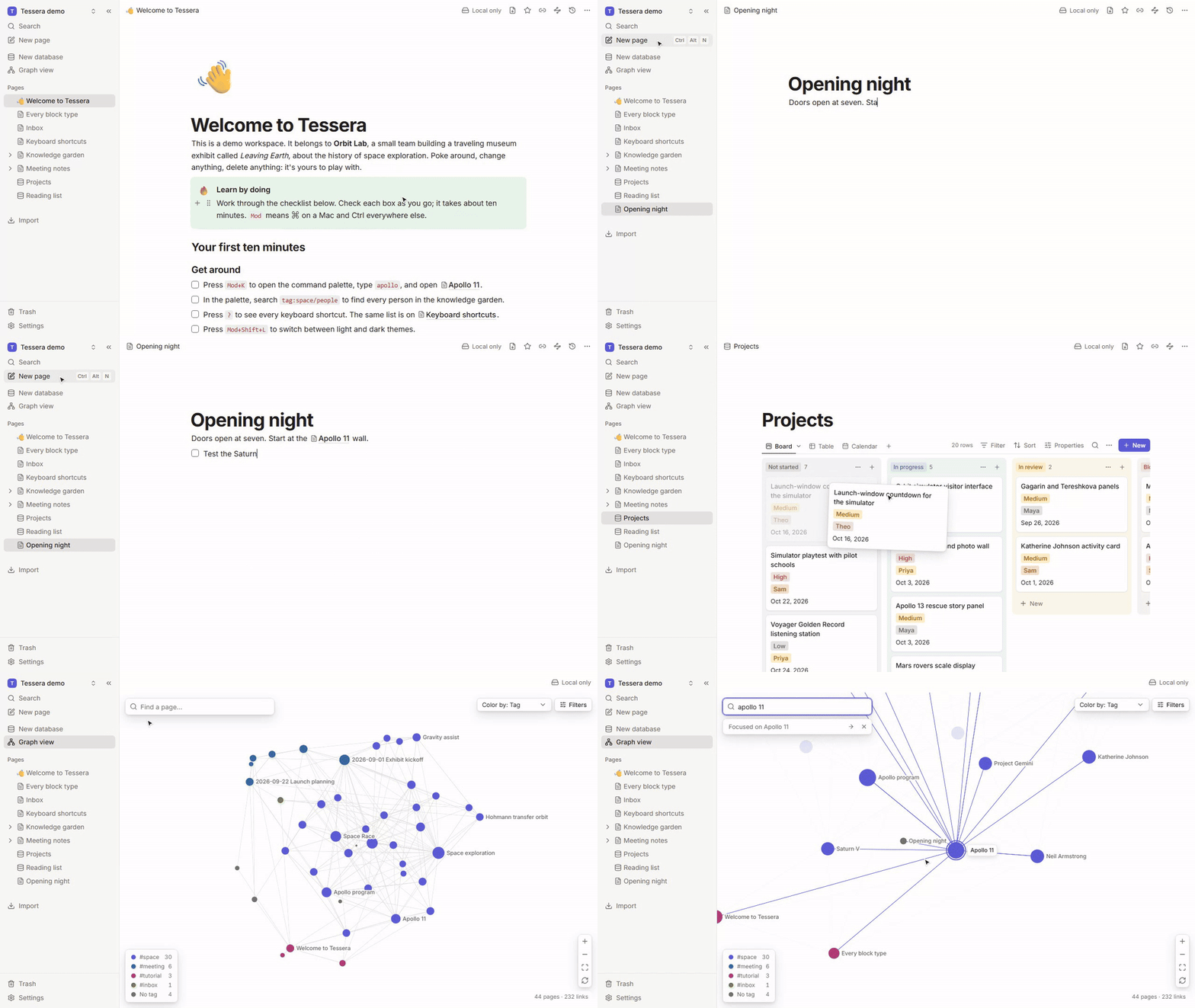
A 20-second tour of Tessera: a new page written with a [[link]] and the slash menu, a card dragged across a project board, and the graph flying to the linked page

- **It's yours.** Your device holds the real data. Tessera works fully offline; a server is optional. - **No lock-in.** Import Notion and Obsidian in one click. Export plain markdown any time. - **Built to be extended.** Plugins run in a sandbox, with permissions you approve. > [!NOTE] > Tessera is an early release (0.1). It's ready to try and to build on, and there will be rough > edges. Keep a backup of anything important, and please > [tell us what breaks](https://github.com/femboypuppy/Tessera-Notes/issues/new/choose).
Table of contents - [Features](#features) - [Quickstart](#quickstart) - [How it works](#how-it-works) - [How Tessera compares](#how-tessera-compares) - [Roadmap](#roadmap) - [FAQ](#faq) - [Contributing](#contributing) - [Community and support](#community-and-support) - [Star history](#star-history) - [Acknowledgements](#acknowledgements) - [License and contact](#license-and-contact)
## Features
A note about Apollo 11 with a table, links to other pages and a list

Write in blocks
Slash menu, markdown shortcuts, tables, callouts, toggles, code and embeds.

The demo's project board, grouped by status

Databases with real views
Table, board, calendar, gallery and list views over typed properties.

The graph of the demo workspace, colored by tag

Links and a graph
Backlinks, unlinked mentions and a graph of everything you know.

The command palette searching for “apollo”, with a preview of the result

Find anything
One palette for pages, full-text results, tags and commands.

A page with another person's live caret, labeled with their name

Real-time collaboration
Live cursors and presence on your own server, and it all works offline.

A Mermaid diagram block rendered by a plugin

Sandboxed plugins
Commands, panels and custom blocks with permissions you approve.

The report after importing an Obsidian vault

Move in, move out
Import Notion and Obsidian; export markdown, HTML, PDF or a backup.

Tessera in its desktop window

Desktop apps
macOS, Windows and Linux, with each workspace in a folder you choose.

The full feature list
**Write in blocks.** A block editor with a slash menu, markdown shortcuts, drag handles, tables, callouts, toggles, code with syntax highlighting, images and embeds (YouTube, Vimeo, Loom, Figma, CodePen). Type `[[` to link a page and `#` to tag it. Copy and paste keep their formatting. **Databases with real views.** Table, board, calendar, gallery and list views over typed properties: text, number, select, multi-select, date, checkbox, URL, email, relation, formula, created and updated time. Filters with nested and/or groups, multi-level sorts, grouping, summaries, row templates and CSV import and export. Inline databases inside any page. **Links, backlinks and a graph.** Links follow renames. Backlinks show the sentence around each link; unlinked mentions become links in one click. A global graph and a local graph for the current page. **Find anything.** Ctrl/⌘+K opens one palette for pages, full-text results, tags and commands, with filters like `tag:space`, `in:Projects` and `is:task`. Search runs in a worker, offline. **Collaborate, or never go online.** Every edit is saved locally first. Sync uses Yjs CRDTs, so offline edits merge without conflicts. Live cursors, presence, roles (owner, editor, viewer) and version history on your own server. **Plugins, safely sandboxed.** Commands, panels and custom blocks in sandboxed iframes, with permissions you approve and can revoke. A typed SDK and `pnpm create tessera-plugin`. **Move in, move out.** Import a Notion export, an Obsidian vault or a markdown folder with links, databases and attachments. Export to Obsidian-compatible markdown, HTML, PDF or a full JSON backup. **Desktop and self-hosting.** Apps for macOS, Windows and Linux keep each workspace in a folder you choose, with quick capture from anywhere. The server is one container with SQLite.
> [!TIP] > The fastest way to look around: choose **Open the demo workspace** on the first screen. It has a > project board, a reading list, meeting notes and a small knowledge garden about the history of > space exploration, so the graph has something to show.

back to top ↑

## Quickstart Run the server and read its one-time setup code: ```bash docker run -d --name tessera -p 8787:8787 -v tessera-data:/data ghcr.io/femboypuppy/tessera:latest docker logs tessera ``` Then open `http://localhost:8787`, choose **Join a workspace on a server**, and create the owner account with that code. Prefer a native app? Download it for macOS, Windows or Linux from the [latest release](https://github.com/femboypuppy/Tessera-Notes/releases/latest).
All install methods
**Desktop app.** Download the installer for your system from the [latest release](https://github.com/femboypuppy/Tessera-Notes/releases/latest) and open it. Each workspace is a folder on your disk, and everything works offline. **Docker Compose**, with a restart policy and optional automatic HTTPS through Caddy: ```bash mkdir tessera && cd tessera curl -fsSLO https://raw.githubusercontent.com/femboypuppy/Tessera-Notes/main/docker-compose.yml docker compose up -d ``` A minimal compose file, if you'd rather write your own: ```yaml services: tessera: image: ghcr.io/femboypuppy/tessera:latest restart: unless-stopped ports: - "8787:8787" volumes: - tessera-data:/data environment: PUBLIC_URL: https://notes.example.com SIGNUP_MODE: invite volumes: tessera-data: ``` **Web app.** Once a server runs, open its address in any modern browser. The web app keeps your workspace in the browser and syncs when it's online. **From source** (Node 24 and pnpm 11): ```bash git clone https://github.com/femboypuppy/Tessera-Notes.git && cd Tessera-Notes corepack enable pnpm install pnpm dev ``` The [installation guide](https://femboypuppy.github.io/Tessera-Notes/guide/installation) covers each option in detail.
> [!IMPORTANT] > Before anyone signs in over the internet, put the server behind HTTPS and keep sign-ups > invite-only (`SIGNUP_MODE=invite`). The > [self-hosting guide](https://femboypuppy.github.io/Tessera-Notes/self-hosting/) covers HTTPS, every > setting, and [backups](https://femboypuppy.github.io/Tessera-Notes/self-hosting/backups). > [!WARNING] > A workspace that lives only in a browser is as durable as that browser profile: clearing site > data deletes it. For anything you'd hate to lose, use the desktop app or sync to a server.

back to top ↑

## How it works ```mermaid flowchart LR subgraph device["Your device"] app["Tessera app
web or desktop"] store[("Local storage
IndexedDB or SQLite")] end subgraph server["Your server (optional)"] sync["Sync server
Hocuspocus"] db[("SQLite")] end other["Other devices
and people"] app -- "every edit, saved first" --> store app <-- "Yjs updates over WebSocket" --> sync sync --> db sync <--> other ``` - **Every page is a [Yjs](https://github.com/yjs/yjs) document.** Edits are written to your device before they go anywhere, and changes from different people merge without conflicts. - **The server is optional.** It stores updates and forwards them to other clients; your devices keep working without it. - **Features plug in.** The editor, databases, search, sync and plugins are separate modules on one small core. The [architecture guide](https://femboypuppy.github.io/Tessera-Notes/contributing/architecture) and [SPEC.md](SPEC.md) explain the details. ## How Tessera compares Tessera is new; the products below are mature and polished. This compares what each one can do, not how refined it is. Last checked **2026-09-23** against each product's own docs, pricing page and license. ✅ yes · ⚠️ partly · ❌ no | | Tessera | Notion | Obsidian | Anytype | AFFiNE | Logseq | | -------------------------- | :-----: | :----: | :------: | :-----: | :----: | :----: | | Open source | ✅ MIT | ❌ | ❌ | ⚠️ 1 | ⚠️ 2 | ✅ AGPL-3.0 | | Local-first, works offline | ✅ | ❌ 3 | ✅ | ✅ | ✅ | ✅ | | Self-hostable sync | ✅ | ❌ | ❌ 4 | ✅ | ✅ | ⚠️ 5 | | Real-time collaboration | ✅ | ✅ | ❌ | ⚠️ 6 | ✅ | ⚠️ 7 | | Databases (typed views) | ✅ | ✅ | ✅ | ✅ | ✅ | ⚠️ 7 | | Plugins | ✅ | ⚠️ 8 | ✅ | ❌ | ❌ | ✅ | | Graph view | ✅ | ❌ | ✅ | ✅ | ❌ | ✅ | | Price | Free | Free; Plus $10/seat/mo | Free; Sync $4/mo | Free; paid from $4/mo | Free; Pro $6.75/mo | Free | **Notes** 1. Anytype's apps use the Any Source Available License, which isn't OSI-approved. Its sync protocol and server (any-sync) are MIT. 2. AFFiNE's editor and apps are MIT; its backend is under the AFFiNE Enterprise Edition license, with a free self-hosted community edition. 3. Notion offers offline access to pages you download ahead of time. It is cloud-first. 4. Obsidian Sync is a paid hosted service. Community plugins can sync through your own storage. 5. The Logseq repository includes a sync server for the database version, but the official roadmap still lists self-hosted sync as planned. 6. Anytype shares spaces between members and syncs changes when they're online; simultaneous editing of one object isn't documented. 7. Real-time collaboration and typed database properties are part of the Logseq database version, in beta since 2026. 8. Notion has a public API for integrations, but no plugins that run inside the app. Prices are the lowest paid tier, billed yearly, in USD. Spotted something out of date? [Open an issue](https://github.com/femboypuppy/Tessera-Notes/issues/new/choose) and we'll fix it.

back to top ↑

## Roadmap Tessera 0.1 covers everything above. Next, roughly in order (follow along in [issues labeled `roadmap`](https://github.com/femboypuppy/Tessera-Notes/issues?q=is%3Aissue+label%3Aroadmap)): - Comments and @-mentions - Public sharing and per-page permissions - End-to-end encryption for synced workspaces - Importers for Logseq, Bear and Evernote - Native mobile apps (the web app already works at phone width) ## FAQ
Is Tessera free?
Yes. It's open source under the [MIT license](LICENSE). There's no paid plan, no account with us and no telemetry. Running a server costs whatever your hosting costs.
Where is my data?
On your device: in a folder you choose (desktop app) or in the browser's storage (web app). If you connect a server, a copy lives on that server too, and you run it.
Do I need a server? Is there a hosted version?
No server is needed: Tessera works fully offline on one device. You need one only to sync devices or work with other people, and it's a single container. There's no Tessera cloud; a small VPS or a home server runs it comfortably.
Is my data encrypted?
Traffic between the apps and your server uses HTTPS. Data at rest is stored as-is on your device and your server, so use disk encryption. End-to-end encryption is on the [roadmap](#roadmap).
Can I use my Obsidian vault directly?
Tessera imports vaults rather than editing the files in place, so that sync and collaboration can merge edits safely. You can export back to Obsidian-compatible markdown at any time, and the desktop app can keep a live markdown copy of each workspace.
How do plugins stay safe?
Each plugin runs in its own sandboxed iframe with no access to the app, your storage or your cookies. It can only call the APIs for the permissions you approved, and you can revoke them at any time.
Is there a mobile app?
Not yet. The web app works on phones and tablets; native apps are on the [roadmap](#roadmap).
More answers in the [FAQ](https://femboypuppy.github.io/Tessera-Notes/guide/faq) and [troubleshooting](https://femboypuppy.github.io/Tessera-Notes/guide/troubleshooting) guides.

back to top ↑

## Contributing Tessera is a friendly place for a first contribution. Read [CONTRIBUTING.md](CONTRIBUTING.md) for the dev setup and a tour of the repo, then pick a [good first issue](https://github.com/femboypuppy/Tessera-Notes/issues?q=is%3Aissue+is%3Aopen+label%3A%22good+first+issue%22). Plugins are welcome too: `pnpm create tessera-plugin my-plugin` scaffolds one. Avatars of the people who have contributed to Tessera ## Community and support - **Questions and ideas:** [GitHub Discussions](https://github.com/femboypuppy/Tessera-Notes/discussions) - **Bugs and feature requests:** [Issues](https://github.com/femboypuppy/Tessera-Notes/issues/new/choose) - **Security reports:** privately, through [GitHub security advisories](https://github.com/femboypuppy/Tessera-Notes/security/advisories/new) - Everyone taking part follows the [Code of Conduct](CODE_OF_CONDUCT.md). ## Star history If Tessera is useful to you, or you'd like to see where it goes, **⭐ [star the repo](https://github.com/femboypuppy/Tessera-Notes)**. It helps other people find it, and it makes our day. Star history chart for femboypuppy/Tessera-Notes ## Acknowledgements Tessera stands on the shoulders of excellent open-source projects: [Yjs](https://github.com/yjs/yjs) · [TipTap](https://github.com/ueberdosis/tiptap) · [ProseMirror](https://prosemirror.net) · [Hocuspocus](https://github.com/ueberdosis/hocuspocus) · [Tauri](https://tauri.app) · [MiniSearch](https://github.com/lucaong/minisearch) · [sigma.js](https://www.sigmajs.org) · [graphology](https://graphology.github.io) · [unified and remark](https://unified.js.org) · [React](https://react.dev) · [Vite](https://vite.dev) · [Radix UI](https://www.radix-ui.com) · [Tailwind CSS](https://tailwindcss.com) · [TanStack Table and Virtual](https://tanstack.com) · [dnd kit](https://dndkit.com) · [Hono](https://hono.dev) · [SQLite](https://sqlite.org) and [better-sqlite3](https://github.com/WiseLibs/better-sqlite3) · [DOMPurify](https://github.com/cure53/DOMPurify) · [Zod](https://zod.dev) · [Lucide](https://lucide.dev) · [Inter](https://rsms.me/inter/) · [Playwright](https://playwright.dev) · [Vitest](https://vitest.dev) · [VitePress](https://vitepress.dev). ## License and contact Tessera is released under the [MIT License](LICENSE). Your notes stay yours, and so does the code. Curious how it was made? [BUILT_WITH_AGENTS.md](BUILT_WITH_AGENTS.md) describes how the first version was built by parallel AI agents working from written briefs. **Contact:** [femboypuppy@tutanota.de](mailto:femboypuppy@tutanota.de) · Security issues: please use [private security advisories](https://github.com/femboypuppy/Tessera-Notes/security/advisories/new).

back to top ↑